
All apps · 0 apps

Courarr
Docker app from jpjoseph12's Repository
Overview
Readme
View on GitHub
Courarr
Auto-updating lists for Sonarr and Radarr: seasonal anime from AniList, and regular TV & movies from TMDB.

Courarr builds lists from saved searches and serves each one as a feed that Sonarr or Radarr imports. Examples:
- "this season's 50 most popular anime"
- "new scripted series that premiered in the last 30 days, no anime"
- "movies released on digital in the last 60 days rated 6.5+"
Lists refresh every night at 3 AM (configurable) or when you click Refresh. A cour is an anime broadcast season, hence the name.
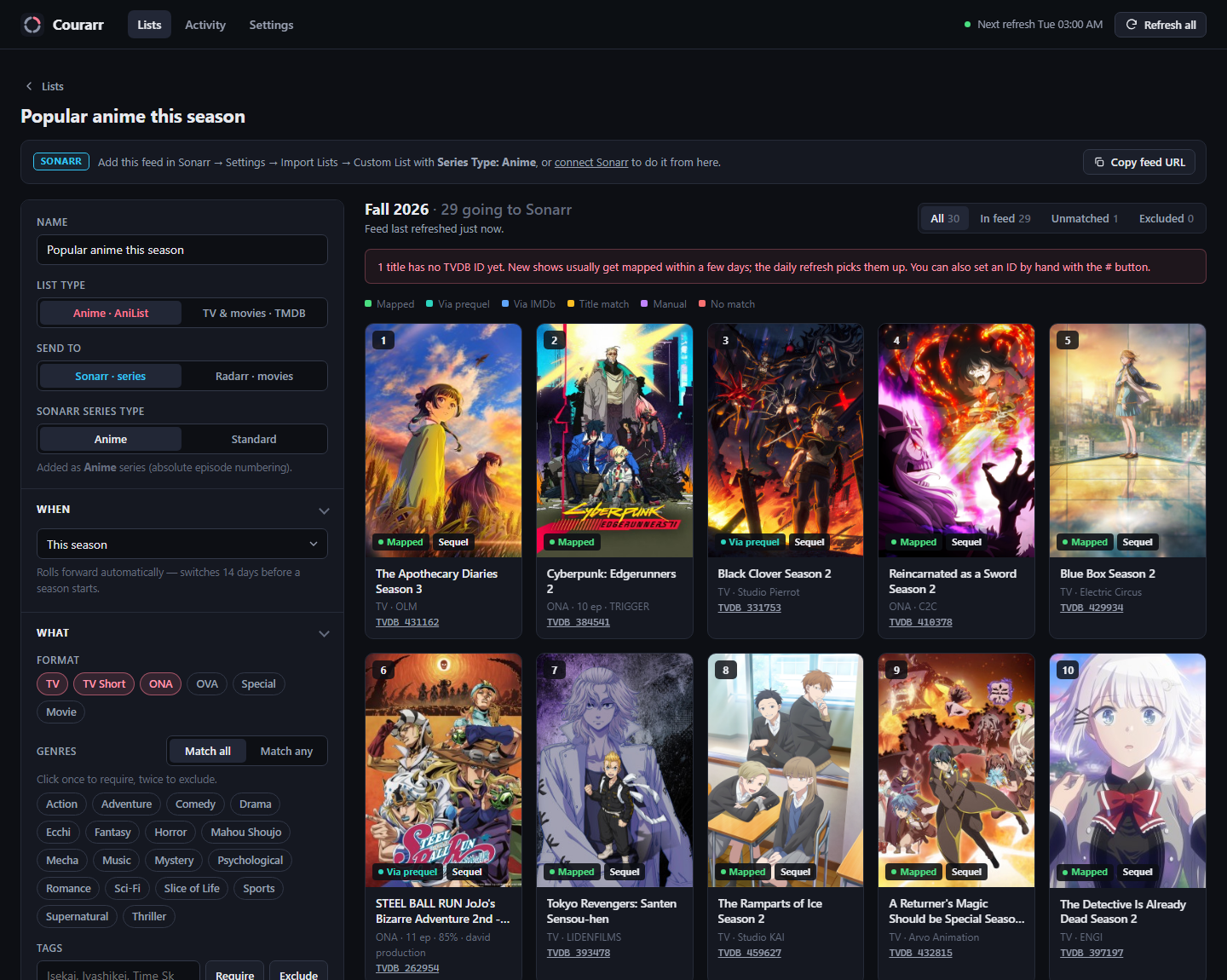
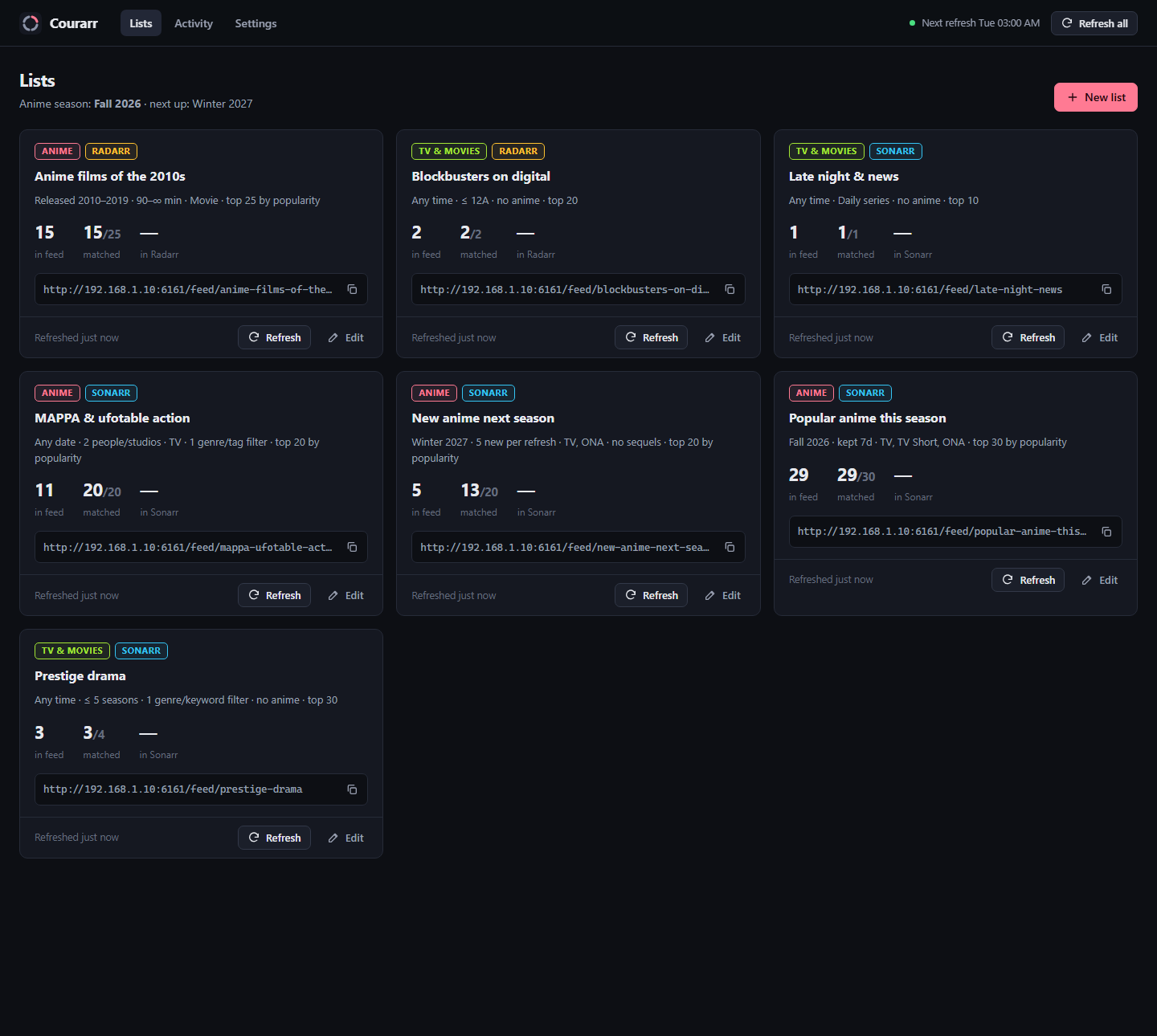 Lists: anime, TV and movie lists, each with its own feed URL. |
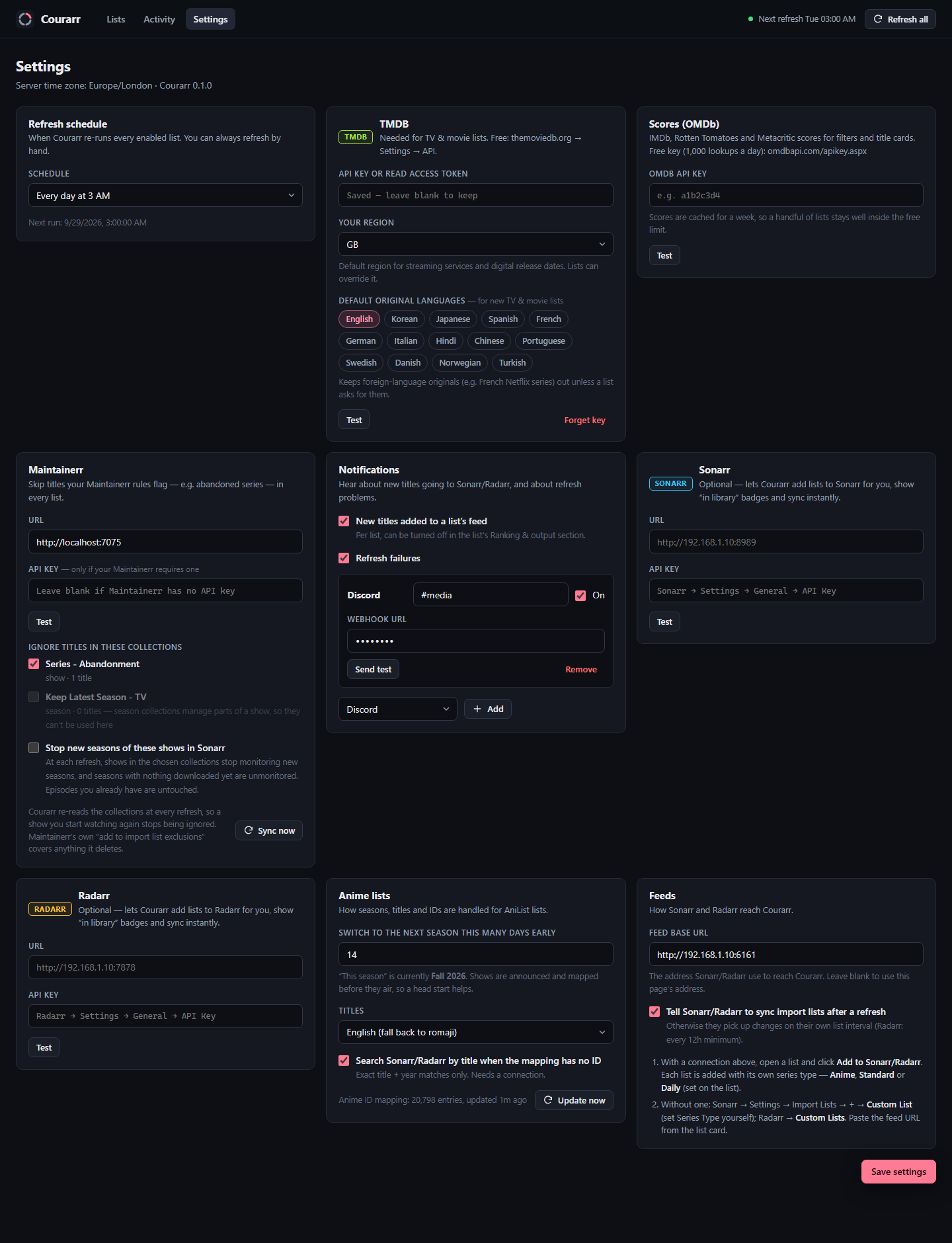 Settings: every connection is optional and has a Test button. |
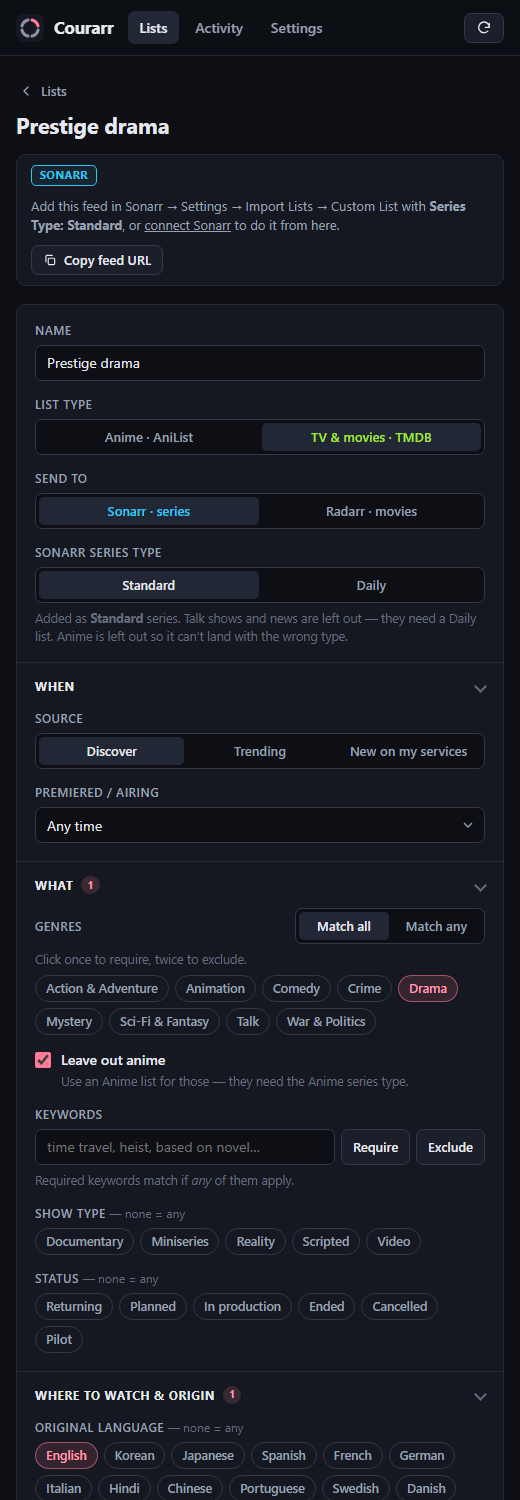 TV list editor: Standard/Daily series type and collapsible filter sections. Works on a phone. |
Contents: Features · What you need · Install · Networking · First-time setup · Updating & backups · Security · Troubleshooting · How it works · Development
Features
Two kinds of list
| Anime | TV & movies | |
|---|---|---|
| Source | AniList (no key needed) | TMDB (free API key) |
| Sonarr series type | Anime (or Standard) | Standard, or Daily for talk shows and news. Anime is left out by default. |
| Radarr | anime films | any films |
The kinds stay separate, so every show reaches Sonarr with the right series type:
- Anime lists only contain anime and use Anime (absolute numbering).
- Standard TV lists leave out anime and date-based shows.
- Daily lists contain only talk shows and news, which Sonarr matches by air date.
Each list can use its own root folder, e.g. /tv/anime, /tv and /tv/daily.
Filters
Every list kind has the same set of filters wherever the data supports it.
| Anime → Sonarr | Anime → Radarr | TV → Sonarr | Movies → Radarr | |
|---|---|---|---|---|
| When: this/next/last season, a year, a year range (with decade buttons), last N years/days, next N days | ✓ | ✓ | ✓ plus "airing this week" | ✓ plus digital vs cinema release |
| Genres: require or exclude, match all or any | ✓ | ✓ | ✓ | ✓ |
| Tags / keywords | ✓ | ✓ | ✓ | ✓ |
| Where to watch | streaming site (Crunchyroll, HIDIVE…) | same | streaming service by region, network / channel | streaming service by region |
| Original language / country | country | country | ✓ | ✓ |
| People | staff & voice actors | same | cast & crew (via their credits) | cast & crew |
| Studios / companies | animation studio | same | production company | production company |
| Runtime | per episode | film length | per episode | film length |
| Episodes / seasons | episodes | – | seasons & episodes, "has an upcoming episode" | – |
| Age rating (max for your region, optionally keep unrated) | via TMDB¹ | via TMDB¹ | ✓ | ✓ |
| Critic & audience scores: IMDb, Rotten Tomatoes, Metacritic | ✓² | ✓² | ✓² | ✓² |
| Sequels | ✓ | ✓ | – | first film vs sequels (by collection) |
| Status | ✓ | ✓ | ✓ plus show type | ✓ |
| Popularity / score / rating / votes, rank by, keep top N | ✓ | ✓ | ✓ | ✓ |
¹ AniList has no age ratings, so anime lists borrow TMDB's through the ID mapping (needs a TMDB key). ² Via OMDb (free key), cached for a week.
Titles with no rating, score, episode count or runtime yet are kept by default, so new releases aren't dropped.
Smart extras
- New on my streaming services (TV & movies): lists titles that newly arrived on the services you pick in the last N days.
- Courarr records the catalogue at every refresh and lists what's new since the last one.
- Pair it with an original language so foreign-language originals don't flood in.
- Drip-feed: at most N new titles per refresh, best-ranked first.
- The rest wait in a queue, so a new 50-title list doesn't make Sonarr/Radarr grab everything at once.
- Titles you already own don't count.
- Keep after drop-off: a title stays in the feed for N days after it falls out of the results, so it doesn't flicker in and out.
- Notifications: Discord, Telegram, ntfy, Gotify or a JSON webhook.
- Sent when titles are added to a list's feed, and when a refresh fails.
- Can be switched off per list.
- Maintainerr: pick collections, e.g. Series - Abandonment, and their titles are never sent by any list.
- Optionally, Sonarr also stops monitoring new seasons of those shows.
- Titles on Sonarr's/Radarr's own import-list exclusions are skipped too.
- Add to Sonarr/Radarr in one click: Courarr creates the import list with the right series type, root folder, quality profile, monitor option and tags, and keeps it in step with renames and deletes.
- Fixes when matching fails: exclude a title from a list, or set an anime title's TVDB/TMDB ID by hand.
- Self-contained: one small container and a SQLite database in
/config. No separate database.
What you need
Whatever you run it on, Courarr needs one port and one folder. Everything else is optional.
| What | Container side | Map it to | Required? |
|---|---|---|---|
| Port | 6161 (TCP) |
any free port on the host, e.g. 6161 |
Yes. It serves the web UI and the feed URLs Sonarr/Radarr read. |
| Config folder | /config |
a persistent folder, e.g. /mnt/user/appdata/courarr or ./config |
Yes. It holds the database (lists, settings, API keys) and caches. Without it, everything is lost when the container is recreated. |
TZ |
environment variable | your time zone, e.g. Europe/London, America/New_York |
Recommended. Scheduled refreshes use it, so "3 AM" is your 3 AM (default UTC). |
PUID / PGID |
environment variables | the user/group that should own /config |
Optional. Default 99/100 (Unraid's nobody:users). On most Linux hosts use 1000/1000; id -u and id -g show yours. |
UMASK |
environment variable | e.g. 002 |
Optional. Default 002. |
PORT |
environment variable | a port number | Rarely needed. Changes the port inside the container. Change the host side of the port mapping instead. |
COURARR_RESET_AUTH |
environment variable | true once, then false |
Only if you forget the password. It removes the login at start-up so you can create a new one; lists and settings are kept. |
There's nothing else to mount. Courarr never touches your media files; Sonarr and Radarr do the downloading. It needs outbound internet access to reach AniList, TMDB, OMDb and GitHub, plus network access to Sonarr, Radarr and Maintainerr if you connect them.
Image: ghcr.io/jpjoseph12/courarr:latest (linux/amd64 and linux/arm64, so Raspberry Pi 4/5 and ARM NAS models work too). Every build is also tagged sha-<commit>, so you can pin an exact build; release tags such as :0.1.0 appear once versions are tagged.
API keys are entered in the web UI, not as environment variables. The first visit walks you through them; see First-time setup.
Install
Unraid: from the Apps tab
Once Courarr is listed in Community Applications: Apps → search Courarr → Install → Apply. The defaults below are already filled in. Until then, use one of the options that follow.
Unraid 7
Unraid 7 no longer has the "Template repositories" box, so the template is added once from the terminal. After that, the install and any later changes happen in the normal Docker UI.
Open a terminal (the >_ icon at the top right) and run:
mkdir -p /boot/config/plugins/dockerMan/templates-user && wget -qO /boot/config/plugins/dockerMan/templates-user/my-Courarr.xml https://raw.githubusercontent.com/jpjoseph12/courarr/main/templates/courarr.xmlDocker tab → Add Container → Template → pick Courarr (under User templates).
Check the fields and click Apply. The defaults are:
Field Default WebUI Port 6161AppData /mnt/user/appdata/courarrPUID / PGID / UMASK (under Show more settings) 99/100/002Click the Courarr icon → WebUI, then follow First-time setup.
The container is managed by Unraid like any other app:
- Edit changes the port, paths or variables.
- Check for Updates pulls new versions.
- Unraid sets
TZautomatically.
Unraid 6
Docker tab → at the bottom, Template repositories → add https://github.com/jpjoseph12/courarr → Save. Then Add Container → Template → Courarr → Apply.
Unraid: filling the form by hand
If you'd rather not use a template, Add Container with these values:
| Field | Value |
|---|---|
| Name | Courarr |
| Repository | ghcr.io/jpjoseph12/courarr:latest |
| Network Type | Bridge |
| WebUI | http://[IP]:[PORT:6161]/ |
| Icon URL | https://raw.githubusercontent.com/jpjoseph12/courarr/main/public/icon.png |
Add Port: container 6161 → host 6161 (TCP) |
|
Add Path: container /config → host /mnt/user/appdata/courarr (read/write) |
|
Add Variable: PUID = 99, PGID = 100 |
Docker Compose
Save this as docker-compose.yml in a new folder and run docker compose up -d:
services:
  courarr:
    image: ghcr.io/jpjoseph12/courarr:latest
    container_name: courarr
    restart: unless-stopped
    ports:
      - "6161:6161"            # host:container. Change the left side if 6161 is taken.
    environment:
      - TZ=Europe/London       # your time zone
      - PUID=1000              # `id -u`
      - PGID=1000              # `id -g`
    volumes:
      - ./config:/config       # database, settings and cache. Keep this!
Open http://<your-server>:6161.
Running it in the same Compose file as Sonarr/Radarr? Put them on the same network and they can use each other's service names. The Networking section explains which address goes where.
services:
  courarr:
    image: ghcr.io/jpjoseph12/courarr:latest
    restart: unless-stopped
    ports: ["6161:6161"]
    environment: [TZ=Europe/London, PUID=1000, PGID=1000]
    volumes: ["./courarr:/config"]
  sonarr:
    image: lscr.io/linuxserver/sonarr:latest
    # …your existing Sonarr settings…
  radarr:
    image: lscr.io/linuxserver/radarr:latest
    # …your existing Radarr settings…
# In Courarr → Settings:  Sonarr URL = http://sonarr:8989,  Radarr URL = http://radarr:7878,
#                         Feed base URL = http://courarr:6161
docker run
docker run -d --name courarr --restart unless-stopped \
  -p 6161:6161 \
  -e TZ=Europe/London -e PUID=1000 -e PGID=1000 \
  -v /path/to/courarr/config:/config \
  ghcr.io/jpjoseph12/courarr:latest
Synology, QNAP, TrueNAS, Portainer, CasaOS…
Every container GUI asks for the same things. Use the table in What you need:
- Image:
ghcr.io/jpjoseph12/courarr:latest. Some GUIs need the registryghcr.ioadded first, or accept the full name directly. - Port: container
6161→ any free host port. - Volume: container
/config→ a folder on your storage, e.g./volume1/docker/courarron Synology. - Environment:
TZ, plusPUID/PGIDfor the user that owns that folder.
Portainer also accepts the Compose file above as a Stack.
Without Docker
Courarr is a plain Node.js app, so it runs anywhere Node 24 or newer runs:
git clone https://github.com/jpjoseph12/courarr.git && cd courarr
npm ci --omit=dev
CONFIG_DIR=./config PORT=6161 TZ=Europe/London npm start
Keep it running with systemd, pm2 or similar. CONFIG_DIR is where the database lives, and it defaults to /config.
Networking: which address goes where
Courarr and Sonarr/Radarr talk in both directions, and each direction has its own setting:
| Direction | Setting | What to enter |
|---|---|---|
| Courarr → Sonarr / Radarr / Maintainerr (lookups, one-click adding, "in library") | Courarr Settings → Sonarr/Radarr/Maintainerr URL | An address the Courarr container can reach. |
| Sonarr / Radarr → Courarr (reading the feeds) | Courarr Settings → Feed base URL | An address Sonarr/Radarr can reach Courarr at. Courarr puts it in every import list it creates. |
Which address works depends on how your containers are networked:
| Your setup | Sonarr URL in Courarr | Feed base URL |
|---|---|---|
| Separate containers in bridge mode (Unraid default) | http://<server-ip>:8989, e.g. http://192.168.1.10:8989 |
leave blank, or http://<server-ip>:6161 |
| Same Compose file / custom Docker network | http://sonarr:8989 (the service/container name) |
http://courarr:6161 |
| Sonarr on a different machine | that machine's IP and port | http://<courarr-host-ip>:6161 |
Two rules of thumb:
- Don't use
localhost. Inside a container,localhostis the container itself, not your server. - Leaving Feed base URL blank uses the address in your browser's address bar, which is fine when that address is also reachable from Sonarr/Radarr (e.g. your server's LAN IP).
First-time setup
Open the web UI. The first visit walks you through it:
- Create your login.
- Connect Sonarr & Radarr (optional): URL and API key, tested as you go.
- Add TMDB for TV & movie lists (free key; the guide links to where to get it). Pick your region and the original languages you watch.
- Add OMDb for critic & audience scores (optional, free).
- Set the feed address Sonarr/Radarr will use, and optionally protect feeds with a key.
- Start a first list from a template.
Every step can be skipped and changed later in Settings. You can re-run the guide from Settings → Login & security. Nothing is required for anime lists; everything else is switched on by adding its key:
| Feature | What to add | Where to get it |
|---|---|---|
| Anime lists | nothing | AniList is free and needs no key |
| TV & movie lists, age ratings on anime | TMDB API key or Read Access Token | themoviedb.org → Settings → API (free) |
| Critic & audience score filters | OMDb API key | omdbapi.com/apikey.aspx (free, 1,000 lookups/day) |
| One-click Add to Sonarr/Radarr, "in library" badges, instant sync, better matching | Sonarr / Radarr URL + API key | Sonarr/Radarr → Settings → General → API Key |
| Skip titles flagged by Maintainerr | Maintainerr URL (+ API key if yours uses one) | e.g. http://<server-ip>:6246 → press Test, then tick the collections |
| Notifications | Discord webhook, Telegram bot, ntfy topic, Gotify app token or any webhook URL | the service's own settings, then press Send test |
Also in Settings:
- Refresh schedule: 3 AM daily by default.
- Your region: for streaming services, age ratings and digital release dates.
- Default original languages: new TV & movie lists start with these, e.g. English.
Each connection has a Test button. Keys are stored in /config/courarr.db and are never shown again in the browser.
Then:
- Lists → New list, or start from a template → Preview → Create list.
- On the list page, click Add to Sonarr / Add to Radarr, or copy the feed URL into Sonarr/Radarr yourself:
- Sonarr → Settings → Import Lists → + → Custom List, and set Series Type to match the list (Anime / Standard / Daily).
- Radarr → Settings → Import Lists → + → Custom Lists.
Updating, backups & uninstalling
Update by pulling the new image and recreating the container:
- Unraid: Docker tab → Check for Updates → Update.
- Compose:
docker compose pull && docker compose up -d. - docker run:
docker pull …, then remove and re-create the container with the same options.
Your lists and settings live in /config and carry over.
Back up by copying the /config folder; Unraid's Appdata Backup plugin includes it automatically. It holds courarr.db (everything you set up, including API keys) and cache/ (downloaded data that re-fetches itself if lost).
Uninstall by removing the container, then deleting the config folder. Remove the Courarr – … import lists from Sonarr/Radarr too; deleting a list inside Courarr does that for you.
Security
- Login: the first visit asks you to create the one account; after that, the web UI and API need it.
- Passwords are stored as salted scrypt hashes, and sessions are HttpOnly cookies (30 days with "Keep me logged in").
- Repeated wrong passwords from one address are blocked for 10 minutes.
- Changing the password (Settings → Login & security) signs out every other browser.
- Forgot the password? Start the container once with
COURARR_RESET_AUTH=true, create a new login, then set it back tofalse. On Unraid it's the Reset login field under Show more settings. Your lists and settings are kept. - Scripts and automations use the API key from Settings → Login & security:
- send it as an
X-Api-Keyheader, or as?apikey=on the URL; - e.g.
curl -X POST -H "X-Api-Key: <key>" http://<server>:6161/api/refresh.
- send it as an
- Feeds (
/feed/<name>) stay readable without logging in, because Sonarr/Radarr can't log in.- Turn on Protect feed URLs with a key to add a secret
?key=…to every feed URL. - Import lists Courarr created are updated automatically; re-copy any you added by hand.
- Turn on Protect feed URLs with a key to add a secret
- Still, don't expose Courarr directly to the internet. For remote access, use a VPN (WireGuard, Tailscale) or a reverse proxy with HTTPS. Behind HTTPS, the session cookie is marked
Secureautomatically. - API keys are stored in plain text in
/config/courarr.db, the same way Sonarr and Radarr store theirs. Treat that folder, and its backups, as private. - Behind an authenticating proxy (Authelia, Authentik…), allow
/feed/*through for Sonarr/Radarr.
Troubleshooting
| Problem | Fix |
|---|---|
| Sonarr/Radarr Test fails in Courarr | Use an address the Courarr container can reach, not localhost (see Networking). Check the API key. |
| Sonarr/Radarr can't read the feed ("unable to connect" on the import list) | Set Feed base URL to an address Sonarr/Radarr can reach, e.g. http://<server-ip>:6161. Open the list again and click Edit → Save in the Sonarr/Radarr bar to update the import list. |
| Radarr says "No results were returned" when adding the list | The feed is empty. Refresh the list first, or widen its filters. Courarr's own Add to Radarr skips this check. |
| Titles show as Unmatched | Brand-new shows can take a few days to get a TVDB/TMDB ID. The nightly refresh picks them up. For anime you can set one by hand with #. |
| TV & movie lists say "Add a TMDB API key" | Add it in Settings → TMDB → Test. |
| Refresh happens at the wrong hour | Set TZ on the container (Unraid does this for you). |
"Permission denied" writing /config |
Set PUID/PGID to the owner of the host folder, or chown it to them. |
| Page looks broken after an update | Hard-refresh the browser (Ctrl+F5). |
| Forgot the password | Start the container once with COURARR_RESET_AUTH=true, create a new login, then set it back to false. |
| "Too many failed attempts" | Wait 10 minutes, or restart the container. |
| Sonarr says the feed is Unauthorized | Feed protection is on. Re-copy the feed URL (it includes ?key=…), or use Add to Sonarr so Courarr keeps it updated. |
Logs: docker logs courarr, or on Unraid, the container's Logs link. The Activity page in Courarr shows every refresh and what it did.
How IDs are matched
Sonarr's Custom List needs TVDB IDs (Sonarr v4 ignores the others), and Radarr's needs TMDB IDs.
Anime (AniList):
- Manual: an ID you set with the # button.
- Mapped: the community Fribb/anime-lists mapping, updated daily.
- Via prequel (Sonarr): sequels use the earlier season's TVDB series.
- Via IMDb (Radarr, needs a connection): Radarr lookup by the IMDb ID from the mapping.
- Title match (needs a connection): Sonarr/Radarr search, accepted only on an exact title match with the year within ±1.
TV & movies (TMDB):
- Movies use their TMDB ID directly.
- Shows use the TVDB ID that TMDB lists. If TMDB doesn't have one yet, Courarr asks Sonarr to resolve the TMDB ID (needs a connection).
Titles with no ID yet show as Unmatched and stay out of the feed until one exists.
API
GET /feed/:slug |
The list in Sonarr/Radarr Custom List format |
POST /api/refresh |
Refresh all enabled lists |
POST /api/lists/:id/refresh |
Refresh one list |
GET /api/health |
Health check (used by the container's HEALTHCHECK) |
Development
npm install
npm run dev            # http://localhost:6161, data in ./.config
npm test               # all tests (about a second, fully offline)
npm run test:coverage  # same, plus coverage report and minimum thresholds
The tests run the real app against local stand-ins for every outside service (AniList, the ID mapping, TMDB, OMDb, Sonarr, Radarr, Maintainerr and webhooks), so no network or API keys are needed. The stand-ins are in test/fixtures/.
Continuous integration: every push and pull request runs:
- the test suite, which fails if coverage drops below 90% of lines, 75% of branches or 85% of functions;
- a syntax check of the web UI;
- a smoke test that builds the Docker image, starts it with custom
PUID/PGID/TZ, and checks the API, UI and feeds, the file ownership and the time zone.
The image is only published to GHCR when all of these pass on main or a version tag.
To try the UI without keys:
- TMDB: run
node test/fixtures/mock-tmdb.mjs 7071, then start Courarr withTMDB_BASE_URL=http://localhost:7071/3and use the API keytest. - Maintainerr and webhooks:
node test/fixtures/mock-services.mjsstands in for Maintainerr (:7075) and a webhook receiver (:7099).
Plain Node 24 (built-in node:sqlite), Express and a dependency-free front end. There's no build step. Every push to main runs the tests and publishes ghcr.io/jpjoseph12/courarr for amd64 and arm64.
Anime data comes from AniList, and anime ID mappings from Fribb/anime-lists. TV and movie data comes from TMDB, and scores from OMDb. This product uses the TMDB API but is not endorsed or certified by TMDB.
License
MIT
Media gallery
1 / 4Install Courarr on Unraid in a few clicks.
Find Courarr in Community Apps on your Unraid server, review the template, and click Install. Unraid handles the Docker app or plugin setup from the published template.
Requirements
Related apps
Explore more like this
Explore allDetails
ghcr.io/jpjoseph12/courarr:latestRuntime arguments
- Web UI
http://[IP]:[PORT:6161]/- Network
bridge- Shell
sh- Privileged
- false
Template configuration
Web UI and the list feed URLs Sonarr/Radarr read.
- Target
- 6161
- Default
- 6161
- Value
- 6161
Database (lists, settings, login) and caches. Keep it: everything you set up lives here.
- Target
- /config
- Default
- /mnt/user/appdata/courarr
- Value
- /mnt/user/appdata/courarr
User ID the app runs as.
- Default
- 99
- Value
- 99
Group ID the app runs as.
- Default
- 100
- Value
- 100
Forgot the password? Set to true, start the container, create a new login in the web UI, then set this back to false. Lists and settings are kept.
- Target
- COURARR_RESET_AUTH
- Default
- false
- Value
- false
File creation mask.
- Default
- 002
- Value
- 002