
Corsair PSU Center
Plugin from racoutlaw
Overview
Readme
View on GitHubCorsair PSU Center
An iCUE-style dashboard for Corsair HXi / RMi digital power supplies, running as a native Unraid plugin.
Corsair's own iCUE software is Windows-only, so a Corsair digital PSU in an Unraid server normally means no monitoring and no fan control at all. This plugin adds both, in its own tab.
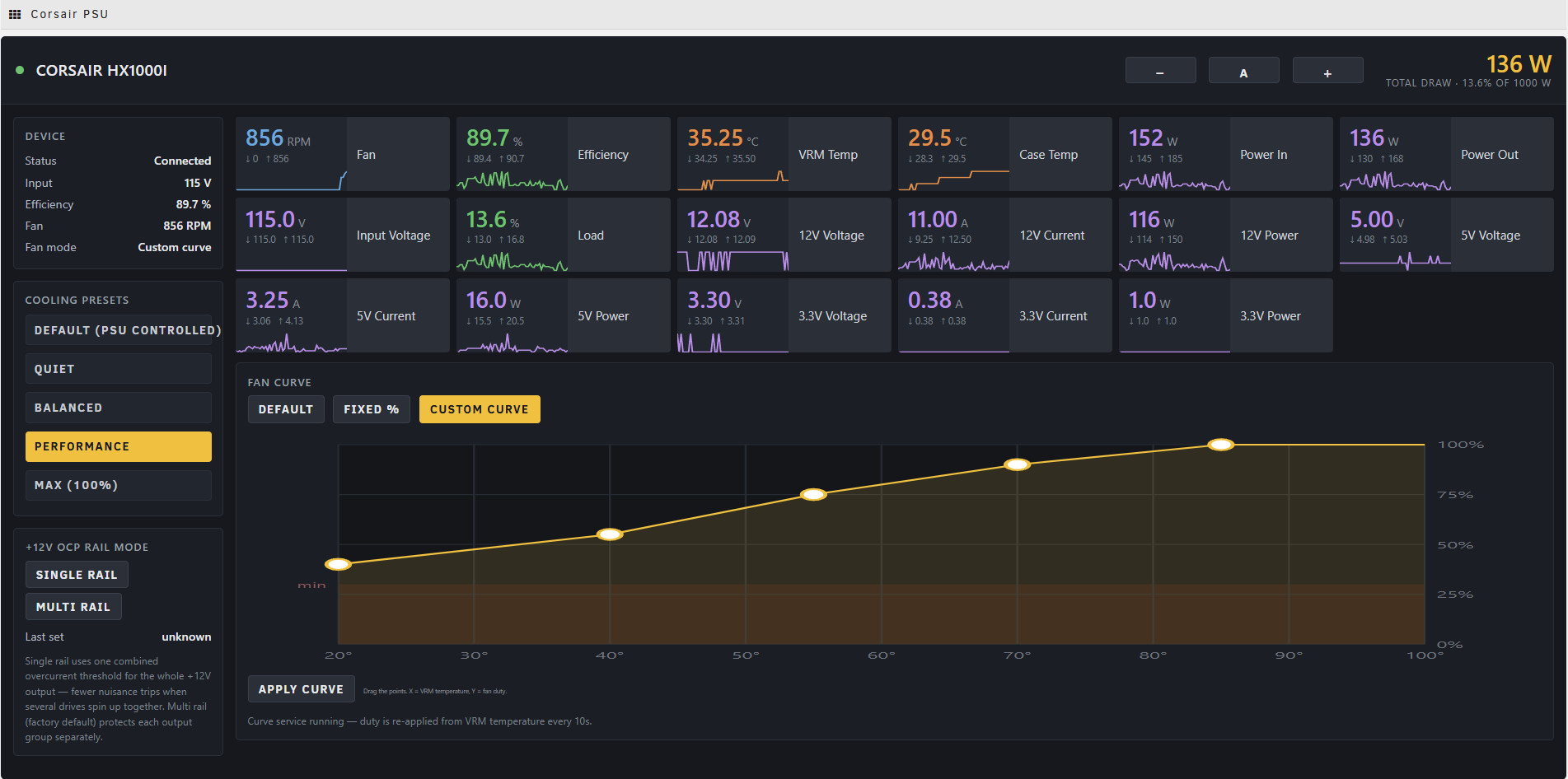
Status: working and in daily use on an ASUS X299 / Unraid 7.2.7 box with an HX1000i. Only that model has been tested on real hardware — the other eleven are supported by the same detection path but are, honestly, untested. Reports welcome.
Features
Live monitoring — read from the kernel's corsair-psu hwmon driver, so polling
costs no USB traffic and cannot collide with anything else talking to the PSU:
- Per-rail voltage, current and power for +12V, +5V and +3.3V
- Total power out, estimated power in, efficiency, load %
- VRM and case temperatures, fan RPM
- Every tile carries a running min/max and a live sparkline
Fan control
- Default — hand the fan back to the PSU's own firmware (zero-RPM idle)
- Fixed % — hold a constant duty, 30–100%
- Custom curve — drag-and-drop curve editor mapping VRM temperature to fan duty
- Presets: Quiet, Balanced, Performance, Max
+12V OCP rail mode — toggle between single-rail and multi-rail overcurrent protection. Single rail uses one combined threshold for the whole +12V output, which means fewer nuisance trips when several drives spin up at once.
Energy & cost tracking
- Watt-hours used and running cost for today, this week, this month, this year, and lifetime, shown as tiles alongside the live sensors
- Enter your electricity rate (per kWh) and each tile shows the cost as well as the kWh
- A lightweight background collector integrates the PSU's input power over time. It reads sysfs only — no USB, no Python — and runs in every fan mode
- Totals persist on the boot flash and survive reboots and plugin updates. Writes are batched (every few minutes) and atomic, so the USB stick isn't worn down and a power loss can't corrupt the saved total; the on-screen figure updates live from RAM
- History — past months and years are kept for good, so nothing is lost when "This Month" rolls over. A Last Month tile plus an Energy History panel let you pick any month or any year, filter to 1 / 3 / 6 / 12 months or All, and see a month-by-month list and a by-year summary. It rolls up the daily data already being recorded (a few bytes per month); days the server was off simply aren't counted
- Currency — choose the symbol shown for costs (USD, EUR, GBP, JPY and more, or a
custom symbol) and whether it sits before the amount (
$1) or after it (1 €) - Your history survives a reinstall — removing the plugin keeps your settings and energy history on the flash, so pulling it to troubleshoot and reinstalling picks everything right back up (only the downloaded package files are cleared)
Mains voltage (Auto / 115V / 230V) — efficiency and input power are interpolated for your mains voltage, normally read straight from the PSU. A few units — notably the HX1000i (2022 revision) — report input voltage at about double the real value over their USB interface. If yours shows ~230V on a 115V outlet (or the reverse), pin your real mains from the header control and the input-voltage readout plus the efficiency and power-in figures stay correct. Auto (the default) trusts the PSU, so existing setups are unaffected.
Adjustable text size — the whole UI scales from one control, remembered per browser.
Supported hardware
Any PSU handled by the kernel corsair-psu driver. The model is detected at runtime
from its USB HID product id — nothing is hardcoded.
| HX series | HX750i, HX850i, HX1000i, HX1000i (2022), HX1200i, HX1200i ATX 3.1, HX1500i |
| RM series | RM650i, RM750i, RM850i, RM1000i |
An unrecognised Corsair PSU still works for everything the kernel exposes (rails,
power, temperatures, fan, and fan control). Only efficiency, input power and load %
are hidden, because those need model-specific coefficients — the plugin will show
n/a rather than invent a number.
Requires Unraid 6.12.0 or newer.
Install
Unraid → Plugins → Install Plugin, paste the URL of corsairpsucenter.plg,
and click Install. Then open the CorsairPSUCenter tab in the top menu.
The package is fully self-contained — it bundles its own Python 3.11 runtime and
every module it needs, so fan control works even on Unraid systems that have no Python
installed (Unraid does not ship Python by default). No pip, no internet access at
install or boot, and nothing to configure by hand. Unraid re-runs the .plg on each
boot, so it survives reboots on its own.
To remove it, use the Plugins page. Uninstall stops the fan service, hands the fan back to the PSU firmware, and removes everything it installed.
How it works
Two deliberately separate paths:
- Telemetry → sysfs. The kernel
corsair-psuhwmon driver publishes all sensors under/sys/class/hwmon/hwmonN/. Reading them is instant, involves no USB traffic, and cannot conflict with other software. - Control → USB HID via
liquidctl. Required, because the kernel driver exposespwm1andpwm1_enableread-only — there is no write path through sysfs. Only the two write operations (fan duty, OCP mode) go over USB, targeted by vendor and product id.
Efficiency and input power are estimates. The PSU does not report input power, so
it is derived from a per-model quadratic fit of output power, interpolated for mains
voltage. The coefficients come from
liquidctl's corsair_hid_psu driver. If your
PSU misreports its input voltage, the Mains voltage control (Auto / 115V / 230V) in
the header lets you pin the real value so these estimates stay accurate.
Why a background service for the fan curve
These PSUs cannot store a fan curve in firmware — set_speed_profile is
NotSupportedByDevice for this family; the hardware only accepts a single fixed duty.
iCUE on Windows works around this by polling temperature and rewriting the duty, and
this plugin does the same: a small daemon reads VRM temperature every 10 seconds and
re-applies the appropriate duty, writing only when the value actually changes.
Consequences worth knowing:
- Minimum duty is 30%.
liquidctlclamps below that. - Curve mode depends on the service running. The UI tells you if it isn't.
- Choosing Default stops the service and returns control to the PSU.
Support
Unraid forum support thread — best place for questions, problems, or to report how it behaves on your hardware. GitHub issues work too if you'd rather report there.
Reports from other PSU models are especially welcome. Only the HX1000i has been tested on real hardware; the other eleven share the same detection path but nobody has confirmed them yet. If you run one, it's useful to know whether the model name, wattage and efficiency read correctly.
Layout
corsairpsucenter.plg     the installer
archive/                 the .txz package + its md5
src/                     readable sources (also inside the package)
  api.php                telemetry + control endpoint
  lib.php                shared PSU table, sysfs + energy helpers
  energyd.php            background energy / kWh collector
  fand.sh                fan curve daemon
  CorsairPSUCenter.page  the UI
ca_profile.xml           Community Applications repository profile
plugins/                 Community Applications plugin template
Credits
Device protocol, model table and efficiency coefficients come from
liquidctl, which does the hard part of
talking to these PSUs. The corsair-psu hwmon driver is part of the Linux kernel.
License
GPL-2.0, matching liquidctl and the Unraid plugin ecosystem.
Media gallery
Categories
Download Statistics
Downloads by Month
Related apps
Explore more like this
Explore allLinks
Details
https://raw.githubusercontent.com/racoutlaw/corsair-psu-center/main/corsairpsucenter.plg