

Correctarr
Docker app from Flizzy27's Repository
Overview
Readme
View on GitHubCorrectarr
Finds and fixes the problems Radarr, Sonarr, SABnzbd and Prowlarr leave lying around — the ones that sit there because nobody is looking.

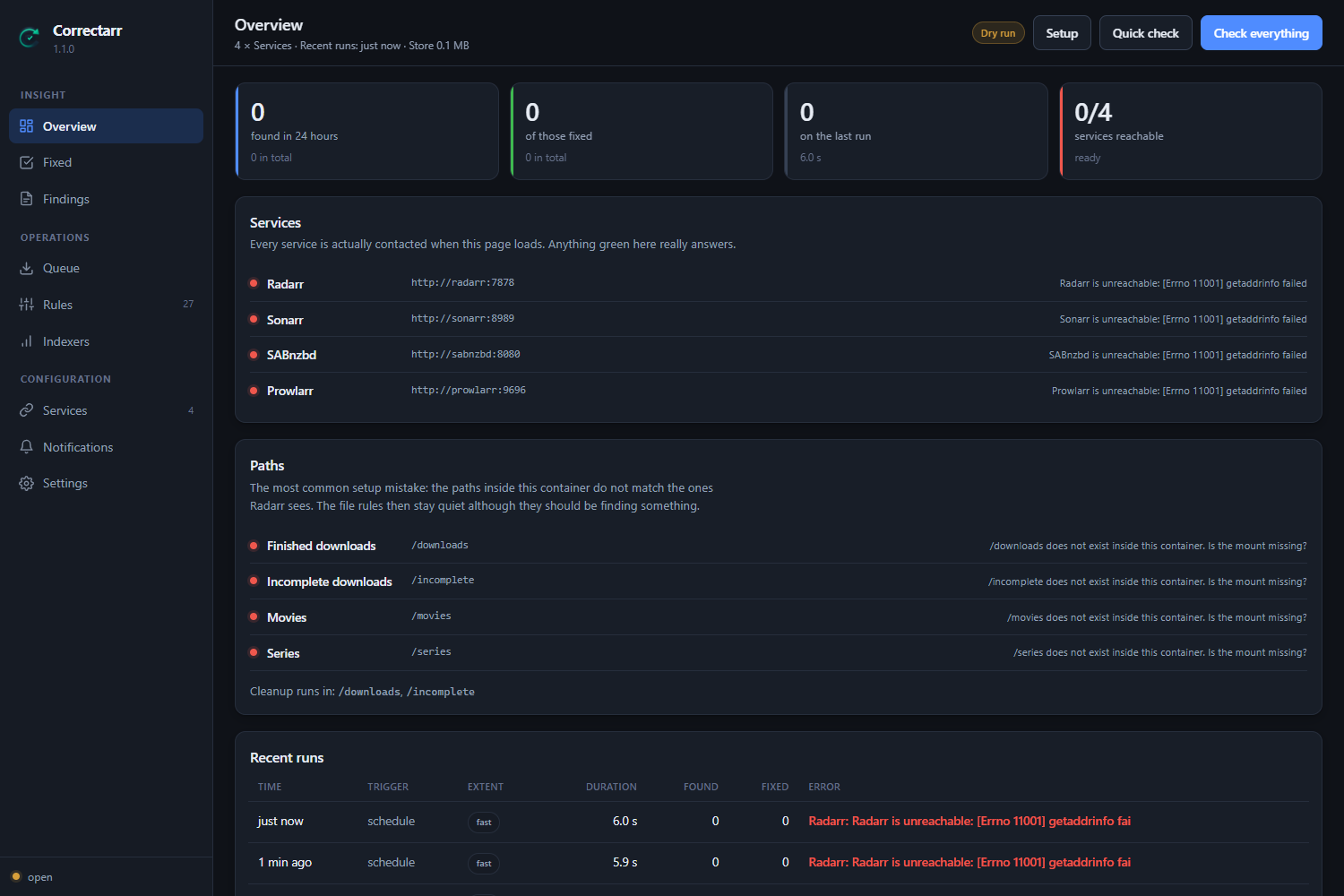
What it is for
Radarr does notice some of these, but it never resolves them on its own:
| Problem | What happens |
|---|---|
| Wrongly matched releases | Radarr stops with "Manual Import required" and then waits forever. From production: Halloween.2018… had been matched to Halloween (1978). |
| Downloads after a profile change | A release is scored exactly once, when it is grabbed. Change a profile afterwards and downloads already in flight run to nothing. |
| Files that cannot be matched | Radarr does not find Crank.I.2006, although the film is in the library as Crank with the alternate title Crank 1. Files like that sit there finished for days. |
| 3D releases | Radarr structurally cannot reject them — its parser swallows markers placed before the year. |
| Leftover debris | Half RAR sets, empty folders, failed downloads. |
| Quiet indexer problems | A disabled indexer is easy to miss but affects every single search. |
How it works
Three ways, at the same time:
- Events — Radarr and Sonarr report through a webhook the moment they grab something or need manual work. Reaction within seconds, before a wrong download has even finished.
- Fast pass — 60 seconds by default, queue rules only.
- Deep pass — 90 minutes by default, additionally the library and the indexers.
The rules
37 rules across six categories. For each one you decide what happens when it finds something — not just on or off:
| report only | write it down, change nothing |
| remove from the queue | it may be grabbed again |
| blocklist | and never this release again |
| blocklist and search again | and look for a replacement now |
| import / import and clean up | bring the file in, optionally clearing the download client entry |
| search / read the file again | ask the service to look again |
| delete | remove the files from disk |
| take off the blocklist | let a release that was refused long ago be tried again |
| do what the finding suggests | for rules whose findings each call for something different — only certain remedies are carried out, the rest are offered as a button |
On top of that, a rule can carry conditions: wait at least six hours, nothing over 20 GB, only when the match is at least 90 % certain. A finding that fails one is still reported — it is just not acted on, and it says why.
And a single dry run switch stops every change at once, across every rule — on by default. A fresh install runs every rule, reports everything it finds and touches nothing, until you have seen the findings and turned it off yourself.
All 37 rules
Queue
| Rule | What it finds | Default action |
|---|---|---|
wrong_year |
Year in the release name does not match the title | Blocklist and search again |
wrong_title |
Release name resembles no known title | Report only |
profile_violation |
Download breaks today's profile rules | Blocklist and search again |
not_an_upgrade |
Import would not be an upgrade | Blocklist |
stalled |
A started download stopped moving | Report only |
premature_grab |
A release for something that is not out yet | Report only |
collection_pack |
A box set, when one film was asked for (Radarr) | Blocklist and search again |
grab_loop |
The same title is grabbed over and over | Report only |
stuck_in_queue |
Blocked, failed or waiting for hours, whatever the cause — with the service's own words and the fix they call for | Do what the finding suggests |
Import
| Rule | What it finds | Default action |
|---|---|---|
manual_import |
Import waiting on manual work, but the match is right | Import |
unpack_failed |
Unpacking really failed | Report only |
detached_folder |
Service and container see different download folders | Report only |
leftover_files |
Leftover download debris | Delete from disk |
unmatched_files |
File without a match — matches it itself | Import and clean up |
Library (deep pass only)
| Rule | What it finds | Default action |
|---|---|---|
missing_audio_language |
Existing file lacks the wanted audio language | Report only |
unreadable_file |
File cannot be read | Report only |
below_profile |
Existing file would be blocked today | Report only |
missing_items |
Monitored and released, but no file | Report only |
cutoff_unmet |
Present, but below the quality that was asked for | Report only |
season_gaps |
A season that is only partly there (Sonarr) | Report only |
series_incomplete |
A finished series that is still incomplete (Sonarr) | Report only |
stale_blocklist |
An old refusal that may be why a title never arrives | Report only |
stray_files |
Archive parts, half-unpacked downloads and videos in a title's folder that the service knows nothing about | Report only |
Download client
| Rule | What it finds | Default action |
|---|---|---|
downloader_warning |
SABnzbd is reporting a warning | Acknowledge the warning |
downloader_stale_entry |
Entry finished, file long since imported | Remove the entry and its folder |
downloader_paused |
The download client is paused | Report only |
downloader_disk_space |
Little free space | Report only |
downloader_update |
A new version is available | Report only |
stuck_in_downloader |
A job paused, failed or finished that the service which grabbed it never picked up | Do what the finding suggests |
Indexers (read only)
| Rule | What it finds | Default action |
|---|---|---|
indexer_disabled |
Prowlarr has switched an indexer off | Report only |
indexer_ineffective |
Many queries, practically no grabs | Report only |
indexer_ranking |
The order contradicts the measured usefulness | Report only |
indexer_unknown |
Indexer bypasses Prowlarr | Report only |
System
| Rule | What it finds | Default action |
|---|---|---|
profile_loop |
A quality profile that makes the service fetch the same thing again | Stop upgrading on score |
service_health |
The service reports a problem about itself | Report only |
disk_space |
Free space is running low | Report only |
api_changes |
The service marked a call this makes as on its way out | Report only |
Guiding principle: when in doubt, do nothing. A rule that is not sure only reports. Better one finding left alone than one good file thrown away. And a fresh install starts with the dry run on: everything is found and reported, nothing is touched, until you have seen the findings and turned it off.
A finding that was found and then not acted on says why — "not acted on: only 1.4 h old, waiting for 6 h" — so a rule held back by its own condition never looks the same as a rule that did nothing. And a finding names what it found against what was wanted: "on disk as HDTV-720p, the profile HD-1080p keeps upgrading until WEBDL-1080p" rather than "below the quality the profile asks for".
And you can act on it there and then. Everything that was found and not dealt with by itself — because its rule only reports, the dry run is on, a condition held it back, or the last attempt failed — waits for you under To do, one card each. A card says what was found, why nothing happened, and what is recommended: the rule's own setting, or, where a rule has looked at that particular case and knows better, its own suggestion with the reason. The recommendation is the first button; everything else the rule can do sits beside it, and Dismiss hides the finding until it changes — the same release with a new complaint comes straight back. A search waits for the answer: it reports what was grabbed and from which indexer, or that there was nothing out there. Actions that remove something are marked and ask first.
The home page counts what is waiting, rule by rule, with a link into that rule's findings and one button that does what is recommended for all of them. The same button sits above the list, for exactly what the filters are showing, and says what each of them would get before it does anything. Whatever would delete is always left out of it and keeps its own button.
It also looks inside the title folders. The services keep a list of the
files that belong to a title and look at nothing else in its folder, so whatever
else ends up in there stays for good. stray_files walks every film and series
folder and reports what the service does not account for — archive parts, the
remains of an unpack, sample videos, other videos — with the size and the
largest files named. Measured on a library of about five hundred films before it
was built: ten folders, ninety gigabytes, one of them holding the complete
archive set of a different film. It only reports: the library is mounted read
only on purpose, and a video that is not the title's own file may be the only
copy of something else. Subtitles, artwork, .nfo files and extras in the
folders Plex and Jellyfin read them from are left alone. It needs the library
mounted and set under Settings → Paths; when the service calls its folder
something else (/tv against /series, say), a service with one root folder is
matched to that setting.
It also works out when there is nothing better to find. A title below its cutoff used to be reported and searched for again on every pass, for ever. It does not have to be told whether a search helped: a title searched for last time that is still on the list is one the search did not help, and after a few of those the finding says so — "three searches since 4 March have turned up nothing better, this is probably the best copy there is" — and stops being searched for by itself. The verdict lapses after six months, because the world gets new releases.
Safety limits
A rule that is wrong about something must not be able to be wrong about it over and over. The loop this guards against was real: an episode was blocklisted, the service grabbed another copy within seconds, the same rule flagged that one too — eight rounds in four minutes. So every automatic action, whichever rule asks for it, has to pass three limits first:
| Limit | Setting | Default | What it does |
|---|---|---|---|
| Per title | safety_title_limit, safety_title_hours |
3 in 24 h | The same film, episode, profile or folder is acted on at most this often, across every rule. After that the finding is still reported, but held: acted on 3 times in 24 h — waiting for a person. |
| Grabbed again | — | always on | When a rule has removed or blocklisted something and then flags the replacement for the same title too, the title is left alone for the whole window instead of going round again. |
| All actions | safety_hourly_limit |
60 per hour | More automatic actions than this in an hour pauses all of them. |
| Throwing away | safety_discard_limit |
30 per hour | The same, counting only those that throw something away — remove, blocklist, delete. |
When a limit pauses everything, a notification goes out on every connection (whatever its filters), a banner says why on every page, and nothing is acted on automatically until you press Resume automatic actions. A restart does not undo it. Findings are still checked and reported throughout, and buttons still work: an action you take by hand is never blocked, but it is counted towards the per-title limit. The limits live under Settings → Checks & safety; none of them can be switched off.
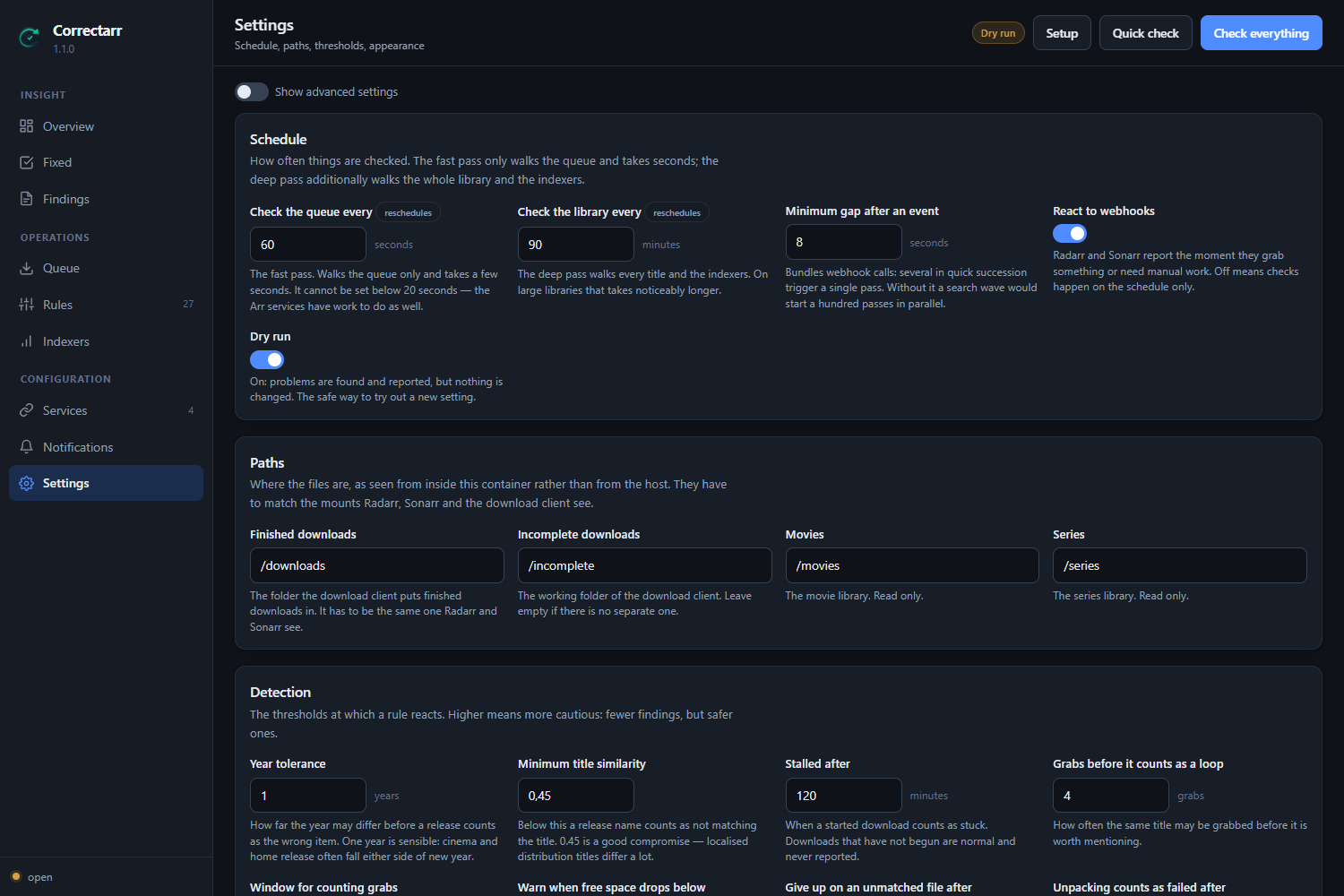
A burst of webhooks — a search wave sends one per grab, seconds apart — starts one pass straight away and folds everything after it into a single further pass once the gap under Minimum gap after an event is over. Two passes never run at the same time.
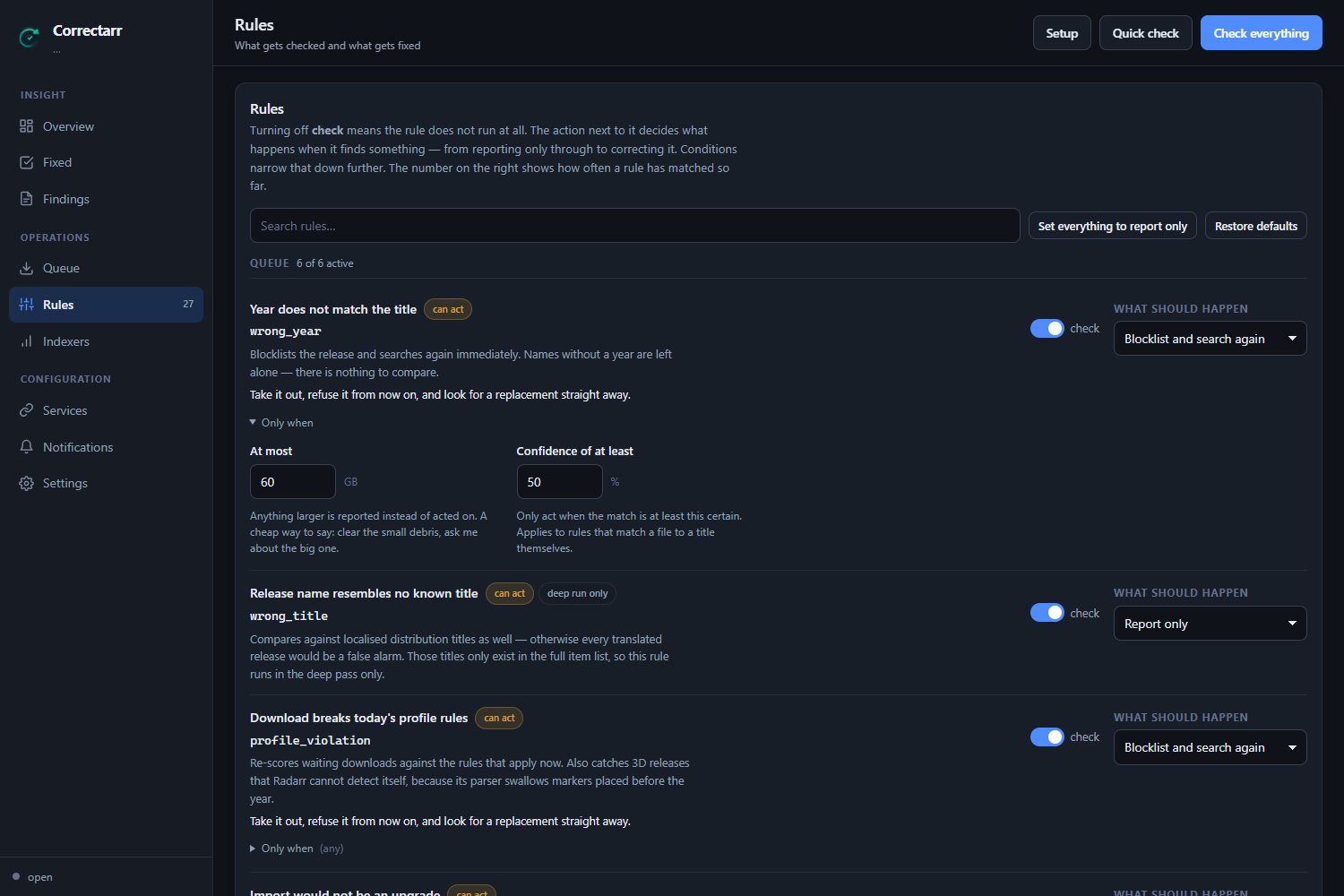
Every rule shows what it does before you turn it on: whether it only reports, acts, or deletes; whether it runs on every pass or only the deep one; and how often it has matched so far. A rule only offers the conditions its own findings can actually answer, so you cannot set one that could never be met.
On a phone, too
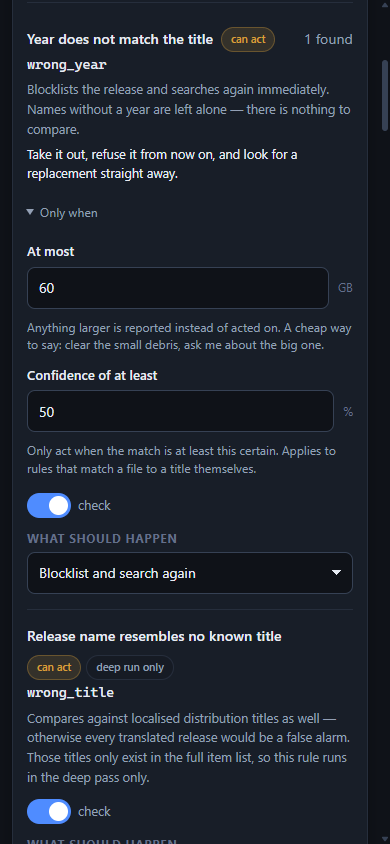
The interface is the same one at every size — nothing is hidden on a small screen and there is no separate mobile version to fall behind. Below 880 pixels the navigation moves to a bar along the bottom — home, to do, activity and downloads under your thumb, everything else one press away under More — and below 620 the columns stack and every control you tap grows to a size you can hit without aiming. It has been checked from 320 pixels up to 4K, on every page, with nothing running off the side at any width, and heights are measured against what is actually on screen rather than against a viewport that ignores the browser's own toolbars.
Video profiles
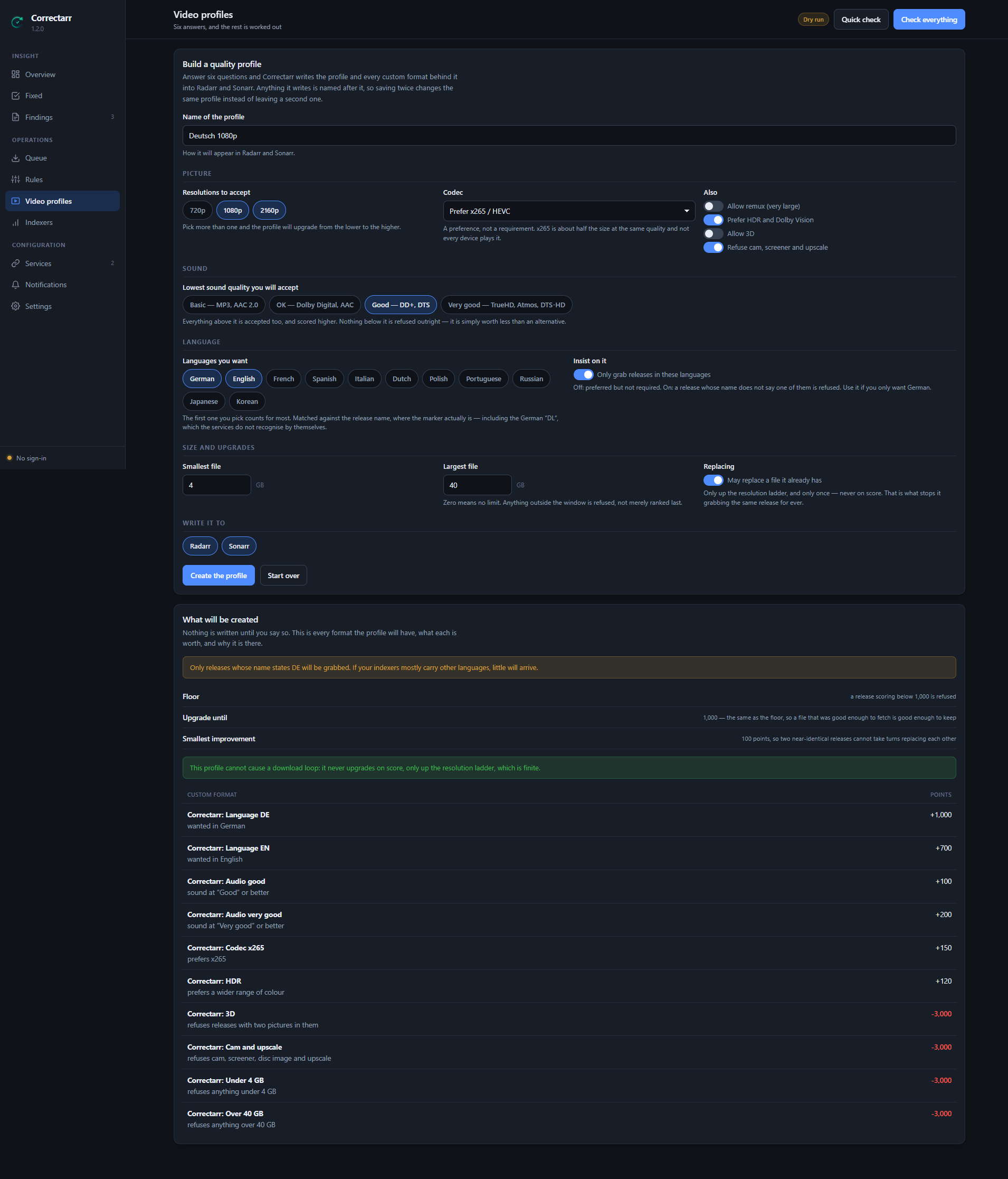
A quality profile decides what gets fetched. Building one by hand means a ladder of qualities plus a pile of custom formats whose numbers have to agree with one another, and getting it wrong is how a library ends up grabbing the same release every hour for a week.
A page of questions instead — which resolutions, off what (HDTV, WEBRip, WEB-DL, Blu-ray, Remux), how good the sound and whether surround matters, which languages and whether they are compulsory, which codec, how much colour, which edition, which groups, what size, may a file be replaced — and Correctarr writes the profile and every custom format behind it into Radarr and Sonarr. Beside the form is the whole plan: every format, what it is worth, and why it is there. Nothing is written until you say so.
Two details worth having: asking for Dolby Vision also refuses it when there is no HDR10 layer underneath, because that plays green on a television that cannot read it — and it looks like the best release in the list right up until it does. And a refusal cannot be outvoted: the penalty is worked out from the bonuses the profile hands out, so a camera recording with the right language and a good group on it still cannot score its way past the floor.
It cannot cause a download loop. That is a property, not a hope. A loop happens when the service believes the file it has is worse than something it can fetch and is wrong about that. One setting decides whether that is possible — upgrade until custom format score — and published profiles set it to ten or fifty thousand so the best available is always chased. That works right up until a file scores lower after import than its release scored before it, and then the service is permanently shopping. Here it is zero, which the services read as "do not upgrade on score at all": a file that was good enough to fetch is good enough to keep. The scores still pick the best of the releases on offer; resolution upgrades still happen, because a ladder is finite. A profile that could never be satisfied is refused rather than written.
Asking for WEB-DL without WEBRip means exactly that: the services let a quality group in or keep it out as a whole, so a group you only want half of is taken apart on the ladder. A profile you made by hand is never overwritten — if the name you type is already taken by one, nothing is written.
If you only want German, say so. The language is asked for with a custom
format rather than the profile's language setting, because before the import
the service reads the language out of the release name — and the German
marker .DL. is not one its parser knows. A profile that demands German throws
away most of the German releases it was set up to find. A custom format sees
the whole name: German DL, GerDub, [DE+EN], and the bare DL that the
majority of them actually carry — but not the DL of WEB-DL, which is where
the release came from, not what it sounds like.
Or pick one that is ready. Ten presets — for films 720p compact, 1080p space-saving, 1080p balanced, 1080p high quality, 2160p HDR, 2160p archive; for series 720p, 1080p and 2160p HDR; and Anime 1080p — each combined with the languages you choose. A preset opens in the full form as a starting point, and passes the same checks as anything built by hand. Series presets stop upgrading at the WEB-DL, because fetching every season again when the Blu-ray comes out costs half as much room once more.
The full form can also narrow one resolution on its own: its own sources (HDTV at 720p only, say, where an old series exists as nothing else), its own size window (15 GB is generous for a 1080p film and refuses nearly every 2160p one), a codec that is required rather than preferred, and a source to stop upgrading at.
How much room it will take. Every profile, built here or already in the service, comes with an estimate — per film or episode, and for the whole library: what is on disk now, what it will be, which files would be replaced, and whether that fits in the free space. The numbers are measured on your own files wherever there are any, because the services' own size settings say nothing until somebody sets them: left at their defaults, a two hour film at WEB-DL is "233 GB". Each estimate says what it rests on — your files at that quality, the profile's own files, a size you set in the service, or a reference value. The storage view adds up the root folders per disk (Radarr and Sonarr on one pool count once), measures how fast the library has grown over the last 90 days from the service's own history, and says when the disk is full at that pace — or that the history is too short to say.
Titles can be moved to another profile from there too. You see first which files that would replace and what it does to the disk; nothing is searched — what the new profile wants arrives when an indexer next offers it.
On the page that is three tabs for the service you pick: Ready profiles, each with its size per film or episode and whether it fits your library; Build your own, with the plan and the room it takes beside the form as you change it; and In the service now, with what every existing profile holds, whether it can loop, and the button that moves titles onto it. The disks, their pace and the largest titles are under Library.
The one that gets everybody
Transformers.2007-2018.COMPLETE.UHD.BluRay.2160p.TrueHD.Atmos.7.1.HEVC-GRP
You asked for Transformers (2007). That is all five of them, sixty-eight gigabytes, and Radarr cannot import it — it will fetch the lot and then fail, or take the wrong one. Nothing catches it on its own: the year check cannot, because 2007 is in the name and 2007 is the right year; the title check cannot, because the name does start with the title and simply carries on.
collection_pack does, on every fast pass, and blocklists it and searches
again — on by default, above 80 % certainty. Four signals, each measured
against the film's own title, so Blade Runner 2049 (2017) is not read as a
span of years and a film actually called The Collection is not read as one.
Profiles built here refuse box sets as well, so it is usually never grabbed at
all — in Radarr. A profile written to Sonarr leaves that refusal out, because a
pack of every season is how a finished series is fetched.
Three things Radarr cannot do itself
Radarr does not see the whole release name. A custom format with a title regex is applied to what is left after the recognised title has been split off. Markers placed before the year are swallowed by the parser:
Black.Panther.3D.HOU.2018…  → parsed title "Black Panther 3D HOU", 3D not detected
Meg.2018.HSBS…              → parsed title "Meg",                  3D detected
Radarr structurally cannot reject those. Correctarr checks the raw name.
Radarr scores only once. Waiting downloads are never re-examined against changed profile rules. Correctarr re-scores them.
Radarr compares years exactly. Its own year check accepts the filed year and the premiere year, and nothing else. That is narrow in one direction and blind in the other — see below.
The year check, in detail
Comparing the year in a release name with the year the service holds looks like a subtraction. It is not, and getting it wrong is expensive both ways.
It accuses good releases. 1917.German.DL.1080p.BluRay.x264-GROUP states no
release year at all — but read the first four digits and you "find" 1917 and
compare it with 2019. Same for 2012, Blade Runner 2049,
2001: A Space Odyssey, and a resolution written out as 1920x1080.
It also rejects differences that are perfectly normal. A film that premiered at a festival one year and reached cinemas the next is filed under different years by different databases, and release groups follow the earlier one. A film that opened in a handful of cinemas on 25 December and went wide in January is filed under December. A Japanese film released at home a year before it reached the West carries its home year. Reject those and the same release is grabbed, rejected and grabbed again, forever.
Correctarr discounts numbers that belong to the title, ignores spelled-out resolutions, and accepts the premiere year and every release date the service already holds instead of guessing a window. Each finding carries a confidence, so you can have it act on a twenty-year gap and merely report a two-year one.
Everything else that turned up in production is written down in
docs/background.md.
Setup
Unraid
Search for Correctarr in Community Applications. The required settings are the port, the configuration directory and the folder holding finished downloads.
About the paths: they have to be the same inside the container as the ones Radarr and Sonarr see. Mount the download folders exactly the way you mounted them there. Settings → Paths shows you whether that worked, and the home page says so as long as it did not.
Docker
docker run -d \
  --name correctarr \
  --restart unless-stopped \
  -p 8099:8099 \
  -v /path/to/appdata/correctarr:/config \
  -v /path/to/downloads:/downloads \
  -v /path/to/incomplete:/incomplete \
  -e PUID=99 -e PGID=100 \
  -e TZ=Europe/Berlin \
  ghcr.io/flizzy27/correctarr:latest
Docker Compose
services:
  correctarr:
    image: ghcr.io/flizzy27/correctarr:latest
    container_name: correctarr
    restart: unless-stopped
    ports:
      - "8099:8099"
    volumes:
      - ./appdata/correctarr:/config
      - /path/to/downloads:/downloads
      - /path/to/incomplete:/incomplete
    environment:
      PUID: 99
      PGID: 100
      TZ: Europe/Berlin
      AUTH: "on"
Then
- Open the interface → create an account (username and password).
- A setup assistant opens by itself and walks you through the rest: adding Radarr, Sonarr, SABnzbd and Prowlarr with a connection test for each, checking the paths, setting the address the webhooks call back on, and notifications.
- It finishes with a dry run — one full pass that changes nothing. The dry run is already on; look through what it found, and turn it off only once you agree with it. Every rule that acts was built that way first, and every single time it turned something up.
All of it can be done later by hand under Settings; the assistant is reachable again under Settings → System at any time.
Supported versions
Checked against the API description each project publishes for the version, and against live installations of the newest ones.
| Service | Versions | Notes |
|---|---|---|
| Radarr | 4, 5, 6 | Radarr 4 has no wanted lists; the missing and cutoff rules read the movie list there instead. |
| Sonarr | 3, 4 | Sonarr 3 has no custom formats, so the score checks have nothing to compare against there. It also cannot be told not to search again after a release is blocklisted. |
| Prowlarr | 1, 2 | Read only. |
| SABnzbd | 3, 4, 5 | From 4.2 on, a removed history entry is archived rather than deleted — it can still be recovered in SABnzbd. |
A service can be reached under a sub path (http://host/radarr). An address
pasted with /api or /api/v3 on the end is fine. For a service behind https
with a self-signed certificate, switch on Accept a self-signed certificate
for that one service; certificates are checked everywhere else.
Configuration
| Variable | Default | Meaning |
|---|---|---|
AUTH |
on |
on = built-in login, off = none (only behind Authelia or similar) |
PORT |
8099 |
Port inside the container |
HOST |
0.0.0.0 |
Bind address |
BASE_URL |
– | Sub path behind a reverse proxy, e.g. /correctarr |
PUID / PGID |
99 / 100 |
Ids the service runs as |
UMASK |
022 |
Permission mask for new files |
FORWARDED_ALLOW_IPS |
* |
Whose X-Forwarded-* headers are believed — set it to your reverse proxy's address if you have one |
TZ |
Etc/UTC |
Timezone |
LOGLEVEL |
INFO |
DEBUG for troubleshooting only |
Everything else — schedule, paths, thresholds, notifications, appearance — is configured in the interface and survives every update.
Seeing what it did
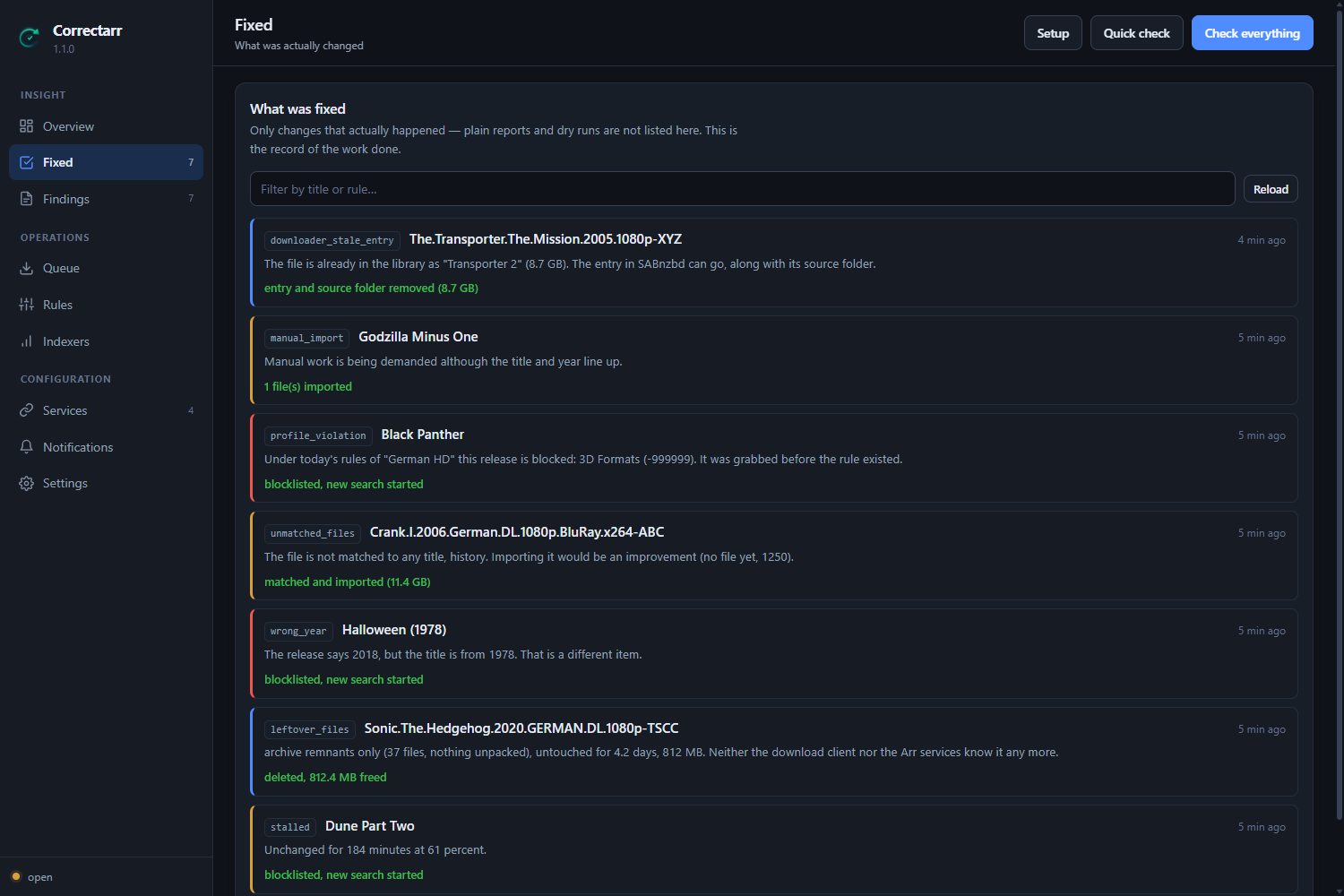
Activity → Done lists only changes that actually happened — plain reports and dry runs are not in there. It is the record of what the program did on your behalf, which matters for something that is allowed to delete files. All findings beside it is the whole log, narrowed by rule, by what became of each finding, or by a word.
Over days rather than one pass, Activity → Numbers (and
GET /api/insights?days=30) answers from the store alone, without contacting a
service: per day how many findings there were,
how many actions were taken by themselves and by hand and how many of those
failed, and how much space deleting gave back; which rules find the most; how
long a problem stays before no pass comes across it any more; what is waiting
for you now; and every time the safety limits paused automatic actions. Actions
and pauses are kept for 90 days, so that is as far back as it goes.
Languages
The interface ships in English and German and follows your browser by default. You can pin either one under Settings → Appearance. Findings recorded months ago are re-rendered in whichever language is active, because the store keeps the message key and its parameters rather than a finished sentence.
Behind a reverse proxy
If the interface runs under a sub path, set BASE_URL. For nginx:
location /correctarr/ {
    proxy_pass         http://127.0.0.1:8099/;
    proxy_set_header   Host              $host;
    proxy_set_header   X-Real-IP         $remote_addr;
    proxy_set_header   X-Forwarded-For   $proxy_add_x_forwarded_for;
    proxy_set_header   X-Forwarded-Proto $scheme;
}
X-Forwarded-Proto is not optional: without that header the service treats an
HTTPS connection as plain and sets the session cookie without Secure. Neither
is Host (or X-Forwarded-Host): a change is only accepted from a page of this
interface, and over plain http the address the browser used is how that is
recognised.
Notifications
Pushover, Telegram, Discord, ntfy, Gotify and plain webhooks. Set up as many connections as you like, of any mix.
Each connection decides for itself what it wants to hear about — a minimum severity, specific rules, specific categories, or only the things that were actually changed. So an errors-only push to your phone and a full log into a chat channel can sit side by side without either one being noise.
Messages are bundled at the end of a pass and grouped by rule, never sent one finding at a time. Two brakes stop floods: deduplication (the same finding reports again no sooner than 12 hours later) and a cooldown (quiet for a configurable period after a message).
The Telegram connection can find your chat id for you — start a chat with your bot, press the button, pick the chat from the list.
A summary, if you want one. Under Settings → Notifications, Send a summary sends a daily or weekly message at the hour you choose, through every enabled connection: what was fixed and how much space that freed, what is still waiting for you, what was tried and did not work, and whether automatic actions were paused. When there is nothing to say, nothing is sent. Off by default. The same page shows what the summary would say right now, and Send it now sends it straight away to see how it looks.
Security
- Built-in login, PBKDF2-HMAC-SHA256 with 600,000 rounds and a per-user salt.
- Sessions are stored as a digest, never as the token itself. The cookie is
HttpOnly,SameSite=Lax, andSecurebehind https. - Anything that changes something is refused when another web page sent it — including a page of another service on the same host.
- API keys never leave the server — not through the interface, not into the log, not into an error message. A stored key is only reused for the address it was entered for; a changed address needs the key again.
- Failed sign-ins are throttled with a growing delay, per address and per account.
- The webhook the services call in on carries a random token.
- The database in
/config, which holds the keys, is readable by its owner only.
AUTH=off disables the login when something in front already handles it.
Without one of the two, the port does not belong on the open internet.
Updates
Settings, services and history live under /config and survive every update.
The schema is upgraded automatically at startup, and a backup of the file is
written next to it before anything changes.
To carry a configuration to another installation, or to keep one safe,
Settings → System downloads a backup and restores one — showing, before
anything is written, exactly what the file would change. Behind it,
GET /api/backup returns every setting, what every rule is set to do, the
services and the notification connections as one JSON file — without API keys
and tokens unless you ask for them with ?secrets=true.
POST /api/backup/restore checks such a file against the same rules the
interface is held to and says what it would change; only with "apply": true
does it write. A restore never deletes anything, keeps the stored key of a
service or connection of the same name and address when the file has none,
and skips — and names — whatever it cannot use rather than refusing the whole
file. It changes nothing in Radarr or Sonarr: a restored service's webhook
still points where the old installation told it to, until the service is saved
once under Settings → Services.
Development
python -m venv .venv
.venv/bin/pip install -r requirements.txt
.venv/bin/pip install pytest ruff
.venv/bin/python -m pytest
.venv/bin/python -m ruff check app/ tests/
The test suite also verifies that every shipped language is complete, so a forgotten translation fails the build instead of reaching a browser as a raw key.
License
Related apps
Explore more like this
Explore allDetails
ghcr.io/flizzy27/correctarr:latestRuntime arguments
- Web UI
http://[IP]:[PORT:8099]/- Network
bridge- Shell
sh- Privileged
- false
Template configuration
The port the interface is reachable on in a browser. If it clashes with something, put a different number here; the WebUI button follows automatically.
- Target
- 8099
- Default
- 8099
- Value
- 8099
Holds the database, the settings, the services and the history. This directory survives a container update and must not be deleted.
- Target
- /config
- Default
- /mnt/user/appdata/correctarr
- Value
- /mnt/user/appdata/correctarr
The folder SABnzbd puts finished downloads in. This MUST be the same one Radarr and Sonarr see, otherwise Correctarr cannot find the files. Write access is needed for cleanup.
- Target
- /downloads
The working folder of SABnzbd. Leave empty if there is no separate one.
- Target
- /incomplete
The movie library. Read only. Optional — without it a few details are missing from the overview.
- Target
- /movies
The series library. Read only. Optional.
- Target
- /series
on = built-in login with username and password (recommended). off = no login; only sensible when Authelia, Authentik or basic auth in a reverse proxy already handles it.
- Target
- AUTH
- Default
- on
- Value
- on
Used for timestamps and scheduling, for example Europe/Berlin or America/New_York.
- Target
- TZ
- Default
- Europe/Berlin
- Value
- Europe/Berlin
Only needed when the interface runs under a sub path such as /correctarr. Leave empty when it has its own hostname or is reached directly on the port.
- Target
- BASE_URL
User id the service runs as. On Unraid 99 (nobody) is correct.
- Default
- 99
- Value
- 99
Group id. On Unraid 100 (users) is correct.
- Default
- 100
- Value
- 100
Permission mask for newly created files.
- Default
- 022
- Value
- 022
INFO in normal operation. DEBUG for troubleshooting only, it gets very chatty. Credentials are redacted either way.
- Target
- LOGLEVEL
- Default
- INFO
- Value
- INFO
For the very first start only: adopts the service automatically. Everything is managed in the interface afterwards and this variable is ignored.
- Target
- RADARR_URL
For the very first start only. Found in Radarr under Settings, General.
- Target
- RADARR_API_KEY
For the very first start only.
- Target
- SONARR_URL
For the very first start only.
- Target
- SONARR_API_KEY
For the very first start only. Without SABnzbd nothing is classified as debris and nothing is deleted.
- Target
- SAB_URL
For the very first start only.
- Target
- SAB_API_KEY
For the very first start only. Optional — without Prowlarr there is no indexer rating.
- Target
- PROWLARR_URL
For the very first start only.
- Target
- PROWLARR_API_KEY