
All apps · 0 apps
CookTrace
Docker app from TraceApps' Repository
Overview
Readme
View on GitHubCookTrace
Trace Every Recipe, From Pantry to Plate
A self-hosted recipe, pantry, and cooking tracker.
No accounts, no telemetry, no cloud sync unless you opt in.








Coming to Apple devices: the Trace apps have no iPhone app yet, because building and testing one needs a Mac and an iPhone. Chip in on Ko-fi. Self-hosting stays free either way.
Jump to: What it is · Features · Install · Env vars · Docs
What CookTrace is
CookTrace runs as a single Docker container on your own hardware, with a PWA for the browser and a native Android app for your phone. No accounts on external services, no data leaving your network, no subscriptions.
Third app in the Trace family alongside NutriTrace, LiftTrace, and NoteTrace.
Principles
- Self-hosting is and will remain free. The server, PWA, and source code will never be paywalled.
- No trackers, no analytics, no telemetry. CookTrace doesn't phone home; your usage is invisible to anyone but you.
- Your data stays on your hardware. No central server, no cloud sync that can read it; nothing leaves your network unless you opt into a third-party integration (Open Food Facts, USDA, an AI provider).
- Open source under AGPL-3.0. Every line that touches your data is readable.
Features
Cooking
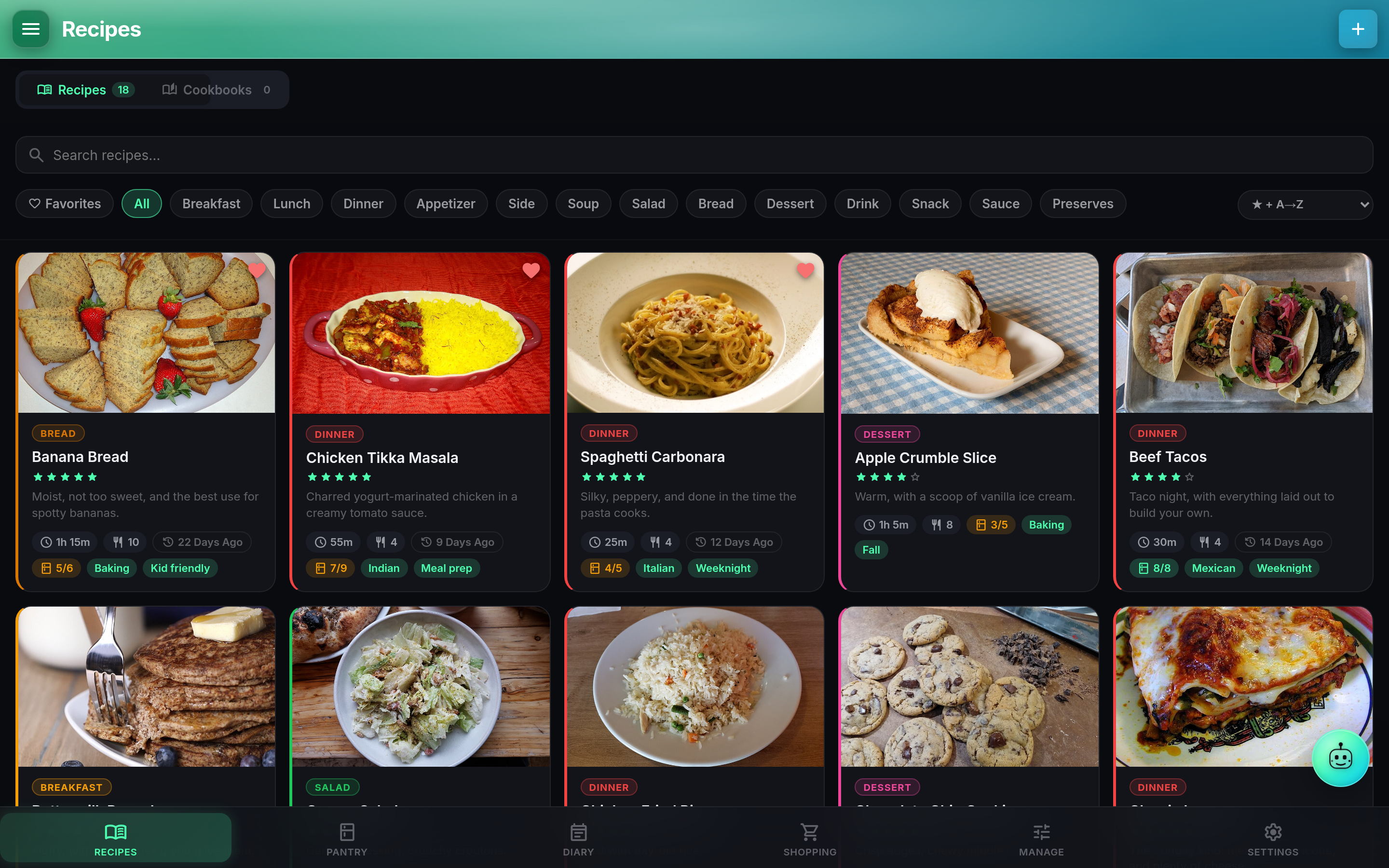
- Recipe library. Full recipe model, cook mode, cook log, live scaling with fraction-aware ingredient math, per-step photos, inline unit converter, FDA-style 34-nutriment Nutrition Facts box. → full guide
- Pantry. Variants, expiration digests, barcode scanning (ML Kit native, QuaggaJS web), OFF + USDA quality signals, pantry-match pill on every recipe card. → full guide
- Cook Diary + Meal Planner. List and month-calendar views, plan-then-cook flow, drag to re-plan. → full guide
- Shopping list. Generate from a recipe (skips stocked items), aisle grouping, cross-recipe dedup. → full guide
Organizing
- Cookbooks + Kitchens. Named collections, per-user and public-link shares, Kitchens for household-wide fanout with Auto-Share. → Cookbooks · Kitchens
- Recipe import. URL (Standard / Enhanced / Smart tiers), file, photo, and bulk Mealie / Paprika / Tandoor zip archives. → full guide
- Manage catalog. Categories (with color dots), tags, kitchen gear, pantry categories, units, cookbooks; drag-to-reorder with per-row recipe counts.
AI + Federation
- Trace AI. Reads your recipes, pantry, diary, and cookbooks; can log a cook, plan a meal, add to shopping, or import a recipe from a URL, all conversationally. 19 tools total. Multi-provider (Claude / OpenAI / Gemini / any OpenAI-compatible endpoint). Smart Log voice, image attach, cook-mode voice control. → full guide
- NutriTrace federation. Pull food data per-user with a Bearer token; log cooks back to the NT diary. → full guide
- Model Context Protocol (MCP). Expose your recipes, pantry, shopping list, and cook diary to external AI agents (Claude Desktop, Cursor, Codex) via the standard MCP Streamable HTTP transport. Off by default; opt in with
MCP_ENABLED=1. Read, write, and destructive tool tiers, each independently gated by its own env flag and token scope. → full guide
Accounts + platforms
- Multi-user + OIDC SSO. Authentik, Keycloak, Pocket ID, Authelia, Auth0, Google. Auto-link verified emails, optional auto-register, admin-group claims, RP-initiated logout. → full guide
- Backups. Full-DB zip with zip-slip / zip-bomb defenses, scheduled auto-backups, portable JSON export, Android local-backup zip. → full guide
- Native Android app. Offline local mode or server-connected differential sync. → full guide
- Wear OS. A watch app for Wear OS 3 and up: your shopping list by aisle, ticked off with a trolley in one hand, and the cook you are in, with ingredients and steps as checklists, the timers a step asks for ringing on your wrist and showing on the watch face, and "I cooked this" at the end. It talks to your server itself, so it works in a shop with no signal, and it pairs itself when you sign in on the phone. → full guide
- Foldables (preliminary). Half open like a book, a recipe opens like a cookbook, the ingredients on one side of the crease and the method on the other. Settings, Shopping, the cook diary and Manage split on the room they have, and dialogs, sheets, timers and Trace keep off the fold.
Apps
- Web (PWA). Any modern browser. Add to home screen for a full-screen app-like experience.
- Android. Signed APK on the Releases page. Local mode is fully offline; connected mode syncs to your server. → install guide
- iOS. Not currently available.
Install
Published to two registries with identical tag sets: ghcr.io/traceapps/cooktrace (primary) and traceapps/cooktrace on Docker Hub (mirror). The snippet below uses GHCR; swap in traceapps/cooktrace:latest if that suits your setup.
Unraid: CookTrace is in Community Applications. Search for CookTrace in the Apps tab; the template sets the port, the appdata folders and the settings. Fill in JWT Secret before the first start.
Minimal docker-compose.yml:
services:
  cooktrace:
    image: ghcr.io/traceapps/cooktrace:latest
    container_name: cooktrace
    ports:
      - "3003:3003"
    volumes:
      - ./data/db:/data/db
      - ./data/uploads:/data/uploads
    environment:
      - JWT_SECRET=change-me-to-a-long-random-string
      - DB_PATH=/data/db/cooktrace.db
      - UPLOADS_PATH=/data/uploads
      # OIDC (optional): uncomment and fill in for SSO
      # - OIDC_ISSUER=https://auth.example.com
      # - OIDC_CLIENT_ID=cooktrace
      # - OIDC_CLIENT_SECRET=...
    restart: unless-stopped
Generate the JWT secret with openssl rand -base64 48, then:
docker compose up -d
Open http://localhost:3003 and a first-run wizard walks you through enabling user management and creating an admin account.
Full walkthrough (env-file layout, reverse proxy, LAN-HTTP notes) at docs/getting-started/compose. Pre-release testers can grab the rolling dev-latest APK; occasional milestone builds also get numbered -devNN pre-releases. See DEPLOY.md for details.
Env vars
The most-asked knobs. Full list at docs/self-hosting/env-vars.
| Variable | Default | Purpose |
|---|---|---|
JWT_SECRET |
- | Signing key for auth tokens. Required when user management is on. |
DB_PATH |
/data/db/cooktrace.db |
SQLite file inside the container. |
UPLOADS_PATH |
/data/uploads |
Uploaded images and server-side backups. |
PORT |
3003 |
Port the server listens on inside the container (3001 before 1.3.0). |
BASE_URL |
- | Mount at a subpath, e.g. /cooktrace. |
LOG_LEVEL |
info |
error | warn | info | debug. |
INSECURE_COOKIES |
unset | Set to 1 on plain-HTTP LAN deployments so the auth cookie isn't dropped. See LAN-HTTP notes. |
MAX_SESSION_HOURS |
8760 |
Session-length cap in hours. Lower for shared / kiosk machines. |
IMPORT_ZIP_MAX_MB |
512 |
Upload cap for Mealie / Tandoor / Paprika bulk-import zips. |
BACKUP_UPLOAD_MAX_MB |
512 |
Upload cap for restore-from-zip. |
BACKUP_SCHEDULE |
- | off | daily | weekly | monthly. Locks the UI field when set. |
BACKUP_TIME |
- | Auto-backup time (HH:MM, container TZ). Locks the UI field. |
BACKUP_RETENTION |
- | How many auto-backups to keep. |
SMTP_HOST / SMTP_PORT / SMTP_USER / SMTP_PASS / SMTP_FROM / SMTP_SECURE |
- | Password reset + invite email. Without SMTP, invites fall back to a copyable link. |
AI_PROVIDER / AI_API_KEY / AI_MODEL / AI_BASE_URL / AI_ENABLED |
- | Lock Trace to a server-side provider. Required combo for local endpoints is AI_PROVIDER=oai-compat + AI_BASE_URL + AI_MODEL. |
OIDC_ISSUER / OIDC_CLIENT_ID / OIDC_CLIENT_SECRET (or numbered OIDC_PROVIDER_N_*) |
- | OIDC SSO provider(s). Env-defined providers are read-only in the UI. Full setup at docs/auth/oidc. |
Env values take priority over Settings-UI values and lock the field for all users.
Data persistence
Bind-mount two host directories: the SQLite database (DB_PATH dir) and uploads (UPLOADS_PATH, which also holds uploads/backups/). The container is stateless beyond these two volumes.
Updating
docker compose pull
docker compose up -d
Schema migrates on startup. Images are multi-arch (linux/amd64 + linux/arm64), so the same command works on x86 hosts, Raspberry Pi 4 / 5, Apple Silicon servers, and ARM cloud instances.
Tech stack
Svelte 5 (compat mode) + Vite 7 PWA · Capacitor 8 Android · Node.js + Express 5 + better-sqlite3 · recipe-scrapers Python bridge (baked into the image) · JWT httpOnly cookies + OIDC 1.0 (PKCE + state + nonce) · multi-arch Docker via GitHub Actions → GHCR.
Trace family
Part of the TraceApps family. Sister apps: NutriTrace for nutrition tracking, LiftTrace for weightlifting, NoteTrace for notes, tasks and reminders. Docs for the family at traceapps.github.io/docs.
More
ROADMAP.md · CHANGELOG.md · CONTRIBUTING.md · PRIVACY.md · Full documentation
Support
CookTrace is free to self-host and always will be. No paid tier, nothing behind a donation, no telemetry. It's built and maintained by one person.
The current goal is a Mac and an iPhone. None of the Trace apps run properly on an iPhone, because building and testing for iOS needs Apple hardware, plus the developer accounts for both app stores. That comes to about $1,300, and the itemised breakdown is on the Support page.
Helping doesn't have to cost anything: starring the repo, reporting bugs with detail, and translating all count, and stars are how self-hosted projects get found.


Disclaimer
CookTrace is not medical, health, or nutrition-professional software. Recipe entries, pantry tracking, AI-extracted nutrition, Trace AI suggestions, Smart Log parsing, and any analytical output are for informational and self-tracking purposes only. Consult a qualified healthcare professional, registered dietitian, or licensed nutritionist before starting a new eating plan or making significant dietary changes, especially with medical conditions in play (diabetes, eating disorders, food allergies, pregnancy, breastfeeding, pediatric needs, kidney or liver disease, metabolic disorders). Trace AI answers can be incorrect; third-party nutrition data (Open Food Facts, recipe websites, schema.org markup, AI photo extraction) is community-curated and may contain inaccuracies. Use at your own risk.
License
AGPL-3.0: entire codebase including the Android app source.
Categories
Download Statistics
Related apps
Explore more like this
Explore allDetails
ghcr.io/traceapps/cooktrace:latestRuntime arguments
- Web UI
http://[IP]:[PORT:3003]/- Network
bridge- Shell
sh- Privileged
- false
Template configuration
Port for the web interface. Change the host port if 3003 is already taken.
- Target
- 3003
- Default
- 3003
- Value
- 3003
Folder for the SQLite database (cooktrace.db). Back up this folder and the Uploads folder.
- Target
- /data/db
- Default
- /mnt/user/appdata/cooktrace/db
- Value
- /mnt/user/appdata/cooktrace/db
Folder for photos and other uploaded files.
- Target
- /data/uploads
- Default
- /mnt/user/appdata/cooktrace/uploads
- Value
- /mnt/user/appdata/cooktrace/uploads
Required. Signs sign-in sessions and protects stored secrets. Use a long random string, for example the output of: openssl rand -base64 48. Keep it secret and keep it the same: changing it signs everyone out and makes stored sign-in and connection secrets unreadable.
- Target
- JWT_SECRET
1: sign-in works over plain http://, the way the WebUI link opens the app on your LAN. Session cookies then travel unencrypted, so keep the app on a network you trust. 0: session cookies are HTTPS-only. Use 0 behind an HTTPS reverse proxy; over plain http:// the browser drops them and signing in sends you back to the login page.
- Target
- INSECURE_COOKIES
- Default
- 1|0
- Value
- 1
Optional. Serve the app under a subpath behind a reverse proxy, for example /cooktrace. Empty: served at the root.
- Target
- BASE_URL
Optional. Turns on the lockout recovery option on the login page (Disable user management), which asks for this token. Empty: recovery stays off.
- Target
- RECOVERY_TOKEN
How much the server logs. Default: info.
- Target
- LOG_LEVEL
- Default
- info|error|warn|debug
- Value
- info
Database file inside the container. Leave as is: it sits in the Database folder above.
- Target
- DB_PATH
- Default
- /data/db/cooktrace.db
- Value
- /data/db/cooktrace.db
Uploads folder inside the container. Leave as is: it is the Uploads folder above.
- Target
- UPLOADS_PATH
- Default
- /data/uploads
- Value
- /data/uploads