
All apps · 0 apps

constat
Docker app from ProphetSe7en's Repository
Overview
Readme
View on GitHubConstat

A Docker container monitor with a built-in web UI. Track container health, view live resource stats, stream logs, get Discord notifications, and auto-restart unhealthy containers — all from a single lightweight image.
Screenshots
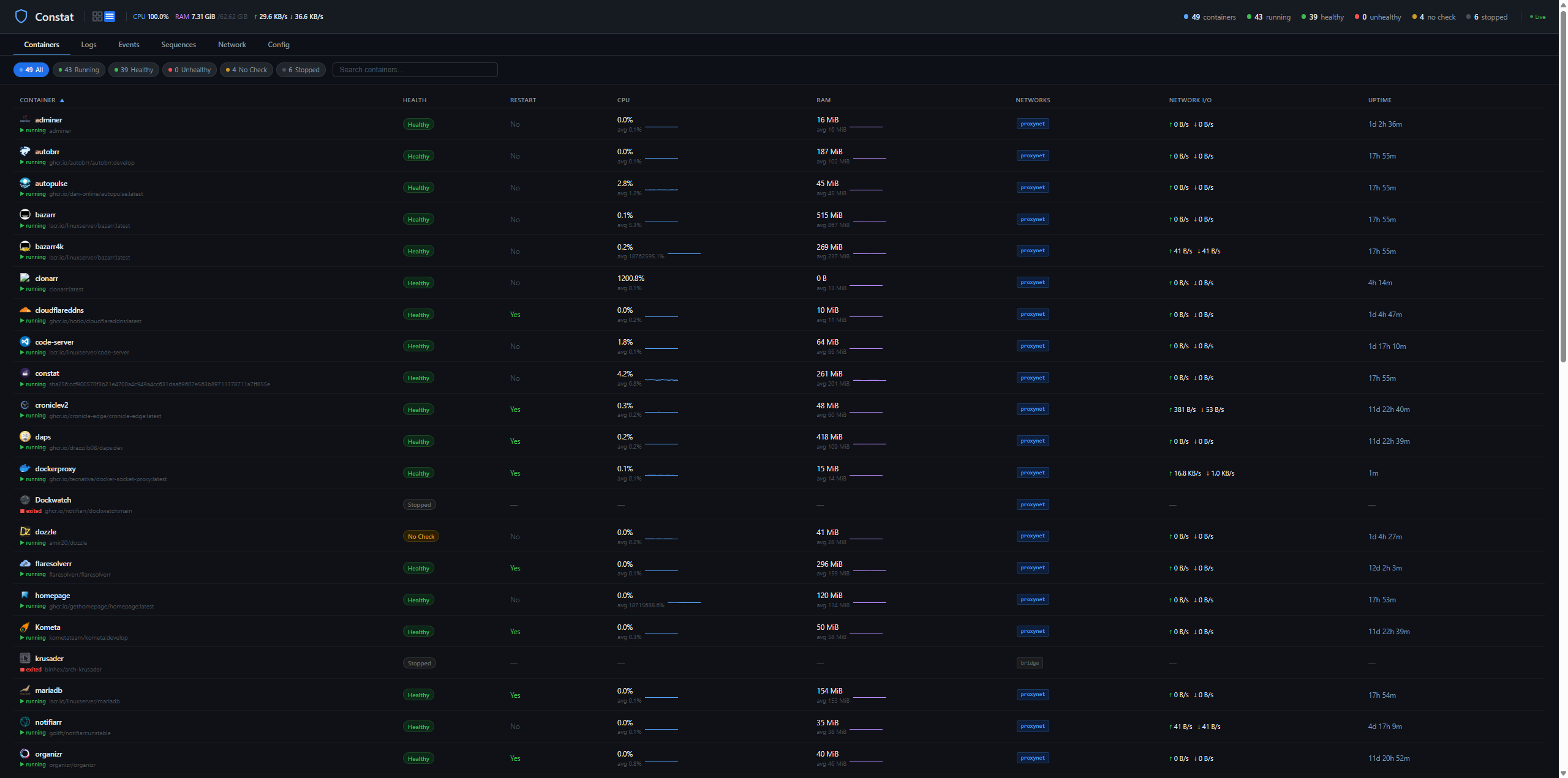
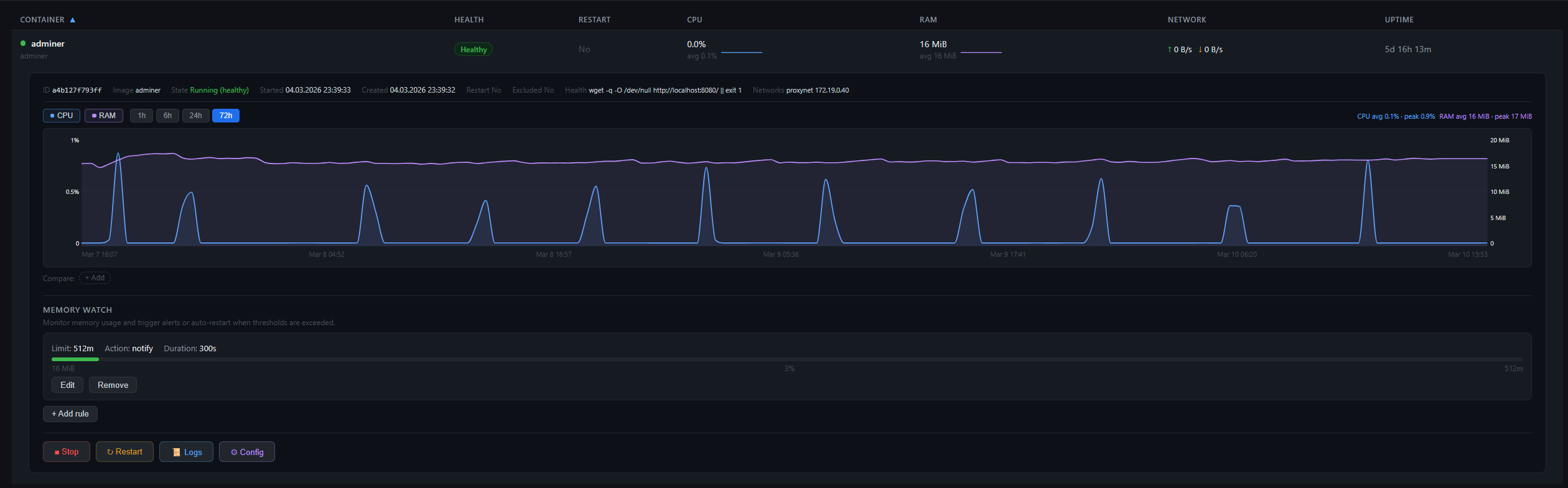
| Containers | Expanded View |
|---|---|
 |
 |
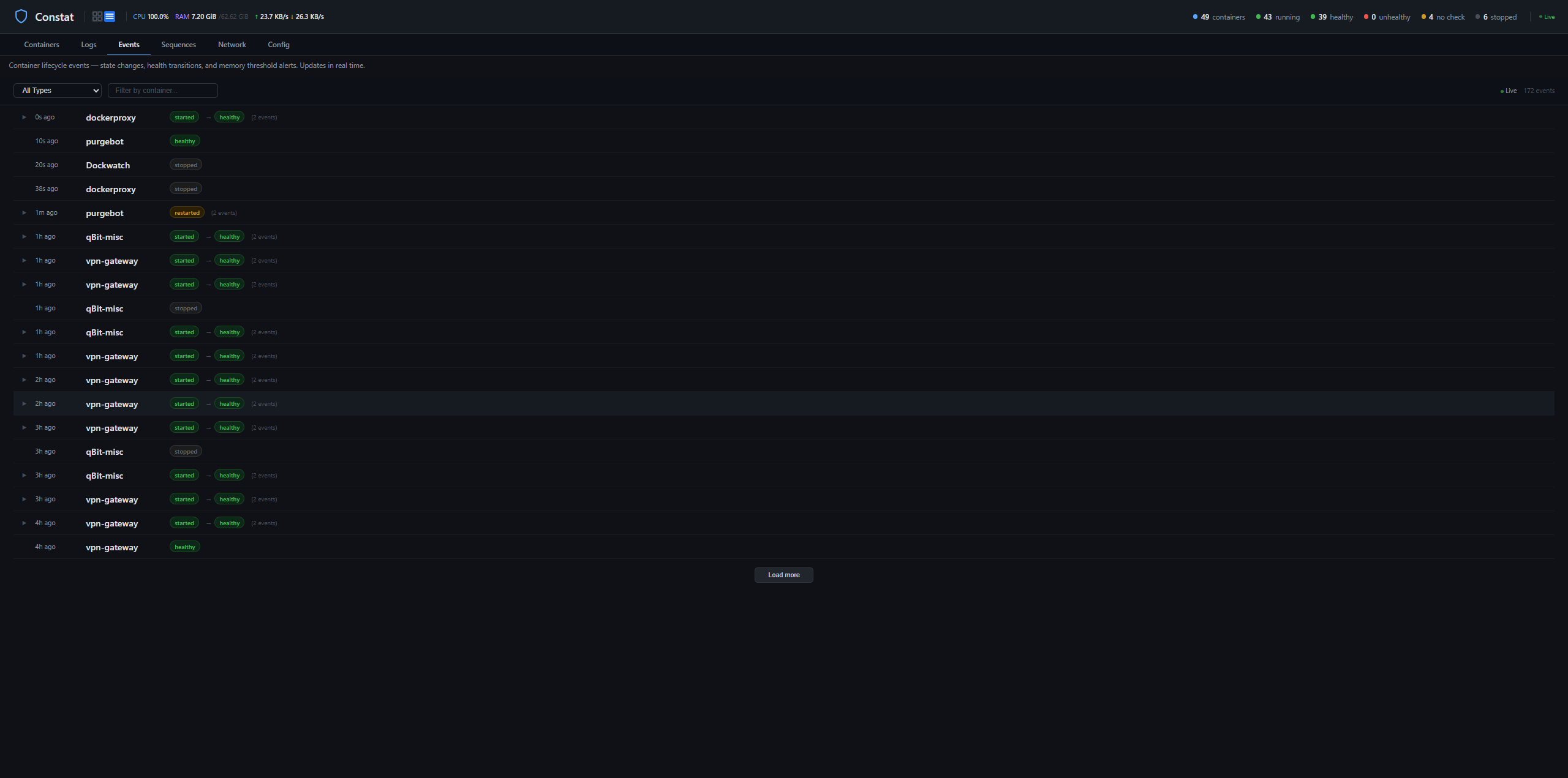
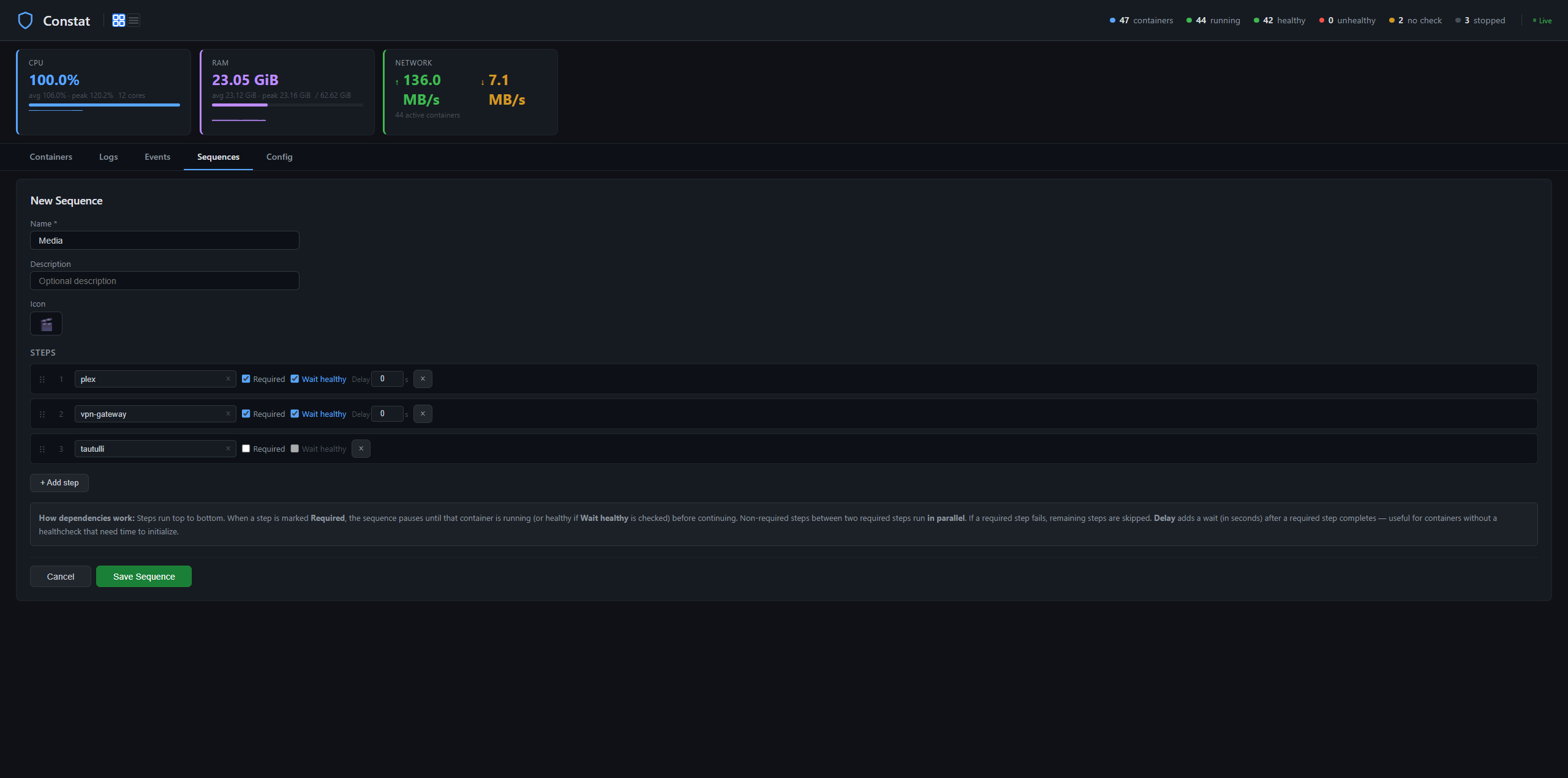
| Events | Sequences |
|---|---|
 |
 |
| Network Topology |
|---|
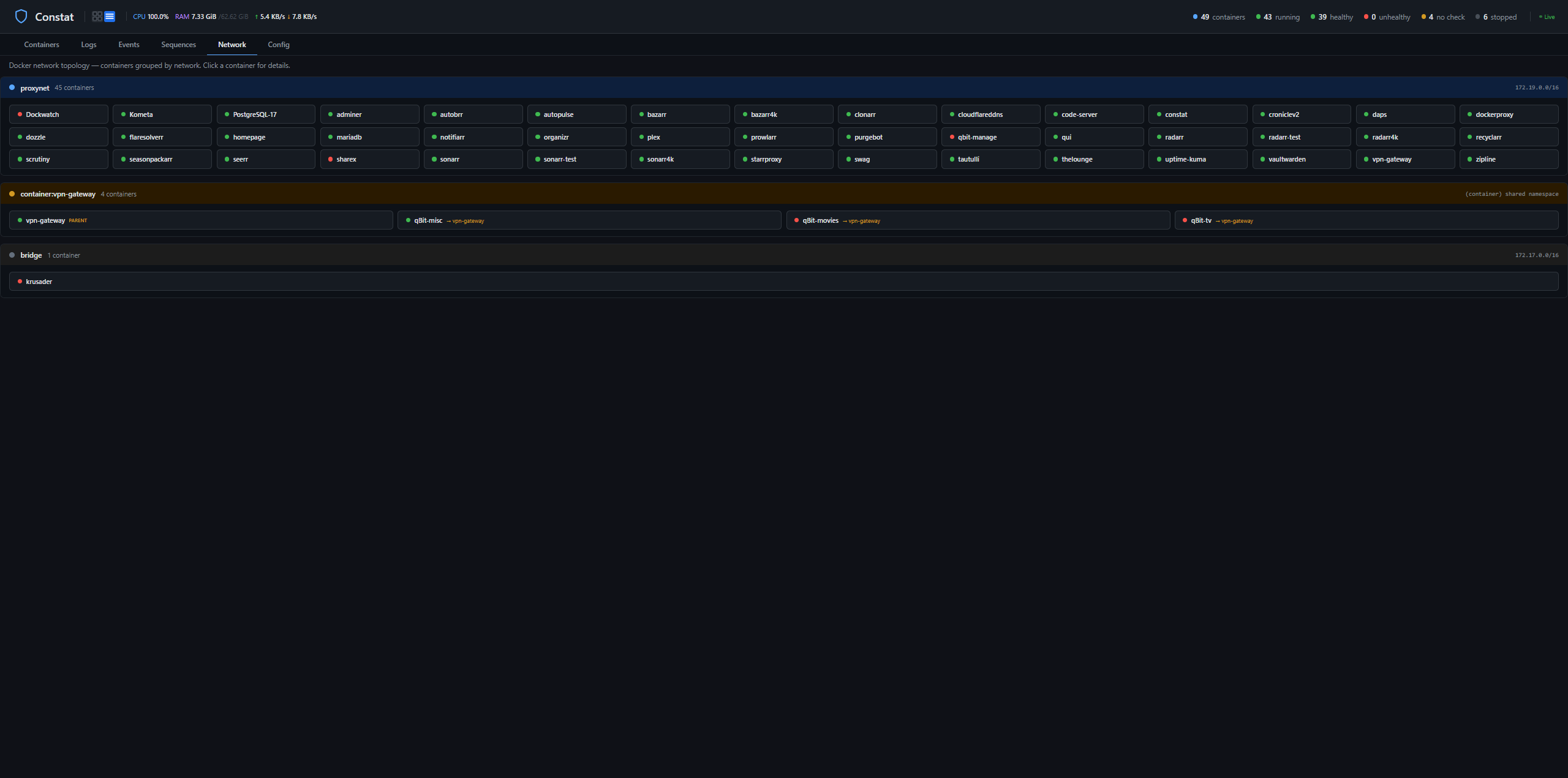 |
Features
- Live stats — CPU, RAM, and network usage updated every 3 seconds via streaming
- Health monitoring — tracks Docker healthcheck status, detects unhealthy containers
- Auto-restart — label-gated restart for unhealthy containers with cooldown protection
- Memory watch — per-container memory thresholds with notify or restart actions
- Image update checks — registry digest comparison with support for private registries (GHCR sponsor packages, private org images, Docker Hub paid plans)
- Image & volume cleanup — scheduled or manual pruning of unused images and volumes
- Log viewer — real-time log streaming with level detection and color-coded display
- Event history — Docker events (start, stop, die, health changes) with grouping
- Sequences — multi-step container orchestration (start/stop chains with dependencies)
- Charts — CPU/RAM history graphs with 1h/6h/24h/3d/7d range selection
- Mobile view — dedicated mobile UI with container cards, sort/filter, charts, and events
- Healthcheck suggestions — built-in database of recommended healthchecks for common images
- Config inspector — view ports, volumes, networks, env vars, and labels per container
- Discord notifications — state changes, health events, new updates with colored embeds
- Authentication — Forms / Basic / None modes with configurable "disabled for trusted networks" bypass, session persistence across restarts, CSRF protection, and a single API key for scripts and Homepage widgets
- Docker-native — PUID/PGID/UMASK, healthcheck, Alpine-based (~46 MB)
Quick Start
1. Run with Docker
docker run -d \
  --name constat \
  --restart unless-stopped \
  -p 7890:7890 \
  -v /var/run/docker.sock:/var/run/docker.sock:rw \
  -v /path/to/config:/config \
  -e TZ=America/New_York \
  ghcr.io/prophetse7en/constat:latest
On first start, a default constat.conf is created in the config directory. Open the Web UI at http://your-host:7890.
Requirements: Docker socket access (read/write) for container monitoring, stats, and restart. If you prefer not to mount the socket directly, see Docker Socket Proxy below.
2. Initial Setup
- Open
http://your-host:7890— on first run you'll be redirected to/setupto create an admin account (see Authentication) - After login, your containers appear automatically with live stats (CPU, RAM, network)
- Click any container row to expand details, charts, and quick actions
- To enable auto-restart, add the Docker label
constat.restart=trueto containers you want restarted when unhealthy (see Auto-Restart) - To set up Discord notifications, go to the Config tab and add your webhook URLs (see Discord Webhooks)
- To add memory monitoring, create rules in the Config tab under Memory Watch (see Memory Monitoring)
Web UI
The built-in Web UI runs on port 7890 (same container, no separate service).
Containers Tab
The main view — a sortable table of all containers with live-updating stats:
- Filter pills — All, Running, Healthy, Unhealthy, No Check, Stopped
- Search — filter by container name
- Sortable columns — Name, Health, Restart, CPU, RAM, Network, Uptime
- Sparklines — mini CPU/RAM/Network graphs in each row (click to open full chart)
- Restart toggle — clickable Yes/No to override auto-restart per container
Expanded view (click a container row):
- Container details: image, state, started/created dates, healthcheck command
- Config inspector: ports, volumes, networks, environment variables, labels
- CPU/RAM charts with selectable range (1h, 6h, 24h, 3d, 7d) and multi-container comparison
- Memory watch rules with live progress bars
- Healthcheck suggestions for containers without a healthcheck
- Quick actions: Start, Stop, Restart
Mobile View
A dedicated mobile-optimized UI — auto-detected on small screens, with a manual toggle in the header:
- Container cards — compact cards showing name, status, health, CPU, RAM, and uptime
- Tap to expand — memory watch rules with progress bars, CPU/RAM charts, and action buttons
- Sort and filter — filter by status (all/running/stopped) and sort by name, CPU, RAM, or health
- Resource summary — total CPU, RAM, and network I/O at a glance
- Events tab — simplified event timeline with grouped events
- Persistent preference — your view choice is saved in localStorage
Logs Tab
Real-time log streaming for any container:
- Sidebar with container list for quick switching
- Server-side timestamp extraction and ANSI escape stripping
- Color-coded level detection (error, warn, info, debug)
- Dozzle-inspired styling with colored left borders per level
- Tail line count selector (100, 500, 1000)
Events Tab
Docker event history with intelligent grouping:
- State events: started, stopped, died, restarted, paused
- Health events: unhealthy, healthy, recovered
- Memory events: threshold notify, restart, blocked, recovered
- Auto-restart indicators and grouped rapid events
- Newest-first ordering with load-more pagination
Sequences Tab
Multi-step container orchestration:
- Create named sequences with emoji icons
- Add steps: start, stop, or restart specific containers
- Per-step options: required/optional, wait for healthy, custom delay
- Live execution tracking with step-by-step progress
- Dependency chains — fail-fast on required steps, skip optional failures
- Searchable container dropdown for step assignment
Tools Tab
Operational tools that complement the pure settings in Config:
- Memory Watch — per-container memory thresholds with live progress bars, inline editor, and grouped rule display
- Image Updates — registry digest comparison (no pulls), scheduled checks with Discord notifications for new updates, color-coded status per container in the main table
- Private registry login — optional credential store for sponsor-gated GHCR packages, private organization images, and paid Docker Hub accounts. Credentials are verified against the registry's
/v2/endpoint before saving and stored in/config/.docker/config.jsonwith 600 permissions. Public images always work without any login — the registry login only unlocks update checks for images that anonymous requests cannot reach. - Cleanup — manual or scheduled pruning of unused Docker images and volumes, with dry-run mode for safety
Config Tab
Edit all settings from the browser:
- Discord webhooks (state + health + maintenance, separate channels)
- Gotify notifications
- Display toggles: show/hide stats columns, charts
- Embed color customization with hex previews
- Time/date format and timezone
- Webhook test button
Configuration
All settings live in /config/constat.conf (bash format). A sample config is created on first start with all options documented. You can edit the file directly or use the Config tab in the Web UI.
Discord Webhooks
Send notifications to Discord when containers change state or become unhealthy.
- In Discord, right-click a channel > Edit Channel > Integrations > Webhooks > New Webhook
- Copy the webhook URL
- Add it in the Config tab or directly in
constat.conf:
ENABLE_DISCORD="true"
DISCORD_WEBHOOK_STATE="https://discord.com/api/webhooks/..."   # start/stop/die/restart
DISCORD_WEBHOOK_HEALTH="https://discord.com/api/webhooks/..."  # unhealthy/recovered
You can use the same webhook URL for both, or separate channels for different notification types. Use the Test Webhook button in the Config tab to verify.
Auto-Restart
Constat only restarts containers that have the Docker label constat.restart=true. This prevents accidental restarts of containers you want to manage manually.
Adding the label:
- Docker run:
--label=constat.restart=true - Docker Compose: under
labels:addconstat.restart: "true" - Unraid: add
--label=constat.restart=truein Extra Parameters
Containers without the label are still monitored — health events go to Discord, but no restart is attempted.
RESTART_LABEL="constat.restart"
RESTART_COOLDOWN="300"    # Min seconds between restarts
MAX_RESTARTS="3"          # Max attempts per cooldown window
The restart override toggle in the UI lets you temporarily disable auto-restart per container without removing the label.
Memory Monitoring
Watch memory usage per container — no Docker --memory flags needed. When a container stays above the threshold for the specified duration, Constat can notify you or restart it.
MEMORY_PAUSED="false"
MEMORY_POLL_INTERVAL="30"
MEMORY_DEFAULT_DURATION="300"   # Seconds above threshold before action

MEMORY_WATCH=(
    "plex:4g:restart"             # Restart if >4 GiB for 5 min
    "radarr:2g:notify"            # Notify if >2 GiB for 5 min
    "qBit-movies:3g:restart:600"  # Restart if >3 GiB for 10 min
)
Rules can also be managed from the Config tab in the Web UI.
Image Update Checks
Constat can check whether newer versions of your container images exist on the registry, without pulling anything. It asks the Docker daemon for the current remote manifest digest and compares it to what is stored locally — if they differ, the container is flagged as "Outdated" in the main table.
Enable it in the Tools tab under Image Updates. You can pick how often the scheduled check runs (6/12/24 hours) and list containers to exclude. Each full check takes about 60–120 seconds depending on how many containers you have. A one-shot Check Now button triggers a manual run with a live progress counter.
Private registries. Public images work without any configuration — Constat contacts the registry anonymously. Some images require authentication (sponsor-gated GHCR packages, private organization images, paid Docker Hub tiers). Those show up as No access in the Update column. To enable checks for them, expand the Private registry login subsection under Image Updates and add a credential:
- For GHCR: create a classic personal access token with only the
read:packagesscope. Do not enablerepo,write:packages,delete:packages, or any other scope —read:packagesis read-only and cannot modify anything on your account. - For Docker Hub: create an access token at hub.docker.com/settings/security with Public Repo Read-only permission.
- Paste the token into the login form and click Login. Credentials are verified against the registry before saving — invalid tokens are rejected immediately.
Credentials are stored in /config/.docker/config.json using the standard Docker config format (the same file docker login writes). The file is created with 600 permissions (owner-only). Tokens are never shown again after saving, never returned via the API, and never logged. Click Remove next to a registry to delete the stored credentials immediately.
If an authenticated request is rejected for an image that is actually publicly pullable (GHCR sometimes does this when the token owner doesn't have explicit access to a public package), Constat automatically retries anonymously so logging in to one registry never breaks checks for other packages on the same host.
Healthcheck Suggestions
Constat includes a built-in database of recommended healthcheck commands for common Docker images (Plex, Radarr, Sonarr, Prowlarr, Bazarr, PostgreSQL, MariaDB, qBittorrent, SWAG, and more). When a running container has no healthcheck configured, a suggestion appears in the expanded view with the command to add as an Extra Parameter. Ports are automatically detected from the container's actual port bindings — if a non-standard port is in use, the suggestion adjusts automatically.
Docker Socket Proxy
If you prefer not to mount the Docker socket directly, Constat supports connecting via a TCP proxy:
-e DOCKER_HOST=tcp://dockerproxy:2375
Note: you'll need read/write access for container restart and start/stop functionality. Read-only proxies will limit Constat to monitoring only.
Docker
Environment Variables
| Variable | Required | Default | Description |
|---|---|---|---|
TZ |
No | UTC |
Container timezone |
PUID |
No | 99 |
User ID for file ownership |
PGID |
No | 100 |
Group ID for file ownership |
UMASK |
No | 002 |
File creation mask |
DOCKER_HOST |
No | — | Docker socket proxy URL (optional) |
UI_ENABLED |
No | true |
Set to false to disable the web UI |
TRUSTED_NETWORKS |
No | (empty — uses Radarr-parity defaults) | Lock Trusted Networks at host level. Comma-separated IPs/CIDRs (192.168.0.0/24, 10.0.0.0/24). When set, the UI field is disabled and cannot be changed via the web interface — only by editing the template and restarting. Useful for defense-in-depth against UI-takeover attackers expanding the trust boundary. |
TRUSTED_PROXIES |
No | (empty) | Lock Trusted Proxies at host level. Comma-separated IPs. Same UI-disabled behavior as TRUSTED_NETWORKS. Only needed when Constat sits behind a reverse proxy that terminates TLS (SWAG, Authelia, Traefik). |
Volumes
| Container Path | Purpose |
|---|---|
/var/run/docker.sock |
Docker socket (required for monitoring) |
/config |
Config, sequences, stats history, restart overrides, registry logins (.docker/config.json) |
Ports
| Port | Purpose |
|---|---|
7890 |
Web UI |
Docker Compose
services:
  constat:
    image: ghcr.io/prophetse7en/constat:latest
    container_name: constat
    restart: unless-stopped
    ports:
      - "7890:7890"
    volumes:
      - /var/run/docker.sock:/var/run/docker.sock:rw
      - ./constat-config:/config
    environment:
      - TZ=America/New_York
      - PUID=99
      - PGID=100
Building from Source
git clone https://github.com/prophetse7en/constat.git
cd constat
docker build -t constat:latest .
Healthcheck
Built-in healthcheck calls /api/summary every 60 seconds. Docker (and platforms like Unraid/Portainer) will show the container as healthy when the API responds.
Unraid
Install via Community Apps: Search for constat in the Apps tab — click Install and configure your settings.
Or install manually: Go to Docker → Add Container, set Repository to ghcr.io/prophetse7en/constat:latest, and add the required paths and ports (see above).
The Web UI is available at http://your-unraid-ip:7890. Config and stats are stored in /mnt/user/appdata/constat by default.
Updating: Click the Constat icon in the Docker tab and select Force Update to pull the latest image.
Architecture
Constat runs two processes in a single container:
- constat.sh — Bash script that watches Docker events, batches notifications, sends Discord webhooks, handles memory monitoring, and manages auto-restart logic
- constat-ui — Go binary serving the web UI and REST API, streaming live stats via SSE
Docker Engine
  ├── constat.sh (bash) — event watcher + Discord + memory + auto-restart
  └── constat-ui (Go)   — web UI + REST API + SSE streaming
       ├── /api/containers         — container list with stats
       ├── /api/stats/stream       — SSE: live stats every 3s
       ├── /api/containers/{id}/logs/stream — SSE: live log streaming
       ├── /api/events/stream      — SSE: Docker events
       ├── /api/sequences/*        — sequence CRUD + execution
       ├── /api/updates            — image update check results
       ├── /api/registry           — private registry logins (list/add/remove)
       ├── /api/images, /api/volumes — image and volume cleanup
       ├── /api/config             — config read/write
       ├── /api/health-suggestions — healthcheck database
       └── /api/summary            — container counts (healthcheck endpoint)
Stats pipeline:
- N goroutines stream
docker statsper container - Stats batched every 3s → SSE to frontend (patches in-place)
- History appended every 30s (ring buffer, up to 7d)
- Persisted to disk every 5 minutes
Frontend: Alpine.js single-page app with Tailwind-inspired styling. No build step — single index.html embedded in the Go binary.
Authentication
As of v0.9.17, the Web UI requires authentication. The model follows Radarr/Sonarr's convention — familiar if you're coming from that ecosystem.
First-run setup
On first access after install or upgrade, you'll be redirected to /setup:
- Create an admin username (1–64 chars, no control chars)
- Create a password (minimum 10 characters, at least 2 of: uppercase, lowercase, digit, symbol)
- Confirm the password and submit
You're automatically logged in and land in the app. Existing config is preserved — only credentials are new.
Two settings you control
Settings → Security:
| Setting | Choices | What it does |
|---|---|---|
| Authentication | Forms (default) / Basic / None |
How the user authenticates. Forms shows a login page; Basic uses the browser's built-in popup (best behind a reverse proxy); None disables auth entirely (requires typed confirmation and shows a persistent warning banner) |
| Authentication Required | Disabled for Trusted Networks (default) / Enabled |
When login is required. Default lets LAN devices skip login; Enabled requires login from every IP including localhost |
Trusted Networks
When Authentication Required = Disabled for Trusted Networks, devices on the listed networks skip the login page. Two modes:
- Leave empty (default) — matches Radarr: trusts all private network ranges (
10.x,172.16–31.xincl. Docker bridges,192.168.x, link-local, IPv6 ULA) plus loopback. Convenient but trusts anything with a private IP, including every Docker container on the host. - Set a custom list — trusts only specific IPs or CIDR subnets you enter. Example:
192.168.0.0/24, 10.0.0.0/24trusts your home VLAN + your WireGuard tunnel, nothing else. Devices on Docker bridges (172.17.x, 172.19.x) then need to log in or use the API key.
Loopback (127.0.0.1) is always trusted regardless, so Docker healthchecks and localhost admin tools don't need to authenticate.
API key
For scripts, Homepage widgets, and other programmatic integrations, use the API key from Settings → Security:
curl -H "X-Api-Key: <key>" http://your-host:7890/api/summary
The key is also accepted as a ?apikey=<key> query parameter, but the header form is preferred (query parameters leak to access logs and browser history).
Click Regenerate API Key to rotate. The old key stops working immediately — update any scripts or widgets that use it.
Reverse-proxy deployments (SWAG, Traefik, Authelia)
If Constat runs behind a reverse proxy:
- Set
AUTHENTICATIONtobasicorformsdepending on what your proxy handles - Set
TRUSTED_PROXIESin/config/constat.confto the proxy's IP (e.g.TRUSTED_PROXIES="172.17.0.1") so Constat reads the real client IP fromX-Forwarded-Forand respectsX-Forwarded-Protofor Secure-cookie flag - If the proxy handles auth (Authelia, Cloudflare Access) and you don't want Constat to prompt as well, set
AUTHENTICATION=none
Protection layers in place
- CSRF (double-submit cookie) blocks cross-site request forgery on all write endpoints
- SSRF (outbound HTTP validation) blocks Constat from being used to probe your internal network via the webhook-test / Gotify-test / registry-login endpoints
- Sensitive data redaction — environment variables with names like
*_KEY,*_TOKEN,*_PASSWORD,*_SECRETetc. are replaced with[REDACTED]in the container-config endpoint, so Constat can't be used to leak credentials from other containers on the host - Session persistence — once logged in, your session survives container restarts within its TTL (30 days default)
- Security headers —
X-Frame-Options: DENY,X-Content-Type-Options: nosniff,Referrer-Policy: same-originon every response
External exposure
Constat deliberately does not include rate limiting or a dedicated audit log. If you expose the port beyond your LAN:
- Use a reverse proxy (SWAG, Traefik) with
fail2banorCrowdSecin front for brute-force protection - Set
Authentication Required = Enabledso even LAN requires login - Consider Authelia or Cloudflare Access for 2FA/SSO
Security Notes
- Docker socket access grants full container control — use a socket proxy for read-only if you don't need restart/start/stop
- Registry credentials (if you use Private registry login) are stored at
/config/.docker/config.jsonin the standard Docker format with 600 permissions — the same asdocker loginon the host. Back up or restrict your/configmount accordingly - Admin credentials live in
/config/auth.json(mode 600) — bcrypt-hashed passwords, never plaintext. Do not commit this file or ship it in images - If you forget your password and can't log in, delete
/config/auth.jsonand restart the container — it will show the setup wizard again. Existing configuration is preserved (only the credentials file is touched)
Support
For questions, help, or bug reports:
- Discord:
#prophetse7en-appson the TRaSH Guides Discord (under Community Apps) - GitHub: ProphetSe7en/constat/issues
Development
Constat is developed with active AI assistance (Claude, Anthropic) under human direction. Architectural decisions, code review, testing on a real Unraid + Docker stack, and releases are done by ProphetSe7en. Issues and PRs go through a human review.
License
MIT
Categories
Related apps
Explore more like this
Explore allDetails
ghcr.io/prophetse7en/constat:latestRuntime arguments
- Web UI
http://[IP]:[PORT:7890]/- Network
bridge- Shell
bash- Privileged
- false
Template configuration
Web UI port
- Target
- 7890
- Default
- 7890
- Value
- 7890
Docker socket for container monitoring and auto-restart
- Target
- /var/run/docker.sock
- Default
- /var/run/docker.sock
- Value
- /var/run/docker.sock
Config directory — edit constat.conf for all settings
- Target
- /config
- Default
- /mnt/user/appdata/constat
- Value
- /mnt/user/appdata/constat
User ID for file ownership
- Default
- 99
- Value
- 99
Group ID for file ownership
- Default
- 100
- Value
- 100
File creation mask
- Default
- 002
- Value
- 002
Optional: lock Trusted Networks at host level. Comma-separated IPs/CIDRs (e.g. 192.168.0.0/24, 10.0.0.0/24). When set, the UI field becomes read-only and can only be changed by editing this template and restarting. Leave empty to configure via the Security panel in the web UI. Loopback is always trusted regardless.
Optional: lock Trusted Proxies at host level. Comma-separated reverse-proxy IPs (e.g. 172.17.0.1). Only needed when Constat sits behind SWAG, Authelia, Traefik, etc. When set, the UI field becomes read-only. Leave empty for direct access.