
All apps · 0 apps

CloudGate
Docker app from Elias02345's Repository
Overview
CloudGate puts the services in your homelab on the internet, even when your connection has no public IP address or open ports (CGNAT, DS-Lite, mobile internet). It manages Cloudflare Tunnels and playit.gg tunnels from one web interface.
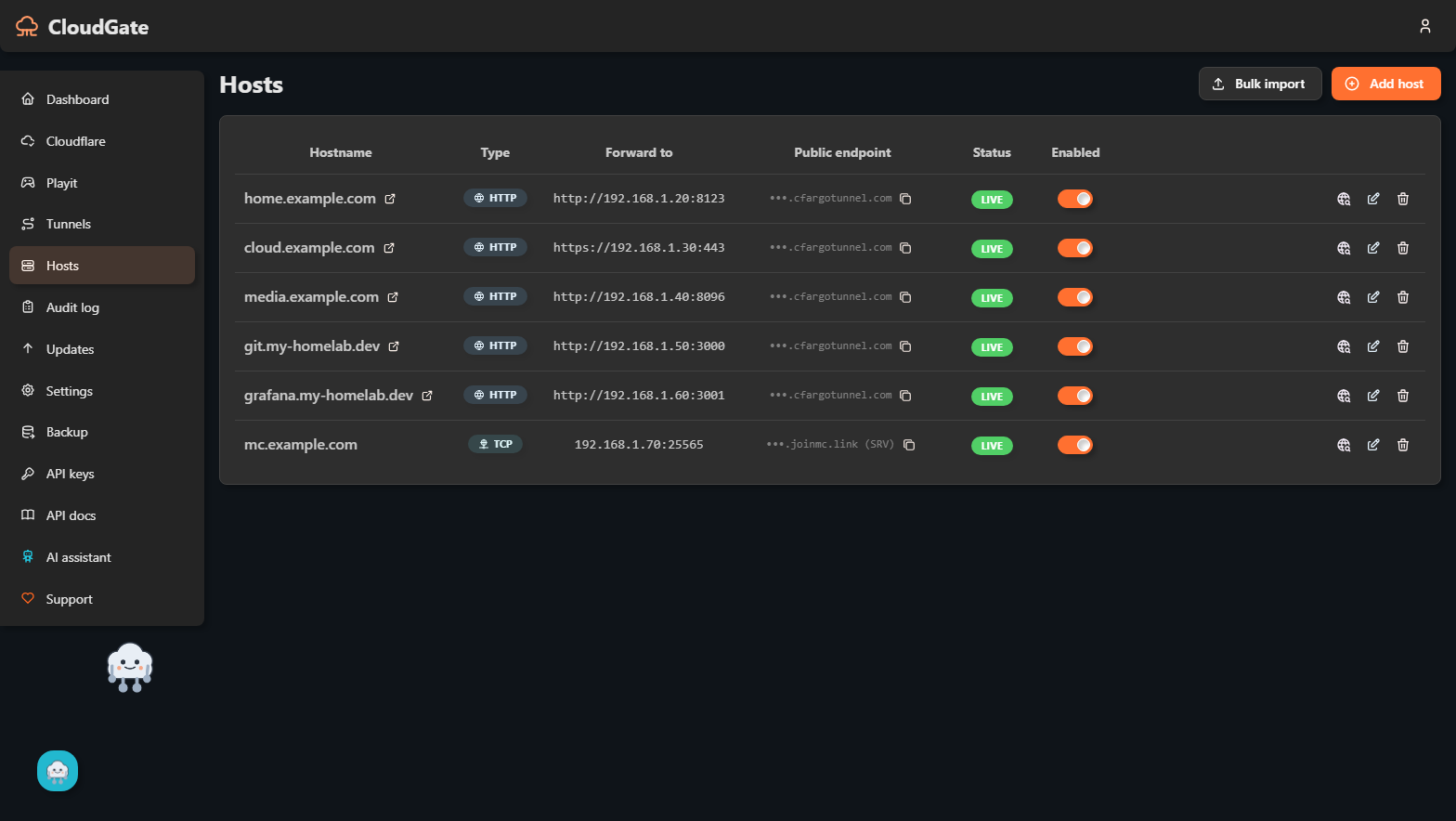
Add a service by entering its local address and the public hostname you want. CloudGate creates the tunnel, the DNS record and the routing rule, and keeps the tunnel running.
Features:
- Cloudflare Tunnel for websites and web apps, with automatic DNS records
- playit.gg tunnels for TCP/UDP services such as game servers and SSH
- Optional local reverse proxy with Let's Encrypt certificates
- Two-factor authentication, audit log and API keys
- No configuration needed: the admin account and all secrets are created on first start
Not affiliated with Cloudflare or playit.gg.
Readme
View on GitHub🌩️ CloudGate
Self-hosted WebUI for Cloudflare Tunnels and playit.gg. Host services from behind CGNAT without port forwarding — Immich, Nextcloud, Jellyfin, Proxmox, Home Assistant, you name it.
Status: stable — v0.5.0 is the first production-ready release.


Why CloudGate?
Many home internet connections (especially in Germany — 1&1, Vodafone Cable, mobile) sit behind CGNAT or DS-Lite. You have no public IPv4, no port forwarding, and tools like Nginx Proxy Manager simply don't work.
Cloudflare Tunnel solves this — for free — but the setup (cloudflared login, tunnel create, route dns, manage config.yml, run the daemon) is a hard wall for non-sysadmins.
CloudGate is a WebUI that does it all:
- Add a service: enter
192.168.1.42:8080andimmich.yourdomain.com→ done. - CloudGate creates the Cloudflare Tunnel, DNS record, ingress rule, and reloads
cloudflared. - Need raw TCP/UDP instead of HTTP — a Minecraft server, SSH, a game server? Playit.gg tunnels handle that (Cloudflare's free tier can't).
- Hybrid mode: per host, pick "via Cloudflare Tunnel" OR "local nginx reverse proxy".
- Self-updates when new releases ship on a standalone install — never overwrites your data. On an app-store install, the platform updates the image instead (see Install from an app store).
Not affiliated with Cloudflare or Playit.gg. CloudGate uses their public, documented APIs.
Quick Start
Option A — One-liner (Ubuntu / Debian / LXC / Proxmox)
Fresh Ubuntu container, no prior setup:
bash -c "$(curl -fsSL https://raw.githubusercontent.com/Elias02345/CloudGate/main/install/lxc-install.sh)"
The installer:
- Installs Docker if missing
- Pulls the latest CloudGate image (falls back to building from source)
- Creates a persistent data volume
- Starts the container and waits for it to become healthy
- Prints your initial admin password
Re-runnable — running it again won't wipe your data.
Proxmox LXC users: enable
nesting=1,keyctl=1in the container's features config. Use an Ubuntu 24.04 template, 2 cores, 1 GB RAM, 4 GB disk minimum.
Option B — Plain Docker
If you already have Docker:
docker run -d --name cloudgate \
  -p 80:80 -p 443:443 \
  -v cloudgate-data:/data \
  --restart unless-stopped \
  ghcr.io/elias02345/cloudgate:latest
The admin UI/API is also served on port 8080 (
-p 8080:8080) — the port app-store platforms (Umbrel, TrueNAS, Unraid, ZimaOS) publish on their own. 80/443 are only needed if you use CloudGate's local-nginx reverse-proxy mode.
What happens next
- Open
http://<your-host-ip>/(or port8080) in a browser. - Login as
admin@cloudgate.localwith the password shown in container logs:docker logs cloudgate | grep -A1 "INITIAL ADMIN PASSWORD" - Change the password (forced on first login).
- Add your Cloudflare API token in the UI (instructions: see
docs/CLOUDFLARE_SETUP.md). - Create your first tunnel, add a host — services live within ~30 seconds.
That's it. CloudGate manages keys, secrets, and updates automatically.
Install from an app store
Packages for Unraid, TrueNAS, Umbrel and ZimaOS are prepared in packaging/ and listings are pending review with each store — CloudGate isn't listed in any app store yet. Once accepted, an app-store install publishes only the admin port and leaves updates to the platform (CLOUDGATE_DISABLE_UPDATES=true); see docs/STORE_PUBLISHING.md for details.
Features
| Category | Capability |
|---|---|
| Install | One-liner installer for Ubuntu/LXC · Plain docker run · Multi-arch GHCR images · app-store packages pending review |
| Bootstrap | Auto-generated encryption key, JWT secret, admin password — zero env vars required |
| Cloudflare | API-token auth · multi-account · automatic zone sync · token revocation cleanup |
| Tunnels | Create, restart, delete · live status · log tail · auto-revive on container restart · SIGHUP reload |
| Playit.gg | Raw TCP/UDP tunnels for Minecraft (Java + Bedrock), SSH and other non-HTTP services |
| Hosts (Cloudflare mode) | DNS CNAME auto-create · tunnel-config rewrite · HEAD-probe test · enable/disable toggle |
| Hosts (local nginx mode) | Per-host conf with nginx -t validation · Let's Encrypt via DNS-01 · auto-renewal cron |
| Security | Argon2id passwords · AES-256-GCM token encryption · 2FA TOTP · per-route rate limiting · audit log |
| Self-update | 6h GitHub polling · mandatory SHA256 verification · atomic in-place install with auto-rollback (standalone installs only — app-store installs are updated by the platform) |
| Resilience | Recovery UI fallback (no blank pages) · DB snapshots per update · sacred-path persistence contract |
| UX | i18n DE+EN · light/dark theme · live dashboard · SSE-driven cache invalidation |
Architecture
┌────────────────────────────────────────────────────────────────┐
│  Browser ──http→ nginx :8080 (and :80) ──┬─→ React SPA (static) │
│                                          └─→ /api → backend :3000│
└────────────────────────────────────────────────────────────────┘
                                  │
        ┌─────────────────────────┴───────────────────────────┐
        │  CloudGate container (s6-overlay supervised)        │
        │                                                     │
        │  bootstrap (oneshot, idempotent) ─► success ─► main │
        │                                  └─► failure ─► recovery-ui
        │                                                     │
        │  backend  ┌──► spawns cloudflared ──tunnels──→ CF   │
        │           ├──► spawns playit-agent ──tunnels──→ Playit.gg
        │           ├──► writes /data/cloudflared/config.yml  │
        │           ├──► writes /data/nginx/hosts/*.conf      │
        │           ├──► self-updater (GitHub polling)        │
        │           └──► ACME cert renewal cron               │
        └─────────────────────────────────────────────────────┘
                                  │
              ┌───────────────────┴───────────────────┐
              │  /data volume — sacred                 │
              │  secrets/  db/  cloudflared/  playit/  │
              │  nginx/{hosts,certs,custom}  logs/     │
              │  updates/{staging,backups}             │
              │                                        │
              │  NEVER overwritten by updates          │
              │  (see CLAUDE.md §1)                    │
              └────────────────────────────────────────┘
Documentation
CLAUDE.md— rules for contributors (and AI assistants) on writing updates that don't break user datadocs/ARCHITECTURE.md— system design overviewdocs/UPDATE_RULES.md— detailed update-safety rulesdocs/CLOUDFLARE_SETUP.md— how to create the Cloudflare API tokendocs/HOME-ASSISTANT.md— fixing Home Assistant's "400: Bad Request" behind a tunneldocs/STORE_PUBLISHING.md— how CloudGate reaches homelab app storesdocs/AGENT.md— API keys and REST recipes for scripting/AI-agent use
Branch Strategy
main— release-only. Tagged versionsv0.x.ytrigger GitHub Releases + GHCR image builds.dev— active development. All feature work goes here first.- Feature branches → PR into
dev→ CI must pass. - Periodic merges
dev → mainproduce releases.
Contributing
PRs welcome. Read CLAUDE.md first — especially the persistence and migration rules.
See docs/CONTRIBUTING.md for the dev workflow.
💛 Support
CloudGate is free forever (MIT) and maintained by a single developer in their spare time. If it saves you a Sunday afternoon, a small tip helps cover infrastructure + signing keys + ongoing dev time:
- ☕ PayPal — one-click
- ₿ Bitcoin:
bc1qphk3h7sw6j429c62ypw6zxgmkfeevmxs437ze3 - ⟠ Ethereum:
0x81deF905D66fd17433003e749f1e69bCFd95664d - ◎ Solana:
G362aMnx7jSXp4iWtCwyw2yXy52ukRVoFgYCpw4aqrPQ
The running app has all of these as scannable QR codes in Sidebar → Support. Full details in SPONSORING.md.
Can't donate? Starring the repo and reporting bugs are equally helpful.
License
Media gallery
1 / 4Install CloudGate on Unraid in a few clicks.
Find CloudGate in Community Apps on your Unraid server, review the template, and click Install. Unraid handles the Docker app or plugin setup from the published template.
Requirements
Categories
Related apps
Explore more like this
Explore allDetails
ghcr.io/elias02345/cloudgate:latestRuntime arguments
- Web UI
http://[IP]:[PORT:8080]/- Network
bridge- Shell
bash- Privileged
- false
Template configuration
Port for the CloudGate admin web UI.
- Target
- 8080
- Default
- 8080
Persistent CloudGate data: generated secrets, the SQLite database, and Cloudflare/nginx state.
- Target
- /data
- Default
- /mnt/user/appdata/cloudgate
Disables CloudGate's built-in self-updater. Unraid updates the image instead - leave this set to true.
- Default
- true
Timezone, e.g. Europe/Berlin.
- Default
- UTC
User ID to run the unprivileged parts of CloudGate as. The backend itself stays root (it reloads nginx/cloudflared).
- Default
- 99
Group ID to run the unprivileged parts of CloudGate as.
- Default
- 100