

CliqRelay
OfficialDocker app from TeeCodeDev's Repository
Overview
CliqRelay is an open-source platform that automatically transforms browser clicks and interactions into beautiful, step-by-step visual documentation and technical guides. By pairing a native browser extension with a high-performance backend, CliqRelay tracks exact DOM interactions and contextual screenshots, automating the heavy lifting of writing user manuals, onboarding documentation, and SOPs.
Key Features:
- Instant Capture: Record user workflows in real time using the CliqRelay Chrome/Firefox browser extension.
- Contextual Screenshots: Automatically captures and crops screenshots for every click and interaction.
- Live Recording Sidepanel: Start, pause, review, and watch steps populate live in the extension sidepanel.
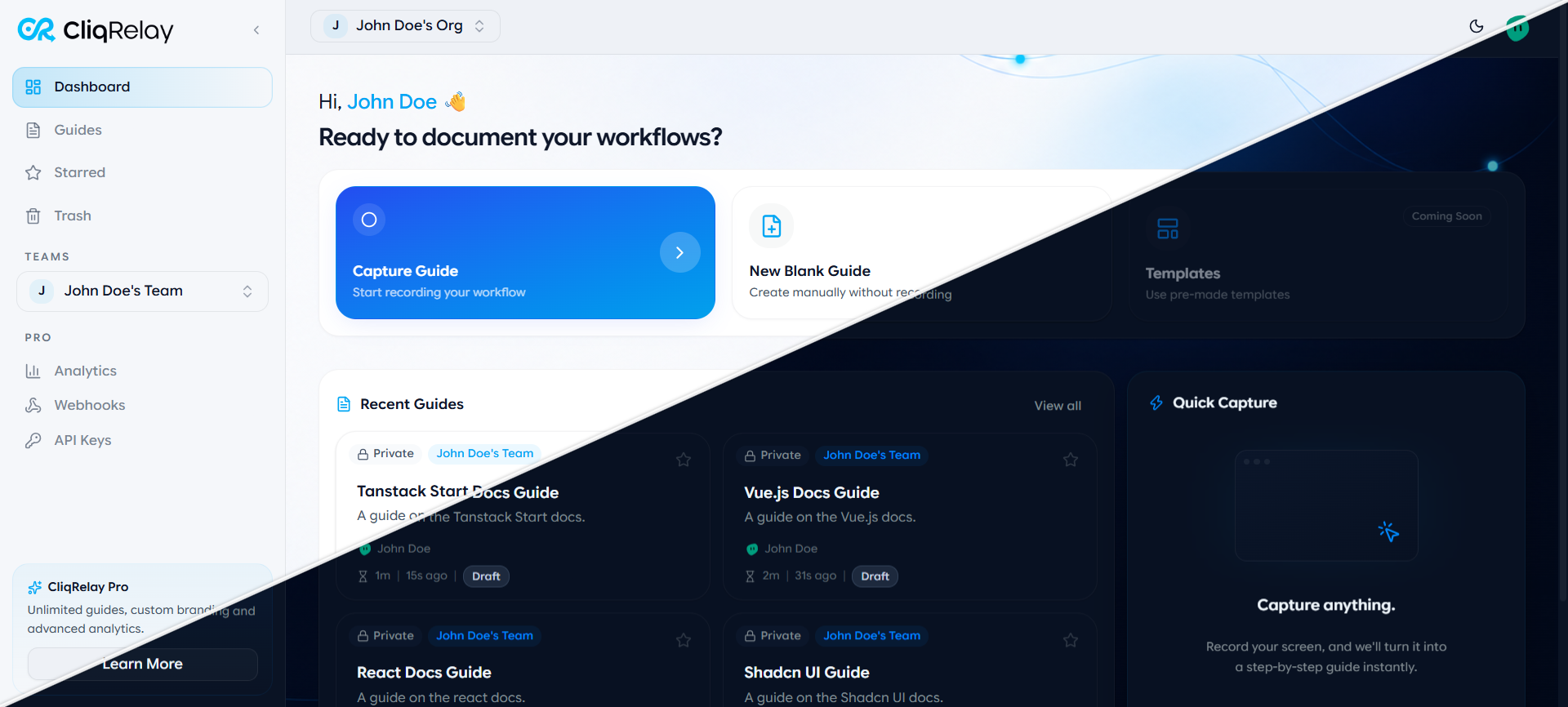
- Rich Guide Editor: Reorder steps, edit descriptions, blur sensitive details, and insert annotations (tips, callouts, alerts, headers).
- PDF Export: Export polished, print-ready PDF guides for offline handoff and team sharing.
- Guide Lifecycle Management: Star, publish, organize, and soft-delete guides with full restore capabilities.
DEPLOYMENT & SETUP INSTRUCTIONS:
CliqRelay consists of a web frontend, backend API, worker, PostgreSQL database, Redis, and RustFS object storage.
Recommended: Docker Compose Manager on Unraid
- Upstream provides a complete [inline]docker-compose.prod.yml[/inline] in the repository.
- Clone the repository into your appdata folder:
[code]git clone https://github.com/CliqRelay/cliqrelay.git /mnt/user/appdata/cliqrelay[/code] - Copy [inline]docker-compose.prod.env.example[/inline] to [inline]docker-compose.prod.env[/inline] and configure your secrets:
[code]cd /mnt/user/appdata/cliqrelay && cp docker-compose.prod.env.example docker-compose.prod.env[/code] - Build and start the stack with Docker Compose:
[code]docker compose --env-file docker-compose.prod.env -f docker-compose.prod.yml up -d --build[/code] - Open the web interface at [inline]http://[IP]:3000[/inline] and install the browser extension.
Credits & Support:
- CliqRelay is created by the CliqRelay Team ([url=https://github.com/CliqRelay/cliqrelay]GitHub[/url]). Support the project via [url=https://dub.sh/tLh3JgA]GitHub Sponsors[/url].
- The donation link below specifically supports the maintenance of this Unraid template repository.
Readme
View on GitHub
CliqRelay
An open-source platform that transforms page clicks and interactions into beautiful, step-by-step visual documentation. By coupling a native browser capture extension with a high-performance backend, CliqRelay tracks exact DOM interactions and contextual screenshots thereby instantly automating the heavy lifting of writing technical guides and docs. Capture and refine workflows instantly to help your teams perform at their best.
☁️ CliqRelay Cloud
Don't want to self-host? CliqRelay Cloud is the hosted version of the platform, no infrastructure required. Sign up, install the extension, and start capturing guides in minutes.
- Platform: Get Started
- Chrome Extension: Install from the Chrome Web Store
Features
- Instant Capture: Capture workflows in real-time with a Chrome/Firefox extension that listens for user interactions and captures them.
- Contextual Screenshots: Automatically capture screenshots during interactions to provide visual context.
- Live Recording Sessions: Start, pause, and review a capture session from the extension's sidepanel, watching steps populate in real time as you click through a workflow.
- Guide Editor: Fine-tune captured guides in the web dashboard, reordering steps, editing titles and descriptions, and inserting custom annotation blocks (headers, tips, callouts, alerts) alongside captured steps.
- Guide Lifecycle Management: Publish, archive, star, and trash guides, with soft-delete and restore support so nothing is lost by accident.
- PDF Export: Export any guide as a polished, print-ready PDF for offline sharing or documentation handoff.
Self-Hosting
You can run the full CliqRelay stack locally or on your own infrastructure.
Prerequisites:
- Docker and Docker Compose
1. Start the backend stack:
$ docker compose --env-file docker-compose.prod.env -f docker-compose.prod.yml down -v && \
  docker compose --env-file docker-compose.prod.env -f docker-compose.prod.yml build --parallel && \
  docker compose --env-file docker-compose.prod.env -f docker-compose.prod.yml up -d
2. Build the browser extension and install it in Chrome:
Follow the apps/extension project's README for this step. This will enable you to run it as a local extension.
Contributing
Your contributions are welcome! Here's how you can get involved:
- If you find a bug, please submit an issue.
- Set up your development environment by following our Contribution Guide.
- Contribute code by making a pull request to enhance features, improve user experience, or fix issues.
Support & Community
Join our growing community for support, discussions, and updates:
Media gallery
1 / 2Categories
Related apps
Explore more like this
Explore allDetails
cliqrelay-web:latestRuntime arguments
- Web UI
http://[IP]:[PORT:3000]/- Network
bridge- Shell
sh- Privileged
- false
Template configuration
The host port for the CliqRelay web dashboard (internal container port is 3000).
- Target
- 3000
- Default
- 3000
URL where the CliqRelay backend API is reachable.
- Target
- API_URL
- Default
- http://[IP]:8080
URL for authentication service endpoints.
- Target
- AUTHULA_URL
- Default
- http://[IP]:8080