
All apps · 0 apps

Cleanuparr
OfficialDocker app from Flamin's Repository
Overview
Cleanuparr (formerly Cleanuperr) is an intelligent automation tool for managing your *arr applications and download clients. It automatically removes problematic downloads, manages stalled torrents, handles failed imports, and keeps your download queue clean. v2.0.0 introduces a brand new web UI for easy configuration and monitoring.
Key Features:
- Strike system for tracking problematic downloads
- Automatic removal of stalled, slow, or failed downloads
- Content blocking with custom blocklists
- Orphaned download detection with cross-seed support
- Smart seeding management
- Notification system
- Modern web interface for configuration
Supports: Sonarr, Radarr, Lidarr, qBittorrent, Deluge, Transmission
Readme
View on GitHubLove this project? Give it a ⭐️ and let others know!
 Cleanuparr
/kliː.nʌp.ər/ — like "cleanuper", someone who does the cleanup. Not "CleanupArr" or "CleanUpArr".




Cleanuparr is an advanced download manager for the Servarr ecosystem. It works with Sonarr, Radarr, Lidarr, Readarr, and Whisparr alongside download clients like qBittorrent, Transmission, and Deluge. Beyond cleaning up stalled, blocked, and malicious downloads, it searches for missing content and quality upgrades, manages seeding, and removes orphaned files.
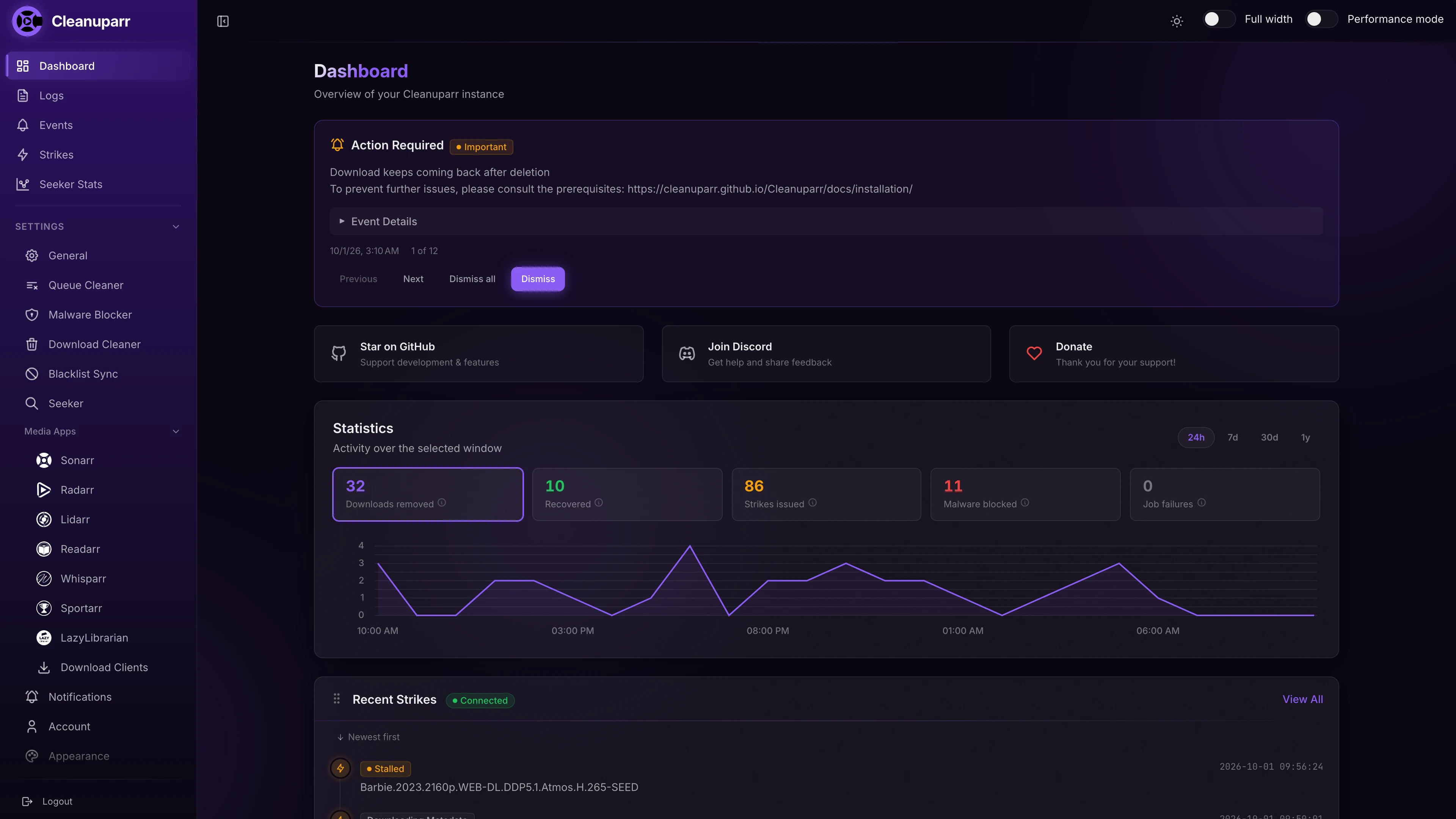
Cleanuparr was created primarily to address malicious files, such as *.lnk or *.zipx, that were getting stuck in Sonarr/Radarr and required manual intervention. Some of the reddit posts that made Cleanuparr come to life can be found here, here, here and here.
[!IMPORTANT] Features:
- Strike system to mark bad downloads.
- Remove and block downloads that reached a maximum number of strikes.
- Remove and block downloads that are failing to be imported by the arrs.
- Remove and block downloads that are stalled or in metadata downloading state.
- Remove and block downloads that have a low download speed or high estimated completion time.
- Remove and block downloads blocked by qBittorrent or by Cleanuparr's Malware Blocker.
- Remove and block known malware based on patterns found by the community.
- Automatically trigger a search for downloads removed from the arrs.
- Proactively search for missing items across your Radarr and Sonarr libraries.
- Search for quality upgrades for items that haven't met their quality profile's cutoff (a.k.a. Cutoff Unmet).
- Search for custom format score upgrades with automatic score tracking.
- Clean up downloads that have been seeding for a certain amount of time.
- Remove downloads that are orphaned/have no hardlinks/are not referenced by the arrs anymore (with cross-seed support).
- Scan configured directories for files not claimed by any active torrent, move them to a dedicated orphaned directory, and optionally auto-purge.
- Notify on strike or download removal.
- Ignore certain torrent hashes, categories, tags or trackers from being processed by Cleanuparr.
Sponsored by GitAds
Screenshots
https://cleanuparr.github.io/Cleanuparr/docs/screenshots
🎯 Supported Applications
*Arr Applications (latest version)
- Sonarr
- Radarr
- Lidarr
- Readarr
- Whisparr v2
- Whisparr v3
- Sportarr
- LazyLibrarian
Download Clients (latest version)
- qBittorrent
- Transmission
- Deluge
- µTorrent
- rTorrent
- SABnzbd
Platforms
- Docker
- Windows
- macOS
- Linux
- Unraid
🚀 Quick Start
docker run -d --name cleanuparr \
  --restart unless-stopped \
  -p 11011:11011 \
  -v /path/to/config:/config \
  -e PORT=11011 \
  -e PUID=1000 \
  -e PGID=1000 \
  -e TZ=Etc/UTC \
  ghcr.io/cleanuparr/cleanuparr:latest
For Docker Compose, health checks, and other installation methods, see the Complete Installation Guide, but not before reading the Prerequisites.
Prefer not to self-host? A managed Cleanuparr instance is available via ElfHosted, bundled alongside Sonarr/Radarr to keep your queues tidy (7-day trial).
🌐 Access the Web Interface
After installation, open your browser and navigate to:
http://localhost:11011
Next Steps: Check out the 📖 Complete Documentation for detailed configuration guides and setup instructions.
📖 Documentation & Support
- 📚 Complete Documentation - Installation guides, configuration, and troubleshooting
- ⚙️ Configuration Guide - Set up download clients, *arr apps, and features
- 🔧 Setup Scenarios - Common use cases and examples
- 💬 Discord Community - Get help and discuss with other users
- 🔗 GitHub Releases - Download binaries and view changelog
🤝 Contributing
We welcome contributions from the community! Whether it's bug fixes, new features, documentation improvements, or testing, your help is appreciated.
Before contributing: Please read our Contributing Guide and announce your intent to work on an issue before starting.
- Contributing Guide - Learn how to set up your development environment and submit contributions
- Report Issues - Found a bug? Let us know!
- Feature Requests - Share your ideas for new features
- Help Test Features - Join Discord to test pre-release features and provide feedback
Credits
Special thanks for inspiration go to:
Buy me a coffee
If I made your life just a tiny bit easier, consider buying me a coffee!

Related apps
Explore more like this
Explore allDetails
ghcr.io/cleanuparr/cleanuparr:latestRuntime arguments
- Web UI
http://[IP]:[PORT:11011]- Network
bridge- Shell
bash- Privileged
- false
Template configuration
Port for the Cleanuparr web interface
- Target
- 11011
- Default
- 11011
- Value
- 11011
Directory where Cleanuparr stores its configuration files and database
- Target
- /config
- Default
- /mnt/user/appdata/cleanuparr
- Value
- /mnt/user/appdata/cleanuparr
Path to your downloads directory (must match your download client's path for hardlink detection)
- Target
- /downloads
- Default
- /mnt/user/downloads
- Value
- /mnt/user/downloads
User ID for file permissions (typically 99 for Unraid)
- Target
- PUID
- Default
- 99
- Value
- 99
Group ID for file permissions (typically 100 for Unraid)
- Target
- PGID
- Default
- 100
- Value
- 100
File creation mask for permissions
- Target
- UMASK
- Default
- 022
- Value
- 022
Timezone setting (e.g., America/New_York, Europe/London)
- Target
- TZ
- Default
- America/New_York
- Value
- America/New_York
Base path for reverse proxy setups (leave empty for direct access)
- Target
- BASE_PATH
Override the internal port (normally not needed)
- Target
- PORT
- Default
- 11011
- Value
- 11011