
All apps · 0 apps

Cleanarr
Docker app from Alphacosmos' Repository
Overview
Readme
View on GitHubCleanarr
A simple UI to help find and delete duplicate and sample files from your Plex server.
Note: At this time only Plex Content Libraries (TV/Movies) are supported.
Plex Setup
You need to check Settings | Library | Allow media deletion within your plex server’s settings
You will need a Plex Token: How to find your Plex Token
Run with Docker
This project is available as a docker container on Docker Hub.
Docker Parameters
You will need to set the correct parameters for your setup:
| Parameter | Function |
|---|---|
-v /some/path/on/your/computer:/config |
(required) Volume mount for config directory |
-e PLEX_BASE_URL="plex_address" |
(required) Plex Server Address (e.g. http://192.169.1.100:32400) |
-e PLEX_TOKEN="somerandomstring" |
(required) A valid Plex token for your Plex Server (How to find your Plex Token) |
-e LIBRARY_NAMES="Movies" |
(optional) Name(s) of your Plex Libraries to search. Separate multiple library names with ";" character. E.g. "Movies 1;Movies 2". Default value is "Movies" |
-e BYPASS_SSL_VERIFY=1 |
(optional) Disable SSL certificate verification. Use this if your Plex Server has "Secure Connections: Required" and you are having issues connecting to it. (Thanks @booksarestillbetter - #2) |
-p 5000:80 |
(required) Expose the UI via the selected port (in this case 5000). Change 5000 to the port of your choosing, but don't change the number 80. |
-e PAGE_SIZE=50 |
(optional) To avoid plex timeouts, results are loaded in pages (or chunks). If you recieve Plex Timeout errors, try setting this parameter to a lower value. |
-e DEBUG=0 |
(optional) To enable debug logging set DEBUG to 1 |
-e PLEX_TIMEOUT=7200 |
(optional) modify the timeout for wrapper (Error : Failed to load content!) |
Example running directly with docker (with make)
build
make build # this will create an .env file if it doesn't already exist
# edit .env file
run
# set CONFIG_MOUNT to a location on your machine where you wish to store the state from Cleanarr
CONFIG_MOUNT=/tmp/config make run
Example running directly with docker (manually)
# you can build and run manually
docker build -t=selexin/cleanarr:latest .
docker run \
	-e PLEX_BASE_URL="http://192.169.1.100:32400" \
	-e PLEX_TOKEN="somerandomstring" \
	-e LIBRARY_NAMES="Movies" \
	-p 5000:80 \
  -v /some/path/on/your/computer:/config \
	selexin/cleanarr:latest
Example using Docker Compose
(Thanks @JesseWebDotCom - #8)
Note that environment variables should not be quoted when using docker-compose.yml format
version: '3'

services:

  cleanarr:
    image: selexin/cleanarr:latest
    container_name: cleanarr
    hostname: cleanarr
    ports:
      - "5000:80"
    environment:
      - BYPASS_SSL_VERIFY=1
      - PLEX_TOKEN=somerandomstring
      - PLEX_BASE_URL=http://192.169.1.100:32400
      - LIBRARY_NAMES=Adult Movies;Kid Videos
    volumes:
      - /some/path/on/your/computer:/config
    restart: unless-stopped
You can then access the UI in your browser at http://localhost:5000/.
Run from Source / Setup Development Environment
To run from source you need to run two parts - the Python Backend and React Frontend.
First clone down this repo:
git clone https://github.com/se1exin/cleanarr
Backend
Requirements: python3
The backend is just a thin wrapper around the Python Plex API using Flask to serve requests. I recommend using a virtualenv to run.
You should change to the backend folder to get things running:
cd backend
Setup the python environment and dependencies:
python3 -m venv venv
source venv/bin/activate
pip install -r requirements.txt
Run the Backend:
PLEX_BASE_URL="plex_address" PLEX_TOKEN="somerandomstring" LIBRARY_NAMES="Movies" PLEX_TIMEOUT="7200" FLASK_APP=main python -m flask run
The backend will start and run from port 5000 on localhost (e.g. http:localhost:5000).
If you are running on a remote server :
PLEX_BASE_URL="http://plex_address:32400" PLEX_TOKEN="somerandomstring" LIBRARY_NAMES="Movies" FLASK_APP=main python -m flask run --host=IP.remote.server
See Flask's Docs for more run options (such as chaning the port).
Frontend
Requirements: node, yarn.
You should change to the frontend folder to get things running:
cd frontend
Setup the node environment and dependencies:
yarn install
Run the Frontend development server:
Note: change
REACT_APP_BACKEND_URLto match where your backend is running at - make sure to include the trailing slash!
REACT_APP_BACKEND_URL="http://localhost:5000/" yarn start
The frontend will now be available in your browser at http:localhost:3000.
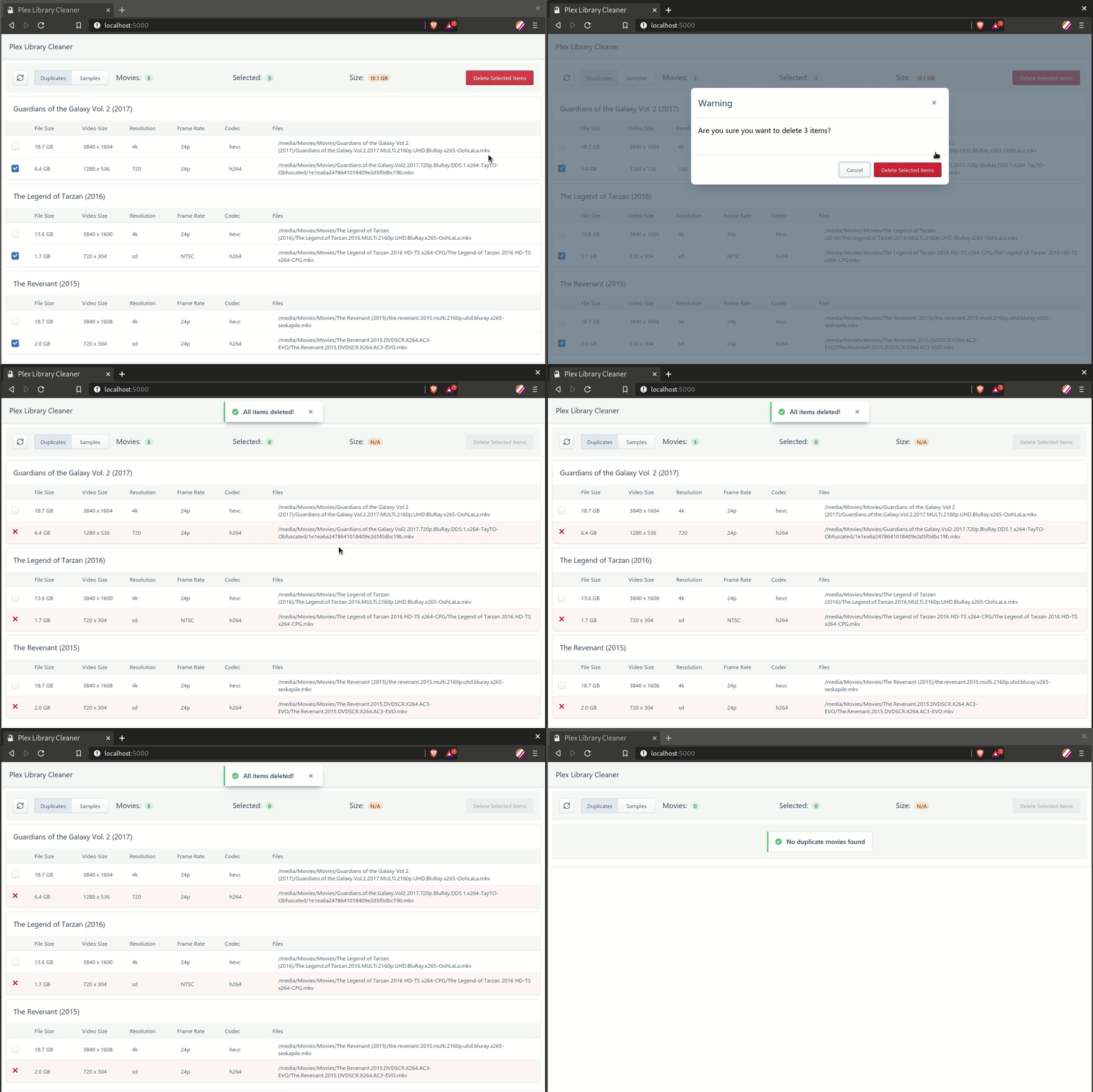
Screenshots
Credits
Thanks to the following projects:
License
MIT - see LICENSE.md
Categories
Download Statistics
Total Downloads Over Time
Related apps
Explore more like this
Explore allLinks
Details
selexin/cleanarrRuntime arguments
- Web UI
http://[IP]:[PORT:80]/- Network
bridge- Shell
sh- Privileged
- false
Template configuration
(required) Plex Server Address (e.g. http://192.169.1.100:32400)
(required) A valid Plex token for your Plex Server
(optional) Name(s) of your Plex Libraries to search. Separate multiple library names with
(optional) Disable SSL certificate verification. Use this if your Plex Server has
Container Port: 5000
- Target
- 80
- Value
- 5000
Container Path: /frontend
- Target
- /frontend
- Value
- /mnt/user/appdata/plex-library-cleaner