

Claude Code for Unraid
Plugin from tabilzad
Overview
Readme
View on GitHubClaude Code for Unraid
An Unraid OS plugin that installs Claude Code, Anthropic's
command-line coding agent, natively on the Unraid host. After installing, claude works in
any terminal on the server, your login and conversations survive reboots, supervised
sessions come back after the array starts, and every session runs under an enforced
safety policy.
Not affiliated. This is a community project. It is not affiliated with, endorsed by, or supported by Anthropic PBC or Lime Technology, Inc. "Claude" and "Claude Code" are trademarks of Anthropic PBC; "Unraid" is a trademark of Lime Technology, Inc.
This is root. Claude Code runs as root on your server, like every Unraid plugin. The plugin's policy (Manual permission mode, no bypass mode, a command guard, an audit log, a read-only flash drive) reduces accidents and casual prompt injection. It is not a security boundary: the permission prompts in your terminal are your control. Read what you approve. Details and limits: docs/SECURITY.md.
Status: beta. See CHANGELOG.md for what changed and docs/TESTING.md for what was verified on real Unraid hardware.
Why a plugin and not a container
A container cannot help when the array is down. The plugin keeps working with the array
stopped and Docker disabled, from RAM, which is exactly when you want an assistant that can
read /var/log/syslog, run smartctl and zpool status, inspect /boot/config, and talk
you through a recovery. It also sees the host as the host does: real mounts, real devices,
real processes, no Docker socket games.
Requirements
- Unraid 7.0.0 or newer, x86_64.
- A Claude subscription (Pro, Max, Team or Enterprise) or an Anthropic API key.
- About 600 MB free on the flash drive: the plugin caches the current and the previous Claude Code binary there (around 280 MB each) so that a reboot never needs the network.
- A share or pool directory for the data directory (defaults to
<appdata>/claude-code-unraid).
Install
- Community Applications: search for "Claude Code" and install the plugin.
- Manually: Plugins, Install Plugin, paste
https://github.com/tabilzad/claude-code-unraid/releases/latest/download/claude-code-unraid.plg.
The install downloads Claude Code from Anthropic's official release servers and verifies it against a sha256 that was taken from Anthropic's GPG-signed release manifest when the plugin was built (see docs/RELEASING.md). It also fetches a small, pinned tmux package for supervised sessions. If a download fails, the plugin still installs and tells you; nothing is ever downloaded during boot when the flash cache is valid.
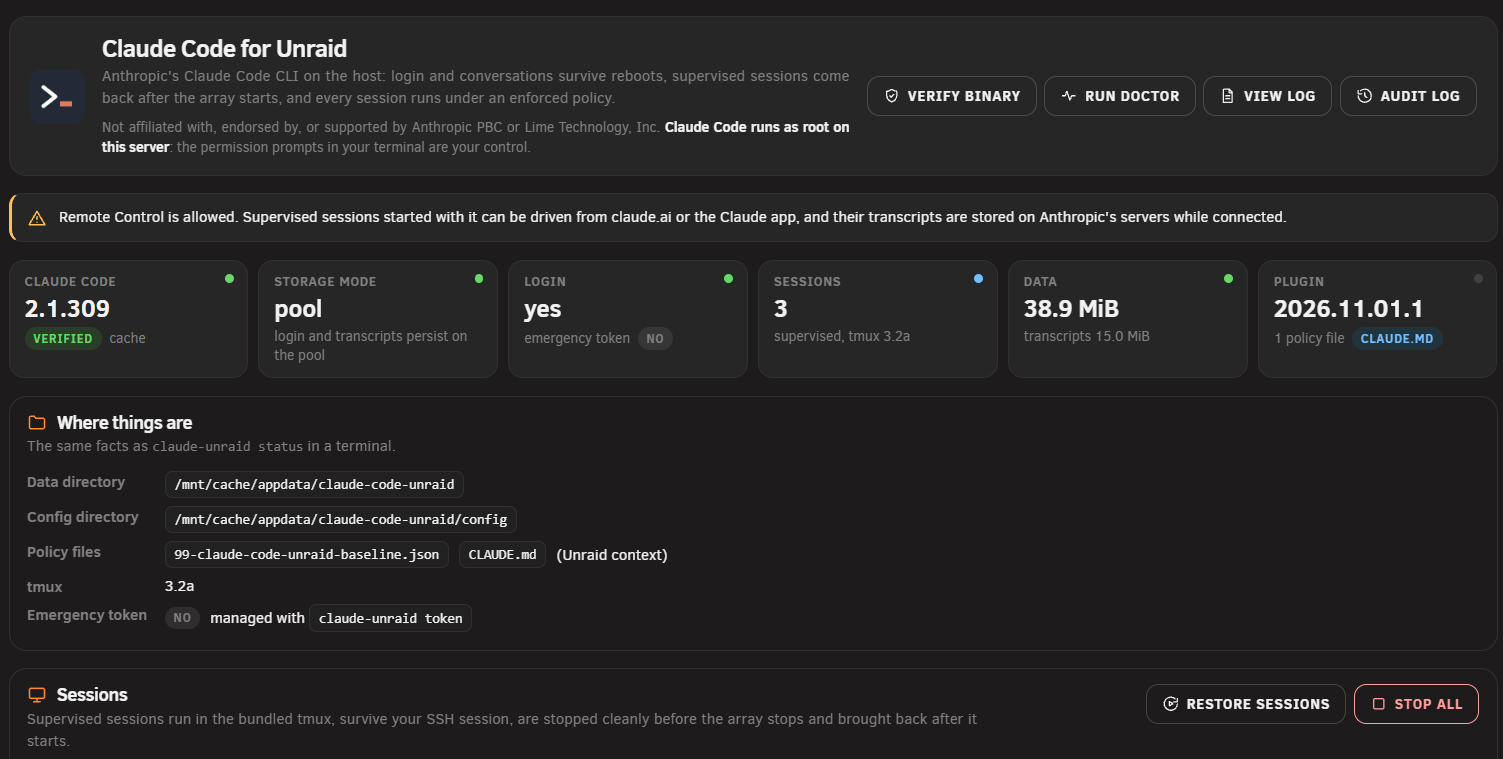
The settings page is at Settings, User Utilities, Claude Code:
First login
claude-unraid status          # what is installed, which mode, where the data lives
cd "$(claude-unraid work server)"   # creates the "server" workspace and enters it
claude                        # then /login (opens a browser URL to confirm)
Start sessions inside a workspace rather than in /root or /: that is what makes them
findable, resumable and restorable. claude --continue in the same workspace reopens the
last conversation; claude --resume lists them.
Workspaces and supervised sessions
A workspace is a directory under <data dir>/work/<name>. A supervised session is a
Claude Code session the plugin runs for you in a terminal multiplexer, so that it survives
your SSH session and the plugin can stop it cleanly when the array stops and bring it back
when the array starts:
claude-unraid start server          # start a supervised session in the "server" workspace
claude-unraid attach server         # attach to it (detach with Ctrl-b d)
claude-unraid list                  # what is running
claude-unraid stop server           # or: stop --all
claude-unraid restore               # bring back sessions that were live at shutdown
Plain claude sessions you start by hand are left alone by the plugin: they are not stopped
and not relaunched, only reported in the syslog when the array stops under them.
Settings, Claude Code lists your workspaces with their last-used time and session state
(claude-unraid workspaces does the same in a terminal). "Open terminal" next to a
workspace opens Unraid's web terminal in that directory, so claude and the first /login
work from the browser without SSH.
Security model, in short
- Every session starts in Manual mode: commands and edits prompt. Bypass mode is disabled by policy (and refused by Claude Code as root). Auto mode is disabled unless you allow it.
- A guard hook blocks a short list of catastrophic commands outright (
mkfs,wipefs,ddto a disk,rm -rfon/mntor/boot,zpool destroy, SMART state changes) and forces a prompt, with the reason, for network access, container escapes, mounts, cron, service restarts, plugin changes and edits to its own policy. - An audit line goes to the syslog for every tool call (command text redacted and truncated; never the output).
/bootis read-only inside every session (a private mount namespace, so a plain write fails in the kernel). The one way around it,/proc/<pid>/rootof a host process, is caught by the guard as text and logged, not closed.claude --boot-rwlifts the read-only mount for one session, only if you allow it in the settings.- Read-only diagnostics (
smartctl -a,zpool status,df,docker ps, ...) are pre-approved so that the useful stuff does not nag. - Every session starts with a short managed
CLAUDE.mdabout Unraid: what/mnt/user, the pools and appdata are, that a new top-level directory there becomes a share, that the flash drive is read-only, and to ask before interrupting other people. Guidance only; Settings, Claude Code, "Unraid context for every session" turns it off. - Remote Control (driving the session from claude.ai or the Claude app) is disabled unless you enable it.
What it cannot do: stop a determined attacker who already controls your prompts, catch every obfuscated command (it matches text), or protect you from what you approve. docs/SECURITY.md lists the known bypasses honestly.
Adding your own permission rules
Three ways, all additive: nothing you add can switch off the baseline's locks or the guard.
In a session. Answer a prompt with "Yes, and don't ask again". The rule is saved in the workspace's
.claude/settings.local.json, which lives on the pool with the workspace.Settings, Claude Code, Permissions. A box for the drop-in
/boot/config/plugins/claude-code-unraid/policy.d/webgui.json, which the plugin installs as a managed50-user-webgui.jsonfor every session. It is checked before it is written and applied to sessions started from then on. Example:{ "permissions": { "allow": ["Bash(docker compose *)", "Bash(docker logs *)", "Bash(git *)"], "ask": ["Bash(docker restart *)"], "deny": ["Read(./.env)"] } }Bash(docker compose *)matches everydocker composecommand (keep the space before the*),Bash(uptime)matches that exact command,Bashalone allows every shell command.More drop-ins. Any
policy.d/*.jsonfile is installed the same way; apply with Settings, Claude Code, Apply.
Keys the baseline sets (permissions.defaultMode, disableBypassPermissionsMode,
disableAutoMode, disableRemoteControl, cleanupPeriodDays, the update locks) are
reported and ignored, because the baseline loads last. Claude Code's own
permissions documentation has the full rule
syntax.
Storage, persistence, the emergency token, Remote Control
Unraid runs from RAM, so the plugin has two storage modes: pool mode once the array is
started (config, login, transcripts under the data directory) and fallback mode while it
is not (a temporary config in RAM, useful for recovery). Logging in during fallback mode is
lost on reboot unless you store an emergency token on the flash drive
(claude setup-token, then claude-unraid token set); the token is passed to Claude Code
through the environment only while the array is stopped. If you store one, do not export
the flash share over SMB. Full details: docs/storage.md.
Remote Control is off by policy. Settings, Claude Code, "Allow Remote Control" turns the
lock off; claude-unraid start <workspace> --remote-control then starts a session you can
drive from claude.ai or the Claude app. While connected, the transcript is stored on
Anthropic's servers.
Uninstall
Plugins, Remove. The plugin removes its RAM side, the launcher and helper, the managed
policy files it wrote and the cached binaries on the flash drive. It keeps your settings
(/boot/config/plugins/claude-code-unraid/claude-code-unraid.cfg), your policy drop-ins
(policy.d/), the emergency token if you stored one, and the data directory with your
login and transcripts, and prints the commands to delete them.
Troubleshooting
claude-unraid doctor                   # self-checks, then `claude doctor`
claude-unraid verify                   # re-hash the installed binary against the pin
/usr/local/emhttp/plugins/claude-code-unraid/scripts/collect-diagnostics
The last command writes a redacted report under /tmp for a bug report. The settings page
has the same self-check behind "Run doctor", and "View audit log" shows the last 200 tool
calls Claude made (command text redacted and truncated, never the output). Logs:
/var/log/claude-code-unraid/install.log (also the "View log" button on the settings page)
and the claude-code-unraid lines in /var/log/syslog. Issues:
https://github.com/tabilzad/claude-code-unraid/issues.
Licensing
The plugin is MIT licensed (LICENSE); third-party notices are in NOTICE. Claude Code is proprietary Anthropic software, downloaded from Anthropic's servers at install time and governed by Anthropic's terms; the plugin never redistributes it. tmux (ISC) is fetched as the unmodified Slackware 15.0 package from an official Slackware mirror.
Development
Only Docker is required: ./scripts/dev-env make check runs lint and the unit tests;
./scripts/dev-env --root make e2e-install and
DEV_ENV_DOCKER_ARGS=--privileged ./scripts/dev-env --root make e2e run the end-to-end
harnesses. docs/SPEC.md is the design, CLAUDE.md the rules, docs/TESTING.md the
hardware checklist, docs/RELEASING.md the release process.
Categories
Download Statistics
Downloads by Month
Related apps
Explore more like this
Explore allDetails
https://github.com/tabilzad/claude-code-unraid/releases/latest/download/claude-code-unraid.plg