
All apps · 0 apps

Classifarr
Docker app from grtgbln's Repository
Overview
Readme
View on GitHubClassifarr
Route every request to the right library with policy-driven decisions you can trust.



Classifarr is an AI- and RAG-powered media classification and routing service. It runs as the decision layer between request inputs (Overseerr/Jellyseerr webhooks, manual/API submissions, and media sync) and your automation stack, then uses metadata, policy rules, and AI/RAG signals to auto-route high-confidence matches to the correct Radarr/Sonarr destination while sending low-confidence cases to review.
Classifarr supports movies and TV shows. Library-agnostic learning means discovering what belongs in your movie and TV libraries from their contents, without depending on predefined library names or categories. Music libraries and audio items are ignored based on their source media type.
Source version: v0.49.2-beta. It becomes a public release only after its tag pipeline succeeds; until then, use the latest published release shown in GitHub Releases. Package files use 0.49.2-beta, while the UI, release notes, and Git tags use v0.49.2-beta. This beta adds reviewed media-identity recovery, clearer evaluation and health reporting, richer database diagnostics and protected local rebuilds. Read the upgrade guidance in RELEASE_NOTES.md before updating an existing installation.
20,872 Docker Hub image pulls as of 2026-10-13 (repository statistics). This counts image pulls, not unique installations, and does not include GHCR.
Why Classifarr
- Helps route requests across multiple libraries using policy-based decisions.
- Reduces manual sorting by automatically handling high-confidence items.
- Keeps low-confidence and ambiguous cases in a review flow, including Discord policy-driven clarification questions.
- Includes queue, retry, and logging tools to support day-to-day operations.
- Supports local, cloud, and hybrid AI/RAG deployments.
- Provides feedback and tuning workflows to improve routing over time.
- Built on a hardened PostgreSQL foundation: 64-bit IDs, query profiling, HNSW index pre-warming, crash-safe visibility timeouts, and automatic database maintenance — ready for long-running production deployments.
Features
Classifarr is a full operations platform for classification, routing, review, and continuous tuning.
1. Classification and Decisioning
- Policy-driven routing for movie and TV requests with confidence scoring.
- Human-in-the-loop handling for low-confidence cases (pending decisions and clarifications).
- Classification history with profile snapshots and correction workflows.
- Manual request submission plus direct classify/reclassify endpoints.
2. Policy and Preset Management
- Policy Builder workflow for creating and maintaining routing rules.
- Built-in Presets catalog plus My Presets, both available for policy-level assignment.
- Pattern discovery and pattern approval/rejection workflows.
- Policy feedback and tuning suggestions with impact views.
3. Command Center and Observability
- Command Center home for queue health, alerts, retries, and actions.
- Live queue stats, failed/pending views, and bulk recovery controls.
- Detailed logs module with filtering, export, resolve, cleanup, and clear actions.
- System health views for dependencies (database, media servers, AI, metadata providers).
4. Library and Media Orchestration
- Media server ingestion and sync support for Plex, Jellyfin, and Emby.
- Library mappings to Radarr/Sonarr instances, root folders, and quality profiles.
- Path mapping and path translation verification for host/container/NAS layouts.
- Reclassification batch engine with validate, execute, pause/resume, retry, and skip.
5. AI and Provider Routing
- Local and cloud classification providers: Ollama, OpenAI, Gemini, OpenRouter, LiteLLM, custom endpoints.
- Provider status checks, model discovery, test actions, and warmup controls.
- AI usage tracking and budget visibility for operational control.
- Provider lock and fallback-aware behavior for resilience.
6. RAG and Embeddings
- Separate RAG settings for text and image embeddings.
- Text embedding modes for local, cloud, and split-provider deployments.
- Image embedding support via local image embedding service and cloud providers.
- Backfill orchestration: manual, scheduled, idle-time, and real-time options.
- RAG health, circuit breaker status, migration tooling, and metrics/export endpoints.
7. Integrations and Automation
- Webhook listener endpoints for Overseerr/Jellyseerr style integrations.
- Webhook configuration management with generated Authorization Header secrets.
- API keys for automation with route-level permission enforcement.
- Notification center plus Discord integration, including policy-driven questions and response handling.
8. Security and Access Control
- JWT auth with session controls (list/revoke sessions, logout-all).
- CSRF protection for cookie-authenticated write routes.
- Route guards for admin vs read-write vs read-only capabilities.
- Runtime security knobs for cookies, CORS, and transport expectations.
9. Operations and Lifecycle
- Setup wizard and first-run admin account creation.
- Backup export/import, preview, download, and cleanup flows.
Configuration exports use one database snapshot; see
backup coverage and recovery limits.
Destination and label references are validated and remapped during restore;
see restore safety and tradeoffs
and verified recovery outcomes.
Restores use an exclusive database session with interrupted-attempt recovery;
see ownership and maintenance limits
and session recovery outcomes.
Configuration imports now require
CLASSIFARR_RUNTIME_MODE=restore; ordinary workers stay inactive until a verified restore and explicit normal restart. See the restore-mode procedure and design and validation outcome. Developers can runnpm run test:local:restore-recovery-drillto exercise interruption, retry and verified restart with disposable containers and synthetic data; see the drill design and results and limits. Usenpm run test:local:published-upgrade-drillfor the digest-pinned published release-to-candidate boundary, including bundled database restart and synthetic movie/TV recovery-to-learning. It requires Docker and authenticated GitHub CLI provenance verification; see the design and outcome. CI now requires both fresh-install and published-upgrade acceptance. Runnpm run test:local:runtime-installation-acceptancefor the same disposable checks and bounded local receipts; dirty-tree runs are diagnostic, not CI acceptance. See the CI design and verified scope. - Migration dashboard and migration APIs for legacy rule movement.
- Scheduler for recurring sync, queue, enrichment, and maintenance tasks.
Engineering Guardrail: Metadata Lists
Provider and persisted metadata for list-like fields such as genres, keywords, tags, and collections is not shape-stable. It may arrive as:
['Documentary'][{ name: 'Documentary' }][{ tag: 'Documentary' }]- JSON-stringified arrays
When working in server/src, do not parse or lowercase these fields ad hoc. Route them through server/src/utils/metadataNormalization.mjs:
normalizeMetadataList(...)normalizeMetadataListLower(...)coerceMetadataArray(...)
This avoids silent false negatives in classification, prompt building, learning, migration, and pattern discovery paths. The server code-health suite now fails new raw JSON.parse(...genres|keywords|tags|collections...) and direct metadata.<field>.map(...toLowerCase()) patterns so regressions are caught in CI.
Classification Flow
Automatic learning uses feedback only when its destination and the candidate resolve to active libraries. Detached records remain available as history and do not count as rejections or recover their destination from stored names or snapshots. See the eligibility design and validation outcome.
Policy suggestion analysis also requires the selected destination to match the policy's current active library. Patterns, weights and thresholds use one eligible cohort and the requested lookback; the returned feedback count reflects that cohort. Historical reports remain available. See the analysis design and outcome.
Pending suggestion storage compares complete JSON configurations structurally and serializes concurrent writes per policy. Equivalent pending submissions create no additional record; existing history is preserved. See the deduplication design and validation outcome.
Each pending tuning suggestion can be applied or rejected once. Concurrent or repeated reviews return a conflict and preserve the first completed review. Application changes, accuracy baseline and audit metadata commit together. The dashboard refreshes after a lifecycle conflict. See the lifecycle design and outcome.
Suggestion analysis automatically freezes its complete evidence cohort. Application requires the policy, active destination and original feedback to remain current. Normal analysis supersedes outdated pending suggestions and creates fresh ones; legacy suggestions can still be dismissed. No automatic routing is introduced. See the cohort design and validation outcome.
Each normalized metadata value contributes one pattern vote per feedback record. Cohort version 3 also requires evaluated candidate evidence; suggestions from versions 1 and 2 must be regenerated through normal analysis before application. See the metadata-vote design and outcome.
Prompt responses save explicit pattern choices, feedback and learning statistics
together with classification completion. Invalid actions fail without partial writes;
repeated responses cannot duplicate feedback. The patternsCreated result counts
distinct saved patterns, including updates to existing patterns. See the
prompt persistence design
and outcome.
Feedback statistics preserve all observations and report evaluated coverage separately. Missing, contradictory or currently ineligible candidate evidence does not count as a success or failure; accuracy is N/A when nothing can be evaluated. Live metrics use current library and policy state without an operator refresh. See the evaluation design and outcome.
Standalone feedback requires a classification_id, selected library and selected
policy. Candidate evidence comes from stored history. Matching retries return the
saved feedback ID; conflicting submissions cannot add another vote. Integrations
must stop sending metadata or correction flags to this endpoint. See the
source-binding design
and outcome.
Policy Statistics automatically shows retained evidence by library and method. History and selected-destination feedback have separate counts; imported membership and candidate availability do not establish classifier accuracy. Existing Library profiles explain common observed traits. See the coverage design and outcome.
History totals and library/method groups also show completed, pending-decision, retry-pending and other states automatically. The categories reconcile to retained events; completed imported membership still does not establish accuracy. See the lifecycle design and outcome.
New classifier history captures the original candidate and its source before routing. Retry/fallback paths retain their policy and signal context. Evidence coverage v2 distinguishes recorded proposals, no proposal, invalid evidence, non-classifier observations and unrecorded legacy history. A later manual selection preserves the original capture. This availability does not expand feedback evaluation. See the capture design and outcome.
An automatic attribution table now separates the original method and candidate source from the current recorded method, including later manual resolution. Legacy history remains explicitly unrecorded. This is another view of the same history events, with bounded groups and complete totals; it adds no operator task. See the attribution design and outcome.
Daily provenance coverage shows the last 14 stored history dates, including today as a partial day. It separates captured, unrecorded, invalid and unsupported provenance, fills empty dates and reconciles older/future/undated exclusions. Dates use the explicitly labelled database calendar because historical timestamps have no offsets. See the daily design and outcome.
New history also keeps an immutable recording instant across time zones. The statistics overview shows how many retained entries have a known or unknown instant; older times are never estimated or backfilled. The daily view continues to use stored calendar dates. See the recording-time design and outcome.
UTC provenance coverage now groups known recording times into 14 UTC dates, including partial today. Unknown recording times, older events and future events are explicitly excluded. Its counts and the stored-calendar view describe the same retained history and must not be added together. See the UTC design and outcome.
The same UTC window now shows capture coverage by recorded library, with explicit older, future and unknown-time counts. Groups are capped at 200 with complete global totals. Recorded library reflects the current history record, including inactive and unassigned libraries; it is not an independent classification label. No reporting controls or manual input are needed. See the library UTC design and outcome.
Original observation types now distinguish imported membership, manual actions, classifier workflows and unknown origins in that same UTC window. New membership and manual queue entries capture their origin automatically. These counts describe evidence composition, including retries and fallbacks; they are not accuracy rates or independent labels. See the design and outcome.
Original classifier proposals are also compared with each history record's current library in the same UTC window. The bounded table separates same and different IDs, no candidate, invalid candidate and unknown recorded libraries. It preserves original proposals across later resolution and catalog removal; agreement does not establish correctness. See the comparison design and outcome.
Statistics describe their scope beside each section: retained policy feedback, recent accuracy windows and the latest activity feed. Policy details label their 30-day breakdown and rolling seven-day comparison. These descriptions replace the inactive date buttons and require no reporting-period selection. See the scope design and outcome.
Policy comparisons show rate changes in percentage points and keep unavailable values as N/A, including missing auto rates. A dedicated table provides row and column headers and keyboard scrolling on small screens. See the comparison design and outcome.
Custom TLS requests now use compatible HTTP transport components and dispose their connections after use. Certificate verification remains the default; only an explicit disabled-verification setting uses the custom path. See the transport design and outcome.
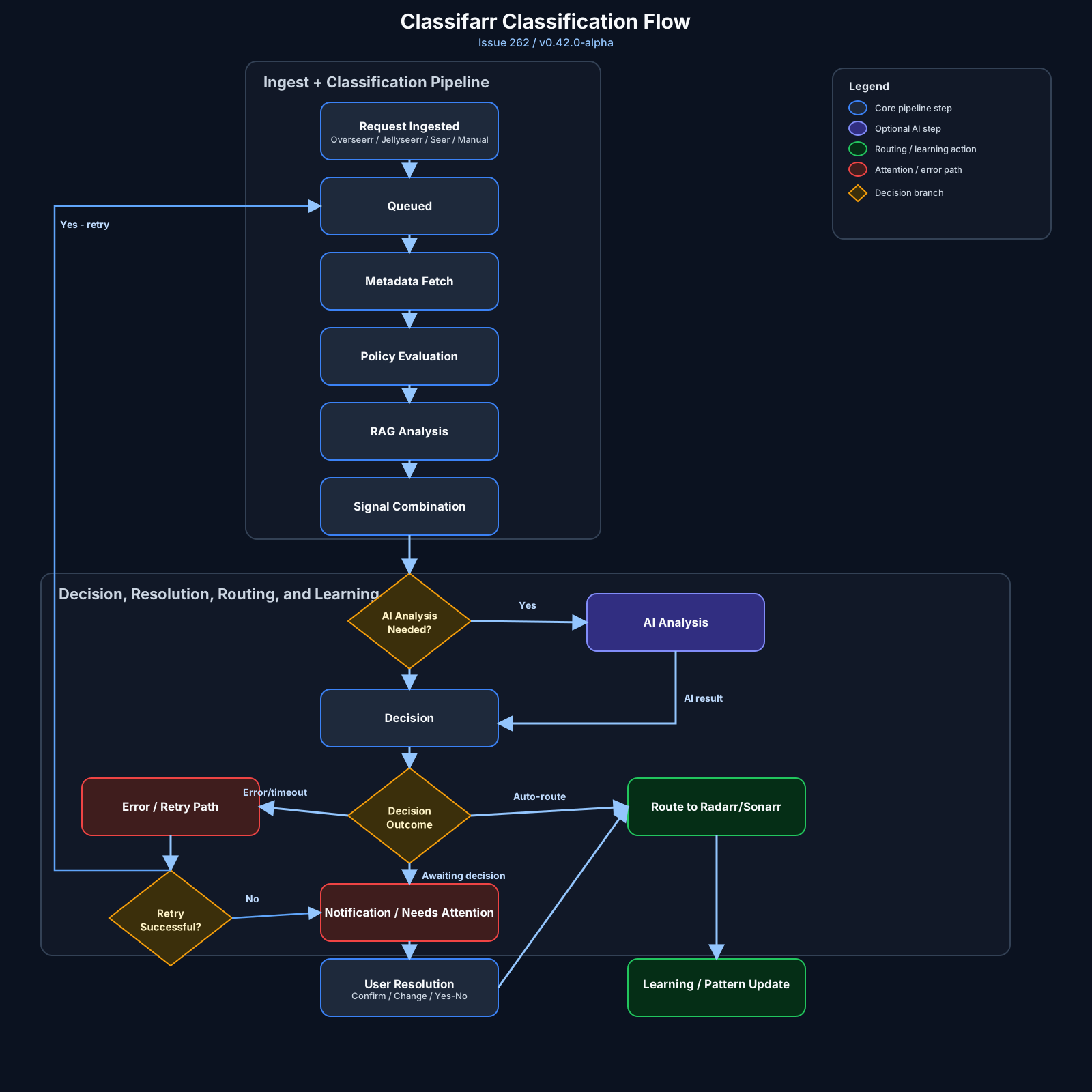
Direct diagram link: docs/assets/issue-262-classification-flow-v042.svg
Quick Start (Docker Compose)
For Synology, use the Container Manager setup and upgrade guide and its dedicated Compose file. It covers existing appdata, NAS permissions and optional media access without assuming your NAS user IDs.
For a new installation with host UID/GID 1000:1000, use this baseline Compose
file. For an existing installation, update the image using your saved setup.
Do not replace its appdata path, user IDs, media mappings or startup options with
these example values. The Unraid guide
explains the different Community Applications and Compose defaults.
services:
  classifarr:
    image: ghcr.io/cloudbyday90/classifarr:latest
    container_name: classifarr
    user: "1000:1000"
    ports:
      - "21324:21324"
    environment:
      PUID: 1000
      PGID: 1000
      TZ: America/New_York
      FORCE_SECURE_COOKIES: "false"
      CORS_ORIGIN: ""
      PGVECTOR_RUNTIME_STAGING: "auto"
    volumes:
      # Existing installations: retain the exact host directory already in use.
      - ./data:/app/data
      # Optional: uncomment for file verification/moves, using an existing folder.
      # - type: bind
      #   source: /your/existing/media
      #   target: /data/media
      #   read_only: false
      #   bind:
      #     create_host_path: false
    restart: unless-stopped
    stop_grace_period: 60s
    security_opt:
      - no-new-privileges:true
    read_only: true
    tmpfs:
      - /tmp
      - /var/run/postgresql:rw,noexec,nosuid,nodev,uid=1000,gid=1000,mode=770
    cap_drop:
      - ALL
    cap_add:
      - CHOWN
      - SETUID
      - SETGID
    extra_hosts:
      - "host.docker.internal:host-gateway"
For a new installation, create ./data as the host user with UID/GID
1000:1000 before starting (for example, mkdir -p ./data). The forced non-root
container cannot repair a root-owned bind directory created by Docker. Do not
reset ownership recursively on an existing database; retain its working setup.
Start:
docker compose up -d
For local source builds from this repo, prefer the smart wrapper so the pgvector build matches the host CPU before the read-only container starts:
npm run docker:smart:up
When a clean local checkout must produce a provenance-verified image for maintenance evidence, use the noninteractive no-cache rebuild instead. It derives the image revision from Git, preserves the current container's exact image before building, verifies that rollback reference before recreating Classifarr, and waits for health. Keep a separate consistent appdata/database backup:
npm run docker:smart:provenance-rebuild
Both rebuild commands leave the old container running during the build. For custom
Compose files, use the same files/project on a protected build and a protected
up --no-build --no-deps --pull never, selecting only classifarr. Do not run
down between them. Retained images are not database backups or permission to
downgrade an upgraded database. See the
rollback protection guide.
Open:
http://localhost:21324
Compose Notes (Important)
- A writable
/app/datamount is required for persistence../datais a new-install example, not a replacement for your existing host directory. Back up existing appdata consistently before upgrading. - Media access is optional for API-only routing. Uncomment the media bind for file verification/moves, select the existing folder and match Radarr/Sonarr paths or configure path mappings. It will not create a misspelled host directory.
- This example forces UID/GID
1000:1000; its appdata and socket permissions must match. Changing onlyPUID/PGIDcannot change Docker's forceduser. Keep working legacy identities intact; use the platform-specific guide for custom IDs. The CA XML starts the normal image entrypoint for identity provisioning and is not equivalent to this forced-non-root example. read_only: truemakes the container root filesystem immutable; writable paths are provided via volumes andtmpfs.PGVECTOR_RUNTIME_STAGING=autolets Classifarr stage avector.sosymlink to the immutable image-layer AVX/AVX2 pgvector binary when supported. The PostgreSQL runtime tmpfs staysnoexec, so startup avoids the earlier copy-and-execute failure mode on Unraid and other hardened Docker hosts.- Set
PGVECTOR_RUNTIME_STAGING=disabledonly if you want to force the image-layer generic pgvector binary. - Compose healthcheck is intentionally omitted for a lean file. The Docker image still has an internal
HEALTHCHECKinstruction.
Required and Recommended Inputs
Required:
- TMDB API key.
- Media server and Radarr/Sonarr mappings.
- A valid
/data/mediabind mount for move operations.
Recommended:
- OMDb API key for richer enrichment.
- AI provider configuration for model-assisted classification.
AI Provider Strategy (Classification)
Classifarr supports both local and cloud classification providers:
ollama(local, no per-token cloud cost).openai,gemini,openrouter,litellm,custom(cloud/API providers).anthropicmodels are supported viaopenrouter,litellm, orcustomendpoint routing.- Optional Ollama fallback can be enabled when primary provider is cloud.
Practical recommendation:
- Local-first/self-hosted default: use
ollamaas the primary classification provider. - Cloud-first: use your cloud provider as primary and enable Ollama fallback for resilience/cost control.
Cloud Provider Recommendations
Use this as a practical selection guide:
| Provider Path | Best For | Notes |
|---|---|---|
openai |
Highest consistency for strict JSON/structured classification output | Good default when you want reliability first |
gemini |
Best value/latency balance for always-on classification | Strong cost/performance profile for medium/large libraries |
openrouter |
Fast model switching across vendors | Best when you want one key and rapid experimentation |
litellm / custom |
Teams running a gateway/proxy across multiple providers | Best for centralized policy, routing, and enterprise-style controls |
anthropic (via OpenRouter/LiteLLM/Custom) |
Conservative, safety-oriented reasoning style | No direct Anthropic selector in Settings today; route Claude through proxy-compatible paths |
Model selection strategy:
- Start with each provider's fast/mini tier model for day-to-day classification.
- Move to higher-tier models only if your misclassification rate remains high.
- Prefer stable model IDs for production and test newer models in staging first.
Pricing note:
- Provider pricing and model catalogs change frequently. Use provider dashboards for live cost checks before locking budgets.
Local Verification
- Root lint:
npm run lint - Server lint:
npm --prefix server run lint:testsandnpm --prefix server run lint:security - Client lint:
npm --prefix client run lint - Root tests:
npm test - Root coverage:
npm run test:coverage
Ollama Local Recommendations (AI + RAG Text)
Source catalog:
Local cost model:
- No per-token API billing.
- Tradeoff is local hardware utilization (VRAM/RAM), latency, and throughput.
Local AI (Classification) Picks
| Profile | Recommended model(s) | Why |
|---|---|---|
| Low-resource local host | qwen3:4b, gemma3:4b |
Good speed on smaller hardware with acceptable quality |
| Best overall default | qwen3:8b, llama3.1:8b |
Strong quality/speed balance for routine classification |
| Hard edge-case reasoning | deepseek-r1:14b, qwen3:14b |
Better reasoning on ambiguous metadata, but slower |
| Premium local quality | qwen3:32b (or larger) |
Highest local quality when hardware allows |
Local RAG Text Embedding Picks
| Profile | Recommended model(s) | Why |
|---|---|---|
| Best default | nomic-embed-text |
Strong retrieval quality with efficient footprint |
| Higher-quality semantic retrieval | mxbai-embed-large |
Better retrieval precision at higher compute cost |
| Multilingual-heavy libraries | bge-m3, qwen3-embedding |
Better multilingual embedding behavior |
| Very lightweight | all-minilm, embeddinggemma |
Fastest local embedding for constrained systems |
Quick start pulls:
ollama pull qwen3:8b
ollama pull nomic-embed-text
Classifarr settings pattern:
- Set AI provider to
ollamaand choose your generation model. - In RAG Text Embeddings, set mode to
same(orseparate_ollamafor a dedicated embedding instance). - Choose an embedding model such as
nomic-embed-textormxbai-embed-large.
Ollama Recommendations by GPU VRAM
Use these as practical starting points for local deployments.
Important:
- Model file size is not the full runtime memory footprint.
- You need headroom for KV cache/context, concurrent requests, and background system load.
- For stability, target model size at roughly 60-75% of available VRAM.
- Use Q4/Q5 quantizations for best fit on consumer GPUs; higher quantizations need more VRAM.
| GPU VRAM | Example GPUs | Recommended local AI model | Fallback model (if OOM/slow) | Why this is the default pick |
|---|---|---|---|---|
| 4 GB | GTX 1650, RTX 3050 (4GB), RX 6400 | qwen3:4b (2.5GB) |
gemma3:4b (3.3GB) |
Best fit with enough headroom for stable inference on low-VRAM cards |
| 8 GB | RTX 3060 Ti, RTX 4060 Laptop, RX 7600 | qwen3:8b (5.2GB) |
llama3.1:8b (4.9GB) |
Best quality-to-speed default for routine Classifarr classification |
| 12 GB | RTX 3060 12GB, RTX 4070 Super, RX 7700 XT | gemma3:12b (8.1GB) |
qwen3:8b (5.2GB) |
Uses available VRAM efficiently while preserving practical context headroom |
| 16 GB | RTX 4060 Ti 16GB, Arc A770 16GB, RX 7800 XT | qwen3:14b (9.3GB) |
gemma3:12b (8.1GB) |
Better reasoning than 8B class with good operational headroom |
| 24 GB | RTX 3090, RTX 4090 | qwen3:30b (19GB) |
qwen3:14b (9.3GB) |
Premium local quality while leaving safer room than 20GB+ alternatives |
| 48 GB+ | RTX A6000, L40S, H100/H200 class | qwen3:32b (20GB) |
qwen3:30b (19GB) |
Strong highest-quality general default; extra VRAM can be used for concurrency/context |
| GPU VRAM | RAG text embedding recommendation | Fit guidance |
|---|---|---|
| 4 GB | nomic-embed-text (274MB) |
Safest default; leaves headroom for system and app workloads |
| 8 GB | nomic-embed-text or mxbai-embed-large (670MB) |
Both run comfortably; choose by retrieval quality preference |
| 12 GB | mxbai-embed-large, bge-m3, qwen3-embedding |
Room for better multilingual retrieval without pressure |
| 16 GB+ | bge-m3 or qwen3-embedding with higher concurrency |
Better when indexing large libraries or running parallel jobs |
Model size references above are from Ollama library pages (Q4 variants shown in Ollama details).
Current Model Picks (As of 2026-02-25)
These picks are optimized for Classifarr's workload: structured JSON classification, high request volume, and occasional hard edge-case reasoning.
| Task | Best value | Best quality | Why |
|---|---|---|---|
| Daily automated classification | gemini-2.5-flash-lite or gpt-5-mini |
gpt-5.1 or claude-sonnet-4-6 |
Most items are routine; use low-cost fast models by default, escalate only when needed |
| Ambiguous/edge-case routing | gemini-2.5-flash |
gpt-5.1 / claude-sonnet-4-6 / claude-opus-4-6 |
Better reasoning and instruction-following on conflicting metadata |
| Very high-throughput, lowest cost | gpt-5-nano or gemini-2.5-flash-lite |
N/A | Best when you prioritize throughput and low spend over absolute quality |
| Premium "one-shot" difficult items | N/A | claude-opus-4-6 |
Best for hardest multi-step cases, highest cost tier |
Price-to-Performance Reference (Text Models)
Prices are per 1M tokens (input/output), using provider-published pricing.
| Provider | Model | Price | Best for in Classifarr |
|---|---|---|---|
| OpenAI | gpt-5-mini |
$0.25 / $2.00 | Best OpenAI default for cost/quality balance |
| OpenAI | gpt-5.1 |
$1.25 / $10.00 | Higher-accuracy difficult classifications |
| OpenAI | gpt-5-nano |
$0.05 / $0.40 | Ultra-cheap high-volume simple tasks |
| Google Gemini | gemini-2.5-flash-lite |
$0.10 / $0.40 | Lowest-cost Gemini option for routine requests |
| Google Gemini | gemini-2.5-flash |
$0.30 / $2.50 | Strong default blend of quality, latency, and cost |
| Google Gemini | gemini-2.5-pro |
$1.25 / $10.00 (<=200k prompt) | Hard reasoning/coding-style edge cases |
| Anthropic | claude-haiku-4-5 |
starts at $1 / $5 | Fast, cheaper Claude path |
| Anthropic | claude-sonnet-4-6 |
starts at $3 / $15 | Best Anthropic balance (recommended Claude tier) |
| Anthropic | claude-opus-4-6 |
starts at $5 / $25 | Highest-capability Claude tier |
Text Embedding Recommendations (As of 2026-02-25)
Use these defaults for Classifarr RAG unless you have a specific retrieval failure pattern:
| Scenario | Best value | Best quality | Notes |
|---|---|---|---|
| General movie/TV semantic retrieval | text-embedding-3-small |
text-embedding-3-large |
Strong default quality/cost for most libraries |
| Multilingual libraries | gemini-embedding-001 |
voyage-4 / voyage-4-large |
Better cross-language retrieval behavior |
| Code/technical-heavy corpora | voyage-code-3 |
voyage-code-3 |
Specialized for code retrieval |
| Local-only / no cloud spend | nomic-embed-text |
mxbai-embed-large |
Run in separate_ollama mode |
Text Embedding Price-to-Performance
Prices below are provider-published rates and units:
| Provider | Model | Price | Unit | Typical Classifarr use |
|---|---|---|---|---|
| OpenAI | text-embedding-3-small |
$0.02 | per 1M input tokens | Best default cost/performance |
| OpenAI | text-embedding-3-large |
$0.13 | per 1M input tokens | Highest OpenAI retrieval quality |
| OpenAI | text-embedding-ada-002 |
$0.10 | per 1M input tokens | Legacy compatibility only |
| Gemini | gemini-embedding-001 |
$0.15 ($0.075 batch) | per 1M input tokens | High-quality multilingual with tunable output dimensionality |
| Voyage AI | voyage-4-lite |
$0.02 | per 1M tokens | Lowest-cost Voyage text embedding |
| Voyage AI | voyage-4 |
$0.06 | per 1M tokens | Balanced quality/cost for retrieval |
| Voyage AI | voyage-4-large |
$0.12 | per 1M tokens | Highest Voyage general retrieval quality |
| Cohere | embed-v4.0 |
See Cohere pricing page | provider pricing units | Modern Cohere text/multimodal embedding path |
| Ollama (local) | nomic-embed-text, mxbai-embed-large, bge-m3, all-minilm |
API cost = $0 | local compute | Best when privacy and predictable cost matter most |
Text Embedding Task Mapping
| Task | Recommended model |
|---|---|
| Default first deployment | text-embedding-3-small or local nomic-embed-text |
| Highest retrieval quality | text-embedding-3-large or voyage-4-large |
| Budget-constrained large backfills | text-embedding-3-small, voyage-4-lite, or local all-minilm |
| Multilingual catalog focus | gemini-embedding-001 or voyage-4 |
Operational notes:
- Changing embedding model or dimensionality can require re-embedding existing vectors.
- Keep one embedding family stable per library where possible to reduce retrieval drift.
- If you run cloud classification, using local Ollama embeddings is still a strong cost-control pattern.
Classifarr-Specific Recommendations
- Start with one of:
gpt-5-mini,gemini-2.5-flash, orclaude-sonnet-4-6(via OpenRouter/LiteLLM/custom). - If monthly cost is the primary constraint:
prefer
gemini-2.5-flash-liteorgpt-5-nano. - If quality on tricky metadata is the primary constraint:
move to
gpt-5.1orclaude-sonnet-4-6. - Keep embeddings cost-efficient first:
use
text-embedding-3-small(or local Ollama embeddings) before moving to higher-cost embedding tiers.
Anthropic in Current UI
- Classifarr currently does not expose a direct
anthropicprovider selector in Settings -> AI. - Use Claude models through:
openrouter,litellm, orcustomOpenAI-compatible gateway paths. - Example model IDs for those routes:
claude-haiku-4-5,claude-sonnet-4-6,claude-opus-4-6.
RAG Provider Strategy (Embeddings)
RAG and embeddings are configured separately from classification in Settings -> RAG & Embeddings.
Text embeddings modes:
same: use the same provider path as classification.separate_ollama: use a dedicated Ollama embedding endpoint/model.cloud: use cloud embedding providers (openai,gemini,voyage,openrouter,cohere).
Image embeddings modes:
disabled(default and valid).separate_local: use a dedicated local image embedding service.cloud: use cloud image embedding providers (vertex,voyage,cohere).
Local Image Embedding Service (Recommended)
For local/self-hosted image embeddings, use:
Classifarr-compatible API contract:
GET /healthGET /readyGET /modelsPOST /embed-image
Current health behavior:
GET /healthconfirms the service is reachable.GET /readyis used when available to distinguish warmup from full readiness.- A reachable sidecar that is still loading its default model is surfaced as
degradedrather than fullyconnected.
Minimal compose example:
services:
  image-embedder:
    image: ghcr.io/cloudbyday90/classifarr-image-embedder:latest
    container_name: image-embedder
    ports:
      - "8000:8000"
    restart: unless-stopped
Then in Classifarr:
- Settings -> RAG & Embeddings -> Image Embeddings
- Mode:
separate_local - Host:
image-embedder(same compose network) orhost.docker.internal(cross-container host access) - Port:
8000
Securing the sidecar with an API key
The sidecar supports optional API key authentication. When REQUIRE_API_KEY=true (the default in the sidecar's reference configuration), all /embed-image and /models requests must carry a valid X-Api-Key header. Classifarr handles this automatically once you paste the key into Settings.
One-time setup:
On the machine running the sidecar, generate a key:
python scripts/generate_env.pyThis writes a random
SERVICE_API_KEYto the sidecar's.envfile and prints it to stdout. The key is never committed to source control.Copy the printed
SERVICE_API_KEYvalue.In Classifarr: Settings → RAG & Embeddings → Image Embeddings → Sidecar API Key — paste the key and save.
Classifarr encrypts the key at rest. If you rotate the sidecar key, re-run generate_env.py, restart the sidecar, and update the field in Classifarr Settings.
If the key is wrong or missing and REQUIRE_API_KEY=true, the sidecar returns 401. Classifarr logs [EMBED_AUTH_FAIL] and will not retry the request automatically. Correct the key in Settings and the circuit resets immediately — no restart required.
To use the sidecar without authentication, set REQUIRE_API_KEY=false in the sidecar's .env and leave the Sidecar API Key field in Classifarr empty.
Cloud Image Embeddings: Availability
Yes, cloud image embedding providers do exist, and Classifarr currently supports:
- Vertex AI image embeddings (model path defaults to
multimodalembedding@001) - Voyage multimodal embeddings (default
voyage-multimodal-3.5) - Cohere image embeddings via
embedAPI (embed-english-v3.0orembed-multilingual-v3.0)
Practical guidance:
- Start with
separate_localfor predictable cost/privacy. - Move to cloud only if you need managed scale or provider-specific quality characteristics.
Practical recommendation:
- Best default: text embeddings enabled, image embeddings disabled initially.
- If classification is cloud and you want lower cost, set text embeddings to
separate_ollama. - Enable image embeddings only after text embeddings are stable and backfill is healthy.
Important:
- Changing embedding mode/model can require re-embedding to keep vectors consistent.
Local HTTP vs HTTPS
For local/LAN HTTP deployments:
- Keep
FORCE_SECURE_COOKIES=false. - Keep
CSRF_PROTECTION=true(recommended; it works on local HTTP). - Keep
CORS_ORIGINempty unless you need a stricter browser allowlist. - Keep
ENFORCE_HTTPS_HEADERS=false(default). In this mode Classifarr keeps standard security headers but does not emit COOP/OAC browser isolation headers that generate warnings on plain HTTP LAN IPs. FORCE_SECURE_COOKIESis optional. If enabled but requests arrive over HTTP, Classifarr falls back to non-secure cookies to avoid lockouts.
For public or HTTPS deployments:
- Set
FORCE_SECURE_COOKIES=true. - Keep
CSRF_PROTECTION=true. - Keep
SECURITY_HEADERS_STRICT=true. - Set explicit
CORS_ORIGINallowlist values. - Optional: set
ENFORCE_HTTPS_HEADERS=trueif you want Classifarr itself to emit HSTS, CSP HTTPS-upgrade headers, and COOP/OAC browser isolation headers.
Runtime Settings (Auto-generated)
In Docker deployments, Classifarr auto-creates this file if it does not exist:
/app/data/config/runtime.json
Runtime precedence:
- DB/UI setting
- Runtime JSON
- Environment variable
- Built-in default
Reference:
Current runtime keys:
force_secure_cookiescsrf_protectioncors_originomdb_request_timeout_msomdb_retry_timeout_multiplieromdb_max_request_timeout_msomdb_max_retriesomdb_ssl_warn_throttle_ms
Default values in generated runtime.json:
{
  "force_secure_cookies": false,
  "csrf_protection": true,
  "cors_origin": "",
  "omdb_request_timeout_ms": 30000,
  "omdb_retry_timeout_multiplier": 2,
  "omdb_max_request_timeout_ms": 60000,
  "omdb_max_retries": 3,
  "omdb_ssl_warn_throttle_ms": 900000
}
Security note:
- Empty
cors_originmeans "allow all origins." This is local-friendly but not recommended for internet-exposed deployments.
CORS_ORIGIN Guidance
Examples:
- Single origin:
CORS_ORIGIN=https://classifarr.example.com - Multiple origins:
CORS_ORIGIN=https://classifarr.example.com,https://ops.example.com - Local relaxed mode:
CORS_ORIGIN=(empty)
Production behavior:
- CORS restriction is opt-in. Leave
CORS_ORIGINempty to allow all origins, or set it explicitly to enforce an allowlist.
First-Time Setup Order
- Create the admin account.
- Configure media server and Radarr/Sonarr mappings.
- Configure TMDB and OMDb keys.
- Configure AI provider and any budget controls.
- Optionally configure Discord integration.
- Validate queue and routing from Command Center.
Daily Operations
- Open Command Center.
- Clear
Alerts. - Resolve
Needs Attentionitems. - Retry actionable
Errors. - Verify enrichment progress and retry queue state.
- Use
/historyfor audit and reclassification checks.
Synchronized inventory and observed library profiles provide evidence for library understanding and future automation. See the inventory-driven direction. Stored profiles and live AI statistics now share item-based percentages and explicit metadata coverage. Profile pages show known and missing counts; an absent trait does not establish a library restriction. Existing profiles receive an automatic refresh after upgrading. See the profile observation design and measured outcome. The existing background worker also refreshes active libraries when inventory membership or observed metadata changes, including libraries without policies. Unchanged syncs need no regeneration, and empty libraries lose obsolete profiles. Inactive libraries retain pending changes until reactivated. See the automatic refresh design and refresh validation. Configured TMDb enrichment now automatically fills provider keywords and original language for identified inventory items. Source tags remain separate, and missing language stays unknown. Successful observations are reused for 30 days; failed requests retry after six hours. Identity changes invalidate prior traits. See the metadata provenance design and 32-item local assessment. Resolved IDs now survive source omissions when recorded provenance and source continuity agree. Changed identities discard stale enrichment and recover through the existing queue. See the retention design and validation outcome. Rating, metadata and history writes also verify the captured source before accepting a provider result, including changes during network waits. See the write-guard design and local validation. The Libraries page automatically compares shared movie and TV identities and common traits across active libraries. Both overlap directions show their denominators; duplicate placements count once, and missing or conflicting traits remain unknown. Bounded reads disclose excluded libraries and withhold comparisons when the inventory limit is exceeded. See the overlap design and measured outcome. An automatic observation-health summary also shows known keywords and original language, fresh captures, missing identities and retry backoff. Valid empty captures and unavailable metadata remain explicit. Queue activity does not imply capture success. See the health design and local validation. Health, overlap and automatic sampling reads now reduce repeated processing of large metadata while retaining the same observations and limits. See the performance design and measured outcome. Metadata provider reads and writes now use consistent selection and preserve configuration identity across saves and restores. Equivalent legacy duplicates consolidate automatically; distinct configurations remain visible in diagnostics. See the provider design and validation outcome. OMDb lookups now reserve local quota before dispatch, including retries and failed attempts. Concurrent workers share one budget with a UTC day boundary; connection tests and usage by other applications are separate. See the quota design and validation outcome. OMDb responses now distinguish confirmed misses from credential, quota and provider failures. Health checks honor failed connection tests, and optional metadata no longer causes formatting errors. See the response design and validation outcome. OMDb requests now enforce a 1 MiB decoded-response budget while reading the body; image downloads enforce their existing 10 MiB limit during transfer. Other buffered HTTP callers can opt into a suitable budget. See the HTTP limits design and validation outcome. Buffered HTTP requests and binary downloads honor caller cancellation while keeping their request deadlines. Cloud and direct-host Ollama embedding retry waits also stop on cancellation. See the cancellation design and validation outcome. Text and image embedding requests now share a 4 MiB decoded-response budget, including Ollama warmup and fallback paths. See the embedding budget design and measured outcome. Embedding vector validation and fixed-schema storage are documented in the design and outcome. The media-sync identity warning investigation has separate design and outcome documents. Unresolved source observations now retain descriptive library membership during normal sync, with bounded examples, capture state and visible incomplete coverage in Libraries. They do not assign provider identities or classification authority. See the design and outcome. Fresh retained source conflicts now withhold only automatic inventory authority for that exact source item, while preserving the historical row and the explicit review path. See the design and outcome. Inventory TMDb failures now distinguish missing items, throttling, access and transport errors using safe diagnostic fields; existing observations and retry cooldowns are preserved. See the failure design and investigation outcome. Malformed observations repair automatically after cooldown using the full attributable observation validator. Bounded background passes advance past fresh records, while valid empty captures remain cached. See the repair design and validation outcome. Acquisition outcomes and library coverage history are also recorded automatically. Libraries shows captured and unavailable attempts alongside bounded coverage samples, with explicit populations and a seven-day window. See the history design and measured outcome. Automatic coverage visits one active library every five minutes, progressing through the catalog without manual schedules. Each visit measures up to 20,000 rows; larger libraries resume on subsequent turns while smaller libraries remain measurable. Inventory and observation-clock revisions guard every page. Changed inputs restart the scan automatically, and partial counts remain distinct from complete coverage. Freshness uses the scan's stated start time. Trends compare complete scans, with deltas withheld after population changes or sampling gaps. Current library names label bounded counts; private fingerprints never reach the browser. Local pagination and expandable tables show retained visits, with earlier hourly coverage separately identified. Revisit time grows with the active library count. Immediate health and overlap summaries retain their existing scope. See the incremental design and validation outcome. Automatic diagnostics summarize retained completions, restarts, discarded visits and active libraries without incremental visits. Unresolved libraries appear first, with explicit observation windows and measurement ages. No extra collection or provider requests are needed; missing retained completion does not establish failure. See the diagnostics design and measured outcome. Manual identity review handles unresolved exceptions.
TMDb observation failures now retain a bounded recovery case independently of log retention. The existing queue uses failure-specific backoff and short leases to resume interrupted attempts safely. A valid response backfills metadata and resolves the case atomically; source changes invalidate old attempts. Unavailable IDs remain unresolved, not guessed from titles. See the recovery design and tradeoffs and validation outcome.
For leased 404 attempts, bounded checks of the current source's known external IDs now distinguish absent records, disagreement, provider failures and corroborated review candidates. Candidate IDs are diagnostic evidence, not automatic changes to identity or routing. See the revalidation design and outcome.
Open Libraries → Metadata recovery with an active administrator session to see recorded open movie/TV provider cases, the affected title, diagnosis and next retry eligibility. Expand an item for source-repair steps and an on-demand Plex link. If Plex is offline, check the link again later; the list does not depend on Plex availability. The page never changes an ID or starts a retry. Counts exclude unchecked items and are not an accuracy or overall-health score. See the view design and validation outcome.
After a saved TMDb key or activation change, gap analysis automatically verifies the current credential before releasing older authentication-blocked cases in small batches. No manual bulk retry is needed. Provider throttling, source conflicts and unrelated 404 cooldowns remain protected; queue admission determines when backfill actually runs. See the credential wakeup design and outcome.
The recovery view also shows measured stage counts, recovery percentage and queue timings for recent credential-released cases. Empty or missing measurements are not presented as success. Scheduled inventory learning waits while libraries are being ingested or due foreground work is being backfilled; recovery itself keeps running. See the progress and startup design and validation outcome.
For unresolved inventory identities, open Libraries → Review media IDs with an administrator session. Enter a TMDb ID, compare the typed provider preview with the source, and explicitly confirm the match. The preview expires after ten minutes; changed source items require a fresh review. Confirmation records an audit receipt and fills the missing ID without starting classification. If the save response is lost, the page checks for the original administrator's receipt without resending confirmation. It retains a minimal recovery reference in the current tab for reloads. An unknown outcome offers Check receipt again; it does not establish that the save failed. Use the same administrator account. See the design and tradeoffs and validation outcome, plus the receipt recovery design and recovery outcome.
API, Auth, and Integrations
Swagger UI:
http://localhost:21324/api/docs
Authentication model:
- Web UI: cookie-based session auth.
- Cookie-authenticated write requests: CSRF header required.
- Automation/API clients:
X-API-Key(no CSRF required for API-key auth).
Common endpoints:
GET /api/librariesPOST /api/media-server/syncGET /api/classification/pendingPOST /api/classification/pending/:id/resolveGET /api/classification/historyGET /api/queue/live-stats
API docs:
docs/api/README.mddocs/api/authentication.mddocs/api/classification.mddocs/api/libraries.mddocs/api/media-sync.mddocs/api/policies.mddocs/api/system.mddocs/api/webhooks.md
Webhook Integration Notes
For Overseerr/Jellyseerr webhook setup:
- Use the webhook endpoint shown in Settings -> Webhooks.
- Use the generated Authorization Header value from the same page.
- Authorization Header is masked by default.
Unmaskreveal uses an inactivity auto-remask timer (default 60 seconds).Regeneraterotates the header and invalidates the previous one.
OMDb Behavior and Tuning
OMDb calls use runtime-configurable timeout and retry behavior.
Current default behavior:
- Base request timeout:
30000ms - Retry timeout multiplier:
2 - Max timeout cap:
60000ms - Max retries:
3
Operational notes:
- Transient OMDb timeouts are logged as warnings and retried.
- Retry queue stale processing rows are auto-recovered.
- Retry queue rows already enriched are auto-resolved to prevent inflated pending counts.
Database Tuning
| Variable | Default | Effect |
|---|---|---|
POSTGRES_SLOW_QUERY_THRESHOLD_MS |
500 |
Queries exceeding this threshold (ms) emit a [SLOW QUERY] warning with elapsed time and query text. Lower on fast NVMe storage; raise on spinning disk or NAS. Set to -1 to disable. |
POSTGRES_CONN_TIMEOUT_MS |
5000 |
Pool connection acquisition timeout (ms). |
POSTGRES_STATEMENT_TIMEOUT_MS |
30000 |
Per-query statement timeout (ms). Kills runaway queries server-side. |
Upgrade Notes for Existing Deployments
- Existing compose files continue to work.
- You do not need to add every new environment variable to get the new behavior.
- New runtime keys are auto-added to
/app/data/config/runtime.jsonwhen missing. - You should still update compose over time for security hardening and documentation parity.
The unreleased embedded lifecycle supervisor is packaged in the image: once an image containing it is deployed, it needs no new Compose fields, Unraid template entries, environment variables or mounts. It drains the application before asking PostgreSQL to shut down cleanly. It does not change credentials or adopt unknown historical ingestion owners.
Container stop timeouts belong to the host. The Compose examples recommend 60s
of headroom, but this is optional and is not silently applied to existing installs.
Unchanged ten-second settings are tested; busy or unresponsive workloads can still
be force-killed by the host. See the design and compatibility limits
and validation outcome.
Development
For recovery, retry and backfill work, use the repository skill $classifarr-recovery-change. It guides design and verification; it does not run live repairs or authorize deployment.
Install dependencies:
npm install
npm --prefix server install
npm --prefix client install
Note: the server and client are already ESM-native ("type": "module"), so the remaining work is cleanup and compatibility hardening rather than a package-format flip. The server install still runs temporary postinstall compatibility patches in server/scripts/patch-jest-changed-files.mjs. One patch lets jest-changed-files work with the newer ESM execa@9 line, and the other lets archiver@7.0.1 work with zip-stream@7 by unwrapping the ESM default export in its CommonJS ZIP plugin. Remove the related overrides in server/package.json and the install-time patches once upstream Jest and Archiver publish compatible releases.
Note: the client install still runs a temporary postinstall patch in client/scripts/patch-eslint-config-loader.mjs. It replaces ESLint's internal find-up based flat-config lookup with a local filesystem ascent helper and swaps ESLint's escape-string-regexp usage to native RegExp.escape, so the client can use the newer ESM find-up@8 and escape-string-regexp@5 lines without relying on CommonJS interop in ESLint internals. Remove the related overrides in client/package.json and the install-time patch once upstream ESLint natively migrates those paths.
ESM/native-support backlog for the next tranche:
- Continue normalizing ESM Jest suites so mocks only expose symbols actually imported at runtime (remove synthetic
defaultwrappers where production imports named exports). - Extract repeated ESM mock-construction patterns in server tests into shared helper factories (for example, small typed/named service-module builders) to reduce drift and dead wrapper reintroduction.
- Audit remaining install-time compatibility patches (
server/scripts/patch-jest-changed-files.mjs,client/scripts/patch-eslint-config-loader.mjs) against upstream releases and remove overrides as soon as native upstream paths are available. - Enforce strict native-import hygiene in CI by expanding the static-import check and adding a targeted guard for test-side synthetic default-wrapper mocks that are not required by runtime imports.
Current status: cookie-security wrapper cleanup and the latest ESM mock-shape cleanup tranche are done, CI includes a multiline-aware guard for synthetic named-service default-wrapper test mocks (npm run esm:check-test-mock-shapes, baseline currently 0), strict-mode scanning for any named+default synthetic wrappers is available (npm run esm:check-test-mock-shapes:strict) with optional category summaries (npm run esm:report-test-mock-shapes:strict:summary), strict backlog is currently 0 candidates after burning down logger/auth/service/config/builtin/external categories, shared createNamedServiceStub(...) helper extraction is now in use across route/integration suites to reduce mock drift, CI emits JSON artifact reports via npm run esm:report-test-mock-shapes:artifact and npm run esm:report-test-mock-shapes:strict:artifact and uploads both in GitHub Actions, and the current server/client dependency check returned no outdated packages from the locked graph.
Run locally:
npm --prefix server run dev
npm --prefix client run dev
The backend uses Node's native watch mode. Imported modules restart it; changes to non-imported files (such as JSON read from disk) require a manual restart. Production startup is unchanged.
npm run lint:docs uses the standard rules in .markdownlint.json and the file
selection in .markdownlint-repo.json. Additional quoted, repository-relative
patterns are additive. Only literals, *, ? and whole-segment ** are
supported; brace expansion and linked files/directories are not followed.
See the tooling replacement design
and validation results.
Build frontend:
npm --prefix client run build
Testing and Quality Gates
Full tests:
npm test
Coverage:
npm run test:coverage
Frontend runner acceptance (also required by npm --prefix client run test:ci):
npm --prefix client run test:config
This checks the exact runner/coverage pair, complete project inventory, real CLI failure exits, hook deadlines, coverage and module-cache invalidation. It uses disposable local fixtures, not application data. See the test-runtime design and observed outcome.
For intermittent lint-setup or CSRF scan timeouts, opt-in wall/CPU phase diagnostics run inside the real tests. They record bounded aggregates without source contents or file paths and do not relax deadlines. See the phase diagnostic design and invocation and observed outcome.
Dependabot keeps Node declaration updates on the deployed runtime major while
leaving compatible updates and security-only proposals eligible. Runtime upgrades
must review both workspaces and .nvmrc together. See the
dependency policy design
and validation outcome.
Server integration tests:
npm --prefix server run test:integration
Developer scan-recovery comparison (requires Docker and server development dependencies):
npm run benchmark:library-scan-recovery
This creates a disposable PostgreSQL container and emits aggregate scheduling, consistency and cost evidence without connecting to the application database. See the benchmark design and measured recommendations.
The follow-up change-journal prototype uses the same disposable runtime:
npm run benchmark:library-page-repair
It measures bounded repairs under continuous changes, with conservative restart and freshness checks. It does not enable production recovery or require an operator collection step. See its design and outcome.
For the follow-up concurrency and cache-lifecycle assessment:
npm run benchmark:library-repair-lifecycle
This uses disposable database sessions to test lock ordering, reconnects and ordinary vacuum behavior. The lifecycle design and outcome also record the read-only Compose occupancy assessment and production adoption criteria.
The next isolated prototype preserves small-library completion with row-count pages and orders source writes using per-library transaction locks:
npm run benchmark:library-scoped-repair
Its design and outcome record sparse-inventory efficiency, concurrent moves and failure behavior. The command uses a disposable database; production adoption requires the documented writer-compatibility checks.
The writer-compatibility follow-up discovers source candidates automatically and tests the existing sync upsert with ordered identity/library transactions:
npm run inventory:writer-compatibility
npm run benchmark:inventory-sync-compatibility
The inventory reads repository code only. The benchmark uses a disposable database. See the design and outcome for discoveries, deployed-schema differences, transaction evidence and remaining adoption gates.
The bounded cleanup follow-up tests resumable full-sync pruning and parent removal:
npm run benchmark:inventory-cleanup
This no-argument assessment creates a disposable PostgreSQL container, checks exact completion under bounded mutations and removes its fixture schema. Its design and outcome describe admission checks, recovery, measured limits and the production dependencies still to validate.
The dependent-record follow-up discovers the declared deletion graph and tests a shared mutation budget while preserving classification history:
npm run inventory:deletion-plan
npm run benchmark:inventory-dependent-cleanup
The first command reads the repository schema only; its output is an evidence report with explicit gaps. The second uses a disposable database. The separate design and outcome document item reservations, audit preservation, catalog findings and remaining adoption work.
The same benchmark now preserves request and feedback references with immutable library snapshots and a shared batch budget. Its separate retention design and measured outcome cover names/statuses, concurrent admission, reconnect recovery, index evidence and the feedback-consumer compatibility needed before production adoption.
Security and docs checks:
npm --prefix server run lint:security
npm run lint:docs
npm run lint:docs:rag-api
CI-aligned run:
npm run test:ci
Troubleshooting
Unconfirmed Radarr/Sonarr routing:
- Check the item by TMDb/TVDB ID and its path in the mapped provider before retrying.
- A timeout or conflict alone is not success; Classifarr verifies the saved identity and destination without automatically repeating an add or moving existing files.
- Use a direct API URL, not a redirect. See the reconciliation guide and results.
- Manual queue classification saves the selection before contacting the provider.
successmeans selection saved; checkrouting.routedandrouting.recordedfor confirmation. Interrupted work stays unconfirmed in History. See the manual routing contract. - For an unconfirmed manual selection, open its History details and choose Check routing (administrator). It checks the saved provider/destination without adding or moving media. Older records without saved intent require review in Radarr/Sonarr. See routing checks.
- To check again unattended, expand Background routing checks for that item and enable it as an administrator. It makes up to three read-only checks, stopping on a verified item, mismatch, or changed configuration. Missing items wait 5 then 15 minutes (plus a little jitter). Provider failures preserve the item allowance and pause checks across that provider configuration: temporary failures back off, while rejected access or invalid configuration require review. Correct credentials or use Check routing after fixing access and waiting for the provider cooldown. No failed add is automatically replayed. Restarting or toggling does not reset the limit. Manual checks share the same provider slot and cooldown; disabling stops future checks, not an in-flight read. No old records are automatically enrolled, and no Compose changes are needed. See the background-check design and provider guard.
OMDb timeout warnings:
- External OMDb latency can cause intermittent timeout warnings.
- Confirm OMDb key validity and outbound connectivity.
- Tune runtime values in
runtime.jsonbefore hardcoding deployment-wide env overrides.
CSRF validation failed on write actions:
- Refresh the browser session and retry.
- Ensure mutating requests are sent through the shared
@/apiclient. - Confirm cookie settings align with HTTP vs HTTPS deployment mode.
Webhook auth failures:
- Regenerate Authorization Header in Settings -> Webhooks.
- Re-save webhook settings after encryption-key changes.
Documentation Index
Core:
docs/architecture/policy-engine.mddocs/implementation_plan_webhook_authorization_header_unmask.mddocs/implementation_plan_smart_rule_form_deprecation.md
Security:
SECURITY.mddocs/SECURITY_REVIEW.mddocs/SECURITY_BENCHMARKS.mddocs/security-fixes/ROUTE-auth-audit.md
Operations:
docs/testing/coverage.mddocs/maintenance.mddocs/MIGRATION_SYSTEM.mddocs/migrations.mddocs/POSTGRESQL.mddocs/nodejs-24-migration.md
Setup:
PLEX_SETUP.mdDISCORD_SETUP.mdAUTHENTICATION.mdunraid/README.md
Contributing
Contributors list: CONTRIBUTORS.md
For contribution proposals, include:
- Problem statement
- Reproduction details
- Implementation scope
License
GPL-3.0-or-later. See LICENSE for the canonical GPL text and COPYRIGHT.md
for the project copyright notice.
Requirements
TMDb API key and configured Radarr/Sonarr library mappings for routing. AI providers, including Ollama, are optional. Media path mounts are needed for file verification and moves. No external PostgreSQL server is required. Existing installations: keep your saved appdata path, PUID/PGID and media mappings. See the setup guide: https://github.com/cloudbyday90/Classifarr/blob/main/unraid/README.md
Categories
Download Statistics
Total Downloads Over Time
Related apps
Explore more like this
Explore allDetails
ghcr.io/cloudbyday90/classifarr:latestRuntime arguments
- Web UI
http://[IP]:[PORT:21324]/- Network
bridge- Privileged
- false
- Extra Params
--add-host=host.docker.internal:host-gateway
Template configuration
Container Port: 21324
- Target
- 21324
- Default
- 21324
- Value
- 21324
Optional media root for file verification and moves. Use this OR separate Movies/TV paths. Leave blank if unused.
- Target
- /data/media
Optional separate movie folder instead of a unified media root. Leave blank if unused.
- Target
- /data/movies
Optional separate TV folder instead of a unified media root. Leave blank if unused.
- Target
- /data/tv
Path to persistent config data
- Target
- /app/data
- Default
- /mnt/user/appdata/classifarr/data
- Value
- /mnt/user/appdata/classifarr/data
The environment the app is running in
- Target
- NODE_ENV
- Default
- production
- Value
- production
Options for Node environment
- Target
- NODE_OPTIONS
- Default
- --max-old-space-size=1536
- Value
- --max-old-space-size=1536
How long completed tasks are retained before auto-cleanup
- Target
- TASK_QUEUE_RETENTION_DAYS
- Default
- 7
- Value
- 7
Runtime pgvector staging is opportunistic: use AVX/AVX2 when the PostgreSQL runtime mount permits it, otherwise fall back to generic.
- Target
- PGVECTOR_RUNTIME_STAGING
- Default
- auto
- Value
- auto
Restart-selected operating mode. Restore mode disables workers and ordinary API operations; restart in normal mode only after verified recovery.
- Target
- CLASSIFARR_RUNTIME_MODE
- Default
- normal|restore
Schema maintenance. Keep startup for the embedded Docker deployment. External is a staged non-embedded runtime boundary, NOT a complete credential cutover.
- Target
- CLASSIFARR_SCHEMA_MAINTENANCE
- Default
- startup|external
- Default
- 1000
- Value
- 1000
- Default
- 1000
- Value
- 1000
- Default
- 002
- Value
- 002