
All apps · 0 apps

cicdodo
Docker app from data-jordan's Repository
Overview
Readme
View on GitHubCICDodo
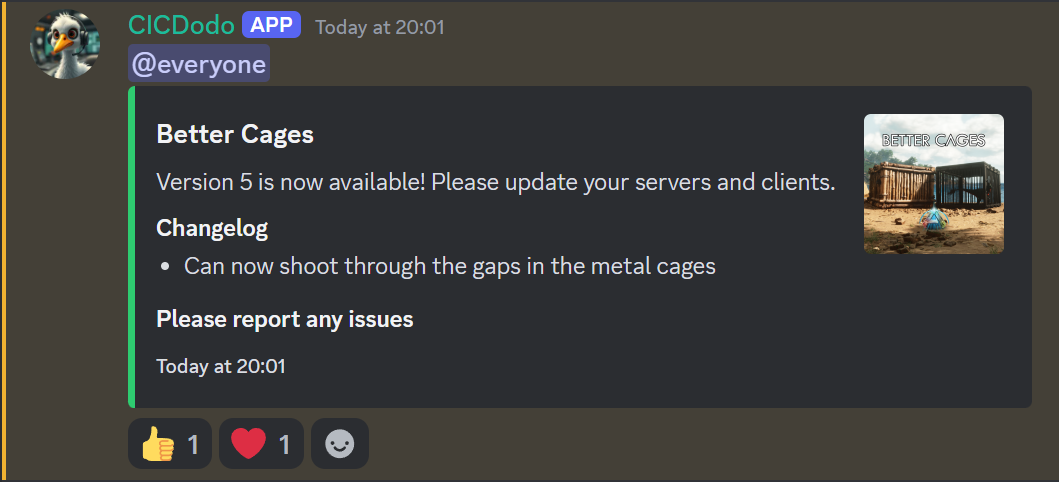
A Discord bot that monitors CurseForge mods and announces new releases to specified Discord channels.
Creating a Discord Bot
To run CICDodo you'll need a bot that can send messages, follow these instructions to create one: https://discordpy.readthedocs.io/en/stable/discord.html
Configuration
Before running the bot, you need to create a .env file with your configuration. Use the provided .env.example as a template:
# Copy the example environment file
cp .env.example .env
Then edit the .env file with your settings:
MOD_IDS: Comma-separated list of CurseForge mod IDs to monitorDEBUG_CHANNEL_ID: Discord channel ID for debug messagesRELEASES_CHANNEL_IDS: Discord channel IDs for release announcements, separated by commas, the index of the mod ID will be used to determine which channel to post toBOT_TOKEN: Your Discord bot tokenCURSEFORGE_API_KEY: Your CurseForge API key- Additional optional settings are available in the
.env.examplefile
Running the Bot
Option 1: Docker Compose (Recommended)
# docker-compose.yml
services:
  bot:
    image: ghcr.io/jordan-dalby/cicdodo:latest
    volumes:
      - ./releases:/app/releases/
    env_file:
      - .env
    restart: unless-stopped
# Pull and run the container
docker-compose up -d

# View logs
docker-compose logs -f
Option 2: Docker CLI
# Run the container
docker run -d \
  --name cicdodo \
  --restart unless-stopped \
  -v ./releases:/app/releases \
  --env-file .env \
  ghcr.io/jordan-dalby/cicdodo:latest
Option 3: Unraid
- Access the Unraid Community Applications
- Search for "CICDodo"
- Click "Install"
- Configure the following variables:
- Discord Bot Token
- CurseForge API Key
- Debug Channel ID
- Releases Channel ID
- Mod IDs (comma-separated)
- Click "Apply"
Data Persistence
The bot stores release information in the ./releases directory, which is mounted as a volume in both Docker configurations. This ensures that release tracking persists across container restarts.
Updating
Docker Compose
docker-compose pull
docker-compose up -d
Docker CLI
docker pull ghcr.io/jordan-dalby/cicdodo:latest
docker stop cicdodo
docker rm cicdodo
docker run -d \
  --name cicdodo \
  --restart unless-stopped \
  -v ./releases:/app/releases \
  --env-file .env \
  ghcr.io/jordan-dalby/cicdodo:latest
Unraid
Updates can be installed through the Unraid web interface when they become available.
Categories
Related apps
Explore more like this
Explore allDetails
ghcr.io/jordan-dalby/cicdodo:latestRuntime arguments
- Network
bridge- Shell
bash- Privileged
- false
Template configuration
Directory for release files
- Target
- /app/releases
- Default
- /mnt/user/appdata/cicdodo/releases
- Value
- /mnt/user/appdata/cicdodo/releases
Comma-separated list of CurseForge mod IDs to monitor
- Target
- MOD_IDS
- Default
- 123456,789012
Discord channel ID for debug messages
- Target
- DEBUG_CHANNEL_ID
Discord channel IDs for release announcements
- Target
- RELEASES_CHANNEL_IDS
Discord bot token
- Target
- BOT_TOKEN
- Default
- your_discord_bot_token_here
CurseForge API key
- Target
- CURSEFORGE_API_KEY
Tag to use in announcement messages
- Target
- MESSAGE_TAG
- Default
- @everyone
- Value
- @everyone
Header template for announcement messages
- Target
- MESSAGE_HEADER
- Default
- Version {version} is now available!
- Value
- Version {version} is now available!
Footer template for announcement messages
- Target
- MESSAGE_FOOTER
- Default
- Update now!
- Value
- Update now!
Whether to show the mod logo in announcements
- Target
- SHOW_LOGO
- Default
- true
- Value
- true
Whether to send announcement messages
- Target
- ANNOUNCE_MESSAGES
- Default
- true
- Value
- true
Logging level (DEBUG, INFO, WARNING, ERROR)
- Target
- LOG_LEVEL
- Default
- INFO
- Value
- INFO
Enable debug mode
- Target
- DEBUG
- Default
- false
- Value
- false