
All apps · 0 apps

CI Runner Farm
Plugin from Lime Technology
Overview
Readme
View on GitHubCI Runner Farm for Unraid
Turn an Unraid server into a resource-capped fleet of self-hosted runners for GitHub Actions or GitLab CI/CD. The farm keeps package and image caches warm, supports Docker-in-Docker, and can scale several single-job runner slots without requiring a VM.
GitHub remains the default provider, so an existing installation upgrades without changing its runner behavior. A farm runs one provider at a time; switching provider drains and recreates the managed slots with the selected provider's credentials and runtime.
What you get
| Capability | What it means |
|---|---|
| Concurrent runner slots | Each slot accepts one job at a time and can have CPU and memory limits, keeping CI from starving the rest of the host. |
| GitHub and GitLab providers | Keep the existing GitHub Actions integration or select GitLab.com/self-managed GitLab. |
| Warm shared caches | Reuse npm, yarn, pnpm, Playwright, Cargo, sccache, or custom cache directories across jobs. |
| User-share mounts | Expose selected Unraid user-share directories to trusted GitHub Actions or GitLab CI jobs with read-only or read-write access. |
| Slot-scoped Docker-in-Docker | Give each runner slot a private privileged Docker daemon without exposing Unraid's existing Docker socket by default; privileged DinD is still capable of host compromise. |
| Bring your own job image | Pull a remote image or edit and build a provider-specific starter image in the plugin. |
| Named runner pools | Route jobs to purpose-built pools with independent fixed capacity, labels/tags, CPU, memory, and images. |
| Fleet controls and telemetry | Validate, start, stop, scale, recycle, and inspect runner/job state from the Unraid webGUI. |
| Job-weight recommendations | Show explainable live and historical weights (light, standard, or heavy), a suggested pool, and capacity/routing warnings. Advisory only; it never changes labels, capacity, or workflow routing. |
| Optional autoscaling | Keep a warm idle buffer between configured minimum and maximum runner counts. |
Architecture
GitHub mode preserves the original container model: each ci-runner-N
container is a GitHub Actions runner based on the configured runner image. The
host keeps the GitHub PAT and gives containers only short-lived registration
tokens.
GitLab mode uses the official
gitlab/gitlab-runner image;
it does not modify or fork GitLab Runner itself. Each slot contains:
ci-runner-N, a persistent GitLab Runner manager withconcurrent = 1, a per-runnerlimit = 1, and a persistedconfig.tomlplus.runner_system_id;ci-runner-N-dind, by default, a private privileged Docker daemon shared with that manager through a Unix socket; and- one temporary Docker-executor job container for each accepted pipeline job,
created from the configured default job image or the job's
.gitlab-ci.ymlimage:override.
DinD slots use an explicit private cgroup v2 namespace. The shipped GitHub
runner image prepares that namespace before its base entrypoint starts dockerd,
so nested Podman can create private cgroups without losing the pids
controller. The provider keeps the configured process limits; it does not use
host cgroups or disable cgroup enforcement.
The reusable GitLab glrt- token identifies the runner configuration. Each
manager retains its own system ID, so recycling a slot does not create a new
shared runner configuration in GitLab.
Named pools and per-pool images
Set Runner layout to Named pools when one host should offer different
runner capabilities, for example a normal build pool and a QA-VM client pool.
Each pool record declares a stable pool ID, routing label, additional labels,
fixed capacity, resource limits, and either the built-in image or a registry
image. Containers are named ci-runner-<pool>-<index> and carry the pool as a
provider-neutral ownership label.
GitHub pools require organization scope. Their routing and additional labels
are passed to the GitHub runner directly. GitLab pools require a separate
runner configuration and modern glrt- authentication token per pool; create
that runner in GitLab with tags matching the pool's labels, then save the token
with the pool ID in Settings. This keeps GitLab's server-owned tag routing
authoritative instead of pretending local config.toml can change it.
KVM is opt in per GitHub runner pool. Add kvm to a pool's labels only when its
jobs need hardware virtualization. The farm then requires group-writable
/dev/kvm on the host and passes the device and numeric group to that pool's
containers. A missing device prevents those runners from starting; ordinary
build pools do not receive it. VM workflows require kvm in runs-on.
A change in device availability or group triggers recycling for the KVM pool.
The built-in runner image adds that group to the non-root runner user before
registration. Custom images must honor KVM_GID the same way when they use
RUN_AS_ROOT=false; Docker's --group-add alone does not survive the base
entrypoint's gosu runner switch.
The V3 record format is:
v3|id|routing-label|additional-labels|fixed|min|max|idle|cpus|memory|image
Records are separated by semicolons. cpus and memory may be inherit;
image may be builtin or a full registry reference. The current classic-pool
implementation uses fixed capacity and deliberately rejects global autoscale
and global image auto-update in pool mode. min, max, and idle are retained
in the versioned contract so adding per-pool autoscaling later does not require
reformatting every pool. Saving pool changes does not interrupt jobs; use Fleet
Restart when ready to apply exact membership, images, and limits.
Job-weight recommendations
The Fleet tab includes a read-only recommendation panel. It classifies active
jobs on a 1–5 scale using the job name, elapsed time, CPU, and memory signals;
maps the result to light, standard, or heavy; and suggests a named pool
when its labels include size-small, size-standard, or size-large (the
short aliases small, standard, large, and heavy are also accepted).
Queue pressure produces separate routing or capacity advice. The engine is
deliberately advisory: it does not resize the farm, relabel runners, or change
workflow routing. Completed jobs are aggregated for 90 days into a bounded
history under the plugin configuration directory. The history stores only a
normalized provider/job-family key, counts, duration totals, min/max, and a
coarse histogram; it does not persist URLs, refs, repositories, or branch names.
After three samples, the approximate historical P95 duration can raise a job's
weight and is shown beside the live recommendation.
Install
Community Applications
Search for CI Runner Farm in Community Applications and click Install.
Install by URL
In Plugins → Install Plugin, paste:
https://github.com/unraid/ci-runner-farm/releases/latest/download/ci-runner-farm.plg
For the moving mainline preview, use the separate CA entry CI Runner Farm - Nightly or paste:
https://github.com/unraid/ci-runner-farm/releases/download/nightly/ci-runner-farm-nightly.plg
Nightly is built on the farm from main, may contain breaking changes, and
replaces the stable plugin channel on the host. Keep the stable release URL
available for rollback; the two channels are not intended to run side by side.
Everything is managed from Settings → Utilities → CI Runner Farm. The page has Fleet, Runner image, and Settings tabs.
GitHub setup
- Leave Active provider set to GitHub Actions.
- Select repository or organization scope, then configure the owner, target repositories, optional runner group, labels, and resource limits.
- Create and save a classic GitHub Personal Access Token.
- Configure Docker, caches, job image, and optional autoscaling; then Validate and Start on the Fleet tab.
| Use case | Classic PAT scopes |
|---|---|
| Repository runners | repo |
| Organization runners | repo, admin:org |
| Either runner type with a private GHCR image | Add read:packages |
| Separate registry token for a private GHCR image | read:packages |
The GitHub PAT is stored at
/boot/config/plugins/ci-runner-farm/token with mode 0600; it is not written
to the main config or passed into job containers. Existing GitHub settings,
container names, and the legacy editable Dockerfile remain compatible.
GitLab setup
1. Create the runner in GitLab
Create a project, group, or instance runner using GitLab's
new runner creation workflow.
Set its tags, protected status, project/group scope, and whether it may run
untagged jobs in GitLab. Copy the runner authentication token shown after
creation; the token must begin exactly with glrt-.
The same token is intentionally reused by the farm's manager slots. Avoid
automatic authentication-token rotation for this shared multi-manager setup:
one manager can rotate first and leave the other persisted managers with the
old token. Rotate manually by stopping the farm, replacing the saved token, and
starting it again. Slot retirement uses the token plus that slot's persisted
system ID to delete only its runner-manager record; it never deletes the shared
runner entity. The plugin rejects glrtr- tokens created through the deprecated
registration-token workflow because their unregister semantics can delete that
shared runner. It also rejects instance-prefixed variants: current official
GitLab Runner releases recognize the safe manager-only unregister path only when
the token itself starts with glrt-.
2. Configure the provider
On the Settings tab:
- Set Active provider to GitLab CI/CD.
- Set GitLab URL to
https://gitlab.comor the HTTPS base URL of a self-managed instance. - Keep the official manager image or pin a version appropriate for the
self-managed instance, for example
gitlab/gitlab-runner:v18.5.0. Explicit host-socket mode requires Runner 18.5.0 or newer; Start and Validate reject an older or unparseable version because safe host cleanup depends on the exact build/helper/service labels fixed in that release. Every mode requires Runner 16.0.0 or newer because that release added manager-only unregister with a persisted system ID. Older images are rejected rather than risk deleting the shared runner entity. Use GitLab 16.0 or newer for a self-managed server so its runner-authentication-token and manager-system-ID APIs match this lifecycle contract. - Save the required
glrt-runner token. - Set the graceful manager shutdown timeout. The default is 7200 seconds.
- Optionally enter monitored project paths and save a separate access token
with
read_api. A project access token covers only its project; for several monitored projects use a group token scoped to their common group or a dedicated PAT that can read every listed project. - Configure resource limits, caches, the default job image, Docker mode, and optional image/service execution policy; save, Validate, and Start.
The runner token is stored separately as
/boot/config/plugins/ci-runner-farm/gitlab-runner-token. The optional API
token is stored as gitlab-api-token. Core job execution needs only the runner
token; the API token is used exclusively for advisory queue and recent-job
telemetry. GitLab Runner also requires the reusable runner token in each
mode-0600 per-slot gitlab-runners/ci-runner-N/config.toml. Token validation
uses a mode-0600 gitlab-token-probe/config.toml: GitLab verification creates
a temporary manager row, so the plugin immediately unregisters it and retains
that file only when exact cleanup must be retried. After a manager is
successfully unregistered and all of its local containers are removed, ordinary
Stop, scale-down, recycle, and provider switching scrub that slot's TOML, Docker
auth, CA snapshot, and unregister marker while preserving .runner_system_id.
Any failed retirement preserves the complete material needed for a safe retry.
Clearing the runner token applies the same rule across the active fleet. Stop,
Restart, manager replacement, and active-token removal send SIGQUIT, stop
accepting new jobs, and wait up to
GITLAB_SHUTDOWN_TIMEOUT for an in-flight job to finish before Docker forces the
manager to stop. The Unraid stopping_docker hook quiesces all GitLab managers
in parallel before Docker stops their DinD sidecars, preserving the same graceful
behavior for array stops and Docker-service restarts. The plugin registers no
diagnostics collector for the
bootstrap/API/registry token files, per-slot/probe config.toml files, or Docker auth
files. Current Unraid system diagnostics list the plugin configuration directory
but do not copy those file contents. Do not add those paths to a support bundle
or attach them manually; they contain live credentials even though their modes
are restricted.
If GitLab is permanently unreachable or the saved manager token has been revoked, normal Stop/Recycle intentionally fails closed and preserves the local manager identity for retry. The Fleet row's warning action provides a separately confirmed force local forget escape hatch: it interrupts that slot, deletes its local manager/sidecar/token-bearing config and slot Docker/cache roots without contacting GitLab, and leaves any offline remote manager record for you to remove in GitLab manually.
Self-managed GitLab and custom CAs
Use the complete HTTPS base URL, including a non-default port if required. If
the instance's certificate chain is not already trusted, upload its PEM CA
chain in the GitLab credential band. It is stored as
/boot/config/plugins/ci-runner-farm/gitlab-ca.crt. Each manager snapshots the
CA used to create it alongside that slot's config.toml, so a CA rotation does
not prevent the old manager identity from unregistering. The manager uses its
snapshot for the GitLab API, and the Docker executor mounts it at the official
/etc/gitlab-runner/certs/ca.crt helper path so clone, artifact, and cache
helpers trust it. Runner also exposes the GitLab chain to jobs through
CI_SERVER_TLS_CA_FILE, but an arbitrary job image does not automatically add
it to that image's system trust store. Job scripts that call the self-managed
service directly must use that file (for example, curl --cacert "$CI_SERVER_TLS_CA_FILE" ...) or install it using the image's own CA tooling.
In DinD mode the uploaded CA is also installed for the exact authority in
Registry server, allowing that per-slot daemon to pull from a registry using
the same private CA. GitLab registry endpoints must use HTTPS (the scheme may be
omitted); plain HTTP is rejected so credentials are never sent to an insecure
registry. GitLab keeps the configured registry credentials available
to each manager even when its default job image is built locally, so an
image: or services: override can authenticate to that one registry. The
strict-network exception for the configured authority follows the same rule.
This does not discover other registry hostnames from job configuration. If the
GitLab registry uses a different hostname or CA, configure that authority and
chain explicitly. Host-socket mode cannot modify Unraid's Docker trust store;
install the registry CA on the host and restart its Docker service before using
that mode. The built-in shared Docker Hub mirror is local HTTP and is explicitly
scoped as an insecure registry inside each DinD daemon; the uploaded CA is
unrelated to it.
Strict network isolation normally blocks the host and LAN. GitLab mode adds a narrow exception for the configured GitLab endpoint so a self-managed instance remains reachable; do not use a broad LAN allow rule. Configure private job image registries explicitly rather than weakening the runner network.
Each private DinD daemon also allocates per-build job and service networks from
Docker's default address pools. If a self-managed GitLab or registry lives in a
private CIDR that overlaps those pools (commonly 172.16.0.0/12), an inner
Docker route can shadow the real endpoint even though the farm firewall allows
it. Keep CI/registry endpoints on non-overlapping subnets, or configure suitable
Docker default address pools before relying on that topology.
Queue telemetry limitation
GitLab does not expose one public API endpoint containing every pending job
eligible for a particular runner. With a read_api token, the plugin can count
pending/recent jobs only for Monitored projects that the token can read.
That number is advisory: it can omit other eligible projects and jobs excluded
by tags or protection rules. Runner execution and busy/idle scaling do not rely
on it.
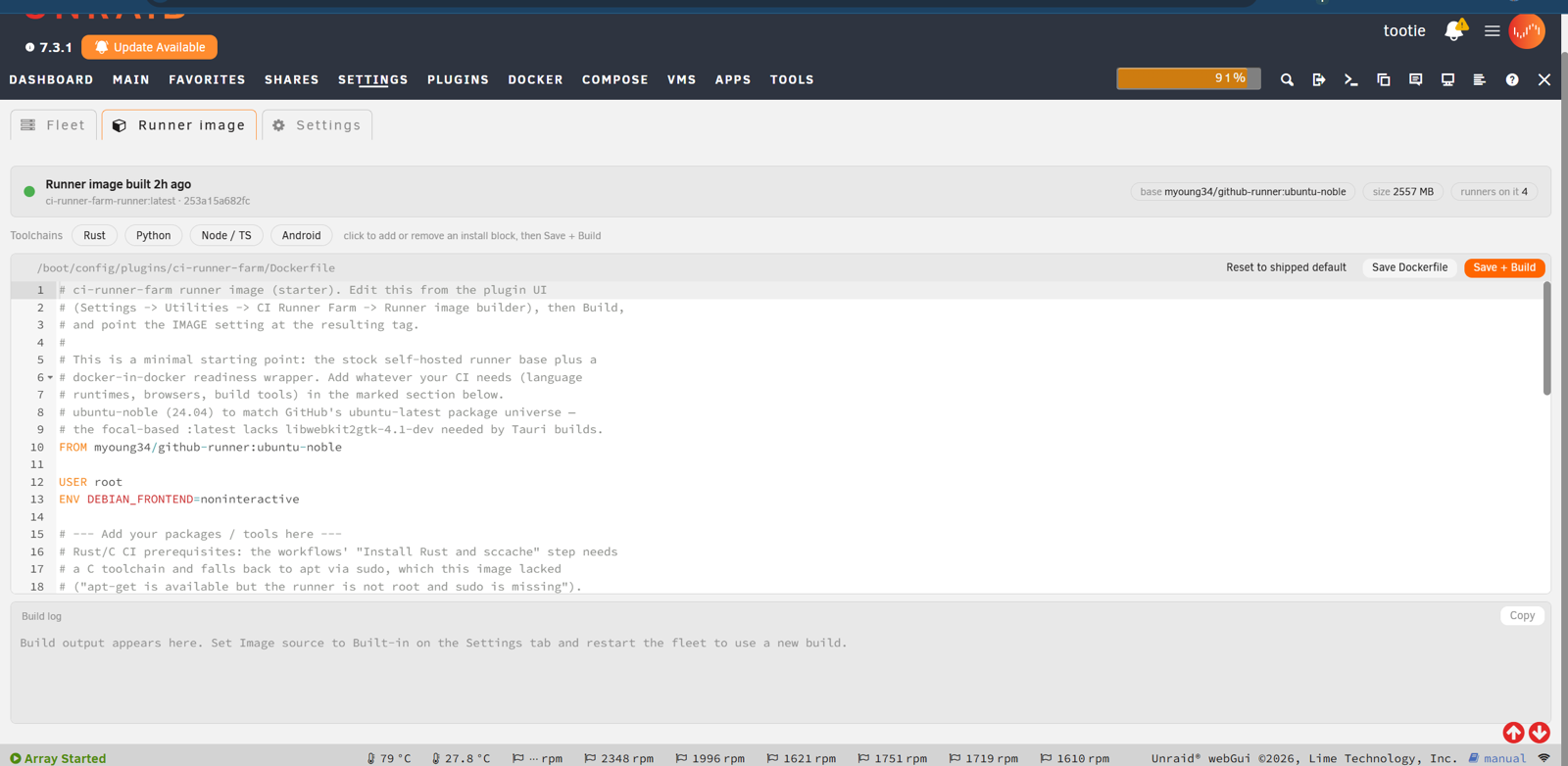
Job images
The Runner image tab maintains provider-specific editable files on flash:
Dockerfile.githubfor the GitHub runner container;Dockerfile.gitlabfor GitLab Docker-executor job containers; and- legacy
Dockerfile, used as the GitHub fallback so existing customized installs keep working.
The packaged starter files are default.github.Dockerfile and
default.gitlab.Dockerfile; the original default.Dockerfile remains
byte-identical to the GitHub default for compatibility. The GitLab starter is a
general Ubuntu job image with common build tools and a Docker client. It is
deliberately not the GitLab Runner manager image. A GitLab job may override the
default with:
build:
  image: node:24
  script:
    - npm ci
    - npm test
GitHub-only image controls such as EPHEMERAL, RUN_AS_ROOT, and the workspace
tmpfs do not change GitLab Docker-executor semantics. GitLab jobs are always
ephemeral at the job-container layer: the manager and configured caches
persist, but every accepted job receives a fresh Docker container.
GitLab execution policy
Pipeline write access implies job-image selection and code execution on this
host. The GitLab settings therefore expose the Docker executor's
allowed_images, allowed_services, pull_policy, and shm_size controls:
GITLAB_ALLOWED_IMAGESandGITLAB_ALLOWED_SERVICESare space-separated wildcard patterns. Empty values deliberately preserve the upgrade-compatible GitLab Runner default of allowing every image; configure explicit trusted registries or image families to narrow that exposure.GITLAB_PULL_POLICY=autopreserves existing behavior (if-not-presentfor the locally built image,alwaysfor a remote default). An explicitalwaysorif-not-presentvalue is also written asallowed_pull_policies, so jobs cannot select a different pull policy. Explicitalwaysrequires a remote default image; it is rejected for the locally built tag because Runner would try to pull a tag with no registry. Runner'sneverpolicy is rejected because a fresh per-slot daemon cannot obtain the helper and service images required to execute its first job.GITLAB_SHM_SIZEis an integer byte count for Docker-executor containers. The default0preserves Docker's default; browser/test workloads commonly need a larger value such as1073741824(1 GiB).
These controls follow GitLab Runner's
Docker executor configuration.
They govern images and services admitted by GitLab Runner; they are useful
guardrails against accidental or declarative .gitlab-ci.yml overrides, not a
security boundary. Every job, helper, and service container receives the
selected Docker socket, so its code can invoke the Docker API directly to
pull/run an otherwise disallowed image;
against privileged DinD it can also request privileged nested containers. Route
only trusted code to this farm even when allowlists are configured.
Maximum job duration is server-owned runner metadata rather than a local
config.toml key; set it on the runner in GitLab or with the
Runners API.
Cache scope and concurrency
GitLab's native /cache bind is deliberately per slot
(gitlab-cache/ci-runner-N), so managers do not race on the same Runner cache
files; the tradeoff is that a cache warmed on one slot is not automatically
available on another. The configurable CACHE_MOUNTS directories are different:
they are shared across every slot for package-manager reuse. Use them only for
cache formats whose tools support concurrent writers, or assign disjoint
directories yourself. The plugin does not currently emit GitLab's distributed
S3 cache configuration, so an external MinIO/S3 backend is not yet a supported
configuration key.
For GitHub runners, the pnpm-store:<container-path> cache entry also sets
PNPM_CONFIG_STORE_DIR (pnpm 11) and npm_config_store_dir (pnpm 10) to that
exact bind destination. This prevents pnpm from selecting /_work/.pnpm-store
when the workspace is on tmpfs. Custom destinations work the same way; duplicate,
relative, noncanonical, read-only, or workspace-root destinations are rejected.
Without a pnpm-store entry, pnpm keeps its normal configuration. The existing
configuration-drift lifecycle drains and replaces runners that need the new
store environment after an upgrade.
Packages copy from the pool-backed store into a workspace on another filesystem
because hard links cannot cross filesystems. This keeps the package store out of
workspace RAM; project node_modules and Actions archive downloads still consume
workspace space. Shared stores are for mutually trusted jobs. A raw Actions cache
archive restore is not pnpm's coordinated install protocol; do not restore such
an archive into a store being used by another job.
User-share mounts
Set USER_SHARE_MOUNTS to a space-separated list of
host-path:container-path:ro|rw entries. For example:
/mnt/user/ci-runner/shared:/mnt/shared:rw
Each source must be an existing canonical directory below
/mnt/user/<share>/; the destination must be a safe path below /mnt inside
the job container. ro makes the mount read-only; rw permits writes. The
setting works with GitHub Actions runner containers and GitLab Docker-executor
jobs. It is separate from CACHE_MOUNTS, which creates cache directories under
CACHE_ROOT. Overlapping sources or destinations are rejected.
Every job routed to a runner with these mounts can access the configured files.
Restrict runner routing to trusted repositories and use a dedicated subdirectory
for each purpose. Keep CACHE_ROOT, Docker data, and workspace storage on a
pool; Docker-in-Docker overlay storage does not work on the FUSE user-share
filesystem. Another trusted service can mount the same host path read-only to
consume files without copying them through the CI artifact service.
Docker and security
Self-hosted runners execute repository-controlled code on your hardware. Use privileged or socket-mounted runners only for trusted private projects.
- DinD is slot-scoped, not host-secure. Each GitLab slot gets a private
privileged daemon, and
concurrent = 1limits its normal cross-job blast radius to that slot. The daemon creates the job, helper, and service containers, and its socket is mounted into job, helper, and service containers; any of them can therefore inspect or remove those siblings, pull/run images that bypass Runner's image/service allowlists, and request privileged containers inside the nested daemon. More importantly, the DinD sidecar itself is privileged and must be treated as capable of host compromise. It avoids handing jobs Unraid's existing Docker control socket, but it is not a security boundary against the NAS. GitLab validation rejects configurations with neither DinD nor host-socket sharing because the Docker executor would have no endpoint. - Host socket sharing is root-equivalent host access. Enable it only as an
explicit alternative for trusted jobs. A job that controls
/var/run/docker.sockcan control Unraid's containers and host filesystem. GitLab host-socket mode requiresNETWORK_ISOLATION=off: per-build networks are created by Unraid's daemon and cannot be confined by attaching only the manager to the farm's dedicated bridge. - Public/fork pipelines are dangerous. Do not route untrusted merge-request or pull-request code to privileged DinD or host-socket runners. Enforce protected runners, tags, runner groups, and private project scope at the CI provider.
- Credentials are separated. Runner-management credentials live in
mode-
0600host files, notci-runner-farm.cfg. Registry credentials use the separateregistry-tokenfile. Clearing it unlinks every per-slot auth file and the plugin-owned tmpfs Docker client config immediately; the plugin never logs registry credentials into root's global Docker config. Managers mount the containing per-slot directory and observe removal. An image pull that already authenticated may still finish. - Network isolation matters.
isolateseparates runner containers from other Unraid containers.strictalso blocks the Unraid host and LAN, apart from narrowly configured service endpoints.
GitHub runner containers resolve runner-farm.host to the management address
of the Unraid host that launched them. Use this stable alias for a service that
is deliberately colocated with a runner pool. host.docker.internal remains
the Docker bridge gateway for local Docker services. In strict mode, only TCP
port 22 on the exact runner-farm.host address is allowed for the colocated QA
VM MCP transport; other host and LAN access remains blocked.
See GitHub's self-hosted runner security guidance and GitLab's self-managed runner security guidance.
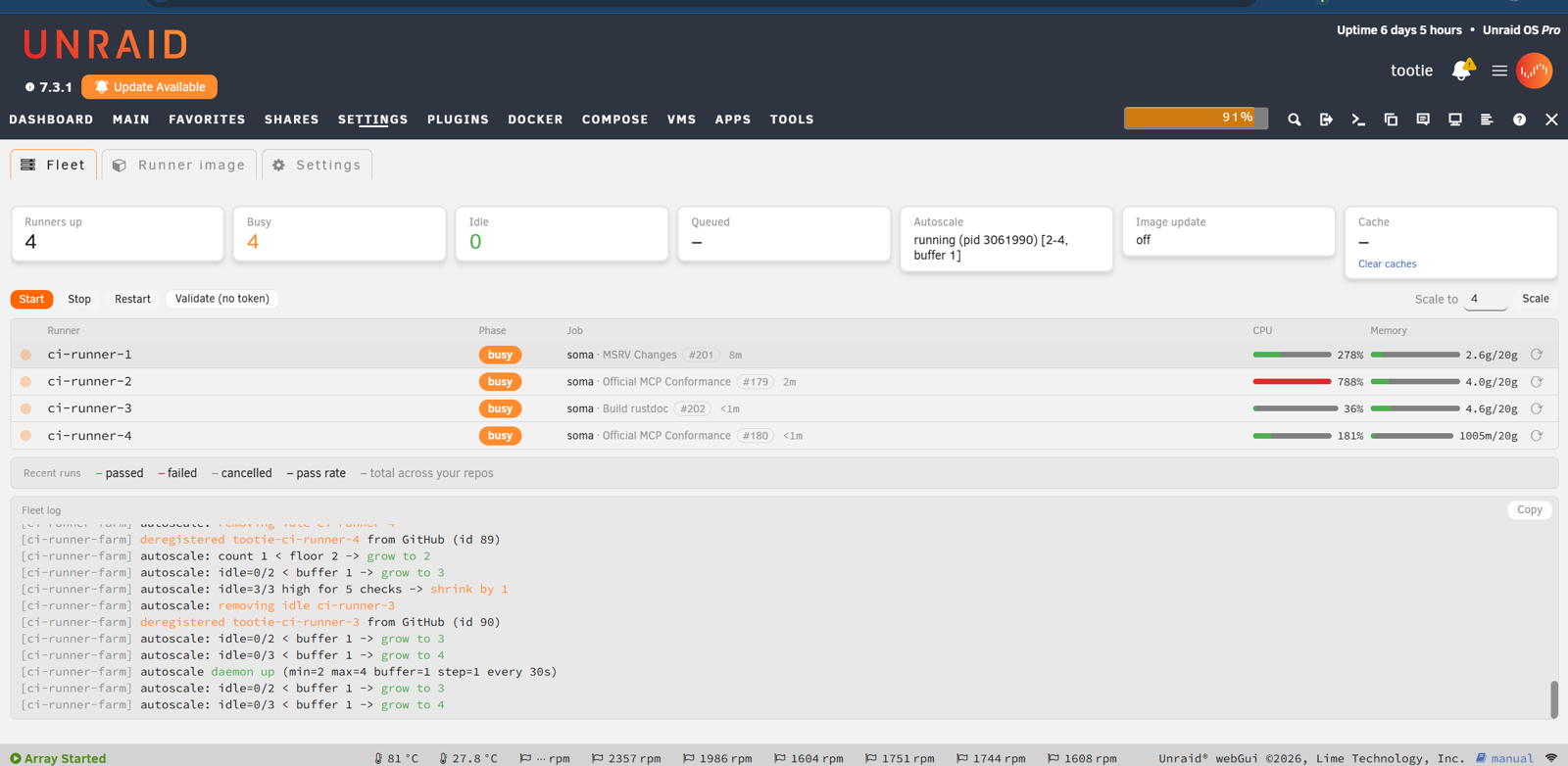
Fleet and autoscaling
The Fleet tab shows provider-neutral runner, project, job, ref, CPU, and memory state while retaining GitHub run/PR links for compatibility. Runner-manager logs are available from each slot; job links open in the provider UI. The autoscaler maintains the configured minimum, maximum, and warm-idle buffer and drains busy slots before recycling or switching provider. Autoscaling is off by default and must be explicitly enabled for GitLab; when enabled, it uses observed manager metrics and job containers, never the incomplete advisory project queue. A provider switch is an idle-drained rolling transition: a busy old-provider slot finishes first, its old adapter deregisters it, and only then is that slot recreated for the new provider. The Fleet tab may therefore briefly show both providers during the transition; ordinary steady state still has one active provider.
Alongside reaping dead or deregistered slots, the autoscale tick also
self-heals build-poisoned GitHub DinD slots. If a slot's nested Docker daemon
crashes mid-build, its persistent buildkit store can be left with dangling
lease metadata or missing snapshot parents: every later build on that slot
fails while the runner itself stays healthy and keeps accepting jobs. The farm
detects the supported BuildKit corruption signatures from the failed job
logs on GitHub (the only place the error is visible), then — only while the
slot is idle, and at most once per slot per hour — stops the container,
clears just the buildkit/ subdirectory of its Docker root (warm image and
layer caches survive), and starts the same container again. Events appear in
the autoscale log.
Every running fleet also has a provider-neutral lifecycle watchdog. For idle GitHub DinD slots, it checks the runner's private Docker daemon for leftover job, helper, or service containers and removes those containers while preserving images, volumes, and layer caches. It also checks outer-runner PID pressure. Two consecutive failed cleanup or pressure checks trigger a full slot recycle. The watchdog runs independently of autoscaling, so fixed-size fleets receive the same protection. GitLab keeps its manager-owned lifecycle path and exposes no candidate to this watchdog.
CLI
include/runner-farm.sh {start|boot-autostart|docker-stopping|stop|restart|scale N|status|status-json|recommendations-json|logs i|validate|build-image|prune-cache|autoscale-*|lifecycle-*|history-daemon}
Development
Fork the repository on GitHub, then keep the canonical project as upstream:
git clone git@github.com:YOUR-ACCOUNT/ci-runner-farm.git
cd ci-runner-farm
git remote add upstream https://github.com/unraid/ci-runner-farm.git
git switch -c feat/gitlab-provider
Run all checks in the bundled Linux environment. This is the preferred command on macOS because the host commonly has Bash 3, BSD tar/realpath, and no PHP CLI:
./tests/run-linux-checks.sh
With compatible Linux tools installed, run bash tests/check.sh directly.
Checks cover Bash/PHP syntax, config parity, safe cache paths, the provider and
credential contract, fork release guards, generated XML, and exact package
contents.
Build and deploy to a disposable Unraid development host:
./build-plg.sh
./deploy.sh root@tower
deploy.sh uploads the complete runtime into a staging directory, validates
its sentinels and permissions, then performs a rollback-protected replacement
of the development copy.
Stop the fleet before deploying; the script refuses an active fleet/daemon so
long-running processes cannot keep executing an unlinked older engine while
new web actions use the replacement.
The generated .plg downloads a version-pinned reproducible .tgz; it is not
an inline/base64 package.
Layout
ci-runner-farm.plg                  generated installer metadata
build-plg.sh                        packages src/ into .plg + reproducible .tgz
deploy.sh                           complete-tree atomic dev deployment
tests/check.sh                      Linux/CI check entry point
tests/run-linux-checks.sh           containerized local check entry point
src/usr/local/emhttp/plugins/ci-runner-farm/
  default.Dockerfile                legacy GitHub starter (compatibility)
  default.github.Dockerfile         named GitHub runner starter
  default.gitlab.Dockerfile         GitLab Docker-executor job starter
  default.cfg                       public reference defaults
  include/runner-farm.sh            common lifecycle engine
  include/runner-recommendations.sh live weight and pool-target heuristics
  include/runner-history.sh         bounded durable duration aggregates
  include/providers/                provider adapters
  include/exec.php                  CSRF-guarded web endpoint
The release workflows are guarded to unraid/ci-runner-farm. They remain inert
in forks even when a fork pushes main, tags v*, or dispatches them manually.
The fork's CI stays on GitHub; no .gitlab-ci.yml is required to add GitLab as a
runtime provider.
Releases and support
Canonical releases use release-please and GitHub Release assets. Questions and bug reports: https://github.com/unraid/ci-runner-farm/issues
Media gallery
1 / 4Download Statistics
Downloads by Month
Related apps
Explore more like this
Explore allDetails
https://github.com/unraid/ci-runner-farm/releases/latest/download/ci-runner-farm.plg