
All apps · 0 apps

Cens-Arr
Docker app from Geoguy89's Repository
Overview
Readme
View on GitHubCens-arr

Cens-arr is an *arr-inspired, vibe-coded application that mutes profanity in your media.
It adds a second audio track, “Censored - English” by default, with the swearing silenced. The original is untouched and stays the default — in Plex or Jellyfin you pick the censored one from the audio menu. One file, two tracks, not two copies.
Built for a household with a small child in the room, so when anything is uncertain the word gets muted.
 your library ──▶ queue ──▶ ffmpeg ──▶ Whisper ──▶ word list ──▶ subtitles
                                                                    │
                                   file with a new track ◀── mute + remux
- Word-accurate muting — Whisper gives each word's time to ~50 ms, so only the swear goes silent, not the line around it.
- Subtitles and Whisper check each other — every swear either one finds is
read against the other. A harmless word Whisper heard as a swear stays in
when the subtitles have a word that sounds like it (“Pass me the caulk
gun”); a swear Whisper missed is muted from the subtitles. Subtitles come
from the file, a
.srtbeside it, or Plex or Jellyfin, which search for them online, and are lined up with the speech first. - One click to fix a wrong call, per show or everywhere, and every mute is listed with its evidence.
- Shows that censor themselves as new episodes arrive, from Sonarr, Plex or Jellyfin.
What it looks like
The screenshots are of a made-up demo library (python tools/screenshots.py
regenerates them), in the dark theme. The page follows the system's light or
dark setting.
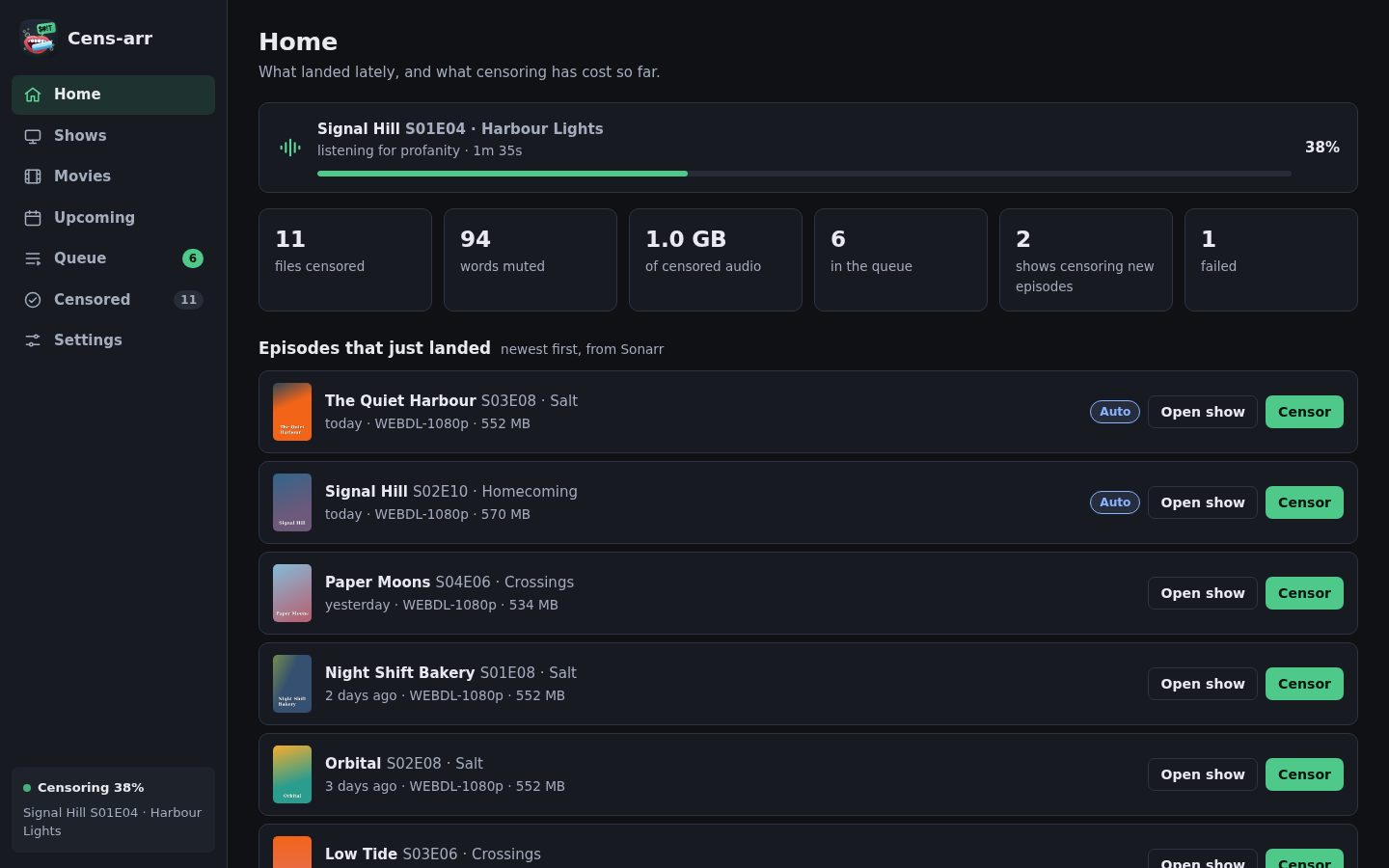
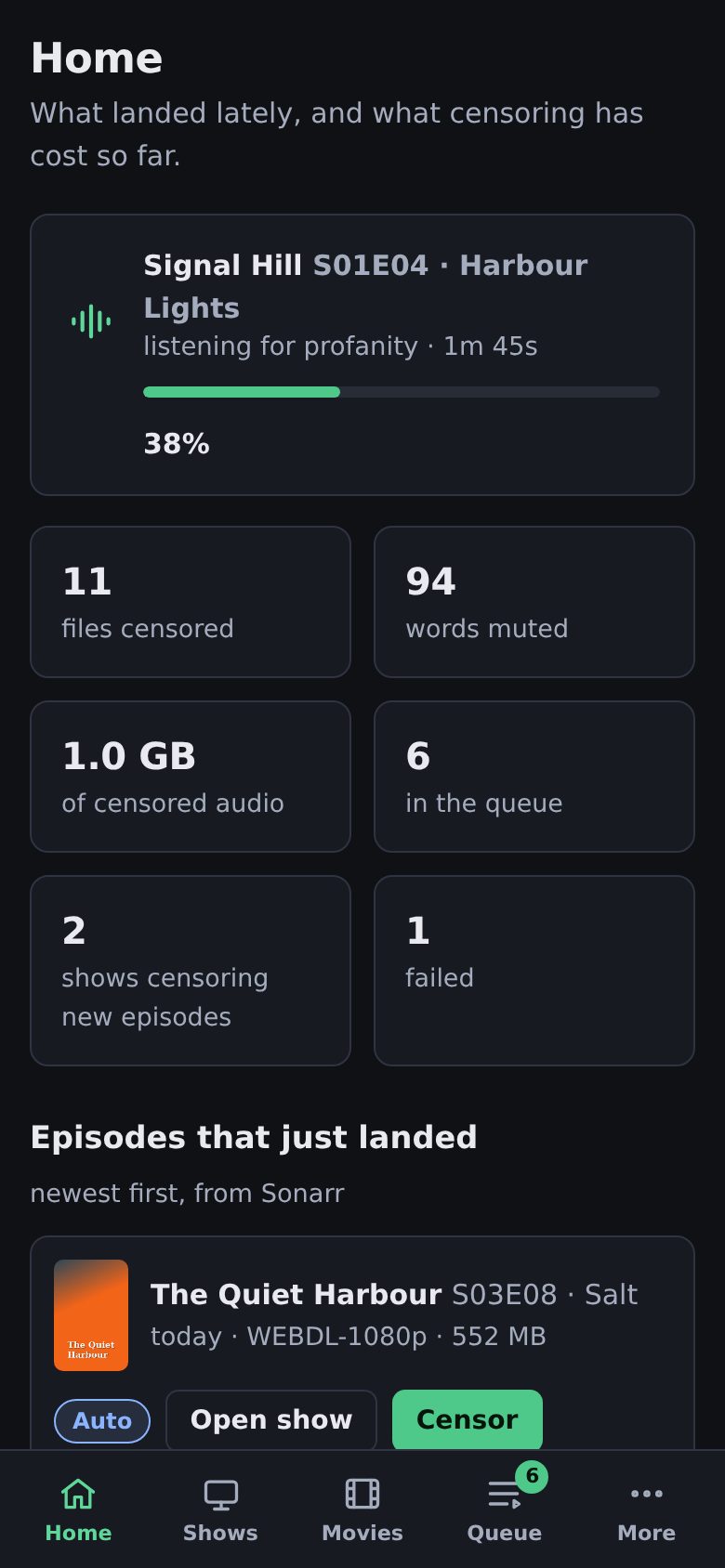
Home — what is being censored, what landed lately, and what it has cost so far. On a new install it opens with a checklist of what is left to set up.
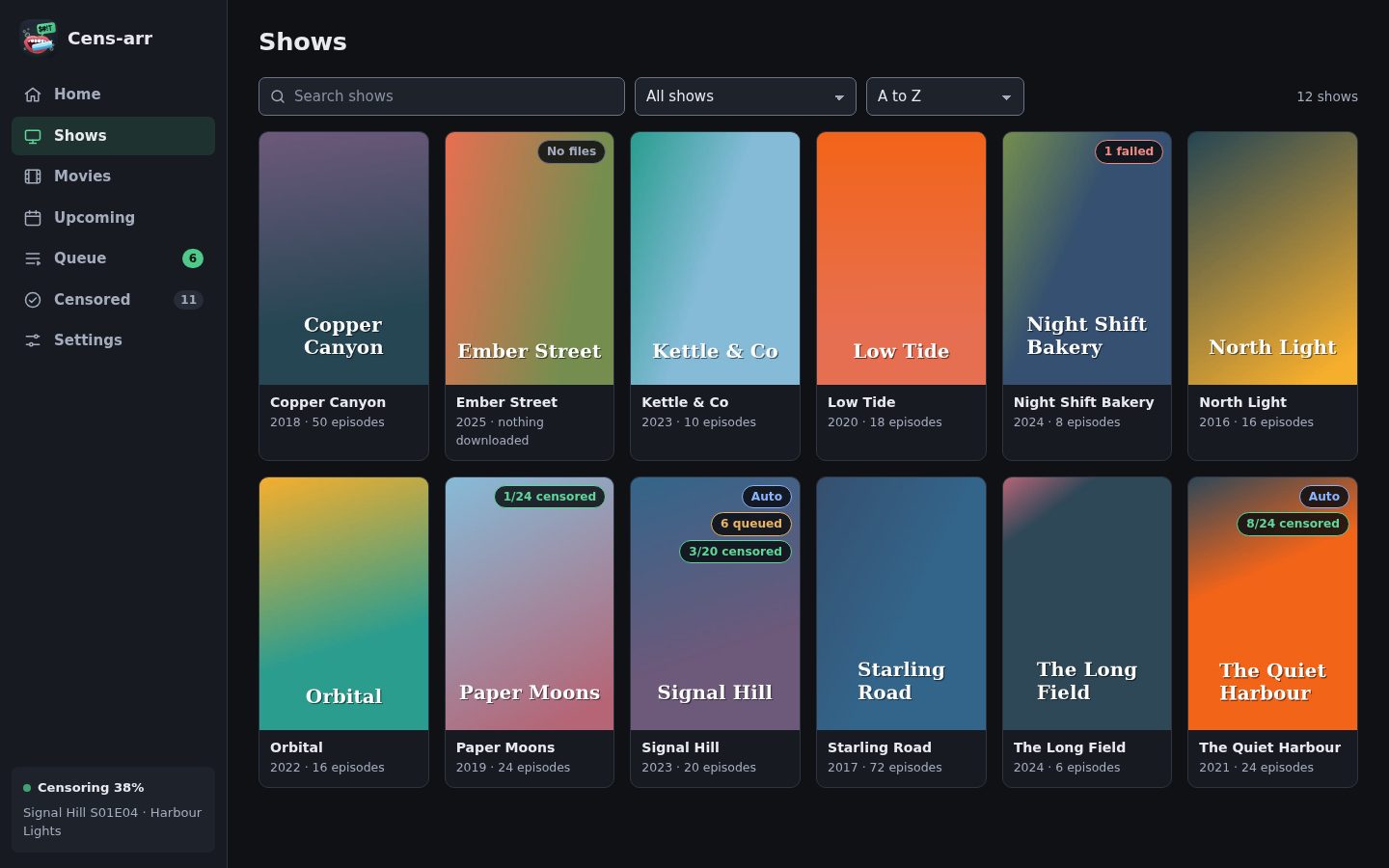
Your library, with badges for censored, queued, auto-censoring, or nothing on disk yet.
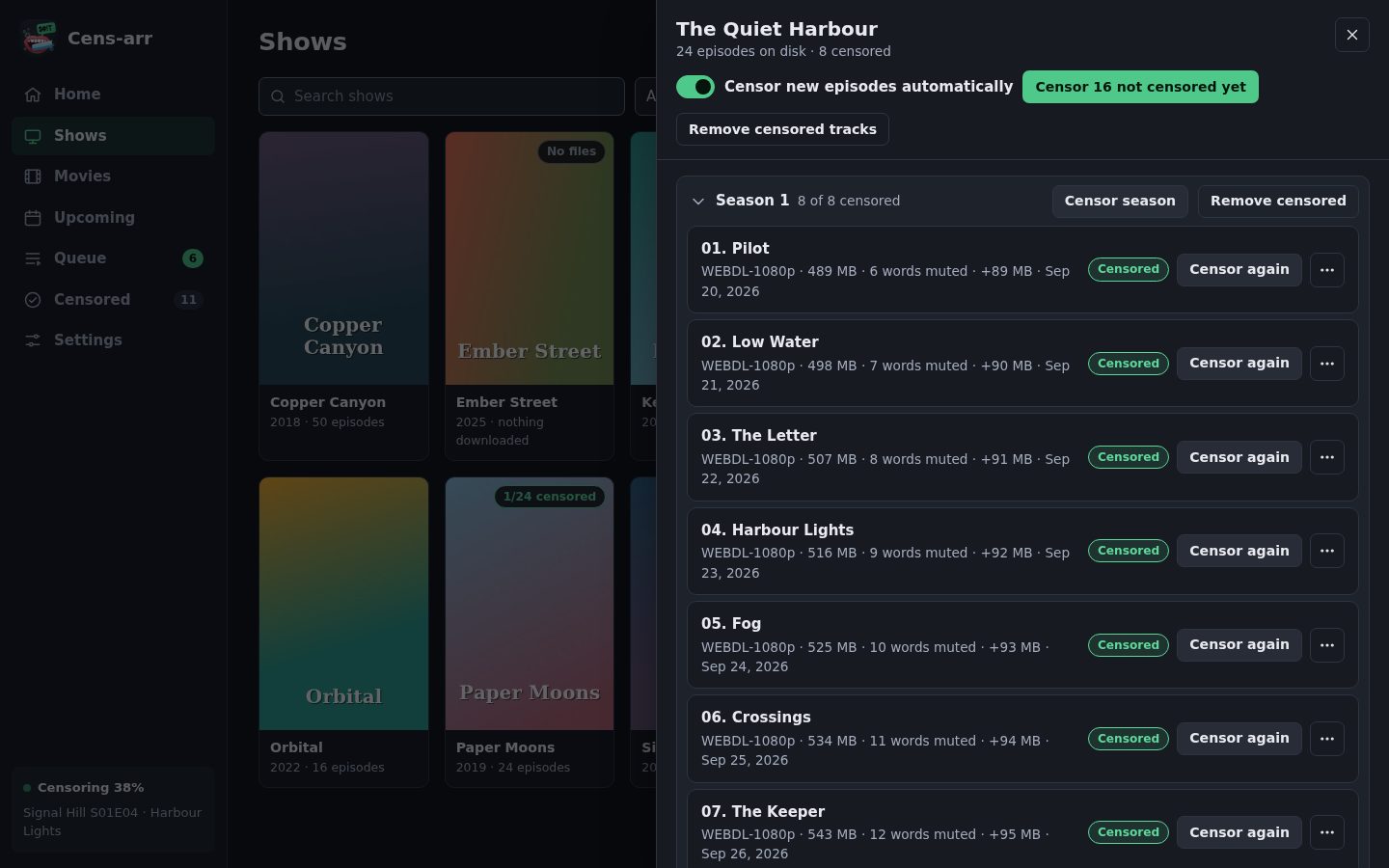
Inside a show — censor one episode, a season, everything outstanding, or from one episode to the end. Removing a censored track is just as easy.
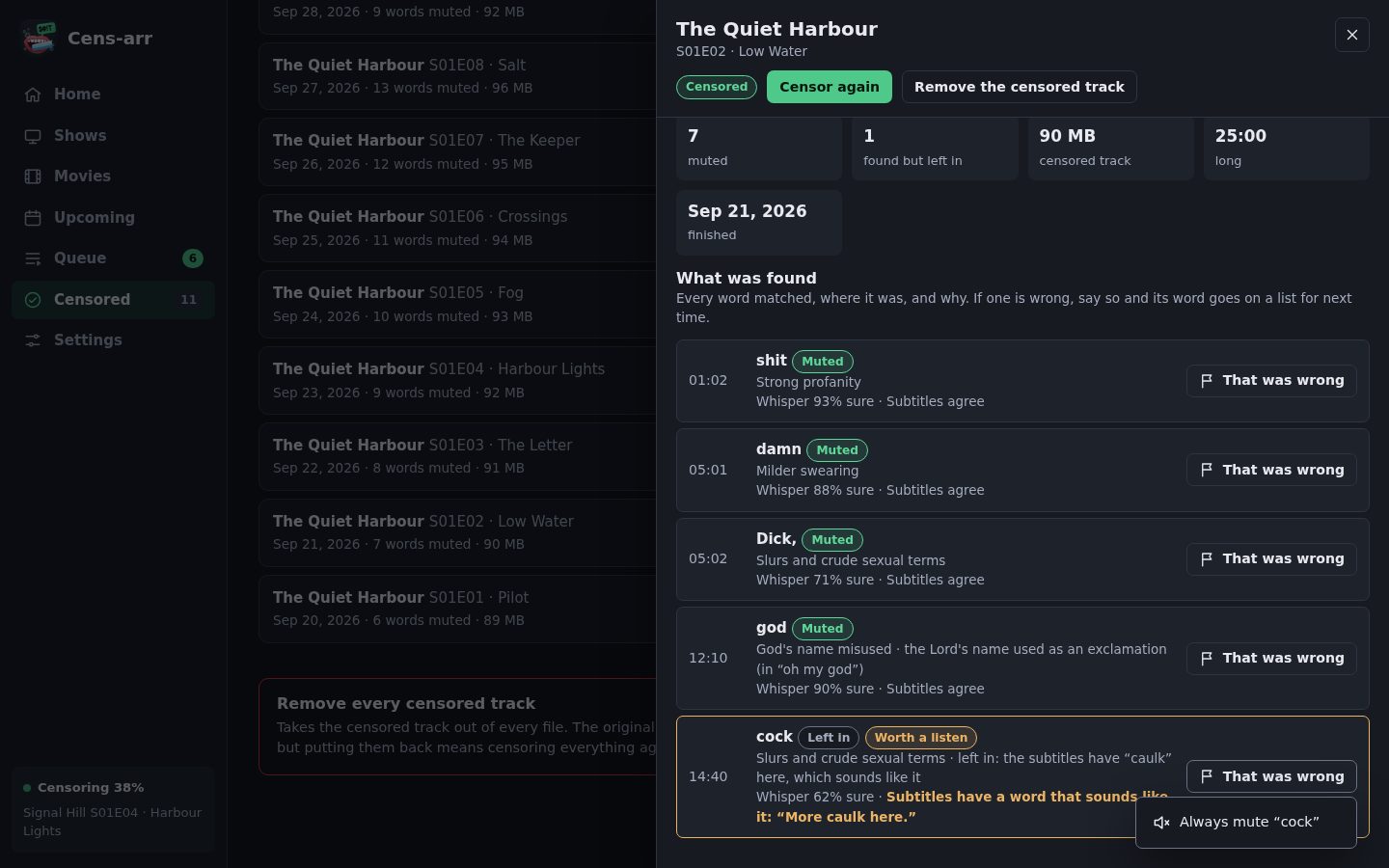
Every mute is on the record, with what Whisper thought of the word and what the file's subtitles say at that moment. When one is wrong — Whisper heard a name as a swear — That was wrong puts the word on a list: never mute it in this show, never mute it anywhere, or check it in context. A word the second opinion let through can be made always muted.
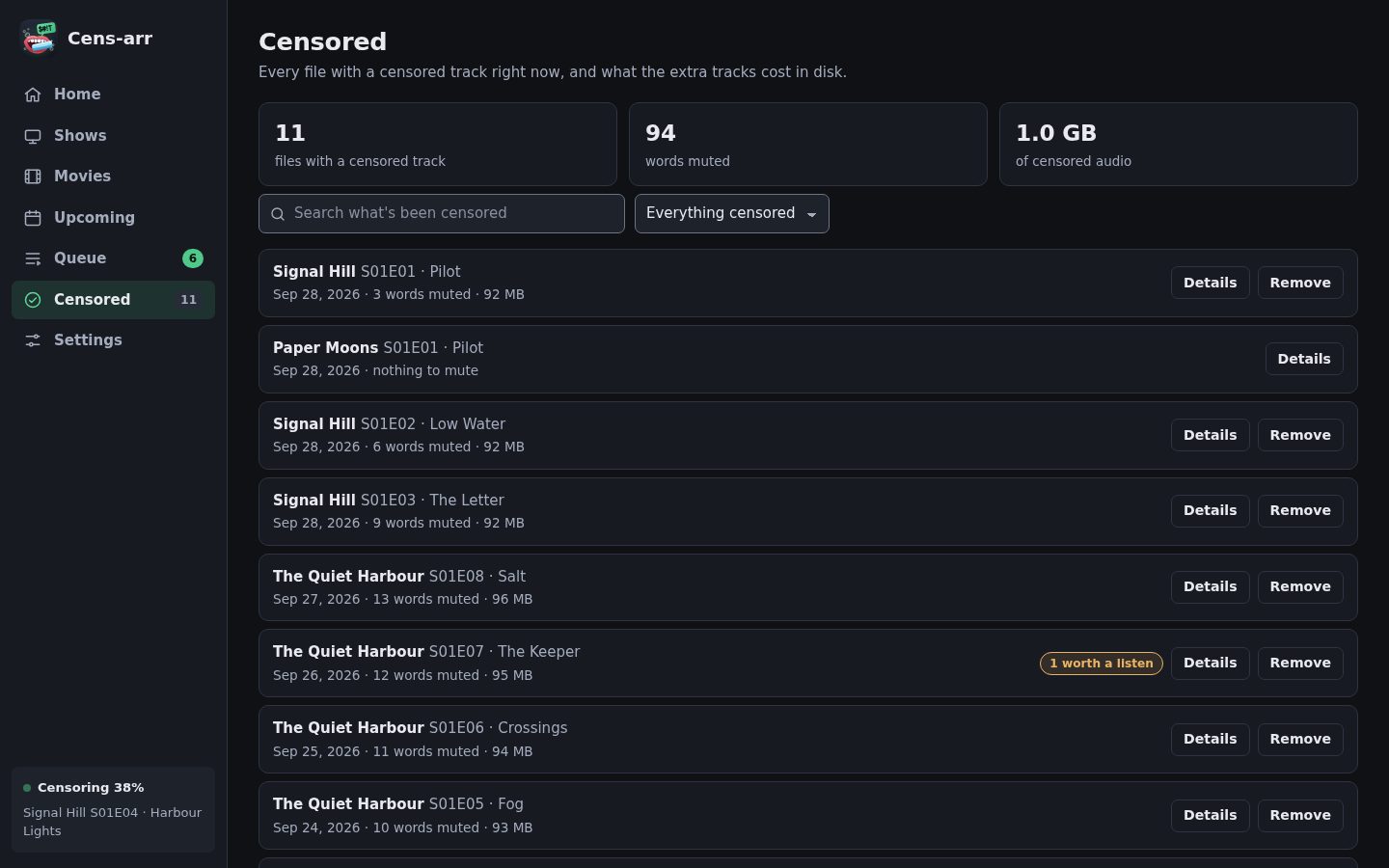
Censored — searchable history, and what the extra tracks cost in disk.
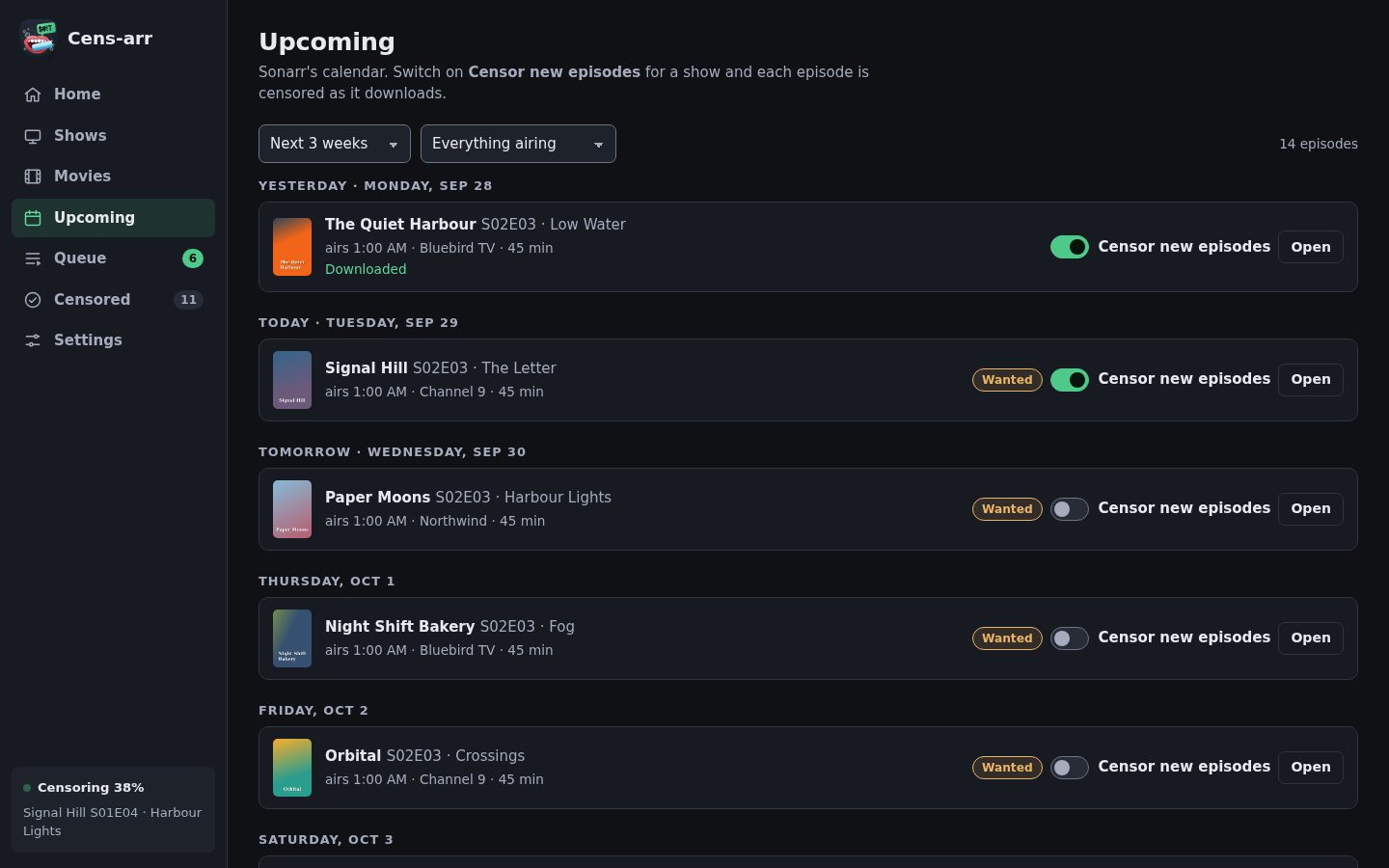
Upcoming — Sonarr's calendar without leaving the app. Sonarr only; the tab hides itself otherwise.
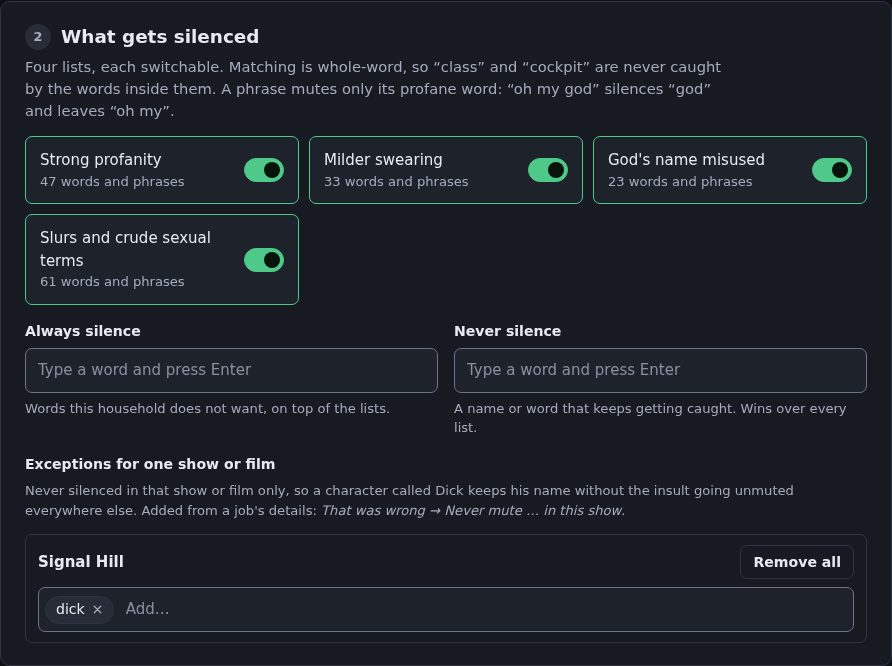
Settings are numbered in the order they need doing, and nothing is saved until you press Save. Each Test button tries what is typed, before it is saved.
On a phone the sidebar becomes a bar along the bottom.
Requirements
| A library | Plex or Jellyfin, optionally with Sonarr for shows. Only asked what exists — except that the subtitle search asks Plex or Jellyfin to attach subtitles it finds (see The subtitles). |
| Media | Mounted so the paths your library reports exist in this container; see Paths. |
| Subtitles | Optional, and used when there: in the file, a .srt beside it, or found by Plex or Jellyfin. |
| GPU | Optional. NVIDIA is much faster; CPU works. See Hardware. |
| Disk | ~1.5 GB for the speech model, plus ~90 MB per censored 25-minute episode. |
| Ollama | Optional, off by default. See Subtitles and Whisper. |
Installing
Docker Compose
services:
  censarr:
    image: ghcr.io/geoguy89/censarr:latest
    container_name: censarr
    restart: unless-stopped
    stop_grace_period: 45s
    ports:
      - "8477:8477"
    volumes:
      - /path/to/appdata/censarr:/config
      # The right-hand side must be the path your library reports.
      # If Plex or Sonarr says /data/media/tv/..., mount it as /data.
      - /path/to/media:/data
    environment:
      - TZ=America/New_York
docker compose up -d
With an NVIDIA GPU, add this to the service as well:
    environment:
      - NVIDIA_VISIBLE_DEVICES=all
      - NVIDIA_DRIVER_CAPABILITIES=compute,utility
    deploy:
      resources:
        reservations:
          devices:
            - driver: nvidia
              count: all
              capabilities: [gpu]
Add it only if you have one. Docker will not start a container whose device reservation cannot be met, so on a machine with no NVIDIA card these lines stop Cens-arr running at all, with an error that says nothing about Cens-arr.
Also on Docker Hub as
geoguy89/censarr:latest. GHCR is the better default — Docker Hub rate-limits anonymous pulls.
docker run
# The container side of the media volume must be the path your library
# reports: censarr opens those paths unchanged.
docker run -d \
  --name censarr \
  --restart unless-stopped \
  -e TZ=America/New_York \
  -p 8477:8477 \
  -v /path/to/appdata/censarr:/config \
  -v /path/to/media:/data \
  ghcr.io/geoguy89/censarr:latest
With an NVIDIA GPU, add --runtime nvidia -e NVIDIA_VISIBLE_DEVICES=all -e NVIDIA_DRIVER_CAPABILITIES=compute,utility.
Unraid
Copy docker/my-Censarr.xml to
/boot/config/plugins/dockerMan/templates-user/, then Docker → Add
Container and pick Cens-arr from the template dropdown. That gives you the
icon, a WebUI link and a working Edit dialog. Updates work normally — the
template pulls from ghcr.io.
Building it yourself
The published image is linux/amd64 only; its CUDA base has no arm64 build.
git clone https://github.com/geoguy89/censarr.git
cd censarr/docker && docker compose up -d --build
Hardware
Listening is the only demanding part.
| Speed | |
|---|---|
| NVIDIA GPU | ~85 s for a 25-minute episode |
| CPU only | Several times slower. Queue it overnight. |
| AMD GPU | Runs, but on the CPU — see below |
Cens-arr picks GPU or CPU on its own. Settings → Listening shows which it found and lets you force either.
faster-whisper runs on CTranslate2, which has CPU and CUDA backends and no ROCm, so an AMD card sits idle. To use one, run something that supports it — whisper.cpp has Vulkan and ROCm backends — and point Cens-arr at it under Settings → Listening → Use my own Whisper server. Anything exposing the OpenAI transcription API works.
A remote server must return word-level timestamps. Cens-arr mutes half a second around one word; with only line-level timings it would have to blank four seconds of dialogue to catch one syllable. The Test button checks for this.
First run
Open http://<host>:8477. Home shows a checklist of what is left to do,
with a link to each fix; it goes away once everything is done. Settings is
numbered in the order things need doing:
- Your library — where shows come from: Sonarr, Plex or Jellyfin, with a test button, and a check that each library folder opens from inside the container.
- What gets silenced — four switchable lists, plus your own always/never words.
- Listening — download the speech model here rather than during your first censor run.
- Muting — padding, fade and the new track's name. The defaults are fine.
- Second opinion — optional: another Whisper server, or your own model, to check a sound-alike before it is left in. The subtitles themselves are always used.
- Media server — where films come from, and extra subtitles; also refreshes the library and pauses during transcodes.
- Advanced — bitrates, ffmpeg threads, number format, keeping backups.
- Who can use this — set a password if this is reachable from outside your network.
A value Cens-arr cannot use — an address without http://, a padding of 9
seconds — is refused when you save, with the reason next to the field.
Then censor one episode before turning it loose on a season.
Where the library comes from
Cens-arr needs one thing: what you own, and where each file is.
Films always come from your media server (Settings → Media server). It knows every version of a film and the subtitles it downloaded, which a downloader does not. Shows come from whichever you pick:
| Shows from | Needs | Notes |
|---|---|---|
| Sonarr | address + API key | The only one that can fill the Upcoming calendar |
| Plex | address + token | Nothing else needed. Artwork comes from Plex too. |
| Jellyfin | address + API key | Same again |
Radarr is not used. An older setup that listed films from Radarr keeps its history; its films are listed from the media server from now on.
Everything else works the same whichever you pick, including censoring new episodes automatically. The Plex and Jellyfin credentials are the same ones used for refreshing and transcode pauses — there is no second set to keep in step.
Paths
Your library reports where each file is as it sees it, and Cens-arr opens that exact path. So mount your media so that the path your library reports exists inside this container:
volumes:
  # Left: where the media is on the host.
  # Right: what your library calls it. Sonarr and Plex in containers usually
  # report something like /data/media/tv/..., so the media is mounted as /data.
  - /mnt/user/data:/data
The two often do not agree — a Plex server on another machine, or one reaching storage over its own mount, reports paths that mean nothing here. The symptom is the library browsing perfectly while every job fails with “not found from this container”.
Settings → Your library shows a check for each library folder: what it reports and whether Cens-arr can open it. When it cannot, it also says where that folder looks to be mounted instead, so the fix is usually one line of the compose file.
There is no path-rewriting setting, deliberately. The media has to be mounted into this container either way — NFS or SMB from another machine is fine, it just has to be mounted — and once it is being mounted, mounting it at the path the library reports costs nothing and leaves one fewer thing to get wrong.
How it works
- Probe — ffprobe reads the file. One already carrying a censored track is skipped unless you ask again.
- Extract — the English audio, as 16 kHz mono. Times are then counted from the start of the file, not of the audio: TV recordings often start the audio a second or two after the picture, and the mutes and subtitles follow the file's clock.
- Listen — Whisper transcribes with word-level timestamps. A subtitle line says a swear happened somewhere in four seconds; words give ~50 ms.
- Match — whole words only, so class and cockpit are never caught. A phrase mutes only the profane word: “oh my god” silences god.
- Check — the subtitles are lined up with what was heard, and every detection is read against them; swears only the subtitles have are added. See Subtitles and Whisper.
- Mute — each match silenced with a 20 ms fade at each edge.
- Verify, then swap — the new file replaces the original only after ffprobe confirms every original stream is present plus one, at the same duration, correctly interleaved.
Transcripts are cached against the audio, so changing a word list and re-censoring skips the slow part.
Keeping the right words
When nothing settles a word, it is muted. The subtitles leave one in only when they have a word in its place that sounds like it. What these do is keep innocent words out of the lists in the first place, and make the rare wrong call quick to find and fix.
Before anything is muted
- Whole words only. class, assassin and cockpit are never caught by what is inside them.
- Endings are not guessed. Only plurals and possessives are added automatically. cocky, cocker (spaniel), booby (trap) and damning (evidence) were all muted once when endings were guessed, so every wanted form — fucking, shitty, pissed — is listed by hand.
- A built-in never list of words that contain or sound like a listed one (cucumber, Dickens, title, assess…), and words deliberately left off the lists because their ordinary sense is far more common: bloody, screwed, cracker, and three slurs that in real use only ever turned up as a chink in his armour, a surname or raccoons, and a Van Dyke beard.
- The Lord's name only as an exclamation. A phrase such as oh my god mutes god; Jesus or Christ on its own is left alone near words like pray, amen or gospel, as long as it is on the check-in-context list (it is by default). Only the profane word of a phrase is muted, so oh my stays audible.
- Your own lists: always silence, never silence, and exceptions for one show or film (a character called Dick keeps his name without the insult being left in everywhere else).
- The second opinion, optional, for words with a real innocent meaning — caulk heard as the other word — from the file's subtitles, your own model, or both.
After a censor run: what is worth a listen
Each detection records two pieces of evidence. Unless the subtitle second opinion is on, neither changes the muting:
- How sure Whisper was of the word. Below 50%, it is flagged. The
built-in Whisper always reports this; a remote server only if it adds it to
the OpenAI response. Transcripts saved before this version have none, and
are reused on a re-censor; deleting
/config/cachemakes files be heard again. - What the subtitles say at that moment, when the file has English text
subtitles (SRT, ASS, MP4 text; picture subtitles cannot be read), or else an
English
.srtor.vttfile beside it —Episode.srt,Episode.en.srt,Episode.en.sdh.srt, the way Bazarr names them (forced ones are skipped). If the line on screen has a different, innocent word — “Pass me the caulk gun” — it is flagged and the line is quoted. A censored line (f***, [bleep]) counts as agreeing. If most lines in a file disagree, the subtitles are taken to belong to another release and set aside for that file rather than flagging everything.
Flagged words are marked Worth a listen in the job's details, and the Censored page can show only the files that have one. That was wrong on the word fixes it for next time; Censor again applies it now, and reuses the saved transcript, so the slow listening step is skipped.
Where things are kept
The censored track is inside the media file itself, as one more audio stream next to the original. There is no second copy of the episode and no separate audio file: Plex or Jellyfin simply shows one more entry in the episode's audio menu. The original audio stream is copied across untouched and stays the default.
How a file gets there:
- The new file is built in a scratch folder beside the original, named
censarr-plus a random suffix (e.g.Show/Season 01/censarr-x1y2z3/). It sits on the same disk so the finished file can be moved into place without copying. That needs free space of about the file's size plus 512 MB; a job that does not have it stops before starting. - Once it verifies, the new file replaces the original at the same path, keeping its owner, permissions and modification time, so the library does not think the episode is new.
- The scratch folder is deleted, whether the job worked or not. One left by a container killed mid-job is swept up the next time a job runs in that folder, once it is six hours old.
The file grows by the size of the censored track, about 90 MB for a 25-minute episode; the Censored page shows the running total. Remove rewrites the file without that track and gives the space back.
Keep a copy of each original (Settings → Advanced, off by default) also
leaves <file name>.censarr-backup beside each file, doubling what it takes
on disk. The copy is refreshed each time the file is changed, so after a second
censor or a removal it holds the file as it was just before that change.
Everything else lives in /config:
| Path | What |
|---|---|
/config/config.yaml |
Settings, including API keys and the login's password hash |
/config/censarr.sqlite |
Job history, every detection, shows set to censor new episodes, second-opinion answers |
/config/cache/models/ |
The speech model, about 1.5 GB |
/config/cache/*.json |
Transcripts, so a re-censor after a word-list change skips listening |
/config/cache/posters/ |
Artwork, fetched once |
/config/cache/subtitles/ |
Subtitles borrowed for a file with none of its own, one per job |
/config/cache/huggingface/ |
Hugging Face's own download cache |
Deleting /config/cache is safe: the model downloads again and files are
listened to again. Deleting censarr.sqlite loses the history and the list
of shows censoring new episodes; the tracks in your files stay, and ones written
by this version are still recognised as Cens-arr's from the file alone.
Subtitles and Whisper
Speech recognition writes homophones. A scene about drywall produced nine mutes of “cock” — the word was “caulk”. No word list fixes that, because the transcript genuinely contains the rude one. The subtitles were written by someone who knew what was said, so every censor run reads them against what Whisper heard, word by word, both ways:
| The subtitles, at that spot | Whisper heard | Result |
|---|---|---|
| the word, or f***, [bleep] | a swear | muted |
| nothing — they run past it (“open a ton of”) | a swear | muted — captions soften |
| a word that does not sound like it (“Whoa!”), or freaking, heck, darn | a swear | muted — captions soften |
| a word that sounds like it (“caulk”) | a swear | left in, worth a listen |
| no line near it, or no subtitles at all | a swear | muted |
| a swear | something else, or nothing | muted from the subtitles, worth a listen |
“At that spot” is read from the script: the words heard just before and after are found in the subtitles, and what sits between them is the answer — a phrase as well as a word, so “the road to hell” against “the Roosevelt” is compared whole. Where nothing anchors it (a chant: “City! City!” heard as “Shit, shit!”), the line on screen is read at about the right point in it - unless the line leaves out words Whisper heard while it was up, which means it was reworded (“It's freezing out here.” for “it is fucking cold out here”). In every reading, a word Whisper also heard close by does not count, contracted or not (she's for she is), since it was said as well.
“Sounds like” compares pronunciations from the CMU Pronouncing Dictionary, the way speech runs together: caulk and cock are pronounced identically, the t and h of “road to hell” are nearly swallowed, and whoa and shit share nothing. A sound-alike also has to start with the same sound (s and sh count as one), so a caption's “get that” for “Oh, shit!” is a softening, not a mishearing; so are minced oaths and TV dubs (freaking, heck, sucker, “Oh, bother”), a word cut short or run on (“mother”, “sh-”, “pussycat”) and the little words that hold a sentence together (its, am, can't, here), however close they sound. A compound is compared on its swear half, so “mother-trucker” and “smarty” are dubs, not mishearings. How sure Whisper was makes no difference: a word it was sure of is left in when the subtitles have a sound-alike there, and muted otherwise.
A swear only the subtitles have — mumbled, talked over, or heard as “posse” — is muted between the words heard either side of it. It is not placed when Whisper already caught it nearby, when only one side is found by a single common word, or when the words either side were said back to back: then the captions added it. A word with a symbol in it counts only when it fits a swear (f***, sh*t - not Ke$ha or C#).
tools/subtitle_stress.py runs these rules with no media: every built-in swear
against the ways captions soften it, the dictionary's sound-alikes, 20,000
captions damaged at random, and subtitles knocked out of line.
On 9 episodes of 4 shows (471 detections), this left in 20 words — ten caulk, a slob, a purses, seven of a crowd's “City!” and a “Go on!” — and muted 3 swears Whisper had missed. “The Roosevelt” was checked separately.
Where the subtitles come from, first found wins:
- the file's own English text track;
- a
.srtor.vttbeside it (see Keeping the right words); - subtitles your media server holds for that file — ones Plex or Jellyfin downloaded, say;
- for a film, another copy of it that the media server knows about: a WEB-DL beside a WEBRip often has the subtitles the other lacks. The other copy is only read, never changed.
- a search by Plex or Jellyfin, which attaches the best English match to the item exactly as its own Search subtitles does. Those subtitles stay on the item in your media server. Jellyfin needs its Open Subtitles plugin; without one, the job says so, Home points to it, and the file is censored by listening alone.
3 to 5 need a media server chosen under Media server. The file is found in the media server by its
path, and a show by its name, so they work when the media server has the
library mounted somewhere else (/data/tv in Plex, /tv here) and when
Sonarr's name carries a year Plex leaves off (Doctor Who (2005)).
Subtitles are often timed for a slightly different cut — a studio logo more
or less at the start shifts every line by the same few seconds, and a TV
recording with the adverts cut differently drifts further at every break, and
subtitles made for a 25 fps release run 4% fast against a 23.976 fps file. It
happens most with another copy's or a search's, sometimes with a downloaded
.srt, now and then with the file's own. So whatever the source, the subtitles
are first lined up with what Whisper heard: the common frame-rate ratios (25, 24
and 23.976 fps) are tried, then one shift for the file (up to three minutes
either way), then a shift every few minutes, each line starting where its first
word is heard - kept only when the result clearly fits better than before.
Subtitles that already fit are left alone. tools/subtitle_audit.py damages a
file's own subtitles in each of these ways and checks they come back; on 8
episodes of 4 shows every case did, with no verdict that would unmute a word. Subtitles that still disagree with most detections,
from a copy that drifts or a different film, are set aside as above. The job
says which it used — subtitles from another copy (Film WEBDL-1080p.mkv),
subtitles from a Plex search (…) — or no subtitles found to check against,
and a copy of borrowed subtitles is kept in /config/cache/subtitles/.
A second opinion on a sound-alike
Optional. Before a sound-alike is left in, Settings → Second opinion can check it:
- Another Whisper server — any OpenAI-compatible one (speaches, faster-whisper-server) — listens to those few seconds again, ideally with a bigger model. If it hears the swear again, it is muted.
- Your own model — Ollama, or any OpenAI-compatible chat server — reads the sentence with the subtitle line beside it and says whether it was profanity.
With neither, the sound-alike is left in and marked Worth a listen. The model is also asked about the words on the check-in-context list in a file that has no subtitles at all; there, without an address, they are muted. Across 196 checks on a real library it changed the outcome twice, at 30–100 s each.
Shows that censor themselves
Marking a show censors episodes downloaded from now on. Nothing already on disk is touched; catching up is a separate button. A show with no files yet can be marked, so a new series arrives censored.
Checked every 10 minutes. For instant censoring, point a Sonarr Connect →
Webhook (On Import) at http://<host>:8477/api/webhook/sonarr. If you
have set a login, put the same username and password in the webhook's
Username and Password fields.
Things worth knowing
- medium.en is the only model offered. large-v3 took 50% longer and caught fewer swears — it favours tidy prose, and tidy prose smooths swearing away.
- Whisper's silence filter is off. On one 43-minute episode it skipped 19 real profanities and saved no measurable time.
- Nothing is written until it verifies. An early build produced a file Plex hung on, because the censored audio landed 485 MB from the picture inside the container. The interleave check exists because of that episode.
- One job at a time, on purpose — the GPU is shared.
Development
server/censarr/
  words.py      word lists and whole-word matching
  subtitles.py  reads Whisper against the subtitles, both ways; lines them up
  sounds.py     whether two words sound alike (CMU Pronouncing Dictionary)
  judge.py      the model's second opinion
  asr.py        Whisper, local or remote, with caching
  media.py      ffprobe/ffmpeg: probe, mute, remux, verify, swap
  library.py    Sonarr, Plex or Jellyfin as the library; versions and subtitles
  pipeline.py   one file, start to finish
  worker.py     the queue
  arr.py        Sonarr client; Plex and Jellyfin refresh and sessions
  auth.py       optional login
  main.py       API and static page
  validate.py   checks a settings save
web/            the page
tests/          pytest suite; demo.py is a made-up library for the UI tests
Tests need ffmpeg on the PATH. The end-to-end tests also need espeak-ng, and
download Whisper tiny.en (~75 MB) the first time.
pip install -r server/requirements.txt -r tests/requirements.txt
python -m pytest -m "not e2e and not ui"   # words, queue, API, real ffmpeg
python -m pytest -m e2e                     # speech -> Whisper -> censored MKV and MP4
python -m pytest -m ui                      # the page in Chromium
python tests/demo.py                        # the demo library on :8477
The UI tests also need Chromium for Playwright:
python -m playwright install chromium.
Set CENSARR_TEST_MODELS to a folder to keep the model between runs. No
Sonarr, Plex, Jellyfin or Ollama is needed: the tests start small local
stand-ins for them.
Licence
MIT — see LICENSE.
Media gallery
1 / 2Install Cens-Arr on Unraid in a few clicks.
Find Cens-Arr in Community Apps on your Unraid server, review the template, and click Install. Unraid handles the Docker app or plugin setup from the published template.
Requirements
Sonarr and Radarr, Plex, or Jellyfin, with the media mounted at the paths it reports. An NVIDIA GPU and Ollama are optional.
Categories
Download Statistics
Related apps
Explore more like this
Explore allDetails
ghcr.io/geoguy89/censarr:latestRuntime arguments
- Web UI
http://[IP]:[PORT:8477]/- Network
bridge- Shell
bash- Privileged
- false
- Extra Params
--restart=unless-stopped
Template configuration
The Censarr web interface.
- Target
- 8477
- Default
- 8477
- Value
- 8477
Settings, the job database and the cached transcripts.
- Target
- /config
- Default
- /mnt/user/appdata/censarr
- Value
- /mnt/user/appdata/censarr
The CONTAINER PATH must be what your library reports. Sonarr, Radarr and Plex in containers usually report /data/media/..., so /data is right for them. Censarr opens those paths unchanged - there is no path rewriting.
- Target
- /data
- Default
- /mnt/user/data
- Value
- /mnt/user/data
NVIDIA only: the GPU used to transcribe. 'all', or a GPU UUID from nvidia-smi -L. Needs --runtime=nvidia in Extra Parameters.
- Default
- all
- Value
- all
NVIDIA only: what the container may use the driver for.
- Default
- compute,utility
- Value
- compute,utility