
All apps · 0 apps

caspar-av
Docker app from Stoatworks Labs' Repository
Overview
Readme
View on GitHubcaspar-AV
AI-assisted project. This codebase was created with Claude Code (Anthropic), directed and reviewed by a human author. The protocol work was derived from the CasparCG 2.5.0 source and then verified against a real CasparCG 2.5.0 server (Ubuntu 24.04, headless, Mesa llvmpipe) — which caught six genuine bugs, including a command-ordering mistake that broke every
MIXERandCGcommand. It has not been run on real output hardware or in a live show. Validate on your own rig before relying on it.
A live-events media server built on CasparCG — screens on a canvas, cues that change several of them on one frame, a media library, graphics templates and a trigger grid, in a browser.
Not affiliated with or endorsed by the CasparCG project.
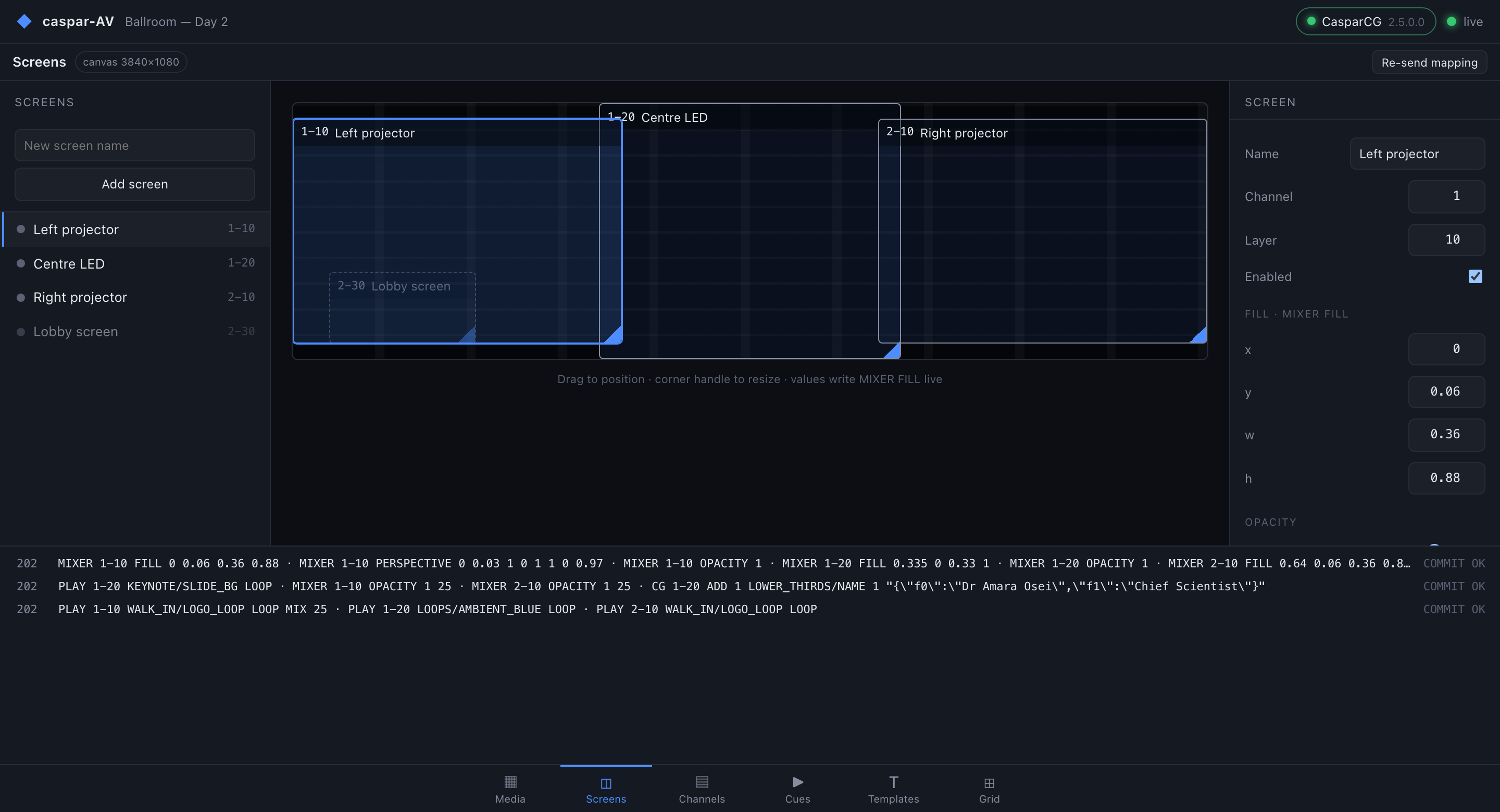
Four outputs placed on a 3840×1080 show canvas. Dragging a screen writes
MIXER FILL; the corner-pin numbers writeMIXER PERSPECTIVE. Every command sent is in the log along the bottom.
Click around the console: https://caspar-av-demo.stoatworks-labs.com — the real
console in your browser, and firing a cue works: the command log fills with
the AMCP the bridge actually compiled for it. It replays a recording of
caspar-avd running against scripts/fake-caspar.py, so nothing is driving a
real server and nothing is saved. See demo/README.md.
A 46-second tour of the real console, driven through its own controls. It is talking to
scripts/fake-caspar.py — a real protocol fixture (AMCP response framing, REQ/RES
correlation, BEGIN/COMMIT batching, OSC telemetry) that renders nothing, so no picture
is coming out of anything.
Download
v0.1.3 — prebuilt for macOS, Windows and Linux. Pick your platform:
macOS — Apple Silicon, Intel
| Build | Download | Size |
|---|---|---|
| Apple Silicon · .dmg disk image (CLI) | caspar-av-0.1.3-macos-aarch64-cli.dmg |
5.8 MB |
| Intel · .dmg disk image (CLI) | caspar-av-0.1.3-macos-x86_64-cli.dmg |
6.0 MB |
| Apple Silicon · .pkg installer (CLI) | caspar-av-0.1.3-macos-aarch64-cli.pkg |
5.5 MB |
| Intel · .pkg installer (CLI) | caspar-av-0.1.3-macos-x86_64-cli.pkg |
5.7 MB |
| Apple Silicon · .tar.gz archive | caspar-av-macos-aarch64.tar.gz |
5.5 MB |
| Intel · .tar.gz archive | caspar-av-macos-x86_64.tar.gz |
5.6 MB |
Windows — x64, ARM64
| Build | Download | Size |
|---|---|---|
| x64 · .exe installer | caspar-av-0.1.3-windows-x86_64-setup.exe |
4.6 MB |
| ARM64 · .exe installer | caspar-av-0.1.3-windows-aarch64-setup.exe |
4.4 MB |
| x64 · .zip archive | caspar-av-windows-x86_64.zip |
5.2 MB |
| ARM64 · .zip archive | caspar-av-windows-aarch64.zip |
5.1 MB |
Linux — x64, ARM64
| Build | Download | Size |
|---|---|---|
| x64 · .deb package (Debian/Ubuntu) | caspar-av_0.1.3_amd64.deb |
2.9 MB |
| ARM64 · .deb package (Debian/Ubuntu) | caspar-av_0.1.3_arm64.deb |
3.0 MB |
| x64 · .rpm package (Fedora/RHEL) | caspar-av-0.1.3-1.x86_64.rpm |
3.0 MB |
| ARM64 · .rpm package (Fedora/RHEL) | caspar-av-0.1.3-1.aarch64.rpm |
3.1 MB |
| x64 · .tar.gz archive | caspar-av-linux-x86_64.tar.gz |
5.8 MB |
| ARM64 · .tar.gz archive | caspar-av-linux-aarch64.tar.gz |
5.8 MB |
All builds, checksums and release notes: github.com/stoatworks-labs/caspar-av/releases.
macOS builds are signed and notarised and open normally. The Windows builds are unsigned, so SmartScreen warns once — see Windows SmartScreen & Defender Firewall for the one-time click-through.
Why this exists
CasparCG Server is a superb playout engine
with an odd gap around it: the organisation's own Frontend is archived, and the
maintained client is a Qt desktop app. There is no maintained web front end.
More to the point, CasparCG is presented as a broadcast playout engine, while the pieces needed to drive it as a live-events media server are already in it and simply unexposed:
| What a media server needs | What CasparCG already has |
|---|---|
| Screens placed on a show canvas | MIXER FILL — position and scale, in normalised units |
| Projector keystone / corner-pin | MIXER PERSPECTIVE — a real four-corner warp |
| Cues that change several outputs at once | BEGIN / COMMIT — locks every touched channel, releases on one frame |
| Soft-edge blending, masking | MIXER CLIP, MIXER CROP, blend modes |
| A media library with thumbnails | media-scanner, over HTTP |
| Data-driven graphics | HTML templates with GDD schemas |
caspar-AV adds the layer above: a show — canvas, screens, cues, pads — that compiles down to those commands.
Why a daemon and not just a web page
CasparCG speaks AMCP over raw TCP (port 5250) and pushes state as OSC over UDP. A browser can do neither. So caspar-AV is a small Rust daemon that holds the connection and serves a React console over ordinary HTTP:
Browser console (React/Vite)
        │  REST + WebSocket (snapshot mirror)
caspar-avd (Rust)                     ← show model, cue compiler, command log
        │  AMCP/TCP 5250      │  OSC/UDP        │  HTTP 8000
CasparCG Server 2.5           telemetry          media-scanner
The console is a passive mirror: it holds no authoritative state, renders the daemon's snapshot and sends commands. Two operators on two laptops see the same thing, and a browser that reconnects is immediately correct.
Status
Built, tested, and verified against a real CasparCG 2.5.0 server.
amcp— protocol codec and async client. Command building with the server's real escaping rules, response framing by status code,REQ/REScorrelation,BEGIN/COMMITbatching. 38 tests.casparosc— OSC decoder and the telemetry state tree, raw plus a typed digest. 13 tests.scanner— media-scanner client: media with ffprobe metadata, thumbnails, templates with GDD schemas, fonts. 5 tests.showd(caspar-avd) — the bridge: supervised connection with reconnect, telemetry subscription, show model and cue compiler, REST + WebSocket API, serves the console. 12 tests.- console — six pages on one shared frame, ported from OpenStage's console.
Verified against real CasparCG 2.5.0 — scripts/protocol-probe.py checks 22
protocol claims with raw sockets (sharing no code with the crates, so it can
disprove them), and scripts/verify-mapping.py has the server PRINT real
frames to confirm MIXER FILL and MIXER PERSPECTIVE actually move pixels.
See docs/scope.md for what that does and does not cover.
Not built: timeline/timecode playback, auto-follow execution (cues carry a follow time; nothing fires it yet), soft-edge blending UI, MIDI/OSC control in, multi-server rigs, audio metering.
Getting started
cargo build --release
cd console && npm ci && npm run build && cd ..
./target/release/caspar-avd --host <your-caspar-host> --show myshow.json
Then open http://localhost:8080.
No CasparCG to hand? Run the fake one. It speaks real AMCP framing, real
REQ/RES correlation and pushes real OSC telemetry — and stands in for
media-scanner too, so the Media and Templates pages have something to show:
python3 scripts/fake-caspar.py
Against a real server, check the protocol assumptions still hold:
python3 scripts/protocol-probe.py --host <your-caspar-host>
The pages
Six pages on one shared frame, with the command log always along the bottom — because "did that command actually land?" is the question a show asks most.
Media — the library from media-scanner, with thumbnails. Double-click to play onto the target screen. 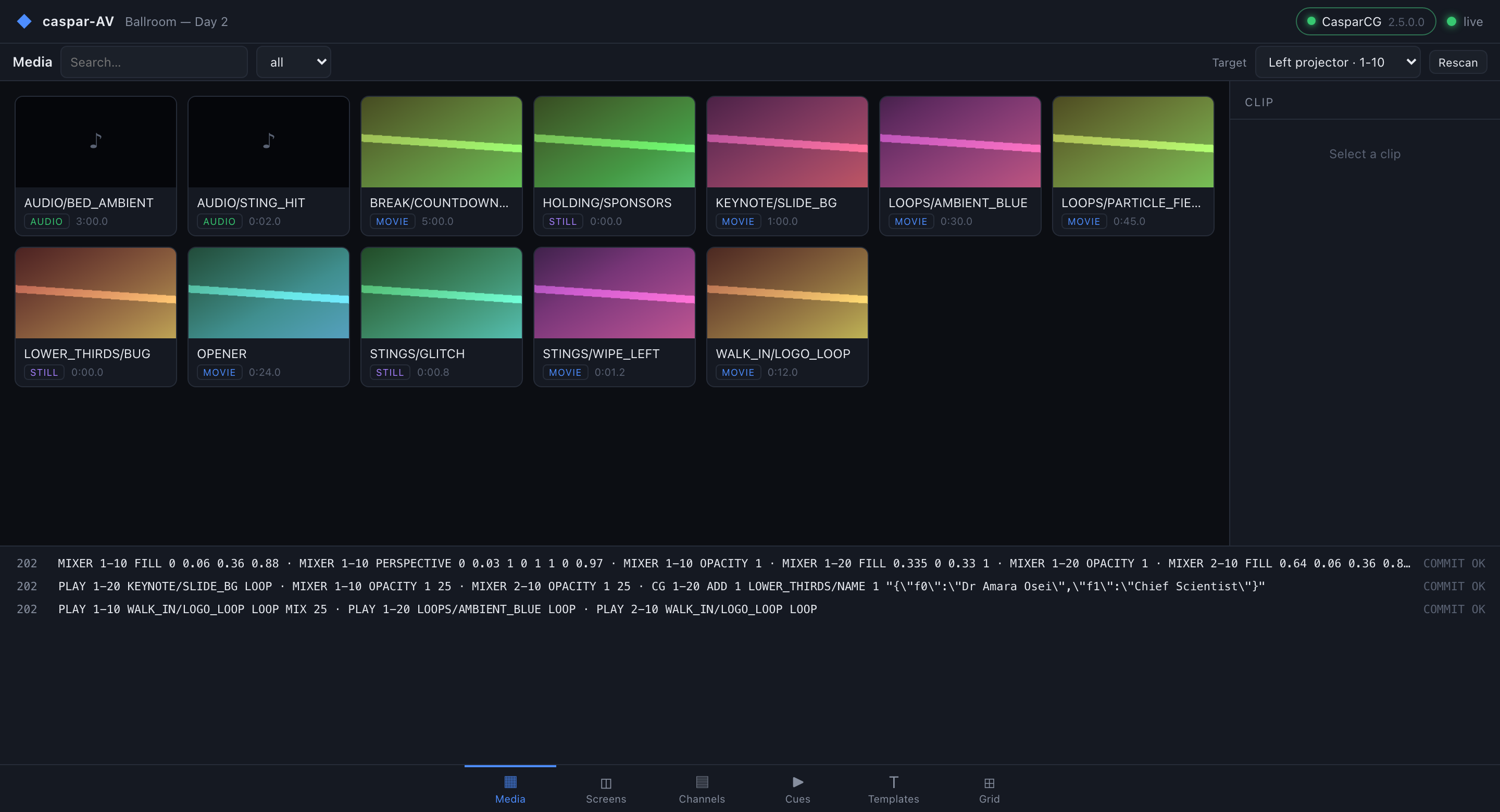
|
Channels — live state straight from OSC: what is playing, position and duration, plus a raw AMCP command line for when something is wrong. 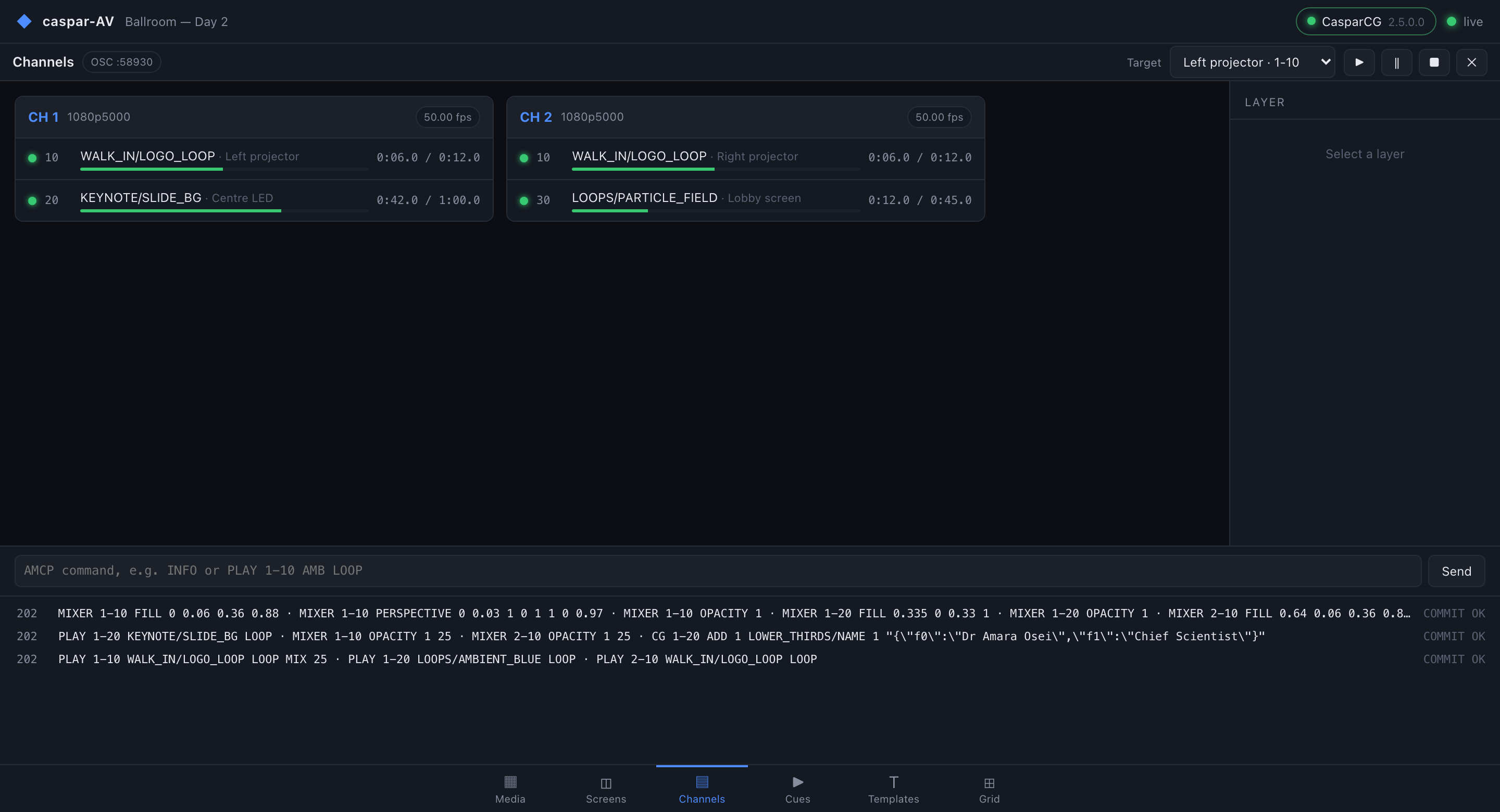
|
Cues — several screens changed together. Fired as one 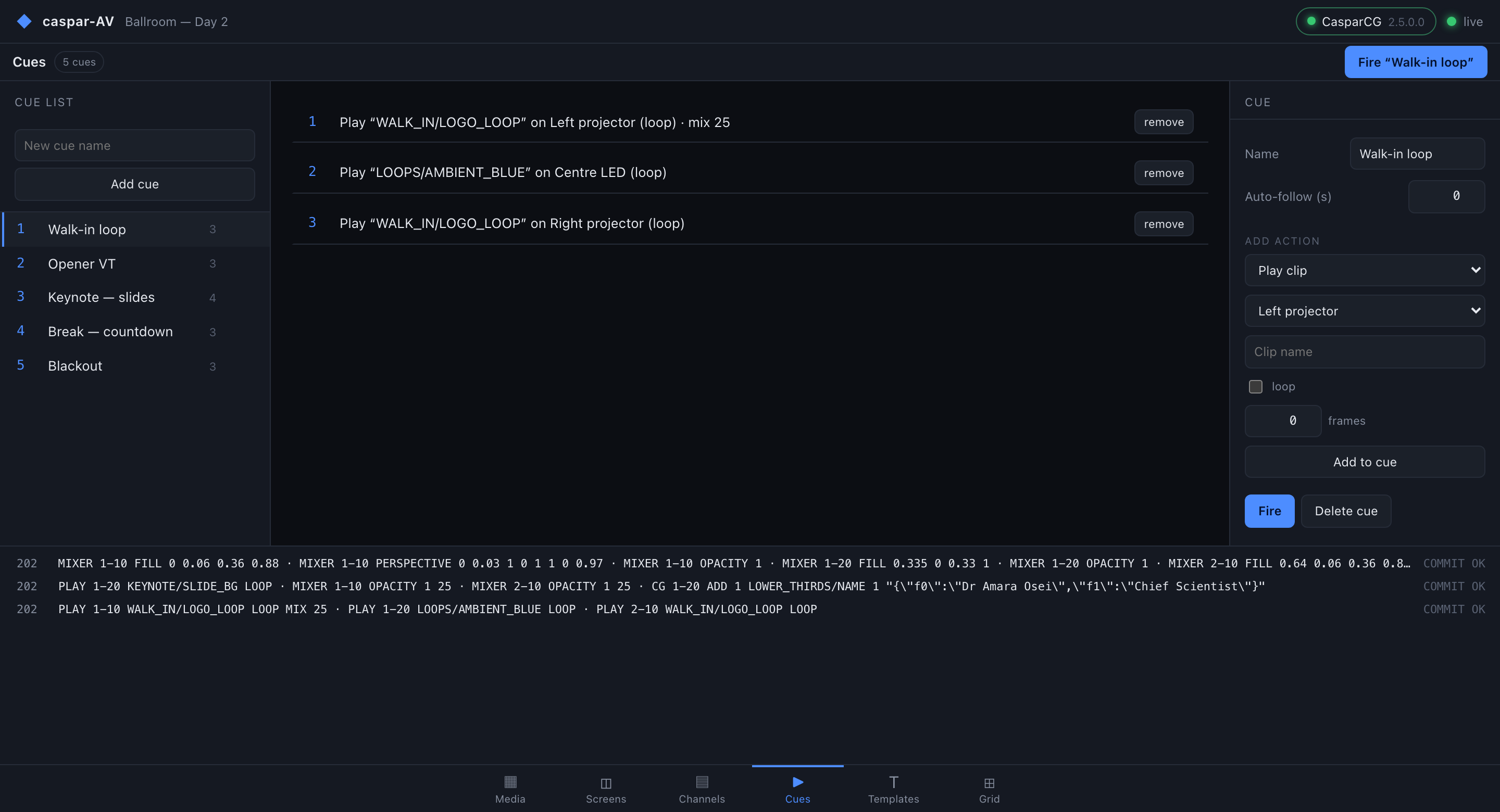
|
Templates — where a template publishes a GDD schema, the data form is generated from it rather than typed as JSON. 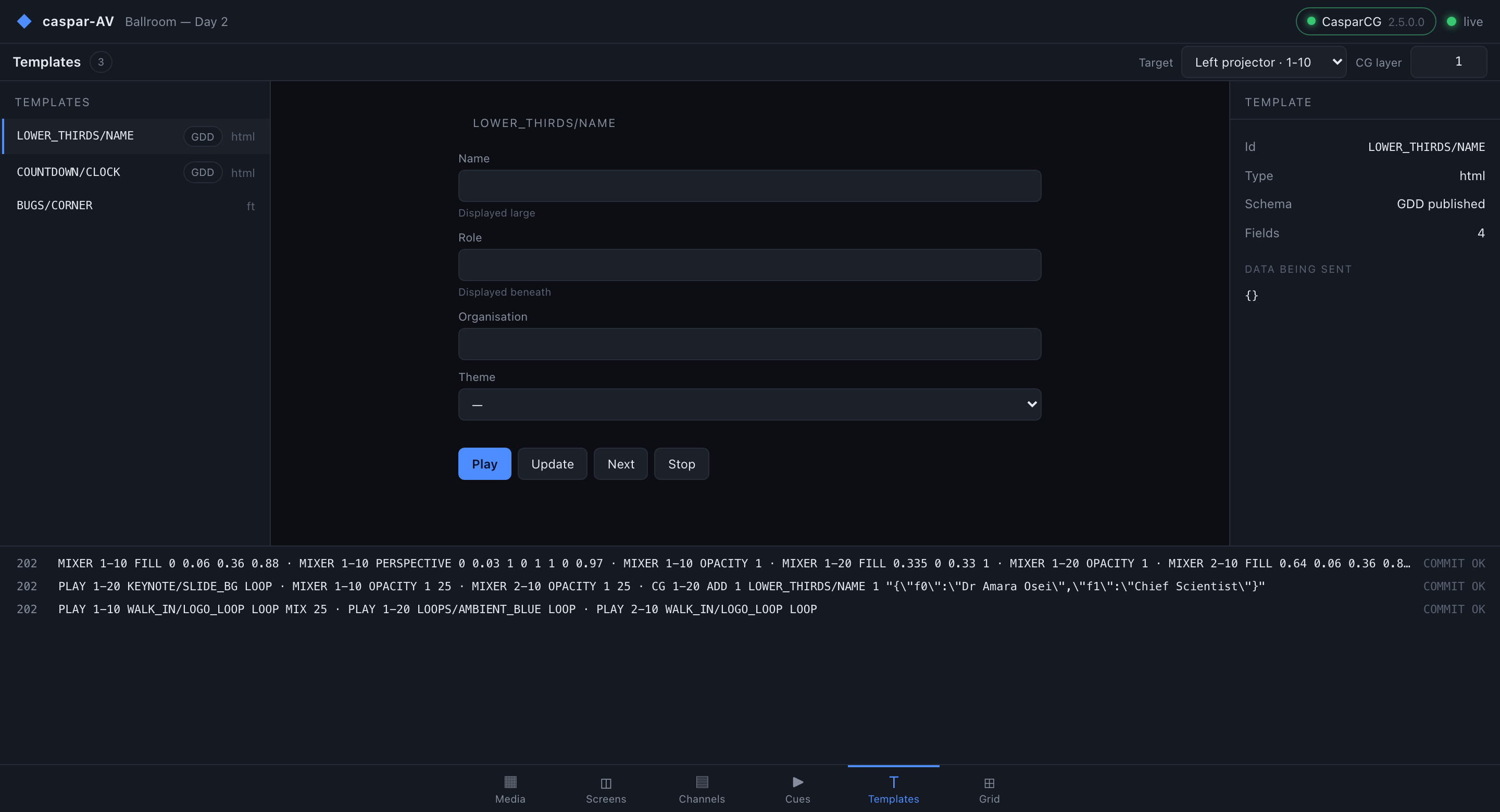
|
Grid — cues as trigger pads. Number keys 1–9 and 0 fire the first ten. 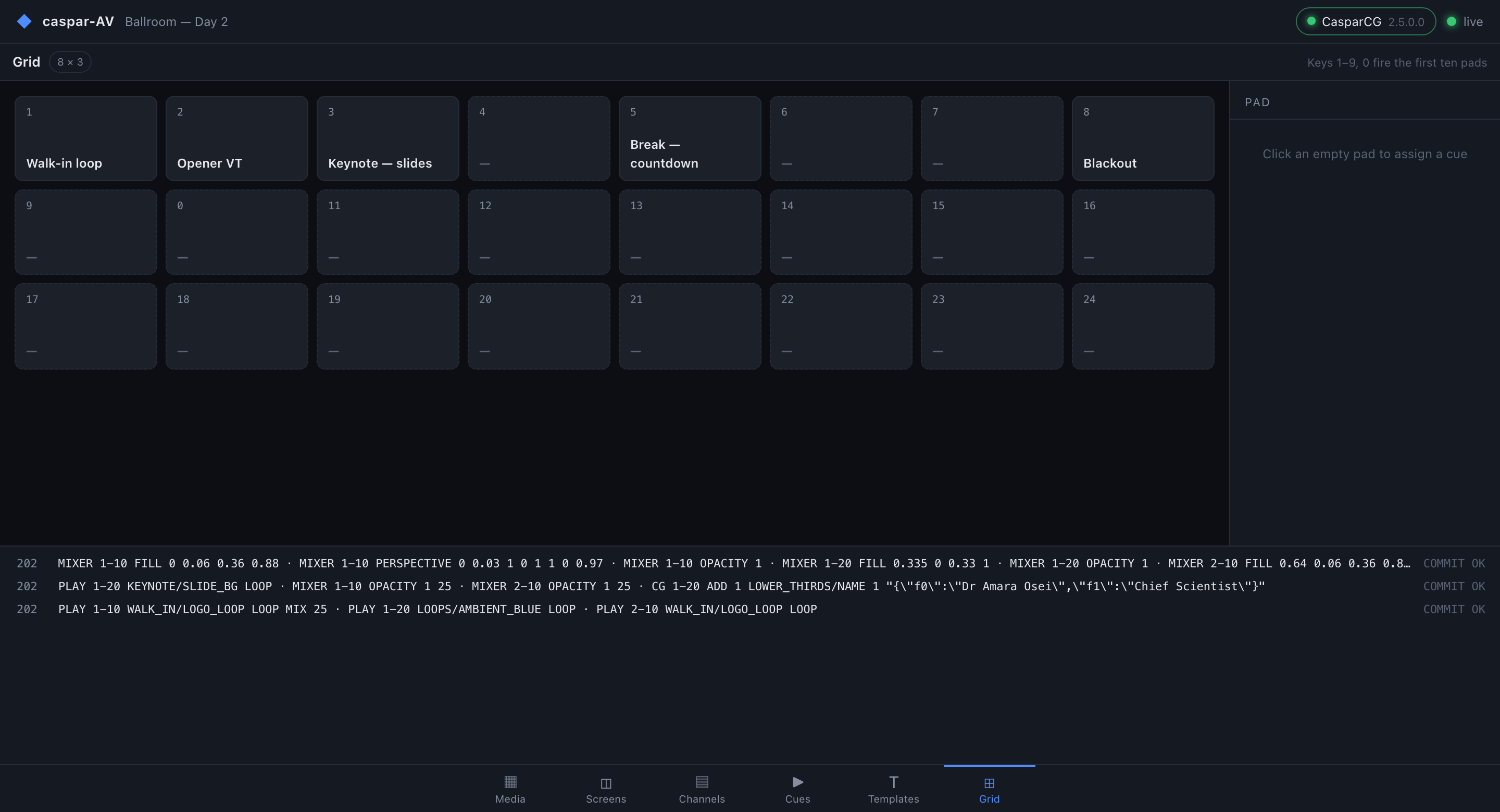
|
Screens — output mapping, shown at the top of this page. Every screenshot here is a real render against
|
Documentation
| Doc | What it covers |
|---|---|
| amcp.md | The protocol, as the 2.5.0 source actually implements it — including where the wiki is wrong |
| architecture.md | Components, the snapshot contract, the show model and how cues compile |
| decisions.md | Every significant choice, why it won, and what is still open |
| diagnostics.md | Where the logs are, what a crash report contains, and how to send one file that explains a fault |
| scope.md | Honestly what is built, what is partial, what is not started |
| releasing.md | How the six-platform release is built, locally |
| test-server.md | Running a real CasparCG to test against, on a Mac |
Inspired by
caspar-AV is not a clone of any of these, and is not affiliated with them. They are listed because the ideas are theirs, and pretending otherwise would be dishonest.
- Pixera, disguise, Millumin and Resolume — the show model. Screens placed on a canvas, corner-pin per output, and a cue that changes several screens on one frame are all conventions these established. What caspar-AV does is show that CasparCG already has the primitives to work that way.
- DaVinci Resolve — the shape of the console: a bottom page-tab bar, and every page built from the same toolbar / left / centre / right / bottom frame with a context inspector on the right.
- OpenStage — the console shell itself, the snapshot-mirror architecture, and the WebSocket-with-polling connection layer, all ported directly from its own console.
- CasparCG — the engine that does all the actual work here.
Windows SmartScreen & Defender Firewall
macOS builds are Developer ID-signed and notarised by Apple — they open normally, with no Gatekeeper warning and no quarantine step. The Windows binaries are not code-signed, so Windows still warns you the first time.
- Windows — SmartScreen shows "Windows protected your PC" → More info → Run anyway.
- Windows Defender Firewall — first launch pops "Allow caspar-AV to communicate on these networks". Tick Private (and Domain on a managed network) — caspar-AV needs it to serve the web console and reach your CasparCG server over AMCP and OSC. Deny it and the console won't load and cues will never reach CasparCG.
- Linux — no signing gate.
Per-artifact steps, self-signing, checksum verification and the Defender Firewall reset procedure: docs/UNSIGNED.md.
Control it from Companion
companion-module-caspar-av is a Bitfocus Companion connection module for this app.
Fires cues and pads, runs screen transport and mixer, invokes templates and sends raw AMCP — with per-screen presets generated from the show.
It keeps three health signals separate rather than merging them: the module's link to caspar-avd, caspar-avd's link to CasparCG, and whether OSC telemetry is arriving at all. The third matters because commands can work perfectly while nothing knows what is on screen.
It is not in the official Companion module store — install it via Settings → Developer modules path.
This project is built on other people's work — see ATTRIBUTIONS.md.
Licence
MIT — see LICENSE. caspar-AV speaks to CasparCG over the wire and links none of its code, so its GPL does not reach this project.
Install caspar-av on Unraid in a few clicks.
Find caspar-av in Community Apps on your Unraid server, review the template, and click Install. Unraid handles the Docker app or plugin setup from the published template.
Categories
Related apps
Explore more like this
Explore allDetails
ghcr.io/stoatworks-labs/caspar-av:latestRuntime arguments
- Web UI
http://[IP]:[PORT:8080]/- Network
bridge- Shell
sh- Privileged
- false
Template configuration
Host port for the web interface.
- Target
- 8080
- Default
- 8092
- Value
- 8092
Configuration files.
- Target
- /app/config
- Default
- /mnt/user/appdata/caspar-av/config
- Value
- /mnt/user/appdata/caspar-av/config
Persistent application data.
- Target
- /app/data
- Default
- /mnt/user/appdata/caspar-av/data
- Value
- /mnt/user/appdata/caspar-av/data