
All apps · 0 apps

cashpilot-worker
Docker app from geiserx's Repository
Overview
Deploy one worker per server. Each worker manages local containers and reports status to the central CashPilot UI dashboard.
Required: Set CASHPILOT_UI_URL to point to your CashPilot UI instance (e.g. http://192.168.1.100:8080) and use the same CASHPILOT_API_KEY as the UI.
The worker exposes a minimal status page on port 8081 showing connection status and local container list.
More info: https://github.com/GeiserX/CashPilot
Readme
View on GitHub






CashPilot is a self-hosted platform that runs passive income services on your own servers and shows what they earn in one web dashboard. Two Docker containers start the 17 services that run in Docker, keep track of the 24 that run as a browser extension, a desktop app or a GPU node, and read the balances of 15 providers into one earnings history. Without it, each provider is a container you write by hand and a dashboard you log into separately.
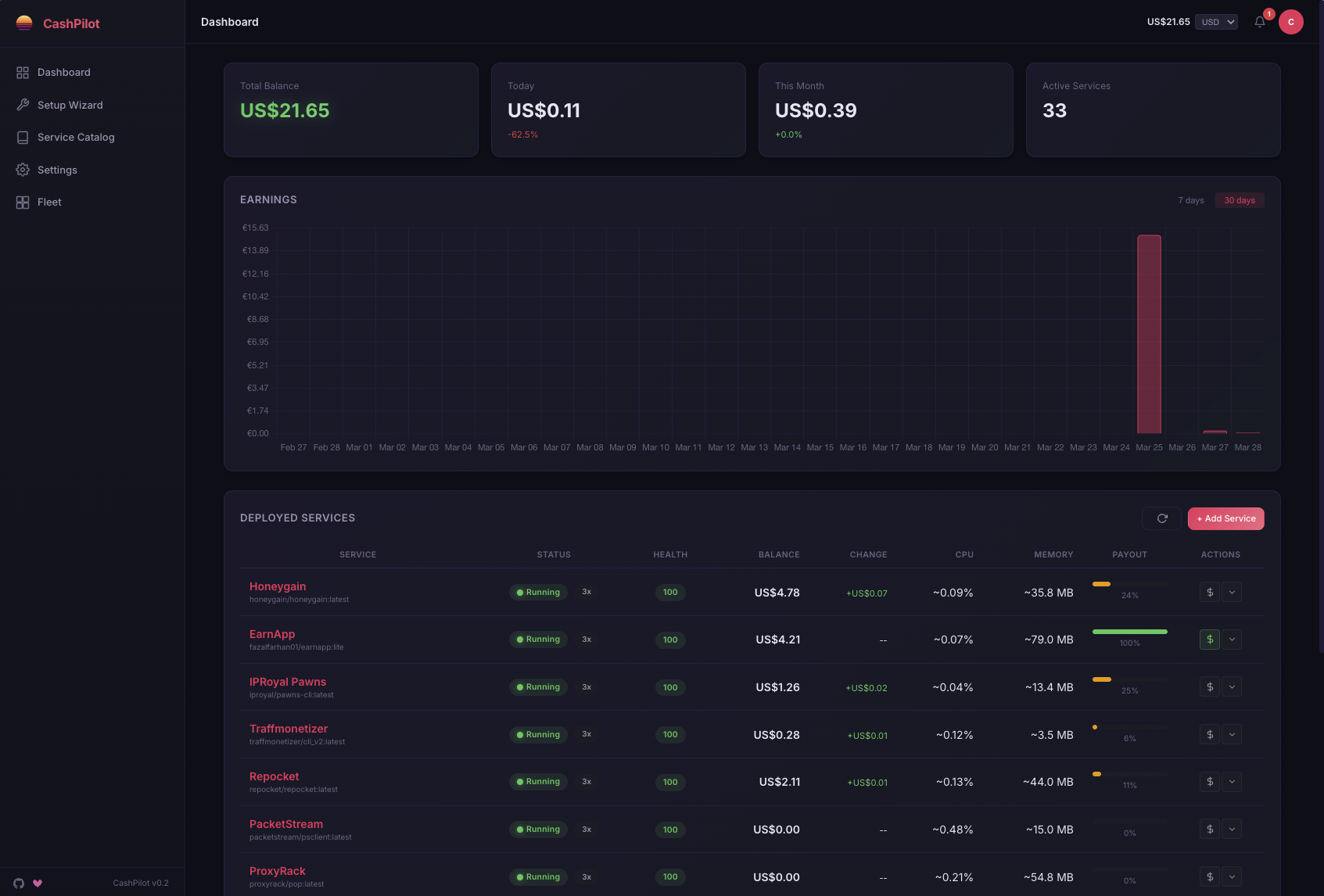
Features
- Starts a Docker service with one click from the catalog; no compose file to write, no YAML to edit.
- Keeps every balance as history: 15 providers are read by built-in collectors every hour, so "running but not earning" shows as a flat line.
- Treats a balance drop as a probable payout and asks you to confirm it; nothing is counted as income by guess.
- Runs a fleet: one worker per server, one dashboard for all of them, every figure per server and per service.
- Checks before you deploy whether the machine fits (residential IP, GPU, disk), and warns when a stored credential is about to expire.
- Encrypts stored credentials at rest; only the worker touches the Docker socket, and the dashboard listens on loopback until you say otherwise.
- Runs on x86-64 and ARM: Raspberry Pi, Apple Silicon and ARM cloud boxes.
- Works from a phone: the dashboard, catalog and wizard are responsive, dark by default, with a light theme.
- Exports Prometheus metrics, and a compose file per service if you would rather run it yourself.
Quick Start
curl -fsSLO https://raw.githubusercontent.com/GeiserX/CashPilot/main/docker-compose.yml
docker compose up -d
docker compose logs cashpilot-ui | grep -i "setup token"
You need Docker on a Linux, macOS or Windows host, amd64 or arm64. Open http://localhost:8080: the welcome page asks for the token from that log line, creates the owner account and opens the setup wizard. The dashboard listens on loopback only and the worker's port 8081 is never published, because both can command the Docker socket; Getting started covers remote access, updating and pinning a version.
Supported Services
40 active services and 1 in beta, 52 catalogued. Each has a [guide](https://geiserx.github.io/CashPilot/guides/) with what it needs, whether it runs in Docker, the payout method and the minimum payout. Services that need a residential IP are marked there; the rest run on a VPS.Run in Docker by CashPilot (17): Honeygain, ProxyLite, Earn.fm, Traffmonetizer, EarnApp *, Repocket, IPRoyal Pawns, Anyone Protocol, Bitping, MystNodes, PacketStream, ProxyBase, ProxyBase Markets, ProxyRack, Sia (hostd), Storj, URnetwork
Browser extension or desktop app, tracked (18): Bytelixir, Bytebenefit, Dawn Internet, Deeper Network, Ebesucher, Gradient Network, Grass, Helium, Nodepay, Noderr Micronodes, Nodle, PassiveApp, Sentinel dVPN, Spide, Teneo Protocol, Theta Edge Node, Titan Network, Uprock
GPU compute, tracked (6): Flux, Golem Network, io.net, Nosana, Salad, Vast.ai
* EarnApp's help centre prohibits Docker containers, VMs, hosting services and home servers, with account termination and cancellation of pending payments as the stated penalty, which is exactly how CashPilot deploys it. Read the guide before deploying.
These lists are generated from the service YAML by
scripts/generate_readme_tables.pyand checked in CI, so they cannot drift from the catalog. Edit the YAML, not the list.
Disclosure. The signup links in CashPilot and in this README are referral links. If you sign up through one, the maintainer may earn a commission, at no cost to you, which helps fund CashPilot's development. To avoid them, sign up on the provider's own website instead.
FAQ
How much can I earn? It depends on your country, your ISP, and how many devices and services you run. One home server running 10 to 15 services makes about $30 to $100 a month; more servers, or GPU compute, add to that. The dashboard shows what you really made.
Is bandwidth sharing safe? These services route other people's traffic (market research, ad verification, price checks) through your connection, so strangers use your IP. Read each provider's terms, and read Protecting your home network before running them on a LAN you care about. This is not legal advice.
Can I run it on a VPS? The services marked residential-only will not pay, or will ban, a datacenter IP. The others run anywhere and are the way to add machines without more home hardware.
Where are my credentials? Encrypted at rest in SQLite with a key at /data/.fernet_key. Back that file up: without it nothing can be decrypted. More in the FAQ.
Documentation
Full documentation: geiserx.github.io/CashPilot.
- Getting started: install, first run, updating, pinning a version
- Configuration: every setting and which source wins; fleet management and running on ARM
- Security: security defaults, protecting your home network, network isolation
- Service guides: one page per service, plus discontinued services
- Operations: backup and restore, backing up node identities, Prometheus metrics
- How it works: the UI and worker split
- FAQ and how CashPilot compares
- Development: adding a service, running the tests; related projects
Upgrading an existing install? Read UPGRADING.md first; it lists only the releases that need you to do something. Release notes are on GitHub Releases.
License
GPL-3.0-or-later. Sergio Fernandez, 2026.
Requirements
Categories
Download Statistics
Related apps
Explore more like this
Explore allDetails
drumsergio/cashpilot-worker:latestRuntime arguments
- Network
bridge- Privileged
- false
Template configuration
Port for the worker mini-UI and API
- Target
- 8081
- Default
- 8081
Docker socket for container management. Required.
- Target
- /var/run/docker.sock
- Default
- /var/run/docker.sock
Worker configuration and state persistence
- Target
- /data
- Default
- /mnt/user/appdata/cashpilot-worker
Timezone (e.g. America/New_York, Europe/London)
- Default
- America/New_York
URL of the CashPilot UI instance (e.g. http://192.168.1.100:8080). Worker sends heartbeats here.
- Target
- CASHPILOT_UI_URL
- Default
- http://192.168.1.100:8080
Shared API key for UI authentication. Must match the key set on the CashPilot UI.
- Target
- CASHPILOT_API_KEY
Human-readable name for this worker shown in the UI dashboard. Defaults to hostname if empty.
- Target
- CASHPILOT_WORKER_NAME
- Default
- unraid