
All apps · 0 apps

calibre-web-automated-book-downloader
Docker app from Nodiaque's Repository
Overview
Readme
View on GitHub📚 Shelfmark: Book Search & Request Tool
[!NOTE] Shelfmark is feature stable and maintained on a best-effort basis. Bug fixes, security updates, and small quality-of-life improvements are still shipped, and pull requests are reviewed — including new features. There is no roadmap for new features for now.
Shelfmark is a self-hosted web interface for searching and requesting books and audiobooks across multiple sources. Bring your own sources, metadata providers, and download clients to build a single hub for your digital library. Supports multiple users with a built-in request system, so you can share your instance with others and let them browse and request books on their own.
Works great alongside the following library tools, with support for automatic imports:
✨ Features
- One-Stop Interface - A clean, modern UI to search, browse, and download from multiple configured sources in one place
- Multiple Sources - Configurable web, torrent, usenet, and IRC source support
- Audiobook Support - Full audiobook search and download with dedicated processing
- Flexible Search - Search metadata providers (Hardcover, Open Library, Google Books) for rich book and audiobook discovery, or query configured sources directly
- Multi-User & Requests - Share your instance with others, let users browse and request books, and manage approvals with configurable notifications
- Authentication - Built-in login, OIDC single sign-on, proxy auth, and Calibre-Web database support
- Real-Time Progress - Unified download queue with live status updates across all sources
- Network Flexibility - Configurable proxy support, DNS settings, and optional Cloudflare handling for protected sources
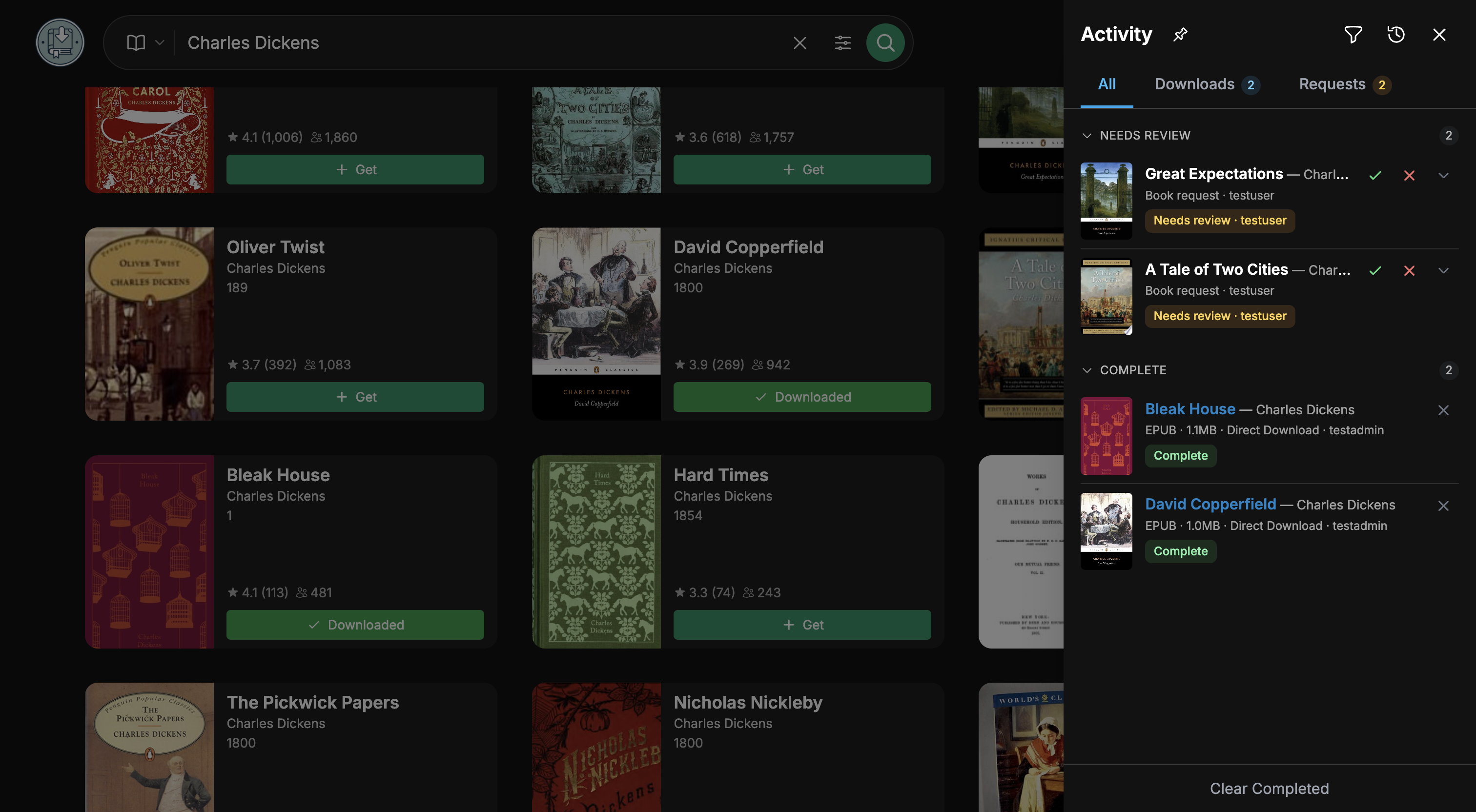
🖼️ Screenshots
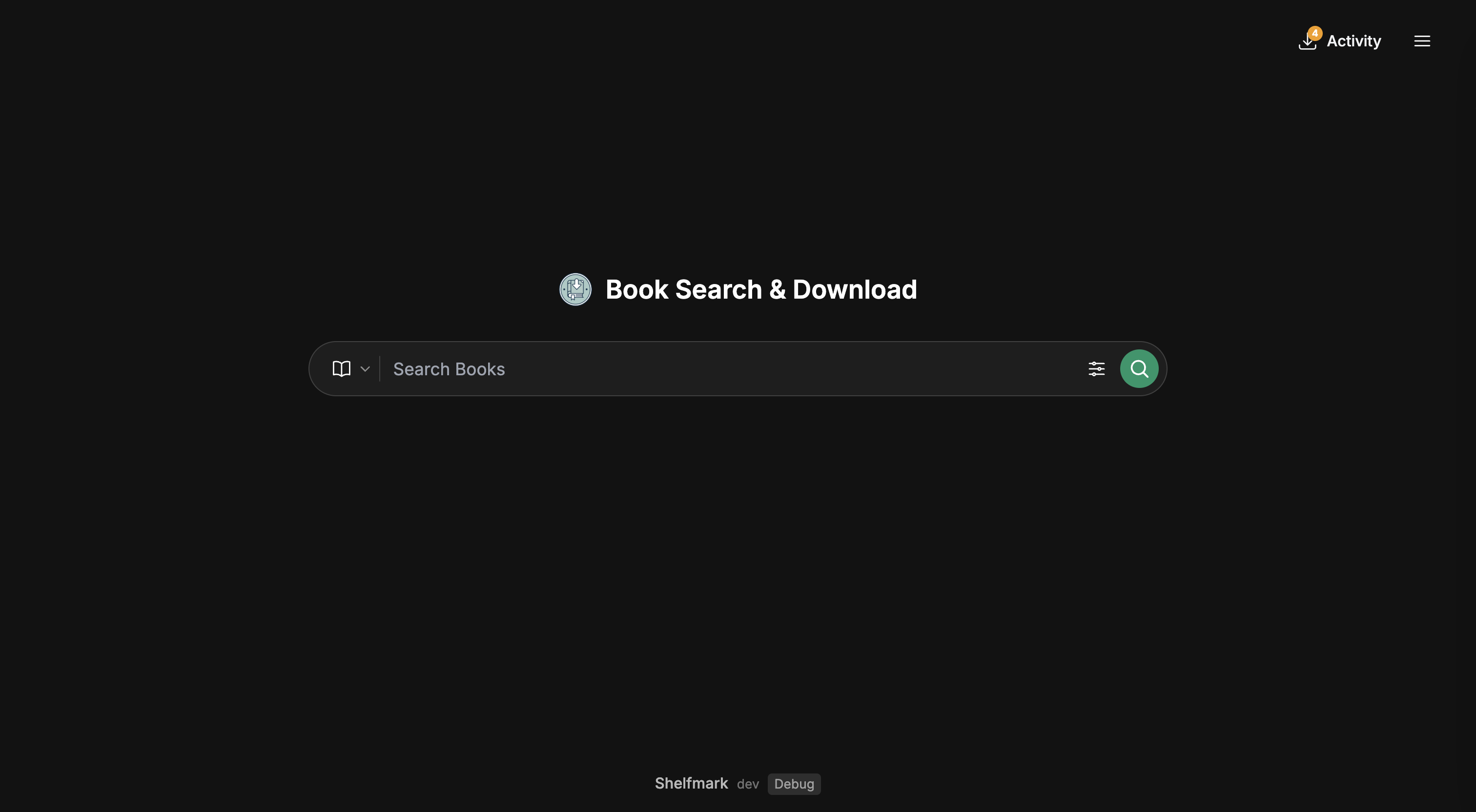
Home screen
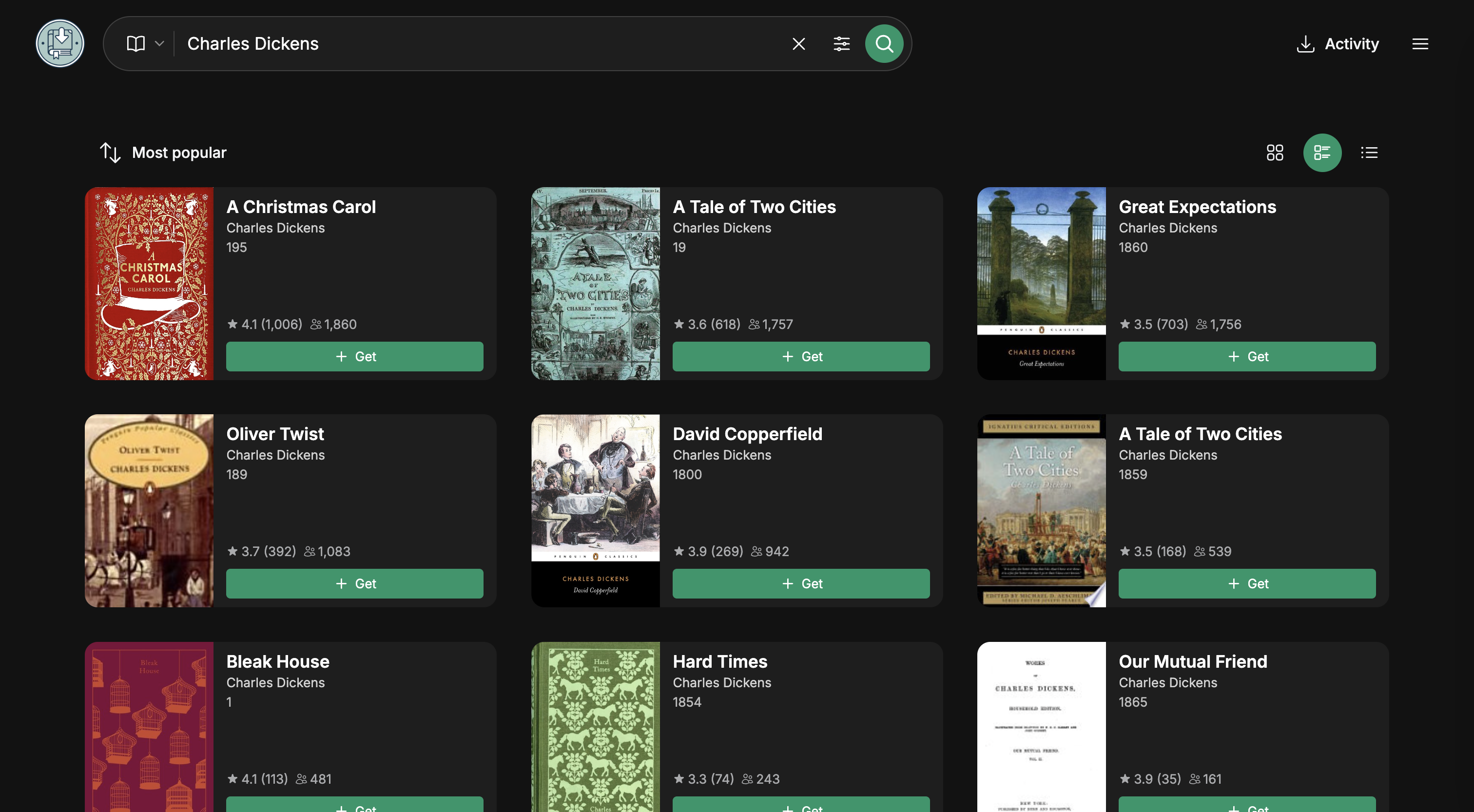
Search results
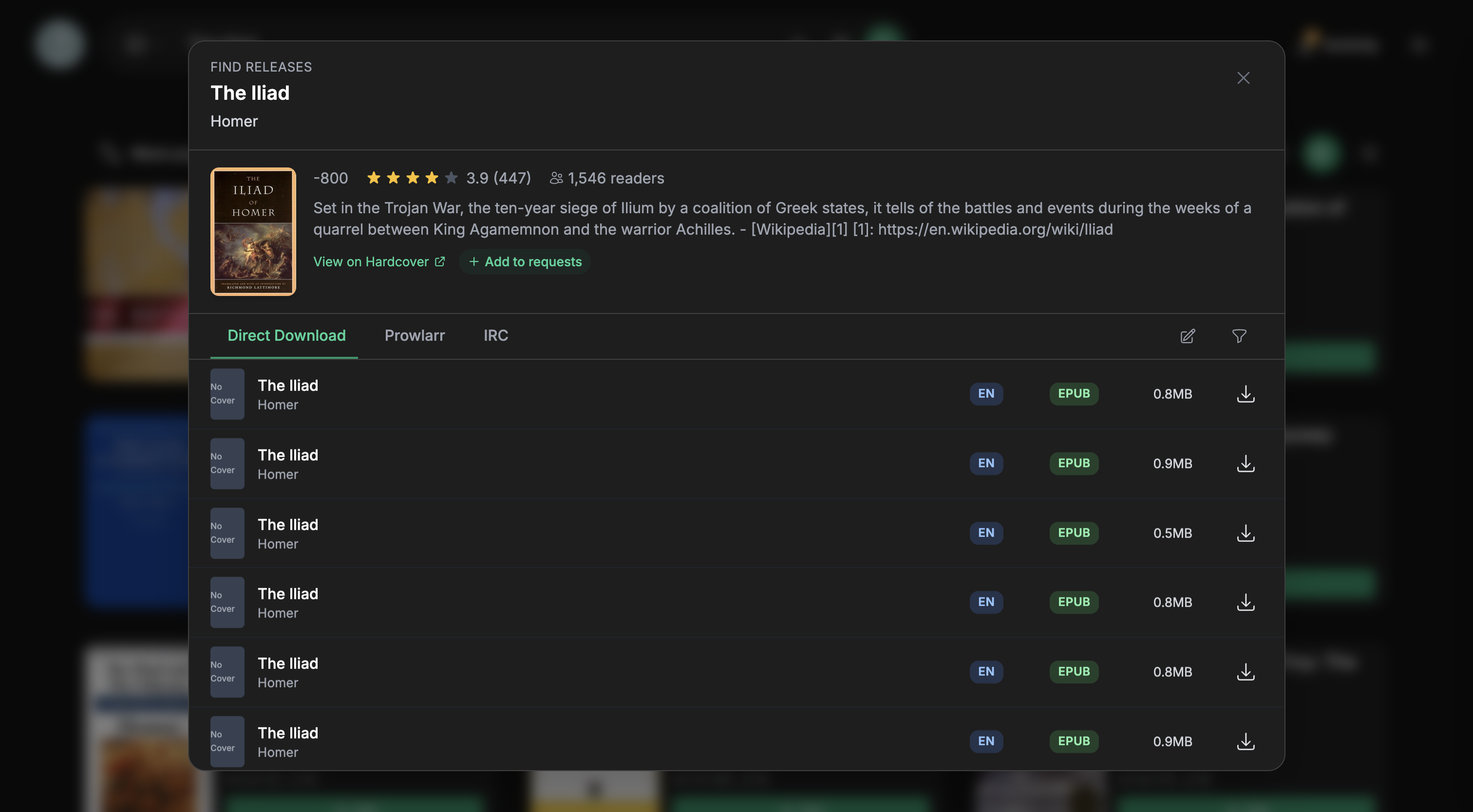
Multi-source downloads
Download queue
🚀 Quick Start
Prerequisites
- Docker & Docker Compose
- At least 2 GB of RAM available to the container when using the standard image — see Memory Requirements
Installation
Download the docker-compose file:
curl -O https://raw.githubusercontent.com/calibrain/shelfmark/main/compose/docker-compose.ymlStart the service:
docker compose up -dOpen
http://localhost:8084
Open the web interface, then configure the sources and settings you want to use.
Volume Setup
volumes:
  - /your/config/path:/config # Config, database, and artwork cache directory
  - /your/download/path:/books # Downloaded books
  - /client/path:/client/path # Optional: For Torrent/Usenet downloads, match your client directory exactly.
Tip: Point the download volume to your CWA or Grimmory ingest folder for automatic import.
Note: CIFS shares require
nobrlmount option to avoid database lock errors.
Non-root container mode
- Start the container as
1000:1000with Dockeruser: "1000:1000"ordocker run --user 1000:1000. - For Kubernetes, set
runAsUser: 1000,runAsGroup: 1000, andrunAsNonRoot: truetogether. PUID/PGIDkeep the default root startup flow.- Mounted paths must already be writable by
1000:1000. USING_TOR=truerequires root startup.
⚙️ Configuration
Search Modes
Direct
- Queries configured sources directly
Universal (recommended)
- Search via metadata providers (Hardcover, Open Library, Google Books) for richer results
- Aggregates releases from multiple configured sources
- Full audiobook support
Hardcover API Key
Hardcover powers metadata search in Universal mode. Create a token at
hardcover.app/account/api — current keys start with hc_pat_
and are far shorter than the JWTs Hardcover issued before August 2026.
Tick these seven scopes on the token screen:
| Scope | Used for |
|---|---|
read:catalog |
Metadata search, plus book, edition, author and series lookups |
read:library |
Your reading status and shelf counts |
read:lists |
Your lists and the books on them |
read:me:content |
Test Connection and the "Connected as" label |
read:users |
Usernames shown alongside lists |
write:library |
Setting a book's reading status from Shelfmark |
write:lists |
Adding and removing books from lists, including auto-remove on download |
The two write: scopes matter only if you set reading status from Shelfmark or leave
Auto-Remove from List on Download enabled (it is on by default) — without them those actions
fail silently. Everything else Hardcover offers (journal, goals, reviews, prompts, notifications,
account) can stay unticked. The all scope works too, but it grants full account access including
deletion, so prefer the list above.
Environment Variables
Environment variables work for initial setup and Docker deployments. They serve as defaults that can be overridden in the web interface.
| Variable | Description | Default |
|---|---|---|
FLASK_PORT |
Web interface port | 8084 |
INGEST_DIR |
Book download directory | /books |
TZ |
Container timezone | UTC |
PUID / PGID |
Runtime user/group for the default root-startup flow (also supports legacy UID/GID) |
1000 / 1000 |
SEARCH_MODE |
direct or universal |
universal |
USING_TOR |
Enable Tor routing (requires root startup) | false |
USING_WIREGUARD |
Enable WireGuard VPN egress with kill-switch (requires root startup) | false |
WIREGUARD_CONFIG |
Path to the mounted wg-quick config | /config/wg0.conf |
WIREGUARD_INTERFACE |
WireGuard interface name | wg0 |
LAN_NETWORK |
Comma-separated CIDRs kept off the tunnel so the WebUI / internal clients stay reachable | 127.0.0.0/8,10.0.0.0/8,172.16.0.0/12,192.168.0.0/16 |
WIREGUARD_ENFORCE_DNS |
Pin the resolver (via WIREGUARD_DNS, else the config's DNS =) so DNS can't silently fall back to an off-tunnel path. Designed for a trusted LAN resolver kept reachable via LAN_NETWORK (query leaves over the LAN; download still egresses via the tunnel) — it does not force queries through the tunnel. Docker's embedded resolver (127.0.0.11) is preserved when present so container-name resolution keeps working; pin its upstream via the container's dns: list. Fails closed if no resolver is available or /etc/resolv.conf is not writable. |
true |
WIREGUARD_DNS |
Explicit resolver(s) to pin (comma/space separated). Use when the VPN's pushed DNS filters domains you need; point at a resolver reachable via the tunnel or an allowed LAN resolver. | (unset; uses config DNS =) |
WIREGUARD_DISABLE_IPV6 |
Strip IPv6 from the tunnel config (many container kernels lack the ip6tables raw table wg-quick needs) and remove IPv6 as a leak surface. |
true |
WIREGUARD_ALLOW_IPV6_LEAK |
Escape hatch: continue even when an IPv6 kill-switch can't be installed AND IPv6 can't be disabled. Only set if the container has no IPv6 connectivity. | false |
WIREGUARD_ALLOW_WEBUI_OFFTUNNEL |
Opt-in off-tunnel WebUI reachability. Default (false) keeps the kill-switch strictly fail-closed: the only off-tunnel egress is loopback, the tunnel device and the LAN allowlist. Set true only if a non-LAN client (e.g. a public reverse proxy on another segment) must reach the WebUI; it permits app-server replies (--sport FLASK_PORT, conntrack REPLY) off-tunnel — server replies only, never client-initiated egress. LAN clients never need it (covered by LAN_NETWORK). |
false |
WIREGUARD_STALE_AFTER |
Seconds since the last handshake before the healthcheck bounces the tunnel. | 180 |
See the full Environment Variables Reference for all available options.
Some of the additional options available in Settings:
- Prowlarr - Configure indexers and download clients to download books and audiobooks
- Additional audiobook sources - Configure additional sources for audiobook discovery
- Direct Download mirrors - Supply your own Anna's Archive mirror URLs; Auto mode tries them in the order listed. The
annas-archive.isdomain does not currently work as a source — useannas-archive.glinstead (checked August 2026; mirror availability changes) - IRC - Add details for IRC book sources and download directly from the UI. Most networks serve audiobooks from the same channel as ebooks (on
irc.irchighway.netthat's#ebooks, while#bookzis effectively inactive), so leave the separate audiobook channel blank unless your network actually indexes one. IRC audiobooks usually arrive as ZIP/RAR archives — keep those enabled under Supported Audiobook Formats or the releases are filtered out of results - Library Link - Add a link to your Calibre-Web or Grimmory instance in the UI header
- File processing - Customiseable download paths, file renaming and directory creation with template-based renaming
- Network Settings - Custom proxy support (SOCKS5 + HTTP/S) and configurable DNS
- Format & Language - Filter downloads by preferred formats, languages and sorting order
- Metadata Providers - Configure API keys for Hardcover, Open Library, etc.
🐳 Docker Variants
Standard
docker compose up -d
The full-featured image with all network capabilities included.
Memory Requirements
The standard image ships a real Chromium browser, which it launches to solve Cloudflare challenges for Direct Download. Chromium needs room to run:
- 2 GB of RAM available to the container is a safe minimum; 1 GB or less is where problems usually start
- Only relevant if you use Direct Download. Prowlarr, IRC and audiobook sources don't start the browser
When the container is starved of memory, Chromium fails to start and every Direct Download fails with unrelated-looking errors — repeated 403 detected; switching to bypasser followed by No download URL found, and downloads that never complete. If you're seeing that, check the container's memory limit and the host's free memory before suspecting your ISP or DNS.
If you can't spare the memory, use the Lite image with an external resolver (e.g. FlareSolverr) running elsewhere.
Tor Routing
Optional Tor support for network privacy:
curl -O https://raw.githubusercontent.com/calibrain/shelfmark/main/compose/docker-compose.tor.yml
docker compose -f docker-compose.tor.yml up -d
Notes:
- Requires root startup
- Requires
NET_ADMINandNET_RAWcapabilities - Timezone is auto-detected from Tor exit node
- Custom DNS/proxy settings are ignored when Tor is active
WireGuard VPN Routing
Optional WireGuard support to route all external egress through a VPN tunnel with a fail-closed kill-switch:
curl -O https://raw.githubusercontent.com/calibrain/shelfmark/main/compose/docker-compose.wireguard.yml
# place your wg-quick config where the compose mounts /config, as wg0.conf
docker compose -f docker-compose.wireguard.yml up -d
Notes:
- Requires root startup
- Requires
NET_ADMINandNET_RAWcapabilities - Mount a standard wg-quick config at
WIREGUARD_CONFIG(default/config/wg0.conf) - All non-LAN egress is forced through the tunnel; if the tunnel drops, external traffic fails closed while LAN ranges (WebUI, Prowlarr, qBittorrent) stay reachable
- IPv4 and IPv6 both fail closed. On kernels without a usable
ip6tables, disable IPv6 for the container (sysctls: net.ipv6.conf.all.disable_ipv6=1, as in the compose example) or the container refuses to start rather than risk an IPv6 leak - A supervised healthcheck bounces the tunnel if the handshake goes stale, and refreshes the endpoint allow rules so a roaming/rotated peer endpoint can reconnect
- Mutually exclusive with
USING_TOR - DNS trust:
WIREGUARD_DNSmust be a resolver you trust on a trusted network segment. When it is a LAN resolver (kept reachable off-tunnel byLAN_NETWORK), the query to that resolver leaves as plaintext UDP/53 on the LAN — the resolver is responsible for encrypting upstream. Two resolver paths exist: (1) when Docker's embedded resolver (127.0.0.11) is present it is preserved so container names (Prowlarr, qBittorrent) resolve — you MUST pin its upstream to a trusted resolver via the container's composedns:list, sinceWIREGUARD_DNScannot repoint the embedded resolver from inside the container; (2) otherwiseWIREGUARD_DNS/the configDNS =line is written to/etc/resolv.conf. SettingWIREGUARD_ENFORCE_DNS=falseis a foot-gun: with no embedded resolver present the container then uses its inherited resolver, which forwards to the Docker daemon's upstream off-tunnel, leaking your DNS. Leave enforcement on unless you have pinned the resolver another way.
Lite
A lighter image without the built-in browser automation. Ideal for:
- External services - Already running FlareSolverr or similar for other applications
- Alternative sources - Using Prowlarr, IRC, or other configured sources
- Audiobooks - Using Shelfmark primarily for audiobooks
- Constrained hosts - No bundled browser, so it runs comfortably below the standard image's memory requirements
curl -O https://raw.githubusercontent.com/calibrain/shelfmark/main/compose/docker-compose.lite.yml
docker compose -f docker-compose.lite.yml up -d
If you need browser-based access with the Lite image, configure an external resolver in Settings.
🔐 Authentication
Authentication is optional but recommended for shared or exposed instances. Multiple authentication methods are available in Settings:
1. Single Username/Password
2. Proxy (Forward) Authentication
Proxy auth trusts headers set by your reverse proxy (e.g. X-Auth-User). Ensure Shelfmark is not directly exposed, and configure your proxy to strip/overwrite these headers for all inbound requests.
3. OIDC (OpenID Connect)
Integrate with your identity provider (Authelia, Authentik, Keycloak, etc.) for single sign-on. Supports PKCE flow, auto-discovery, group-based admin mapping, and auto-provisioning of new users.
4. Calibre-Web Database
If you're running Calibre-Web, you can reuse its user database by mounting it:
volumes:
  - /path/to/calibre-web/app.db:/auth/app.db:ro
Multi-User Support
With any authentication method enabled, Shelfmark supports multi-user management with admin/user roles. Users can have per-user settings for download destinations, email recipients, and notification preferences. Non-admin users only see their own downloads and can submit book requests for admin review. Admins can configure request policies per source to control whether users can download directly, must submit a request, or are blocked entirely.
See API Access to call the API with a static key from scripts and integrations.
Project Scope
Shelfmark is a manual search and download tool, the entry point to your book library, not a library manager. It finds books, downloads them, and sends them to a configured destination. That's the full scope.
Shelfmark intentionally does not:
- Track or manage your library - it doesn't know or care what you already own
- Integrate with library software - what happens after delivery is up to your library tool
- Monitor authors, series, or new releases - there is no background automation
- Queue future downloads - if a book isn't available now, Shelfmark won't watch for it
These are non-goals, not missing features.
Contributing
Shelfmark's core feature set is complete.
Pull requests are welcome and all of them get reviewed, new features included. If you want a feature, the fastest path is to send a PR for it rather than to file a request.
Feature requests that fall outside the project scope (library integration, automation, collection management) will be closed, and PRs implementing them won't be merged. If you're unsure whether something fits, open a discussion first.
Health Monitoring
The application exposes a health endpoint at /api/health (no authentication required). Add a health check to your compose:
healthcheck:
  test: ["CMD", "curl", "-sf", "http://localhost:8084/api/health"]
  interval: 30s
  timeout: 30s
  retries: 3
Logging
Logs are available via:
docker logs <container-name>/var/log/shelfmark/inside the container (whenENABLE_LOGGING=true)
Log level is configurable under Settings → Advanced or via the LOG_LEVEL environment
variable (DEBUG, INFO, WARNING, ERROR, CRITICAL; case-insensitive, defaults to
INFO). The environment variable wins over the setting, and DEBUG=true forces DEBUG
regardless of either. Changes take effect on restart.
Development
# Quality checks
make checks              # Run ALL static analysis (frontend + Python)
make python-checks       # Run Ruff, BasedPyright, and Vulture
make install-python-dev  # Sync Python runtime + dev tools with uv

# Frontend development
make install     # Install dependencies
make dev         # Start Vite dev server (localhost:5173)
make build       # Production build
make frontend-typecheck  # TypeScript checks

# Backend (Docker)
make up          # Start backend via docker-compose.dev.yml
make down        # Stop services
make refresh     # Rebuild and restart
make restart     # Restart container
The frontend dev server proxies to the backend on port 8084.
License
MIT License - see LICENSE for details.
⚠️ Disclaimer
Shelfmark is a search interface that displays results from external metadata providers and sources. It does not host, store, or distribute any content. The developers are not responsible for how the tool is used or what is accessed through it.
Users are solely responsible for:
- Ensuring they have the legal right to download any material they access
- Complying with copyright laws and intellectual property rights in their jurisdiction
- Understanding and accepting the terms of any sources they configure
Use of this tool is entirely at your own risk.
Support
For issues or questions, please file an issue on GitHub.
Categories
Related apps
Explore more like this
Explore allDetails
ghcr.io/calibrain/calibre-web-automated-book-downloader:latestRuntime arguments
- Web UI
http://[IP]:[PORT:8084]- Network
bridge- Shell
bash- Privileged
- false
Template configuration
Appdata folder
- Target
- /var/log/cwa-book-downloader
- Default
- /mnt/user/appdata/calibre-web-automated-book-downloader/
- Value
- /mnt/user/appdata/calibre-web-automated-book-downloader/
Container external port. Follow FLASK PORT. Default: 8084
- Target
- PORT
- Default
- 8084
- Value
- 8084
Default: 8084
- Target
- 8084
- Default
- 8084
- Value
- 8084
FLASK port. If you change this, you need to recreate the
- Default
- 8084
- Value
- 8084
Web interface binding. Default: 0.0.0.0
- Default
- 0.0.0.0
- Value
- 0.0.0.0
Mount should align with your Calibre-Web-Automated ingest folder.
- Target
- /cwa-book-ingest
- Default
- /mnt/user/calibre_library/import/
- Value
- /mnt/user/calibre_library/import/
Download directory inside the docker. Default: /cwa-book-ingest. If you change this, you must change the path for 'Calibre Web Automated Import Folder'
- Target
- INGEST_DIR
- Default
- /cwa-book-ingest
- Value
- /cwa-book-ingest
Disable CF bypass and use alternative links instead. Default: true
- Default
- false
- Value
- false
Maximum download retry attempts. Default: 3
- Default
- 3
- Value
- 3
Retry delay (seconds). Default: 5
- Default
- 5
- Value
- 5
Processing loop delay (seconds)
- Default
- 5
- Value
- 5
Supported book formats. PDF is currently not supported. Default: epub,mobi,azw3,fb2,djvu,cbz,cbr
- Default
- epub,mobi,azw3,fb2,djvu,cbz,cbr
- Value
- epub,mobi,azw3,fb2,djvu,cbz,cbr
Preferred language for books. Default: en
- Default
- en
- Value
- en
Used to enable authentication to the web gui using the same user/pass as calibre. Remove to disable authentication. MUST NOT BE EMPTY
- Target
- CWA_DB_PATH
Base URL of Annas-Archive (could be changed for a proxy). Default: https://annas-archive.org
- Default
- https://annas-archive.org
- Value
- https://annas-archive.org
Optional Donator key for Anna's Archive fast download API
Use book title as filename instead of ID
- Target
- USE_BOOK_TITLE
- Default
- false
- Value
- false
Debug mode toggle. Default: false
- Default
- false
- Value
- false
Proxy URLs for AA, comma separated. Default empty
- Target
- AA_ADDITIONAL_URLS
HTTP PRoxy URL
- Target
- HTTP_PROXY
HTTPS proxy URL
- Target
- HTTPS_PROXY
Custom DNS IP
- Target
- CUSTOM_DNS
Use DNS over HTTPS
- Target
- USE_DOH
- Default
- false
- Value
- false
Path to an executable script that runs after each download before the file is moved to ingest directory
- Target
- CUSTOM_SCRIPT
- Default
- 99
- Value
- 99
- Default
- 100
- Value
- 100
DEBUG | INFO | WARNING | ERROR | CRITICAL
- Target
- LOG_LEVEL
- Default
- info
- Value
- LOG_LEVEL
Enable log file in /var/log/cwa-book-downloader
- Target
- ENABLE_LOGGING
- Default
- true
- Value
- true