

CalendarIT
Docker app from Richy1989's Repository
Overview
Readme
View on GitHub

CalendarIT
A lightweight, modern calendar. It does what you want — and just that.
No feeds to scroll, no AI to argue with, no "productivity suite" to sign up for. CalendarIT is a self-hosted calendar that's just that — a beautiful, easy-to-use calendar. Try it, you'll like it.
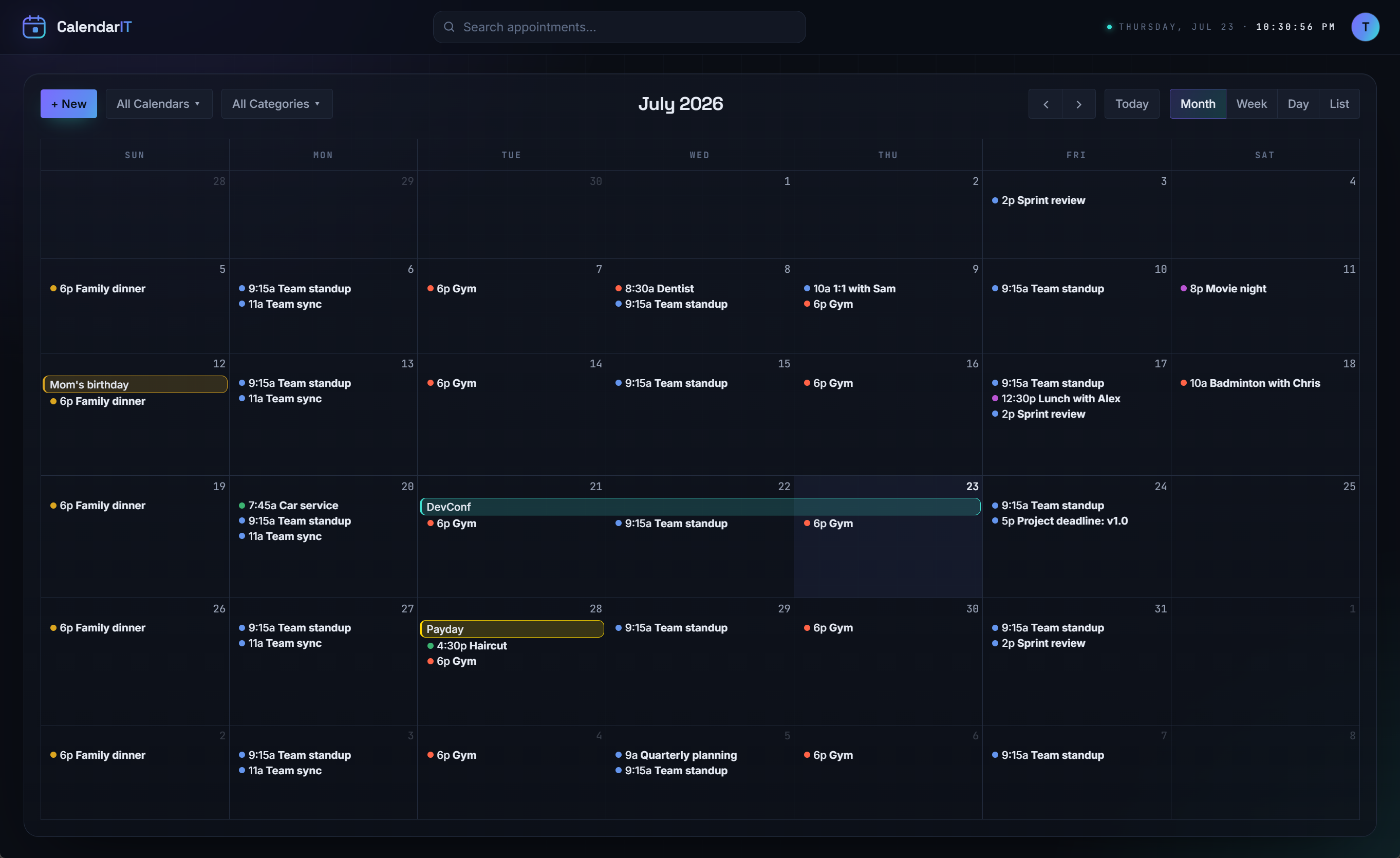

Why
Most calendar apps grew into something else - CalendarIT deliberately stays small:
- Good-looking and simple. Easy on the eyes, easy to use — the combination I couldn't find anywhere else.
- Yours. Self-hosted. Your events live in your database, on your server.
- Standards-first. Plain iCalendar (
.ics) and CalDAV, so it talks to the tools you already have instead of locking you in. - Quiet. A clean, dark, keyboard-friendly UI that gets out of the way.
If a feature doesn't help you keep track of your time, it doesn't belong here.
What it does
- 📅 Events, the fast way — drag on the grid to create, double-click or right-click, drag to move or resize — with undo/redo for every change.
- 🗂️ Multiple calendars — split Personal from Work, toggle which are shown, move events between them; each syncs as its own calendar over CalDAV.
- 🔁 Recurring events — daily, weekly, monthly, yearly, or custom: every N days/weeks/months (shift patterns like "every 4 weeks on Mon and Tue"), monthly on "the second Tuesday", ending on a date or after N times. Edit or move a single occurrence without touching the rest of the series, and it syncs to your phone that way too.
- ⏰ Reminders — by email or browser notification (Web Push), set per appointment; they also sync to your phone as calendar alarms (VALARM) over CalDAV.
- 📱 Made for phones too — a responsive layout with a thumb-reachable toolbar, and swipe left/right to page between views.
- 🌍 Time zones — stored correctly, displayed in yours, DST-safe.
- 🎨 Categories — named colors (Work, Family, …) managed in Settings; recolor a
category and every appointment in it follows. Give a whole calendar a category (say, an
imported holiday calendar) and everything in it without one of its own takes that color. Syncs via the iCalendar
CATEGORIES+COLORproperties; a color picked on the phone maps back to the nearest category. - 🔎 Search — find any appointment by title or location, keyboard-first.
- 📲 Phone sync — a built-in CalDAV server, so any CalDAV-capable app can subscribe and sync two-way.
- 📄 iCal import / export — pick which calendars to export; import into any calendar or a new one.
- 🔐 Accounts — email + password, JWT sessions with rotating refresh tokens, password change and self-service reset by email, and a switch to close sign-up. See every signed-in device in Settings and sign any of them out — instantly.
- 📮 Reliable mail — invitations, replies and reminders are queued and sent in the background through your own mail account, retried while your mail server is down, and listed in Settings with what happened to each.
 |
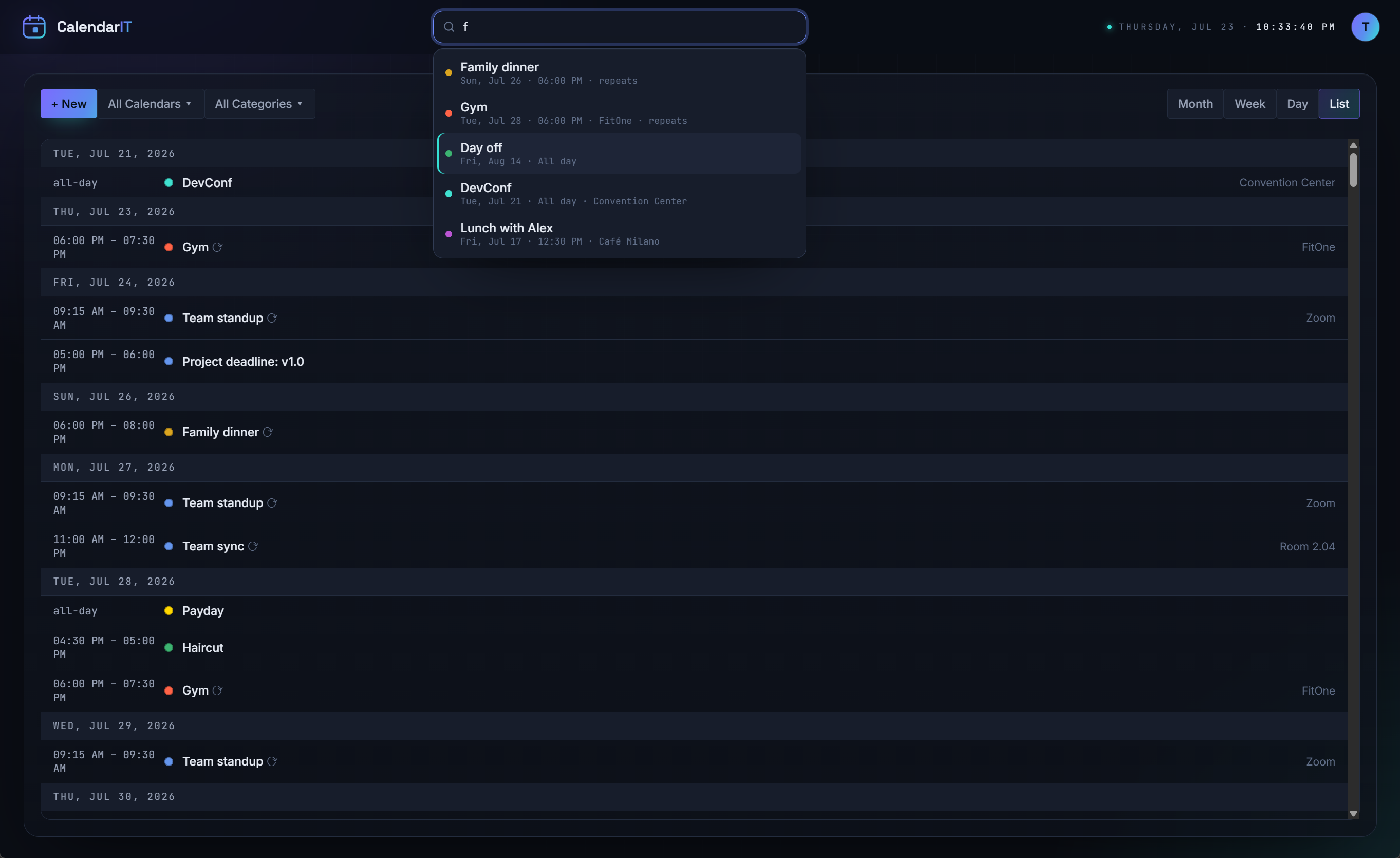 |
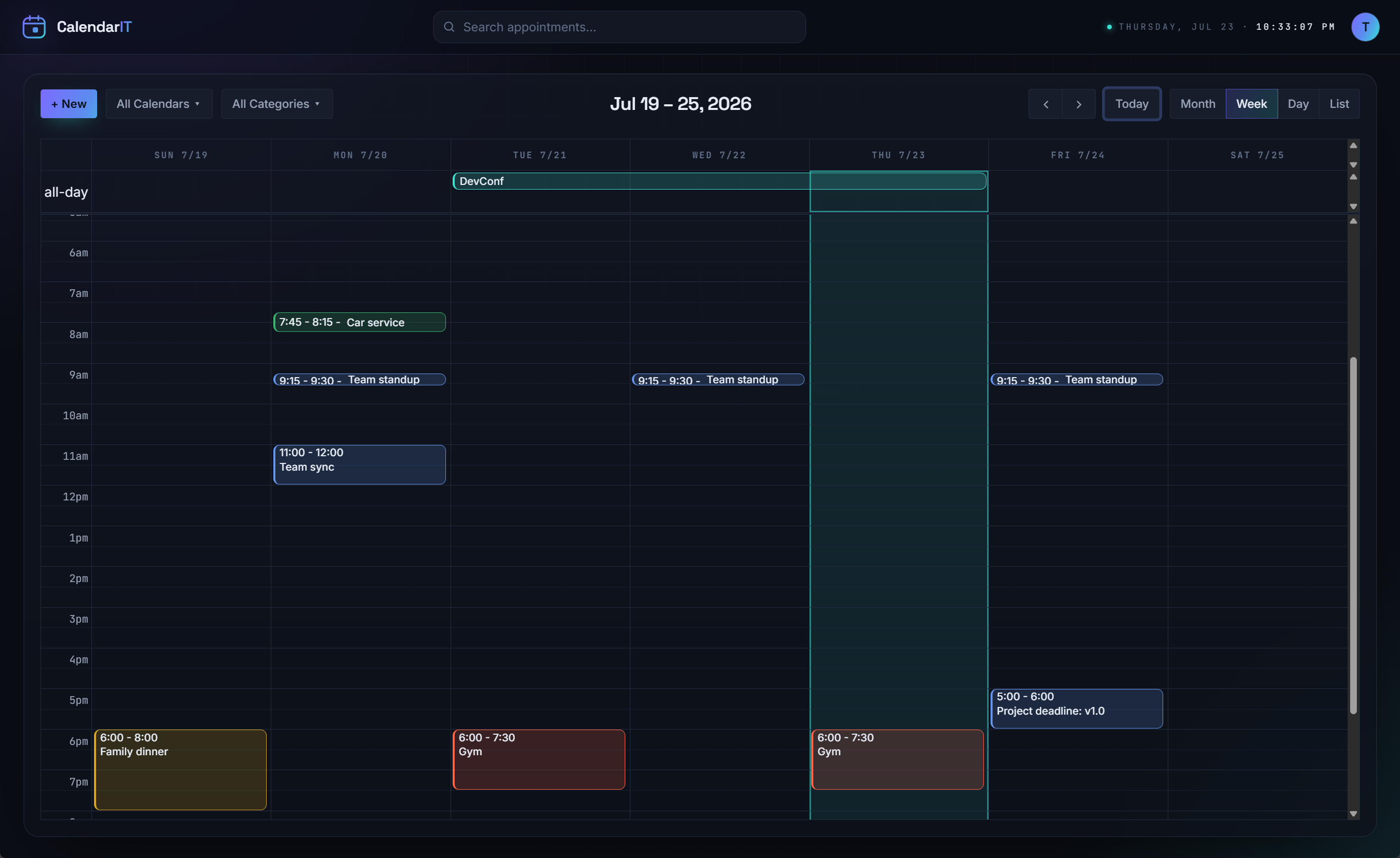
| Week View. | List View, and search for appointments (works in all views). |
Quick start
With Docker
Set a signing key — Compose reads it from a .env in the same folder:
echo "JWT_SIGNING_KEY=$(openssl rand -base64 48)" > .env
A minimal docker-compose.yml — one container on the built-in SQLite database, no separate DB
needed (the repo ships a fuller, commented version that uses PostgreSQL, with its own
.env.example):
services:
  app:
    build: .                       # or an image you've built/pushed
    restart: unless-stopped
    environment:
      # DATABASE_PROVIDER defaults to Sqlite — no separate database service required.
      APPDATA_PATH: /appdata       # SQLite file, avatars, and auto-generated keys live here
      JWT_SIGNING_KEY: ${JWT_SIGNING_KEY:?set JWT_SIGNING_KEY in .env}   # required — min 32 chars
      # Optional extras (see the Configuration table below): DISABLE_REGISTRATION,
      # PUBLIC_BASE_URL (for password-reset emails), FORWARDED_PROXY_HOPS, VAPID_*, …
    volumes:
      - appdata:/appdata
    # The app serves plain HTTP on :8080 and is deliberately NOT published to the host — put a
    # TLS-terminating reverse proxy in front and point it at http://app:8080 (CalDAV clients
    # effectively require HTTPS). To reach it directly from the host, publish to loopback only:
    #   ports: ["127.0.0.1:8080:8080"]

volumes:
  appdata:
Then start it:
docker compose up --build # add -d to run in the background
Running Unraid? Ready-made templates live in deploy/ —
calendarit.unraid.xml (plain) and calendarit-traefik.unraid.xml (with Traefik
labels preconfigured).
Local development
# 1) backend  → http://localhost:5299
cd core/calendarITCore
dotnet run

# 2) frontend → http://localhost:5173  (proxies /api to the backend)
cd web
npm install
npm run dev
Regenerate the typed API client after changing the backend (with it running):
cd web && npm run gen:api
Configuration
Everything is set through environment variables:
| Variable | Purpose |
|---|---|
DATABASE_PROVIDER |
Sqlite (default) or Postgres — the shipped docker-compose.yml sets Postgres |
POSTGRES_CONNECTION |
Npgsql connection string (Postgres only) |
APPDATA_PATH |
Writable data dir (SQLite file, etc.) — /appdata |
JWT_SIGNING_KEY |
Required. ≥ 32 chars |
JWT_ISSUER / JWT_AUDIENCE |
Token issuer / audience |
DISABLE_REGISTRATION |
true closes public sign-up. Existing accounts are unaffected |
PUBLIC_BASE_URL |
Required for password reset. Origin used in reset links, e.g. https://calendar.example.com |
AUTH_RATE_LIMIT_PER_MINUTE |
Auth requests allowed per client IP per minute. Default 20 |
FORWARDED_PROXY_HOPS |
How many X-Forwarded-For hops to trust. Default 1 — see below |
Serilog__MinimumLevel__Default |
Log level (console-only, to stdout). Default Information |
NO_COLOR |
Set to anything to turn the log's colour off (the layout stays). Unset by default: docker logs and Unraid's log view show the colours |
VAPID_PUBLIC_KEY / VAPID_PRIVATE_KEY |
Web Push signing keys. Optional — auto-generated and persisted under APPDATA_PATH if unset. Set both to pin them across deployments |
VAPID_SUBJECT |
Contact URI in push messages, e.g. mailto:admin@example.com. Default mailto:admin@calendarit.local |
MAIL_HOST_POLICY |
Where users' mail servers may point: private (default — internet + LAN, never the server itself or link-local/cloud-metadata addresses), public (internet only; use when strangers can sign up), or any |
PUID / PGID |
User/group the app runs as inside the container. Default 1654 (the image's app user); the Unraid templates use 99/100 |
Set
PUBLIC_BASE_URLif you want self-service password reset. The address in a reset link is deliberately never read from the request:Hostis just a header, and the forgot-password endpoint is anonymous, so taking it from there would let anyone have a genuine reset link mailed to a host they control. With it unset, reset links aren't sent and the server logs why — sign-in, and everything else, is unaffected.
Set
FORWARDED_PROXY_HOPSto match your setup. The app trusts exactly this many proxies when reading the client's IP, which is what the auth rate limit and your logs key on. Count the proxies in front of the API: 1 when your reverse proxy talks to the app directly (thedocker-composesetup), 2 for the single-container image, where your proxy sits in front of the container's own nginx. Too low and every client looks like one address; too high and clients can forge their own.
Repeated bad passwords lock an account for 15 minutes after 10 failures — this covers the web login and CalDAV alike, since both check the same credentials. Worth knowing if you change your password: a phone still syncing with the old one will keep retrying and can lock you out, so update it in your CalDAV client too. (Completing a password reset lifts a lockout.)
The containers run the app as an unprivileged user. They start as root only long enough to take ownership of the data directory — including volumes written by older, root-run images — then drop to
PUID/PGID. Nothing to do when upgrading.
Close sign-up once everyone has an account. Set
DISABLE_REGISTRATION=true— your instance is reachable by anyone who knows the address, because that is what makes phone sync work. Existing accounts keep working and the Register tab disappears from the sign-in screen.
Forgot your password?
The sign-in screen has a Forgot your password? link that emails a single-use link, valid for
two hours. Because CalendarIT has no mail relay of its own, that email is sent through your own
connected mail account (Settings → Email) — set a Reminder From address there if you'd rather
it came from noreply@ than your personal address.
If the account has no working mail account, the link can't be emailed, so the server writes it to its log instead:
docker logs <container> | grep password-reset
That keeps a self-hosted instance recoverable without database surgery. It also means anyone who can read your container logs can take over an account — which is already true of anyone who can read your database, so it grants no new access, but it is worth knowing.
Email needs no environment variables. Invitations and reminders are sent through each user's own mail account, connected in-app under Settings → Email (SMTP + IMAP, password stored encrypted). Mail is queued and sent in the background — saving an event never waits on a mail server — and retried with backoff for a while if the server can't be reached; Settings → Email → Outgoing mail shows what was sent, what's waiting, and why anything failed. Users without a connected account simply get their reminders logged instead of emailed.
Browser notifications are opt-in per browser. Choose Browser on an appointment's reminder (or flip the toggle in Settings → General) and allow the permission prompt. They arrive even when CalendarIT isn't open, and need a secure origin — HTTPS in production, or
localhostin dev. No keys to configure: VAPID keys are generated automatically on first run (setVAPID_*only if you want to pin them across deployments).
Project layout
core/calendarITCore/   ASP.NET Core solution (API host + Domain/Application/Infrastructure/CalDav)
web/                   React + Vite frontend
Dockerfile             Two images: the API serving the SPA (default), and nginx + API (--target bundle)
docker-compose.yml     App + PostgreSQL
ARCHITECTURE.md        Design decisions and roadmap
Status
Under active development — built in phases (see ARCHITECTURE.md §10).
- ✅ Foundations: solution, logging, health checks, Docker skeleton
- ✅ Accounts & auth: Identity + JWT with rotating refresh tokens; per-device sessions you can review and sign out (effective immediately), throttled and timing-safe logins
- ✅ Web UI shell: calendar views, event editor (title, time, color, location, description)
- ✅ Events persist to the database — create / edit / delete / drag, scoped per user, with undo/redo
- ✅ Recurring events (RRULE) with timezone/DST-correct expansion; edit, move or delete a single
occurrence (or put it back), or change the whole series. Edited occurrences round-trip as
RECURRENCE-IDoverrides over CalDAV,.icsand email invitations - ✅ iCal (.ics) import / export — round-trips title, time + zone, all-day, color, RRULE; export a selection of calendars, import into a chosen or new calendar
- ✅ Reminders — email and browser notifications (Web Push) via a Quartz.NET job (recurrence-aware, timezone-correct, dedup); the channel is chosen per reminder on the event
- ✅ Mail outbox — all outgoing mail is queued and sent in the background with retries; its status is visible (and retryable) in Settings → Email
- ✅ CalDAV server — two-way sync with standard clients: discovery, ETags/CTag, calendar-query/multiget, create/edit/delete, reminders as VALARM both ways (no RFC 6578 sync-tokens yet — clients fall back to CTag polling)
- ✅ Multiple calendars — create/rename/delete in Settings, per-calendar visibility toggles, each exposed as its own CalDAV collection
- ✅ Categories — events take their color from a named category (managed in Settings); existing per-event colors were auto-migrated into categories on first startup
- ✅ Mobile — responsive phone layout, a thumb-reachable bottom toolbar, and swipe left/right to page between views (visual polish still ongoing)
- ✅ Inviting guests — connect your own email account (Settings → Email, password stored
encrypted), add guests to an event, and they get a standard iMIP invite with Accept/Decline in
their calendar; updates and cancellations are mailed too.
- Guest replies sync back — with IMAP configured, your inbox is scanned on a configurable interval (default 5 min) and each Accept/Decline/Tentative updates the guest's status on the event (read-only, idempotent — messages are never modified).
- Receiving invitations — the same scan picks up invitations others email you (iMIP REQUEST), adds them as pending (dashed outline + ✉), and removes them when the organizer cancels. Forwarding an invitation to that address works too, inline or as an attachment.
- Responding — open a received invitation and Accept / Maybe / Decline; your status is saved and an iMIP REPLY is emailed back to the organizer.
- An invitation not sent by its organizer (e.g. a forward) only ever lands as pending for you to accept or decline. Cancellations and guest replies must genuinely come from the organizer (or guest) they name, so nobody can delete your events or answer for a guest — mismatches are logged and ignored.
A few edges are still rough (noted above and in the roadmap), but the features listed here work end-to-end.
Missing / next
Not there yet — on the list:
- ⬜ Task management — to-dos with due dates and completion, alongside events, syncing over
CalDAV as
VTODO.
Support
CalendarIT is free and self-hosted — no accounts, no subscriptions. If it's useful to you and you'd like to say thanks, you can buy me a coffee ☕. Much appreciated, but never expected.
License
Released under the MIT © 2026 Richy Leopold. Free to use, modify, and distribute; just keep the copyright and license notice.
Media gallery
1 / 3Categories
Download Statistics
Related apps
Explore more like this
Explore allDetails
richy1989/calendarit:latestRuntime arguments
- Web UI
http://[IP]:[PORT:80]/- Network
bridge- Shell
bash- Privileged
- false
Template configuration
Host port for the CalendarIT web UI. Browse to http://[Unraid-IP]:[this port].
- Target
- 80
- Default
- 8080
- Value
- 8080
Host folder where CalendarIT stores its SQLite database, uploaded avatars, and the auto-generated JWT signing key. Point this at your appdata share to persist data across updates.
- Target
- /data
- Default
- /mnt/user/appdata/calendarit
- Value
- /mnt/user/appdata/calendarit
Optional. Secret (at least 32 characters) used to sign login tokens. LEAVE EMPTY to auto-generate one and persist it under /data (recommended). Set your own only if you need a fixed key across multiple instances; changing it later signs everyone out.
- Target
- JWT_SIGNING_KEY
Optional. Production (default) or Development. Development also exposes the OpenAPI document at /openapi/v1.json.
- Target
- ASPNETCORE_ENVIRONMENT
- Default
- Production
- Value
- Production
Optional. Sqlite (built-in, default — recommended for most self-hosters) or Postgres. If set to Postgres, also fill in the Postgres Connection string.
- Target
- DATABASE_PROVIDER
- Default
- Sqlite
- Value
- Sqlite
Optional. Full Npgsql connection string, required only when Database Provider is Postgres. Example: Host=192.168.1.10;Port=5432;Database=calendarit;Username=calendarit;Password=secret. Ignored while Database Provider is Sqlite.
- Target
- POSTGRES_CONNECTION
Optional. Set to true once everyone who needs an account has one. Your server is reachable by anyone who knows its address — that is what makes phone sync work — so leaving sign-up open means strangers can create accounts on it. Existing accounts keep working and the Register tab disappears from the sign-in screen.
- Target
- DISABLE_REGISTRATION
- Default
- false
- Value
- false
Optional — required only for self-service password reset: the address users actually type, e.g. https://calendar.example.com. Reset links are built from this and never from the request, because the address in a request is a header anyone can set — otherwise a stranger could have a working reset link mailed to a site of their choosing. Leave empty and reset emails are simply not sent; sign-in and everything else still work.
- Target
- PUBLIC_BASE_URL
Optional. How many proxies sit in front of the app, used to work out each visitor's real IP address (which the login rate limit and the logs rely on). Leave at 1 when you browse straight to this container's port. Set it to 2 if you put your own reverse proxy in front of it — counting too few makes every visitor look like one address, too many lets visitors fake theirs.
- Target
- FORWARDED_PROXY_HOPS
- Default
- 1
- Value
- 1
Optional. How many sign-in, registration, and token-refresh requests one IP address may make per minute before being turned away. The default suits a household; raise it only if legitimate users share one address and hit the limit.
- Target
- AUTH_RATE_LIMIT_PER_MINUTE
- Default
- 20
- Value
- 20
Optional. Minimum log level written to the container log: Verbose, Debug, Information (default), Warning, Error, or Fatal.
- Target
- Serilog__MinimumLevel__Default
- Default
- Information
- Value
- Information
Optional. Public half of the VAPID key pair that signs browser (Web Push) reminder notifications. LEAVE EMPTY to auto-generate a pair on first run and persist it under /data (recommended) — browser notifications then work with no setup. Set your own (both keys) only to keep the same keys across multiple instances or rebuilds.
- Target
- VAPID_PUBLIC_KEY
Optional. Private half of the VAPID key pair (keep secret). Leave empty to auto-generate it alongside the public key. Only set this if you also set the VAPID Public Key.
- Target
- VAPID_PRIVATE_KEY
Optional. Contact URI sent to push services with each notification, e.g. mailto:admin@example.com. Leave empty to use the built-in default. Only relevant when browser notifications are used.
- Target
- VAPID_SUBJECT