
All apps · 0 apps

calagopus-aio
Docker app from Calagopus' Repository
Overview
Readme
View on GitHub
Calagopus Panel




A modern game server management panel, rebuilt from the ground up in Rust.
Calagopus is a ground-up reimplementation of Pterodactyl Panel in Rust. It keeps what made the original great - secure, container-based game server management - while aiming for better performance, a refreshed UI, more features, and a cleaner extension model on both the frontend and backend. If you already run Pterodactyl or Pelican, there is a supported migration path.
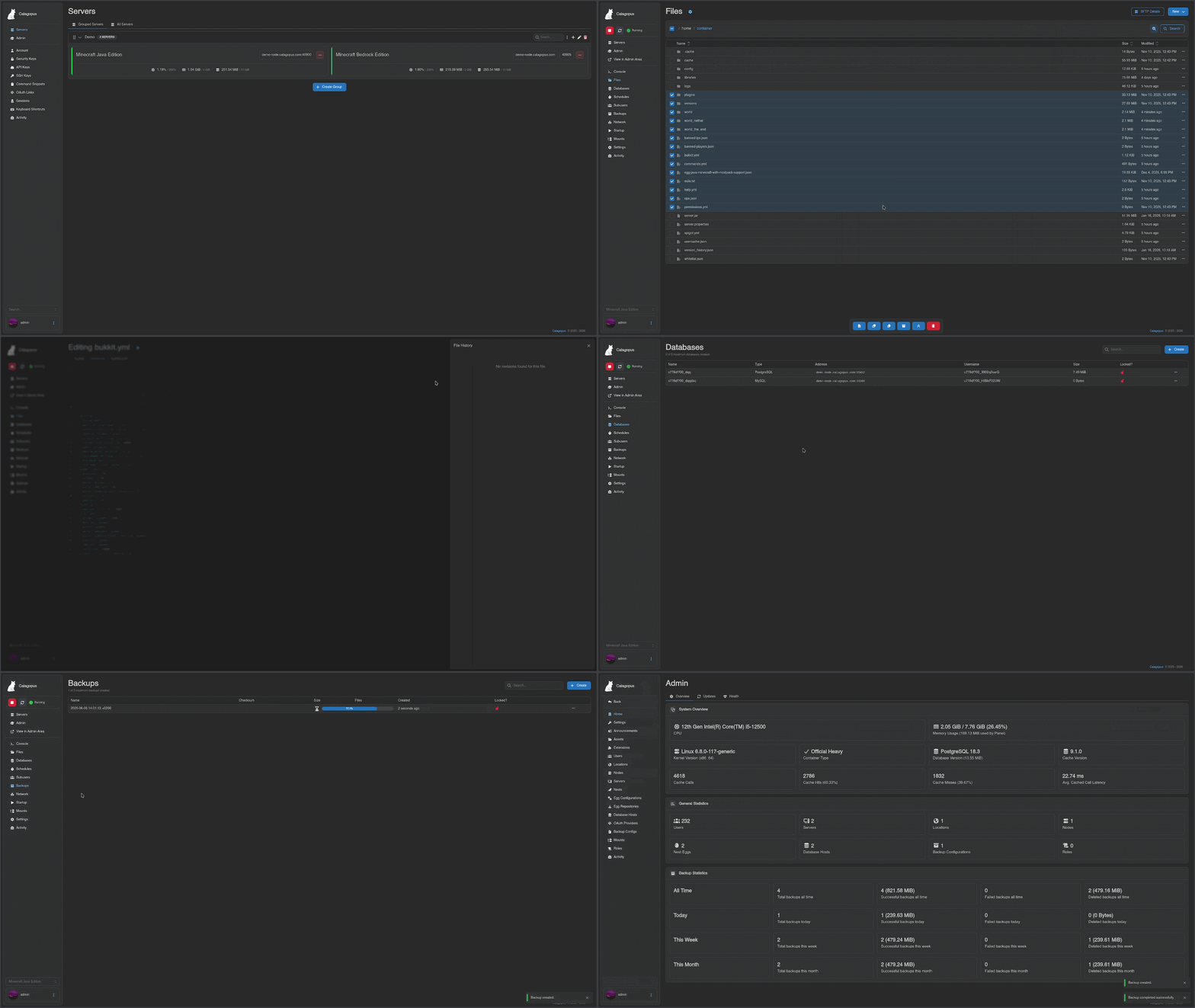
Features
- Rust backend - a fast, efficient backend built on Tokio and Axum.
- Modern frontend - React, Mantine, and Tailwind for a clean, responsive UI.
- Extensible by design - first-class extension systems for backend and frontend, no hacky patches or overrides, real plugin APIs.
- Egg compatible - reuses Pterodactyl-style eggs, including a Rust port of Laravel's validation rules.
- Migration friendly - import your existing setup from Pterodactyl or Pelican.
Installation
Full instructions live in the documentation.
Roadmap
Tracked publicly here:
Project Structure
Repository layout
frontend/- The frontend of the panel, built with React, Mantine, and Tailwind.extensions/*- Frontend extensions, such as themes and plugins.
backend/- The backend of the panel, built with Rust and Axum.backend-extensions/*- Backend extensions, such as auth providers and database drivers.database/- Database migrations using Drizzle.database-migrator/- A tool to run database migrations, built with Rust and SQLx.shared/- Shared code between backend parts, mainly relevant for extensions.wings-api/- An auto-generated API client for the Wings API, built with Rust.generator-src/- The source for the API generator, written in TypeScript.
rule-validator/- A semi-port of Laravel's validation rules in Rust for use with eggs.schema-extension/
Contributing
Contributions are welcome. See CONTRIBUTING.md for PR guidelines, open an issue to discuss larger changes first, and check the Discord if you want to chat through an idea before writing code.
Acknowledgments
Calagopus builds on the ideas and ecosystem of Pterodactyl and Pelican. Thanks to those projects and their communities.
License
See LICENSE.
Star History
Requirements
Requires PostgreSQL and Valkey containers on the same Docker network. Follow the instructions at https://calagopus.com/docs/panel/installation/unraid.
Categories
Download Statistics
Total Downloads Over Time
Related apps
Explore more like this
Explore allDetails
ghcr.io/calagopus/panel:aioRuntime arguments
- Web UI
http://[IP]:[PORT:8000]- Network
calagopus- Shell
bash- Privileged
- false
Template configuration
HTTP port for the panel WebUI.
- Target
- 8000
- Default
- 8000
- Value
- 8000
SFTP port for the integrated Wings daemon.
- Target
- 2022
- Default
- 2022
- Value
- 2022
Persistent panel data directory.
- Target
- /var/lib/calagopus
- Default
- /mnt/user/appdata/calagopus/data
- Value
- /mnt/user/appdata/calagopus/data
Panel log directory.
- Target
- /var/log/calagopus
- Default
- /mnt/user/appdata/calagopus/logs
- Value
- /mnt/user/appdata/calagopus/logs
Wings AIO configuration file. Must exist on the host before starting, see setup instructions above (step 5). Docker will create a directory here instead of a file if the path is missing.
- Target
- /wings-config.yml
- Default
- /mnt/user/appdata/calagopus/wings-config.yml
- Value
- /mnt/user/appdata/calagopus/wings-config.yml
Docker socket — required for Wings to manage game server containers.
- Target
- /var/run/docker.sock
- Default
- /var/run/docker.sock
- Value
- /var/run/docker.sock
Docker containers directory — required for Wings.
- Target
- /var/lib/docker/containers/
- Default
- /var/lib/docker/containers/
- Value
- /var/lib/docker/containers/
Wings main configuration directory (config.yml lives here).
- Target
- /etc/calagopus-wings/
- Default
- /mnt/user/appdata/calagopus/wings/config
- Value
- /mnt/user/appdata/calagopus/wings/config
Wings data directory (server volumes, backups, archives).
- Target
- /var/lib/calagopus-wings/
- Default
- /mnt/user/appdata/calagopus/wings/data
- Value
- /mnt/user/appdata/calagopus/wings/data
Wings log directory.
- Target
- /var/log/calagopus-wings/
- Default
- /mnt/user/appdata/calagopus/wings/logs
- Value
- /mnt/user/appdata/calagopus/wings/logs
Wings temporary directory.
- Target
- /tmp/calagopus-wings/
- Default
- /mnt/user/appdata/calagopus/wings/tmp
- Value
- /mnt/user/appdata/calagopus/wings/tmp
Required. A long, random secret key used to encrypt sensitive data. Generate one with: openssl rand -hex 32
- Target
- APP_ENCRYPTION_KEY
- Value
- CHANGEME
PostgreSQL connection URL. Change the hostname to match your PostgreSQL container name.
- Target
- DATABASE_URL
- Default
- postgresql://panel:panel@calagopus-db/panel
- Value
- postgresql://panel:panel@calagopus-db/panel
Redis/Valkey connection URL. Change the hostname to match your Valkey/Redis container name.
- Target
- REDIS_URL
- Default
- redis://calagopus-cache
- Value
- redis://calagopus-cache
Container timezone.
- Target
- TZ
- Default
- UTC
- Value
- UTC
Automatically run database migrations on startup.
- Target
- DATABASE_MIGRATE
- Default
- true
- Value
- true
Internal HTTP port the panel listens on.
- Target
- PORT
- Default
- 8000
- Value
- 8000
Enable the Wings proxy.
- Target
- APP_ENABLE_WINGS_PROXY
- Default
- true
- Value
- true
Use the decryption cache.
- Target
- APP_USE_DECRYPTION_CACHE
- Default
- true
- Value
- true
Use the internal cache.
- Target
- APP_USE_INTERNAL_CACHE
- Default
- true
- Value
- true
Mark this instance as primary.
- Target
- APP_PRIMARY
- Default
- true
- Value
- true
Panel log directory inside the container.
- Target
- APP_LOG_DIRECTORY
- Default
- /var/log/calagopus
- Value
- /var/log/calagopus
Path to the base Wings configuration file inside the container.
- Target
- AIO_BASE_WINGS_CONFIGURATION
- Default
- /wings-config.yml
- Value
- /wings-config.yml