
All apps · 0 apps

CacheParty
Docker app from antiremy's Repository
Overview
Readme
View on GitHub CacheParty
A faster drop-in replacement for lancache: one binary that caches game downloads for your whole LAN.
Like lancachenet/monolithic, it sits behind lancache-dns. Clients resolve CDN names to this machine; it caches plain-HTTP downloads from Steam, Battle.net, Epic, Riot, Xbox/WSUS, PlayStation and anything else in cache-domains.
Drop-in means the same environment variables and the same access.log format. Non-goals: caching HTTPS (:443 is a blind SNI
passthrough), reading nginx's on-disk cache format.
Advantages over stock lancache
Faster downloads
- Streaming request coalescing. Many clients asking for the same uncached
chunk cause one upstream fetch, and every client receives bytes as they
arrive. nginx's
proxy_cache_lockmakes waiters poll for about 500 ms and wait for the whole slice. In benchmarks with 50 clients, cold time to first byte drops from about 500 ms to 50–135 ms, and cold throughput for Steam-style many-small-file downloads is about 1.6x. - Adaptive read-ahead. After a miss, CacheParty fetches the chunks a client will need next, growing the window on slow origins while sharing it fairly between downloads.
- No internal proxy hop. Redirects are followed inside the upstream client
instead of through a second server on
localhost:3128. - Fast domain lookup. A hash map plus a reversed-label suffix tree instead of thousands of regexes per request.
Easier to run
- Internet download speed limit.
UPSTREAM_RATE_LIMIT(e.g.500m) caps how much internet bandwidth the cache uses, so a big download doesn't slow down the rest of the network. Cache hits still run at full LAN speed. - Fast restarts. A persistent chunk index (bbolt) means startup does not walk millions of files.
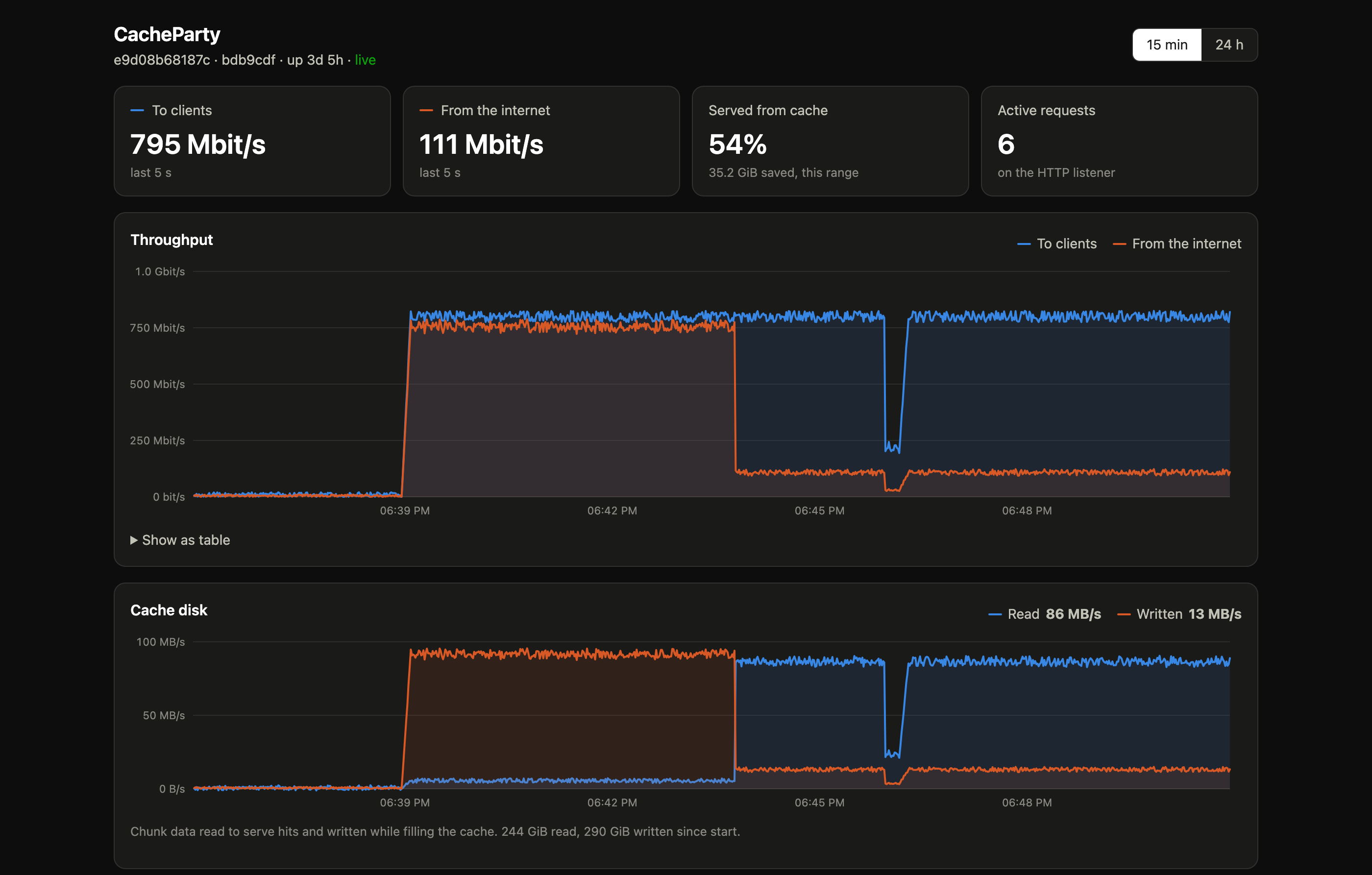
- Built-in dashboard. Live throughput, cache hit share, and per-service,
per-game, per-client and per-CDN-host traffic, at
http://<host>:8080/, plus Prometheus/metrics. See Dashboard, metrics and logs. - Live settings. Cache size, free-space floor, max age, read-ahead, upstream rate limit and bypass domains can be changed from the dashboard without a restart.
- Cache repair and purge. Bad chunks are repaired on the fly when
requested,
cacheparty verifychecks the whole cache without reading chunk contents, andcacheparty purge(or the dashboard) removes one game. See Cache repair. - Bypass domains.
BYPASS_DOMAINSsends chosen hosts straight through uncached.
Safer caching
- Never serves wrong bytes. If an object changes upstream, all of its chunks are dropped; truncated upstream responses abort the client rather than looking complete.
- Stricter domain matching. Hosts are matched on whole DNS labels, so
evilsteamcontent.comis not cached as Steam.
See Compatibility for every behavior difference from nginx lancache and the known limitations.
Quick start
docker run -d --name cacheparty --restart unless-stopped \
  -p 80:80 -p 443:443 -p 8080:8080 \
  -v /srv/cacheparty:/data \
  -v /mnt/cache:/data/cache \
  ghcr.io/antiremy/cacheparty
/data holds logs, settings, dashboard stats and the cache-domains checkout;
/data/cache holds the cached chunks and their index, so mount it from the big
disk. Swap in your own host paths. CacheParty can't read nginx's cache format,
so give it an empty directory rather than an existing monolithic cache.
The image is published to GHCR and Docker Hub for amd64 and arm64: latest
tracks main, and releases are tagged by version (1.2.3, 1.2, 1).
Each GitHub release also
has static linux/amd64 and linux/arm64 binaries. To build the image
yourself, run docker build -t cacheparty ..
Then point lancache-dns at the host's IP and open http://<host>:8080/ for
the dashboard. The image is built on distroless/static, runs as root so it
can bind :80/:443, and has a HEALTHCHECK that calls
/cacheparty healthcheck (a request to /lancache-heartbeat).
Set DASHBOARD_PASSWORD to allow changing settings and repairing the cache
from the dashboard; without it the dashboard is read-only. All variables are
listed in Configuration.
Run locally without root:
NOFETCH=true DOMAINS_DIR=./testdata/domains LOG_DIR=/tmp/gc-logs \
HTTP_ADDR=127.0.0.1:8081 SNI_ADDR=127.0.0.1:8443 METRICS_ADDR=127.0.0.1:8080 \
  go run ./cmd/cacheparty
curl -H 'Host: example.com' http://127.0.0.1:8081/
curl http://127.0.0.1:8080/metrics
open http://127.0.0.1:8080/         # dashboard
Documentation
- Configuration: environment variables, live settings, memory limits, log rotation.
- Dashboard, metrics and logs: what the dashboard shows,
/metrics, and the log formats. - Cache repair:
cacheparty verifyandcacheparty purge. - How it works: listeners, cache keys and chunking, coalescing, read-ahead, bypass rules, upstream fetching, storage and eviction.
- Compatibility: differences from nginx lancache and known limitations.
- Benchmarks: methodology and results against monolithic.
- Development: tests, linting and package layout.
License
MIT. See LICENSE.
Media gallery
1 / 2Requirements
Categories
Download Statistics
Related apps
Explore more like this
Explore allDetails
ghcr.io/antiremy/cacheparty:latestRuntime arguments
- Web UI
http://[IP]:[PORT:8080]/- Network
br0- Privileged
- false
Template configuration
Cached chunks and their index. Put this on the disk or pool with the most space; use an empty folder, not an existing monolithic cache.
- Target
- /data/cache
- Default
- /mnt/user/cacheparty/
- Value
- /mnt/user/cacheparty/
Logs, dashboard settings and stats, and the cache-domains checkout.
- Target
- /data
- Default
- /mnt/user/appdata/cacheparty/
- Value
- /mnt/user/appdata/cacheparty/
Maximum total cache size, e.g. 500g or 2t. Can also be changed later from the dashboard.
- Target
- CACHE_DISK_SIZE
- Default
- 1000g
- Value
- 1000g
Lets you change settings, verify the cache and purge games from the dashboard. Leave empty for a read-only dashboard.
- Target
- DASHBOARD_PASSWORD
Resolvers used to reach the real CDNs. Must not be the DNS server that points game domains at this cache.
- Target
- UPSTREAM_DNS
- Default
- 8.8.8.8 8.8.4.4
- Value
- 8.8.8.8 8.8.4.4
Caps internet bandwidth used for cache misses, in bits/s (e.g. 500m, 1g). 0 is unlimited. Cache hits always run at full LAN speed.
- Target
- UPSTREAM_RATE_LIMIT
- Default
- 0
- Value
- 0
Evict old chunks to keep at least this much free space on the cache volume.
- Target
- MIN_FREE_DISK
- Default
- 10g
- Value
- 10g
Evict chunks not accessed within this time.
- Target
- CACHE_MAX_AGE
- Default
- 3560d
- Value
- 3560d
Comma-separated domains to pass through without caching, e.g. example.com, *.cdn.example.net
- Target
- BYPASS_DOMAINS
Chunk fetches allowed to run ahead of clients, across all clients. 0 disables read-ahead.
- Target
- CACHE_MAX_PREFETCHES
- Default
- 64
- Value
- 64
Chunk size. Changing this makes everything already cached unreadable; leave it alone unless you are starting a fresh cache.
- Target
- CACHE_SLICE_SIZE
- Default
- 1m
- Value
- 1m
Git repository for the list of domains to cache.
- Target
- CACHE_DOMAINS_REPO
- Default
- https://github.com/uklans/cache-domains.git
- Value
- https://github.com/uklans/cache-domains.git
Branch of the cache-domains repository.
- Target
- CACHE_DOMAINS_BRANCH
- Default
- master
- Value
- master
Set to true to skip updating cache-domains at startup.
- Target
- NOFETCH
- Default
- false
- Value
- false
access.log format: cachelog or cachelog-json.
- Target
- NGINX_LOG_FORMAT
- Default
- cachelog
- Value
- cachelog
If you set a container memory limit, set this a little below it (e.g. 900MiB for 1 GiB).
- Target
- GOMEMLIMIT
Caching proxy. Clients must reach it on port 80, so use a dedicated IP (br0) rather than remapping it.
- Target
- 80
- Default
- 80
- Value
- 80
HTTPS SNI passthrough (not cached).
- Target
- 443
- Default
- 443
- Value
- 443
Dashboard, /metrics and health check.
- Target
- 8080
- Default
- 8080
- Value
- 8080