

Bragibooks
Docker app from grtgbln's Repository
An audiobook library cleanup and management tool built with Python and Django.
Overview
Readme
View on GitHub
Bragibooks
CI License: GPL-3.0-only Docker pulls Docker image version Contributors
A self-hosted web board for batch audiobook processing with
m4b-merge, AudiobookDB metadata, and a live queue.
Long Description
Bragibooks is a self-hosted, single-operator web application for cleaning up and organizing audiobook files. It runs as one Go binary with an embedded SvelteKit frontend, merging split mp3, m4a, and m4b chapters, converting formats, cleaning existing metadata, and writing correctly tagged output through m4b-merge. Books are matched against the community-maintained AudiobookDB database for title, author, narrator, and release information, then processed in a queue you watch live.
It is an operations board for a personal audiobook pipeline, not a cloud library, SaaS dashboard, or media player. Run it on a home server with Docker, select a batch, match it, queue it, and watch the work finish. It is single-user and local-first, with no account and no telemetry.
Table of Contents
- Security
- Background
- Install/Running
- Usage
- Screens
- Configuration
- Migrating from the Python (Django) app
- API
- Contributing
- Releases
- Building
- Maintainers
- License
Security
Bragibooks is designed for one operator on a private network, and the API routes are protected by address and credential checks:
- Off (default): requests are accepted only from loopback and private LAN addresses (
127.0.0.0/8,::1,10/8,172.16/12,192.168/16). Everything else is refused. - On (enabled in Settings → External API): the API is additionally reachable from any address by clients that present the server-generated API key as
Authorization: Bearer <key>(or thebragibooks_tokencookie). The key is minted server-side, shown once in a modal for copying into external tools, and then only its SHA-256 digest is stored. LAN/browser access is unchanged in either state. - Exception:
GET /api/healthis mounted outside the auth middleware, so any client whoseHostis accepted (see below) can read it without credentials. It returns only{"status":"ok","version":…}— no library data.
Upgrading from the legacy BRAGIBOOKS_ADMIN_TOKEN env var: on the first startup after an upgrade, if BRAGIBOOKS_ADMIN_TOKEN is set, the SERVER_API_ENDPOINT_ENABLED pin is absent, the external API has no state in the database yet (disabled, no key), and the migration has not run before, the token is migrated once into the external API key — the API is enabled with the token's SHA-256 digest stored (the raw key is never stored). The run is marked in the settings row and never repeats: disabling the API later does not re-migrate it, and BRAGIBOOKS_ADMIN_TOKEN is ignored from then on (change the key via Settings → External API). If the pin is present, the token is not migrated: its first observation writes a single mark and logs one line, later startups with the pin are silent, and removing the pin later does not re-run the migration. In the other situations — the migration already ran, or the external API already has state — startup logs a warning naming the ignored variable.
The web interface itself has no login screen; it relies on the boundary above and the server-set CSRF double-submit cookie. Do not expose the port directly to the public internet. For remote access, prefer a VPN, or put an authenticating reverse proxy in front of the app and follow docs/reverse-proxy.md. Two independent settings matter: SERVER_ALLOWED_HOSTS must contain the exact external hostname when the proxy preserves it (a proxy may instead send an already-allowed backend Host), and BRAGIBOOKS_TRUSTED_PROXIES is needed only when the app should trust X-Forwarded-For to identify the client. With an accepted Host, a proxy that forwards a public client address does not make that client LAN: the SPA shell still loads, but protected /api and /covers requests return 403 while the External API is off and 401 while it is on, because the stock UI sends no API key. For machine access from elsewhere, enable the External API in Settings and use the printed bk_… key as Authorization: Bearer <key>; key requests do not need BRAGIBOOKS_TRUSTED_PROXIES.
The HTTP Host authority is checked on all routes, including health and the UI, before API authorization. localhost, literal loopback/private/link-local IPv4/IPv6 addresses, and a non-wildcard SERVER_HOST are accepted by default. Private literal addresses intentionally include a container host's LAN address, which is not visible on the container's interfaces. DNS names are never trusted by resolving them to private IPs. For a LAN hostname, public address, or reverse-proxy domain, set SERVER_ALLOWED_HOSTS=books.lan,books.example (YAML: server.allowed_hosts, a comma-separated string), then restart. Entries are exact names or literal addresses, not URLs, suffixes, or wildcards; invalid entries stop startup. ASCII DNS names are case-insensitive and one trailing dot is ignored. IPv6 authorities must be bracketed (for example [fd12::1]:8888); zone identifiers are not supported. Optional numeric ports (1–65535) are validated but ignored for host matching so published ports keep working. Unspecified addresses (0.0.0.0, [::]) are not trusted merely because the listener binds all interfaces. A proxy must preserve the allowed Host or supply an allowed backend Host: X-Forwarded-Host and Forwarded never override it, even for trusted proxies. Host acceptance does not grant API access or bypass existing key/CSRF checks. Host acceptance is also not the same as keyless authorization: the keyless LAN classifier recognizes IPv6 loopback (::1) plus IPv4 RFC 1918 ranges only, not native IPv6 ULA or link-local clients, so those clients need the External API key or an IPv4 path.
Background
Bragi — god of poetry in Norse mythology. The name fits an application concerned with spoken books and music.
The interface follows the same idea the app itself serves: a calm, dense work surface that tells you what is happening without decoration or guesswork. The person who runs the server and owns the books can see state at a glance. The normal work is linear — select, match, queue, finish.
Install/Running
Docker is the fastest way to run Bragibooks. The image includes the Go server, embedded SvelteKit frontend, ffmpeg, and m4b-merge; no host toolchain is required.
Image tag:
developis the rolling development channel, built by CI from thedevelopbranch. For a stable deployment, pin a versioned release tag instead; the final Python image remains available aspython-final(see Migrating).
Docker
Create or choose host directories for the database/configuration, input books, output books, and completed source files. Then start Bragibooks:
docker run --rm -d --name bragibooks \
  --publish 8888:8000 \
  --volume "$PWD/config:/config" \
  --volume /path/to/input:/input \
  --volume /path/to/output:/output \
  --volume /path/to/completed:/input/done \
  --env SERVER_PORT=8000 \
  --env DIRECTORIES_INPUT_DIR=/input \
  --env DIRECTORIES_OUTPUT_DIR=/output \
  --env DIRECTORIES_COMPLETED_DIR=/input/done \
  ghcr.io/djdembeck/bragibooks:develop
The equivalent Docker Hub image is djdembeck/bragibooks:develop. The container listens on port 8000 — the same port the Python image used, so an existing -p 8000:8000 mapping keeps working — and the command above publishes it as http://localhost:8888. The mounted /config directory holds the SQLite database (by default bragibooks.db) and any runtime configuration; it is declared a volume in the image so the database persists across container recreation. API_KEY_API_KEY is optional, but setting it enables AudiobookDB requests that require an API key.
The repository's production compose file uses the locally built bragibooks:local image and reads BRAGIBOOKS_INPUT_DIR / BRAGIBOOKS_OUTPUT_DIR for host paths (defaults: docker/books/input and docker/books/output). Completed files default to /input/done inside the input volume; mount a separate host directory there if you want them stored elsewhere. Reverse proxies, host allowlisting, and forwarding-header behavior are covered in docs/reverse-proxy.md.
Existing binary
If you already have a bragibooks binary, put ffmpeg, ffprobe, and m4b-merge on PATH, provide the input/output directories, and run it from the directory containing config/config.yaml:
DIRECTORIES_INPUT_DIR=/path/to/input \
DIRECTORIES_OUTPUT_DIR=/path/to/output \
DIRECTORIES_COMPLETED_DIR=/path/to/completed \
./bragibooks
The binary serves the web UI on SERVER_HOST:SERVER_PORT (port 8000 by default). SERVER_HOST is unset by default, which makes Go bind all interfaces (:8000); set SERVER_HOST=127.0.0.1 to restrict it to loopback. See Building for the source-build commands.
Usage
The normal work is deliberately linear: select, match, queue, finish.
Start the container with the Docker command above, then open http://localhost:8888 in a browser. You can check that the server is up first:
curl http://localhost:8888/api/healthIntake: browse the mounted input directory and select one or more audiobook folders or files.
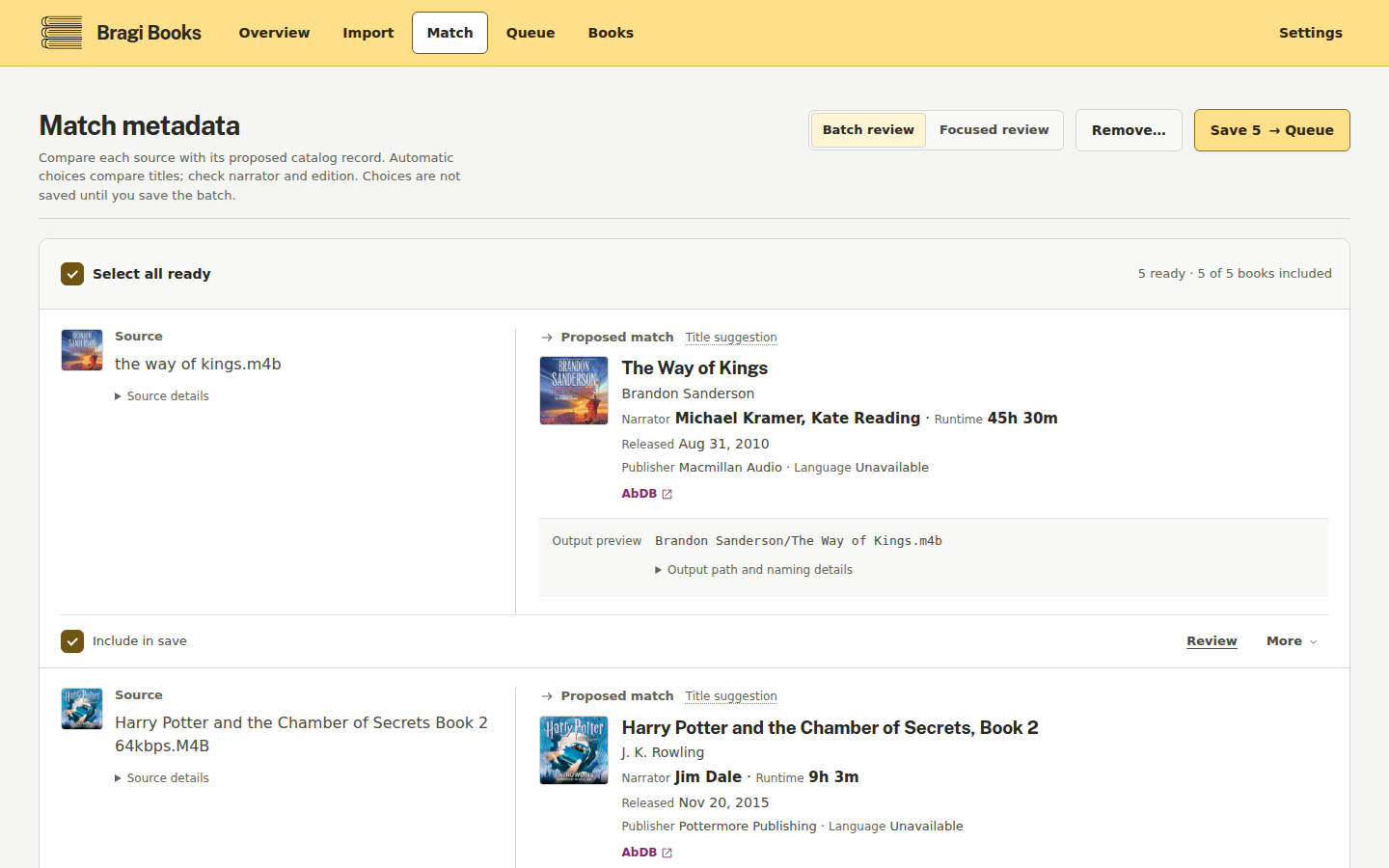
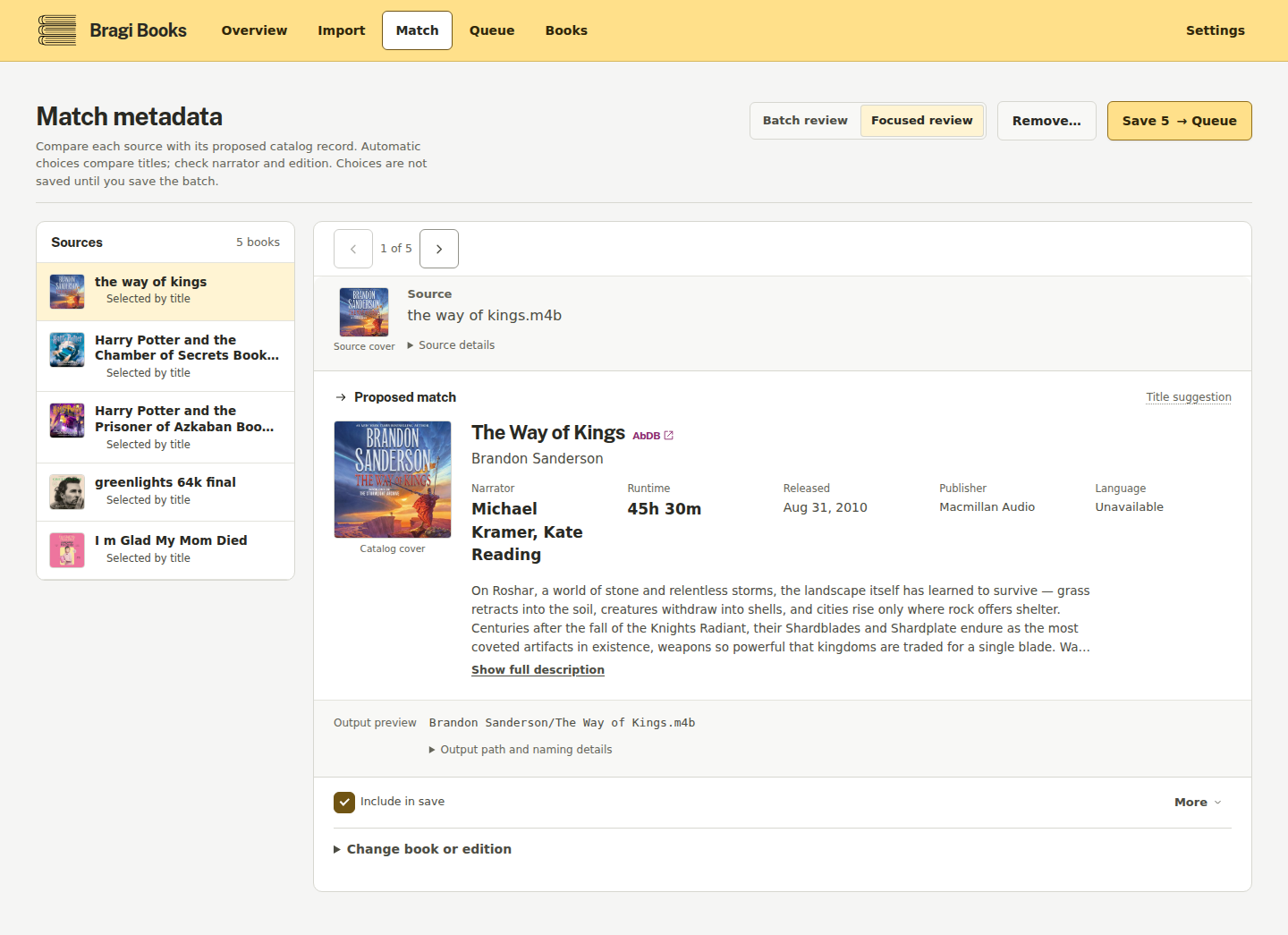
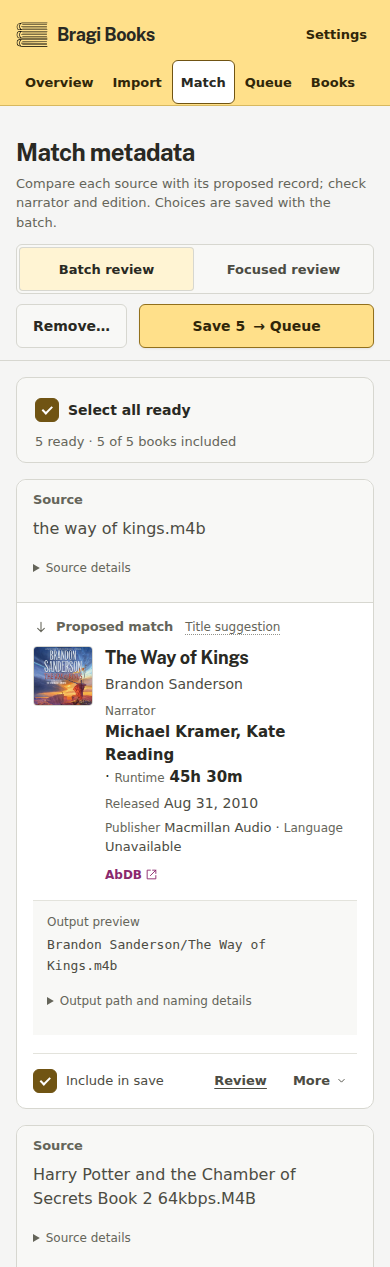
Match: let Bragibooks search AudiobookDB, then confirm or correct the book, release, author, and narrator metadata. Custom search is available when the first match is wrong.
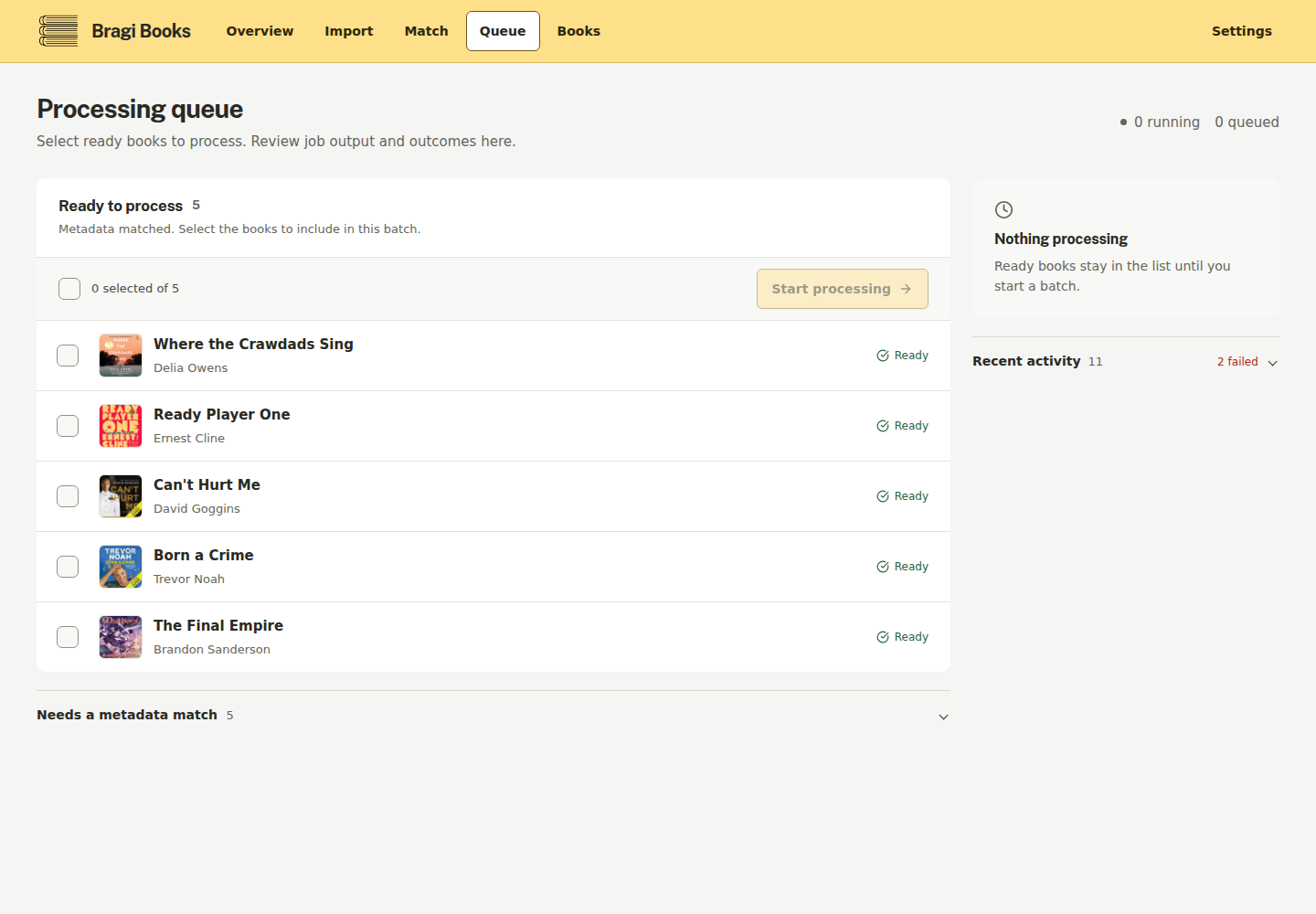
Queue: select the matched books and, optionally, a saved output profile — a named preset (output directory and/or path format) created under Settings — then submit the batch. The effective destination (output directory, path format, and completed directory) is snapshotted into each job at queue time — for profile, override, and plain global jobs alike — so later profile or Settings changes do not move, re-format, or redirect already-queued work. Bragibooks invokes
m4b-mergeto merge, convert, clean, tag, and repackage the source files.Finish: follow live processing output in the browser, then review completed books and any errors. Jobs can take from seconds to hours depending on the number and type of files.
Screens
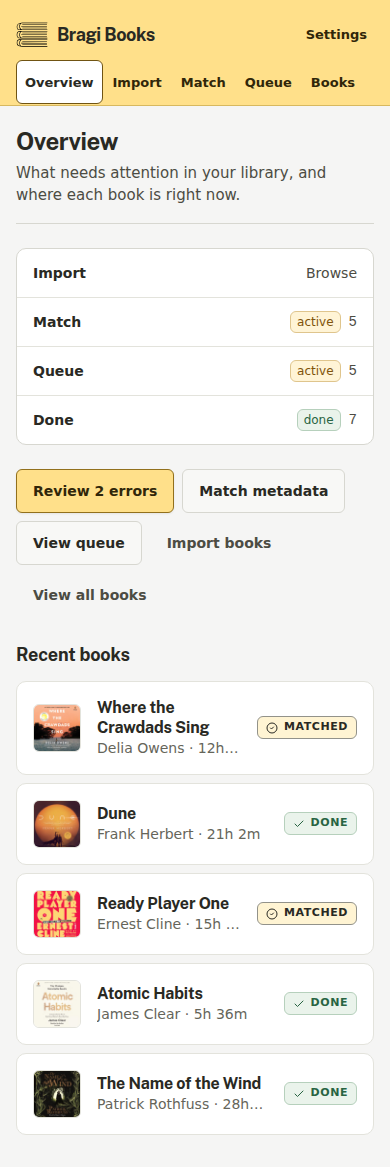
Screens of the current interface:
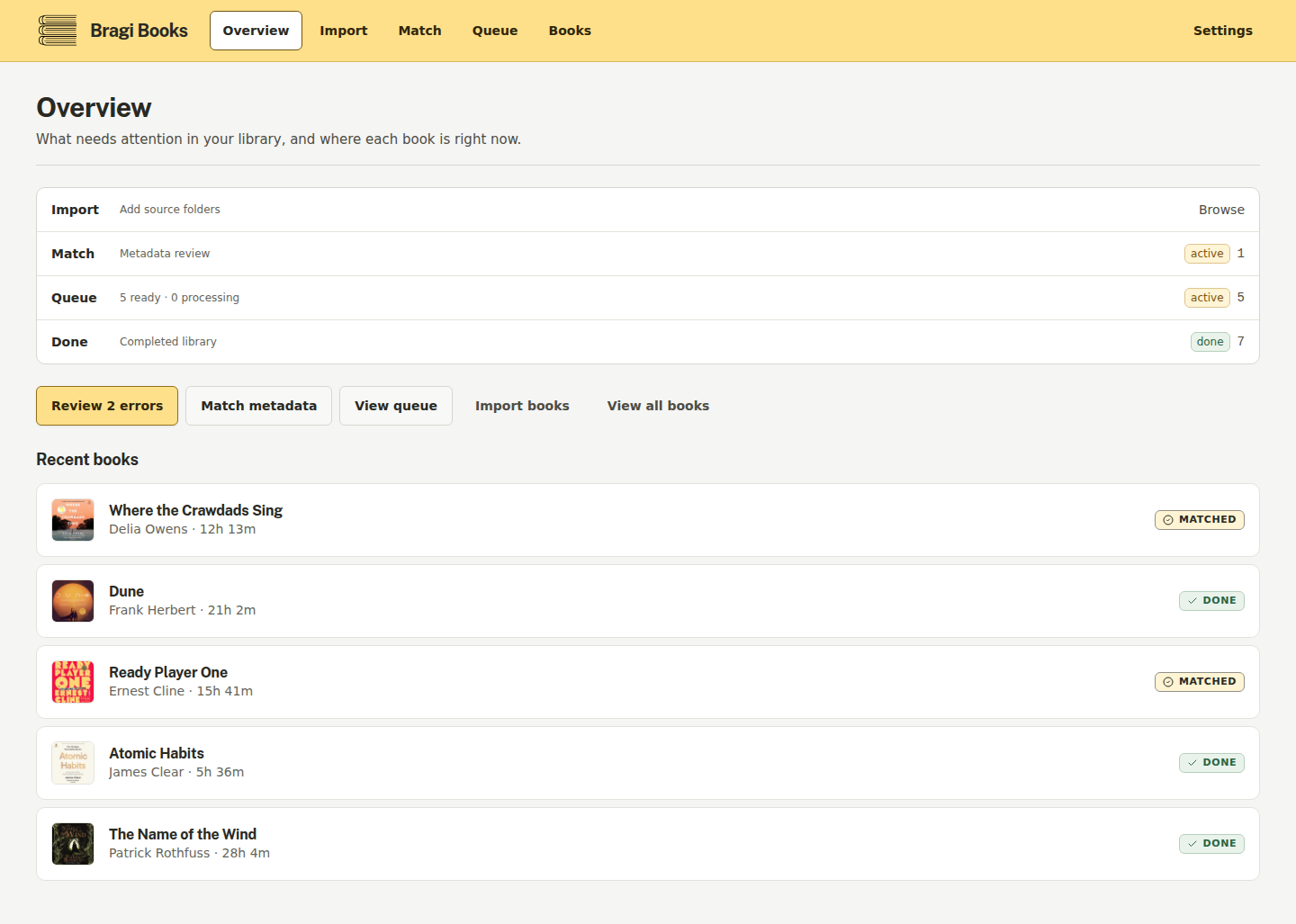
All screens (desktop and mobile)
| Match — batch mode | Match — focused mode |
|---|---|
|
|
| Import | Queue |
|---|---|
|
|

| Books | Book detail | Settings |
|---|---|---|
|
|
|
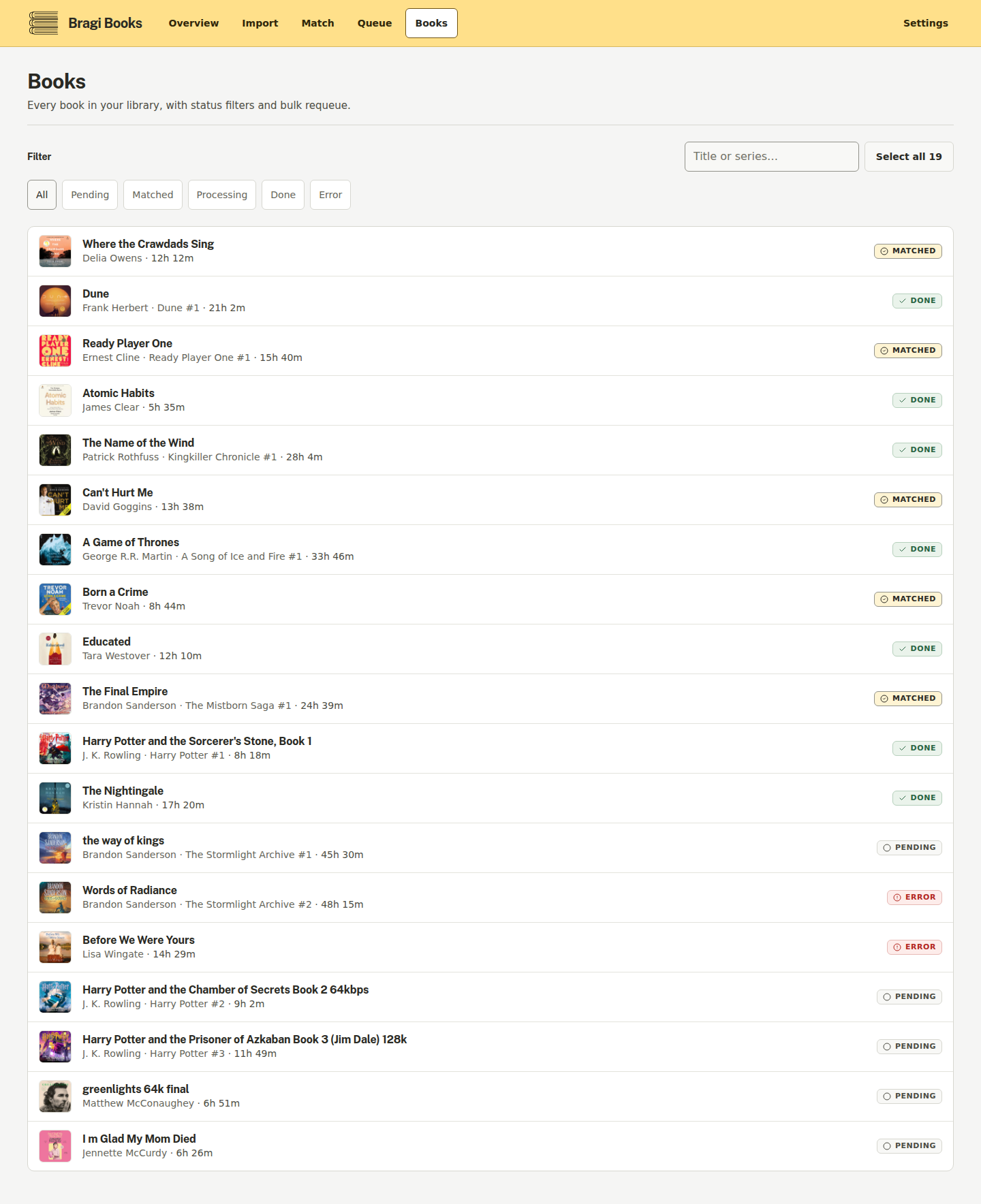
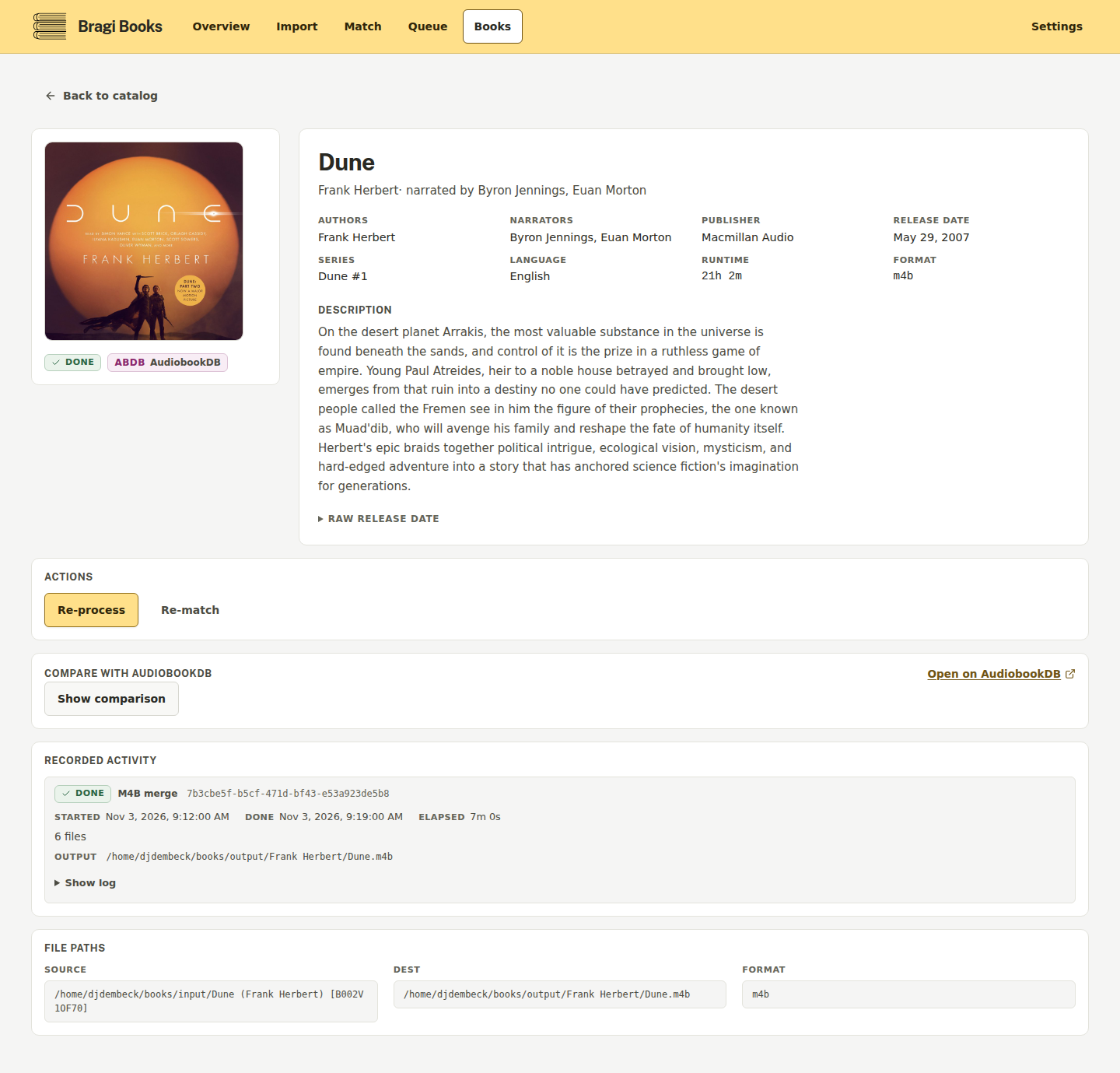
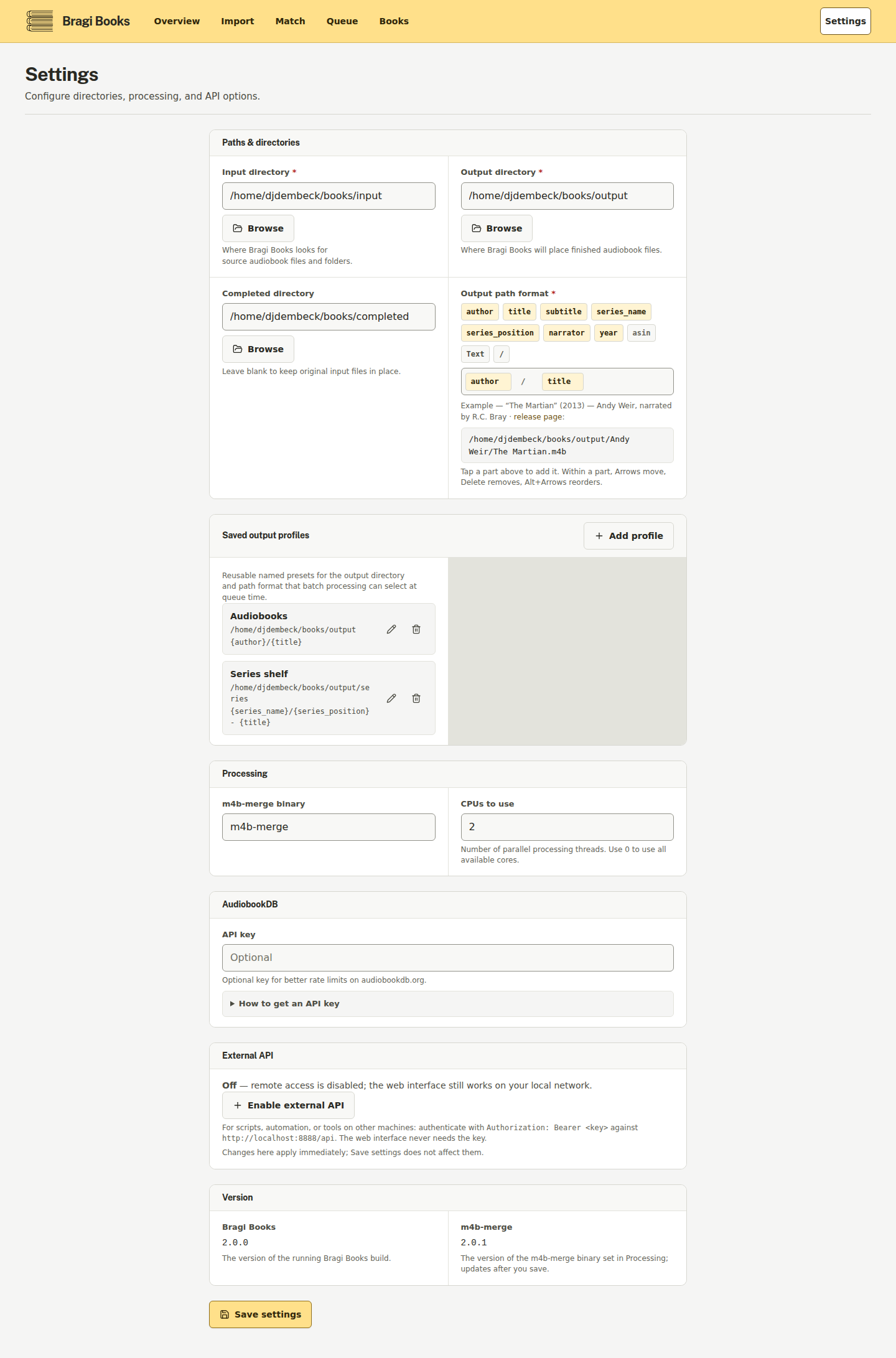
Mobile (390px):
| Overview (mobile) | Batch match (mobile) |
|---|---|
|
|
| Books (mobile) |
|---|
|

Configuration
Bragibooks reads config/config.yaml and falls back to environment variables. When the same setting is present in both, the environment variable wins, so the YAML file is never surprised by a default. Settings can also be changed at runtime through PUT /api/settings; runtime changes are persisted by the application.
The key environment variables are:
| Variable | Purpose | Default |
|---|---|---|
SERVER_HOST |
Address for the HTTP server | empty (all interfaces; set 127.0.0.1 for loopback only) |
SERVER_ALLOWED_HOSTS |
Additional exact Host names/addresses, comma-separated; restart after changing | empty (localhost and literal loopback/private addresses remain available) |
BRAGIBOOKS_TRUSTED_PROXIES |
Comma-separated proxy IPs/CIDRs whose X-Forwarded-For is trusted; only XFF is parsed; env-only, restart after changing |
empty (forwarding headers never trusted) |
SERVER_PORT |
HTTP port | 8000 |
DATABASE_PATH |
SQLite database path | config/bragibooks.db |
M4B_MERGE_BINARY |
m4b-merge executable name or path |
m4b-merge |
API_KEY_API_KEY |
Optional AudiobookDB API key | empty |
API_KEY_BASE_URL |
AudiobookDB API base URL | https://audiobookdb.org/api |
DIRECTORIES_INPUT_DIR |
Source audiobook directory | unset |
DIRECTORIES_OUTPUT_DIR |
Destination directory for processed books | unset |
DIRECTORIES_COMPLETED_DIR |
Directory for completed source files | unset |
DIRECTORIES_INDEXING_ENABLED |
Force the input directory pre-index on at boot (exact "true" value only — unlike SERVER_API_ENDPOINT_ENABLED, any other value such as false, 1, yes, or TRUE is ignored and the saved/YAML preference stays in effect; disabling stays to the Settings toggle) |
false |
PROCESSING_NUM_CPUS |
Number of processing workers | 1 |
PROCESSING_PATH_FORMAT |
Output path format | {author}/{title} |
PROCESSING_METADATA_FIELDS |
Comma-separated embedded-metadata fields processing may write (title, subtitle, authors, narrators, series, description, genres, year, cover). While set, the pin stays authoritative for processing jobs: the Settings UI renders the selection read-only, saves of it are ignored (unrelated settings in the same save still apply), and the pin never reaches the durable stores — it stops applying the moment it is removed |
empty (all supported fields) |
PROCESSING_METADATA_CHAPTERS |
Chapter write policy: write or preserve. While set, the pin stays authoritative for processing jobs: the Settings UI renders the policy read-only, saves of it are ignored (unrelated settings in the same save still apply), and the pin never reaches the durable stores — it stops applying the moment it is removed |
write |
PROCESSING_REGION |
Accepted for compatibility with older setups; no effect | us |
PROCESSING_LOG_LEVEL |
Processing log level | info |
For a YAML-based setup, create config/config.yaml in the mounted config directory:
server:
  port: 8000

directories:
  input_dir: /input
  output_dir: /output
  completed_dir: /input/done
  indexing_enabled: false

processing:
  num_cpus: 1
  path_format: "{author}/{title}"
  region: us
  # metadata_fields: [title, authors, cover]  # omit for all supported fields
  # metadata_chapters: write                  # or: preserve
Output-directory validation (saved output profiles and queue output-directory overrides) is platform-appropriate: the directory must be absolute, and on the Windows build C:\... and UNC roots are accepted alongside the /-prefixed paths used on Unix.
All configuration keys and precedence details
Environment variables use the uppercase, prefixed form of the YAML path: server.port becomes SERVER_PORT, directories.input_dir becomes DIRECTORIES_INPUT_DIR, and so on. The remaining supported keys are database.path, m4b_merge.binary, api_key.api_key, api_key.base_url, processing.log_level, processing.path_format, and processing.region (region also accepts the legacy REGION alias).
Precedence is environment variable > YAML > default. The configuration file is normally config/config.yaml; the loader also searches the working directory, /app/data, and /config. If no YAML file exists, environment variables and defaults are used.
Migrating from the Python (Django) app
README covers the main path; the full guide with candidate paths, troubleshooting, and the manual endpoint lives in docs/migration-from-python.md.
- Stop the old app first and back up the legacy
/configvolume (including anydb.sqlite3-walsidecar files) and your audio directories yourself — the migration does not create an automatic backup of the old database. - Point the new container's
/configvolume at the same mount so the legacydb.sqlite3sits at/config/db.sqlite3(or setLEGACY_DB_PATHto point elsewhere). - On first start, if the new Go database is empty, Bragibooks opens the legacy Django database read-only and copies books, authors, narrators, and settings over automatically. Book status maps as Done →
done, Processing →pending, Error →error. - The migrated data then lives in
/config/bragibooks.db; keep that path (or setDATABASE_PATH) persistently across container updates.
Archived images. The final Python source is preserved as the python-final Git tag, and the matching container image carries that tag on both registries — ghcr.io/djdembeck/bragibooks:python-final and djdembeck/bragibooks:python-final —
pinned at index digest sha256:e583597e3823a091a11a78e277805d453d791b65ad8da827ff2355bd8cb2f924 (linux/amd64) so the archive never moves. That is the last image built from the Python
codebase. The current application is the Go build described in this README, and stable deployments can pin a versioned release tag.
API
The web frontend uses the HTTP API below. Responses are JSON unless noted otherwise; job streams use server-sent events (SSE).
| Method | Endpoint | Purpose |
|---|---|---|
GET |
/api/health |
Health and version check |
GET |
/api/directories?path=/input |
List a directory |
GET |
/api/directories/tree?path=/input |
Read a directory tree |
GET |
/api/directories/stream?path=/input |
Stream directory entries as NDJSON |
GET |
/api/books |
List books; supports status, page, and limit filters |
POST |
/api/books |
Add source book entries |
GET |
/api/books/{id} |
Read a book |
PUT |
/api/books/{id} |
Update a book |
DELETE |
/api/books/{id} |
Remove a book |
GET |
/api/books/{id}/match-evidence?book_id=...&release_id=... |
Match source-vs-catalog evidence for one selected record |
GET |
/api/books/{id}/metadata |
Read a book's catalog snapshot, its manual override layer, and the effective (merged) values |
PUT |
/api/books/{id}/metadata |
Save the manual override layer (edited values, explicit clears, artwork choice, millisecond chapters); records a database row only — tags are written when a processing job runs |
POST |
/api/books/{id}/metadata/reset |
Discard the manual override layer and return to the captured catalog values |
POST |
/api/books/{id}/metadata/cover |
Upload local artwork as an immutable per-book cover asset (5 MiB max, the pinned engine's limit) |
POST |
/api/engine/preview |
Non-mutating engine preview: resolve the effective values against the engine's output-name resolver (no files are read or written); request body is capped at 1 MiB, and a larger body is refused with 413 |
GET |
/api/search?query=...&types=books&skip=0&take=20 |
Search AudiobookDB |
GET |
/api/search/books/{id} |
Fetch an AudiobookDB book |
GET |
/api/search/releases/{id} |
Fetch an AudiobookDB release |
GET |
/api/output-profiles |
List saved output profiles |
POST |
/api/output-profiles |
Create a saved output profile |
PUT |
/api/output-profiles/{id} |
Update a saved output profile |
DELETE |
/api/output-profiles/{id} |
Delete a saved output profile |
POST |
/api/process |
Queue processing for matched books; an optional output_profile_id applies a saved output profile to the batch |
GET |
/api/jobs?book_id=... |
List processing jobs, optionally filtered to one book |
GET |
/api/jobs/{id} |
Read job status |
GET |
/api/jobs/{id}/stream |
Stream live job output over SSE |
GET |
/api/settings |
Read runtime settings |
PUT |
/api/settings |
Update runtime settings |
POST |
/api/migrate |
Migrate a legacy database |
POST |
/api/migrate/people |
Recover people from a legacy database |
For example, monitor a queued job without opening the web UI:
curl -N http://localhost:8888/api/jobs/<job-id>/stream
Contributing
See CONTRIBUTING.md for the contribution workflow, bug reports, enhancement proposals, and style guidance.
Use Conventional Commits. Feature work normally targets develop; releases are made from main. The CI pipeline checks formatting, vetting, module tidiness, frontend type checks, builds, and tests.
Releases
Promote develop to main with one normal merge-commit PR. Release runs automatically; Actions → Release → Run workflow on main uses the same publisher with optional version/bump overrides. Manual-only installations remove the push trigger once. No release-preparation branch, manifest commit or merge-back is required.
The immutable vX.Y.Z tag reserves the exact source SHA before publication. Retry the original run after a partial failure, including when main has advanced; an existing unlabelled archive is reused only when its content digest matches the rebuild (a stale asset fails the run and must be resolved out of band), a labelled historical archive is verified by its provenance label instead of its bytes, and a conflicting version/source, image digest or asset provenance label fails instead of overwriting an output. The existing Go linker input supplies the normalised application version consumed by /api/health and Settings. GoReleaser builds Linux/macOS amd64/arm64 and Windows amd64 archives plus checksums. GHCR and Docker Hub receive the same verified image bytes with vX.Y.Z and X.Y.Z tags, copied without changing digests; production consumers pin one of those tags or the digest.
Release lookups list every draft and published record (paginated, exact tag match; duplicates fail closed), so a delayed lower stable publishes with --latest=false while a new highest stable advances GitHub Latest; an already-published retry is a no-op. The draft is created up front in the reserve job, and if the release listing does not return a record — because the draft was just created and the listing lags — the asset step treats that as an empty store and uploads every built artifact, and a create rejected as already exists is tolerated; absence is a state, not an error. Existing labelled archives are preserved even when a rebuild produces different bytes: the five-archive checksum manifest is verified against the preserved-plus-pending set before any upload, a manifest missing from the release is generated from the combined verified digests, and an immutable manifest that cannot describe the combined set stops the run with no writes.
CI remains the sole branch/PR-preview writer with dev/SHA identities. Release owns named version outputs; mutable latest/major/minor aliases are no longer written. The Docker build also pins its consumed m4b-merge binary image by digest. After outputs complete, the existing Annalist App fills notes from the previous published ancestor release rather than an unfinished reservation.
Automatic/manual runs share a non-cancelling GitHub queue: max (up to 100 pending). Current actionlint v1.7.12 lacks that documented key (upstream issue); do not remove queue retention or suppress unrelated diagnostics. Main protections remain unchanged; develop keeps required CI without base freshness.
Building
Building from source requires Go 1.26+, Bun, and the runtime dependencies ffmpeg, ffprobe, and m4b-merge. The production build embeds the SvelteKit frontend in the Go binary.
Source metadata extraction (per-book snapshots of embedded tags, IDs, and durations read at intake) is best-effort: it needs ffprobe on PATH, and when ffprobe is missing the server logs a startup warning, keeps importing books, and persists a degraded metadata row with explicit error states instead.
Make
The repository's standard build is:
make build
./bragibooks
make build installs the locked frontend dependencies, builds web/, copies the result into webfs/build/, and compiles the server with the webui build tag.
Explicit build steps
The equivalent commands are:
cd web
bun install --frozen-lockfile
bun run build
cd ..
rm -rf webfs/build
cp -r web/build webfs/build
go build -tags webui -ldflags="-s -w" -o bragibooks ./cmd/bragibooks
Build a Docker image
The Dockerfile builds the SvelteKit frontend, embeds it in a statically compiled Go binary, and creates a Debian runtime image with ffmpeg and m4b-merge:
docker build -f docker/Dockerfile -t bragibooks:local .
docker run --rm -p 8888:8000 \
  -v "$PWD/config:/config" \
  -v /path/to/input:/input \
  -v /path/to/output:/output \
  -v /path/to/completed:/input/done \
  -e DIRECTORIES_INPUT_DIR=/input \
  -e DIRECTORIES_OUTPUT_DIR=/output \
  -e DIRECTORIES_COMPLETED_DIR=/input/done \
  bragibooks:local
Development
For backend hot reload with air, run:
make watch
For the complete two-service development environment, use the development compose file. It runs the Go backend on port 8000 and the Vite frontend on port 5175:
docker compose -f docker/docker-compose.dev.yml up --build
The development backend mounts the repository for source hot reload plus separate, writable media directories at /input and /output (default host paths docker/books/input and docker/books/output); completed inputs are stored under /input/done. Set BRAGIBOOKS_INPUT_DIR and BRAGIBOOKS_OUTPUT_DIR to other specific host directories when starting Compose; do not mount a home directory. Keep these paths writable: Bragibooks and m4b-merge rename and tag inputs as part of processing. The Dockerfile and compose images are digest-pinned; Renovate manages image digest updates through the existing Dockerfile and Docker Compose managers.
Open http://localhost:5175 while the development stack is running. The Vite server proxies /api and /covers requests to the Go backend. The development Compose profile explicitly allows the backend service name with SERVER_ALLOWED_HOSTS=bragibooks-dev, because Vite's string-form proxy sends the target authority as Host. If you change VITE_PROXY_TARGET to another DNS hostname, add that exact hostname to the backend's allowed hosts; this does not bypass its API-key or CSRF checks.
Maintainers
- @djdembeck — idea and initial work
Contributors are recorded using the all-contributors specification:
- Koby Huckabee (
AceTugboat) — code, ideas/planning/feedback, and documentation - Andreas (
sandreas) — tools
Release notes are maintained in CHANGELOG.md.
License
GPL-3.0-only — GNU General Public License v3.
Media gallery
1 / 4Categories
Download Statistics
Total Downloads Over Time
Related apps
Explore more like this
Explore allLinks
Details
ghcr.io/djdembeck/bragibooks:latestRuntime arguments
- Web UI
http://[IP]:[PORT:8000]/- Network
bridge- Privileged
- false
Template configuration
Container Port: 8000
- Target
- 8000
- Default
- 8000
- Value
- 8000
Comma-separated list of trusted domains for CSRF protection
- Target
- CSRF_TRUSTED_ORIGINS
- Default
- http://IP_ADDRESS:8000
- Value
- http://IP_ADDRESS:8000
Path to the input folder containing audiobooks
- Target
- /input
Path to the output folder for processed audiobooks
- Target
- /output
Path to the done folder for completed audiobooks
- Target
- /done
Path to the configuration directory
- Target
- /config
- Default
- /mnt/user/appdata/bragibooks/config
- Value
- /mnt/user/appdata/bragibooks/config
Set the logging level
- Target
- LOG_LEVEL
- Default
- INFO
- Value
- INFO
Enable or disable debug mode
- Target
- DEBUG
- Default
- false|true
- Default
- 099
- Value
- 099
- Default
- 100
- Value
- 100