

Boxarr
Docker app from TQ's Repository
Boxarr solves the problem of keeping your media library current with popular movies without manual intervention.
Overview
Readme
View on GitHubBoxarr - Box Office Tracking for Radarr

Automatically track and add trending box office movies to your Radarr library
Boxarr monitors weekly box office charts and seamlessly integrates with Radarr to ensure your media library always has what people want to watch. No more manual searching for popular movies - Boxarr handles it automatically.
🎯 Why Boxarr?
- Stay Current - Never miss trending movies that everyone's talking about
- Save Time - No more manually searching for and adding popular films
- Smart Automation - Automatically add movies based on your preferences
- Family Friendly - Keep your media server stocked with what people actually want to watch
🤔 Why Not Seerr?
Seerr is excellent for request-based libraries where users actively request content. Boxarr serves a different purpose:
- Automatic vs Request-Based: Boxarr automatically adds mainstream hits without anyone having to request them
- Box Office Focus: Tracks actual commercial success, not just user requests
- Zero User Interaction: Works silently in the background, no user accounts or requests needed
- Complementary Tool: Use both! Seerr for specific requests, Boxarr for mainstream coverage
📋 Why Not Radarr Lists?
While Radarr lists are useful, Boxarr offers unique advantages:
- Box Office = Mainstream Appeal: Tracks movies with proven commercial success, ensuring broad appeal
- Unbiased Selection: Based on actual revenue data, not curator preferences or ratings
- Weekly Updates: Fresh data every week, not dependent on list maintainer updates
- Duplicate Prevention: Uses Radarr API to check existing movies before adding
- Historical Tracking: Build a library of movies that were culturally significant at release
Boxarr ensures your library includes the mainstream movies that dominated theaters - the films people are most likely to want to watch.
📚 Documentation
View the full documentation in our Wiki for detailed guides, configuration options, and troubleshooting.
✨ Key Features
- 📊 Weekly Box Office Tracking - Automatically fetches the weekend's top movies from Box Office Mojo, for up to 5 regions at once
- 🔄 Radarr Integration - Seamlessly checks and adds movies to your library
- 🗂️ Genre‑Based Root Folders - Organize movies into folders by genre
- ⚡ Auto-Add Movies - Automatically add trending movies with smart filters
- 🔍 Advanced Custom Filtering - Fine-tune selections with genre, rating, and release year filters
- 📅 Scheduled Updates - Runs weekly on your preferred schedule
- 🎨 Beautiful Web UI - Clean, responsive interface for all devices
- 🚀 Easy Setup - Simple web-based configuration wizard
📋 Requirements
- Radarr v3.0+ (required)
- Docker (recommended) or Python 3.10+
- Network access to Box Office Mojo
🚀 Quick Start
Docker (Recommended)
docker run -d \
  --name boxarr \
  -p 8888:8888 \
  -v /path/to/config:/config \
  ghcr.io/iongpt/boxarr:latest
Visit http://localhost:8888 and follow the setup wizard.
Docker Compose
version: '3.8'

services:
  boxarr:
    image: ghcr.io/iongpt/boxarr:latest
    container_name: boxarr
    ports:
      - 8888:8888
    volumes:
      - ./config:/config
    restart: unless-stopped
    environment:
      - TZ=America/New_York  # Optional: Set your timezone
View full installation guide →
⚙️ Initial Setup
- Open your browser to
http://localhost:8888 - Enter your Radarr URL and API key
- Configure quality profiles and preferences
- Save and start tracking!
📖 Configuration & Features
- Box Office Tracking - How weekly tracking works
- Configuration Guide - All settings explained
- Auto-Add Movies - Automatic movie additions with filters
- Genre-Based Root Folders - Smart content organization
- API Reference - REST API documentation
🔧 Advanced Configuration
Reverse Proxy Support
Boxarr can run behind reverse proxies (nginx, Traefik, Caddy) with custom URL base support.
environment:
  - BOXARR_URL_BASE=boxarr  # Access at /boxarr/
View reverse proxy setup guide →
Box Office Regions & Timeout
By default Boxarr tracks the US & Canada domestic chart. Set a Box Office Mojo area code to follow a different region, or list up to 5 regions to track several at once, and tune the scraper timeout for slow connections. The setup page offers the same choice as a checkbox list.
environment:
  - BOXARR_FEATURES_BOX_OFFICE_REGION=NL  # BOM area code (e.g. NL, DE, GB); empty = US & Canada domestic
  - BOXOFFICE_TIMEOUT=120                 # Box Office Mojo request timeout in seconds (default 120, range 5-600)
The region setting takes any of these forms; domestic stands for the US & Canada chart:
| Form | Example | Tracks |
|---|---|---|
| One code | NL |
the Netherlands |
| Comma-separated | domestic,DE |
US & Canada, then Germany |
| JSON list | ["NL","DE"] |
the Netherlands, then Germany |
In local.yaml the same setting is boxarr.features.box_office_region, as a single code or a YAML list (an unquoted NO, which YAML reads as false, is still taken as Norway).
With several regions:
- At most 5 regions are used; a longer list is cut off with a warning, and the setup page will not save more.
box_office_limitapplies per region: with a limit of 10 and 3 regions, up to 30 chart rows are read each week.- Each week is one combined list without duplicates: a film that charted in several regions appears once. The weekly page also shows each region's own chart on its own tab.
auto_add_limitis one cap for the whole run: at most X movies are added per run, across all your regions, in chart order. Films a filter or the ignore list skips, and films already in Radarr, do not count.- The minimum-gross filter compares a film's best weekend gross across its regions.
- If a region cannot be fetched, the other regions are still saved: the failed region keeps the chart from the week's previous update when there is one, and the weekly page shows a notice for it. A week saved before multi-region support is left unchanged instead.
While BOXARR_FEATURES_BOX_OFFICE_REGION is set, it overrides local.yaml and the setup page shows the region picker locked.
API Access
Boxarr provides a REST API for integration and automation.
📸 Screenshots
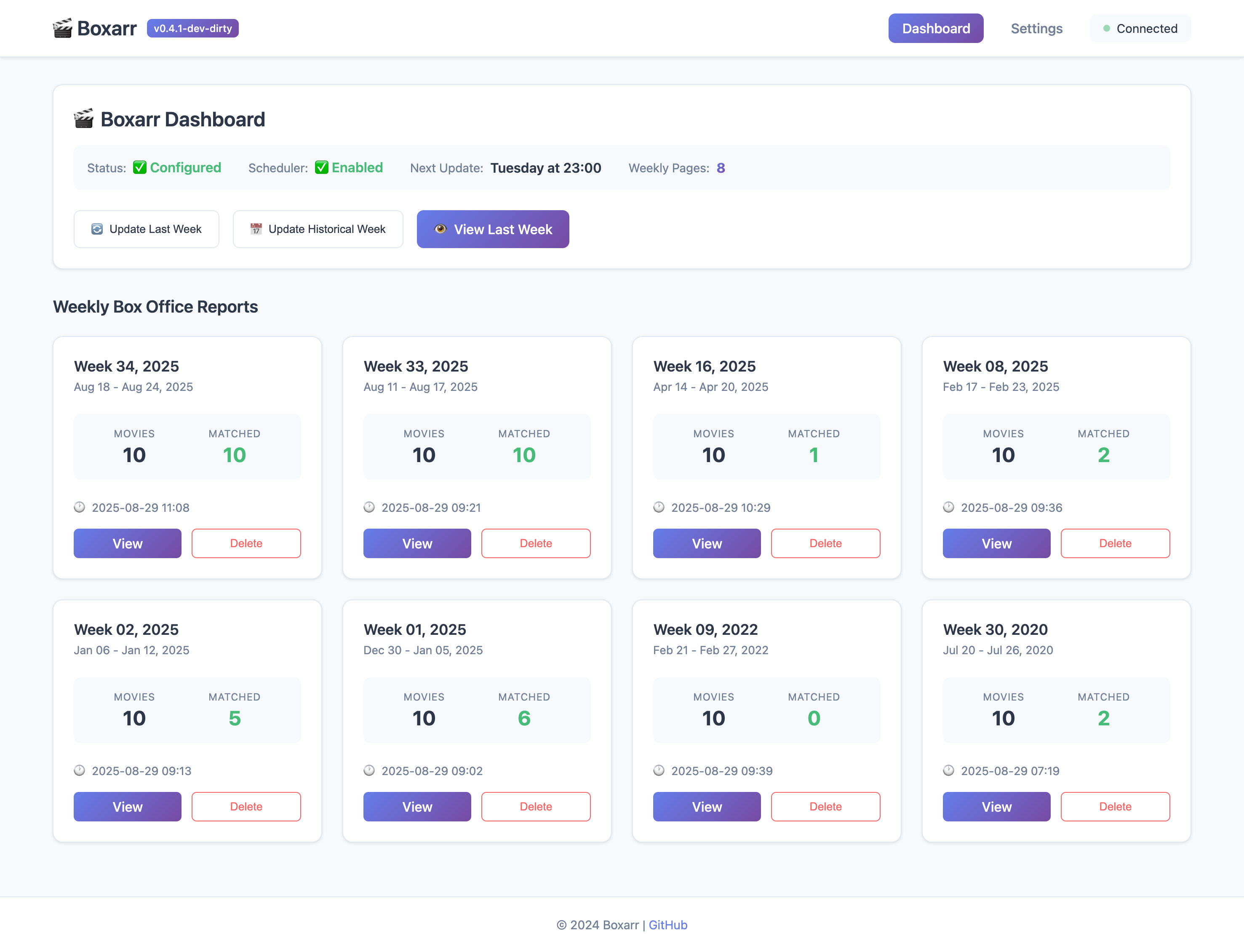
Dashboard View |
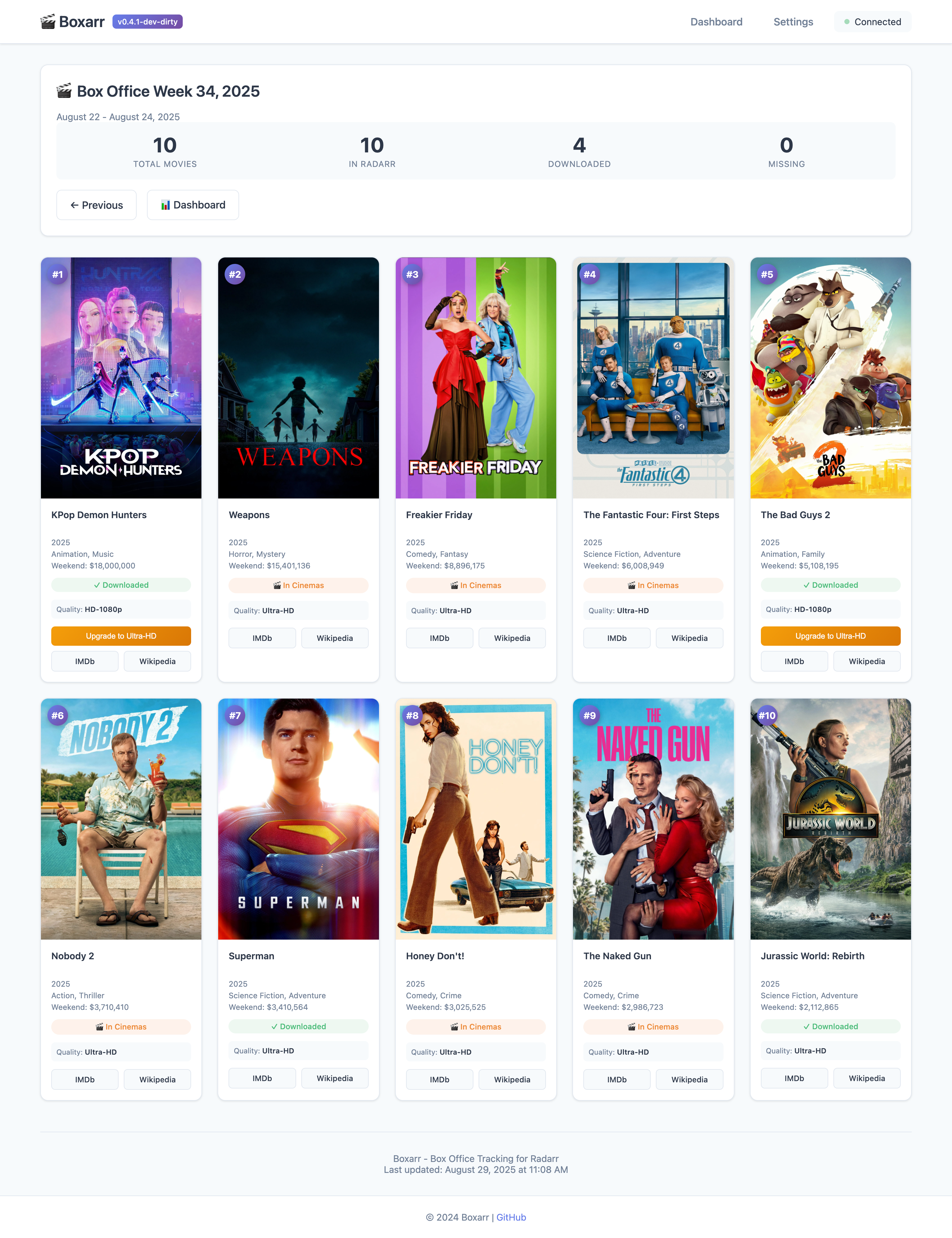
Weekly Box Office |
🆘 Help & Support
- Documentation Wiki - Full documentation
- FAQ - Frequently asked questions
- Troubleshooting Guide - Common issues and solutions
- GitHub Discussions - Community support
- Report Issues - Bug reports and feature requests
Contributing
We welcome contributions! Please see our Contributing Guide for guidelines.
License
GNU General Public License v3.0 - see LICENSE for details.
Acknowledgments
- Radarr for the excellent movie management platform
- Box Office Mojo for box office data
- The self-hosting community for inspiration and feedback
Disclaimer
This project is not affiliated with Box Office Mojo, IMDb, or Radarr. It's an independent tool created for personal media management.
Made with ❤️ for the self-hosting community
Categories
Related apps
Explore more like this
Explore allLinks
Details
ghcr.io/iongpt/boxarr:latestRuntime arguments
- Web UI
http://[IP]:[PORT:8888]/- Network
bridge- Shell
sh- Privileged
- false
Template configuration
- Target
- 8888
- Default
- 8888
- Value
- 8888
- Target
- /config
- Default
- /mnt/user/appdata/boxarr
- Value
- /mnt/user/appdata/boxarr
Optional
- Target
- TZ
- Default
- YOUR TIMEZONE