
All apps · 0 apps

Bookshelf-Traveller
Docker app from DonKevlar's Repository
Overview
Readme
View on GitHubBookshelf Traveller



A fully featured Audiobookshelf discord bot with playback and administrative functionality. Enjoy your travels! :)
You'll need to create your own discord application in order to do this. This is fairly straightforward; here is a guide:
Create a Discord App - Getting Started
Make sure that you select all intents when setting up your bot and that you have created a URL to add it to your desired discord server.
If you provide the CLIENT_ID environment variable, an invite link will be generated when the bot starts up for you. :)
Note: To find the CLIENT_ID value, go to the discord developer portal, click on OAUTH2, and under client information you'll see the client id.
Ownership by default will allow only you to control the bot. To disable this, use the env variable OWNER_ONLY.
When using commands that use images, i.e. /media_progress or /recent_sessions,
the server must use an HTTPS connection due to a requirement from discord's API. If not, no image will be generated.
Important note regarding HTTPS connections: I've experienced a lot of issues when streaming audio from my server to discord using an https connection as the source. I have yet to confirm if this is a double NAT issue, a reverse proxy issue, or otherwise. I suggest you utilize a direct connection to your server, i.e. http://127.0.0.1:13378, if you intend to listen to an audiobook for more than 15 minutes at a time. As a workaround for including images, I've added the OPT_IMAGE_URL env variable. If this is utilized (with an https connection), the bot will use this link for all images instead of the initial server URL.
Troubleshooting
Before reporting an issue, please make sure that you enable DEBUG_MODE=true. You can use this when reporting an issue as it will describe all backend services and any script-related problems.
Environmental Variables
| ENV Variables | Description | Type | Required? |
|---|---|---|---|
AUDIO_ENABLED |
By default set to True, disable if you want to remove the ability for audio playback. |
Boolean | NO |
bookshelfToken |
Bookshelf User Token (All user types work, but some will limit your interaction options.) | String | YES |
bookshelfURL |
Bookshelf URL with protocol and port, ex: http://localhost:80 | String | YES |
DB_HOST |
Database host address (required if using MariaDB). Example: localhost |
String | NO |
DB_NAME |
Database name (required if using MariaDB). Example: bookshelf |
String | NO |
DB_PASSWORD |
Database password (required if using MariaDB) | String | NO |
DB_PORT |
Database port (required if using MariaDB). Default: 3306 |
Integer | NO |
DB_TYPE |
Database type to use. Options: sqlite (default) or mariadb |
String | NO |
DB_USER |
Database username (required if using MariaDB) | String | NO |
DEBUG_MODE |
By default, set to False. It enables verbose logs and also disables all notifications. |
Boolean | NO |
DEFAULT_PROVIDER |
Experimental, set the default search provider for certain commands. | String | NO |
DISCORD_TOKEN |
Discord API Token | String | YES |
EPHEMERAL_OUTPUT |
By default set to True, this sets all commands to be ephemeral (shown only to you). |
Boolean | NO |
FFMPEG_DEBUG |
By default, set to False. It creates FFmpeg logs inside the appdata folder. |
Boolean | NO |
MULTI_USER |
By default set to True, disable this to re-enable admin controls (conditional on the user logged in) and to remove the /login and /select options. |
Boolean | NO |
OPT_IMAGE_URL |
Optional HTTPS URL for generating cover images and sending them to the discord API. This is primarily if you experience similar issues as mentioned above. | String | NO |
OWNER_ONLY |
By default set to True. Only allow bot owner or role owners (if enabled) to use the bot. |
Boolean | NO |
PLAYBACK_ROLE |
A discord role ID, used if you want other users to have access to playback. | Integer | NO |
TIMEZONE |
Default set to America/Toronto |
String | NO |
Database Configuration
By default, the bot uses SQLite for local database storage. For production environments or multi-instance deployments, MariaDB/MySQL is supported.
SQLite (Default)
No additional configuration needed. Database files are stored in the db/ directory.
MariaDB/MySQL Setup
- Create a database and user:
CREATE DATABASE bookshelf CHARACTER SET utf8mb4 COLLATE utf8mb4_unicode_ci;
CREATE USER 'bookshelf_user'@'%' IDENTIFIED BY 'your_password';
GRANT ALL PRIVILEGES ON bookshelf.* TO 'bookshelf_user'@'%';
FLUSH PRIVILEGES;
- Set the following environment variables:
DB_TYPE=mariadb
DB_HOST=localhost
DB_PORT=3306
DB_USER=bookshelf_user
DB_PASSWORD=your_password
DB_NAME=bookshelf
Installation
Current installation method is by docker container; however, you can also run main.py within a project folder.
Docker Container
Docker Container Available:
Docker Hub
docker pull donkevlar/bookshelf-traveller:latest
GitHub Package Repository
docker pull ghcr.io/donkevlar/bookshelf-traveller:master
To run the container, paste the following command:
docker run -d \
--name bookshelf-traveller \
-e DISCORD_TOKEN="INSERT_TOKEN" \
-e bookshelfToken="INSERT_TOKEN" \
-e bookshelfURL="http://myurl.domain.com" \
-e CLIENT_ID="CLIENTID" \
-e AUDIO_ENABLED="True" \
-e MULTI_USER="false" \
-v ./bookshelf-traveller:/ABSBOT/db \
donkevlar/bookshelf-traveller:latest
or using docker compose:
services:
  bookshelf-traveller:
    image: donkevlar/bookshelf-traveller:latest
    container_name: bookshelf-traveller
    environment:
      - DISCORD_TOKEN=INSERT_TOKEN
      - bookshelfToken=INSERT_TOKEN
      - bookshelfURL=http://myurl.domain.com
    volumes:
      - ./bookshelf-traveller:/ABSBOT/db
    restart: always
Unraid
Visit the community applications (CA) store and search for the template name listed below, click install and insert your discord and ABS tokens respectively and enjoy!
Template Name: Bookshelf-Traveller
Python Script
Requirements: Python 3.10 or above.
FFmpeg must be installed in the project directory and/or in PATH to run audio commands using the script installation method. If this is too difficult, please use the docker instructions above.
You'll also need a '.env' file for loading the above ENV Variables
Step 1: Navigate to Directory
Open your terminal and navigate to your desired folder.
Step 2: Clone Project
Git clone the project
git clone https://github.com/donkevlar/Bookshelf-Traveller.git
Step 3: Download Dependencies
Windows
pip install -r requirements.txt
Linux Debian/Ubuntu
For all OS options visit Interactions.py
pip install -r requirements.txt
sudo apt install ffmpeg libffi-dev libnacl-dev
Step 4: Start
Make sure that you are in the /Bookshelf-Traveller directory.
python main.py
Bot Commands
The following commands are available:
By default, set up as '/' commands, or a.k.a. app commands Here's the list of commands sorted alphabetically:
| Command | Description | Arguments | Additional Information | Additional Functionality |
|---|---|---|---|---|
/active-task |
Pulls all active tasks, this is a server-wide command. (Sees all users, channels, etc.) | |||
/add-book |
Add a book to your wishlist, this command is open server-wide. | title, provider, force |
Most successful searches will appear on audible, but others are available by default. Note that even if a title is specific, sometimes that can result in too many options and the bot returning nothing. Use a series name when this occurs. | Autocomplete |
/add-user |
Will create a user, requires username, password | name, password, user_type, optional: email |
Only with ABS admin token. Otherwise disabled. *MULTI_USER must be False. | |
/all-libraries |
Displays all current libraries with their ID | |||
/announce |
Creates a public link for people to join the voice channel | |||
/book-list-csv |
Get complete list of items in a given library, outputs a CSV | libraryid |
Only with ABS admin token. Otherwise disabled. *MULTI_USER must be False. | Autocomplete Enabled & Cover Images |
/change-chapter |
Changes chapter in currently playing audio | type: next, previous |
||
/discover |
Provides 10 random books to the user | |||
/listening-stats |
Pulls your total listening time | |||
/login |
Login using ABS username and password. | username, password |
||
/media-progress |
Searches for the media item's progress | book_title |
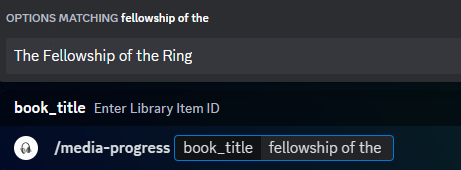
Features autocomplete, simply type in the name of the book and it will return the name and ID for you. | Autocomplete Enabled & Cover Images |
/new-book-check |
Will look back using the given search period for any recently added books. Can be used as a recurring task. | minutes, enable_task, disable_task |
Use the minutes argument for a live use case. Note: This does not affect the task timing. Default task is set to refresh every 5 minutes. |
|
/pause |
Pause audio | |||
/ping |
Displays the latency between your server and the discord server shard | |||
/play |
Start a new audio session from server, syncs automatically | book |
Autocomplete provides up to the last 10 titles you've listened to. Also, provides a full embedded UI with playback controls. | |
/remove-book |
Mark a book as downloaded in your wishlist | |||
/recent-sessions |
Will display up to 10 recent sessions in a filtered and formatted way. | |||
/recently-added |
Will display up to 10 recently added books. | |||
/refresh |
Refresh play book | |||
/resume |
Resume audio | |||
/select |
Switch between logged in ABS users | |||
/setup-tasks |
Used to setup any tasks that are persistent when the bot is running. | task, channel |
Required for all recurring tasks. | |
/stop |
Disconnect bot from channel | |||
/test-connection |
Will test the connection of your bot to the Audiobookshelf server | optional: opt_url |
Optionally you can test the connection to any URL. | |
/user |
Will display the currently logged in user. | |||
/user-search |
Search for a specific user by name | name |
Only with ABS admin token. Current public release only has name, but will be updated to include search by ID, or by using the autocomplete. Only with ABS admin token. Otherwise disabled. *MULTI_USER must be False. | Autocomplete Enabled |
/volume |
Adjusts the bot's volume in the currently connected channel. | volume: integer between 0 & 100 |
Default volume is set to 50%. | |
/view-all-wishlists |
View all active or inactive wishlists of all submitted wishlists. Admin/owner command only. | |||
/wishlist |
View your wishlist. Server-wide command. |
Alternative Packages
Audio-only packages have been deprecated. Please use the environmental variables to modify how you would like your bot to function.
Features
/play
Play any of your audiobooks directly in discord! This also works with Xbox or Mobile clients. The bot will automatically sync your progress to your ABS server, and allow you to use multiple users from one place!
Multi-Channel Notifications (/setup-task)
Monitor and track what is added to your ABS server by utilizing the book check tasks. Select which channels you want the notifications to be subscribed to; multiple channel notifications are supported!
/wishlist
Create a customized wishlist, with direct messages so that your other server members can subscribe to see when something they wishlisted gets added.
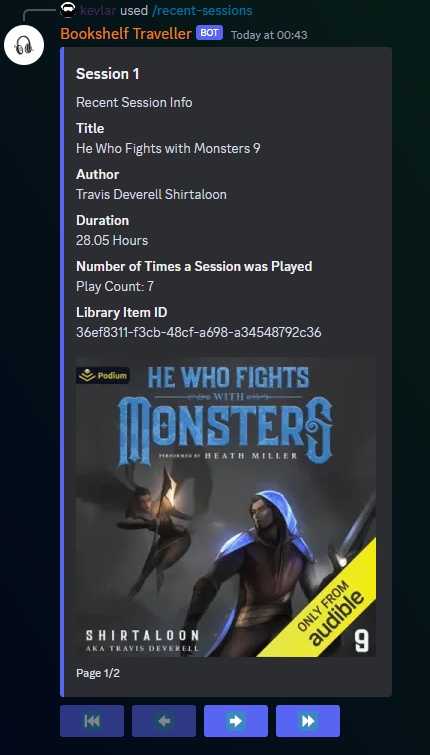
/recent-sessions
List your most recent sessions.
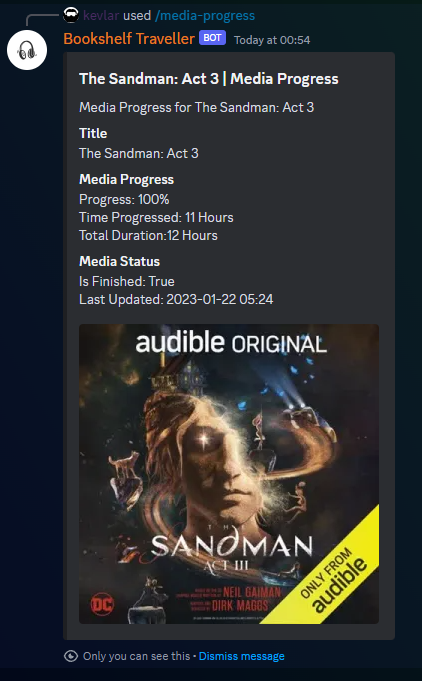
/mediaprogress
View all of your media's progress at a glance.
Other examples
Install Bookshelf-Traveller on Unraid in a few clicks.
Find Bookshelf-Traveller in Community Apps on your Unraid server, review the template, and click Install. Unraid handles the Docker app or plugin setup from the published template.
Requirements
Categories
Download Statistics
Related apps
Explore more like this
Explore allDetails
donkevlar/bookshelf-traveller:latestRuntime arguments
- Network
bridge- Shell
sh- Privileged
- false
Template configuration
Discord application token.
- Target
- DISCORD_TOKEN
- Value
- INSERT_TOKEN
Discord application client ID. This can be found under the 'OAuth2' tab in the discord dev portal.
- Target
- CLIENT_ID
ABS Token, generated in the settings page of the user. Accepts all user types, but will have limitations if not admin.
- Target
- bookshelfToken
- Value
- INSERT_TOKEN
Audiobookshelf url. ex: http://127.0.0.1:13378
- Target
- bookshelfURL
- Default
- http://127.0.0.1:13378
- Value
- http://127.0.0.1:13378
Path for db(s) to stay persistant. Delete if you want the docker to re-initialize the dbs everytime it starts up.
- Target
- /ABSBOT/db
- Default
- /mnt/user/appdata/bookshelf_traveller/db
- Value
- /mnt/user/appdata/bookshelf_traveller/db
Only the owner will have access to all commands. Disable to allow others to use the bot.
- Target
- OWNER_ONLY
- Default
- True
- Value
- True
By default is true, enables the audio module. If disabled, it will remove the ability for audio playback.
- Target
- AUDIO_ENABLED
- Default
- True
- Value
- True
Default search provider for titles. Please refer to ABS API wiki page for full list. EXPERIMENTAL AND OPTIONAL
- Target
- DEFAULT_PROVIDER
- Default
- audible
By default is true, enables the audio module. If disabled, it will remove the ability for audio playback.
- Target
- AUDIO_ENABLED
- Default
- True
- Value
- True
Playback Role. Can be copied over from discord when developer mode is enabled.
- Target
- PLAYBACK_ROLE
- Default
- True
- Value
- 0
Enables multi-user login to ABS server. Disable to allow admin controls.
- Target
- MULTI_USER
- Default
- True
- Value
- True
Used if you want to use HTTPS connection to retrieve your images. Note this won't do anything if you are already using it in the primary URL.
- Target
- OPT_IMAGE_URL
Will make log verbose and show all internal library logs as well.
- Target
- DEBUG_MODE
- Default
- False
- Value
- False