
All apps · 0 apps

BombVault Widget
Plugin from Junker der Provinz
Overview
Readme
View on GitHub




💣 BombVault Widget puts BombVault's activity log where you already look: a real, native tile on the Unraid 7 dashboard. Every backup, restore, verify, prune, off-site replication and drill scrolls by as it happens — plus the next scheduled run — in the same dark terminal-style log as BombVault's own widget.
Read-only — the tile is fed through a same-origin proxy; the widget token never reaches the browser.

Table of Contents
1. What is this?
A small Unraid plugin (no daemon, no container) that registers a native dashboard tile named BombVault Activity. The tile shows up in the dashboard's tile-management list like the built-in ones — hide it, move it between columns, collapse it. Its body is a fixed-height, scrollable, always-dark log (newest at the bottom, auto-follow unless you scroll up) whose lines mirror BombVault's own embeddable widget one-to-one: green for success, red for failures, blue for off-site replication, yellow for the pulsing "next: …" line.
2. Screenshots
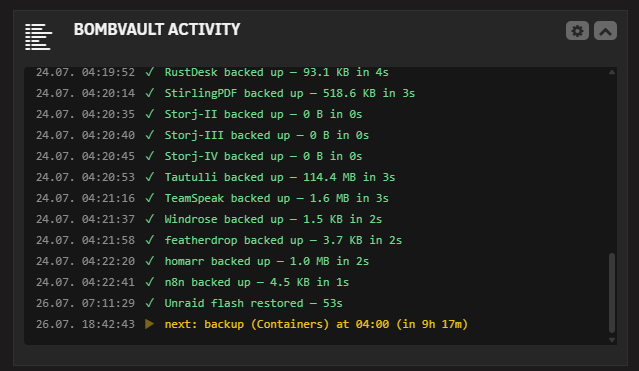
The BombVault Activity tile on the Unraid dashboard — every backup, restore and verify scrolls by in the dark terminal-style log, with the pulsing "next: …" line at the bottom.
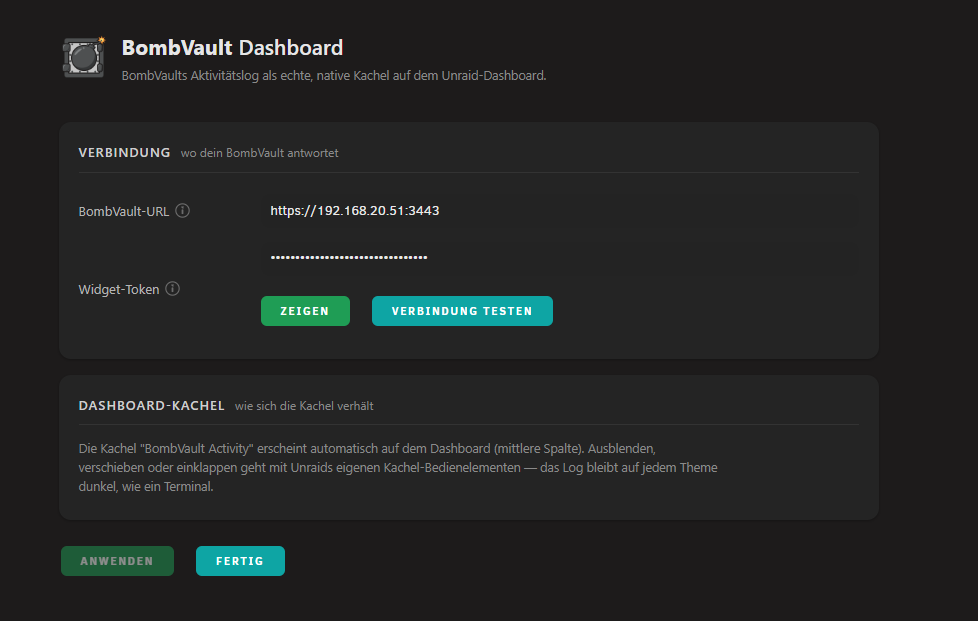
Settings under Utilities: BombVault URL + widget token with a one-click connection test, and a short note on how the tile behaves.
3. Requirements
- Unraid 6.12.0 or newer (the tile uses the modern dashboard; built for Unraid 7).
- BombVault 6.9.0 or newer running on your network.
- A widget token, generated in BombVault → Settings → System → Dashboard widget.
4. Install on Unraid
Community Applications listing: TODO — until the CA entry in unraid-apps is live, install via Plugins → Install Plugin with the raw .plg URL:
https://raw.githubusercontent.com/junkerderprovinz/bombvault-widget/main/plugin/bombvaultwidget.plg
5. Setup
- In BombVault open Settings → System → Dashboard widget and generate a widget token (copy it right away — it is shown only once).
- In Unraid open Settings → Utilities → BombVault Widget, enter the BombVault URL (e.g.
https://192.168.20.51:3443) and the token, hit Apply. Pasting BombVault's full widget URL (…/widget?token=…) into the token field works too — the token part is extracted automatically. - Click Test connection — it answers with the BombVault version when everything is wired.
- Open the Dashboard: the BombVault Activity tile is live in the middle column.
6. How it works
bombvaultwidget.Dashboard.pageregisters the tile (Menu="Dashboard:0"+$mytiles), a static scaffold with the native Unraid 7 tile header (chevron, an open-BombVault link once a URL is configured, cog to the settings page).scripts/bombvaultwidget.jspollsserver/status.phpevery 10 seconds and renders the log rows viatextContent(no HTML from feed data ever runs).server/status.phpis a same-origin proxy: it reads the URL + token from/boot/config/plugins/bombvaultwidget/bombvaultwidget.cfgand calls exactly one endpoint — BombVault'sGET /api/widget/data— with theX-Widget-Tokenheader, 5 s timeout, self-signed LAN TLS accepted. Unreachable or misconfigured = a clean JSON 503, which the tile shows as a pulsing red status line while keeping the history on screen.
7. Security
The widget token stays server-side: the browser only ever talks to the Unraid webgui (session-protected), and the proxy only ever talks to the one hard-coded BombVault endpoint — no request parameter can redirect it. On BombVault's side the token grants read-only access to the activity log and schedule preview, nothing else, and can be revoked/rotated any time in BombVault's settings. TLS peer verification is deliberately disabled for the LAN call because BombVault serves a self-signed certificate on a private address.
8. License
MIT — see LICENSE.
Install BombVault Widget on Unraid in a few clicks.
Find BombVault Widget in Community Apps on your Unraid server, review the template, and click Install. Unraid handles the Docker app or plugin setup from the published template.
Categories
Download Statistics
Downloads by Month
Related apps
Explore more like this
Explore allDetails
https://raw.githubusercontent.com/junkerderprovinz/bombvault-widget/main/plugin/bombvaultwidget.plg