
All apps · 0 apps

blend-calc
Docker app from Stoatworks Labs' Repository
Overview
Readme
View on GitHubBlend Calc
AI-assisted project. This codebase was created with Claude Code (Anthropic), directed and reviewed by a human author. The blend, pixel-budget and curved-optics maths is verified numerically — 66 tests pin the conservation invariants, the flat/curved limit cases and the lens-selection logic — and the PDF report is generated and inspected across flat, curved, single-projector, large-array and deliberately-broken designs. The Resolume Arena exporter's XML vocabulary was derived from real files written by an Arena 7.27.0 install and is asserted in CI to invent no elements or attributes. It has not been round-tripped through a running Arena, and no blend has ever been driven onto real projectors from it. The shipped projector and lens specifications are seed data flagged
unverifiedthroughout.
A projector edge-blend calculator that runs entirely in the browser. Define a projection canvas, set the array, pick a projector and lens from a library you control, and get the system resolution, the overlap budget, the lens requirement per position, a PDF report, and a Resolume Arena advanced-output file.
No backend, no accounts, no telemetry. Everything is computed client-side and stored in
localStorage, so it deploys as a static site to a Cloudflare Worker.
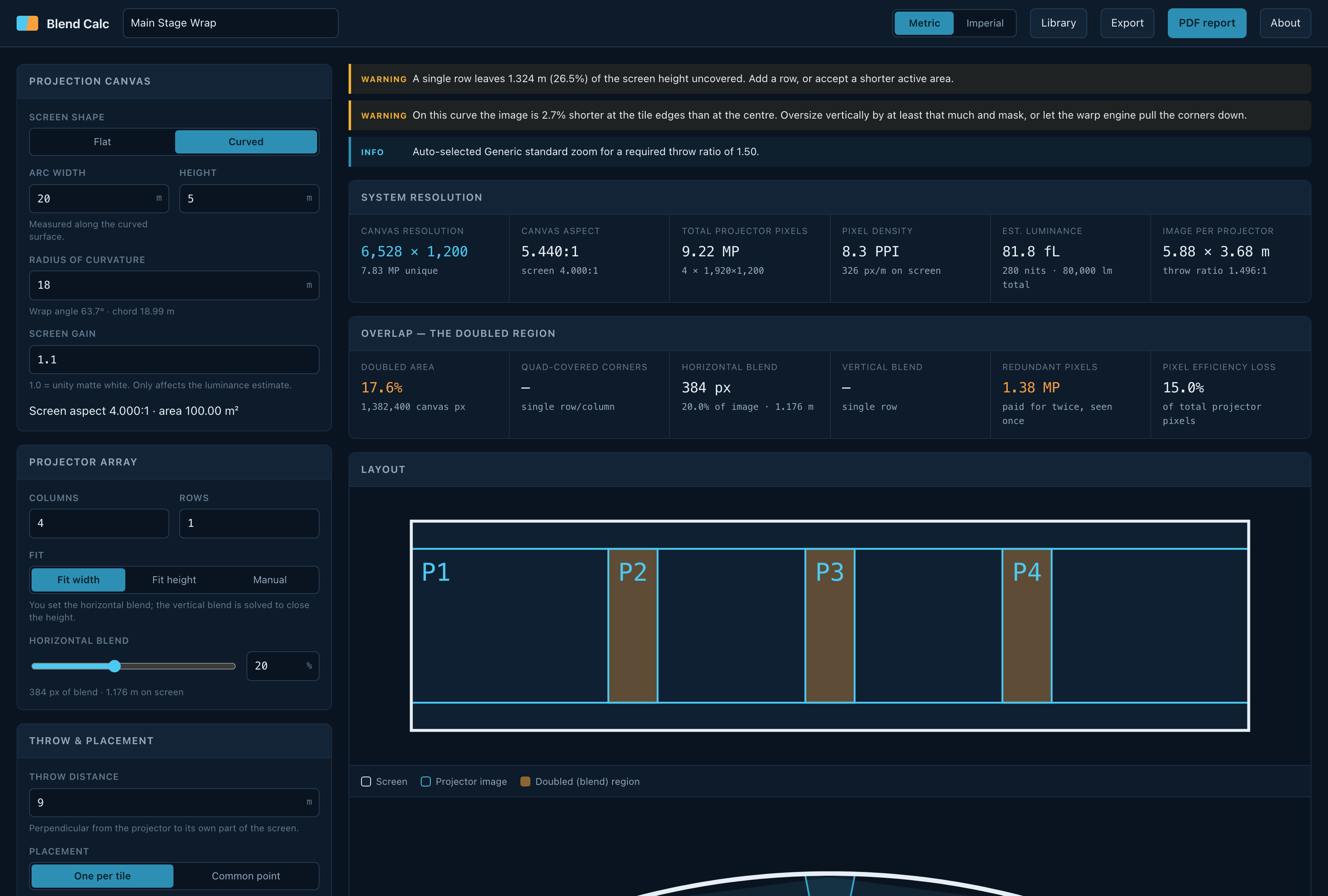
A 20 m × 5 m cylindrical screen on an 18 m radius, four projectors wide at 20% blend. The warnings are live: this array leaves 26.5% of the screen height uncovered, and the curve makes the image 2.7% shorter at the tile edges than at the centre.
What it does
Canvas — flat or cylindrical. On a curve you give the arc width (measured along the surface, the way a screen is actually built) and the radius; the wrap angle and chord fall out of that.
Array — any grid of columns × rows. You pin one blend and the solver derives the other so the array closes on the screen exactly:
| Fit mode | You set | Solver derives |
|---|---|---|
| Fit width | horizontal blend | vertical blend |
| Fit height | vertical blend | horizontal blend |
| Manual | both | reports the spill or shortfall instead of correcting it |
System resolution — the blended canvas size, total projector pixels, pixel density on the screen surface in PPI, and an estimated screen luminance in foot-lamberts and nits.
The doubled region — the overlap accounting, which is the thing that makes blends expensive. Blend bands are covered by two projectors; where a horizontal and a vertical blend cross, by four. The report separates all three, in canvas pixels and as a share of the canvas, and totals the redundant pixels you pay for twice and see once.
Throw and lens — required throw ratio per column, the lens that covers it, where it sits in its zoom range, and the horizontal lens shift needed. Two placement models:
- One per tile — each projector on the axis of its own tile. No shift needed.
- Common point — the whole array stacked at one position. Off-axis tiles need shift, and on a curve the throw varies per column.
Library — projectors by brand/model with their native resolution, light output and lens mount; lenses grouped into mount families so they are entered once, not once per body. Fully editable, with JSON import/export.
Exports — a PDF system report, a Resolume Arena advanced-output XML, and the design itself as JSON.
Curved screens
The optics on a curve are not the flat maths with a fudge factor. A projector forms a flat image; a curved screen does not, so the flat image has to be wider than the tile's arc length to reach around the curvature. With a segment subtending angle θ at radius R and a throw D:
half-angle  α = atan( R·sin(θ/2) / (D − R·(1 − cos(θ/2))) )
flat width  w = 2·D·tan(α)
throw ratio   = D / w
Two consequences the tool reports and a flat calculator misses:
- You need a wider lens than the flat maths suggests.
- The image is shorter at the tile edges than at the centre, because a concave screen's edges bulge towards the projector. You oversize vertically and mask, or let the warp engine pull the corners down. The percentage is on screen and in the report.
A projector at the centre of curvature (throw = radius) is a normal, often ideal, position and is handled — the formula collapses to α = θ/2 there. The real constraint is that the projector must be in front of the plane through its own tile's edges.
Resolume Arena export
The XML format was derived from two files written by a real Arena 7.27.0 (rev 14395) install, not from documentation. See docs/resolume-export.md for exactly what is reproduced, what is deliberately left out, and what has and has not been verified.
Short version: the file carries the geometry — one Screen per projector, each with a Slice whose input rectangle is that projector's share of the composition with its overlap. Soft-edge parameters are not written, because no reference file had blending enabled and a guessed parameter name is worse than an absent one. The blend widths are in the UI and the report; set them on each slice edge in Arena.
Running it
npm install
npm run dev
npm test
npm run build
npm run build writes a static site to dist/.
Deploying to Cloudflare
Connect the repo with build command npm ci && npm run build and output directory dist,
or run npm run deploy from a machine with wrangler logged in. wrangler.toml declares
the static-assets Worker; public/_headers sets a strict CSP and immutable caching for the
hashed assets. Full instructions, and what the CSP allows and why, are in
docs/deployment.md.
Accuracy, and what this is not
Every figure is geometric. It assumes square pixels, no keystone, no lens distortion, a perfectly built screen, and zero optical losses. The luminance estimate is a ceiling: it ignores lamp ageing, port glass, and blend-region compensation losses.
The shipped projector and lens data is seed data, flagged unverified, and has not
been checked against datasheets. Anything unverified is badged in the UI and carries a
warning box on the PDF. Clear the flag per model once you have confirmed it. The generic
lens classes ("standard zoom, 1.3–1.8:1") are honest by construction — they describe a
category, not a product.
Confirm lens coverage and brightness against manufacturer datasheets, and the room against a site survey, before anything is ordered or quoted.
Run your own copy
Blend Calc is a static page, so hosting it yourself is one container serving the built files — the same files the hosted copy serves, running somewhere that still works when the venue has no internet.
Docker. The image is built by this repo's docker.yml workflow on every
push and published as ghcr.io/stoatworks-labs/blend-calc:
docker run -d --name blend-calc --restart unless-stopped -p 8521:80 ghcr.io/stoatworks-labs/blend-calc:latest
Or docker compose up -d with the docker-compose.yml
in this repo, which maps the same port. Either way it is then at
http://localhost:8521/.
Unraid. Search Community Applications for Blend Calc — the template is
templates/blend-calc.xml
in stoatworks-unraid, which is what the CA feed reads.
Stoatworks Burrow lists it under Self-hosted, with the compose file a click away.
The Dockerfile, docker-compose.yml, docker/ and the workflow are
generated from fleet.json in stoatworks-unraid. Change them there and
regenerate rather than editing them here.
This project is built on other people's work — see ATTRIBUTIONS.md.
Licence
MIT.
Install blend-calc on Unraid in a few clicks.
Find blend-calc in Community Apps on your Unraid server, review the template, and click Install. Unraid handles the Docker app or plugin setup from the published template.
Categories
Related apps
Explore more like this
Explore allDetails
ghcr.io/stoatworks-labs/blend-calc:latestRuntime arguments
- Web UI
http://[IP]:[PORT:80]/- Network
bridge- Shell
sh- Privileged
- false
Template configuration
Host port for the web interface.
- Target
- 80
- Default
- 8521
- Value
- 8521