
All apps · 0 apps

bitwarden-export
Docker app from onetx's Repository
Overview
Readme
View on GitHubBitwarden_Export

Bitwarden_Export: Docker to backup your Bitwarden vault contents

Features
This simple bash docker image uses the Bitwarden CLI to perform three backup tasks:
- Export personal vault
- Export organization vault (if applicable)
- Export file attachments (if applicable)
New Features
- Securize authentication tokens with Infisical Vault
- Receive notification in any platform with Shoutrrr
The docker image provides the choice of creating unencrypted export files or password-encrypted export files. Attachments are not encrypted.
Compatibility
This docker image is compatible with Linux, MacOs or Windows. Please adapt docker-compose file to each OS.
Requirements
This docker image requires the following:
- Docker (Obviously)
- Personal API Keys for CLI Authentication https://bitwarden.com/help/personal-api-key/
How to Use the docker image
Before using the image for the first time, you must edit the variables and volumes to provide authentication credentials and folder locations to save export files and attachments, as well as your organisation ID (if you want to export your organisation's vault; otherwise, leave it blank).
The docker image will prompt you for your password each time so that you don't have to save that within the docker image.
Execution:
From a terminal window, simply type: bash bw_export.sh and follow the prompts.
Outputs
The following are created by the docker image:
- JSON file containing your exported personal vault contents (password-encryption is recommended)
- JSON file containing your exported organization vault contents (optional)
- folder containing copies of your file attachments, labelled by subfolder names that match the name given to each vault item
How to run the container
Run container in any plattorm with docker command line:
If you prefer to run it manually or just once, run the following command:
docker run --name bw-export -v ./export/data:/var/data -v ./export/attachment:/var/attachment -e "BW_CLIENTID=<CLIENT ID FROM BITWARDEN API>" -e "BW_CLIENTSECRET=<CLIENT SECRET FROM BITWARDEN API>" -e "BW_PASSWORD=<BITWARDEN PASSWORD>" 0netx/bw-export:latest
Run container in any plattorm with docker compose:
To run this container you must copy the
docker-compose.ymlfrom the repository.services: bw-export: container_name: bw-export image: 0netx/bw-export:latest volumes: - ./export:/var environment: - BW_CLIENTID=<CLIENT ID FROM BITWARDEN API> - BW_CLIENTSECRET=<CLIENT SECRET FROM BITWARDEN API> - BW_PASSWORD=<BITWARDEN PASSWORD> # Optional: Own Vaultwarden/Bitarden selfhosted server #- BW_URL_SERVER=<YOUR VAULTWARDER URL SERVER> - OUTPUT_PATH=<Output path i.e. /var/data/ > - ATTACHMENTS_PATH=<attachment path i.e. /var/attachment/ > - EXPORT_PASSWORD=<Export password. Export will be encrypted with this password> - BW_ORGANIZATIONS_LIST=<Organization list id, comma separated> # Optional: Map the container's internal user to a user on the host machine # - PUID=1000 # - PGID=1000 # Optional: Execution logging file. Please check output path is mapping inside a volume # - FILE_LOG=/var/data/bw-export-logfile.log # Optional: Keep the maximum number of exports defined. A maximum of X exports will be retained, the oldest exports will be deleted. # - KEEP_LAST_BACKUPS=5Configure each required variable and volumes.
Run the compose with
docker compose up
Enviroment Variables
Vaultwarden Export can be configured using the following environment variables.
You must report the following variables so that the container can authenticate itself in your vault. The API Keys for authentication can be obtained from Personal API Keys for CLI Authentication https://bitwarden.com/help/personal-api-key/
| Variable | Description |
|---|---|
BW_CLIENTID |
It's client_id variable from your account |
BW_CLIENTSECRET |
It's client_secret variable from your account |
BW_PASSWORD |
Your Bitwarden/Vaultwarden password. |
EXPORT_PASSWORD |
Encryption password you have chosen for exporting then vault. if you choose to use password-encryption to store your export files (recommended) be sure that you use a strong and memorable password! (don't just store it inside Bitwarden, because if you get locked out of your account you won't be able to restore your exports) |
OPTIONALS VARIABLES:
| Variable | Description |
|---|---|
BW_ORGANIZATIONS_LIST |
If you want to make a backup of your organizations, set one or more organizations separated by comma. |
NOTIFICATION_URL |
Shoutrrr notification url Service overview |
KEEP_LAST_BACKUPS |
Optional: Keep the maximum number of exports defined. A maximum of X exports will be retained, the oldest exports will be deleted. |
FILE_LOG |
Optional: Execution logging file. Please check output path is mapping inside a volume |
Safety
This container is based on an automation of the official Bitwarden CLI client. This script does not save, trace or store any information. The session is closed after the backup has been performed.
If you wish you can configure each variable using docker secrets as in the example docker-compose.secrets.sample.yml
Safety. Option A Define docker secret files
mkdir ./.secrets
echo BW_CLIENTID > ./.secrets/.bwclientid
echo BW_CLIENTSECRET  > ./.secrets/.bwsecret
echo BW_PASSWORD  > ./.secrets/.bwpassword
- Configure
docker-compose.secrets.sample.ymlwith your variables and volumes - Run it and enjoy it.
Safety. Option B Use infisical
Sign up in Infisical free account
Create a project and create the variables bellow:
BW_CLIENTID=CLIENT ID FROM BITWARDEN APIBW_CLIENTSECRET=CLIENT SECRET FROM BITWARDEN APIBW_PASSWORD=BITWARDEN PASSWORDEXPORT_PASSWORD=EXPORT PASSWORD. Optional
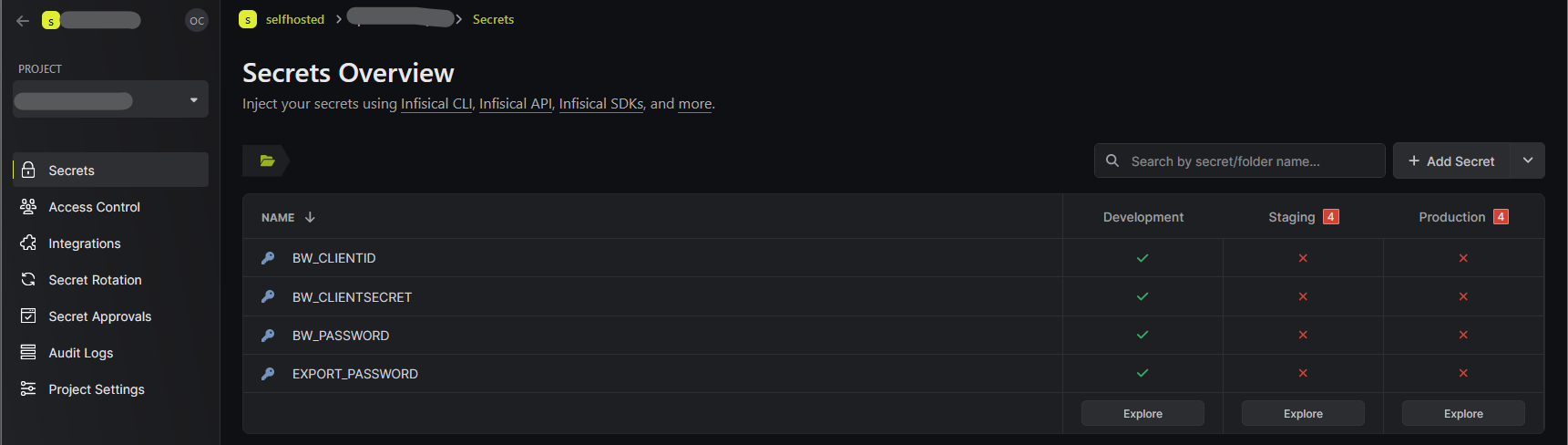 *This is an example from Infisical Website
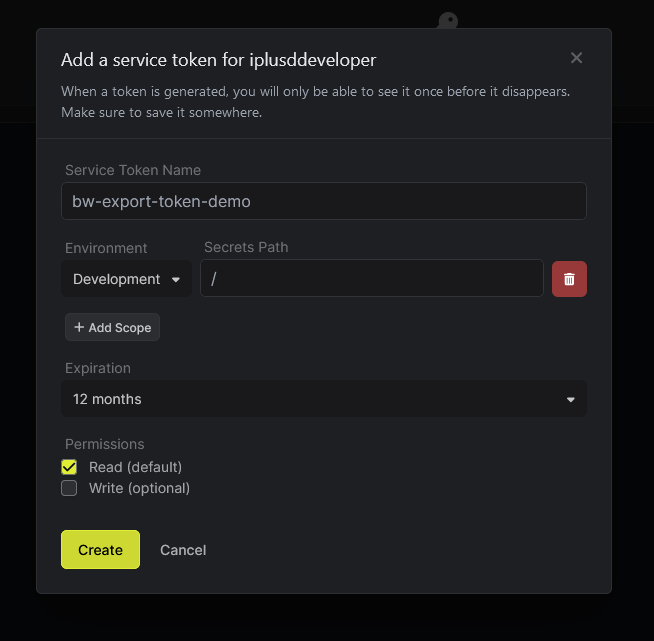
- Create a Service Token in Project -- Access Control -- Service Tokens. Customize Service Token Name and Secrets Path according to your requerimients.
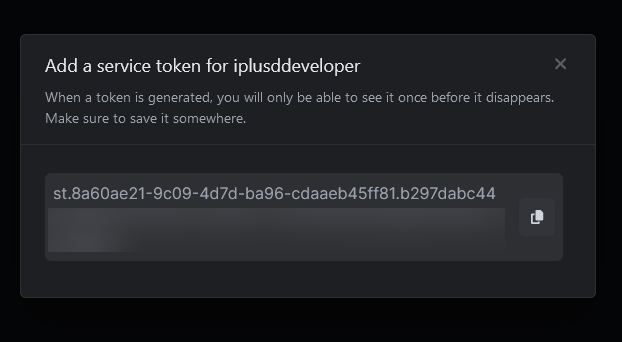
- Copy created service token
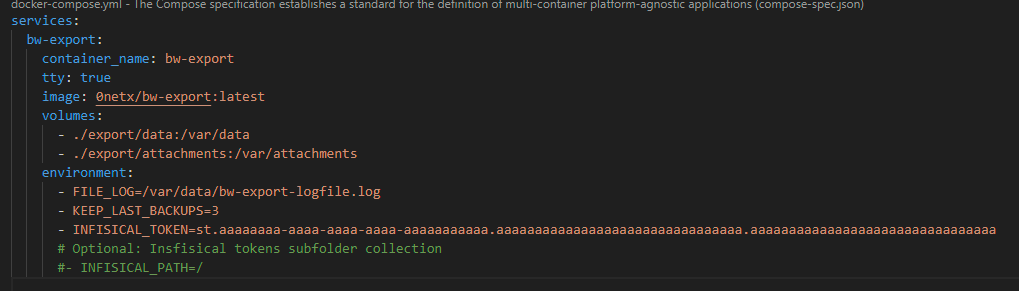
- Edit Docker compose and add the variables
INFISICAL_TOKENwith previous generated token andINFISICAL_PATHwith Secrets Path value
Notification in Telegram
In order to receive notifications on Telegram, we must inform the following variable by replacing the values of $BOT_TOKEN and $CHAT_ID with the token of our bot and the chat id of our user:
NOTIFICATION_URL=telegram://$BOT_TOKEN@telegram/?channels=$CHAT_ID
Example:
NOTIFICATION_URL=telegram://1009999999:AAaaaaaaaaaaaaaaaaaaaaaaaaaaaaaaaaaaaaa@telegram/?channels=19599999999
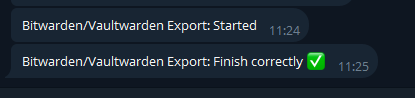
When export finish correctly, you should receive a notification:
Notification in Gotify
The notification URL is the Gotify host followed by an application token:
NOTIFICATION_URL=gotify://$GOTIFY_HOST/$GOTIFY_TOKEN
Example:
NOTIFICATION_URL=gotify://gotify.example.com/gtfya.AbCdEf0123456789AbCdEf0123456789AbCdEf01234
If Gotify runs under a subpath, add it before the token (gotify://example.com/gotify/$GOTIFY_TOKEN). If it is served over plain HTTP instead of HTTPS, append ?disabletls=yes.
Both token formats are accepted: the legacy one from Gotify below 3.0.0 (15 characters starting with A) and the one issued by Gotify 3.0.0 and later (gtfya. prefix, around 50 characters). Support for the newer format is why this image builds Shoutrrr from the nicholas-fedor fork: the original containrrr project stopped at v0.8.0, which rejects any token that is not exactly 15 characters starting with A.
Run in Unraid
Please see the following link Bitwarden_Export Unraid Tempplate Readme
PUID and PGID Variables
Docker runs all of its containers under the root user domain because it requires access to things like network configuration, process management, and your filesystem. This means that the processes running inside your containers also run as root. This kind of elevated access is not ideal for day-to-day use, and potentially gives applications the access to things they shouldn't (although, a strong understanding of volume and port mapping will help with this).
Another issue is file management within the container's mapped volumes. If the process is running under root, all files and directories created during the container's lifespan will be owned by root, thus becoming inaccessible by you.
Using the PUID and PGID allows our containers to map the container's internal user to a user on the host machine. All of our containers use this method of user mapping and should be applied accordingly.
Using the variables
When creating a container from one of our images, ensure you use the -e PUID and -e PGID options in your docker command:
docker create .... -e PUID=1000 -e PGID=1000 ....
Or, if you use docker-compose, add them to the environment: section:
environment:
  - PUID=1000
  - PGID=1000
It is most likely that you will use the id of yourself, which can be obtained by running the command below. The two values you will be interested in are the uid and gid.
id $user
KEEP_LAST_BACKUPS Variable
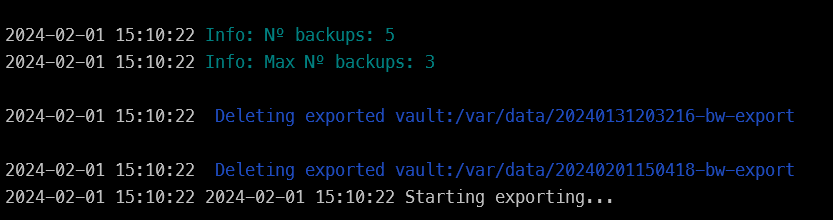
Keep the maximum number of exports defined. A maximum of X exports will be retained, the oldest exports will be deleted.
environment:
  - KEEP_LAST_BACKUPS=5
Each export is saved in the output folder with the template <DateTime>-bw-export.
When the variable KEEP_LAST_BACKUPS is set, the container will sort the folders and delete the oldest ones while keeping the number of folders indicated by the variable.
Developers only - How to build the image
Clone repo and build docker image
git clone https://github.com/0neTX/Bitwarden_Export.git
cd Bitwarden_Export
docker build --no-cache -t bw-export --progress=plain .
SPECIAL THANKS
This docker image is based on the script of @dh024/Bitwarden_Export that I used as a base and inspiration. Thank you very much.
Disclaimer
Since the purpse of this docker image is to create a copy of all your passwords and secrets stored in Bitwarden, you should carefully inspect this docker image to ensure it meets your needs and that it will execute as you would expect. I provide no guarantees that it will work for you!
- Note: the docker image will not export vault items in your Trash, nor will it export your password history -- this is a limitation of the Bitwarden CLI tools
License
This project is licensed under the GPL 3.0 License. See the LICENSE file for details.
Categories
Download Statistics
Total Downloads Over Time
Related apps
Explore more like this
Explore allLinks
Details
0netx/bw-exportRuntime arguments
- Network
bridge- Shell
sh- Privileged
- false
Template configuration
OPTIONAL: If you have your own Bitwarden or Vaulwarden server, set in the environment variable BW_URL_SERVER its url address.
Your Bitwarden Personal API Key can be obtain in: https://bitwarden.com/help/personal-api-key/
Your Bitwarden Personal API Key can be obtain in: https://bitwarden.com/help/personal-api-key/
Bitwarden Vault Password
OPTIONAL: Set one or more organizations separated by comma. To obtain your organization_id value, open a terminal and type:bw login #(follow the prompts); bw list organizations | jq -r '.[0] | .id' Example: cada13d7-5418-37ed-981b-be822121c593,cada13d7-5418-37ed-981b-be82219879878979,cada13d7-5418-37ed-981b-be822121c5435 If empty, the container export a backup of ALL Organizations in vault
The password used to encrypt the exporte vault.
Path to save exported vault
- Target
- /var/data
- Default
- /mnt/user/appdata/bw-export
- Value
- /mnt/user/appdata/bw-export
- Target
- /var/attachments
- Default
- /mnt/user/appdata/bw-export
- Value
- /mnt/user/appdata/bw-export