
All apps · 0 apps

BirdView
Docker app from StorkenLorken's Repository
Overview
BirdView is a modern, blazing-fast storage visualization dashboard. It allows you to explore your Unraid shares, identify space wasters by category (Video, Backups, etc.), and track storage trends over time with historical snapshots.
Readme
View on GitHub🐦 BirdView
Ever wondered where all your storage went?
BirdView is a snappy, macOS-inspired dashboard that helps you hunt down space-hogs on your Unraid server (or any home server). It scans your drives, categorizes your junk, and tracks how your storage grows over time.
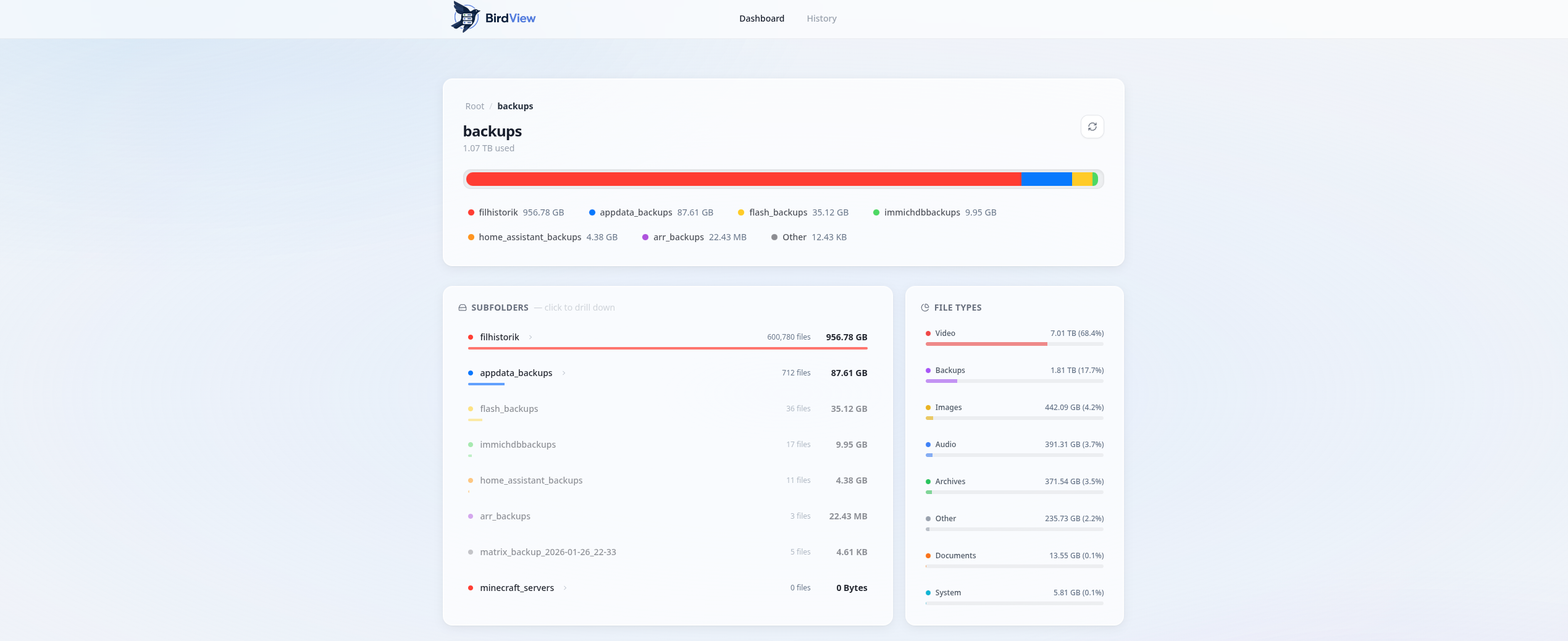
Why you'll love it
- Fast as heck: Written in Go, so it rips through millions of files in a few minutes.
- Eye Candy: A beautiful frosted glass UI that actually looks good.
- Time Travel: See exactly how much your "Backups" folder grew since last month.
- No Mess: Just one Docker container. No complex setup, no external databases.
Get it running
Unraid (The easy way)
- Head to the Apps tab.
- Search for
BirdView. - Hit Install and you're done!
Configuration
- Storage to Scan: Point this to whatever you want BirdView to analyze (default:
/mnt/user). - AppData: This is where BirdView saves its history database. Keep this persistent so you don't lose your charts!
- Scan Interval: Set how many days to wait between automatic scans. We recommend 7 days to keep your drives happy.
- Web Port: The port where you'll access the dashboard (default:
8080).
How Categorization Works
BirdView doesn't just look at extensions; it's a bit smarter than that. It uses two methods to group your files.
- Smart Paths: If a file is inside a folder named
Backups,TimeMachine, orDocker, it's automatically tagged as Backups or System, regardless of what the file is. - File Types: If the folder name doesn't give it away, it looks at the extension:
- Video:
.mp4,.mkv,.avi,.mov, etc. - Audio:
.mp3,.wav,.flac, etc. - Images:
.jpg,.png,.gif,.heic, etc. - Archives:
.zip,.tar,.iso,.dmg, etc. - Documents:
.pdf,.docx,.xlsx,.txt, etc. - System:
.db,.log,.json,.yaml, etc. - Other: Anything that doesn't fit the above!
- Video:
Docker Compose
Just copy this into your docker-compose.yml:
version: '3.8'
services:
  birdview:
    image: storken/birdview
    ports:
      - "8080:8080"
    volumes:
      - /mnt/user:/data:ro        # What you want to scan
      - ./appdata:/app/data       # Where to save history
    environment:
      - BIRDVIEW_SCAN_INTERVAL_DAYS=7
License
MIT. Go wild.
Categories
Download Statistics
7,690
Total Downloads
Related apps
Explore more like this
Explore allLinks
Details
Repository
storken/birdviewLast Updated2026-05-13
First Seen2026-05-12
Runtime arguments
- Web UI
http://[IP]:[PORT:8080]- Network
bridge- Shell
bash- Privileged
- false
- Extra Params
--restart unless-stopped
Template configuration
Web UI PortPorttcp
The port the dashboard is accessible on.
- Target
- 8080
- Default
- 8080
- Value
- 8080
Storage to ScanPathro
The root path you want BirdView to scan and visualize.
- Target
- /data
- Default
- /mnt/user
- Value
- /mnt/user
AppData (Database)Pathrw
Location for the SQLite database to store history.
- Target
- /app/data
- Default
- /mnt/user/appdata/birdview
- Value
- /mnt/user/appdata/birdview
Scan Interval (Days)Variable
How often (in days) BirdView should automatically scan your array.
- Target
- BIRDVIEW_SCAN_INTERVAL_DAYS
- Default
- 7
- Value
- 7