
Birdsong
Docker app from dopeytree's Repository
Overview
Readme
View on GitHubBirdsong
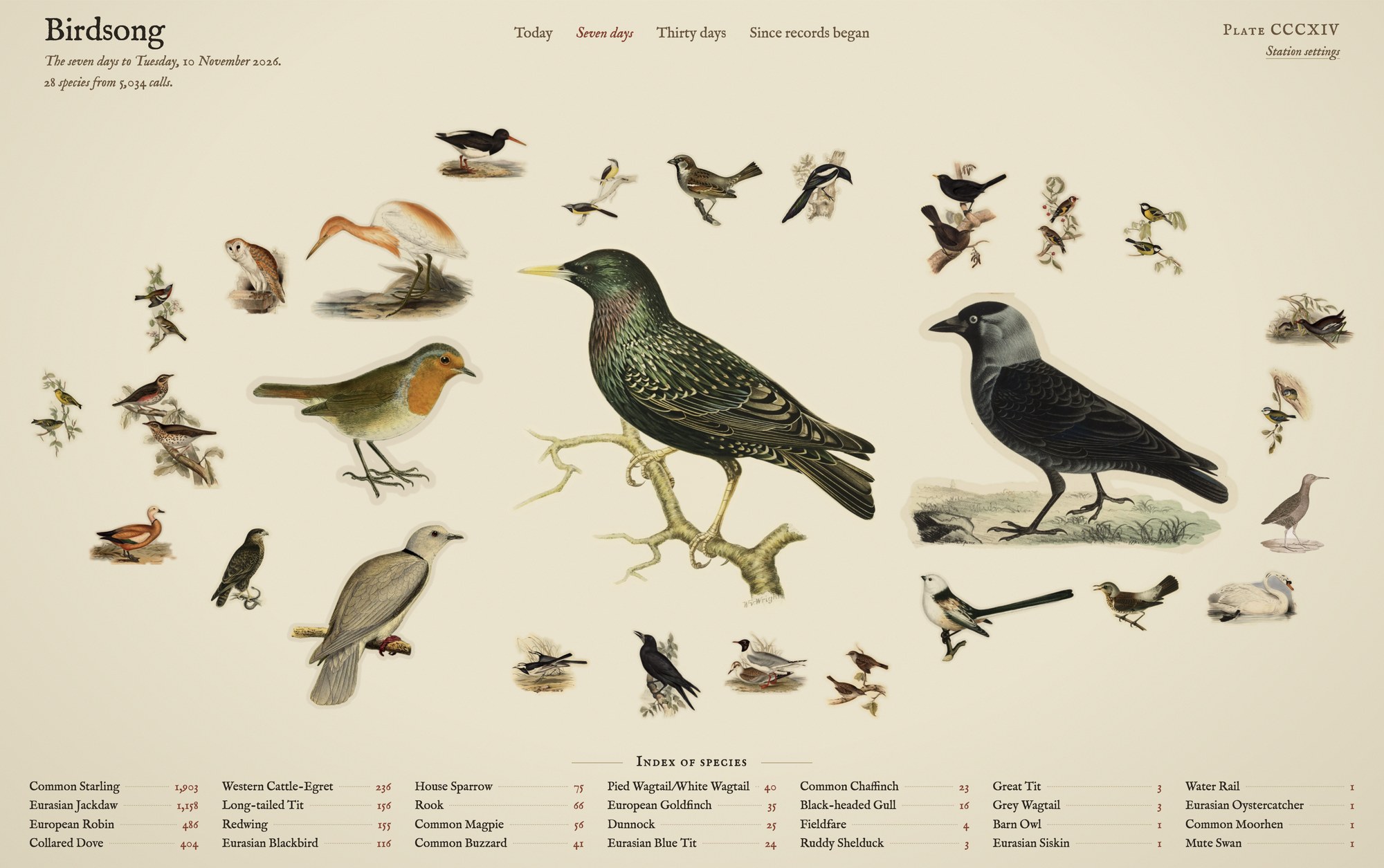
Birdsong draws the birds your BirdNET-Go station has heard as a single plate of hand-cut 1800s illustrations, each bird sized by how often it called. It is one small Docker container with one setting.
Created by Ed Stone. Current version: 0.42
(changelog); images are also tagged by version, e.g. :0.42.
See it in action
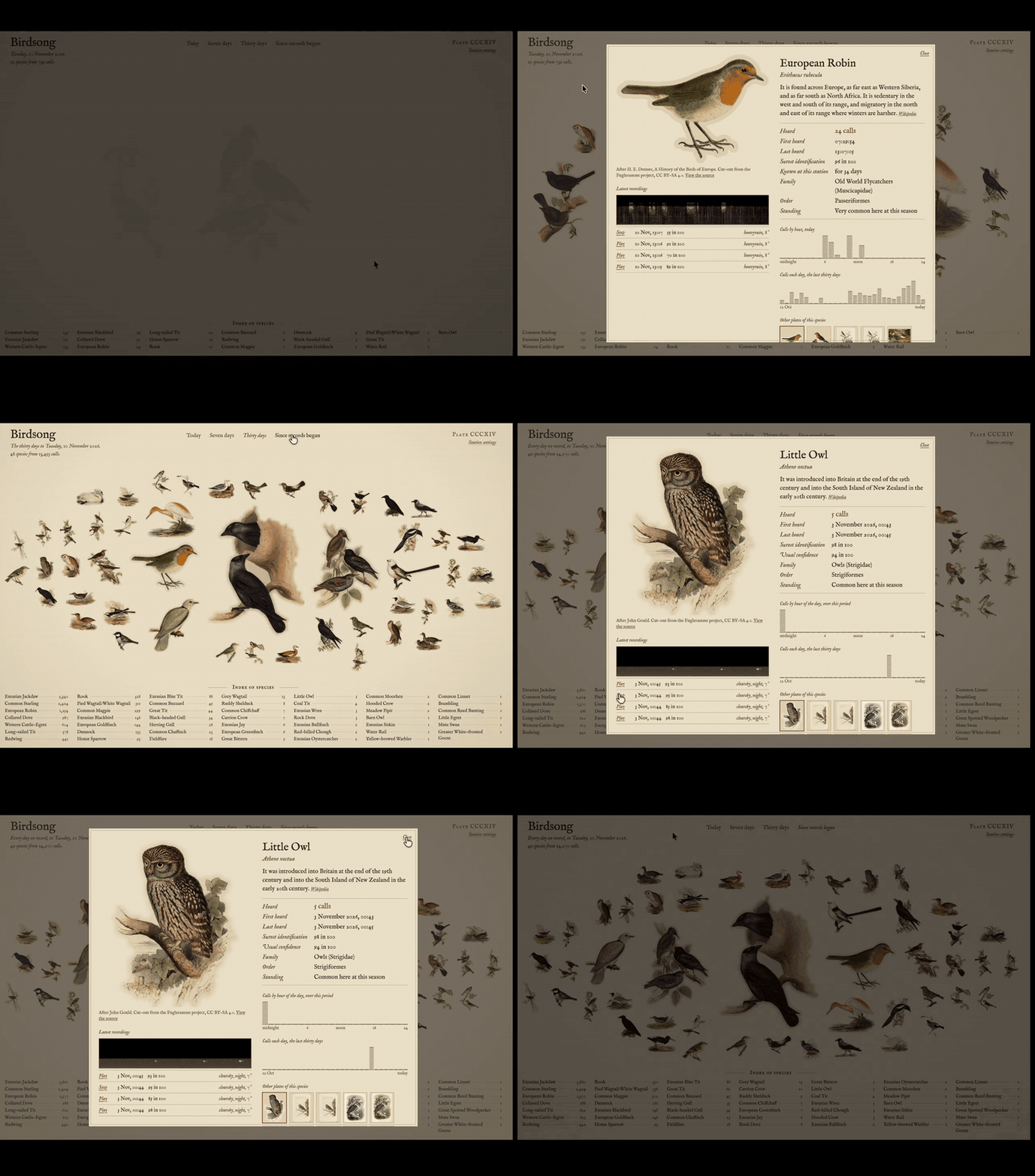
Shown at double speed; the full recording has sound, including a little owl heard in the small hours.
What it shows
- The plate: every species heard in the chosen period, sized by its number of calls, with an index of species and counts beneath.
- Periods: today, seven days (the default), thirty days, or since records began. The plate refreshes every minute.
- A card for each bird, opened by selecting it:
- the illustration, with the artist credited
- a sentence or two about the bird, from Wikipedia
- calls heard, first and last heard, surest identification, how long the species has been known at the station, family, order and how common it is locally at this season
- a note when the bird is new to the station, the year or the season
- calls by hour of the day, and calls each day for the last thirty days
- the latest recordings, with the weather at the time, playback and a spectrogram
- other illustrations of the species to choose from
- One-screen mode (on by default): the plate shrinks so the index fits beneath it without scrolling. Switch it off under Station settings.
Run it
docker run -d --name birdsong --restart unless-stopped \
  -p 8095:80 \
  -e BIRDNET_URL=http://192.168.1.50:8080 \
  ghcr.io/dopeytree/birdsong:latest
Then open http://<your-server>:8095. BIRDNET_URL is the address of
your BirdNET-Go as the container can reach it: use the server's IP, not
localhost. That is the only setting.
Unraid: install the template from the terminal, then Docker tab, Add Container, and choose
birdsongunder Template:wget -O /boot/config/plugins/dockerMan/templates-user/my-birdsong.xml \ https://raw.githubusercontent.com/dopeytree/birdsong/main/unraid/birdsong.xmlCompose: see
docker-compose.yml.Preview without a station: open
/?demofor a sample plate.
If BirdNET-Go has a password or private mode switched on, allow this container's address in BirdNET-Go's security settings. Recordings and spectrograms appear only if BirdNET-Go keeps audio clips, and weather only if it has a weather provider switched on.
Home Assistant
To put Birdsong on a Home Assistant dashboard, add a new view and give it
the Grid layout, then add a single Webpage (iframe) card with your
Birdsong address, for example http://192.168.1.50:8095. One-screen mode
(on by default) suits the card well.
If you open Home Assistant over HTTPS, the browser will refuse to embed a plain-HTTP page inside it: serve Birdsong through your reverse proxy with HTTPS and use that address in the card instead.
HTTPS with Tailscale
To give Birdsong an HTTPS address (which the Home Assistant iframe needs when Home Assistant itself is HTTPS), Unraid's per-container Tailscale works well:
- Edit the container and switch on Use Tailscale.
- Tailscale needs a persistent folder for its identity. The template
ships one: a Data folder (
/mnt/user/appdata/birdsongmapped to/data), which Tailscale finds on its own, so there is nothing to configure. If your container predates the Data folder, or you run plaindocker run, add-v /mnt/user/appdata/birdsong:/data. Without it, Tailscale refuses to start, and would otherwise join the tailnet as a brand-new machine on every update. - Enable Tailscale Serve with port
80(the container's internal port, not the LAN port), and make sure MagicDNS and HTTPS certificates are enabled for your tailnet (Tailscale admin, DNS).
Birdsong is then at https://birdsong.<your-tailnet>.ts.net with a real
certificate. Note that only devices on your tailnet can reach that
address; for every device on your LAN instead, put Birdsong behind a
reverse proxy such as Nginx Proxy Manager with its own certificate.
What is inside the image
- The page (
html/index.html, plain HTML with no build step) and nginx, which also forwards/apito BirdNET-Go so the page and the data share one address. - About 1,400 bird cut-outs covering some 800 species, from the Fugleramme project, fetched when the image is built.
- The IM Fell English typeface.
The image is rebuilt every Monday, which is how new Fugleramme artwork arrives: update the container as you would any other.
What still comes from the internet
- A bird with no Fugleramme cut-out falls back to an old plate from Wikimedia Commons, cut off its page in the browser. Failing that it uses BirdNET-Go's own photo, or just the bird's name.
- The description on each card comes from Wikipedia.
Both are skipped quietly when offline. Everything else is local.
Settings
"Station settings" on the page holds one-screen mode, an optional BirdNET-Go address override, and the credits. These settings, the last period chosen, and any illustration you pick for a bird are remembered per browser, not shared between devices.
Build it yourself
docker build -t birdsong .
docker build --build-arg FUGLERAMME_REF=v0.21.3 -t birdsong .   # pin the artwork
To pin a species to an illustration of your choice for everyone, add it
to CURATED_RAW near the top of the script in html/index.html.
Credits and licences
- Code in this repository: MIT, see
LICENSE. - Bird cut-outs: the classic style of Fugleramme by Arne Giacomo,
after Gould, the von Wright brothers, Audubon and others,
CC BY-SA 4.0. The image carries its
ATTRIBUTION.mdand manifest at/art/. Keep the credit shown on the page if you change it. - Icon (
unraid/icon.png): the robin cut-out from Fugleramme, after H. E. Dresser, CC BY-SA 4.0. - Descriptions: Wikipedia, CC BY-SA.
- Fallback plates: public-domain works on Wikimedia Commons, chiefly Nederlandsche Vogelen (Nozeman & Sepp, 1770-1829), Koninklijke Bibliotheek.
- Typeface: IM Fell English by Igino Marini, SIL Open Font Licence
(
html/fonts/OFL.txt). - BirdNET-Go is a separate project (CC BY-NC-SA 4.0, non-commercial) and is not included.
Media gallery
Requirements
*** Requires BirdNET-Go, running and reachable from this container. ***
If BirdNET-Go has a password or private mode switched on, allow this container's address in its security settings. For support, visit the forum: https://forums.unraid.net/topic/194221-support-dopeytree-docker-templates/ or GitHub issues: https://github.com/dopeytree/birdsong/issues
Categories
Related apps
Explore more like this
Explore allLinks
Details
ghcr.io/dopeytree/birdsong:latestRuntime arguments
- Web UI
http://[IP]:[PORT:80]/- Network
bridge- Shell
sh- Privileged
- false
Template configuration
Port the Birdsong page is served on.
- Target
- 80
- Default
- 8095
- Value
- 8095
Address of your BirdNET-Go, with http:// and its port, for example http://192.168.1.50:8080. Use the server's IP, not localhost.
- Target
- BIRDNET_URL
- Default
- http://192.168.1.50:8080
- Value
- http://192.168.1.50:8080
Optional, only used with Unraid's per-container Tailscale: a persistent folder so Birdsong keeps its tailnet identity across updates. If you enable Tailscale on this container, set its 'Tailscale State Directory' to /tailscale.
- Target
- /tailscale
- Default
- /mnt/user/appdata/birdsong/tailscale
- Value
- /mnt/user/appdata/birdsong/tailscale