

bfbackup-controller
Docker app from DelSol's Repository
Overview
Readme
View on GitHubBFBackup
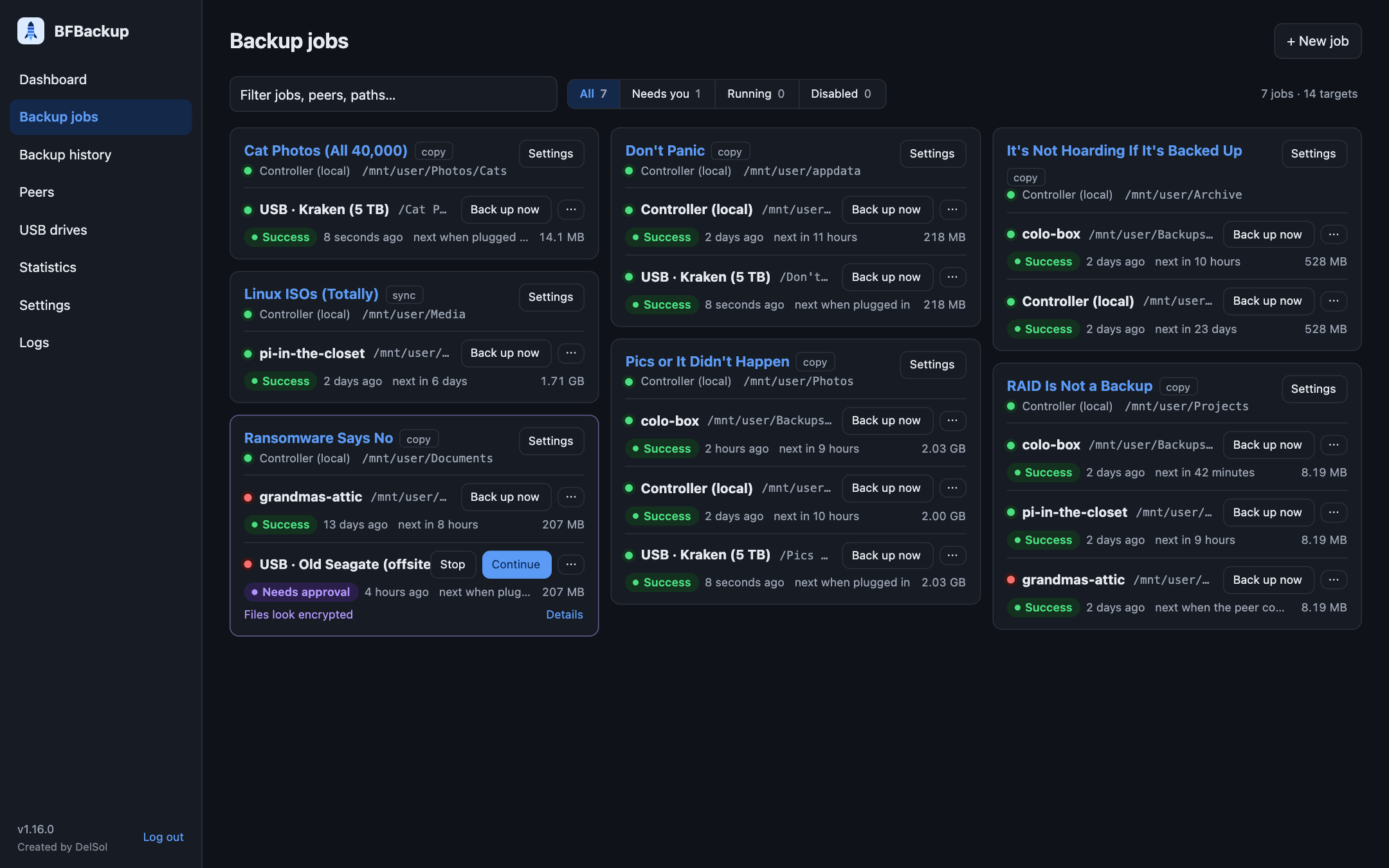
Incremental backup between Unraid servers (or any Linux host with Docker), stored as plain files: no repository, no archive, no special format. If BFBackup is gone tomorrow, your backups are still just folders you can open and copy.
One controller container has the web UI, schedules and database. Peers on other servers connect to it with a token and send or receive files. Targets can also be local folders and USB drives.
Features
- Incremental: only new and changed files move, SHA-256-checked end to end
- Fast and encrypted: parallel transfers over one connection, TLS 1.3
- Push or pull: any node can be source or target; several targets per job
- USB drives for offline backups, backed up automatically when plugged in
- Deletes never propagate on their own: removed files go to a trash first
- Anomaly checks (mass changes, files that look encrypted, …) pause a backup until you approve it
- Browse and restore single files, folders or search results
- Verify quick or deep (finds bit rot), on a schedule if you like
- Notifications by Pushover or email
- Statistics, activity log, audit log, light and dark theme
- Phone app (PWA) for Android and iPhone
More screenshots: public-release/screenshots.
Install on Unraid
- Apps (Community Applications) → search BFBackup.
- Install bfbackup-controller on one server, open
http://<server>:7700and choose the admin password. - Peers → Add peer → copy the token.
- Install bfbackup-peer on every other server, set Controller address and Token. Peers need no open ports (they connect to port 7701).
- Backup jobs → New job: pick source, target and schedule.
A single server with only local disks or USB drives needs no peer. Templates without the App Store: public-release/unraid.
Install with Docker (any Linux host)
Image: delsolger/bfbackup
(amd64, arm64, arm/v7). Compose files:
- controller.compose.yml
- peer.compose.yml
- try-it.compose.yml: controller and peer on one machine, to try it out
- unraid.compose.yml: for the Unraid Compose Manager plugin
Map host folders at the same path inside the container (/srv:/srv).
Configuration
Everything is set in the web UI, except:
| Variable | Role | Default | Meaning |
|---|---|---|---|
BFB_ROLE |
both | – | controller or peer |
BFB_ROOTS |
both | /mnt |
Folders BFBackup may access |
BFB_DATA |
both | /config |
Database and settings |
BFB_UID, BFB_GID |
both | unset | Owner of written files (Unraid: 99/100) |
BFB_HTTP_ADDR |
controller | :7700 |
Web UI |
BFB_PEER_ADDR |
controller | :7701 |
Peer connections |
BFB_CONTROLLER |
peer | – | host or host:port of the controller |
BFB_TOKEN |
peer | – | Token from the Peers page |
Good to know
- Meant for LAN or VPN: don't expose port 7700 to the internet.
- Installing the phone app needs HTTPS (e.g. a reverse proxy in front of 7700).
- Peer doesn't connect? See
/config/connection.logon the peer. - Security problems: report privately via the security policy.
- Planned features: ROADMAP.md · feature request
Development
make test      # all tests (uses Docker if Go is not installed)
make dev-up    # controller on http://localhost:7700 with ./testdata
Code map: docs/DESIGN.md.
License
Requirements
Categories
Download Statistics
Related apps
Explore more like this
Explore allDetails
delsolger/bfbackup:latestRuntime arguments
- Web UI
http://[IP]:[PORT:7700]/- Network
bridge- Shell
sh- Privileged
- false
- Extra Params
--stop-timeout 30
Template configuration
Web interface. Keep it in your LAN or VPN, never forward it to the internet.
- Target
- 7700
- Default
- 7700
- Value
- 7700
Peers connect here. Must be reachable from every peer.
- Target
- 7701
- Default
- 7701
- Value
- 7701
Database, hook scripts (hooks/), database snapshots (db-backups/).
- Target
- /config
- Default
- /mnt/user/appdata/bfbackup
- Value
- /mnt/user/appdata/bfbackup
Shares to back up from, or to restore and store backups into (/mnt/user), and USB or unassigned disks (/mnt/disks). Same paths as on the host, so paths in the UI match Unraid. The single array disks and pools are only used to move deleted files into the trash without copying; they are never shown. Use 'Allowed roots' to narrow what BFBackup may touch.
- Target
- /mnt
- Default
- /mnt
- Value
- /mnt
Comma-separated folders inside the container BFBackup may read and write. Nothing outside is reachable, symlinks included.
- Target
- BFB_ROOTS
- Default
- /mnt
- Value
- /mnt
Files and folders BFBackup creates get this owner (99 = nobody on Unraid). Empty: leave as root.
- Target
- BFB_UID
- Default
- 99
- Value
- 99
100 = users on Unraid.
- Target
- BFB_GID
- Default
- 100
- Value
- 100
Optional. Only used when no password is set yet; otherwise you choose it on first visit of the web UI.
- Target
- BFB_ADMIN_PASSWORD
auto: accept encrypted and unencrypted peers (older versions, BFB_TRANSPORT=plain). tls: refuse unencrypted peers.
- Target
- BFB_TRANSPORT
- Default
- auto
- Value
- auto
debug, info, warn or error.
- Target
- BFB_LOG_LEVEL
- Default
- info
- Value
- info