
All apps · 0 apps
beep_music_converter
Docker app from SpaceInvaderOne's Repository
Overview
Readme
View on GitHubBeep-Music-Converter
Unraid container to convert mp3 or wav to PC beep speaker music
This is a container to be able to convert a wav or mp3 file into "beep code" so to be able to play it through a PC beep speaker. This is made to run as a container on an Unraid server. To install please use Community Applications. (template can be seen here)
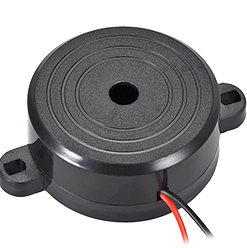
You will need a beep speaker in your server for this to work. Dont worry they are very cheap! Under $5 on Amazon for two! https://amzn.to/3kwWvlN
To use install template from CA. Fill in the variables. Custom. choose from default|Indiana Jones|Monkey Island
default - This is the standard running mode. It will look for an mp3 or wav file in the folder file_to_convert in the containers appdata folder. - The file will first be converted from its source to a 16bit Wav file using sox. After which its passed to wavtobeep for conversion to beep code and placed in the folder converted_wavs in the container's appdata
Indiana Jones - This converts a test wav file (Indiana Jones) and plays it through the beep speaker
Monkey Island _ This converts a test wav file (Monkey Island) and plays it through the beep speaker
Silent choose from no|yes If set to yes converts the file without playing it default is "no" time default 50 -Time window for frequency analysis (in ms). . Experiment with different values for individual tune to find best
The folder in this repo called beep_music has a collection of converted beep music files (i will add to this) https://github.com/SpaceinvaderOne/Beep-Music-Converter/tree/main/beep_music
Categories
Download Statistics
Total Downloads Over Time
Related apps
Explore more like this
Explore allDetails
spaceinvaderone/beep_music_converterRuntime arguments
- Web UI
https://amzn.to/3kwWvlN- Network
bridge- Shell
sh- Privileged
- true
Template configuration
Default or choose other for an example to be converted
- Default
- default|Indiana_Jones|Monkey_Island
- Value
- default
Silent converts file without also playing through beep speaker. Default 'no'
- Default
- no|yes
- Value
- no
Time window for frequency analysis (in ms). Default 50 ms. Experiment with different values for individual tune to find best
- Default
- 50
- Value
- 98
path to beep speaker (you must have a beep speaker for this container to work)
- Value
- /dev/tty0
appdata
- Target
- /config
- Default
- /mnt/user/appdata/Beep-Music-Converter
- Value
- /mnt/user/appdata/beep_music_converter