
All apps · 0 apps

bambulab-metrics-exporter
Docker app from BlackBush's Repository
Overview
Readme
View on GitHubbambulab-metrics-exporter







See your Bambu Lab 3D printer in Grafana: print progress, temperatures, fans, AMS filament and humidity, errors and more. The exporter runs as a small Docker container, talks to your printer over your home network (or through Bambu Cloud), and publishes the data for Prometheus to collect and Grafana to chart.
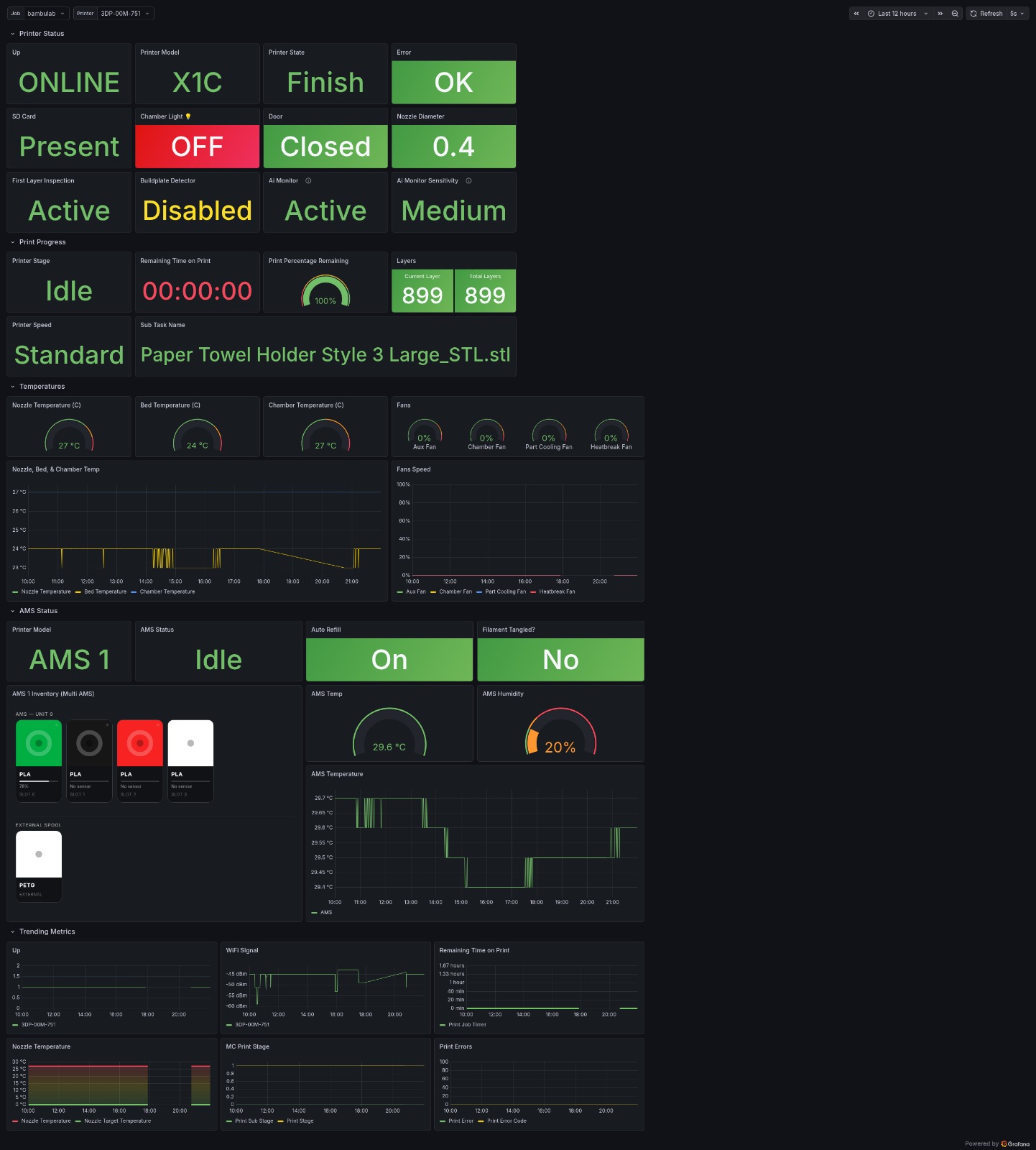
Supported printers: X1, X1C, X1E, X2D, P1P, P1S, P2S, A1, A1 mini, A2L, H2D, H2D Pro, H2S and H2C are recognized. Real-world testing so far is on an X1C; if you own another model and want to help, please open an issue on GitHub.
Contents
- What you need
- Quick start (Docker, Unraid, Docker Compose)
- Connecting the printer
- Optional: set up with environment variables
- Prometheus and Grafana
- Metrics
- How it works
- Known limitations
- More documentation
- Development
What you need
- A computer or NAS that runs Docker (for example Unraid, Synology, or any Linux machine).
- Your printer either:
- on the same network, with LAN Mode details: IP address, serial number and access code (printer screen: Settings > Network, or Bambu Studio: Device > LAN Mode), or
- linked to your Bambu Cloud account (you log in with your email and a code).
- Prometheus and Grafana to store and chart the data. A ready-made Grafana dashboard is available.
Quick start
1. Create a secret key. Run this once and keep the result somewhere safe:
openssl rand -hex 32
It locks (encrypts) the printer settings and cloud login that the exporter saves, so they survive restarts. If you change it later, you only need to connect the printer again.
2. Start the container:
docker run -d \
  --name bambulab-exporter \
  --restart unless-stopped \
  -p 9109:9109 \
  -v /path/to/config:/config/bambulab-metrics-exporter \
  -e BAMBULAB_SECRET_KEY=<your-secret-key> \
  ghcr.io/theblackbush/bambulab_metrics_exporter:latest
Replace /path/to/config with a folder on your machine and <your-secret-key> with the key from
step 1.
3. Connect the printer: open http://<your-server-ip>:9109/auth in a browser, choose
Local or Bambu Cloud, and fill in the form. See
Connecting the printer for details.
4. Check it works: open http://<your-server-ip>:9109/. The status page shows whether the
printer is connected, and http://<your-server-ip>:9109/metrics lists the collected data.
Unraid
- On the Docker tab, scroll to Template repositories, add
https://github.com/TheBlackBush/bambulab_metrics_exporteron a new line and click Save. - Click Add Container and pick bambulab-metrics-exporter from the Template list.
- Fill in Secret Key (step 1 above) and click Apply.
- Open the container's WebUI, click Printer Connection and connect the printer.
All other template fields are optional.
Docker Compose
The included docker-compose.yml needs only the secret key. Put it in a
.env file next to the compose file (see .env.example), then:
docker compose up -d
and connect the printer on the /auth page as in step 3.
Connecting the printer
Open http://<your-server-ip>:9109/auth (also linked as Printer Connection on the status
page) and choose one of:
- Local (LAN): enter the printer's IP address, serial number and LAN access code. Best when the printer is on the same network as the exporter.
- Bambu Cloud: enter your Bambu account email and click Send code, then enter the code from the email and click Log in. The serial number is only needed if your account has more than one printer. Use this when the printer is not on the same network.
The exporter connects right away; no restart is needed.
Good to know:
- Settings are remembered. They are saved encrypted in the config folder and survive restarts and updates (this needs the secret key from step 1).
- The page wins over environment variables. Settings saved on the page are used even if the container also has printer settings in environment variables (including Unraid template fields). Reset to env vars on the page removes the saved settings.
- When the cloud login expires (for example after a password change), the exporter keeps running, shows Login required on the page, and waits for you to log in again.
- Security: the page has no password. Anyone who can open port 9109 can change which printer or account the exporter uses, so keep the port on your home network. Saved passwords and codes are never shown on the page.
- Without a browser: run
docker exec -it bambulab-exporter bambulab-reauth(on Unraid: open the container's Console and runbambulab-reauth) for the same cloud login in a terminal.
Optional: set up with environment variables
Everything in this section is optional. Use it if you prefer configuring the container with
variables instead of the /auth page, for example in scripted setups.
Local connection:
docker run -d \
  --name bambulab-exporter \
  --restart unless-stopped \
  -p 9109:9109 \
  -v /path/to/config:/config/bambulab-metrics-exporter \
  -e BAMBULAB_SECRET_KEY=<your-secret-key> \
  -e BAMBULAB_HOST=192.0.2.100 \
  -e BAMBULAB_SERIAL=01P00A000000000 \
  -e BAMBULAB_ACCESS_CODE=12345678 \
  ghcr.io/theblackbush/bambulab_metrics_exporter:latest
Bambu Cloud connection with the email-code flow:
- Set
BAMBULAB_TRANSPORT=cloud_mqtt,BAMBULAB_SERIAL,BAMBULAB_SECRET_KEYandBAMBULAB_CLOUD_EMAIL, withoutBAMBULAB_CLOUD_CODE, and start the container. - It sends one verification code to your email and waits.
- Add
BAMBULAB_CLOUD_CODE=<code>and recreate the container. - After it logs in, remove
BAMBULAB_CLOUD_CODE: codes work only once, and the saved login is used from then on.
You only need a new code if the saved login is lost (new config folder, changed secret key) or
expires. Logging in on the /auth page is the easier way in every one of these cases.
You can also keep the variables in a file: copy .env.example to .env, edit
it, and add --env-file .env to docker run.
Variables
Only BAMBULAB_SECRET_KEY is recommended for every setup; printer and login variables are only
needed when you do not use the /auth page.
| Variable | Needed | Default | Description |
|---|---|---|---|
BAMBULAB_SECRET_KEY |
recommended | - | Encrypts the saved printer settings and cloud login so they survive restarts; keep it unchanged |
BAMBULAB_TRANSPORT |
no | local_mqtt |
local_mqtt (LAN) or cloud_mqtt (Bambu Cloud) |
BAMBULAB_HOST |
env setup, LAN | - | Printer IP address or hostname |
BAMBULAB_SERIAL |
env setup | - | Printer serial number |
BAMBULAB_ACCESS_CODE |
env setup, LAN | - | Printer LAN access code |
BAMBULAB_PORT |
no | 8883 |
Printer MQTT port |
BAMBULAB_USERNAME |
no | bblp |
Printer MQTT username |
BAMBULAB_CLOUD_EMAIL |
env cloud login | - | Bambu account email for the email-code flow |
BAMBULAB_CLOUD_CODE |
env cloud login | - | One-time code from the email; remove after login |
BAMBULAB_CLOUD_USER_ID |
no | - | Cloud user id (only for tokens you obtained yourself) |
BAMBULAB_CLOUD_ACCESS_TOKEN |
no | - | Cloud access token (only for tokens you obtained yourself) |
BAMBULAB_CLOUD_REFRESH_TOKEN |
no | - | Cloud refresh token; renews the access token without a new email code |
BAMBULAB_CLOUD_MQTT_HOST |
no | us.mqtt.bambulab.com |
Bambu Cloud MQTT server |
BAMBULAB_CLOUD_MQTT_PORT |
no | 8883 |
Bambu Cloud MQTT port |
BAMBULAB_REQUEST_PUSHALL |
no | true |
Ask the printer for a full status report on every poll (read-only) |
PRINTER_NAME_LABEL |
no | empty | Name shown for the printer in metrics (default: the printer's own name) |
POLLING_INTERVAL_SECONDS |
no | 10 |
Seconds between polls |
REQUEST_TIMEOUT_SECONDS |
no | 8 |
Seconds to wait for a printer report |
LISTEN_HOST |
no | 0.0.0.0 |
Web server bind address inside the container |
LISTEN_PORT |
no | 9109 |
Web server port inside the container |
AUTH_ALLOWED_HOSTS |
no | empty | Extra host names allowed for the /auth page (for example a reverse-proxy name), comma separated |
LOG_LEVEL |
no | INFO |
Log detail: DEBUG, INFO, WARNING or ERROR |
Full reference, including PUID, PGID and UMASK:
Configuration.
Prometheus and Grafana
Prometheus: add the exporter as a scrape target (one target per printer container):
scrape_configs:
  - job_name: bambulab
    scrape_interval: 15s
    static_configs:
      - targets: ["<your-server-ip>:9109"]
More in Prometheus Setup,
and ready-made alert rules in
examples/prometheus/prometheus.alerts.yml.
Grafana: import dashboard 25033 from
Grafana.com (or the JSON in
examples/grafana/). The AMS filament panel needs the free Business Text
plugin; see Grafana Dashboard.
Metrics
All metrics start with bambulab_ and carry printer_name and serial labels. A few
highlights:
| Metric | What it shows |
|---|---|
bambulab_printer_connected |
1 while the exporter is connected to the printer |
bambulab_printer_gcode_state{state} |
Printer state (IDLE, RUNNING, PAUSE, FINISH, FAILED, ...) |
bambulab_print_progress_percent |
Print progress (0-100) |
bambulab_print_remaining_seconds |
Estimated time left |
bambulab_nozzle_temperature_celsius, bambulab_bed_temperature_celsius |
Temperatures (plus _target_ versions) |
bambulab_hms_active_errors{severity} |
Active printer errors by severity |
bambulab_ams_slot_remaining_percent{ams_id,slot_id} |
Filament left per AMS slot |
bambulab_ams_unit_humidity_index{ams_id} |
AMS humidity level (1-5) |
bambulab_firmware_update_available |
1 when a firmware update is available |
The full list (100+ metrics, with which printers report each one) is in the
Metrics Reference.
A sample of the output is in examples/sample_metrics.prom.
How it works
The exporter connects to the printer's MQTT service, either on the LAN (
local_mqtt) or through Bambu Cloud (cloud_mqtt), and listens to the printer's status reports (device/<serial>/report).It only reads: the only messages it sends are two read-only requests,
pushall(a full status report, every poll) andget_version(the module list, once per connection).The printer model is detected from the module list, the serial number prefix, or
BAMBULAB_PRINTER_MODEL. Each model has a hardware profile, so metrics for parts a printer does not have (for example a chamber heater) are left empty instead of showing placeholder values.Web pages and endpoints on port 9109:
Path Purpose /Status page /authPrinter connection page /auth/statusConnection state as JSON /metricsData for Prometheus /healthLiveness check (for container health checks) /readyReady once the first printer data has arrived
Known limitations
- Only the X1C has been tested on real hardware; other models are recognized from their data and may report some values differently.
- One container monitors one printer. For several printers, run one container per printer.
- The MQTT connection is encrypted, but the printer's certificate is not verified (the printers use self-signed certificates).
- Some values depend on the printer model and firmware; missing values are left empty rather than shown as zero.
More documentation
The GitHub Wiki has the full guides:
| Page | Description |
|---|---|
| Quick Start | Step-by-step setup |
| Installation | Docker, Docker Compose, Unraid |
| Configuration | All settings |
| Prometheus Setup | Scrape config, alert and recording rules |
| Metrics Reference | Every metric, per-model support, PromQL examples |
| Grafana Dashboard | Import steps and panels |
| Troubleshooting | Common problems |
Release notes: CHANGELOG.md.
Development
The project ships only as a Docker image (no PyPI package). To run the tests:
python3 -m venv .venv
.venv/bin/python -m pip install -r requirements-dev.txt && .venv/bin/python -m pip install -e .
make test   # full suite with coverage gate
make lint
To build the image locally: docker build -t bambulab-metrics-exporter:latest .
Media gallery
Requirements
Related apps
Explore more like this
Explore allDetails
ghcr.io/theblackbush/bambulab_metrics_exporter:latestRuntime arguments
- Web UI
http://[IP]:[PORT:9109]/- Network
bridge- Shell
sh- Privileged
- false
Template configuration
Host port for the web UI and /metrics.
- Target
- 9109
- Default
- 9109
- Value
- 9109
Stores the encrypted /auth page settings and cloud credentials.
- Target
- /config/bambulab-metrics-exporter
- Default
- /mnt/user/appdata/bambulab-metrics-exporter
- Value
- /mnt/user/appdata/bambulab-metrics-exporter
Encrypts the settings and cloud login saved by the /auth page so they survive restarts. Generate once (openssl rand -hex 32) and keep it; changing it means connecting again.
- Target
- BAMBULAB_SECRET_KEY
Optional. local_mqtt (LAN) or cloud_mqtt (Bambu Cloud). Ignored once a connection is saved on the /auth page.
- Target
- BAMBULAB_TRANSPORT
- Default
- local_mqtt|cloud_mqtt
- Value
- local_mqtt
Optional. Printer serial number; leave empty to set it on the /auth page.
- Target
- BAMBULAB_SERIAL
Optional, local_mqtt only. Printer IP or hostname; leave empty to set it on the /auth page.
- Target
- BAMBULAB_HOST
Optional, local_mqtt only. LAN access code from the printer (Settings, Network); leave empty to set it on the /auth page.
- Target
- BAMBULAB_ACCESS_CODE
local_mqtt only. Keep 8883.
- Target
- BAMBULAB_PORT
- Default
- 8883
- Value
- 8883
local_mqtt only. Keep bblp.
- Target
- BAMBULAB_USERNAME
- Default
- bblp
- Value
- bblp
Optional, cloud_mqtt only. For the env-variable login flow: the container emails a verification code to this address. Not needed when you log in on the /auth page.
- Target
- BAMBULAB_CLOUD_EMAIL
Optional, cloud_mqtt only. Legacy: the emailed verification code for the env-variable flow; remove it after login. Logging in on the /auth page is easier.
- Target
- BAMBULAB_CLOUD_CODE
Optional, cloud_mqtt only. Only for manually obtained tokens; leave empty.
- Target
- BAMBULAB_CLOUD_USER_ID
Optional, cloud_mqtt only. Only for manually obtained tokens; leave empty.
- Target
- BAMBULAB_CLOUD_ACCESS_TOKEN
Optional, cloud_mqtt only. Only for manually obtained tokens; leave empty.
- Target
- BAMBULAB_CLOUD_REFRESH_TOKEN
cloud_mqtt only. Bambu Cloud MQTT broker; keep the default unless your account uses another region.
- Target
- BAMBULAB_CLOUD_MQTT_HOST
- Default
- us.mqtt.bambulab.com
- Value
- us.mqtt.bambulab.com
cloud_mqtt only. Keep 8883.
- Target
- BAMBULAB_CLOUD_MQTT_PORT
- Default
- 8883
- Value
- 8883
Optional. printer_name label on all metrics; leave empty to use the printer name from the printer or Bambu Cloud.
- Target
- PRINTER_NAME_LABEL
true: ask the printer for a full status report every poll (read-only). false: only listen to updates the printer sends on its own.
- Target
- BAMBULAB_REQUEST_PUSHALL
- Default
- true|false
- Value
- true
Seconds between polls.
- Target
- POLLING_INTERVAL_SECONDS
- Default
- 10
- Value
- 10
Seconds to wait for a printer report each poll.
- Target
- REQUEST_TIMEOUT_SECONDS
- Default
- 8
- Value
- 8
Extra host names allowed for the /auth page, comma separated (for example a reverse-proxy name). IP addresses and local names are always allowed.
- Target
- AUTH_ALLOWED_HOSTS
Log verbosity.
- Target
- LOG_LEVEL
- Default
- INFO|DEBUG|WARNING|ERROR
- Value
- INFO
User ID the exporter runs as (Unraid: 99).
- Default
- 99
- Value
- 99
Group ID the exporter runs as (Unraid: 100).
- Default
- 100
- Value
- 100
File creation mask.
- Default
- 002
- Value
- 002
HTTP bind address inside the container. Keep 0.0.0.0.
- Target
- LISTEN_HOST
- Default
- 0.0.0.0
- Value
- 0.0.0.0
HTTP port inside the container. Keep 9109; to use another port on the server, change Web UI Port instead.
- Target
- LISTEN_PORT
- Default
- 9109
- Value
- 9109
Config path inside the container; must match the Config Dir container path.
- Target
- BAMBULAB_CONFIG_DIR
- Default
- /config/bambulab-metrics-exporter
- Value
- /config/bambulab-metrics-exporter
Encrypted credentials file name in the config directory.
- Target
- BAMBULAB_CREDENTIALS_FILE
- Default
- credentials.enc.json
- Value
- credentials.enc.json