
All apps · 0 apps

AuthPortal
Docker app from grtgbln's Repository
Overview
Readme
View on GitHubAuthPortal (v2.0.6)






AuthPortal is a lightweight, self-hosted authentication gateway built for Plex, Jellyfin, and Emby ecosystems. It provides a unified login experience for media-based communities and home-lab environments—issuing secure, signed sessions for use across your intranet portals and apps.
AuthPortal authenticates users directly against their connected media server accounts, seals the server tokens for reuse, and manages session lifecycle via HTTP-only cookies. Authorized users are directed to their personalized home page, while unrecognized users are served a restricted or “guest” view.
[!IMPORTANT] Use at your own risk. This project leans on Vibe Coding practices - AI pair-programming, automated refactors, and rapid iteration. Treat releases as starting points - test, monitor, and adapt to your stack. AuthPortal remains an independent effort with no endorsement from Plex, Emby, or Jellyfin.
[!NOTE]
- Docker Hub: https://hub.docker.com/r/modomofn/auth-portal
- GitHub Repo: https://github.com/modom-ofn/auth-portal
Features
Unified login gateway
- Supports Plex authentication and Emby/Jellyfin username+password login
- Responsive modal-style interface for seamless in-browser authentication
Secure session management
- Signed, HTTP-only JWT cookie for authorized sessions
- Optional TOTP-based multi-factor authentication (with recovery codes)
- Per-tenant MFA enforcement toggles
Enterprise-ready expansion
- Optional LDAP integration for downstream application SSO requirements
- Extensible provider architecture
Lightweight deployment
- Single-binary, fully containerized service
- Simple environment-variable configuration
- Minimal external dependencies
Customizable experience
- Two distinct home pages: authorized vs. unauthorized
- Dark, modern UI with branded login buttons
Runtime configuration & admin console
- Web-based editing of Providers, Security, MFA, App Settings, and LDAP Sync config with versioning and history
- Dedicated admin shell with persistent sidebar navigation, collapsible layout toggle, theme picker, and account menu
- Access Control tab for RBAC roles, permissions, and manual user-role bindings
- OAuth client management (list/create/update/delete + secret rotation) with persistent audit history and change reasons
- Config backup tab with manual exports, scheduled runs (hourly/daily/weekly), retention, and one-click restore/download actions
- Logs tab with consolidated admin audit history, tab/user filters, date sorting, and a live admin log stream viewer
RBAC, app entitlements, and directory mapping
- Database-backed roles, permissions, role-permission mappings, and user-role bindings
- Seeded system roles:
admin,viewer, anduser - Optional LDAP group-to-role synchronization during LDAP sync runs
- Permission-gated portal app buttons and permission-backed OAuth scopes for downstream apps
First-party OAuth 2.1 / OIDC
- Authorization-code + PKCE, optional
offline_accessrefresh rotation, RS256-signed ID tokens - Discovery, JWKS, token, and userinfo endpoints ready for downstream apps and identity brokers
- Authorization-code + PKCE, optional
UI Preview
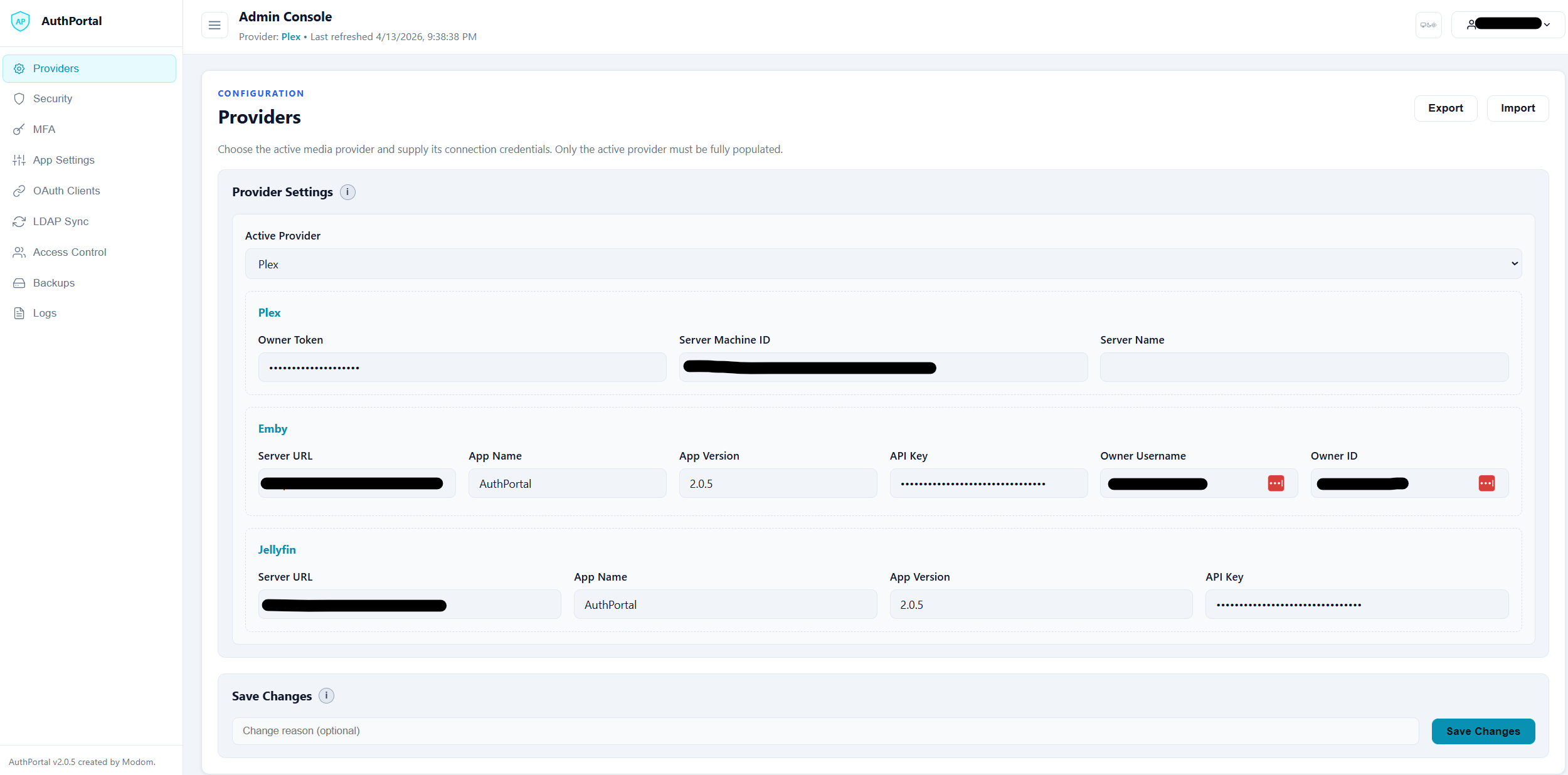
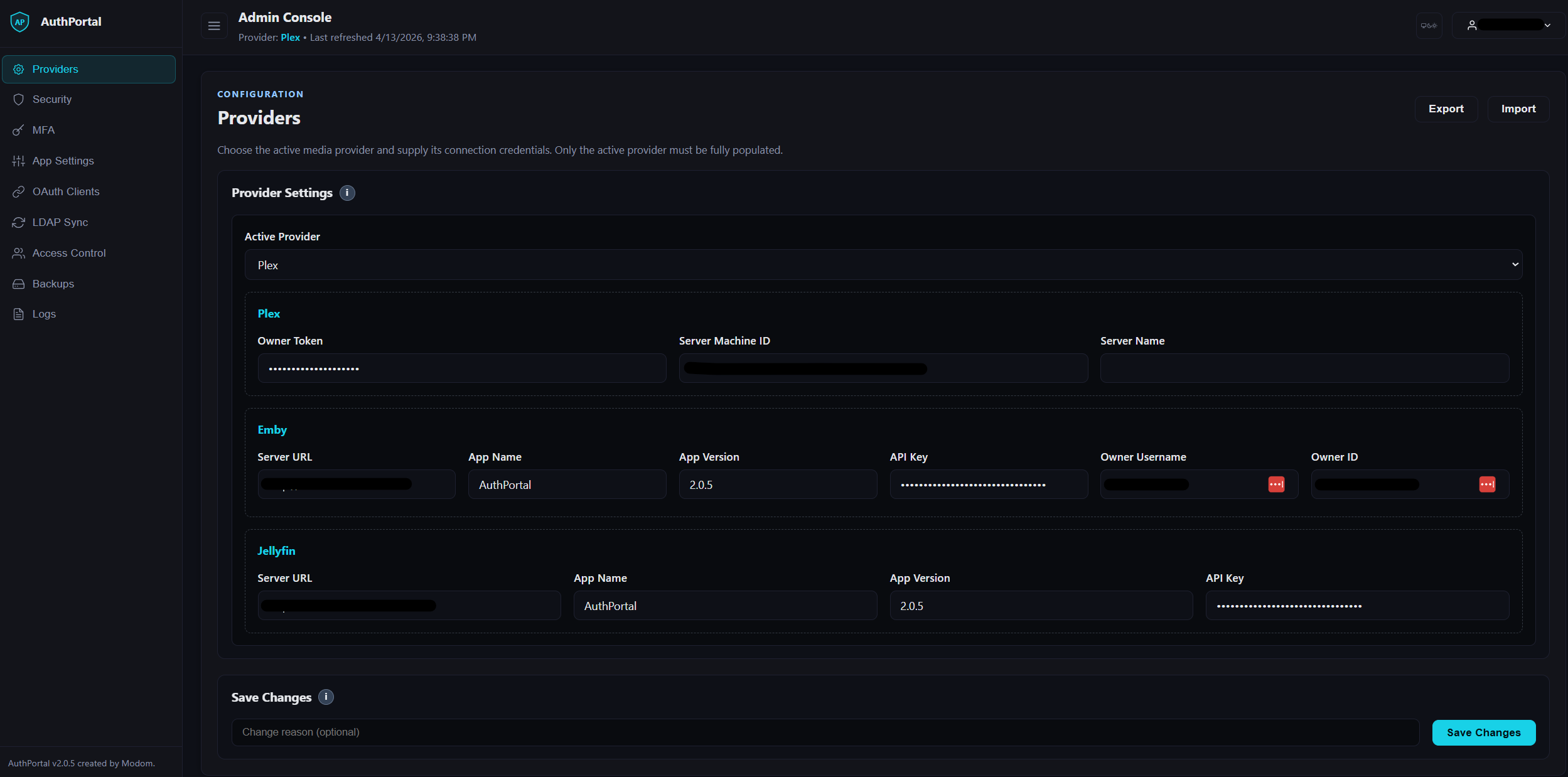
Table of Contents
- Features
- What's New in v2.0.5
- LDAP Sync
- Quick Start
- Configuration
- Providers (Plex / Jellyfin / Emby)
- Security Notes
- Database
- Build & Images
- Logging
- HTTP Routes
- Frontend Bits
- How it works
- Customization
- Security best practices
- Security scans and code analysis
- AI-Assisted Development
- Contributing
- License
- Upgrade Guide (to v2.0.6)
What's New in v2.0.5
- RBAC is now built into AuthPortal: AuthPortal now has database-backed roles, permissions, role bindings, and permission middleware instead of relying only on a broad admin flag.
- Access Control admin tab: operators can create custom roles and custom permissions, assign permissions to roles, and manage manual user-role bindings from the browser.
- Permission-aware app entitlements: App Settings service buttons can require a selected custom permission, and downstream OAuth/OIDC clients can request those same permissions as scopes.
- OAuth client scope and audit improvements: OAuth Clients now uses a scope picker backed by the RBAC permission catalog, stores persistent server-side audit history, and captures admin-supplied change reasons for create/update/delete/rotate actions.
- Admin shell refresh: the console now uses a dedicated sidebar layout with section icons, a collapsible navigation rail, a light/dark/system theme picker, and a header user menu to make the expanded admin surface easier to navigate.
- LDAP Sync is now first-class in AuthPortal: the former standalone
ldap-synccompanion workflow is replaced by a built-inLDAP Syncadmin tab with persisted runtime config. - Manual and scheduled LDAP sync runs: run syncs on demand or on an hourly/daily/weekly schedule directly from the admin console, with next-run calculation and persisted run history.
- LDAP group-to-role mapping: optional LDAP group synchronization can map directory groups onto RBAC roles during sync.
- Connection validation before save/run: test LDAP connectivity, bind credentials, and Base DN reachability from the UI before committing config.
- Safe stale-entry cleanup: optional deletion of stale LDAP records now only targets entries previously marked as AuthPortal-managed under the configured Base DN.
- Improved LDAP observability and UX: per-user sync failures are logged with the affected username, completion summaries are logged per run, and the admin panel now exposes structured connection-test results, audit-history integration, and a cleaner sectioned layout.
- OpenLDAP bootstrap simplification: the old
ldap-seedhelper is no longer part of the recommended workflow because AuthPortal can create the configured Base DN when it is missing and creatable. - Dedicated Logs admin tab: admin audit history is now consolidated into a single Logs surface with tab/user filters, date sorting, and a live application log stream that admins can start, pause, or refresh on demand.
- Expanded server-side audit coverage: Access Control and Backups actions now emit persistent audit events so the Logs tab reflects real server history instead of browser-local state.
LDAP Sync
LDAP sync is built into AuthPortal in v2.0.5. Configure it in the Admin Console under LDAP Sync to run manual syncs or schedule recurring LDAP exports of authorized users.
What it does:
- Connects to LDAP with the configured host, bind DN, and password.
- Creates the configured Base DN when it is missing and creatable.
- Exports currently authorized AuthPortal users as LDAP entries.
- Supports manual sync and built-in hourly/daily/weekly scheduling.
- Records recent run history in the admin UI.
- Optionally deletes stale LDAP entries that were previously marked as managed by AuthPortal.
- Optionally maps LDAP groups to RBAC roles during sync when group sync is enabled.
What changed from the old workflow:
- There is no longer a separate
ldap-syncservice or repo dependency in the recommended AuthPortal deployment path. - The old
ldap-seedhelper forou=usersis no longer required for the default setup. - LDAP sync configuration, change history, and schedule state now live with the rest of the AuthPortal admin/runtime config.
Operational notes:
- Use the
Test Connectionbutton before saving or running a sync. Base DN Exists = PASSmeans the target branch is already usable.Base DN Exists = FAILandBase DN Creatable = PASSmeans AuthPortal should be able to create the branch on the first sync.Base DN Exists = FAILandBase DN Creatable = FAILmeans you need to fix the directory layout or LDAP ACLs first.- Stale deletion only applies to entries previously stamped as AuthPortal-managed.
- When LDAP group sync is enabled, configure the group search base DN, group name/member attributes, and at least one LDAP group-to-role mapping before saving.
Quick Start
- .env
# ---------- Core ----------
POSTGRES_PASSWORD=change-me-long-random
SESSION_SECRET=change-me-32+chars-random
SESSION_COOKIE_DOMAIN=yourdomain.com
APP_BASE_URL=http://localhost:8089

# Trusted proxy CIDR ranges for forwarded headers (comma separated; leave blank to disable)
TRUSTED_PROXY_CIDRS=

# Multi-factor authentication
MFA_ENABLE=1
MFA_ENFORCE=0
MFA_ISSUER=AuthPortal

# Authorized page extra link (optional)
LOGIN_EXTRA_LINK_URL=/some-internal-app
LOGIN_EXTRA_LINK_TEXT=Open Internal App

# Unauthorized page "Request Access" mailto link
UNAUTH_REQUEST_EMAIL=support@example.com
UNAUTH_REQUEST_SUBJECT=AuthPortal Access Request

# Set 'MEDIA_SERVER=' options: plex | emby | jellyfin
MEDIA_SERVER=plex

# Set 'FORCE_SECURE_COOKIE=1' in prod; if behind TLS/NGINX with X-Forwarded-Proto use 1
FORCE_SECURE_COOKIE=0
# Force HSTS headers even if APP_BASE_URL is http (set to 1 when TLS terminates upstream)
FORCE_HSTS=0
# Timezone (IANA name, e.g., America/New_York) used for schedules and timestamps
APP_TIMEZONE=UTC
# Container timezone (usually matches APP_TIMEZONE)
TZ=UTC

# 32-byte base64 key (e.g., openssl rand -base64 32) (Do Not Reuse Example Below)
DATA_KEY=generate-your-own-key

# Admin bootstrap (comma-separated username:email pairs)
ADMIN_BOOTSTRAP_USERS=admin:admin@example.com

# OAuth2/OIDC signing & issuer (provide one of *_KEY or *_KEY_PATH)
OIDC_SIGNING_KEY_PATH=/run/secrets/oidc_signing_key.pem
OIDC_SIGNING_KEY=
OIDC_ISSUER=https://auth.example.com
# Optional allow-list for absolute OIDC redirect_uri hosts (comma/semicolon separated).
# If unset, AuthPortal trusts hosts from each client's registered redirect URIs.
TRUSTED_REDIRECT_HOSTS=

# Logging # DEBUG | INFO | WARN | ERROR
LOG_LEVEL=INFO

# ---------- LDAP Sync (optional; point to your existing LDAP server) ----------
LDAP_HOST=ldap://ldap.example.com:389
LDAP_ADMIN_DN=cn=admin,dc=authportal,dc=local
LDAP_ADMIN_PASSWORD=change-me-strong
BASE_DN=ou=users,dc=authportal,dc=local
LDAP_STARTTLS=false
LDAP_DELETE_STALE_ENTRIES=false
LDAP_SYNC_SCHEDULE_ENABLED=false
LDAP_SYNC_SCHEDULE_FREQUENCY=daily
LDAP_SYNC_SCHEDULE_TIME=02:15
LDAP_SYNC_SCHEDULE_DAY=sunday

# ---------- Plex ----------
# Optional but recommended for server-authorization checks
PLEX_OWNER_TOKEN=plxxxxxxxxxxxxxxxxxxxx

# Either set machine id or a server name (machine id wins if both present)
PLEX_SERVER_MACHINE_ID=
PLEX_SERVER_NAME=

# ---------- Emby ----------
EMBY_SERVER_URL=http://localhost:8096
EMBY_APP_NAME=AuthPortal
EMBY_APP_VERSION=2.0.6
# EMBY_API_KEY=
EMBY_OWNER_USERNAME=
EMBY_OWNER_ID=

# -------- Jellyfin ---------
JELLYFIN_SERVER_URL=http://localhost:8096
JELLYFIN_API_KEY=
JELLYFIN_APP_NAME=AuthPortal
JELLYFIN_APP_VERSION=2.0.6
- docker-compose.yaml
version: "3.9"

services:
  postgres:
    image: postgres:15.19@sha256:7e2070cf6ad06fb3cbbd141b1bafbb7fd5bb63e2b6001e6daf34448eb555e4b3
    restart: unless-stopped
    environment:
      POSTGRES_DB: authportaldb
      POSTGRES_USER: authportal
      POSTGRES_PASSWORD: ${POSTGRES_PASSWORD:?set-in-.env}
      # reuse same flag as app
      LOG_LEVEL: ${LOG_LEVEL:-INFO}
      TZ: ${TZ:-UTC}
    command:
      - sh
      - -c
      - |
        set -e
        case "${LOG_LEVEL:-INFO}" in
          DEBUG|debug)
            EXTRA="-c log_min_messages=debug1 -c log_connections=on -c log_disconnections=on -c log_destination=stderr"
            ;;
          INFO|info)
            EXTRA="-c log_min_messages=info -c log_destination=stderr"
            ;;
          WARN|warn|WARNING|warning)
            EXTRA="-c log_min_messages=warning -c log_destination=stderr"
            ;;
          ERROR|error)
            EXTRA="-c log_min_messages=error -c log_destination=stderr"
            ;;
          *)
            EXTRA="-c log_min_messages=warning -c log_destination=stderr"
            ;;
        esac
        # IMPORTANT: call the official entrypoint so initdb still runs on first boot
        exec docker-entrypoint.sh postgres $$EXTRA
    volumes:
      - pgdata:/var/lib/postgresql/data
    healthcheck:
      test: ["CMD-SHELL", "pg_isready -U $${POSTGRES_USER} -d $${POSTGRES_DB}"]
      interval: 10s
      timeout: 5s
      retries: 10
    networks: [authnet]

  auth-portal:
    image: ${AUTH_PORTAL_IMAGE:-auth-portal:hardened-local}
    build:
      context: ./auth-portal
      dockerfile: Dockerfile
    ports:
      - "8089:8080"
    environment:
      # App
      APP_BASE_URL: ${APP_BASE_URL:-http://localhost:8089}
      APP_TIMEZONE: ${APP_TIMEZONE:-UTC}
      TZ: ${TZ:-UTC}
      TRUSTED_PROXY_CIDRS: ${TRUSTED_PROXY_CIDRS:-}
      SESSION_SECRET: ${SESSION_SECRET:?set-in-.env}
      SESSION_COOKIE_DOMAIN: ${SESSION_COOKIE_DOMAIN:?set-in-.env}
      DATA_KEY: ${DATA_KEY:?set-in-.env}
      LOGIN_EXTRA_LINK_URL: ${LOGIN_EXTRA_LINK_URL:-}
      LOGIN_EXTRA_LINK_TEXT: ${LOGIN_EXTRA_LINK_TEXT:-}
      UNAUTH_REQUEST_EMAIL: ${UNAUTH_REQUEST_EMAIL:-}
      UNAUTH_REQUEST_SUBJECT: ${UNAUTH_REQUEST_SUBJECT:-}
      FORCE_SECURE_COOKIE: ${FORCE_SECURE_COOKIE:-0}
      FORCE_HSTS: ${FORCE_HSTS:-0}
      MEDIA_SERVER: ${MEDIA_SERVER:-plex}
      MFA_ENABLE: ${MFA_ENABLE:-1}
      MFA_ENFORCE: ${MFA_ENFORCE:-0}
      MFA_ISSUER: ${MFA_ISSUER:-AuthPortal}
      OIDC_SIGNING_KEY_PATH: ${OIDC_SIGNING_KEY_PATH:-}
      OIDC_SIGNING_KEY: ${OIDC_SIGNING_KEY:-}
      OIDC_ISSUER: ${OIDC_ISSUER:-http://localhost:8089}
      LOG_LEVEL: ${LOG_LEVEL:-INFO}

      # Admin Config
      ADMIN_BOOTSTRAP_USERS: ${ADMIN_BOOTSTRAP_USERS:?set-in-.env}

      # DB
      DATABASE_URL: postgres://authportal:${POSTGRES_PASSWORD:?set-in-.env}@postgres:5432/authportaldb?sslmode=disable

      # LDAP Sync
      LDAP_HOST: ${LDAP_HOST:-ldap://ldap.example.com:389}
      LDAP_ADMIN_DN: ${LDAP_ADMIN_DN:-cn=admin,dc=authportal,dc=local}
      LDAP_ADMIN_PASSWORD: ${LDAP_ADMIN_PASSWORD:-}
      BASE_DN: ${BASE_DN:-ou=users,dc=authportal,dc=local}
      LDAP_STARTTLS: ${LDAP_STARTTLS:-false}
      LDAP_DELETE_STALE_ENTRIES: ${LDAP_DELETE_STALE_ENTRIES:-false}
      LDAP_SYNC_SCHEDULE_ENABLED: ${LDAP_SYNC_SCHEDULE_ENABLED:-false}
      LDAP_SYNC_SCHEDULE_FREQUENCY: ${LDAP_SYNC_SCHEDULE_FREQUENCY:-daily}
      LDAP_SYNC_SCHEDULE_TIME: ${LDAP_SYNC_SCHEDULE_TIME:-02:15}
      LDAP_SYNC_SCHEDULE_DAY: ${LDAP_SYNC_SCHEDULE_DAY:-sunday}

      # Plex
      PLEX_OWNER_TOKEN: ${PLEX_OWNER_TOKEN:-}
      PLEX_SERVER_MACHINE_ID: ${PLEX_SERVER_MACHINE_ID:-}
      PLEX_SERVER_NAME: ${PLEX_SERVER_NAME:-}

      # Jellyfin
      JELLYFIN_SERVER_URL: ${JELLYFIN_SERVER_URL:-http://localhost:8096}
      JELLYFIN_API_KEY: ${JELLYFIN_API_KEY:-}
      JELLYFIN_APP_NAME: ${JELLYFIN_APP_NAME:-AuthPortal}
      JELLYFIN_APP_VERSION: ${JELLYFIN_APP_VERSION:-2.0.6}

      # Emby
      EMBY_SERVER_URL: ${EMBY_SERVER_URL:-http://localhost:8096}
      EMBY_APP_NAME: ${EMBY_APP_NAME:-AuthPortal}
      EMBY_APP_VERSION: ${EMBY_APP_VERSION:-2.0.6}
      EMBY_API_KEY: ${EMBY_API_KEY:-}
      EMBY_OWNER_USERNAME: ${EMBY_OWNER_USERNAME:-}
      EMBY_OWNER_ID: ${EMBY_OWNER_ID:-}
    depends_on:
      postgres:
        condition: service_healthy
    restart: unless-stopped
    healthcheck:
      test: ["CMD-SHELL", "wget -qO- --header='Host: 127.0.0.1' http://127.0.0.1:8080/healthz >/dev/null || exit 1"]
      interval: 30s
      timeout: 3s
      start_period: 20s
      retries: 3
    networks: [authnet]

volumes:
  pgdata:

networks:
  authnet:
- Run
docker compose up -d --build
# Visit http://localhost:8089
If you plan to use LDAP Sync, point the LDAP environment variables at your existing LDAP implementation, then open Admin -> LDAP Sync in AuthPortal to save connection settings, run a manual sync, or enable the built-in scheduler.
Configuration
APP_BASE_URLexternal URL users hit (drives redirects & cookie flags). Use HTTPS in production.SESSION_COOKIE_DOMAINdomain scope for session + pending-MFA cookies (e.g.,auth.example.com).MEDIA_SERVERplex,jellyfin, oremby.SESSION_SECRETHMAC secret for the session JWT cookie (required, 32+ random bytes; the service refuses to start if unset or using the legacy default).SESSION_TTLauthorized-session lifetime as a Go duration (default24h).SESSION_SAMESITEcookie SameSite mode:lax(default),strict, ornone(nonerequires HTTPS/Secure cookies).DATA_KEYbase64 32-byte key for sealing provider tokens at rest (required).MFA_ENABLE/MFA_ENFORCE/MFA_ISSUERmulti-factor toggles; see below.FORCE_SECURE_COOKIEset to1to forceSecureon cookies (behind TLS/ingress).FORCE_HSTSset to1to always emit Strict-Transport-Security even ifAPP_BASE_URLis http (use when TLS terminates upstream).APP_TIMEZONEIANA timezone (e.g.,America/New_York) used for backup scheduling and admin timestamps; setTZto the same value in Docker to keep the container clock aligned.TRUSTED_PROXY_CIDRScomma-separated CIDR ranges of proxies allowed to supplyX-Forwarded-For/X-Real-IP; leave empty to rely onRemoteAddr.TRUSTED_REDIRECT_HOSTSoptional comma/semicolon-separated host allow-list for absolute OIDCredirect_urivalues; if unset, allowed hosts derive from each client's registered redirect URIs.LOGIN_EXTRA_LINK_URLexternal URL on authorized page.LOGIN_EXTRA_LINK_TEXTtext for that authorized-page link.UNAUTH_REQUEST_EMAILemail address for unauthorized page "Request Access" mailto.UNAUTH_REQUEST_SUBJECTsubject for the unauthorized-page mailto link.BACKUP_DIRfilesystem path inside the container for generated config backups (default./app/backupsrelative to the binary).LDAP_DELETE_STALE_ENTRIESwhen set totrue, scheduled or manual LDAP syncs may delete stale entries previously marked as AuthPortal-managed under the configured LDAP base DN.LDAP_SYNC_SCHEDULE_ENABLED/LDAP_SYNC_SCHEDULE_FREQUENCY/LDAP_SYNC_SCHEDULE_TIME/LDAP_SYNC_SCHEDULE_DAYbootstrap defaults for the built-in LDAP scheduler; once saved in Admin, the persisted runtime config takes precedence.LOG_LEVELDEBUG,INFO,WARN, orERROR.
Admin Console & Config Store (new in v2.0.4)
- Reach the admin experience at
/adminwith a user provisioned viaADMIN_BOOTSTRAP_USERS(comma-separatedusername:emailpairs evaluated at startup). - Providers, Security, MFA, App Settings, and LDAP Sync settings now persist in Postgres as JSON documents. Edits go through
/api/admin/config/{section}with optimistic concurrency (versionfield) and are tracked in/api/admin/config/history/{section}. - The admin shell now includes a persistent sidebar, collapse toggle, theme selection (
system,dark,light), and header user menu to keep the expanded multi-tab console manageable on desktop and smaller screens. - Each save accepts an optional change reason and appends to the audit log. Use the Refresh button to pull the latest runtime config before editing if multiple admins are active.
- The OAuth tab in the admin console surfaces live client management (list/create/update/delete plus secret rotation), persistent audit history, and change reasons backed by the
/api/admin/oauth/*endpoints. - The Access Control tab exposes RBAC role, permission, and manual binding management backed by the
/api/admin/rbac/*endpoints.
LDAP Sync (new in v2.0.5)
- The LDAP Sync tab under
/adminmanages LDAP host/bind/Base-DN settings, StartTLS, optional stale-entry deletion, manual sync runs, and the built-in scheduler. - Optional group sync in the same tab can map LDAP groups to AuthPortal RBAC roles.
- The
Test Connectionaction validates connect, bind, Base DN existence, and Base DN creatability before you save or sync. - Scheduled runs support
hourly,daily, andweeklytiming directly in the UI and are reflected in theNext Scheduled Runpanel state. - Recent sync history includes manual and scheduled runs with trigger source, timestamps, result status, entry counts, and summary/error output.
- LDAP sync config changes participate in the same config history and consolidated audit workflow as the other admin sections.
Backups
- The Backups tab under
/adminlets you export the current config documents on demand (Run Backup) or configure an automatic schedule (hourly/daily/weekly with retention and section filters). - Backup files are JSON blobs stored under
BACKUP_DIR(default./app/backupsbeside the binary) and include metadata such as author, timestamp, and which sections were captured. - Scheduled backup settings now live in the config store (section
backups), so your cadence, selected sections, and retention persist across container rebuilds and are auditable like other config updates. - Each row in the table supports
Download,Restore, andDelete. Restore immediately applies the captured config via the standard validation pipeline; deletion only affects the filesystem. - The same functionality is exposed via the REST API (
/api/admin/backups*); see HTTP Routes below for endpoint details.
OAuth 2.1 / OIDC Authorization Server (new in v2.0.4)
- Discovery endpoint
/.well-known/openid-configurationadvertises JWKS (/oidc/jwks.json), authorize (/oidc/authorize), token (/oidc/token), and userinfo (/oidc/userinfo) URLs. /oidc/authorizeimplements the authorization-code grant with PKCE. User consent is recorded per client/scope, supportsprompt=consent, and returnsconsent_requiredwhenprompt=noneis requested without prior approval.- If a portal session is missing,
/oidc/authorizeis resumed after login (and MFA when required) using a validated localnextcontinuation. - Client
redirect_urivalidation is exact-string against the registered redirect URI list (scheme/host/path/query must match exactly). - OAuth error responses redirect back to valid absolute callback URLs (
http/https) with standarderrorquery parameters. /oidc/tokenhandlesauthorization_codeandrefresh_tokengrants. Refresh tokens rotate on every use and are only issued when theoffline_accessscope is granted./oidc/userinforeturnssub,preferred_username, and optional email claims based on granted scopes. ID tokens are RS256-signed and echo the incomingnonce.- Provide signing material with
OIDC_SIGNING_KEY_PATH(PEM on disk) or inlineOIDC_SIGNING_KEY; override the advertised issuer withOIDC_ISSUERwhen running behind a reverse proxy. - Register clients through the admin console (OAuth tab) or the REST API:
GET/POST /api/admin/oauth/clients,PUT/DELETE /api/admin/oauth/clients/{id},POST /api/admin/oauth/clients/{id}/rotate-secret,GET /api/admin/oauth/scopes, andGET /api/admin/oauth/history. - Custom RBAC permissions can be used as OAuth scopes, which lets downstream apps request app-specific entitlements such as
audiobookshelf.read.
RBAC / Access Control (new in v2.0.5)
- AuthPortal now stores roles, permissions, role-permission assignments, and user-role bindings in Postgres.
- Seeded system roles are
admin,viewer, anduser; system permissions protect core admin surfaces such as config, LDAP, backups, OAuth, and RBAC management. - The Access Control tab under
/adminlets operators create custom permissions and custom roles, assign permissions to roles, and manage manual role bindings for users. - App Settings service links can require a selected permission. If no permission is selected, the button is shown to all authorized users.
/whoamiand/menow expose the caller's effective roles and permissions for downstream integrations.
Admin Logs
- The Logs tab under
/adminreplaces the older per-tab Recent Changes sidebar/modal with a single consolidated audit view. - Audit history is aggregated across config sections, OAuth client management, Access Control actions, backup actions, and LDAP Sync-related config history.
- Operators can filter the table by admin tab and acting user, then sort by change date to review older or newer activity first.
- The live log stream is off by default and only starts polling after an admin explicitly starts it.
- While streaming, admins can choose an auto-refresh interval; when paused, they can use manual refresh to poll the latest buffered entries.
Multi-factor authentication
MFA_ENABLEcontrols whether users can enroll; leave it1when enforcing.MFA_ENFORCEforces every login to satisfy MFA once a user is enrolled (or immediately when set globally).MFA_ISSUERcustomises the label your authenticator app displays and the recovery code download header.- Enrollment lives under
/mfa/enroll/*; challenges use/mfa/challengeand/mfa/challenge/verify. Recovery codes rotate on each successful verify.
Plex
PLEX_SERVER_MACHINE_IDpreferred; exact machine identifier of your server.PLEX_SERVER_NAMEfallback if machine id not set.PLEX_OWNER_TOKENoptional owner token. If configured, the owner account is always authorized (account id match).
Jellyfin
JELLYFIN_SERVER_URLe.g.,http://<host>:8096. If Jellyfin runs in Docker, use your host IP from the app containers perspective (notlocalhost).JELLYFIN_API_KEYoptional; enables stricter authorization checks (IsDisabledpolicy).JELLYFIN_APP_NAME,JELLYFIN_APP_VERSIONclient headers used in requests.
Emby
EMBY_SERVER_URLe.g.,http://<host>:8096. If Emby runs in Docker, use your host IP from the app containers perspective (notlocalhost).EMBY_API_KEYoptional; enables stricter authorization checks (IsDisabledpolicy).EMBY_APP_NAME,EMBY_APP_VERSIONclient headers used in requests.
Providers (Plex / Jellyfin / Emby)
Plex:
StartWebcreates a PIN and returns the Plex Auth URL popup opens.Forwardpolls the PIN, fetches user info, seals token, decides authorization:- User token can see configured server in
/api/v2/resources(match machine id or name), OR - Owner fallback if
PLEX_OWNER_TOKENis set and account ids match.
- User token can see configured server in
Jellyfin:
StartWebreturns/auth/forward?jellyfin=1.Forward(GET) serves a small login page; (POST) authenticates, seals token, validates the user token (/Users/Me), then (optionally) overlays admin policy viaJELLYFIN_API_KEY(IsDisabled).Emby:
StartWebreturns/auth/forward?emby=1.Forward(GET) serves a small login page; (POST) authenticates, seals token, and optionally checksIsDisabledviaEMBY_API_KEY.
All providers implement IsAuthorized(uuid, username); success is cached in media_access.
Security Notes
- Token sealing: tokens are encrypted with
DATA_KEYbefore DB insert/update. Unseal on read; failures clear the in-memory token. - Cookies: Session and pending-MFA cookies honour
SESSION_COOKIE_DOMAIN; they are HTTP-only, SameSite=Lax, and rotate after successful MFA.Secureis automatic whenAPP_BASE_URLis HTTPS, or force it withFORCE_SECURE_COOKIE=1. - Authorization: admin and downstream-app access is enforced through RBAC permissions, not just a legacy admin boolean. Custom app permissions can gate portal links and OAuth scopes.
- Admin observability: the Logs tab is permission-gated behind admin access, and its audit table is backed by persisted server audit records for OAuth, Access Control, backups, and config changes.
- Rate limits: login endpoints share a per-IP limiter (burst 5, ~10 req/min); MFA enrollment/challenge use a tighter burst 3, ~5 req/min (tune in
main.go). - CSRF-lite: POST routes require same-origin via Origin/Referer.
- Headers:
X-Frame-Options: DENY,X-Content-Type-Options: nosniff,Referrer-Policy: strict-origin-when-cross-origin. AddsStrict-Transport-Security: max-age=86400; includeSubDomains; preloadwhenAPP_BASE_URLis HTTPS. Popup/auth completion pages keep a narrowed CSP withscript-src 'self'; popup handoff is performed bystatic/login.jsrather than inline script.
Database
Users table (legacy-compatible):
id 			 BIGSERIAL PRIMARY KEY,
username     TEXT UNIQUE NOT NULL,
email        TEXT NULL,
media_uuid   TEXT UNIQUE,
media_token  TEXT NULL,
media_access BOOLEAN NOT NULL DEFAULT FALSE,
created_at   TIMESTAMPTZ NOT NULL DEFAULT now(),
updated_at   TIMESTAMPTZ NOT NULL DEFAULT now()
Indexes:
CREATE INDEX IF NOT EXISTS idx_users_username    ON users (username);
CREATE INDEX IF NOT EXISTS idx_users_media_uuid  ON users (media_uuid);
Plex PINs table (unchanged):
CREATE TABLE IF NOT EXISTS pins (
  code       TEXT PRIMARY KEY,
  pin_id     INTEGER NOT NULL,
  created_at TIMESTAMPTZ NOT NULL DEFAULT now()
);
Identities
- Purpose: multi-provider identity linking (one row per provider per user).
- Columns:
user_id (FK),provider,media_uuid,media_token,media_access, timestamps. - Uniqueness:
(provider, media_uuid),(user_id, provider). - Backfill: on startup, rows are inserted from
users.media_uuidwhen present. - Writes: app upserts into both
usersandidentities(transition-friendly). - Reads: prefer
identitiesthen fallback touserswhere needed.
RBAC tables
roles: role catalog with seeded system roles and custom roles.permissions: permission catalog containing system permissions plus admin-defined custom permissions.role_permissions: many-to-many mapping between roles and permissions.user_roles: user-role assignments, including manual and LDAP-synchronized sources.
These tables are created and migrated automatically at startup. Existing legacy admin users are backfilled into the seeded admin role during upgrade.
Build & Images
- Go:
1.26.8on Docker Hardened Imagesdhi.io/golang:1.26.8-alpine3.23-dev(builder stage). - Builder installs
git+ CA certs, runsgo mod downloadthengo mod tidy -compat=1.26, builds with:-v -x(verbose),-buildvcs=false(avoid VCS scans),-trimpath,-ldflags "-s -w".
- Builder:
dhi.io/golang:1.26.8-alpine3.23-dev. - Runtime:
dhi.io/alpine-base:3.23-alpine3.23, keeps CA certs in-base, copies tzdata from the builder stage, and runs as non-rootuid 65532.
Logging
- App:
LOG_LEVEL=DEBUG|INFO|WARN|ERROR. Examples:
DEBUG jellyfin/auth POST http://<server>/Users/AuthenticateByName?format=json
WARN  emby/auth HTTP 401 body="..."
DEBUG plex: resources match via machine id
- Admin Logs tab:
- Consolidated audit history is available in the admin UI via the
Logstab. - The live stream viewer reads from an in-memory recent log buffer exposed only to authenticated admins.
- Streaming is opt-in and disabled by default; admins can start, pause, or manually refresh the view.
- Consolidated audit history is available in the admin UI via the
- Postgres:
LOG_LEVELmaps to server params:DEBUGlog_min_messages=debug1, connection/disconnection logging onINFOlog_min_messages=infoWARNlog_min_messages=warningERRORlog_min_messages=error
HTTP Routes
Core portal
GET /login page (auto-redirects to/homeif session present).GET /homerenders authorized or unauthorized view based onIsAuthorized.GET /whoamiJSON: normalized identity, session metadata, effective roles, and effective permissions.GET /meJSON profile summary including username, uuid, roles, and permissions when logged in.POST /logoutclears cookies; same-origin required.GET /static/*static assets.
Authentication
POST /auth/start-webJSON{ authUrl }(per-IP rate limited).- Plex: returns the Plex auth URL for the PIN flow.
- Jellyfin/Emby: returns
/auth/forward?jellyfin=1or/auth/forward?emby=1.
GET|POST /auth/forwardpopup finisher for all providers.- Plex: completes PIN polling and closes the popup.
- Jellyfin/Emby: GET serves the form; POST authenticates and closes the popup.
GET /auth/pollPlex PIN poller (rate limited, JSON{ status }).
Multi-factor authentication
GET /mfa/challengeHTML challenge page shown when MFA is required.POST /mfa/challenge/verifyJSON{ ok, redirect, recoveryUsed, remainingRecoveryCodes }; accepts optionalnextfor OIDC continuation and rotates the session cookie on success.GET /mfa/enrollHTML enrollment UI for authenticated users.GET /mfa/enroll/statusJSON summary of enrollment state (enabled/pending timestamps, remaining recovery codes).POST /mfa/enroll/startJSON{ ok, secret, otpauth, digits, period, drift, enforced, previouslyEnabled }to seed authenticator apps.POST /mfa/enroll/verifyJSON{ ok, recoveryCodes }confirming enrollment and returning fresh recovery codes.
OAuth 2.1 / OIDC
GET /.well-known/openid-configurationdiscovery document.GET /oidc/jwks.jsonJWKS for RS256 validation.GET /oidc/authorizeauthorization-code endpoint; if not authenticated, redirects to login and resumes vianext.POST /oidc/authorize/decisionconsent form postback (allow/deny).POST /oidc/tokentoken exchange for authorization code + refresh grants.GET /oidc/userinfouserinfo endpoint (bearer token required).
Admin console & APIs
GET /adminadmin SPA for bootstrap/admin users.GET /api/admin/configreturns the admin configuration bundle, including Providers, Security, MFA, App Settings, and LDAP Sync.PUT /api/admin/config/{section}update a configuration section with optimistic concurrency.GET /api/admin/config/history/{section}fetch prior revisions.GET /api/admin/config/permissionslist custom permissions allowed in App Settings service-link gating.GET /api/admin/ldap-syncfetch LDAP sync config, scheduler status, and recent runs.POST /api/admin/ldap-sync/test-connectionvalidate LDAP connectivity and Base DN readiness using the submitted form values without saving them.POST /api/admin/ldap-sync/runtrigger a manual LDAP sync run.GET /api/admin/logs/historyfetch consolidated admin audit history across supported tabs.GET /api/admin/logs/streamfetch the buffered live application log stream for the admin Logs tab.GET /api/admin/oauth/clientslist registered OAuth clients.GET /api/admin/oauth/historyfetch persistent OAuth audit history.GET /api/admin/oauth/scopeslist standard OIDC scopes plus custom RBAC permission scopes.POST /api/admin/oauth/clientscreate a new client.PUT /api/admin/oauth/clients/{id}update client metadata.DELETE /api/admin/oauth/clients/{id}delete a client.POST /api/admin/oauth/clients/{id}/rotate-secretrotate client secret and return the new value.GET /api/admin/rbacfetch roles, permissions, and current bindings.PUT /api/admin/rbac/bindingscreate or replace manual user-role bindings.POST /api/admin/rbac/rolescreate a custom role.PUT /api/admin/rbac/roles/{name}update a role definition.DELETE /api/admin/rbac/roles/{name}delete a custom role.POST /api/admin/rbac/permissionscreate a custom permission.PUT /api/admin/rbac/permissions/{name}update a custom permission.DELETE /api/admin/rbac/permissions/{name}delete a custom permission.GET /api/admin/backupsreturn the current schedule metadata plus available backup files.POST /api/admin/backupscreate a manual backup for the selected sections.PUT /api/admin/backups/scheduleupdate the automated backup schedule (frequency, sections, retention).GET /api/admin/backups/{name}download a specific backup file.DELETE /api/admin/backups/{name}remove a backup file from storage.POST /api/admin/backups/{name}/restorerestore captured config sections from a saved backup.
Health & readiness
GET /healthzliveness check.GET /readyzreadiness (DB connectivity).GET /startupzstartup probe sharing the same checks as readiness.
Frontend Bits
- Styles:
static/styles.css(icons clamped to 22"22 inside the sign-in button) - Login script:
static/login.js- Opens a placeholder popup synchronously on click, then navigates it (prevents popup blockers).
- Accepts
postMessagetypes:plex-auth,emby-auth,jellyfin-auth,auth-portal. - If the popup is closed/blocked, falls back to full-page nav.
- Binds via
id="auth-signin"/[data-auth-signin]/.auth-signin
How it works
High-level
- User clicks Sign in with Plex/Emby/Jellyfin; frontend opens the provider popup.
- If the user is already authenticated with the provider, the popup returns immediately.
- Server completes provider-specific auth, seals/stores the media token, and decides authorization.
- If MFA is required (enforcement on or the user has enabled it), the app issues a pending-MFA cookie and redirects to
/mfa/challenge; otherwise it sends the user directly to/home. - If login originated from
/oidc/authorize, AuthPortal preserves that request and resumes it after login; MFA challenge completion also resumes the same authorize URL. - The MFA challenge verifies a TOTP or recovery code, rotates the JWT, clears the pending cookie, and redirects to the validated continuation target (or
/home). - Session cookie TTL defaults to 24h for authorized users and 5m for unauthorized; authorized user profiles are stored in Postgres.
- The opener page updates based on authorization, showing the authorized or restricted home experience and optional extra links.
Customization
- Branding and portal styling: use Admin -> App Settings to set the end-user portal app name, logo URL, background color, modal color, title color, body text color, and optional custom background image.
- Custom background image: set
portalBackgroundUrlto a relative path such as/static/portal-background.jpgor an absolutehttp(s)URL. When this is set, it overrides onlyportalBackgroundColor; modal, title, body text, and service button colors continue to apply. - Background display mode: set
portalBackgroundModetospan,fit,centered,original,stretch, ortile.spanis the default and fills the viewport while cropping as needed;fitkeeps the whole image visible;centereduses the image's natural size centered in the viewport;originaluses natural size from the top-left;stretchforces the image to the viewport;tilerepeats it. - Environment defaults: first-run/default values can be supplied with
PORTAL_APP_NAME,PORTAL_LOGO_URL,PORTAL_BACKGROUND_COLOR,PORTAL_BACKGROUND_URL,PORTAL_BACKGROUND_MODE,PORTAL_MODAL_COLOR,PORTAL_TITLE_COLOR, andPORTAL_BODY_TEXT_COLOR. Once App Settings are saved in Postgres, manage ongoing changes through the admin UI or/api/admin/config/app-settings. - Authorized / Unauthorized page copy: edit the text fields in Admin -> App Settings -> Portal Config. The copy fields support
{{username}},{{providerName}}, and{{appName}}.
Security best practices
- Put AuthPortal behind HTTPS (e.g., Caddy / NGINX / Traefik).
- Set strong
SESSION_SECRET(startup now fails if it's missing/short),DATA_KEY, and DB credentials. - OAuth client secrets are hashed with bcrypt before storage; rotate legacy secrets so they’re re-hashed and unusable if the DB or backups leak.
- Access and refresh tokens are stored as deterministic SHA-256 digests, so leaked database rows don’t expose bearer tokens (rotate outstanding tokens after upgrading).
- Config backups written to disk are encrypted with the same
DATA_KEY, so keep that key secret and re-bootstrap older plaintext backups if needed. - The admin Logs tab can expose recent operational log lines in-browser to authenticated admins, so avoid logging secrets and keep admin access tightly scoped.
- Admin flag changes immediately revoke outstanding sessions by bumping an internal session version; reissue cookies after any privilege change.
- Dont expose Postgres or LDAP externally unless necessary.
- Keep images and dependencies updated.
- Enforce MFA everywhere by setting
MFA_ENABLE=1andMFA_ENFORCE=1; the code already backstopsMFA_ENABLEwhen enforcement is on. - If the portal is only used for same-origin apps, consider
SESSION_SAMESITE=strict; usenoneonly with HTTPS because Secure cookies are required. - Keep rate limits aligned with your threat model; newIPRateLimiter accepts tighter limits if you need to clamp brute force attempts (rate_limiter.go:10-74).
Security scans and code analysis
Automated security checks run on this project:
- Syft SBOM + Grype: SBOM generated from the built image; Grype scans that SBOM.
- TruffleHog: secret scanning on every push/PR in CI/CD.
- git-secrets: local pre-commit and commit-message guardrail to catch credentials before they land in git history.
- GitHub CodeQL: static analysis for code-level vulnerabilities in every PR and on main.
- Trivy: container and dependency scans to catch OS and library CVEs in our images.
- Docker Scout: image-level vulnerability insights for each commit/tag, including base image and layer analysis.
- SonarQube Cloud: continuous code quality and security hotspot detection across the codebase.
If you spot an issue or have questions about these scans, please open an issue or reach out.
Local secret scanning (git-secrets)
Install git-secrets, then bootstrap the repo hooks:
brew install git-secrets
./scripts/install-git-secrets-hooks.sh
git secrets --scan-history
On Windows PowerShell:
.\scripts\install-git-secrets-hooks.ps1
git secrets --scan-history
The bootstrap scripts install git-secrets hooks for this repository and register AWS patterns plus a small set of generic credential patterns for passwords, tokens, API keys, and private keys.
AI-Assisted Development
AuthPortal is developed with AI assistance as part of the delivery workflow, but not as a substitute for engineering judgment. I currently use OpenAI Codex to help with core framework and backend work, and Claude Code to help accelerate frontend interface work.
That said, I remain responsible for every change that lands in this repository. AI-generated code is treated as a draft, not an authority.
What that means in practice:
- I review all generated changes before they are committed or pushed.
- I test changes locally before publishing updates.
- I validate behavior against the actual application flow, not just the generated diff.
- I use automated scanning and analysis to catch issues early, but I do not rely on automation alone.
- I will revise or reject AI-generated output when it does not meet the project standard.
I have more than 25 years of experience across enterprise IT infrastructure, application support, and migrations/deployments. That experience is what governs the decisions in this project. AI helps me move faster, but it does not replace accountability, operational caution, or hands-on verification.
If you are cautious about AI use in open source, that caution is reasonable. The goal here is to be transparent about the workflow: AI is used to speed delivery, while review, testing, and release responsibility stay with me.
Contributing
Issues and PRs welcome:
https://github.com/modom-ofn/auth-portal/issues
License
GPL-3.0 https://opensource.org/license/gpl-3-0/
[!IMPORTANT] Use at your own risk. This project leans on Vibe Coding practices - AI pair-programming, automated refactors, and rapid iteration. Treat releases as starting points - test, monitor, and adapt to your stack. AuthPortal remains an independent effort with no endorsement from Plex, Emby, or Jellyfin.
Upgrade Guide (to v2.0.6)
- Pull
modomofn/auth-portal:v2.0.6to receive the current Go toolchain, dependency, and container security updates. Deployments upgrading from versions before v2.0.5 also receive the RBAC, built-in LDAP Sync, and OAuth audit improvements described above. - If you previously used the standalone
ldap-syncworkflow, migrate that configuration intoAdmin -> LDAP Syncand stop relying on the external repo/service. - If your compose/docs still reference
ldap-seedforou=users, remove that dependency unless you intentionally seed extra LDAP structure outside AuthPortal-managed sync. - Review the new Access Control model:
- Existing legacy admin users are backfilled into the seeded
adminrole. - Use
Admin -> Access Controlto manage custom roles, custom permissions, and manual user-role bindings. - If you expose downstream apps through App Settings or OAuth, create app-specific permissions first and assign them through roles.
- Existing legacy admin users are backfilled into the seeded
- Review LDAP behavior before enabling stale deletion or group-role synchronization:
- Leave
Delete stale AuthPortal-managed LDAP entriesoff until at least one successful built-in sync has updated the entries you want AuthPortal to own. - Verify the bind account has permission to create entries under the configured Base DN.
- If you enable LDAP group sync, verify the group search base DN, name/member attributes, and group-to-role mappings first.
- Leave
- Set
SESSION_COOKIE_DOMAINto the host you serve AuthPortal from (e.g.,auth.example.com) so session + pending-MFA cookies survive redirect flows. - Decide on MFA posture:
- Leave
MFA_ENABLE=1to let users enroll. - Flip
MFA_ENFORCE=1if everyone must pass MFA on login; keepMFA_ENABLE=1in that case.
- Leave
- Verify end-to-end:
- Existing users can log in, enroll, and download recovery codes.
- Enforced logins reach
/mfa/challengeand succeed with both TOTP codes and a recovery code. - Repeated bad logins or code attempts return HTTP 429 from the per-IP rate limiters.
- LDAP
Test Connectionpasses, a manual LDAP sync succeeds, and scheduled runs appear inRecent Sync Runswhen enabled. - Access Control role assignments behave as expected for admin surfaces and app-specific entitlements.
- OAuth clients can request intended custom permission scopes and their audit history records the admin-supplied reason.
Media gallery
1 / 4Requirements
Requires a separate Postgres database.
Download Statistics
Total Downloads Over Time
Related apps
Explore more like this
Explore allDetails
modomofn/auth-portal:latestRuntime arguments
- Web UI
http://[IP]:[PORT:8080]/- Network
bridge- Privileged
- false
Template configuration
Container Port: 8080
- Target
- 8080
- Default
- 8080
- Value
- 8080
Postgres database connection URL
- Target
- DATABASE_URL
- Default
- postgres://POSTGRES_USER:POSTGRES_PASSWORD@POSTGRES_IP:5432/AuthPortaldb?sslmode=disable
- Value
- postgres://POSTGRES_USER:POSTGRES_PASSWORD@POSTGRES_IP:5432/AuthPortaldb?sslmode=disable
Public URL of this service. If using HTTPS, cookies will be marked Secure.
- Target
- APP_BASE_URL
- Default
- http://IP_ADDRESS:PORT
- Value
- http://IP_ADDRESS:PORT
Comma-separated list of trusted proxy CIDR ranges for forwarded headers
- Target
- TRUSTED_PROXY_CIDRS
Type of media server to authenticate against
- Target
- MEDIA_SERVER
- Default
- plex|emby|jellyfin
HMAC secret for JWT cookie
- Target
- SESSION_SECRET
Base64 32-byte key for sealing tokens at rest
- Target
- DATA_KEY
Set to 1 to force Secure on cookies (behind TLS/ingress)
- Target
- FORCE_SECURE_COOKIE
- Default
- 0|1
Set to 1 to force HSTS headers even if APP_BASE_URL is http (when TLS terminates upstream)
- Target
- FORCE_HSTS
- Default
- 0|1
External URL on authorized page
- Target
- LOGIN_EXTRA_LINK_URL
Text for external URL on authorized page
- Target
- LOGIN_EXTRA_LINK_TEXT
Email address for unauthorized page request access link
- Target
- UNAUTH_REQUEST_EMAIL
Subject for unauthorized page request access email
- Target
- UNAUTH_REQUEST_SUBJECT
Token from Plex server owner; used to validate server membership.
- Target
- PLEX_OWNER_TOKEN
Machine ID of your Plex server (preferred over name).
- Target
- PLEX_SERVER_MACHINE_ID
Optional: Plex server name (used if machine ID not set).
- Target
- PLEX_SERVER_NAME
URL of your Emby server (e.g. http://IP:PORT).
- Target
- EMBY_SERVER_URL
API key from your Emby server.
- Target
- EMBY_API_KEY
Name of the Emby application (for client headers).
- Target
- EMBY_APP_NAME
- Default
- AuthPortal
- Value
- AuthPortal
Version of the Emby application (for client headers).
- Target
- EMBY_APP_VERSION
URL of your Jellyfin server (e.g. http://IP:PORT).
- Target
- JELLYFIN_SERVER_URL
API key from your Jellyfin server.
- Target
- JELLYFIN_API_KEY
Name of the Jellyfin application (for client headers).
- Target
- JELLYFIN_APP_NAME
- Default
- AuthPortal
- Value
- AuthPortal
Version of the Jellyfin application (for client headers).
- Target
- JELLYFIN_APP_VERSION
PEM-encoded private key for OIDC ID token signing
- Target
- OIDC_SIGNING_KEY
Issuer URL for OIDC provider (should match APP_BASE_URL)
- Target
- OIDC_ISSUER_URL
- Default
- http://IP_ADDRESS:PORT
- Value
- http://IP_ADDRESS:PORT
Optional, comma-separated allow-list for absolute OIDC redirect_uri hosts
- Target
- TRUSTED_REDIRECT_HOSTS
Logging level
- Target
- LOG_LEVEL
- Default
- INFO|DEBUG|WARN|ERROR