
All apps · 0 apps

Authelia-Admin-Control-Panel
Docker app from grtgbln's Repository
Overview
Readme
View on GitHubAuthelia Admin Control Panel
A web-based administration interface for managing Authelia authentication server with LLDAP.
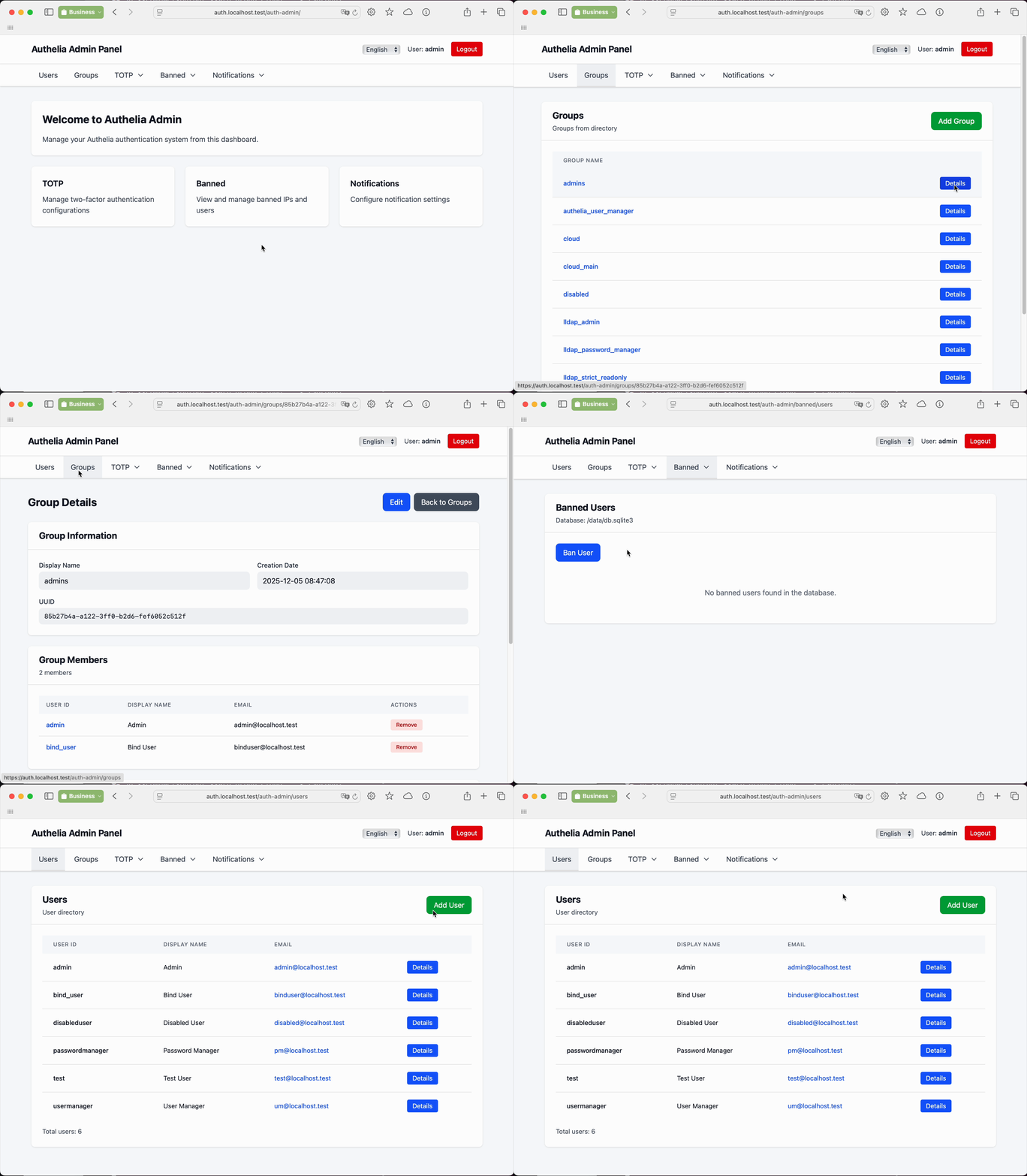
Features
- Management of users and groups in LLDAP
- View and manage TOTP configurations
- View TOTP history
- Management of banned users and IPs
- Dedicated role for management of regular users (user_manager)
- Dedicated role for management of passwords of regular users (password_manager)
- Internationalization
- Ability to add another directory system
Not yet implemented
- Management of attributes of users and groups
- Browsing and management of users in Authelia file provider
How to run locally with PostgreSQL
- checkout the repository
/etc/hostsentries:127.0.0.1 localhost.test auth.localhost.test ldap.localhost.test- Run in the first termainl:
docker-compose -f docker-compose.test-pg.yml up - Run in the second terminal: sleep 5 && docker compose -f docker-compose.test-pg.yml exec -T lldap /bootstrap/bootstrap.sh
- Close the second terminal
- Open
https://auth.localhost.testand login, then go tohttps://auth.localhost.test/auth-admin
Configuration
Configuration can be provided via YAML file or environment variables. Environment variables specific to the application use the AAD_ prefix and override YAML values.
Don't forget to configure your load balancer. Authelia Admin CP should be accessible at https://{{AAD_AUTHELIA_DOMAIN}}/auth-admin/.
Authelia Admin implements concept of protected users. Protected users are users which belong to the following groups: lldap_admin, lldap_password_manager, lldap_strict_readonly, authelia_user_manager. Only users with membership in lldap_admin can do anything with other protected users. Protected users are implemented to prevent access rights escalation.
Add your users of Authelia Admin in the following groups:
- lldap_password_manager - can list users, groups and change password of not protected users
- authelia_user_manager - lldap_password_manager access rights + can create, edit and delete users, can change memeberhip and password of non protected users
- lldap_admin - full access rights
Environment Variables
Mandatory settings for non-development environment
You need to specify only the following environment variables for a minimal instance:
AAD_AUTHELIA_DOMAIN- Domain of Authelia server for authentication of requests, e.g.,auth.yourdomain.comTRUSTED_ORIGINS- Trusted origins for CSRF protection, e.g.,https://auth.yourdomain.com
Application Configuration
| Variable | Description | Default |
|---|---|---|
PORT |
Server port | 9093 |
HOST |
Server host | 0.0.0.0 |
AAD_CONFIG_PATH |
Path to config.yml | /opt/authelia-admin/config.yml |
AAD_LOGLEVEL |
Logging level | WARN |
Authelia Integration
| Variable | Description | Default |
|---|---|---|
AAD_AUTHELIA_DOMAIN |
Authelia domain for authentication | auth.localhost.test |
AAD_AUTHELIA_CONFIG_PATH |
Path to Authelia's configuration.yml (optional when AAD_DB_* define the database) |
/config/configuration.yml |
AAD_AUTHELIA_COOKIE_NAME |
Session cookie name | authelia_session |
AAD_AUTHELIA_MIN_AUTH_LEVEL |
Minimum auth level (1=password, 2=2FA) | 2 |
AAD_AUTHELIA_ALLOWED_USERS |
Comma-separated list of allowed users | (empty = all users) |
Directory Service (LLDAP GraphQL)
| Variable | Description | Default |
|---|---|---|
AAD_DIRECTORY_TYPE |
Directory service type | lldap-graphql |
AAD_DIRECTORY_LLDAP_GRAPHQL_ENDPOINT |
LLDAP GraphQL API endpoint | http://lldap:17170/api/graphql |
AAD_DIRECTORY_LLDAP_GRAPHQL_USER |
LLDAP admin username | admin |
AAD_DIRECTORY_LLDAP_GRAPHQL_PASSWORD |
LLDAP admin password | (required) |
AAD_DIRECTORY_LLDAP_GRAPHQL_LDAP_HOST |
LDAP host for password changes | lldap |
AAD_DIRECTORY_LLDAP_GRAPHQL_LDAP_PORT |
LDAP port for password changes | 3890 |
AAD_DIRECTORY_LLDAP_GRAPHQL_LDAP_BASE_DN |
LDAP base DN for user operations | (required for password changes) |
Database (Authelia storage)
Authelia Admin works with Authelia's storage database: SQLite or PostgreSQL. Settings are merged per key, from lowest to highest priority:
- Built-in defaults
storagesection of Authelia'sconfiguration.yml(AAD_AUTHELIA_CONFIG_PATH)AAD_DB_*environment variables
The database type is AAD_DB_TYPE when set, otherwise the storage.local or storage.postgres section of the Authelia file. Values of the other backend are ignored. The Authelia file is optional when environment variables define the database.
Database configuration is validated at startup:
- An invalid value stops the container with exit code 1. The log names the variable. Secrets are never logged.
- Without any database configuration the application starts with a warning. Database pages show an error and
/auth-admin/healthreturns 500. - Connection errors are reported per request, so the database may start after Authelia Admin.
| Variable | Description | Default | Authelia file source |
|---|---|---|---|
AAD_DB_TYPE |
PG or SQLITE, case-insensitive |
from Authelia file | storage.local / storage.postgres |
AAD_DB_SQLITE_PATH |
Path to Authelia's SQLite database | (required for SQLITE) |
storage.local.path |
AAD_DB_SQLITE_BUSY_TIMEOUT_MS |
Wait time for SQLite locks, milliseconds | 5000 |
— |
AAD_DB_PG_HOST |
PostgreSQL host | localhost |
host of storage.postgres.address |
AAD_DB_PG_PORT |
PostgreSQL port | 5432 |
port of storage.postgres.address |
AAD_DB_PG_DATABASE |
Database name | authelia |
storage.postgres.database |
AAD_DB_PG_USERNAME |
User name | authelia |
storage.postgres.username |
AAD_DB_PG_PASSWORD |
Password | (empty) | storage.postgres.password |
AAD_DB_PG_PASSWORD_FILE |
File with the password, e.g. a Docker or Kubernetes secret. Must not be combined with AAD_DB_PG_PASSWORD |
— | — |
AAD_DB_PG_SCHEMA |
Schema | public |
storage.postgres.schema |
AAD_DB_PG_TIMEOUT_MS |
Connection timeout, milliseconds (0 = no timeout) |
5000 |
storage.postgres.timeout |
AAD_DB_PG_POOL_MAX |
Maximum connection pool size | 10 |
— |
AAD_DB_PG_TLS_MODE |
disable, require, verify-ca or verify-full |
disable; verify-full when the file has a tls block |
storage.postgres.tls |
AAD_DB_PG_TLS_CA_FILE |
PEM file with trusted CA certificates | system trust store | — |
AAD_DB_PG_TLS_CERT_FILE |
PEM client certificate for mutual TLS | — | storage.postgres.tls.certificate_chain |
AAD_DB_PG_TLS_KEY_FILE |
PEM client private key for mutual TLS | — | storage.postgres.tls.private_key |
AAD_DB_PG_TLS_SERVER_NAME |
Name verified in the server certificate instead of the host | host | storage.postgres.tls.server_name |
AAD_DB_PG_TLS_MIN_VERSION |
TLS1.2 or TLS1.3 |
TLS1.2 |
storage.postgres.tls.minimum_version |
AAD_DB_PG_TLS_MAX_VERSION |
TLS1.2 or TLS1.3 |
TLS1.3 |
storage.postgres.tls.maximum_version |
*_MS variables are plain integers of milliseconds. Authelia's timeout uses Authelia duration notation: 5s, 1m30s, or a plain integer of seconds.
PostgreSQL TLS modes:
| Mode | Encrypted | Certificate chain verified | Host name verified | Authelia equivalent |
|---|---|---|---|---|
disable |
no | no | no | no tls block |
require |
yes | no (skip verify) | no | tls.skip_verify: true |
verify-ca |
yes | yes, AAD_DB_PG_TLS_CA_FILE required |
no | — |
verify-full |
yes | yes | yes | tls block |
TLS verification is not affected by NODE_TLS_REJECT_UNAUTHORIZED. Opportunistic TLS (prefer), Authelia servers fallbacks and unix:// addresses are not supported.
Security
| Variable | Description | Default |
|---|---|---|
TRUSTED_ORIGINS |
CSRF trusted origins | (required for production) |
NODE_TLS_REJECT_UNAUTHORIZED |
Set to 0 for self-signed certificates |
(not set) |
YAML Configuration
Example of config.yml for authelia-admin:
# Logging level (DEBUG, INFO, WARN, ERROR). Default: WARN
# Can be overridden by AAD_LOGLEVEL environment variable
logging_level: WARN

authelia:
  # Domain where Authelia is accessible
  domain: auth.localhost.test
  # Name of the session cookie used by Authelia
  cookie_name: authelia_session
  # Minimum authentication level required (1=password, 2=2FA)
  min_auth_level: 2
  # Optional: List of allowed users (if not set, all authenticated users are allowed)
  # allowed_users:
  #   - admin
  #   - user2

# Directory service configuration
directory:
  # Type of directory service (currently only lldap-graphql is supported)
  type: lldap-graphql
  # Configuration for LLDAP GraphQL backend
  lldap-graphql:
    endpoint: http://lldap:17170/api/graphql
    user: admin
    password: admin1234
    ldap_host: lldap
    ldap_port: 3890
    # LDAP base DN (required for password changes)
    ldap_base_dn: dc=example,dc=com
Docker
The application runs on port 9093 and expects the Authelia database to be mounted.
docker run -p 9093:9093 \
  -v /path/to/authelia/config:/config \
  -v /path/to/authelia/data:/data \
  -v /path/to/authelia-admin/config.yml:/opt/authelia-admin/config.yml:ro \
  -e AAD_LOGLEVEL=DEBUG \
  -e TRUSTED_ORIGINS=https://auth.yourdomain.com \
  ghcr.io/asalimonov/authelia-admin:latest
Alternatively, using environment variables instead of a config file:
docker run -p 9093:9093 \
  -v /path/to/authelia/config:/config \
  -v /path/to/authelia/data:/data \
  -e AAD_LOGLEVEL=DEBUG \
  -e AAD_AUTHELIA_DOMAIN=auth.yourdomain.com \
  -e AAD_DIRECTORY_LLDAP_GRAPHQL_ENDPOINT=http://lldap:17170/api/graphql \
  -e AAD_DIRECTORY_LLDAP_GRAPHQL_USER=admin \
  -e AAD_DIRECTORY_LLDAP_GRAPHQL_PASSWORD=secret \
  -e TRUSTED_ORIGINS=https://auth.yourdomain.com \
  ghcr.io/asalimonov/authelia-admin:latest
PostgreSQL configured only with environment variables, without mounting Authelia's configuration:
docker run -p 9093:9093 \
  -v /path/to/secrets:/run/secrets:ro \
  -e AAD_AUTHELIA_DOMAIN=auth.yourdomain.com \
  -e AAD_DIRECTORY_LLDAP_GRAPHQL_PASSWORD=secret \
  -e AAD_DB_TYPE=PG \
  -e AAD_DB_PG_HOST=postgres \
  -e AAD_DB_PG_USERNAME=authelia \
  -e AAD_DB_PG_PASSWORD_FILE=/run/secrets/postgres-password \
  -e AAD_DB_PG_TLS_MODE=verify-full \
  -e AAD_DB_PG_TLS_CA_FILE=/run/secrets/postgres-ca.pem \
  -e TRUSTED_ORIGINS=https://auth.yourdomain.com \
  ghcr.io/asalimonov/authelia-admin:latest
Note: When deploying with a reverse proxy, ensure the
TRUSTED_ORIGINSmatches your domain for CSRF protection.
SQLite: Authelia Admin runs as uid 1001 and opens the database read-write. The database file and its directory must be writable by uid 1001, e.g. run Authelia with
PUID=1001andPGID=1001.
Docker Compose
See docker-compose.yml for a complete example with Authelia, LLDAP, and Traefik.
Development
# Install dependencies and build docker image
make build-dev

# Run Authelia, LLDAP, and Traefik via Docker Compose
make run-docker-compose

# In a second terminal, run Docker with authelia-admin with hot-reload
make run-dev
Use admin user with admin1234 password. The confirmation code can be found in the ./test-data/authelia/notification.txt file.
E2E Test Prerequisites
/etc/hostsentries:127.0.0.1 localhost.test auth.localhost.test ldap.localhost.test- Docker and Docker Compose installed
- Production image built with
make build - Chromium installed:
npx playwright install chromium
Run Playwright UI - npx playwright test --config=e2e/playwright.config.ts --ui --project=chromium
Integration Tests
make test-large builds the production image and runs tests/integration with Testcontainers. The tests start LLDAP, Authelia, Traefik and PostgreSQL in throwaway containers and verify database configuration via AAD_DB_* variables for SQLite and PostgreSQL, including TLS modes and startup validation.
Prerequisites:
- Docker
- Node.js 22.22+ and
npm installon the host. The tests run on the host, not inside a container. - The image under test.
make test-largebuilds it.npm run test:integrationusesauthelia-admin:latestfrommake build, or the image inAAD_TEST_IMAGE.
Requirements
- Node.js 22+
- Access to Authelia's storage: the SQLite database file or the PostgreSQL server
- Authelia's configuration file, unless the database is configured with
AAD_DB_*variables - Access to GraphQL and LDAP interfaces of LLDAP
Media gallery
Requirements
Requires a `config.yaml` file to be present in the Config Path. See documentation: https://github.com/asalimonov/authelia-admin#yaml-configuration
Related apps
Explore more like this
Explore allDetails
ghcr.io/asalimonov/authelia-admin:latestRuntime arguments
- Web UI
http://[IP]:[PORT:9093]/- Network
bridge- Privileged
- false
Template configuration
Container Port: 9093
- Target
- 9093
- Default
- 9093
- Value
- 9093
Path to the Authelia config.yaml file
- Target
- /opt/authelia-admin/config.yml
Set the trusted origins for Authelia
- Target
- TRUSTED_ORIGINS
- Default
- https://auth.yourdomain.com
Path to the config folder
- Target
- /config
- Default
- /mnt/user/appdata/authelia_admin/config
- Value
- /mnt/user/appdata/authelia_admin/config
Path to the app data folder
- Target
- /data
- Default
- /mnt/user/appdata/authelia_admin/data
- Value
- /mnt/user/appdata/authelia_admin/data
Set the log level
- Target
- AAD_LOGLEVEL
- Default
- DEBUG|INFO|WARNING|ERROR|CRITICAL