

Auditarr
Docker app from chrizantoz's Repository
Overview
Readme
View on GitHub🔍 Auditarr
 release licence runs on demo image
Auditarr is a nightly quality-control bot for a self-hosted media library. If you run the "arr" apps — Sonarr (TV), Radarr (movies), Whisparr (adult), Bazarr (subtitles) — alongside Plex, Auditarr opens every media file, checks what is actually inside it against what those apps believe is there, quietly fixes the safe problems on its own, and leaves you one-click, undoable buttons for the rest.
Think of it as a librarian that walks the shelves each night: it finds the mislabeled, the broken, the wrong-language and the missing — then either fixes them or hands you a tidy to-do list.
- 🧪 Try it in your browser: a demo with sample data (actions simulated) is built on every release by
uibot/make_demo.py; it is published at https://chrizantoz.github.io/auditarr/ once the repository is public. - 📘 New here? Start with the User guide — a plain-language tour of the page and every button.
- 📋 Everything it checks and every button it has: FEATURES.md
- 📰 What changed and when: CHANGELOG.md
- 🗺️ Where it is going: ROADMAP.md · 📦 Installing step by step: docs/INSTALL.md
It is deliberately small: one Python file, one HTML page, a local SQLite file for its state, and no separate database server. It runs as a single Docker container.
🚧 Status
Beta. Auditarr was built for one homelab (about 14,000 files across Sonarr, Radarr, Whisparr, Bazarr and Plex on Unraid) and then generalized: the Setup tab, the install docs and the test suites exist so that a second person can run it. Expect rough edges around setups that differ from that one (other players, other path layouts, no Plex). Issues with a copy of the Live tab's log lines are welcome.
🖼️ Screenshots
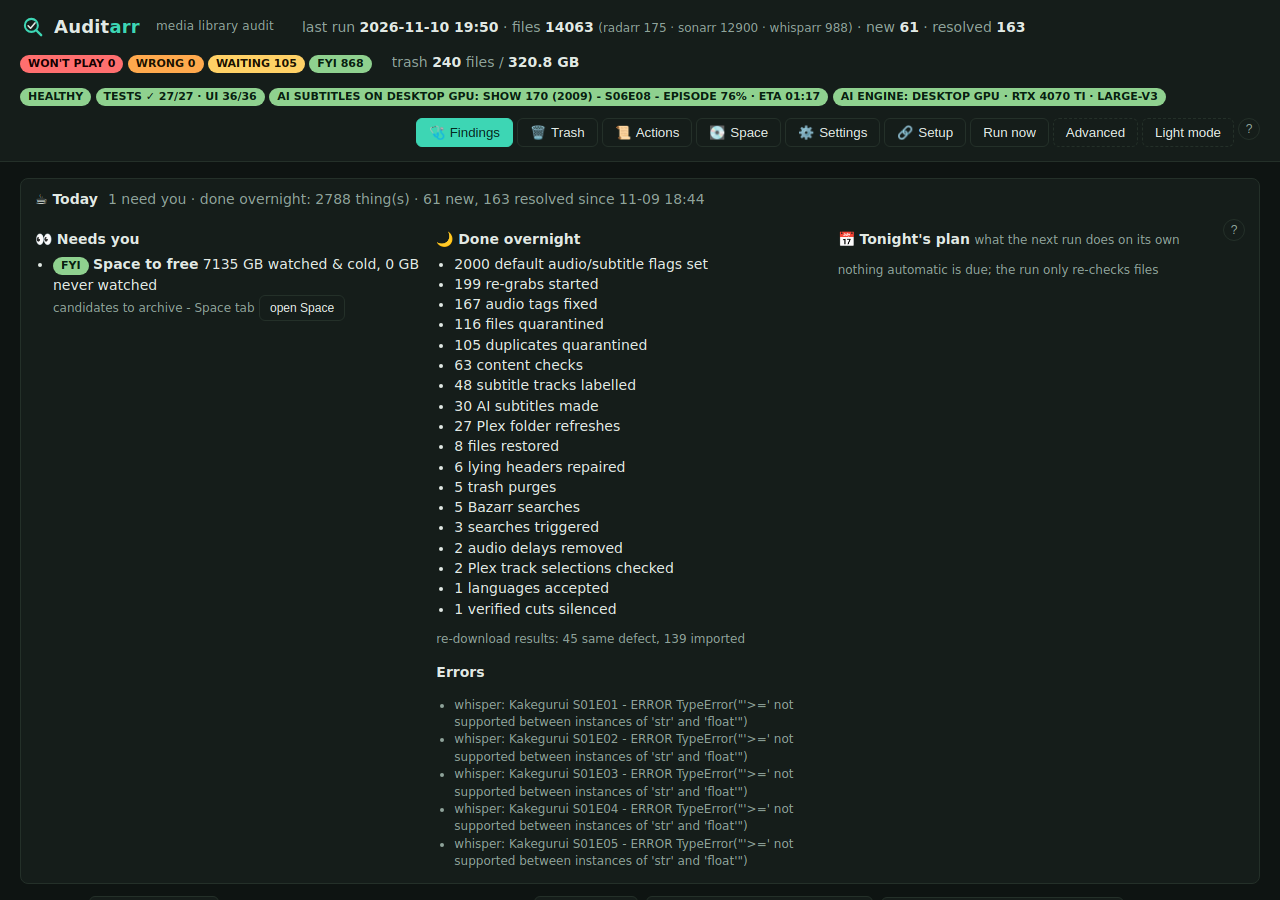
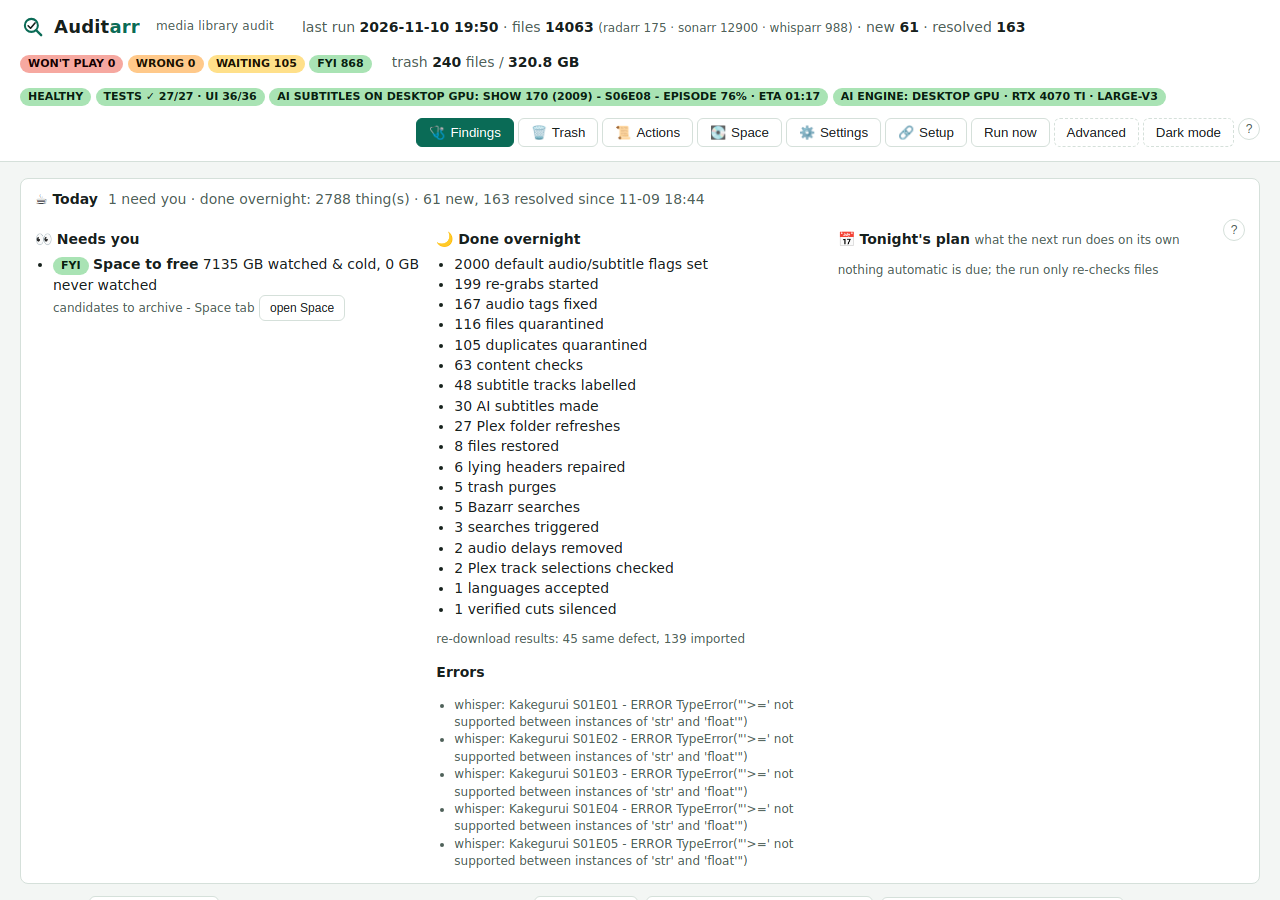
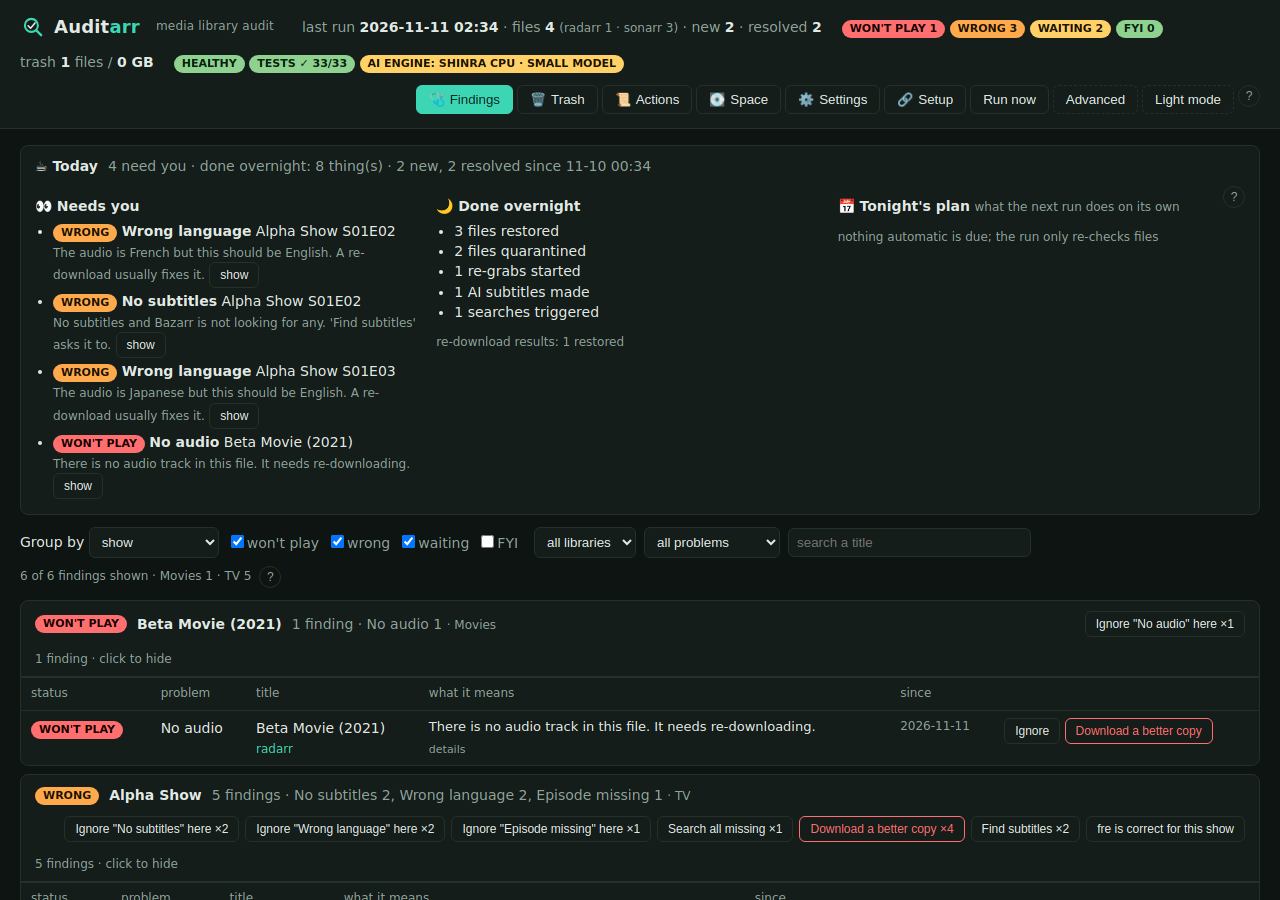
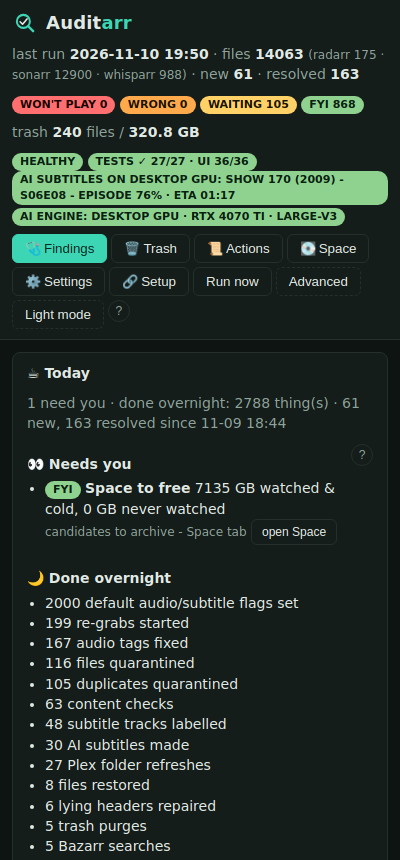
Taken by the test bot in CI from real (sanitised) data, so they are always current.
| Findings, dark | Findings, light |
|---|---|
 |
 |
| A small test library with one of each problem | On a phone |
|---|---|
 |
 |
🧭 How it works
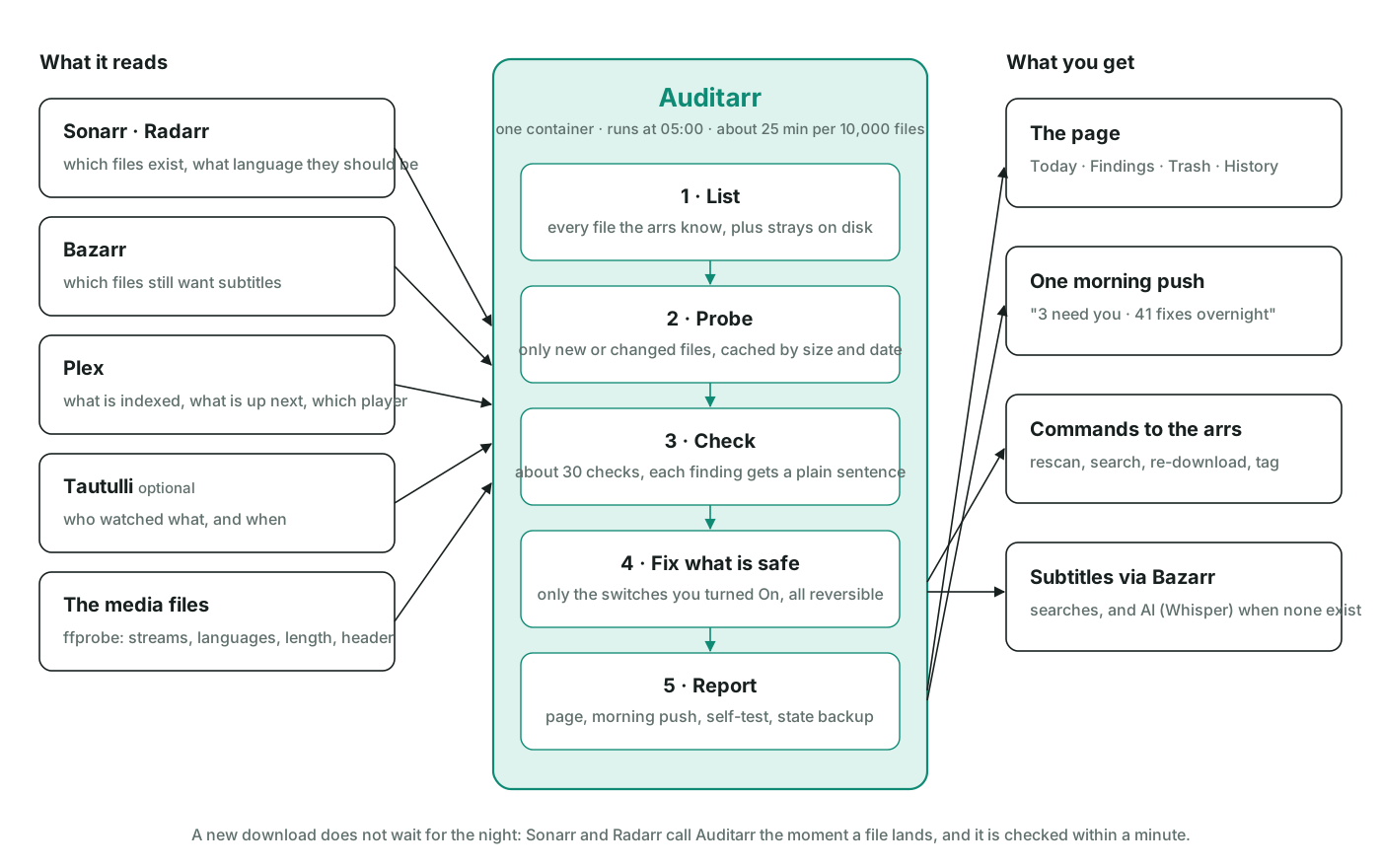
Every night it reads what the library should be from the arrs, reads what it is from the files, and every gap becomes a finding with a plain sentence. Safe fixes run on their own behind switches you control; anything it moves goes to a trash folder with a countdown and one-click Undo.

The full picture, with the automation switches and where it runs: How Auditarr works.
🧰 What you'll need
- The arr apps and/or Plex you already run. You don't need all of them — Auditarr uses whichever it can reach.
- Your media visible to Auditarr at the same path the other apps use (mounted at
/databelow). If the paths differ, you can map them — see Requirements. - About five minutes to fill in the
docker runcommand below.
How it works in three steps
- 🔗 Connect — start the container, open the page, paste your Sonarr / Radarr / Bazarr / Plex addresses and keys on the Setup tab and press Test.
- 🌙 It audits every night — opens every file, finds what is wrong, fixes the safe things by itself, and sends you one morning message: Needs you: …
- 🔘 You press a button — every problem has one plain-language sentence and one verb button (Download a better copy, Make AI subtitles, …). Everything is reversible from the Trash tab.
What it runs on
Inside the container: Python 3.12 and its standard library, one Python package (pyyaml, to read Bazarr's config), ffmpeg/ffprobe and mkvtoolnix. No database server, no framework. The test bots need Node 20 with jsdom, playwright, axe-core, pixelmatch and pngjs (see uibot/package.json); none of that ships in the app image.
🚀 Quick start (Docker)
The short way: run the container with your media mounted, open the page, and follow the Setup tab. It asks for the Sonarr, Radarr, Bazarr and Plex addresses and API keys, tests each one, shows which media folders it can see, and starts the first audit.
docker run -d --name auditarr --restart unless-stopped -p 3091:3091 \
  -e TZ=America/Winnipeg -v /path/to/appdata/auditarr:/config -v /path/to/media:/data/media \
  ghcr.io/chrizantoz/auditarr:latest
Step-by-step for Unraid and docker compose, including where to find the keys: docs/INSTALL.md. A compose file is in docs/docker-compose.yml, an Unraid template in docs/unraid-template.xml.
The mounts below are the hands-off alternative: keys are read from the apps' own config files and nothing has to be typed.
docker run -d --name auditarr --restart unless-stopped -p 3091:3091 \
  -e TZ=America/Winnipeg -e HOST_IP=192.168.1.10 -e RUN_AT=05:00 \
  -v /path/to/appdata/auditarr:/config \
  -v /path/to/media:/data \
  -v /path/to/sonarr/config.xml:/arr/sonarr.xml:ro \
  -v /path/to/radarr/config.xml:/arr/radarr.xml:ro \
  -v /path/to/bazarr/config/config.yaml:/arr/bazarr.yaml:ro \
  -v /path/to/plex/Preferences.xml:/arr/plex.xml:ro \
  ghcr.io/chrizantoz/auditarr:latest
Open http://host:3091. The first run reads every file once (roughly 25 minutes per 10,000 files) to learn your library; after that it only re-checks what changed, so nightly runs take a couple of minutes.
📁 Requirements: Auditarr, the arrs, Bazarr and Plex must all see the media at the same path (/data here). If they don't, add a mapping such as PLEX_PATH_MAP=/data/media=/data. API keys are picked up automatically from the read-only config files you mount above; or set them yourself (SONARR_APIKEY, etc.).
➕ Optional extras: Tautulli for watch stats (-v /path/to/tautulli/config.ini:/arr/tautulli.ini:ro, powers the Space tab), NTFY_URL (+ NTFY_TOKEN_FILE) for phone notifications, SUBGEN_URLS for AI-subtitle (Whisper) servers, a Docker socket proxy at DOCKER_API for live subtitle-generation progress, and PAPERCLIP_* to hand findings to an agent. An Unraid template is in docs/unraid-template.xml.
💬 Help and community
- Unraid users: the support thread on the Unraid forum.
- Everyone: GitHub Discussions for questions and ideas, Issues for bugs.
🔒 Who can open the page
Out of the box the page is open to your local network (handy at home). On the Setup tab, step 4 turns on a built-in sign-in: a user and password stored hashed in Auditarr's own database, a session cookie, and a plain login page. /health and the import webhook (token-protected) stay reachable for monitoring and for Sonarr/Radarr. If you already protect it with a reverse proxy that sets Remote-User (Authelia, Authentik), set TRUST_PROXY_AUTH=1 and that header counts as a sign-in. Forgot the password: start once with AUTH_USER, AUTH_PASSWORD and AUTH_RESET=1. A second, read-only login for family is one step further down the same page: it sees everything and can change nothing.
🛡️ Is it safe? (yes — nothing is deleted outright)
- It starts cautious. Every action that writes or deletes is a switch set to
off,dryrun(show me what it would do, change nothing) oron. Out of the box, anything that removes a file is in dry-run. The switches:ARR_RESCAN,DEDUPE,REMEDIATE(deleting re-downloads also needsREMEDIATE_CONFIRM=I_UNDERSTAND_FILES_WILL_BE_DELETED),SUBTAG,AUTO_FIXHEADER,AUTO_VERIFY,TRACK_PREFS,PLEX_REFRESH. (JOBS=offlets a container note the jobs it would run without running them — used for the staging copy.) - Nothing is deleted directly. Files are moved to a Trash folder and only purged after a grace period: duplicates after 3 days (
TRASH_DAYS_DEDUPE), re-downloads after 14 (TRASH_DAYS), archives after 30 (TRASH_DAYS_ARCHIVE). The Trash tab restores anything with one click. - Repairs are lossless. When it fixes a broken file header or audio that's out of sync, it rebuilds the file without re-encoding (a "remux") and verifies the new copy before the original is swapped out.
- Who can press the buttons: the web UI only accepts changes from a private network, or from a user your reverse proxy has already logged in (Authelia-style
Remote-User).
⚙️ Settings
The About tab shows the version you run, the newest release (checked once a day, chip in the header when there is one), and how to update. With an update hook (UPDATE_HOOK_URL, e.g. Watchtower's HTTP API) it also gets an Update now button.
Every option has a sensible default and can be changed on the Settings tab (saved in the database — no file editing needed). If the same option is set in more than one place, this is the order that wins: a one-off ?KEY= in the URL → what you saved in the UI → the container's environment variable → the built-in default. The Settings tab shows you where each current value is coming from.
🧑💻 For developers
🧪 Testing (full write-up: docs/TESTING.md)
GET /api/selftestruns the in-container test suite (detector sampling + reversible API checks); it also runs automatically after every nightly audit.uibot/is a headless browser bot (jsdom):cd uibot && npm install jsdom && node ui_bot.js ../ui.html fixtures, plus a real-browser run (browser_bot.js, Playwright). The publishedghcr.io/chrizantoz/auditarr-uibotimage is that bot packaged to run nightly against your own instance — optional; the app itself isghcr.io/chrizantoz/auditarralone.- CI runs both on every push and publishes the images.
docs/auditarr-deploy.shstages a new image against a copy of the database before promoting it.
🗂️ Project layout
audit.py        the whole backend (checks, actions, scheduler, HTTP API)
ui.html         the whole UI
tests/          self-test, API smoke suites, diagnostics
uibot/          headless UI bot + Dockerfile + fixtures
docs/           Unraid template, deploy/staging script, homelab notes
Built for a single homelab; shared as-is. Issues and ideas welcome.
☕ Support
Auditarr is free and stays free. If it saved you an evening, a tip helps pay for the GPU time and test hardware behind the next release.
📄 License
GPL-3.0. Use it, change it, share it; anything you distribute based on it must stay open under the same terms. See LICENSE.
Related apps
Explore more like this
Explore allDetails
ghcr.io/chrizantoz/auditarr:latestRuntime arguments
- Web UI
http://[IP]:[PORT:3091]/- Network
bridge- Shell
sh- Privileged
- false
- Extra Params
--memory=1g
Template configuration
the page, the API and /health
- Target
- 3091
- Default
- 3091
- Value
- 3091
- Target
- /config
- Default
- /mnt/user/appdata/auditarr
- Value
- /mnt/user/appdata/auditarr
Look at any file path in Sonarr: if it starts with /data/media, mount your media share here. Read-write so files can be moved to the trash folder and back.
- Target
- /data/media
- Default
- /mnt/user/data/media
- Value
- /mnt/user/data/media
your time zone - the nightly audit runs at RUN_AT in this zone
- Default
- America/New_York
- Value
- America/New_York
daily run time (HH:MM)
- Default
- 05:00
- Value
- 05:00
optional here - the Setup tab asks for it
optional here - the Setup tab asks for it
optional
optional
optional
optional
optional
optional
morning digest push, e.g. https://ntfy.sh/your-topic (empty = none)
address of this page as you reach it (e.g. https://auditarr.example.com); used in push-notification links and webhooks (empty = host IP)
language(s) that count as right for non-anime (ISO 639-2, comma list)
- Default
- eng
- Value
- eng
subtitle language(s) you want
- Default
- eng
- Value
- eng
re-download broken files by itself: off / dryrun (only report) / on (also needs REMEDIATE_CONFIRM). Files go to the trash first.
- Default
- dryrun|off|on
- Value
- dryrun
type I_UNDERSTAND_FILES_WILL_BE_DELETED to allow REMEDIATE=on