
Audiobind
Docker app from stinger303's Repository
Finds audiobooks that are split into many files, checks each one against the Audible catalog, merges the parts into a single tagged m4b with real chapter marks and cover art, and…
Requirements
Overview
Readme
View on GitHubAudiobind
Fix an audiobook library instead of curating it by hand.
Audiobind walks a folder of audiobooks, works out what each book actually is, merges the ones that
are spread over dozens of files into a single tagged .m4b, and files the result into a clean
Author/Title library. It is built for the mess every audiobook collection eventually becomes:
Part 1, Disc 3, StoneColdUnabridgedPart2, three copies of the same book, and a folder called
Vince Flynn Novels 14 books Complete Collection.
What you get
- One
.m4bper book, with the Audnex chapter marks, the full tag set and an embedded cover. - Every book checked against the Audible catalog. A winner must beat the best different work by a margin, and knockoffs (summaries, study guides, zero-runtime stubs) never count against it.
- A completeness check: a set whose runtime is an hour short of the catalog is reported, not merged.
- Optional single-file MP3 output (
OUTPUT_FORMAT) with ID3 chapters, cover and tags, alone or next to the.m4b. - Optional wishlist acquisition from a private tracker you configure, through qBittorrent. Off unless the
TRACKER_*settings are complete. - Discover books: search the catalog, plus suggestions based on the authors, narrators and genres you already own.
- Series completion: the Series page shows what you are missing, and Want all missing puts it on the wishlist in one click.
- Conversion never changes or deletes your source files. Only the explicit Delete button does,
and a read-only
/librarymount rules even that out. - A dry run that decides and logs everything and writes nothing.
- One container, Python standard library only, no telemetry, no external database (state is a
SQLite file under
/config).
Requirements
- Docker (or Unraid). Nothing else to install: ffmpeg is in the image.
- Optional, for wishlist acquisition only: an account on a private tracker (and a VPN container if you want tracker traffic kept off your home connection) and qBittorrent for the downloads.
Quick start: the three mounts (/library, /output, /config) and the
account must be right before the first scan - the First run
checklist walks through them in order. The UI answers on this machine and on private LAN IPs out of
the box; set ALLOWED_HOSTS only to restrict it to exactly the names you list.
library-in/                         library-out/
  Michael Lewis- Moneyball/           Michael Lewis/
    Moneyball/                          Moneyball/
      1-01 1A.mp3  ... 195 files           Moneyball.m4b   (one file, 16 chapters, cover)
    Moneyball [Disc 2]/                    cover.jpg
    Moneyball [Disc 3]/                    metadata.json
Status: beta — read this before you point it at your library
Audiobind is a beta: a solo project with a single front-end developer, and the
code is written with heavy AI assistance (designed, reviewed and tested by a human,
but not hand-written line by line). It reads real audiobook libraries and writes to
a separate output library, and software like that can fail badly — you may
experience data loss. Converting only reads your sources and writes new files to the
output folder; the only thing that ever deletes source files is the explicit Delete
button (a confirmation dialog, no undo). Keep backups, run it against a copy first, and
pin a tagged release instead of latest if reproducible behavior matters to you. The
first scan starts as soon as the container does, and AUTO_CONVERT=high (the default)
converts the books it is sure of; set Auto convert to off to review every match first.
How it works
- Group parts into books.
Book/Disc 1..9andBook/Part 1..3collapse into one unit. A book is a unit, never a directory. - Verify against the Audible catalog. Title, author, narrator, series, ASIN - via the public Audible search API and Audnex. Every candidate is scored, and the winner must beat the best different work by a margin before it is trusted. Knockoffs (summaries, reviews, study guides, zero-runtime stubs) never count against that margin, and when two candidates are neck and neck the one Audnex agrees with wins.
- Prove completeness. The summed runtime of the parts is compared with the catalog runtime. A set that is an hour short is reported, not merged.
- Merge and convert. One
ffmpegpass: concat demuxer, AAC, Audnex chapter marks scaled onto the real timeline, embedded cover, full tag set. The bitrate never drops below the configured floor (128 kbps by default) and a richer source keeps its own bitrate. A file that is already AAC in an MP4 container, at or below the configured channel count and sample rate (both are caps), is remuxed with-c:a copy- no re-encode at all, so a mono or 22050 Hz book stays mono or 22050 Hz. A book that is re-encoded is written at the lower of its own channel count and rate and the caps: never upmixed, never resampled up. - File it. In the Audiobookshelf layout:
Author/Title/Title.m4borAuthor/Series/3 - Title/Title.m4b, plus acover.jpgand an Audiobookshelf-compatiblemetadata.json. See Folder layout.
It is deliberately conservative
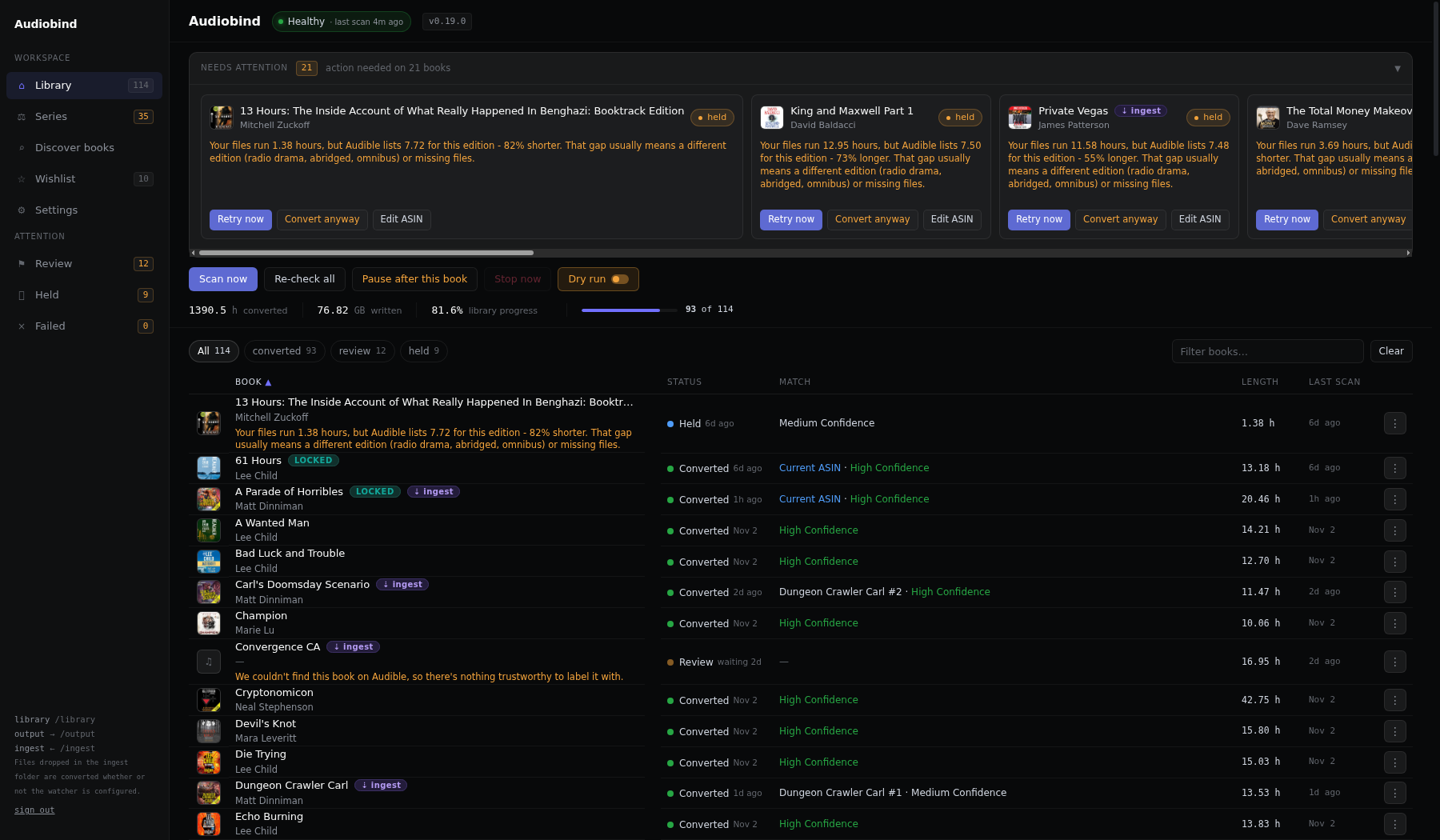
| Confidence | Meaning | Default behaviour |
|---|---|---|
HIGH |
title and author both corroborated, clear winner | converted |
MEDIUM |
exact title, author inferred from the catalog | left for review (converted when AUTO_CONVERT=medium) |
LOW |
weak or ambiguous match | left for review |
COLLECTION |
several books in one folder | left for review |
| held | runtime disagrees with the catalog by >15% - usually the wrong edition, or a shortened rip | not converted |
Converted books are written to the separate output library. The web UI's Delete is the one destructive path — it permanently removes the source folder and the published output, after you confirm in a dialog (one Delete permanently button; there is no typed confirmation, so read the dialog). It only removes an output folder Audiobind itself converted: a book marked already published points at a folder that was there before, and Delete forgets the book but leaves that folder alone. Inside a converted book's folder it removes only the files Audiobind can prove it wrote; anything else (your own files, or extras beside a book converted by an older release that kept no record) is left, and the answer names it. If you mount the library read-only instead, Delete adapts: it removes the published output and forgets the book, keeps the source folder untouched, and tells you so (the folder will reappear on the next scan unless you remove it from the share).
Delete only removes what belongs to that one book. When two books' part folders share a
parent folder (Author/Foo Part 1, Author/Bar Part 1, ...), each book shows up on its own
row (Author#foo, Author#bar), and Delete removes only that book's part folders, never
the shared Author folder. If the folder you're deleting also holds another book's audio,
Delete refuses and nothing is removed.
Documentation
- Installation and first run - Unraid, docker, compose, hardening, a reverse proxy, the first account, signing in.
- Using Audiobind - the web UI controls, the Series page, Discover books and the wishlist, the CLI.
- Configuration - every environment variable with its default, and the output formats (M4B, MP3, both).
- Acquisition - bring your own downloader, the optional private-tracker wishlist watcher, running it through a VPN.
- Development - running the tests and building the image, and the correctness traps in the encoder.
- SECURITY.md - how to report a vulnerability privately, and what is in and out of scope.
- CHANGELOG.md - what changed in each release.
License
MIT - see LICENSE.
Media gallery
Categories
Related apps
Explore more like this
Explore allLinks
Details
ghcr.io/stinger303/audiobind:latestRuntime arguments
- Web UI
http://[IP]:[PORT:8080]- Network
bridge- Shell
sh- Privileged
- false
- Extra Params
--restart=unless-stopped --read-only --tmpfs /tmp --cap-drop=ALL --cap-add=CHOWN --cap-add=SETUID --cap-add=SETGID --security-opt=no-new-privileges:true
Template configuration
Folder holding the audiobooks to fix. Writable so Delete can fully remove a book. Owner decides: set Access Mode to Read Only for a guarantee the app never touches your sources - this disables source-delete (Delete then removes only the output).
- Target
- /library
- Default
- /mnt/user/data/media/audiobooks
- Value
- /mnt/user/data/media/audiobooks
Where finished m4b files are written. Never the same as the library path.
- Target
- /output
- Default
- /mnt/user/data/media/audiobooks-fixed
- Value
- /mnt/user/data/media/audiobooks-fixed
Database, audit report and work files.
- Target
- /config
- Default
- /mnt/user/appdata/audiobind
- Value
- /mnt/user/appdata/audiobind
Status page and JSON API. Change it if another container already uses this port.
- Target
- 8080
- Default
- 8686
- Value
- 8686
Leave at 8080. Change it only if Audiobind runs inside a VPN container's network and another app there (often qBittorrent) already uses 8080: pick another port such as 8686 and publish that port on the VPN container. On the normal bridge network, changing it breaks the WebUI port mapping above.
- Target
- WEB_PORT
- Default
- 8080
- Value
- 8080
Optional. When this variable is not set at all, the UI answers on this machine and on private LAN addresses (like 192.168.1.10), but not on hostnames. Any value here restricts it: set a comma-separated list of the names/IPs you open the web UI with, e.g. 192.168.1.10,tower,tower.local: then only exactly those are answered (protects against DNS-rebinding attacks).
- Target
- ALLOWED_HOSTS
Only for upgrading: an install that still signs in with a token keeps working while this is set. On a new install leave it empty and create your account on the setup page that opens on the first visit. It asks for the one-time setup code printed in the container log on the first start (look for 'setup code'). Scripts send it as 'Authorization: Bearer TOKEN'.
- Target
- AUTH_TOKEN
true only when Audiobind sits behind your own reverse proxy: X-Forwarded-Host/-For/-Proto from the addresses in Trusted proxy IPs are then believed. Needs Trusted proxy IPs as well.
- Target
- TRUSTED_PROXY
- Default
- false
- Value
- false
Comma-separated addresses or CIDRs of your reverse proxy (for example 172.18.0.0/16). Forwarded headers are only honoured from these peers; empty means none.
- Target
- TRUSTED_PROXY_IPS
Which confidence tiers convert without asking: high, medium or off. high converts the books it is sure of on the first scan, which starts as soon as the container does. Choose off to review every match first, then switch to high under Settings.
- Target
- AUTO_CONVERT
- Default
- high
- Value
- high
How often to look for new books.
- Target
- SCAN_INTERVAL_MIN
- Default
- 30
- Value
- 30
Minimum AAC bitrate. A richer source keeps its own bitrate (a 256k mp3 stays 256k); anything below this is lifted to it. Capped at 320k.
- Target
- AUDIO_BITRATE
- Default
- 128k
- Value
- 128k
1 = mono, 2 = stereo. Stereo keeps the source layout; mono halves the file size.
- Target
- AUDIO_CHANNELS
- Default
- 2
- Value
- 2
Books converted at once. Raise if your CPU is idle.
- Target
- JOBS
- Default
- 1
- Value
- 1
CPU priority for ffmpeg. Higher = yields to everything else.
- Target
- NICE
- Default
- 10
- Value
- 10
Hold a book when its runtime differs from the catalog by more than this fraction (0.15 = 15%).
- Target
- MAX_RUNTIME_DELTA
- Default
- 0.15
- Value
- 0.15
Audible region for metadata: us, uk, ca, au, de.
- Target
- REGION
- Default
- us
- Value
- us
true = log every decision but write nothing.
- Target
- DRY_RUN
- Default
- false
- Value
- false
Path of the rotating log file (5 MB, 3 backups). Written next to the console log, so it survives a container recreate. Set it to empty only if you want no file log.
- Target
- LOG_FILE
- Default
- /config/audiobind.log
- Value
- /config/audiobind.log
Optional webhook (Discord/Slack/ntfy) posted a summary after each scan.
- Target
- NOTIFY_URL
Optional. Folder where downloaded audiobooks land (for example qBittorrent's completed folder for the wishlist watcher). Mounted read-only. Leave empty to turn ingest off.
- Target
- /ingest
Set to /ingest when the Ingest path above is used; empty = ingest off.
- Target
- INGEST_DIR
Easier: leave empty and fill this in under Settings > Watcher in the web UI (checked there, no restart). Needed for the wishlist. Base URL of your private tracker, e.g. https://tracker.example (no path). A path here (e.g. a pasted bookmark) stops the container from starting. The wishlist watcher is off until this, both paths, the search body, the cookie name and the session are set (plus the qBittorrent address and login below).
- Target
- TRACKER_URL
Easier: leave empty and fill this in under Settings > Watcher in the web UI (checked there, no restart). Needed for the wishlist. Path of the tracker's JSON search endpoint.
- Target
- TRACKER_SEARCH_PATH
Easier: leave empty and fill this in under Settings > Watcher in the web UI (checked there, no restart). Optional. POST (default) or GET.
- Target
- TRACKER_SEARCH_METHOD
Easier: leave empty and fill this in under Settings > Watcher in the web UI (checked there, no restart). Optional. The category value to send with a search, if the site needs one. Empty = none is sent.
- Target
- TRACKER_SEARCH_CATEGORY
Easier: leave empty and fill this in under Settings > Watcher in the web UI (checked there, no restart). Optional. How a POST sends the search body: json (default) or form (application/x-www-form-urlencoded key=value pairs).
- Target
- TRACKER_SEARCH_ENCODING
Easier: leave empty and fill this in under Settings > Watcher in the web UI (checked there, no restart). Needed for the wishlist. The search request as a JSON object with {{title}}, {{author}} and {{category}} placeholders, e.g. {"q": "{{title}} {{author}}"}. A member that is only placeholders and comes out empty is left out. A value here that is not a JSON object stops the container from starting.
- Target
- TRACKER_SEARCH_BODY
Easier: leave empty and fill this in under Settings > Watcher in the web UI (checked there, no restart). Needed for the wishlist. Path of the tracker's torrent download endpoint.
- Target
- TRACKER_DOWNLOAD_PATH
Easier: leave empty and fill this in under Settings > Watcher in the web UI (checked there, no restart). Optional. Query parameter carrying the torrent id (default tid).
- Target
- TRACKER_DOWNLOAD_PARAM
Easier: leave empty and fill this in under Settings > Watcher in the web UI (checked there, no restart). Optional. Query parameter that spends a freeleech credit, e.g. fl. Empty = never sent.
- Target
- TRACKER_FREELEECH_PARAM
Easier: leave empty and fill this in under Settings > Watcher in the web UI (checked there, no restart). Needed for the wishlist. The name of the tracker's session cookie.
- Target
- TRACKER_COOKIE_NAME
Easier: leave empty and fill this in under Settings > Watcher in the web UI (checked there, no restart). Needed for the wishlist. The value of the tracker's session cookie. Create the session for the IP the container reaches the tracker from. A secret.
- Target
- TRACKER_SESSION
Optional. http://host:port (or https://) proxy for every tracker request, e.g. a VPN container's HTTP proxy. Empty = direct. Fail-closed: a dead proxy means no tracker request, never a direct one. This covers Audiobind's own visits to the tracker (searches and .torrent files). The download itself is qBittorrent's; route qBittorrent through your VPN separately. Prefer running Audiobind in the VPN container's network (see Running the watcher through a VPN: https://github.com/stinger303/audiobind/blob/main/docs/acquisition.md#running-the-watcher-through-a-vpn).
- Target
- TRACKER_PROXY
Easier: leave empty and fill this in under Settings Watcher in the web UI (checked there, no restart). Optional. Text to send as the User-Agent to the tracker. Empty = audiobind/version. Set to none to send no User-Agent (some trackers refuse that with HTTP 400).
- Target
- TRACKER_USER_AGENT
Easier: fill this in under Settings > Watcher in the web UI (checked there, no restart). Set to true if your account holds the tracker's top membership tier (some trackers call it VIP, others Premium). When false, torrents restricted to that tier are skipped instead of attempted.
- Target
- TRACKER_VIP
- Default
- false
- Value
- false
Easier: leave empty and fill this in under Settings > Watcher in the web UI (checked there, no restart). Optional. Your VPN's exit address. When set, the watcher checks which IP the tracker would see before every cycle and refuses to contact it unless it is exactly this one. Leave empty to skip this check.
- Target
- TRACKER_EXPECTED_EGRESS_IP
Optional. Your home connection's public IP. When set, the watcher checks which IP the tracker would see before every cycle and refuses to contact it if it is this one, or if it cannot tell. One small HTTPS request per cycle to ipinfo.io.
- Target
- TRACKER_HOME_IP
true = the watcher searches and logs what it would download, but never downloads. Separate from Dry run.
- Target
- WATCH_DRY_RUN
- Default
- false
- Value
- false
Minutes between wishlist watcher cycles (10-1440).
- Target
- WATCH_INTERVAL_MIN
- Default
- 60
- Value
- 60
Wanted books the watcher searches per cycle (1-20). Also editable in Settings > Watcher.
- Target
- WATCH_MAX_PER_CYCLE
- Default
- 5
- Value
- 5
No torrent is added in a cycle while this many in the qBittorrent category are still downloading. 0 = no limit.
- Target
- WATCH_MAX_INCOMPLETE
- Default
- 10
- Value
- 10
Easier: leave empty and fill this in under Settings Watcher in the web UI (checked there, no restart). The address you open qBittorrent's WebUI with, e.g. http://192.168.1.10:8080. Only if Audiobind shares a VPN container's network with qBittorrent: http://127.0.0.1:its port.
- Target
- QBIT_URL
Easier: fill this in under Settings > Watcher in the web UI (checked there, no restart). The qBittorrent category torrents are added to. One folder, three names. Example: host folder /mnt/user/downloads/audiobooks → Audiobind's Ingest path (Audiobind calls it /ingest) → in qBittorrent, the category's save path is whatever qBittorrent's own Docker page maps that host folder to (often /downloads/audiobooks or /data/audiobooks). Never type /ingest into qBittorrent.
- Target
- QBIT_CATEGORY
- Default
- audiobooks
- Value
- audiobooks
Easier: leave empty and fill this in under Settings > Watcher in the web UI (checked there, no restart). qBittorrent WebUI username. The watcher stays disabled without a login.
- Target
- QBIT_USER
Easier: leave empty and fill this in under Settings > Watcher in the web UI (checked there, no restart). qBittorrent WebUI password.
- Target
- QBIT_PASS
User ID for written files.
- Default
- 99
- Value
- 99
Group ID for written files.
- Default
- 100
- Value
- 100
Timezone for log timestamps.
- Default
- America/Denver
- Value
- America/Denver