
All apps · 0 apps

aspect-calc
Docker app from Stoatworks Labs' Repository
Overview
Readme
View on GitHubAspect Calc
AI-assisted project. This codebase was created with Claude Code (Anthropic), directed and reviewed by a human author. The arithmetic is pinned by 100 tests, including the ratio-naming rules that are the only part with judgement in them — that 3440×1440 is reported as 21:9 rather than its exact reduction 43:18, and that 1366×768 is never called exactly 16:9 however close it lands. The PowerPoint sizing follows the format's own 56-inch slide limit. Nothing here has been checked by measuring a real screen, because there is nothing to measure: it is arithmetic over the numbers you type, and it is only as right as they are.
An aspect ratio, pixel pitch and display geometry calculator for people who put pictures on walls. Browser only — no account, no backend, nothing you type leaves the tab.
The whole model is one relation:
resolution (px) × pixel pitch (mm) = physical size (mm)
Give it any two and it calculates the third. Diagonal and aspect ratio are two more ways of writing the physical size, so you can also hand it a 55" diagonal and "16:9" and get the width and height back.
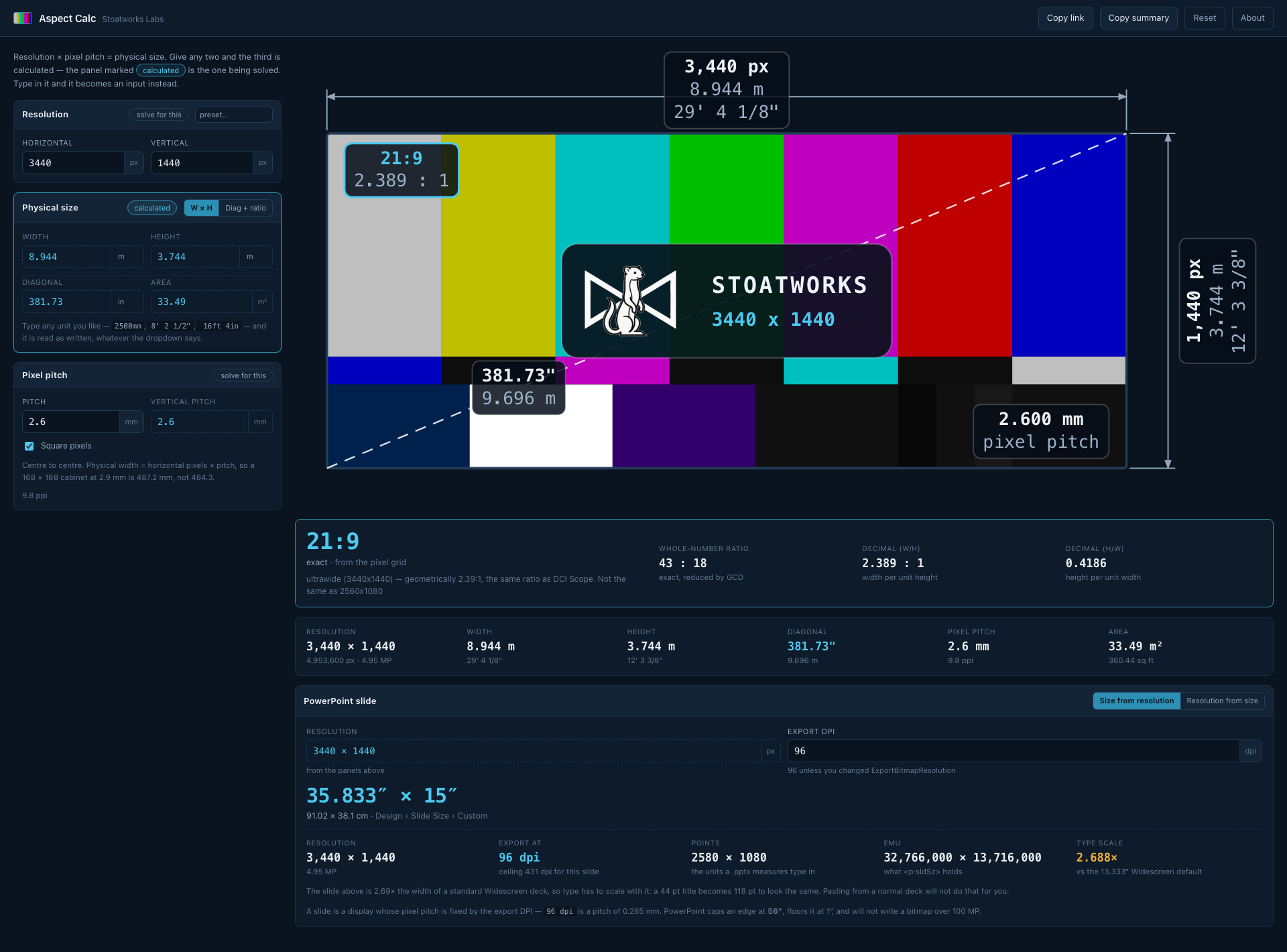
3440 × 1440 at a 2.6 mm pitch: an 8.944 m wall, the ratio named 21:9 with its exact 43:18 beside it, the display drawn to scale with every dimension on it, and the PowerPoint slide size (35.833″ × 15″) that exports to that resolution.
What it does
- Aspect ratio from anything — a resolution in pixels, a physical size in mm/cm/m, inches or feet-and-inches, or a diagonal and a ratio.
- Names the ratio properly. 3440×1440 reduces exactly to 43:18, and nobody has ever ordered a 43:18 monitor — it is called 21:9. 1366×768 reduces to 683:384, which is not a ratio so much as an accusation; the useful answer is 16:9, 0.05% off. Both the trade name and the arithmetic are always shown, and a match that isn't exact says so and says by how much.
- Both decimal forms —
1.778 : 1and0.5625. - Pixel pitch in any direction: pitch from resolution and size, size from resolution and pitch, or resolution from size and pitch. Non-square pixels are reported, not averaged away.
- Diagonal and area, always, in both measuring systems at once.
- PowerPoint slide sizes, both directions — the slide size for a target resolution, or the resolution a given slide size exports to. Handles the 56-inch cap, the 1-inch floor and the 100 MP export ceiling, and gives you points and EMU alongside inches and cm.
- The display drawn to scale with SMPTE-style colour bars and every dimension on it.
Running it
npm install
npm run dev
npm test          # 100 tests
npm run build     # tsc -b && vite build -> dist/
Notes from the trade
Pitch is centre-to-centre and every pixel owns a full cell, so physical width is
horizontal pixels × pitch, not (pixels − 1) × pitch. A 168 × 168 px cabinet at 2.9 mm is
487.2 mm square, not 484.3. Getting this wrong loses one pitch across the whole wall, which
is invisible in a spreadsheet and very visible when the last cabinet does not fit the frame.
The two 21:9s are not the same ratio. 2560×1080 is 64:27 (2.370:1) and 3440×1440 is 43:18 (2.389:1). They are 0.8% apart and both are sold as "21:9". The calculator names them both 21:9 and then tells you which one you have.
The colour bars are a picture, not a signal. The pattern is stretched to whatever aspect you are looking at — which is what a real generator does — and the RGB values are the standard 75% bar values but are not colour-managed. Do not grade against it.
Notes on PowerPoint
A slide is a display whose pixel pitch is fixed by the export DPI: slide size × DPI = pixels, and 96 dpi is a pitch of 0.265 mm. What makes it worth calculating is that
PowerPoint adds three limits an LED wall does not have.
56 inches is a hard stop on either edge, and 1 inch is a hard floor. A 7680-wide wall at 96 dpi wants an 80-inch slide, which PowerPoint refuses. The answer is to build at half size and export at 200%, and the tool works out the divisor and the resulting export DPI for you. A shape steeper than 56:1 cannot be a PowerPoint slide at any scale, and it says so.
PowerPoint will not write a bitmap over 100 megapixels, so the export DPI has its own
ceiling of sqrt(100,000,000 / (w × h)) with the slide in inches. On a 40 × 22.5 inch slide
that is 333 dpi, whatever you put in ExportBitmapResolution.
PowerPoint's two 16:9 slide sizes are not the same size. "Widescreen" is 13.333 × 7.5 in; "On-screen Show (16:9)" is 10 × 5.625 in, which is also what Google Slides defaults to. Both are exactly 16:9, and a deck moved between them has every point size on every slide wrong by a third. This is why the tool always reports a size and never just a ratio.
Usually you should not resize the deck at all. For a 16:9 target the better answer is to
leave the deck on Widescreen and raise the export DPI — 3840 px wide is just 288 dpi — which
keeps every template, master and font size where it is. The tool offers that route whenever
the ratio matches and the required DPI is a whole number, and withholds it when it is not,
because ExportBitmapResolution is a DWORD and a rounded 102 dpi quietly delivers the wrong
pixel count.
The dialog rounds, the file does not. Widescreen is 40/3 inches — 12,192,000 EMU — and the "13.333" the dialog shows is a genuinely different slide at 12,191,695 EMU. The presets here carry the exact values.
Run your own copy
Aspect Calc is a static page, so hosting it yourself is one container serving the built files — the same files the hosted copy serves, running somewhere that still works when the venue has no internet.
Docker. The image is built by this repo's docker.yml workflow on every
push and published as ghcr.io/stoatworks-labs/aspect-calc:
docker run -d --name aspect-calc --restart unless-stopped -p 8520:80 ghcr.io/stoatworks-labs/aspect-calc:latest
Or docker compose up -d with the docker-compose.yml
in this repo, which maps the same port. Either way it is then at
http://localhost:8520/.
Unraid. Search Community Applications for Aspect Calc — the template is
templates/aspect-calc.xml
in stoatworks-unraid, which is what the CA feed reads.
Stoatworks Burrow lists it under Self-hosted, with the compose file a click away.
The Dockerfile, docker-compose.yml, docker/ and the workflow are
generated from fleet.json in stoatworks-unraid. Change them there and
regenerate rather than editing them here.
This project is built on other people's work — see ATTRIBUTIONS.md.
Licence
MIT. Part of Stoatworks Labs.
Install aspect-calc on Unraid in a few clicks.
Find aspect-calc in Community Apps on your Unraid server, review the template, and click Install. Unraid handles the Docker app or plugin setup from the published template.
Categories
Related apps
Explore more like this
Explore allDetails
ghcr.io/stoatworks-labs/aspect-calc:latestRuntime arguments
- Web UI
http://[IP]:[PORT:80]/- Network
bridge- Shell
sh- Privileged
- false
Template configuration
Host port for the web interface.
- Target
- 80
- Default
- 8520
- Value
- 8520