
All apps · 0 apps

Array Rebalance
Plugin from FugginOld
Overview
Readme
View on GitHubUnraid-Rebalance
Rebalance your array after large data moves.
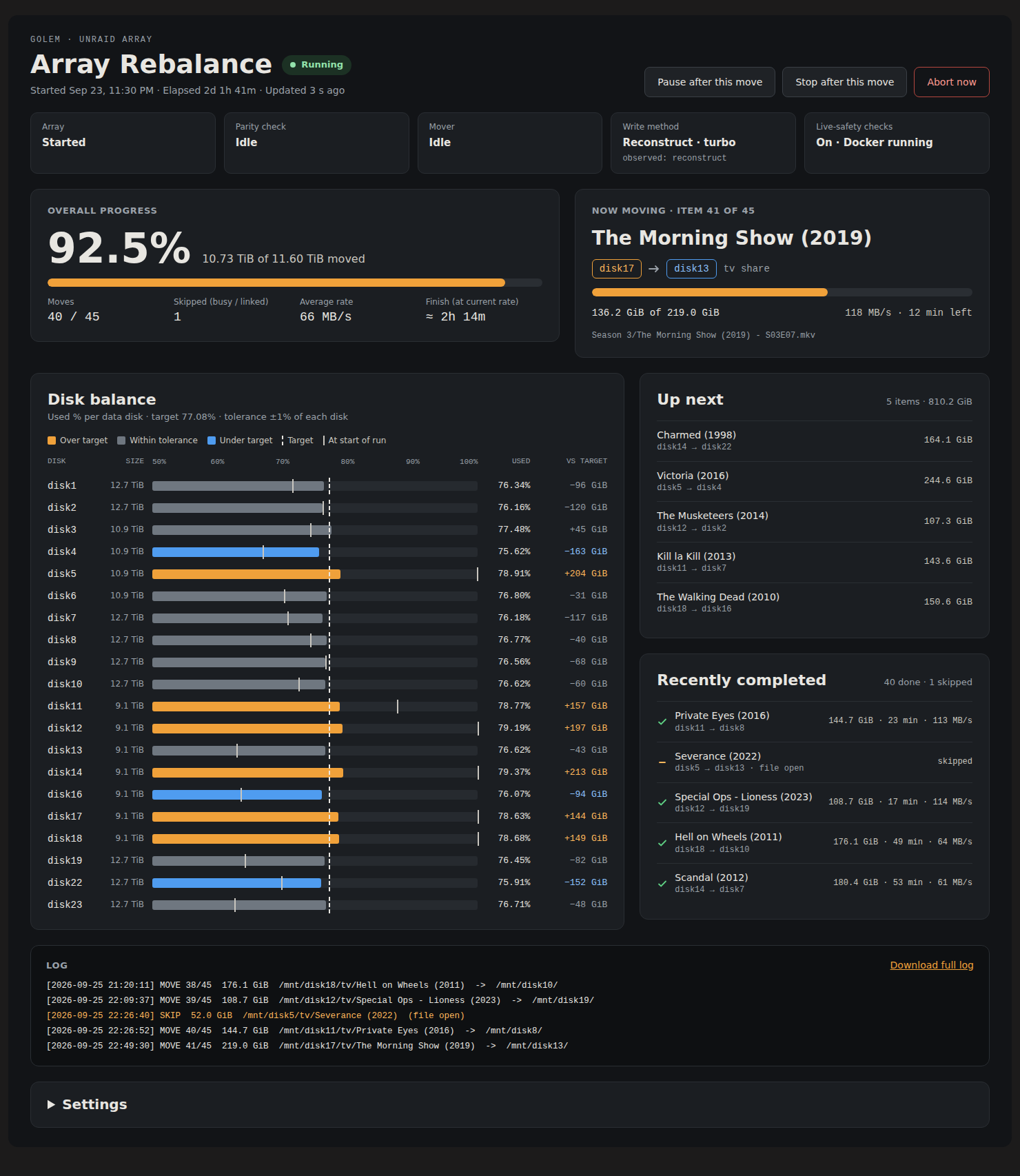
An Unraid plugin that rebalances array data so every data disk is filled to the same percentage of its capacity — a 14 TB disk ends up holding proportionally more than a 10 TB disk — with a live dashboard in the webGui.
Install
Community Applications: search Apps for Array Rebalance.
Manually: Plugins → Install Plugin, paste:
https://raw.githubusercontent.com/FugginOld/Unraid-Rebalance/main/rebalance.plg
Then open Settings → User Utilities → Array Rebalance. Start with Dry run.
How it works
- Target. Target fill % = total used ÷ total capacity of the included data disks. Each disk's target is its size × that %. A disk is balanced within ±
TOLERANCE_PCTof its own size. - Plan. Folders at
ITEM_DEPTHinside each share (depth 1 = a movie folder or a whole TV series) are chosen largest-first from over-target disks and assigned to the most under-target disk that can take them without overshooting either side. Share included/excluded disks are honored, and nothing is planned onto a disk where the same path already exists. - Execute. Each item moves disk-to-disk with
rsync -aHAX --remove-source-files, keeping its path, so user shares look identical. Every check is repeated right before each move.
Dry run only builds the plan. Start rebalance rebuilds the plan from current usage, then executes it.
Safety
- Only
/mnt/diskN→/mnt/diskN. Never/mnt/user, cache or pools. - Source files are deleted only after they've been copied. The run stops on the first failed move.
- Parity is maintained on every write. Moves pause while a parity check/rebuild or the mover runs.
- Skips items that have open files, were written in the last
SKIP_RECENT_MINminutes, contain in-progress download patterns, or have hardlinks pointing outside the item (e.g. torrent ↔ media links). Skipped items are retried on the next run. - Reconstruct write ("turbo") is pushed to the md driver for the run and the original setting restored afterwards. It is always applied, because
var.inican report1while the driver still does read/modify/write.
Controls: Pause and Stop take effect after the current move finishes. Abort stops immediately — the item in flight is left split across two disks (still readable through the user share).
Shell
/usr/local/emhttp/plugins/rebalance/scripts/rebalance-ctl plan|run|pause|resume|stop|abort|status
tail -f /var/log/rebalance.log
Layout
rebalance.plg                         plugin manifest (version + md5 patched by CI on release)
icon.png                              icon used by the Community Applications listing
build.sh                              builds releases/rebalance-<ver>-x86_64-1.txz (local test builds)
tests/engine_test.sh                  integration tests against a fake array (run by CI)
.github/workflows/test.yml            syntax checks + integration tests on push / PR
.github/workflows/release.yml         tag -> test -> build -> patch plg -> GitHub release
source/usr/local/emhttp/plugins/rebalance/
  Rebalance.page                      dashboard + settings (Settings -> User Utilities)
  default.cfg                         defaults; user settings in /boot/config/plugins/rebalance/rebalance.cfg
  scripts/rebalance.sh                engine: plan / run
  scripts/rebalance-ctl               start / pause / resume / stop / abort
  include/status.php                  JSON for the dashboard (GET)
  include/action.php                  controls + settings save (POST, CSRF-checked by the webGui)
  include/log.php                     log download
Runtime state: /var/local/rebalance/ (status, plan.tsv, history.tsv, progress). Log: /var/log/rebalance.log (previous run in .log.1).
Release
Packages are published as GitHub release assets by CI; nothing binary is committed.
- Add a
###YYYY.MM.DD###block to<CHANGES>inrebalance.plg, commit and push tomain. - Tag main's tip with the same version and push the tag:
git tag 2026.09.25 && git push --tags
release.yml then runs the tests, builds the .txz, patches version and md5 into rebalance.plg (the download URL is derived from the version), commits that to main, and publishes the release with the package attached and your changelog block as the notes. It refuses a tag that isn't main's tip or has no matching changelog block. Same-day re-release: use a suffix such as 2026.09.25a for both the block and the tag.
To test locally: bash tests/engine_test.sh and bash build.sh.
The Community Applications listing lives in FugginOld/unraid-templates (plugins/unraid-balance.xml) and only points at rebalance.plg here. Version and changelog are read from the .plg, so releases don't touch the template repo.
Install Array Rebalance on Unraid in a few clicks.
Find Array Rebalance in Community Apps on your Unraid server, review the template, and click Install. Unraid handles the Docker app or plugin setup from the published template.
Categories
Download Statistics
Downloads by Month
Related apps
Explore more like this
Explore allDetails
https://raw.githubusercontent.com/FugginOld/Unraid-Rebalance/main/rebalance.plg