
Arkive
Docker app from arkive's Repository
Overview
Readme
View on GitHubArkive
Open-source backup and disaster recovery for Unraid servers.
Discovers your Docker apps and their databases, takes consistent database dumps,
encrypts every snapshot with restic, and proves the backups restore.
 Latest release
Docker pulls
License
Python
Platform
Why Arkive
Copying appdata while databases are running produces backups that may not restore. Arkive finds the databases behind your containers, dumps each one with its native tool, and snapshots the dumps together with your files. Then it keeps checking that backups are still happening and that they actually restore. It doesn't assume a scheduled job worked.
Arkive is under active development. Backup, snapshot, restore, cloud targets and verification are implemented and covered by unit, integration and end-to-end tests.
Documentation
The user guide covers installing on Unraid, the setup wizard and the checklist that follows it, every storage provider, notifications, the recovery kit, restoring (including disaster recovery on a fresh server), restore drills, overdue-backup alerts and the heartbeat, troubleshooting, upgrading, and the security model. Start with the quick start.
To explore the interface with sample data before you configure anything, open any Arkive page with ?demo=true, for example http://your-server:8200/?demo=true.
Features
Backup
- Automatic discovery. Finds database containers by image, scans app bind mounts for SQLite files, and ships profiles for common apps (Immich, Paperless-ngx, Vaultwarden, Plex, Authelia, Sonarr/Radarr, …).
- Application-consistent dumps. PostgreSQL (every database in the cluster, plus roles), MariaDB/MySQL, MongoDB, SQLite and Redis. Truncated or corrupt dumps are detected and never replace the last good one.
- Encrypted, deduplicated snapshots. Powered by restic. Each snapshot holds the database dumps, the Unraid flash config and your watched directories, so any one snapshot is a complete restore point.
- Storage targets. Local disk, Backblaze B2, S3-compatible storage (AWS, MinIO, …), Wasabi, SFTP, Google Drive and Dropbox, via rclone. Use several at once.
- Schedules and retention. Cron schedules (no system cron needed), keep-daily/weekly/monthly retention, and weekly pruning. A job that fires while another backup runs waits for it.
Knowing it works
- No silent successes. A run that misses anything (a database, a path, a target, unreadable files) is reported as
partial, with the reason. - Overdue-backup watchdog. If a job hasn't produced a good backup within its schedule window, the dashboard turns red and you get an alert.
- Heartbeat. Point Arkive at an Uptime Kuma push monitor or a healthchecks.io check. Arkive pings it only while every job is healthy, so you're also alerted when Arkive itself is down.
- Restore drills. Every week, Arkive restores recent database dumps from the latest snapshot and loads each into a temporary, network-isolated copy of its own database image.
- Per-database health. The Databases page shows, for every database, its last good dump, dump size and trend, last restore drill and the point in time it can be restored to. A dump that suddenly shrinks to half its usual size or less (configurable) makes runs
partialuntil the size comes back or you accept it, since that usually means lost data. Redis dumps, which are cache and queue snapshots, are not checked. - No offsite copy warning. The dashboard warns, and a notification goes out, when every target your jobs upload to is on the server itself.
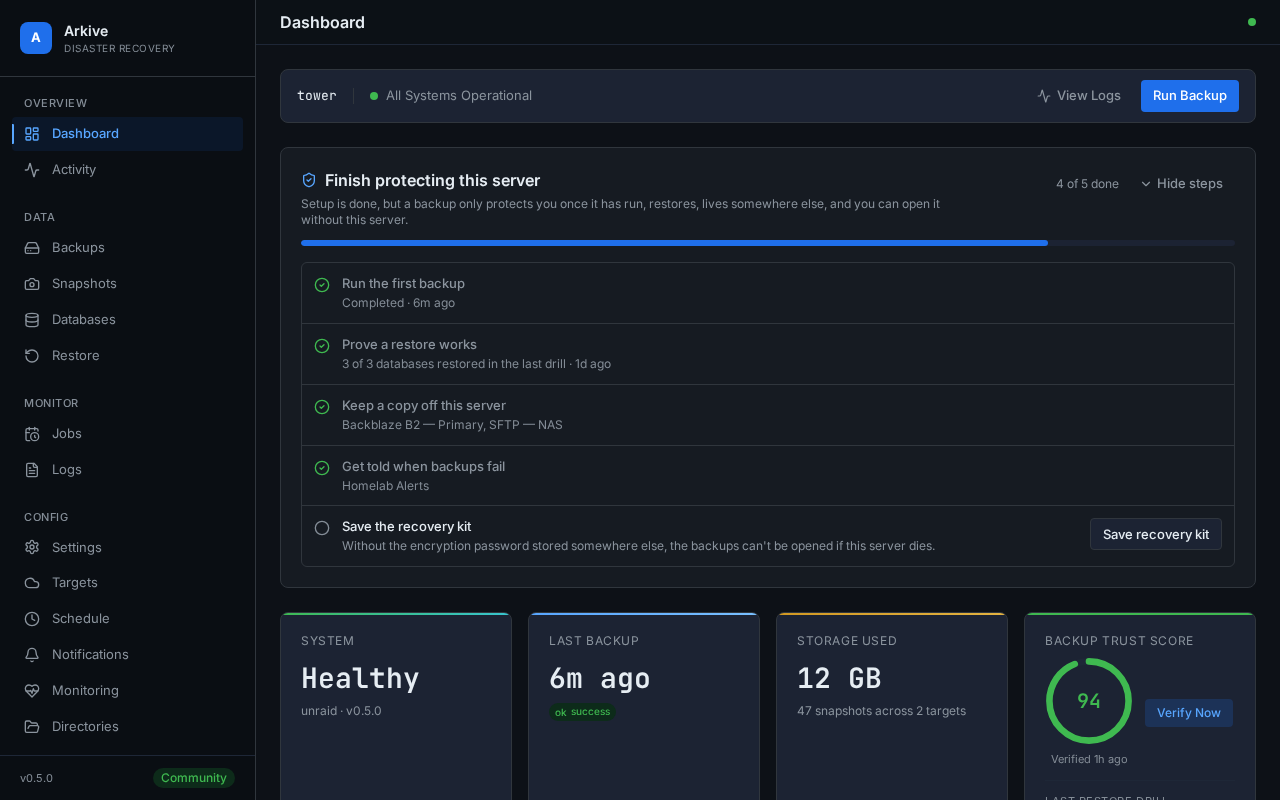
- Setup checklist. After setup, the dashboard lists what is left before the server counts as protected (a clean first backup, a proven restore, an offsite target, a notification channel, a saved recovery kit) and ticks each step off from what Arkive has actually recorded.
- Repository checks. A weekly
restic check, a test restore of a random file, and a trust score on the dashboard. - Notifications through Apprise: Discord, Slack, ntfy, Telegram, email, Gotify, Pushover, Uptime Kuma and webhooks.
Restore
- Recovery kit. A one-time export of the encryption password, every repository location and step-by-step restore instructions, so your backups stay usable if the server is lost.
- Snapshot browser and granular restore of individual files and dumps.
- Guided database restore. Pick a database and a snapshot; Arkive takes a safety dump of the current database, loads the snapshot's dump into the running Postgres or MariaDB/MySQL container (optionally stopping the apps that use it) and lets you undo. SQLite files are restored and checked, with exact commands to swap them in.
- Restore plan. A downloadable PDF tailored to your setup.
Interface
- A dashboard with live backup progress, health and storage use, in light and dark themes.
- A six-step setup wizard: encryption password, container discovery, storage, schedules, directories, done.
- A REST API with OpenAPI docs at
/docs, and a CLI.
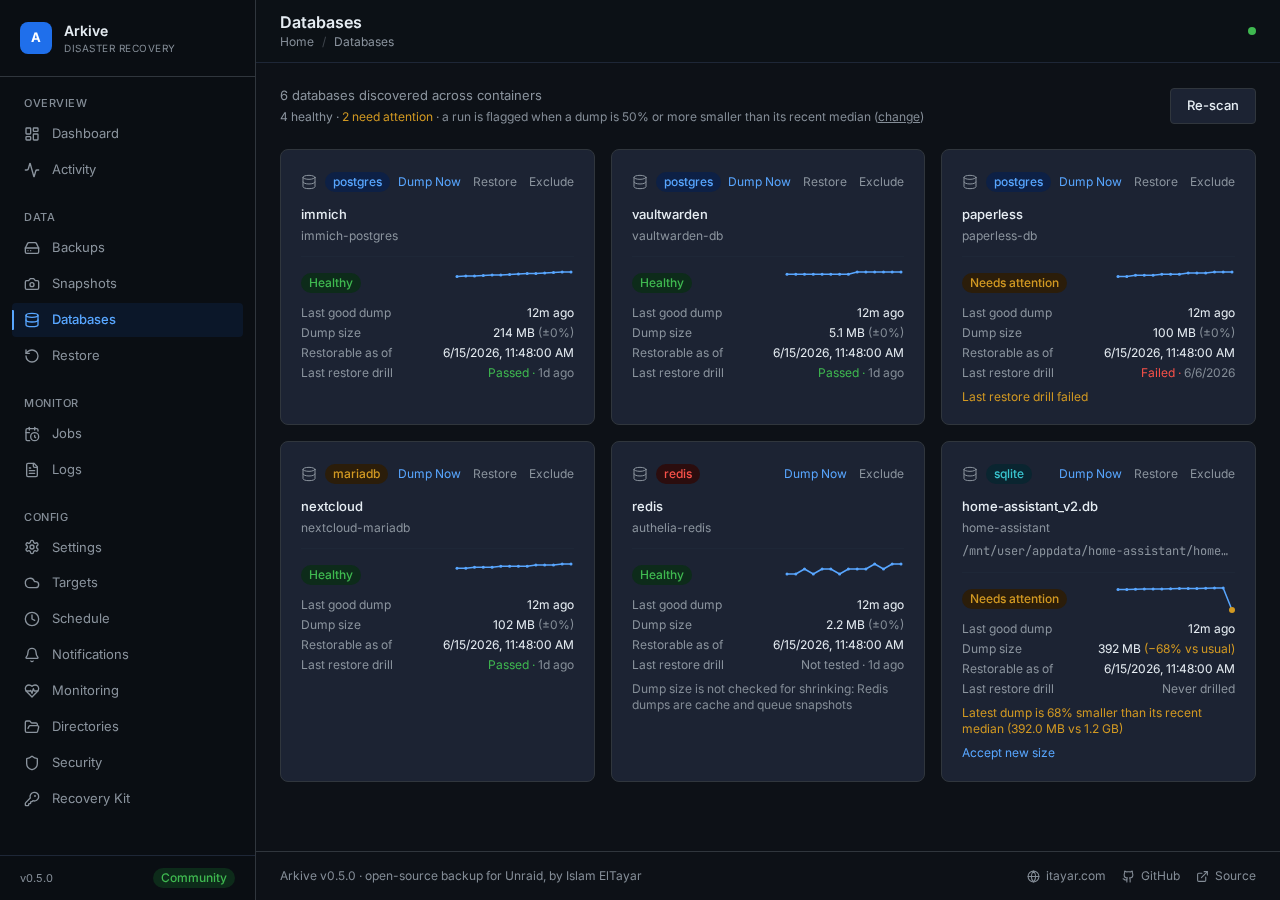
Every database with its own health: last dump, size trend, last drill |
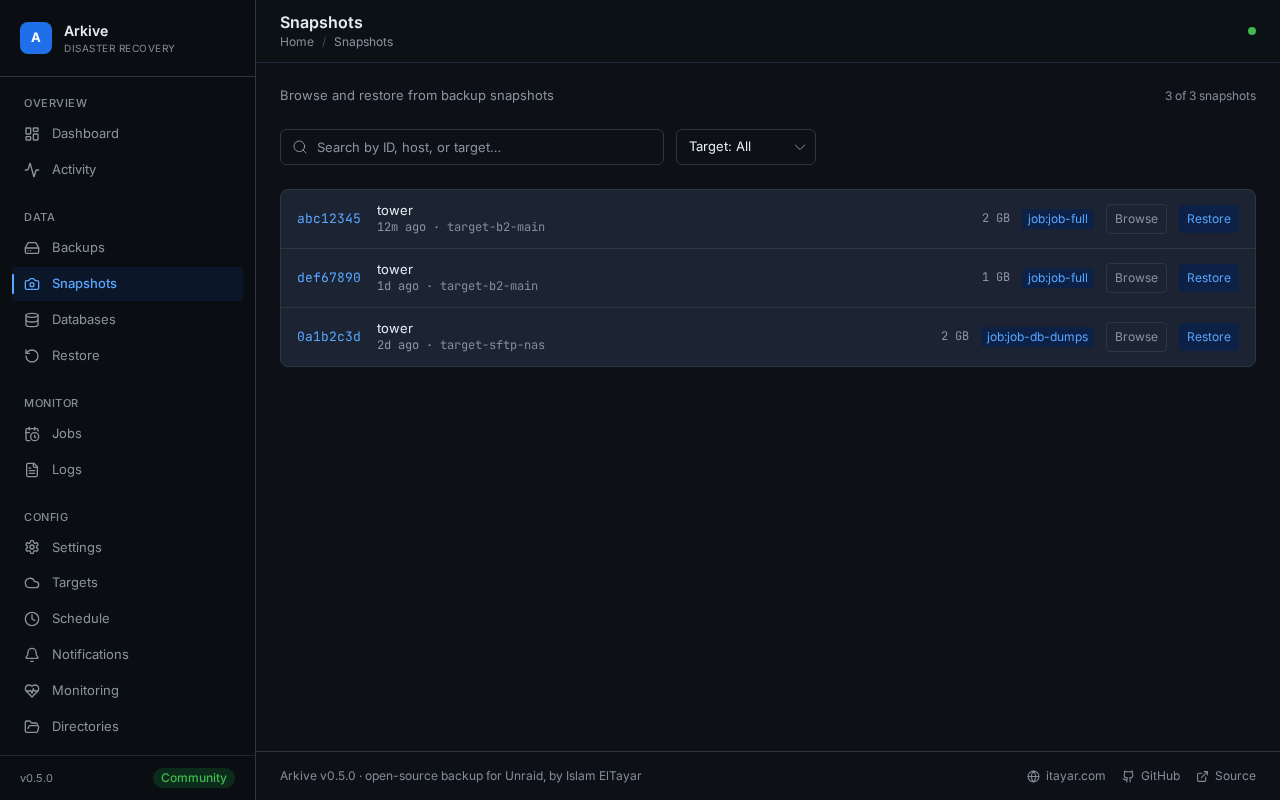
Snapshots across targets, browsable and restorable |
Screenshots use the built-in demo data: open any page with ?demo=true. frontend/scripts/docs-screenshots.sh regenerates them.
Quick start
Unraid
Add the template from https://raw.githubusercontent.com/islamdiaa/Arkive/main/unraid-template.xml (or install from Community Applications if it's listed there). The template mounts /mnt/user/appdata, the flash config and the Docker socket read-only, keeps Arkive's own state in /mnt/user/appdata/arkive, and maps /mnt/user/backups read-write for a local target. To back up another share, add a path that maps it to the same path in the container, read-only (for example /mnt/user/photos to /mnt/user/photos). Map shares one at a time rather than all of /mnt/user: an exclusive share is a symlink in /mnt/user and can't be read through it. Its image tag, islamdiaa/arkive:0, follows releases; the main tag is rebuilt from every commit to main and is not a release.
Docker Compose
services:
  arkive:
    image: islamdiaa/arkive:latest
    container_name: arkive
    # On Unraid, run as root so flash backup and app-owned SQLite files are readable.
    user: "0:0"
    ports:
      - "8200:8200"
    volumes:
      - /var/run/docker.sock:/var/run/docker.sock:ro
      - /mnt/user/appdata/arkive:/config
      - /mnt/user/appdata/arkive/cache:/cache
      - /mnt/user/appdata:/mnt/user/appdata:ro
      - /boot/config:/boot-config:ro
      # Destination for a local storage target (must be a host path)
      - /mnt/user/backups:/mnt/user/backups
    environment:
      - TZ=America/New_York
    restart: unless-stopped
Docker run
docker run -d --name arkive --restart unless-stopped --user 0:0 \
  -p 8200:8200 -e TZ=America/New_York \
  -v /var/run/docker.sock:/var/run/docker.sock:ro \
  -v /mnt/user/appdata/arkive:/config \
  -v /mnt/user/appdata/arkive/cache:/cache \
  -v /mnt/user/appdata:/mnt/user/appdata:ro \
  -v /boot/config:/boot-config:ro \
  -v /mnt/user/backups:/mnt/user/backups \
  islamdiaa/arkive:latest
First boot
Open http://your-server:8200 and follow the setup wizard. It asks for an encryption password, discovers your containers, sets up a storage target and schedules, and lets you add extra directories.
Afterwards:
- Save the recovery kit (Settings → Recovery kit) somewhere other than the server. Without the encryption password, no snapshot can be opened.
- Add a notification channel (Settings → Notifications) so failures reach you.
- Add an off-site target. A local target on the same array doesn't protect against losing the server.
The browser may then ask for the admin API key once, to create a session.
Upgrading
Pull the new image and recreate the container with the same /config volume (docker compose pull && docker compose up -d). Database migrations run automatically on start.
latest is the newest release; pin a version tag (islamdiaa/arkive:0.6.0) to upgrade on your own schedule. The main tag is built from every commit to main and is not a release. What changed in each release is in CHANGELOG.md.
How it works
 DISCOVER   Docker socket -> containers, their databases, app profiles
 DUMP       pg_dump / mysqldump / mongodump / SQLite .backup / redis BGSAVE
 SNAPSHOT   restic: encrypted, deduplicated (dumps + flash + watched dirs)
 UPLOAD     each storage target in turn (local, or rclone for cloud/SFTP)
 RETAIN     keep-daily / weekly / monthly, weekly prune
 VERIFY     overdue watchdog, weekly restic check, restore drills
 NOTIFY     Apprise channels, plus an optional heartbeat URL
Supported databases
| Engine | How it is dumped | Example apps |
|---|---|---|
| PostgreSQL | pg_dump for every database in the cluster, plus pg_dumpall --globals-only (roles) |
Immich, Nextcloud, Gitea, Authentik |
| MariaDB / MySQL | mysqldump --single-transaction |
WordPress, BookStack, Firefly III |
| MongoDB | mongodump |
UniFi Controller, Rocket.Chat |
| SQLite | online .backup, then PRAGMA integrity_check |
Vaultwarden, Home Assistant, Plex |
| Redis | BGSAVE + dump.rdb |
Authelia, Outline |
SQL dumps must end with the tool's completion trailer, or they count as failed. They are stored uncompressed by default (Settings → Dump compression). restic compresses the repository, and an uncompressed dump deduplicates against the previous one, so a large database adds only its changes to each snapshot. Choose gzip if the local dump folder's size matters more. arkive-dumps-manifest.json, included in every snapshot, records which dump file belongs to which container and database.
Configuration
Environment variables
| Variable | Default | Purpose |
|---|---|---|
TZ |
UTC |
Time zone for schedules and logs |
ARKIVE_CONFIG_DIR |
/config |
Database, logs, dumps and restores |
ARKIVE_LOG_LEVEL |
INFO |
Log level (logs are JSON) |
ARKIVE_TRUSTED_PROXIES |
(none) | Comma-separated IPs/CIDRs of reverse proxies whose X-Forwarded-For is trusted |
ARKIVE_CORS_ORIGINS |
localhost dev origins | Comma-separated extra origins allowed to call the API |
ARKIVE_ALLOW_NEW_KEYFILE |
0 |
Start even if /config/.keyfile is missing or doesn't match the database (see below) |
ARKIVE_DEV_MODE |
0 |
Development only: skip the Docker socket and binary checks |
Volumes
| Mount | Purpose | Mode |
|---|---|---|
/var/run/docker.sock |
Container discovery and dumps | read-only |
/config |
Arkive's database, logs, dumps, restores | read-write, required |
/cache |
restic metadata cache | read-write, recommended |
A local target path, e.g. /mnt/user/backups |
Destination of a local storage target | read-write |
/mnt/user/appdata (and anything else to protect) |
Data to back up | read-only |
/boot/config → /boot-config |
Unraid flash config backup | read-only |
Arkive only writes to /config, /cache and local target paths. Restores always land in /config/restores, and you copy the files into place from there, so the data you protect can stay mounted read-only. The one exception is a guided database restore you confirm: it loads the dump through the database container's own client (psql, mariadb/mysql), never by writing files under /mnt/user.
A local target must be a path mapped to the host. Arkive refuses targets inside the container's own filesystem or an anonymous volume, because those are deleted when the container is re-created.
On Unraid, run as root. The flash config and some app-owned SQLite files aren't readable by other users, and backups will be partial without root.
Encryption key and recovery kit
Secrets in Arkive's database (the restic password, storage credentials) are encrypted with /config/.keyfile. If that file is missing or doesn't match the database, Arkive refuses to start rather than silently creating a new key that would strand every stored secret. Restore the original keyfile, or set ARKIVE_ALLOW_NEW_KEYFILE=1 to start fresh and re-enter your secrets.
The keyfile lives on the same disk as everything else, so save the recovery kit (Settings → Recovery kit) somewhere other than the server. The dashboard reminds you until you confirm you have.
Monitoring
A job is overdue when its last good backup is older than the longest gap in its schedule plus 25% (at least 2 hours). For a daily job, that's about 30 hours. Override this with Settings → Monitoring → Stale backup hours.
For a heartbeat:
- Create an Uptime Kuma Push monitor (heartbeat interval 30–60 minutes) or a healthchecks.io check.
- Paste its URL into Settings → Monitoring and send a test ping.
Arkive pings it every 15 minutes while all jobs are healthy. If Arkive stops, or backups fail or go overdue, the pings stop and your monitor alerts.
API
The browser UI uses an HttpOnly session cookie. Scripts and the CLI use the X-API-Key header:
curl -H "X-API-Key: ark_your_key_here" http://localhost:8200/api/jobs
GET /api/status answers without authentication, but only with a minimal health payload (for Docker health checks); the full status requires a key or session.
Development
Requires Python 3.12, Node.js 22 and Docker.
git clone https://github.com/islamdiaa/Arkive.git && cd Arkive

# Backend
cd backend
python -m venv .venv && . .venv/bin/activate
pip install -r requirements.txt -r requirements-dev.txt -e ".[dev]"
ARKIVE_DEV_MODE=1 ARKIVE_CONFIG_DIR=/tmp/arkive-dev \
  python -m uvicorn app.main:app --host 127.0.0.1 --port 8200 --reload

# Frontend (second terminal): http://localhost:5173, proxies /api to :8200
cd frontend && npm ci && npm run dev
Tests:
cd backend
python -m pytest -m "not slow and not live" -n auto   # core lane
python -m pytest -m "slow and not live" -n auto       # Docker/provider integration
ruff check --select F,E9 app && bandit -r app -ll

cd ../frontend
npm run check && npx vitest run && npm run build
scripts/e2e.sh --docker                               # Playwright suite in Docker
backend/      FastAPI app (api/, core/, models/, services/) and pytest suites
frontend/     SvelteKit 2 + Svelte 5 + Tailwind CSS 4; Vitest and Playwright tests
profiles/     YAML app profiles used by discovery
docs/         User guide (MkDocs site: mkdocs.yml) and deployment notes
CLAUDE.md     Architecture notes and invariants for contributors and coding agents
CHANGELOG.md  Release notes; RELEASING.md has the release checklist
Contributing
Contributions are welcome. See CONTRIBUTING.md. Run the backend and frontend checks above before opening a pull request.
Roadmap
- Automated restore verification (restore drills)
- Tailwind CSS 4 (#53)
- Prometheus metrics endpoint (
/api/metrics) - Multi-user access with roles
- Scheduled email digest
Security
Please report vulnerabilities privately through GitHub Security Advisories, not public issues. SECURITY.md covers the deployment model (Arkive holds the Docker socket, so treat its port like an admin console) and what is in place.
License
Built for the Unraid community. Backups should be automatic, encrypted, and boring.
Media gallery
1 / 3Requirements
After setup, save the recovery kit (Settings, Recovery kit) somewhere other than this server: without the encryption password no snapshot can be restored.
Categories
Download Statistics
Related apps
Explore more like this
Explore allDetails
islamdiaa/arkive:0Runtime arguments
- Web UI
http://[IP]:[PORT:8200]- Network
bridge- Shell
bash- Privileged
- false
- Extra Params
--restart unless-stopped --user 0:0
Template configuration
Port for the Arkive web interface and API. Don't expose it to the internet.
- Target
- 8200
- Default
- 8200
Arkive's database, encryption keyfile, logs, database dumps and restores.
- Target
- /config
- Default
- /mnt/user/appdata/arkive
Your appdata share, read-only. Arkive backs it up and finds app SQLite databases in it, so keep the container path /mnt/user/appdata. To back up another share, add a path with the same host and container path (for example /mnt/user/photos), read-only. Don't map all of /mnt/user: exclusive shares can't be read through it.
- Target
- /mnt/user/appdata
- Default
- /mnt/user/appdata
Unraid flash drive config, read-only, for flash backups.
- Target
- /boot-config
- Default
- /boot/config
Used to discover containers and run database dump tools inside them. Read-only doesn't limit Docker API calls: whoever controls Arkive controls Docker.
- Target
- /var/run/docker.sock
- Default
- /var/run/docker.sock
Read-write folder for a local storage target (the setup wizard suggests /mnt/user/backups). The host folder can be anywhere, such as an Unassigned Devices disk; keep the container path. Remove this path if you only use remote targets. A local target doesn't protect against losing the server, so add an off-site target too.
- Target
- /mnt/user/backups
- Default
- /mnt/user/backups
restic metadata cache. Speeds up backups to remote targets; safe to delete.
- Target
- /cache
- Default
- /mnt/user/appdata/arkive/cache