

aquilon-vpu-map
Docker app from Stoatworks Labs' Repository
Overview
Readme
View on GitHubAquilon VPU Map
AI-assisted project. Status: field testing. This codebase was created with Claude (Anthropic), directed and reviewed by a human author. It's read a real Aquilon C end to end, in three different configurations. Three of the four captures and the screenshots come from that box, and the second configuration corrected two things the first had made look settled. The fourth capture comes from a second chassis, which agreed with the model on 2026-09-09 (the details are under The recorded captures, below). Link setups, combined VPUs and a few other configurations are still untested, and the list is under Working without a device.
A map of how an Analog Way LivePremier has handed out its VPU mixers across screens, layers and slices.
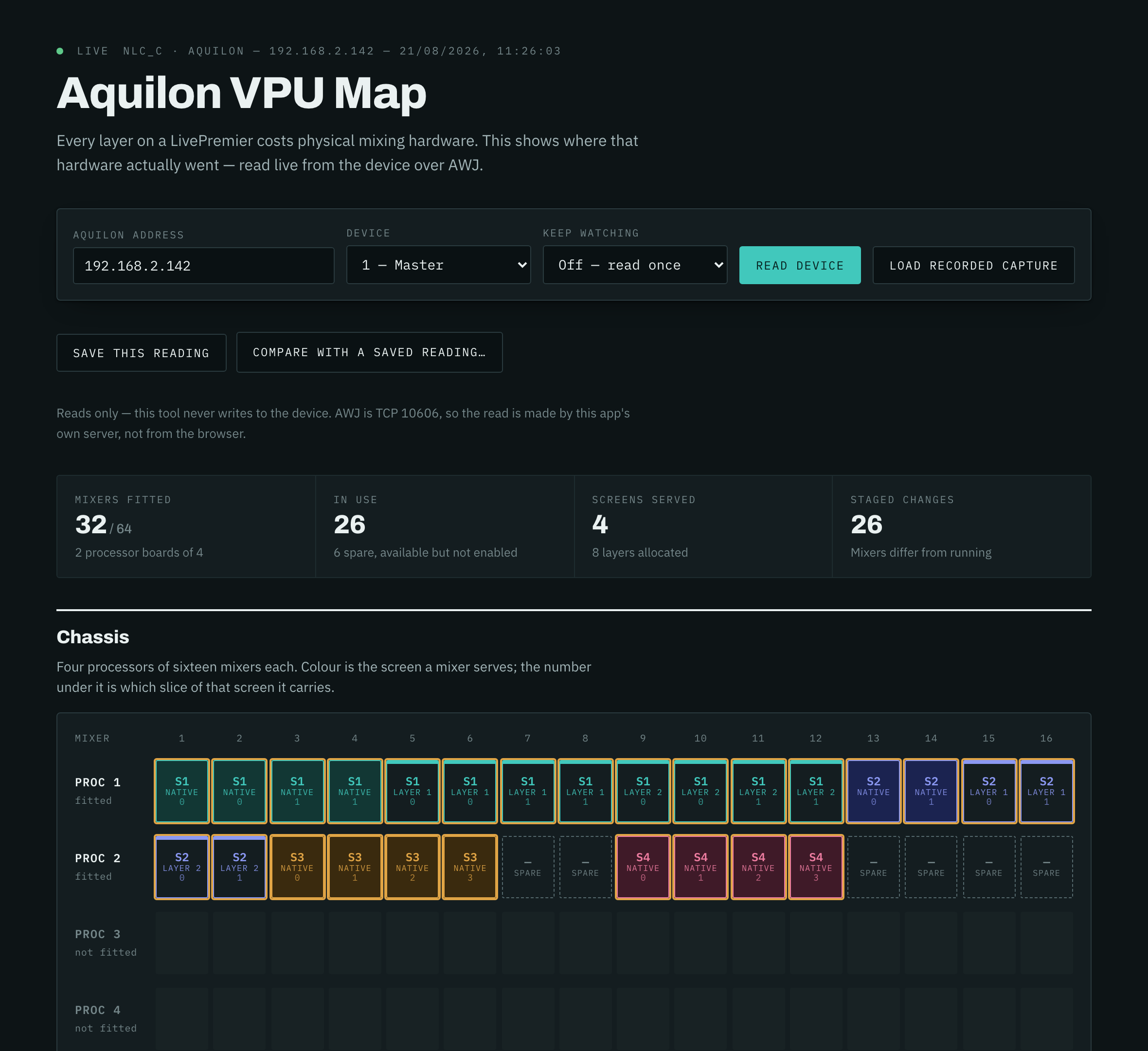
Every layer on a LivePremier costs physical mixing hardware. The device knows where every bit of it went and will happily tell you, but the stock Web RCS only shows it a panel at a time. This puts the whole chassis on one screen.
Download
v1.4.0 — prebuilt for macOS, Windows and Linux. Pick your platform:
macOS — Universal (Apple Silicon + Intel)
| Build | Download | Size |
|---|---|---|
| Universal (Apple Silicon + Intel) · .dmg disk image | Aquilon.VPU.Map_1.4.0_universal.dmg |
3.9 MB |
Windows — x64
| Build | Download | Size |
|---|---|---|
| x64 · .exe installer | Aquilon.VPU.Map_1.4.0_x64-setup.exe |
1.6 MB |
Linux — x64
| Build | Download | Size |
|---|---|---|
| x64 · .deb package (Debian/Ubuntu) | Aquilon.VPU.Map_1.4.0_amd64.deb |
2.5 MB |
| x64 · .rpm package (Fedora/RHEL) | Aquilon.VPU.Map-1.4.0-1.x86_64.rpm |
2.5 MB |
Also in this release:
Aquilon.VPU.Map_1.4.0_universal.app.tar.gz— macOS app bundle (updater archive; the .dmg is the install), 3.8 MB
All builds, checksums and release notes: github.com/stoatworks-labs/aquilon-vpu-map/releases.
macOS builds are signed and notarised and open normally. The Windows builds are unsigned, so SmartScreen warns once.
The link grid
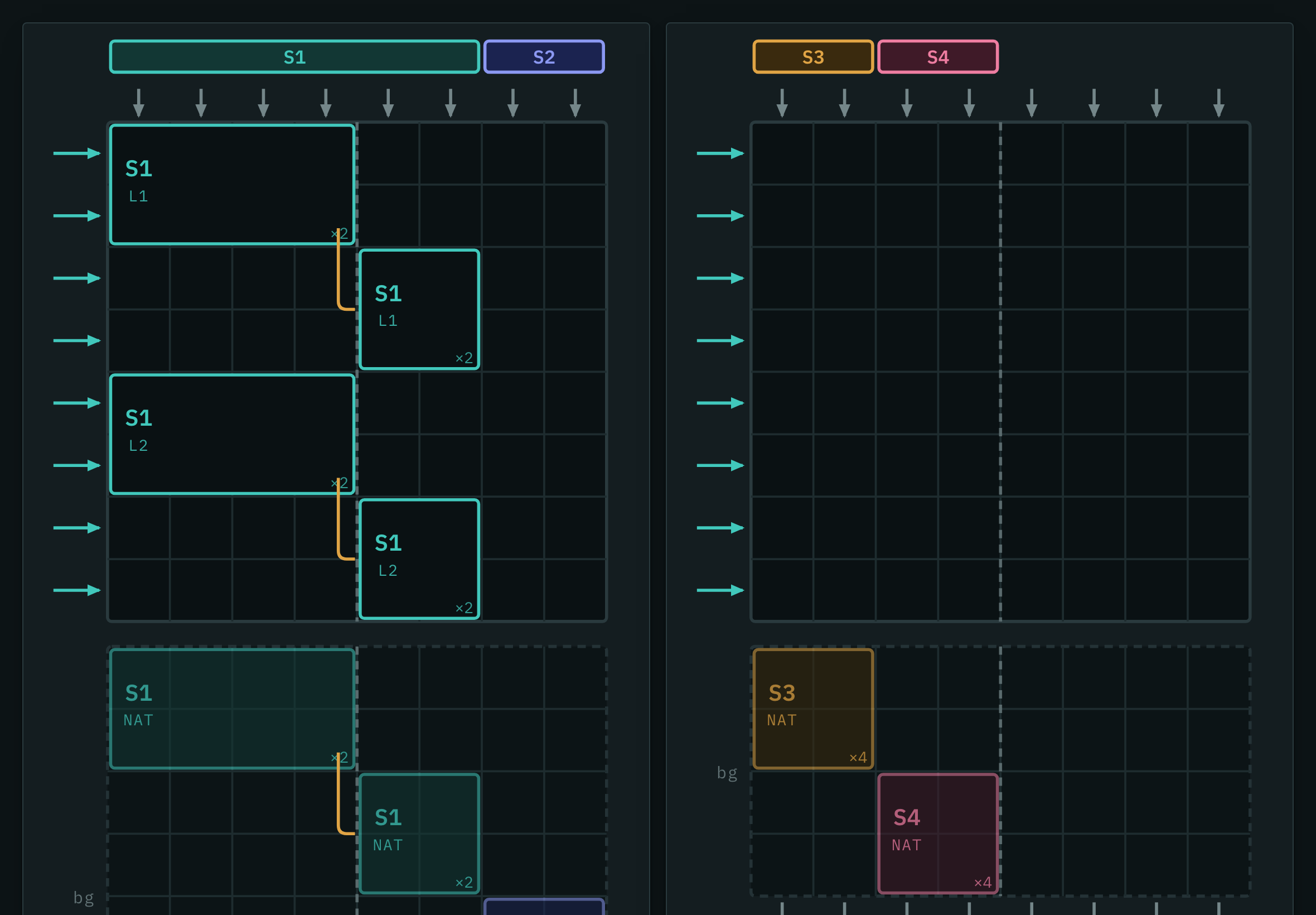
The manual draws a VPU as an 8×8 field of links: eight layer links in from the left, eight output links in through the top and out through the bottom (User Manual v6.2 §5.5). It's a crosspoint field, and the view follows the manual's own figures, read top to bottom the way an output link runs through it:
- A row is one layer-capacity link, and it carries one layer. Two layers never share a row. A layer is as tall as its capacity: dual link (up to 4K30) is 1, 4K60 is 2, 5K60 is 4.
- Columns belong to screens. Each screen owns a contiguous run of output links, as wide as the number of outputs it uses, and screens sit side by side, so two four-output screens fill a VPU as links 1–4 and 5–8 (§5.5.4). That means all of a screen's layers start at the same link.
- A layer's bar is continuous, and breaks at the centre line. A layer spread over more than four output links takes another layer link and wraps onto it (§5.5.4), drawn with the manual's hook. A twelve-output screen's layer costs three links, over two VPUs (§5.5.5).
- Optimized mode lifts that boundary for capacity-2 layers, and only those (§5.5.6), so on an optimized VPU their bars run unbroken across the centre line.
- A screen's native background isn't layer capacity. It's reported like a layer and holds mixers, but it's drawn dimmed in a band of its own, above the field, and left out of the layer-link count. The native is the bottom of the stack, so it's the first thing on the output link, with layer 1 composited over it and the rest down the field.
- A screen that runs out of mixers carries on in the next VPU. Its next layer is
allocated there on the same output links (the base capture has S3's native on
VPU 1 and its layer 1 on VPU 2), so the link runs out of the bottom of one VPU and
into the top of the next. Those two cards are stacked, the screen keeps the same
columns on both, and the leaving and arriving arrows take the screen's colour, with
↓ VPU 2under the leaving ones. (This isn't §5.5.5's combined VPU, which is a screen too wide for one; that's never been captured.) - The header names each link. The screen bar over the columns is always there. On
a live read, or a capture that carries the outputs (the fourth one does), two rows
under it say which region and which output plug each link is (
R1,Out 5), with the label, connector type and card in the tooltip. A 4K output is two links wide.
The columns come from the values, not the keys.
usedOnOutPipe<k>: '<n>'is a pair, and the two halves disagree. The key is the VPU pipe the mixer is wired to, and those are interleaved: a six-output screen's first mixer sits on pipes 1, 3, 5 and 7. The value is which of the screen's output links that pipe carries, and those are 1, 2, 3, 4: in order, contiguous, and what the manual draws. Read the keys as columns and you get a screen's layers on scattered links and a bar reaching across the centre line, which the hardware can't do.Nothing names the layer link (the row) at all. It doesn't need to: the rules above fix how many links each layer spends and forbid sharing, so the only thing left to choose is the order down the field, and that follows the device's own mixer allocation order.
Nothing names the output behind a link either. The header gets that from the outputs themselves (each one says which screen and region it's in, and its capacity), dealt out over the screen's links in output-number order, two per 4K output. The paths and the sums hold on a real box (the fourth capture is lifted from a whole-store pull of 2026-09-09). The order is the only one the object model offers, and no box has confirmed it yet, because every screen read so far had one output. So it's checked against the screen's own
outputCountandusedOutputCapabilities, and a screen whose outputs don't add up gets no header rather than a wrong one. docs/CAPTURE-GUIDE.md says what to do the next time a box is reachable.
$vpuLayer, which looked like the reported grid, has never reported anything. On 6.2 hardware it answersE12, and so does$pipe; on a 6.1.60 Aquilon RS4 both are there with every scaler at its defaults. See docs/HARDWARE-PROBE.md.
Working without a device
There's no Aquilon to read here any more, so the four recorded configurations in
data/ are the whole ground truth. Every one is offered in the app's
Recorded capture picker, and the tests run off them.
node scripts/capture-config.mjs --report
audits them with no device needed: what each capture proves, and which questions none of them can answer (a capacity-1 layer, an over-budget configuration, Cut & Fill actually enabled, a screen too wide for one VPU). Each of those is a configuration somebody with hardware has to build.
Still untested, then: Link setups (devices 2–4), capacities other than 4K and
5K, combined VPUs and Cut & Fill. Optimized mode has been read once, in
data/aquilon-c-optimized.json, and the tests run off it. capture-config.mjs --report
lists what each open question needs and why it matters. If device time is short, do
capacity-1, over-budget and Cut & Fill first.
If you're that somebody, docs/CAPTURE-GUIDE.md is written for you and assumes nothing: what to set up, what to run, and what it settles. Recording one is
node scripts/capture-config.mjs <ip> --name capacity-1 --label "Dual-link layer"
which writes a redacted capture into data/ and lists it in the picker. Like
everything else here, it only reads.
What a VPU mixer is
A VPU mixer is the physical mixing and scaling resource the device allocates to a (screen, layer) pair. An Aquilon has up to four processors of sixteen mixers, 64 in total, though most chassis are part-populated.
A layer too wide for a single mixer is split across several, each carrying one slice. That's why an eight-slice native layer can eat a whole processor board on its own, and why counting layers never tells you whether a configuration will fit.
The device reports the map read-only, and keeps two copies of it: current (running)
and new (staged). This tool shows the running map and highlights anything the staged
one would change.
Using it
The desktop app is the easiest way in: double-click it, nothing to install. Grab it from Releases: macOS, Windows or Linux, about 2 MB (nearer 4 MB for the universal macOS one) because it uses the system WebView rather than bundling a browser.
The macOS builds are signed and notarised and open normally. The Windows builds are unsigned, so SmartScreen warns once.
It's the same UI as the server build; the only difference is how it reaches the switcher. On the desktop, Rust makes the AWJ connection directly.
Or run the server
npm start
Then open http://localhost:8531 and enter your Aquilon's address.
- Screens are named the way you named them, "S1 · Main LED", read from the device. Those names stay in the live view; they're not in the recorded captures or the profiler, which are both public.
- Keep watching re-reads on an interval. It stops itself if a read fails, and leaves the last good reading on screen rather than blanking on a network blip.
- Save this reading writes the whole thing to a file. Compare with a saved reading then diffs the live device against it and lists what moved. Take one before the show, compare during it.
- Staged changes shows what applying the device's own pending configuration would do, including link re-allocations that change no property at all.
- Will it fit? is answered from the device's own figures rather than guessed: output links spent, layers over outputs, links spare, and a warning if a screen is over budget. Screens in Optimized mode are marked, and the grid stops drawing the scaling-engine boundary on their VPU, because it doesn't apply there (§5.5.6).
docs/ROADMAP.md is what it can't do yet, and which capture would unblock each one.
PORT=9000 AQUILON_IP=192.168.1.50 npm start
AQUILON_IP only sets the address the form starts on; the field is editable and the
browser remembers the last address you used.
Docker
docker compose up -d
Or straight from the registry, which is what the Unraid Community Applications template uses:
docker run -d --name aquilon-vpu-map -p 8531:8531 ghcr.io/stoatworks-labs/aquilon-vpu-map:latest
Bridge networking is enough: the app discovers nothing and only makes an outbound connection to the address you type.
Why it needs a server
AWJ is a raw TCP protocol on port 10606. A browser tab can't open a TCP socket, so the page can't talk to the device directly, however it's hosted. The app's own server does the read and hands back JSON.
That's also why there's no useful "just open the HTML file" mode: without the server you get the recorded capture and nothing else.
Reads only
This tool never writes to the device. It sends AWJ get and nothing else, not
even the Subscriptions write that a push-based client would need. Every property it
reads is declared readOnly in the device's own model, so there's nothing here it
could change by accident.
If you want to be sure, lib/awj.js has no code path that emits replace.
The recorded captures
Four real reads, picked to be different from each other: the first three from one Aquilon C on 2026-08-21, the fourth from a second chassis on 2026-09-09.
data/aquilon-c-snapshot.json: four screens, one layer each, every mixer4K, with one eight-slice native layer. Load recorded capture shows this one.data/aquilon-c-6output-5k.json: the same chassis reconfigured, with S1 a six-output screen with native plus two layers, and S2 a 5K layer.data/aquilon-c-optimized.json: S1 with three layers over three outputs, reportingisOptimized, plus the per-screen resource status.data/aquilon-c-dual-outputs.json: the second chassis, lifted from its whole-store pull. Three single-output screens on dual-link HDMI outputs, and the only capture that carries the outputs.
The tests run against all four, because the first on its own supports assumptions the
second disproves, the big one being that a slice identifies one mixer. It doesn't: a
layer spread over more than four output links is carried by a second mixer on
different links, so a six-output screen reads as slices [0,0,1,1].
Verified against a second chassis, 2026-09-09. scripts/probe-hardware.mjs,
scripts/profile-vpu.mjs and scripts/capture-config.mjs were all run against a
different Aquilon C (NLC_C, firmware 6.2.73) and agreed with the recorded model: 32
mixers fitted, 24 enabled, channel still [0] on every one, slices [0,1,2,3],
capability 4K. $vpuLayer is still missing on 6.2.73 (it answers E12 on
hardware and exists but is empty on the simulator), so the link grid still has to be
worked out from mixerAllocation.usedOnOutPipe1..8, which is what this repo does.
Re-run probe-hardware.mjs after any firmware update; that's what it's for.
The host each one came from is redacted, and screen names are stripped, because those are show data. A test fails if a capture ever grows them back. Nothing else is edited.
Supported devices
Built for LivePremier (Aquilon). Alta 4K and Midra 4K speak AWJ too, and the
client here will connect to them, but the VPU mixer map is a LivePremier structure
and other platforms answer E12 for it. The app tells you so rather than showing an
empty chassis.
Firmware 6.1.x has no VPU map. An Aquilon RS4 on 6.1.60, three screens on air,
answers E12 for $vpuMixer (2026-10-16): it simply doesn't say how its mixers are
allocated. What it does say is each screen's layers by size and, in the staged
configuration, how many more of each size the box has room for — so that's what the
app shows, under a banner that names the box and its firmware. The room is the box's
one pool seen from each screen, so every screen shows the same figure.
Some simulators have no VPU map either, and the same E12 looks identical on the
wire. So the app doesn't guess from the shape of the answer: it asks the device
whether it's a simulator (isSimulated) and which firmware it runs
(version/@props/updater), and words the banner from that. It used to call every
such box a simulator, which is the one wrong thing to tell someone standing in front
of a live switcher.
Which collections a box carries depends on its firmware, not on whether it's
hardware. A 6.2.73 Aquilon C has vpuMixerList and neither pipeList nor
vpuLayerList; a 6.1.60 RS4 and the 6.2.73 simulator of August had the opposite. Say
which firmware anything was checked on.
Paths
Firmware 6.2, verified on hardware. The collection segment is $vpuMixer, camelCase;
$vpu-mixer and $mixer both answer E12.
DeviceObject/preconfig/resources/{current|new}/status/mapping
  /$device/@items/<1-4>                       1 = master, 2-4 = Link followers
  /$vpuMixer/@items/PROC_<1-4>_MIXER_<1-16>
    /@props/isAvailable                       fitted?
    /@props/isEnabled                         in use?
    /@props/usedInScreen                      S1..S24
    /@props/usedInLayer                       NATIVE, then 1..256
    /@props/slice                             0..8
    /@props/capability                        OFF DUAL 4K 3 5K 5 6 7 8K
    /@props/channel                           0 on every mixer seen so far;
                                              assumed to index the Link device
    /@props/seamlessCapa
    /@props/cutnfillCapa                      OFF, or the capability it doubles
    /mixerAllocation/@props/usedOnOutPipe{1-8} which output link, NONE..64
    /$scaler/@items/{A,B}/@props/{memoryFill,memoryCut}  SM1..SM8
AWJ can't enumerate: every container read returns {}. See AGENTS.md for
where the model came from and how to recover the rest of it.
Profiling your own device
If you've got a LivePremier, a profile of how your box has allocated its VPU mixers is properly useful. The model here was built from one Aquilon C, and every configuration that differs from it teaches me something.
node scripts/profile-vpu.mjs 192.168.1.50 --note "Aquilon RS4, 3 screens"
One file, no dependencies, Node 18+. It only reads. There's a single line in it
that sends anything to the device, and it's hard-coded to AWJ's get verb; the script
says so at the top and invites you to check. It takes about five seconds and is safe on
a live system, though you may as well run it between shows.
It writes vpu-profile-<model>-<timestamp>.json and prints a summary. The file records
structure only: screens appear as S1..S24 and mixers as PROC_n_MIXER_n. No
addresses, serial numbers, device names, screen names or labels, so there's nothing
in it that identifies you, your client or your show. Read it, then attach it to an
issue if you're happy to share.
The most useful ones are configurations unlike the ones already recorded: mixed
capabilities (DUAL, 8K), Link setups with more than one device, Cut & Fill,
or a screen spread over more than 8 outputs. The script tells you which
of these your box has.
Probing hardware
node scripts/probe-hardware.mjs <ip> --out probe-out
Read-only. Captures the device's whole preconfig/resources subtree, sweeps for
paths this tool doesn't use yet, and reports whether the $vpuLayer link grid is
populated. See docs/HARDWARE-PROBE.md.
Tests
npm test
No dependencies, no build step. Node 18+.
This project is built on other people's work — see ATTRIBUTIONS.md.
Licence
MIT, see LICENSE.
Not affiliated with Analog Way. "LivePremier", "Aquilon" and "Alta" are their marks.
Categories
Related apps
Explore more like this
Explore allDetails
ghcr.io/stoatworks-labs/aquilon-vpu-map:latestRuntime arguments
- Web UI
http://[IP]:[PORT:8531]/- Network
bridge- Shell
sh- Privileged
- false
Template configuration
Host port for the web interface.
- Target
- 8531
- Default
- 8531
- Value
- 8531