

aquilon-pitch
Docker app from Stoatworks Labs' Repository
Overview
Readme
View on GitHubAquilon Pitch
AI-assisted project. This codebase was created with Claude Code (Anthropic), directed and reviewed by a human author. The arithmetic isn't taken from the user manual. It was driven into a running AW LivePremier Simulator 6.2.73 and read back off the wire: fourteen ratio/raster pairs were written to a real output's
pitchRatioH/Vand the resultingpitchedWidth/pitchedHeightrecorded. Those observations are pinned as tests, and they're what settled the direction of the ratio, the field's range, its precision, and the fact that the device floors the canvas footprint rather than rounding it. No pitch-compensated screen built from this has been driven onto real LED walls, and nothing here has touched physical Aquilon hardware. The simulator runs the samenlc-platformweb application and the same object model, but it isn't the switcher.
Work out the pitch compensation an Analog Way LivePremier needs when one screen spans LED walls of different pixel pitches.
Type each output group's raster and its pitch (or its measured size, and let the pitch fall out). You get the H Ratio and V Ratio to type into Web RCS, the canvas footprint each group will take, the screen canvas that results, and the millimetres the device's three-decimal field costs you at the far edge of each wall.
It runs entirely in the browser. There's no account and no backend, and nothing is uploaded, so a client's set design has nowhere to leak to.
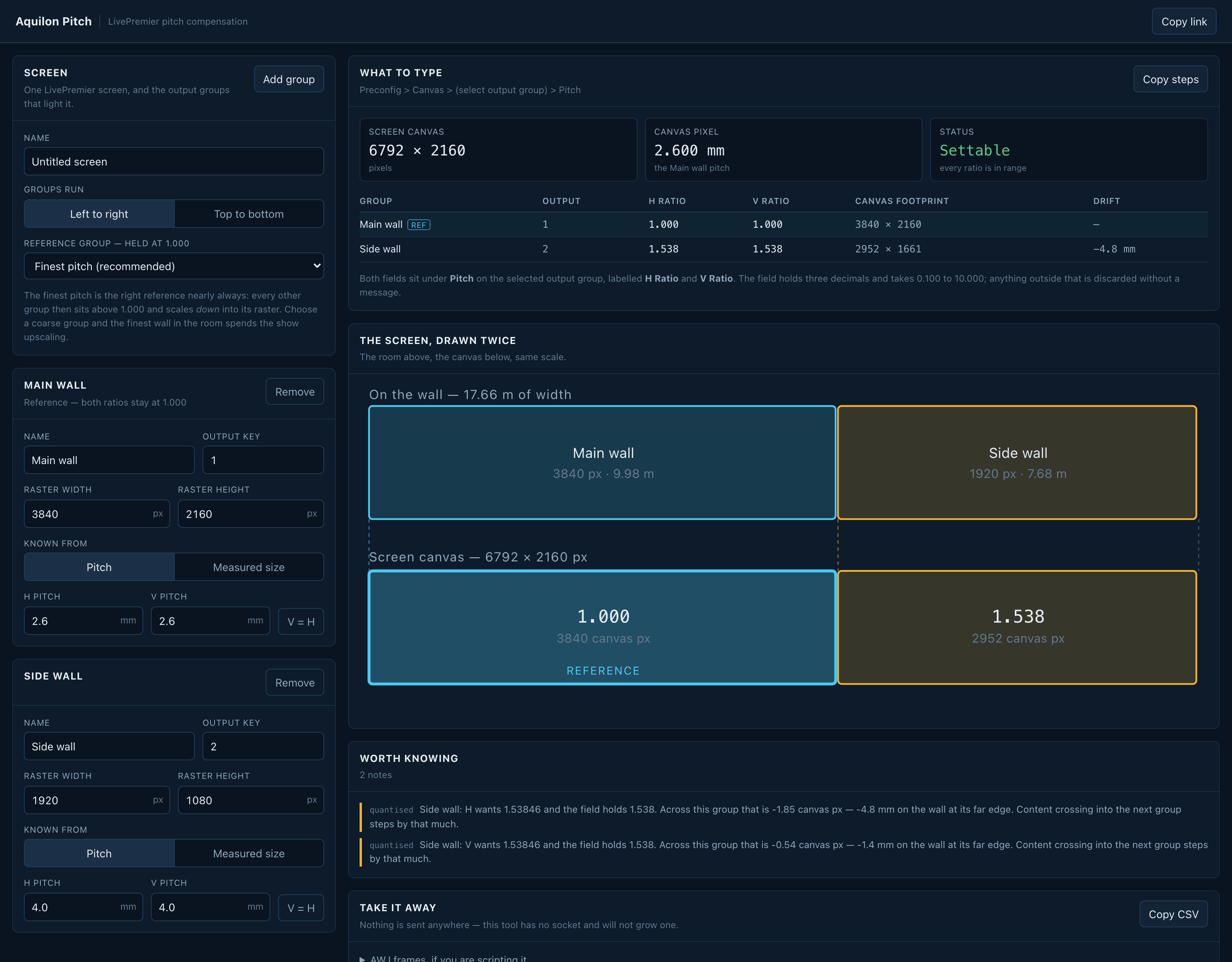
A 2.6 mm main wall and a 4.0 mm side wall on one screen: the side wall wants a ratio of 1.53846…, the field holds 1.538, and across its 1920-pixel raster that's 1.85 canvas pixels short, or 4.8 mm of real wall at the far edge, which the notes under the drawing say out loud. This is the hosted tool, with the side wall's pitch typed in over the example it opens with.
The problem it exists for
A screen spanning a 2.6 mm main wall and a 5.2 mm side wall has two output groups with half the pixel density of each other. Drive them from one canvas at 1:1 and a layer crossing the join changes physical size the instant it crosses: same pixels, twice the millimetres.
LivePremier's answer is pitch compensation: a per-output-group ratio that says how much canvas each group's raster is worth. The manual gives it four sentences:
Some Screens using multiple outputs can have outputs with different pitches, especially LED video walls. […] The reference output group should use a 1:1 pitch. In Pitch, set the H and V ratio of the output group compared to the reference output group.
What it doesn't say is which way round the ratio goes, what the field will hold, or what happens when the answer isn't a round number. All three matter, and all three are in here.
Which way the ratio goes
The ratio multiplies the group's raster to give its footprint on the canvas. A coarser wall gets a number above 1.000.
Verified: pitchRatioH = 2000 written to output 1 of a running simulator, followed by
xUpdate = true, turned that output's read-only pitchedWidth × pitchedHeight from
1920 × 1080 into 3840 × 2160. The 1920-pixel-wide output is handed 3840 canvas pixels and
resamples them down into its own raster, which is what you want for a wall whose pixels are twice
as far apart.
Make the finest wall the reference
The tool defaults to it and will argue if you override it.
The ratio scales a raster up into canvas pixels, so the reference should be the group with the most pixels per millimetre. Every other group then lands above 1.000, is given more canvas than it has real pixels, and scales down, which is a resize a video processor does well and nobody sees.
Pick a coarse group as the reference instead and the fine wall lands below 1.000. It's handed fewer canvas pixels than it has real ones and spends the whole show upscaling, visibly, on the best-pitch surface in the room. The tool tells you when you do it.
What the field will actually hold
| Stored as | integer thousandths — 1000 is 1.000 |
| Range | 0.100 to 10.000 |
| Precision | three decimals, and no more |
| Out of range | the write is discarded, not clamped |
| Where | Preconfig > Canvas > select output group > Pitch |
| Labels | H Ratio and V Ratio — two separate fields, one per axis |
That "discarded, not clamped" line is the one worth knowing. Writing 10001 to a field holding 1001 left it holding 1001, and so did writing 99. The device says nothing at all, and the operator is left looking at a field that still reads whatever was in it before. So this tool refuses an out-of-range ratio rather than silently clamping it to 10.000 and reporting a number the switcher will never take.
The device floors, and it costs you a pixel
pitchedWidth = floor(rasterWidth × pitchRatioH / 1000)
Floor, not round. That was measured four separate times:
| raster | ratio | exact | device gave | rounding would give |
|---|---|---|---|---|
| 1080 | 1.234 | 1332.72 | 1332 | 1333 |
| 1920 | 1.001 | 1921.92 | 1921 | 1922 |
| 1080 | 0.333 | 359.64 | 359 | 360 |
| 1920 | 1.234 | 2369.28 | 2369 | 2369 |
Combined with the three-decimal field, that's where the drift comes from. A 2.6 mm reference and a 4.0 mm wall want a ratio of 1.53846…, the field holds 1.538, and across a 1920-pixel raster that's 1.85 canvas pixels short, which is 4.8 mm of real wall at the far edge. The tool reports that number per group per axis, because it's the number that decides whether the rounding matters.
What you get
- The two ratios per output group, ready to type, at the precision the field holds.
- The canvas footprint each group takes, computed the device's way.
- The screen canvas the design needs, and a plain statement when a blocked group means it isn't achievable as specified.
- The drift, in canvas pixels and in millimetres on the wall.
- The screen drawn twice: the walls in the room above and the canvas below, at the same scale, so a mapping that isn't uniform is visible rather than inferred.
- A CSV for the show folder, and the AWJ frames a script would send.
What it will not do
It has no socket and won't grow one. A pitch change is a preconfig change on a live show
machine. The AWJ frames are printed for you to use as you see fit, and nothing here connects to a
switcher, which is what makes it always safe to open. If you do script it, xUpdate isn't
optional: writing a ratio on its own moves the command value and leaves the canvas exactly where
it was (verified).
Running it
npm install
npm run dev
npm test
Build with npm run build; dist/ is a static site, deployed as a Cloudflare Worker with
static assets (npm run deploy).
The engine is meant to be borrowed
src/lib/ has no React, no DOM, no dependencies and no imports outside itself. It's written to be
vendored into the other LivePremier tools in the fleet, the way awj-surface's core is vendored
into livepremier-plus.
npm run build:lib # -> dist-lib/aquilon-pitch-engine.js
It's one readable ESM file, unminified, with the comments intact. A minified blob in someone
else's src/vendor/ is a dead end, and the hash manifests in the consuming repos only mean
something if a reviewer can diff actual code. src/lib/index.ts is the barrel that defines the
public surface, so adding an export there widens the contract.
A TypeScript consumer copies src/lib/ itself instead and keeps the types, which works because
the directory is closed, domain types included. Nothing in it imports a path that leaves it.
dist-lib/ is generated but committed, so a fresh clone can hand a consumer the file without
building first. dist-lib.test.ts loads the built bundle beside the source and demands the same
answers, so a stale copy fails the suite rather than silently disagreeing with every tool that
borrowed it.
Status
Alpha. The device arithmetic is measured and pinned by 51 tests. The UI has been driven end to end in a browser. What hasn't happened yet: nothing has run against physical Aquilon hardware, and no screen configured from these numbers has been played out onto real LED walls and looked at. The simulator is the same web application and object model as the switcher, and it still isn't the switcher.
Run your own copy
Aquilon Pitch is a static page, so hosting it yourself is one container serving the built files — the same files the hosted copy serves, running somewhere that still works when the venue has no internet.
Docker. The image is built by this repo's docker.yml workflow on every
push and published as ghcr.io/stoatworks-labs/aquilon-pitch:
docker run -d --name aquilon-pitch --restart unless-stopped -p 8540:80 ghcr.io/stoatworks-labs/aquilon-pitch:latest
Or docker compose up -d with the docker-compose.yml
in this repo, which maps the same port. Either way it is then at
http://localhost:8540/.
Unraid. Search Community Applications for Aquilon Pitch — the template is
templates/aquilon-pitch.xml
in stoatworks-unraid, which is what the CA feed reads.
Stoatworks Burrow lists it under Self-hosted, with the compose file a click away.
The Dockerfile, docker-compose.yml, docker/ and the workflow are
generated from fleet.json in stoatworks-unraid. Change them there and
regenerate rather than editing them here.
This project is built on other people's work — see ATTRIBUTIONS.md.
Licence
MIT.
Categories
Related apps
Explore more like this
Explore allDetails
ghcr.io/stoatworks-labs/aquilon-pitch:latestRuntime arguments
- Web UI
http://[IP]:[PORT:80]/- Network
bridge- Shell
sh- Privileged
- false
Template configuration
Host port for the web interface.
- Target
- 80
- Default
- 8540
- Value
- 8540