
All apps · 0 apps
App-Store-Webhook-Proxy
Docker app from Docked by Yannis' Repository
Overview
App Store Webhook Proxy
Your webhook endpoint will be available at: /appstore-webhook
Get real-time notifications for your app’s App Store status changes — like Ready for Review, Rejected, or Approved — delivered directly to Slack and/or Microsoft Teams.
Apple introduced official App Store Connect Webhooks at WWDC 2025. This proxy makes it easy to forward those webhooks to your team’s tools of choice.
⚠️ Note: This container must be accessible from the internet to receive webhook events from Apple. You can expose it directly or use a reverse proxy (e.g., NGINX or Traefik).
Configuration:
SHARED_SECRET– Required. Used to verify incoming webhook requests.SLACK_WEBHOOK_URL– Optional. Webhook URL for Slack.TEAMS_WEBHOOK_URL– Optional. Webhook URL for Microsoft Teams.APP_STORE_URL– Optional. URL to your app on the App Store, shown in the notification.TIMEZONE– Optional. Used to localize timestamps in messages. Example:Europe/Athens
📄 Guides & Source:
Readme
View on GitHubApp Store Webhook Proxy for Microsoft Teams, Slack & Azure DevOps








This project provides a simple, secure Node.js proxy to forward webhook events from App Store Connect to Microsoft Teams and/or Slack, including signature verification and platform-specific formatting. It can also automatically create Pull Requests in Azure DevOps when your app goes live on the App Store.
🚀 Features
- ✅ Verifies App Store webhook signatures using HMAC SHA-256
- ✅ Forwards formatted messages to Microsoft Teams and Slack
- ✅ Custom message templates per platform
- ✅ Supports custom timezones for event timestamps
- ✅ Automatic Azure DevOps PR creation when app is published (
READY_FOR_SALE) - ✅ Auto-complete with squash merge on created PRs
- ✅ Configurable trigger state for testing (via
APPLE_EVENT_TRIGGER) - ✅ Error handling and logging
- ✅ Dockerized and ready for deployment (e.g. Render, Railway)
- ✅ One-click deployable to Render
📋 Prerequisites
- App Store Connect access with one of the following roles: Account Holder, Admin, or App Manager to create a webhook.
- A configured workspace in either: Microsoft Teams and/or Slack
- (Optional) An Azure DevOps Personal Access Token (PAT) with Code (Read & Write) scope, if you want automatic PR creation when the app goes live.
📦 Installation Guides
End-to-end simple installation guides, from installing the proxy to get the test message to MS Teams / Slack.
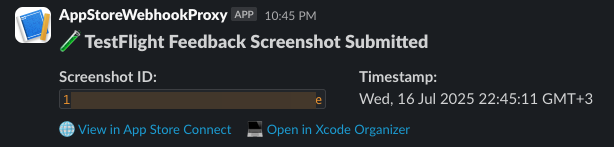
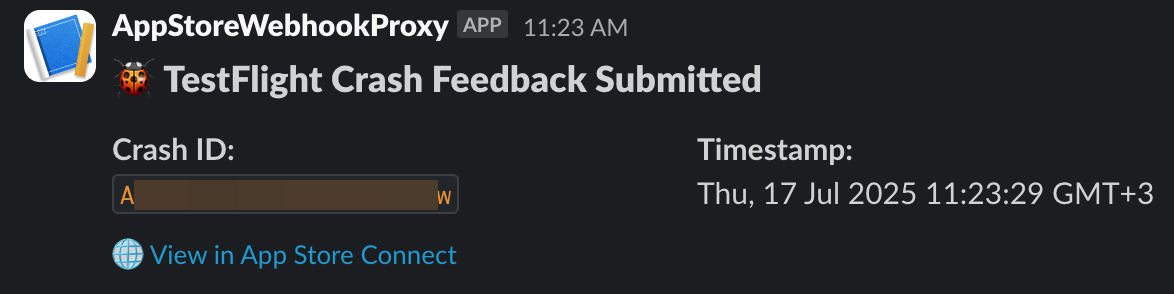
💡 To enable full support for TestFlight feedback (including deep links to App Store Connect and Xcode Organizer), make sure to set the following environment variables:
APP_ADAM_ID,APP_BUNDLE_ID, andAPP_PLATFORM_ID.
💬 Microsoft Teams
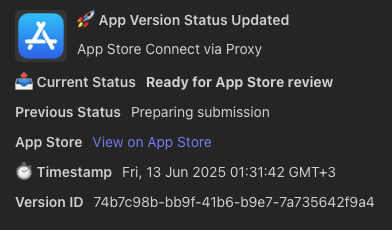
📘 Step-by-step setup guide: Integrate App Store Webhooks with Microsoft Teams (Medium)
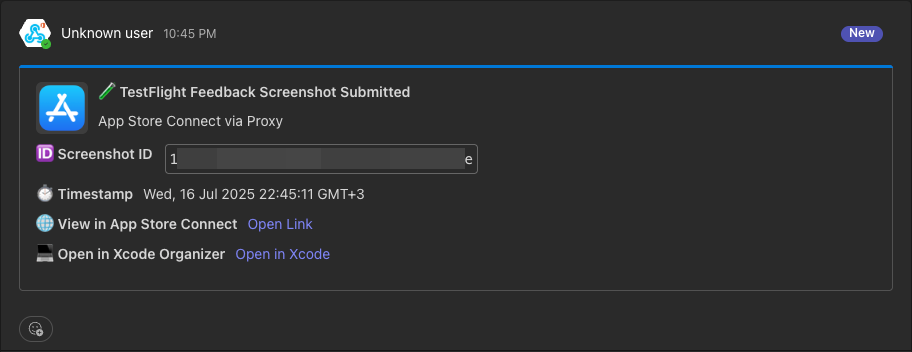
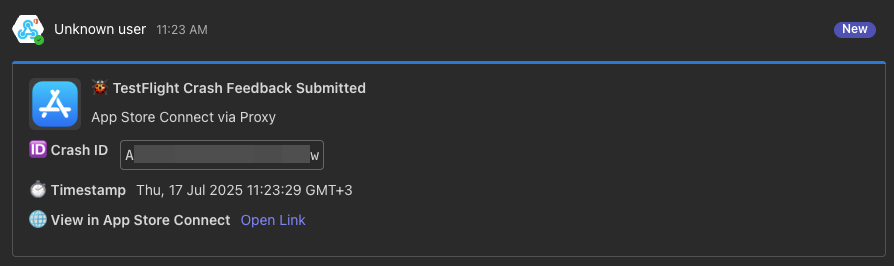
💬 Slack
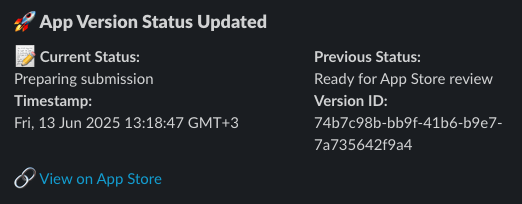
📘 Step-by-step setup guide: Integrate App Store Webhooks with Slack (Medium)
🔀 Azure DevOps — Automatic PR Creation
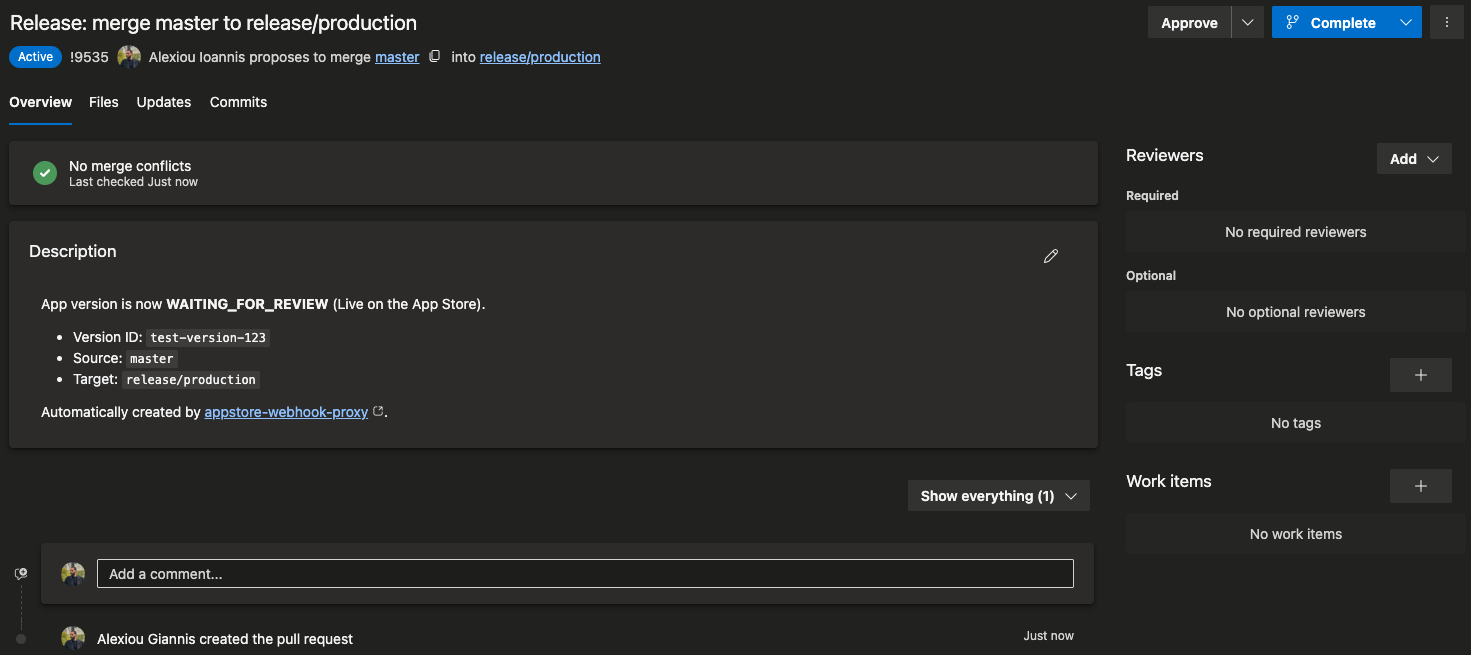
📘 Step-by-step setup guide: Automate Your App Store Release Pipeline — Create Azure DevOps PRs from Apple Webhooks (Medium)
When your app reaches READY_FOR_SALE (live on the App Store), the proxy can automatically create a Pull Request in Azure DevOps (squash merge). The source and target branches are configurable via AZURE_DEVOPS_SOURCE_BRANCH and AZURE_DEVOPS_TARGET_BRANCH (defaults: master → release/production).
How it works:
- Apple sends a webhook with
appStoreVersionAppVersionStateUpdatedandnewValue: "READY_FOR_SALE" - The proxy creates a PR in your Azure DevOps repository
- Auto-complete is disabled on the PR (squash merge, source branch preserved). You can configured via
ENABLE_AUTO_COMPLETE - If PR creation fails, a failure notification is sent to Teams/Slack
Setup:
- Create a PAT in Azure DevOps at
https://dev.azure.com/{YourOrg}/_usersSettings/tokenswith Code (Read & Write) scope - Set the required environment variables:
AZURE_DEVOPS_PAT,AZURE_DEVOPS_ORG_URL,AZURE_DEVOPS_PROJECT,AZURE_DEVOPS_REPO_ID - (Optional) Override source/target branches via
AZURE_DEVOPS_SOURCE_BRANCHandAZURE_DEVOPS_TARGET_BRANCH
This feature is entirely optional. If
AZURE_DEVOPS_PATis not set, the proxy works exactly as before (Teams/Slack only).
✅ Supported Webhook Events
appStoreVersionAppVersionStateUpdatedwebhookPingCreatedbetaFeedbackScreenshotSubmissionCreatedbetaFeedbackCrashSubmissionCreatedbuildUploadStateUpdatedbuildBetaDetailExternalBuildStateUpdated
Unknown events will still be delivered in raw JSON.
🔧 Proxy Setup Options
Here you can find all the available options to run the proxy.
⚠️ To make the proxy work, it must be accessible from the internet. In my Unraid setup, I use an NGINX reverse proxy. If you're not familiar with this, it's easier to use the 1. One-Click Render Deployment option, which provides a public domain automatically.
The incoming webhook should be sent to the path: /appstore-webhook.
1. One-Click Render Deployment
Click below to deploy instantly to Render:

Make sure to set the environment variables during setup (Read the Environment Variables table below).
Render automatically sets
NODE_ENV=production
2. Unraid Setup
To install via Unraid:
- Open the Apps tab in your Unraid dashboard.
- Search for:
AppStore-Webhook-Proxy - Click Install and configure the required environment variables.
💬 Need help or want to leave feedback?
Join the support thread in the Unraid Community Forum.
🎥 Watch the setup walkthrough:
3. Docker Setup
Build and run using Docker:
docker build -t appstore-webhook-proxy .
docker run -p 3000:3000 --env-file .env appstore-webhook-proxy
4. Manual Setup (Node.js)
If you'd like to run the app directly with Node.js:
git clone https://github.com/yourusername/appstore-webhook-proxy.git
cd appstore-webhook-proxy
npm install
⚙️ Environment Variables
Create a .env file (or set variables directly in your cloud environment):
| Variable | Explanation | Default Value |
|---|---|---|
SHARED_SECRET |
Required. Secret used to verify incoming App Store Webhook requests. You define it when creating the webhook in App Store Connect, then set the same value here. Set it here: App Store Webhooks Setup |
(empty) |
TEAMS_WEBHOOK_URL |
Required if integrating with Microsoft Teams. Webhook URL for sending notifications to Microsoft Teams. Leave empty if not used. Example: https://your-teams.webhook.urlCreate it here: Microsoft Teams Incoming Webhook Guide |
(empty) |
SLACK_WEBHOOK_URL |
Required if integrating with Slack. Webhook URL for sending notifications to Slack. Leave empty if not used. Example: https://hooks.slack.com/services/XXX/YYY/ZZZCreate it here: Slack Webhook Guide |
(empty) |
APP_STORE_URL |
(Optional) Public URL of your app on the App Store. Included in notifications to make it easier to access the app’s page. Example: https://apps.apple.com/app/id123456789 |
(empty) |
TIMEZONE |
(Optional) Timezone used to format timestamps in messages. Use a valid IANA timezone, e.g. Europe/Athens. |
UTC |
APP_ADAM_ID |
(Optional – Used for TestFlight feedback). The App Store Connect "adamId" of your app. Required to generate links to App Store Connect and Xcode Organizer in TestFlight screenshot feedback messages. | (empty) |
APP_BUNDLE_ID |
(Optional – Used for TestFlight feedback). The bundle identifier of your app (e.g. com.company.app). Required to generate Xcode Organizer links for TestFlight screenshot feedback. |
(empty) |
APP_PLATFORM_ID |
(Optional – Used for TestFlight feedback). The App Store Connect platform ID (e.g. iOS). Required to generate Xcode Organizer links for TestFlight screenshot feedback. |
(empty) |
AZURE_DEVOPS_PAT |
(Optional – Required for Azure DevOps PR creation). Personal Access Token with Code (Read & Write) scope. If not set, PR creation is skipped entirely. Create one at: https://dev.azure.com/{YourOrg}/_usersSettings/tokens |
(empty) |
AZURE_DEVOPS_ORG_URL |
(Optional – Required for Azure DevOps PR creation). Your Azure DevOps organization URL. Example: https://dev.azure.com/YourOrg |
(empty) |
AZURE_DEVOPS_PROJECT |
(Optional – Required for Azure DevOps PR creation). Azure DevOps project name. | (empty) |
AZURE_DEVOPS_REPO_ID |
(Optional – Required for Azure DevOps PR creation). Repository ID or name in Azure DevOps. | (empty) |
AZURE_DEVOPS_SOURCE_BRANCH |
(Optional) Source branch for the auto-created PR. | master |
AZURE_DEVOPS_TARGET_BRANCH |
(Optional) Target branch for the auto-created PR. | release/production |
ENABLE_AUTO_COMPLETE |
(Optional) Set to true to enable auto-complete (squash merge) on created PRs. |
false |
APPLE_EVENT_TRIGGER |
(Optional) The Apple version state that triggers PR creation. Override with e.g. WAITING_FOR_REVIEW for testing without a real App Store release. |
READY_FOR_SALE |
ENABLE_TEST_ENDPOINT |
(Optional – For local testing only). When set to true, enables the internal /test/webhook route that allows you to manually POST Apple-style webhook payloads to simulate real events. This endpoint is disabled by default and should never be enabled in production. |
false |
INTERNAL_TEST_TOKEN |
(Optional – Recommended when testing). Security token required via the x-internal-token HTTP header when calling /test/webhook. Helps prevent unauthorized access to the test endpoint. Ignored if ENABLE_TEST_ENDPOINT is false. |
(empty) |
You can also copy from the example:
cp .env.example .env
🧪 Running Locally
npm start
Then send a webhook POST to:
http://localhost:3000/appstore-webhook
🔐 Usefull App Store Connect info:
- When setting up the webhook in App Store Connect, Apple will ask for a secret. Use a string of your choice and set it in
SHARED_SECRET. - Official docs:
📂 Project Structure
.
├── app.js                 # Entry point
├── routes/
│   ├── webhook.js         # Webhook handler
│   └── testWebhook.js     # Test endpoint handler
├── utils/
│   ├── eventTemplates.js  # Teams formatter
│   ├── slackTemplates.js  # Slack formatter
│   └── stateDescriptions.js
├── services/
│   ├── signatureVerifier.js
│   ├── teamsNotifier.js
│   ├── slackNotifier.js
│   ├── azureDevOpsService.js  # Azure DevOps REST API client
│   └── releaseAutomation.js   # PR creation orchestration
├── middleware/
│   ├── errorHandler.js
│   └── logging.js
├── Dockerfile
├── render.yaml            # Render deploy spec
├── .env.example
├── .dockerignore
├── .gitignore
└── README.md
💡 Contributing
PRs and feedback welcome! You can help with:
- More supported event types
- Custom Slack/Teams formatting
- Delivery logs and retry support
🧪 Testing Locally
When developing or validating new webhook event types, you can simulate Apple webhook deliveries using the internal test endpoint.
1. Enable the test endpoint
In your local .env file, add:
ENABLE_TEST_ENDPOINT=true
INTERNAL_TEST_TOKEN=super_secret_token
⚠️ Important:
Never enable this in production environments.
The /test/webhook route is only intended for local or QA testing.
2. Send a test payload
curl -X POST http://localhost:3000/test/webhook \
  -H "Content-Type: application/json" \
  -H "x-internal-token: super-secret-token" \
  -d '{
    "data": {
      "type": "buildUploadStateUpdated",
      "id": "1239d9f7-12b5-4456-8859-12b04e6e8445",
      "version": 1,
      "attributes": { "oldState": "PROCESSING", "newState": "COMPLETE" },
      "relationships": {
        "instance": {
          "data": { "type": "buildUploads", "id": "1239d9f7-12b5-4456-8859-12b04e6e8445" },
          "links": { "self": "https://api.appstoreconnect.apple.com/v1/buildUploads/1239d9f7-12b5-4456-8859-12b04e6e8445" }
        }
      }
    }
  }'
4, Verify output
If configured correctly:
- You’ll see messages in Slack and/or Microsoft Teams.
- The terminal will log something like:
🧪 Simulating Apple event: buildUploadStateUpdated - The HTTP response will confirm what was sent:
{
    "ok": true,
    "receivedType": "buildUploadStateUpdated",
    "results": {
        "slack": "sent",
        "teams": "sent"
    }
}
5. Disable after testing
Remove or comment out these lines in .env when done:
# ENABLE_TEST_ENDPOINT=true
# INTERNAL_TEST_TOKEN=super-secret-token
This ensures the testing route is not exposed in production deployments.
📝 License
MIT
Categories
Download Statistics
Related apps
Explore more like this
Explore allDetails
yannisalexiou/appstore-webhook-proxyRuntime arguments
- Web UI
http://[IP]:[PORT:3000]- Network
bridge- Shell
sh- Privileged
- false
Template configuration
- Target
- 3000
- Value
- 38888
Required. (Just a random string) Secret used to verify incoming App Store Webhook requests. You define it when creating the webhook in App Store Connect, then set the same value here. Set it here: https://appstoreconnect.apple.com/access/integrations/webhooks
Required if integrating with Microsoft Teams. Webhook URL for sending notifications to Microsoft Teams. Leave empty if not used. Example: https://your-teams.webhook.url Create it here: https://learn.microsoft.com/en-us/microsoftteams/platform/webhooks-and-connectors/how-to/add-incoming-webhook?tabs=newteams,dotnet
Required if integrating with Slack. Webhook URL for sending notifications to Slack. Leave empty if not used. Example: https://hooks.slack.com/services/XXX/YYY/ZZZ Create it here: https://api.slack.com/messaging/webhooks
(Optional) Public URL of your app on the App Store. Included in notifications to make it easier to access the app’s page. Example: https://apps.apple.com/app/id123456789
(Optional) Timezone used to format timestamps in messages. Use a valid IANA timezone, e.g. Europe/Athens.
- Default
- UTC
- Value
- UTC