

Analysarr
Docker app from SEC844's Repository
Overview
No configuration file needed: on first launch, create the administrator account and follow the setup wizard.
Important: mount your data share exactly like in Emby/Jellyfin, your torrent client, Sonarr and Radarr (same host path, same container path), otherwise hardlinks cannot be detected.
Readme
View on GitHub

Analysarr
The health dashboard for your media stack.
Emby or Jellyfin · Sonarr · Radarr · qBittorrent, Deluge or Transmission · Seer · cross-seed





Analysarr shows, for every movie and series, its state across your whole stack — and lets you act on it in a few clicks instead of juggling four web interfaces.
- Is this movie still seeding, and is the torrent protected by a hardlink to the library?
- Which files are duplicates left behind by a Sonarr/Radarr upgrade?
- Which torrents are orphans (old quality, nothing links to them anymore)?
- Who watched it, who requested it, and how much space would deleting it really free?
Like Analysarr? Give it a ⭐ on GitHub: it helps other people find the project and keeps it moving.
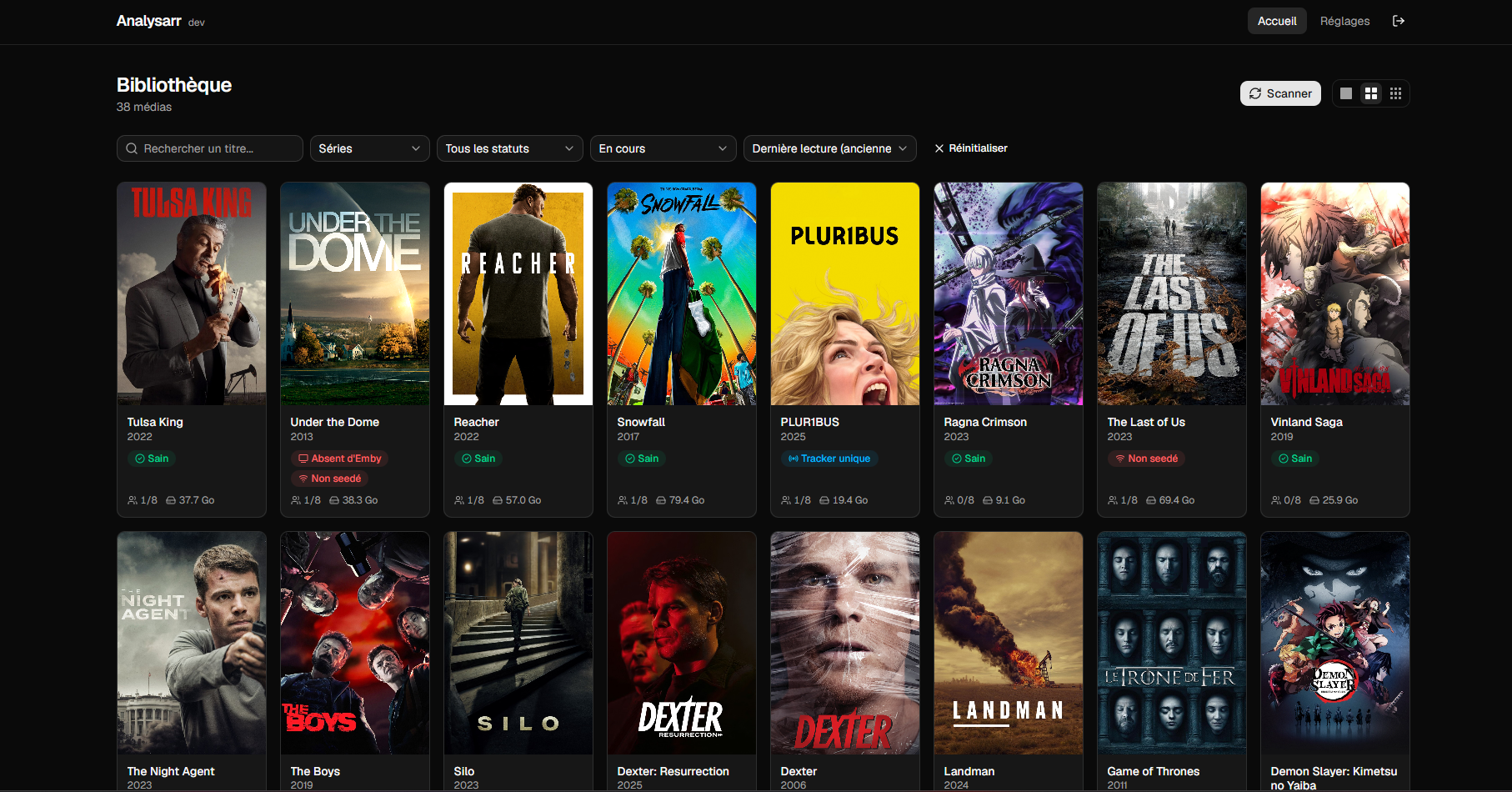
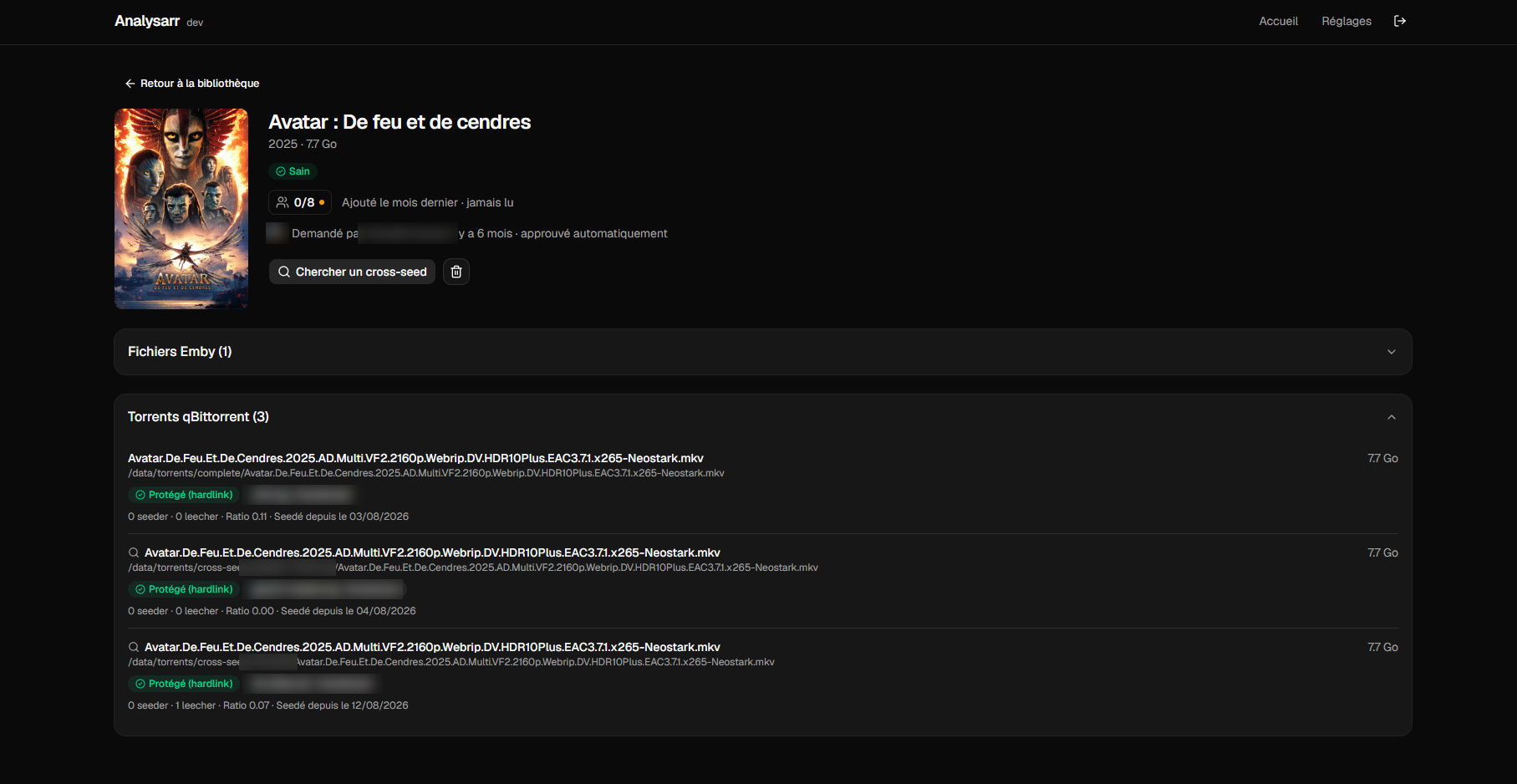
Features
Detection
- Duplicates, orphan torrents, missing hardlinks, content seeded on a single tracker, media missing from the media server or not seeded at all.
- Seasons downloaded ahead but not imported yet are shown as Not imported, never as orphans: they are never offered for clean-up.
- Blocked imports: downloads Sonarr/Radarr finished but could not move into the library get their own status, with the reason given by Sonarr/Radarr and a one-click retry — a media stuck there is no longer reported as missing from the media server, and its download is never offered for cleanup.
- Stalled downloads: a download that stopped progressing is reported on the media, with the reason. Purely informative: Analysarr never deletes or restarts a download.
- Torrent ↔ media matching by inode first (works for cross-seed copies living outside Sonarr/Radarr folders), then Sonarr/Radarr history, then title similarity.
- Trackers per torrent, with passkeys hidden.
Actions — always with a preview and an explicit confirmation
- Cascade cleanup of duplicates and orphans.
- Selective deletion (torrents, episodes, seasons, whole series or movie) with the real disk space freed, hardlinks accounted for. Companion files (NFO, subtitles, artwork) follow the video, and a folder left without any video is removed.
- Optional removal from Sonarr/Radarr (never added to exclusion lists). Seer and Ombi are read only: a request is never deleted nor recreated.
- One-click hardlink repair, with a symbolic link fallback across filesystems.
- Retry a blocked import (nothing is deleted: the file already on disk is simply handed back to Sonarr/Radarr).
- Remove a media that has nothing left on disk from Sonarr/Radarr.
- Ignore what you chose on purpose: the ⋯ menu ignores a torrent, keeps a file on purpose (a dubbed and a subtitled version side by side) or hides an alert of a media — for instance a home video no Radarr will ever know. Ignored items are never cleaned up, repaired or touched by automations, and each one is reported again automatically as soon as its situation changes. Hidden alerts stay visible, struck through; everything is listed in Settings → Ignored items.
- Targeted cross-seed search per episode, season or whole series.
Decision support
- Watch activity per user (
3/10watched it, progress on hover), last played date, date added, favourites and each account's last activity. - Series status from Sonarr (continuing, ended) and private torrents flagged, whatever the torrent client.
- Requests from Seer or Ombi: who asked, when, who approved (Ombi does not record who approved).
- "Cleanup candidates" sort: big files nobody watched for a long time.
- Deletion assistant (Cleanup tab, a poster grid like the library, filters and selection kept while you browse): ranks the media nobody watches any more with a score out of 100 you can open to see why (time without playback, active accounts that have not finished it, age in the library, ended series), next to the space its deletion would really free (hardlinks and cross-seed copies counted once). Favourites of active accounts, requests not yet watched by their requester, recent additions, torrents still seeding their minimum and media you excluded are never suggested — with the reason shown. Four modes (Age and interest, Balanced, Space first, Custom): in Custom, the criteria share the 100 points of the score; deletion goes through the usual selective deletion, one media after the other, after a preview and a confirmation.
- Disk forecasts (Cleanup → Space and forecasts): from one measurement a day, the growth trend of each disk over the last 30 days with a high/low range, a chart of the history and the projection, and "full in 6 to 9 weeks". Below 14 days of history, it says so instead of guessing.
- Cleanup automations (Settings → Automations, trigger Cleanup candidate): delete whole media whose score AND freeable space are above the thresholds you set (score 50 and 1 GB at the very least), at most 10 per run, in simulation until you switch it off, through the same deletion as the assistant. Protected media and media someone is watching are never touched — checked again right before each deletion — and nothing is deleted when watch data or requests could not be read at the last full scan (the assistant shows a warning too). Every run is in the history and can be notified.
- Weekly summary (opt-in: subscribe a notification channel to Weekly summary): every Monday at 9 am, library growth, estimated disk filling, top 10 cleanup candidates and torrents whose seeding obligation ends within a week. Send now in Settings → Notifications shows it right away.
Everyday comfort
- Library filters: media type, state (healthy / alert / hidden alerts), sorting and search at hand, plus a "Filters" panel where several statuses and watch states can be combined.
- Scheduled scans, scan history, path diagnostics that pinpoint a missing Docker mount.
- Real time, by default: Analysarr creates a webhook in every Sonarr/Radarr instance by itself (state, test and retry in each instance's settings; turn it off there and it removes its webhooks and follows Sonarr/Radarr read-only through their history and queue instead), reads the torrent client lightly (
sync/maindatafor qBittorrent), the media server's latest changes — removals included, through its item counts — and the request manager (Seer or Ombi). An import, a deletion, a finished torrent, a watched episode or a new request shows up within seconds, the changed media is briefly highlighted, and the full scan becomes a nightly check (4 am by default, Settings → Schedule). Sonarr/Radarr must be able to reach Analysarr for their webhooks: its address is detected from your browser and can be changed in Settings → Application. Prefer scans only? Turn real time off in Settings → Schedule: nothing is queried between two scans. - Targeted scans: the arrow next to Scan runs a single service — Radarr, Sonarr, the media server, the torrent client, the queue, watch activity or Seer/Ombi — and every media page has its own Scan this media button. Both are much faster than a full scan and leave the rest of the cache untouched.
- qBittorrent, Deluge or Transmission: the torrent client is a setting, everything else works the same way.
- Several Sonarr and Radarr instances (e.g. a dedicated 4K Radarr): each media stays linked to the instance tracking it, and a version tracked by another instance is never treated as a duplicate.
- Library files are matched to Sonarr/Radarr even when containers mount the library at different paths.
- Connection status of every service in the settings, with an alert in the header as soon as one becomes unreachable.
- Read-only dashboard widget (
/api/status) for Homepage, Homarr or any JSON-capable tool. - Rich notifications on Discord, ntfy or Gotify (poster, space freed, result of every step). Several channels, each with its own events: scan finished, scan failed, orphans detected, blocked imports, stalled downloads, deletion, cleanup, hardlink repair, cross-seed search, automation, update available.
- Optional automations: on orphans, duplicates, non-hardlinked torrents or blocked imports, clean up, repair, retry the import, search a cross-seed or just notify — with conditions (seed time, ratio, media type, reclaimable space), a simulation mode and a cap per run.
- Seed protection: a torrent that has not finished its minimum seeding time is never deleted by a cleanup or an automation — private torrents by default (a torrent whose privacy is unknown counts as private), public ones if you wish, with per-tracker rules (time and optional ratio). The cleanup preview says until when each torrent is protected; a manual deletion stays possible, with a warning. On for new installs; existing installs are offered to turn it on (Settings → Seed protection).
- Mount safety net: any action that touches the disk is refused when a volume is not mounted, so nothing is removed from Sonarr/Radarr or from the database while the files are still there.
- Optional trash: every deletion is kept as one restorable entry — library files, torrents (removed from the client without touching their data), and Sonarr/Radarr tracking all come back together, hardlinks included (Settings → Trash). Trashed files are renamed with a non-video extension so cross-seed never finds them in its
dataDirsand re-downloads what you deleted (withincludeNonVideos: true, also add"folder:.analysarr-trash"to itsblockList). - Hardened for exposure: security headers (strict CSP, clickjacking protection), rate limiting on the sign-in routes, real client address behind a declared reverse proxy, and a sign-in log in Settings → Account.
- Library media that Sonarr/Radarr does not track are detected too: a movie added by hand or a series removed from Sonarr shows up with its duplicates and its torrents, instead of staying invisible — and one button adds it back to Radarr/Sonarr with the folder that already holds its files, so nothing is downloaded again.
- Automation safety net: when a scan flips an unusual share of the library (unreachable share, torrent client reset), automations pause themselves and wait for you to resume them.
- Action history: every deletion, cleanup, repair and cross-seed search, with its detailed result.
- English and French interface, dark/light theme, display preferences.
- Update check when the app is opened (at most one request every 10 minutes), with an optional notification when a new version is released.
Compatibility
| Service | Supported | Required |
|---|---|---|
| Emby | 4.x | One of Emby or Jellyfin |
| Jellyfin | 10.9 or newer | One of Emby or Jellyfin |
| Sonarr | v3, v4 | Yes |
| Radarr | v3 or newer | Yes |
| qBittorrent | 4.1 or newer (WebUI API v2) | One torrent client |
| Deluge | 2.x (web interface) | One torrent client |
| Transmission | 3.0 or newer (RPC) | One torrent client |
| Seer (Overseerr, Jellyseerr, Seerr) or Ombi | Current versions (Ombi v4) | Optional |
| cross-seed | Daemon mode | Optional |
Quick start
Docker Compose
services:
  analysarr:
    image: ghcr.io/sec844/analysarr:latest
    container_name: analysarr
    restart: unless-stopped
    ports:
      - "1818:1818"
    environment:
      # Recommended: same user and group as Sonarr, Radarr and your torrent client.
      PUID: 1000
      PGID: 1000
      UMASK: "002"
      DATABASE_PATH: /config/analysarr.db
    volumes:
      - ./analysarr:/config
      # Same host path AND same container path as in your media server,
      # qBittorrent, Sonarr and Radarr (see "Paths and hardlinks").
      - /mnt/data:/data
File permissions (PUID, PGID, UMASK)
Analysarr creates and deletes files in your library (hardlink repair, trash). Set PUID/PGID to
the same user and group as Sonarr, Radarr and your torrent client (Unraid: 99/100): Analysarr
then runs as that user and creates files with UMASK (default 002). Only /config is re-owned at
startup; your media and downloads never are. Without PUID/PGID, Analysarr runs as root, like
previous versions.
If Analysarr is not allowed to modify a file, a deletion is refused before anything is touched, with the path at fault.
The database lives in /config. An existing install that still has its database in /data keeps
using it (a warning in the logs explains how to move it): no action is required after an update.
Unraid
Search for Analysarr in the Apps tab (Community Applications).
Without Community Applications: Docker → Add Container → paste this template URL:
https://raw.githubusercontent.com/SEC844/unraid-templates/main/templates/analysarr.xml
First launch
Open http://<host>:1818, create the administrator account, then follow the setup wizard: media server, Sonarr, Radarr, torrent client, folder paths, then cross-seed and Seer if you use them (both optional). A final summary shows what is ready and what is still missing.
There is no configuration file to edit: everything is configured from the interface, with a Test connection button for every service and a Browse button for every path. Once the wizard is done, run a first scan from the library.
Paths and hardlinks
This is the one thing to get right. Analysarr compares the files seen by your media server and by your torrent client from inside its own container. It must therefore see exactly the same paths as those containers:
| Container | Host path | Container path |
|---|---|---|
| Emby / Jellyfin | /mnt/data |
/data |
| qBittorrent / Deluge / Transmission | /mnt/data |
/data |
| Sonarr / Radarr | /mnt/data |
/data |
| Analysarr | /mnt/data |
/data |
This is the layout recommended by the TRaSH Guides. If your containers use other paths, mirror them in Analysarr. Settings → Paths → Path diagnostics tells you immediately if a mount is missing, and which folder.
Write access to the data share is only used when you delete media or repair hardlinks, always after a confirmation.
Dashboard widget
Generate a key in Settings → System → Widget, then query http://<host>:1818/api/status with the X-Api-Key header (or Authorization: Bearer). The response only contains counters: media total, movies, series, healthy media, media per status, reclaimable space, last scan and service status. Example for Homepage:
- Analysarr:
    href: http://analysarr:1818
    widget:
      type: customapi
      url: http://analysarr:1818/api/status
      headers:
        X-Api-Key: YOUR_KEY
      mappings:
        - field: { media: total }
          label: Media
        - field: { statuses: doublon }
          label: Duplicates
        - field: reclaimable_bytes
          label: Reclaimable
          format: bytes
Updating
Pull the new image and recreate the container. Your settings and cache live in /config and are kept. The interface shows a notification when a new version is available (Settings → Application, can be disabled).
Upgrading from a version older than 0.19.0? The default port changed from 8000 to 1818. Update your port mapping (1818:1818, or the container port on Unraid), or set the PORT=8000 environment variable to keep the previous port.
Security
- A single administrator account; passwords hashed with bcrypt; login locked for 15 minutes after 5 failed attempts.
- Optional two-factor authentication (TOTP authenticator app) with single-use recovery codes.
- Automations never run unless you create a rule: new rules start in simulation, every run is capped, and they reuse the manual actions — a protected or repairable torrent is never deleted.
- The widget endpoint requires its own key (stored hashed, accepted in a header only), exposes counters only (no titles, paths or service addresses) and never triggers requests to your services.
- Sessions stored server-side, sent as an
httpOnlycookie. - API keys and passwords of your services stay on the server: they are never sent back to the browser.
- The only outbound connections are the services you configure (notification channels included), plus an optional update check against the GitHub API (sends only the Analysarr version).
- Notification webhooks and tokens are write-only too; only official Discord webhook URLs are accepted, and test notifications only go to saved channels.
- Analysarr can delete files: do not expose it directly to the internet. Put it behind a reverse proxy with HTTPS, or keep it on your local network / VPN.
Found a vulnerability? Please report it privately, see SECURITY.md.
FAQ
Will Analysarr delete something on its own? No. Scans are read-only. Every deletion or repair shows a preview first and waits for your confirmation.
Torrents show as "not evaluated" or paths are unreachable. A mount is missing or differs from your other containers. Run Settings → Paths → Path diagnostics: it shows the folder that is not visible from Analysarr.
The connection test says "the server at this address is Jellyfin, not Emby". Choose the right media server at the top of the media server card in Settings.
Do I need Seer or cross-seed? No. Both are optional and fully hidden until you enable them.
AI assistance
Analysarr is developed with the help of an AI assistant. Every change is reviewed and tested by the maintainer before it is released.
Contributing
Contributions are welcome — read CONTRIBUTING.md first.
License
GNU AGPL-3.0. You may use, modify and share Analysarr; any modified version you distribute or run as a service must stay open source under the same license.
Categories
Related apps
Explore more like this
Explore allDetails
ghcr.io/sec844/analysarr:latestRuntime arguments
- Web UI
http://[IP]:[PORT:1818]/- Network
bridge- Shell
sh- Privileged
- false
Template configuration
Port of the web interface.
- Target
- 1818
- Default
- 1818
- Value
- 1818
Share holding your library and downloads. Use the SAME host path and the SAME container path as in Emby/Jellyfin, your torrent client, Sonarr and Radarr (e.g. TRaSH Guides layout: /mnt/user/data mounted on /data everywhere). Write access is only used when you delete media or repair hardlinks, always after a confirmation.
- Target
- /data
- Default
- /mnt/user/data
- Value
- /mnt/user/data
Database, settings and poster cache.
- Target
- /config
- Default
- /mnt/user/appdata/analysarr
- Value
- /mnt/user/appdata/analysarr
SQLite database location inside the container. Keep it inside the Appdata path so it survives updates.
- Target
- DATABASE_PATH
- Default
- /config/analysarr.db
- Value
- /config/analysarr.db