
All apps · 0 apps

AMUD-Dashboard
Docker app from TRADMSS' Repository
Overview
Compiled Rust homelab dashboard — app launcher, live Docker telemetry, Plex/Jellyfin/HA badges. Zero YAML; config in SQLite via the web UI. ~35–100MB RAM for server + agent combined.
Also install the companion template: AMUD Agent (search Community Apps for "AMUD Agent"). Both containers must use the same Agent Secret and the same Socket Path.
Unraid appdata is owned by nobody (UID 99) by default — the dashboard runs as PUID 99 so first boot works without SSH chown.
Docs: https://boubli.github.io/AMUD-Dashboard/docs/installation/Unraid
Readme
View on GitHub
AMUD Dashboard




English | Español | Português | Français | Deutsch | Italiano | Русский | 中文 | 日本語 | हिन्दी | 한국어 | العربية
Changelog · Blog · Theme Gallery · Roadmap · Docs · FAQ
What's new in v1.9.5
- Nodes polish — strip hidden until 2+ agents; Settings → Agents / Nodes live table + env snippets
- Theme icon styles — Settings/topbar icons change glyph/style with the theme (not only color)
- Add App CTA — larger primary action vs Settings / Sign Out
- Upgrade docs — Native / Proxmox, Docker, and Unraid steps in every release notes tag
What's new in v1.9.4
- Multi-node agents — one AMUD server, agents on every Proxmox / Unraid / CasaOS / Docker host (Multi-node docs)
- TCP + optional TLS — remote agents over VPN or TLS; UDS stays for co-located installs
Full history: Changelog
Release status (2026-10-04)
Last 5 validated releases (full history: Changelog):
v1.9.5(current latest recommended)v1.9.4v1.9.3v1.9.2v1.9.1
Do not use: v1.8.6, v1.8.5 (layout), v1.5.5.4, v1.5.6.1, v1.6.1 (withdrawn or broken).
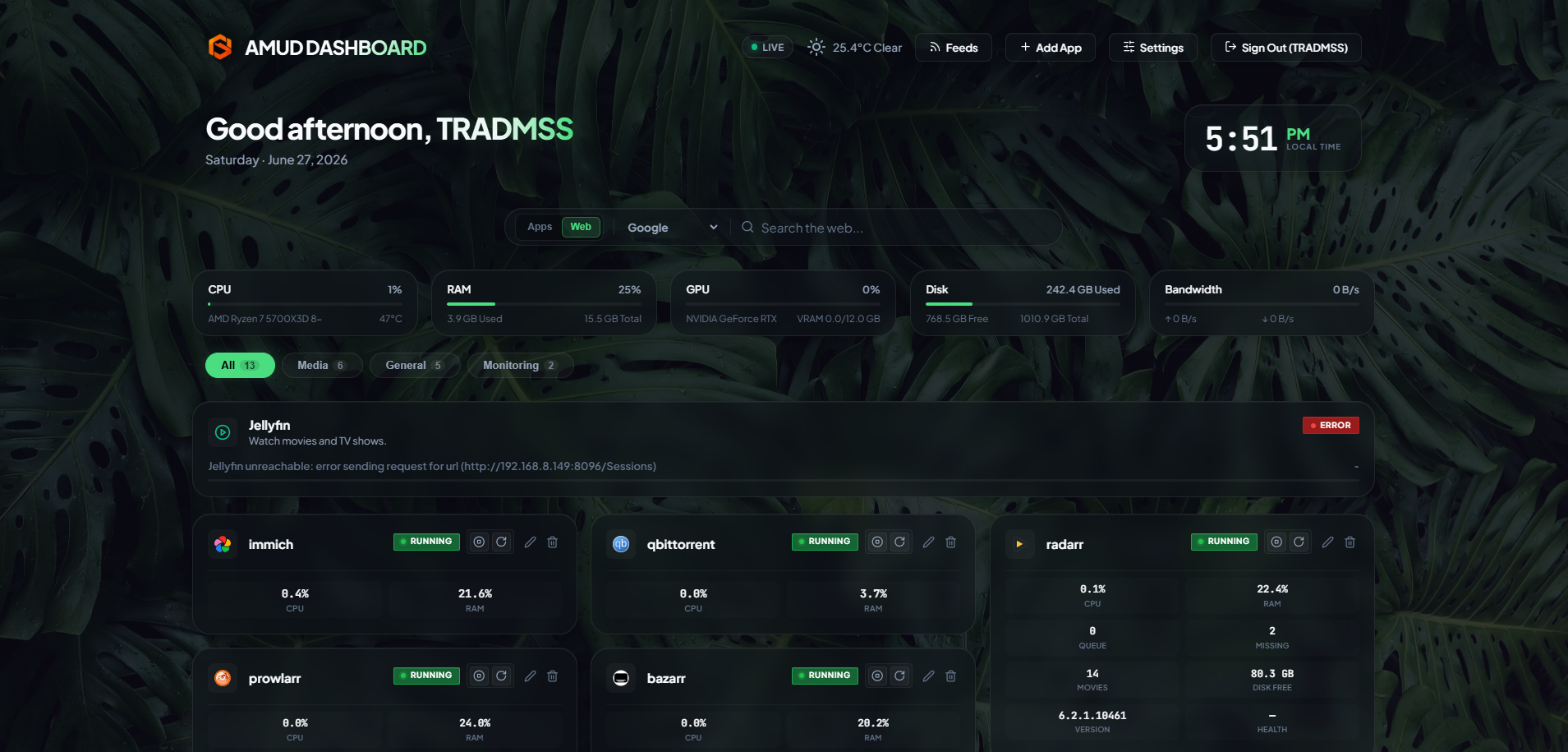
Unify your homelab. A fast, Rust-powered, zero-YAML dashboard with live Proxmox & Docker telemetry, container controls, and integrations for popular self-hosted services — all from the UI. Run one server and optional agents on every host (multi-node).
Unlike legacy dashboards (Heimdall, Homepage, Homarr) that run on heavy runtimes (PHP-FPM, Node.js) and rely on complex nested YAML configuration files, AMUD is written in compiled Rust and persisted entirely in SQLite. Combined, the server and telemetry agent idle at 30–50 MB of RAM (peak ~150 MB with a full integration grid) with sub-millisecond route execution.
Homepage & Homarr parity: AMUD ships integration cache, Homepage YAML import, Custom API widgets, LDAP, per-user boards, Plex/Jellyfin cards, and a growing long-tail catalog — see Comparison.
Architecture & Design Decisions
AMUD Dashboard is split into two native binaries:
amud-server: Axum-based web server serving server-rendered HTML (templated via Alpine.js) and managing state via SQLite. One server can accept many agents.amud-agent: Standalone daemon on each homelab host (Proxmox, Unraid, CasaOS, Docker, …). It streams host + container telemetry over UDS (local) or TCP/TLS (remote). See Remote agents / multi-node.
graph TD
    User[Web Browser] -->|HTML / WebSockets| Server[amud-server]
    Server -->|SQLite WAL| DB[(amud.db)]
    AgentLocal[amud-agent Local] -->|UDS| Server
    AgentRemote[amud-agent Remote] -->|TCP or TLS| Server
    AgentLocal -->|HTTPS REST| PVE[Proxmox VE API]
    AgentLocal -->|Unix Socket| Docker[Docker Daemon]
    AgentRemote -->|HTTPS REST| PVE2[Other PVE / Docker]
Technical Stack Justifications
Rust & Axum
- No Runtime Overhead: Compiles directly to native machine code. Eliminates the JVM/V8 startup and heap overhead.
- Concurrent Event Loop (Tokio): Telemetry streams and third-party integrations (AdGuard, Pi-hole, Plex, Home Assistant) poll concurrently on Tokio green threads. Telemetry is serialized once per poll tick and broadcasted to WebSockets using a
tokio::sync::watchchannel.
SQLite Persistence (rusqlite)
- Zero YAML: Configuration is stored in an embedded SQLite database. Layouts, category tabs, and settings are configured directly via the UI, bypassing YAML syntax headaches.
- Performance: Configured in WAL (Write-Ahead Logging) mode, enabling concurrent reads and low-latency writes without external network overhead.
Direct Telemetry Collection
- Zero Shell Subprocesses: Legacy solutions fork system calls like
pveshorcurlevery few seconds to grab container stats, resulting in high CPU overhead. - Natively Networked:
amud-agentutilizeshyperandrustlsto send native HTTPS REST API calls to Proxmox VE and reads the Docker daemon directly over the UNIX socket viahyperlocal.
Telemetry Configuration
Proxmox VE Integration
Host metrics function automatically. For LXC container monitoring, the agent must be authenticated to the Proxmox VE REST API.
1. Generate API Token
In the Proxmox VE Web UI:
- Navigate to Datacenter → Permissions → API Tokens.
- Click Add. Select User (e.g.,
root@pam) and Token ID (e.g.,amud). - Uncheck Privilege Separation so the token inherits the user's VM/System audit permissions.
- Copy the returned Secret key.
2. Pass Token to Agent
Set the environment variable on the host running the agent:
PVE_API_TOKEN=PVEAPIToken=root@pam!amud=XXXXXXXX-XXXX-XXXX-XXXX-XXXXXXXXXXXX
Deployment
Docker Compose
For containerized hosts on x86_64/amd64 (combines server and agent communicating over a shared volume for the Unix socket).
ARM64 hosts: Docker images are amd64-only. Use native install or update-amud.sh with release *-arm64 binaries instead.
version: '3.8'

services:
  app:
    image: tradmss/amud-dashboard:latest
    container_name: amud_app
    restart: always
    ports:
      - "8000:8000"
    environment:
      - PORT=8000
      - BIND_ADDR=0.0.0.0
      - DB_PATH=/app/data/amud.db
      - PUID=99
      - PGID=100
      - AMUD_SOCKET_MODE=666
      - AMUD_SOCKET_PATH=/var/run/amud/amud.sock
      - AMUD_AGENT_SECRET=change-me-to-a-long-random-string # MUST match the agent secret below
    cap_drop:
      - ALL
    security_opt:
      - no-new-privileges:true
    volumes:
      - ./data:/app/data
      - amud_run:/var/run/amud

  agent:
    image: tradmss/amud-dashboard:latest
    container_name: amud_agent
    entrypoint: ["/app/amud-agent"]
    restart: always
    environment:
      - AMUD_SOCKET_PATH=/var/run/amud/amud.sock
      - AMUD_AGENT_SECRET=change-me-to-a-long-random-string # MUST match the app secret above
      - AMUD_DOCKER=1 # Auto-enabled when docker.sock is mounted; set 0 to disable
    cap_drop:
      - ALL
    security_opt:
      - no-new-privileges:true
    volumes:
      - amud_run:/var/run/amud
      - /var/run/docker.sock:/var/run/docker.sock:ro

volumes:
  amud_run:
    name: amud_run
Unraid (Community Applications)
Install both apps from Unraid’s Apps tab (they need to talk to each other):
Use the same Agent Secret on both. Full guide: Unraid install docs
First-boot permission error? If the dashboard log shows .amud-secrets-key: Permission denied, update to v1.7.2+ and recreate the container, or see troubleshooting and appdata permissions.
Template XML lives in templates/ with ca_profile.xml for Community Applications submission.
Proxmox LXC Autopilot Script
For native installation within a Proxmox VE LXC container (running outside Docker), execute this on your Proxmox VE host:
curl -sSL https://github.com/boubli/AMUD-Dashboard/releases/latest/download/setup-amud.sh | bash
Production Resource Footprint
| Dimension | Heimdall (Legacy PHP) | AMUD Dashboard (Rust) |
|---|---|---|
| Engine | PHP 8+ / Laravel | Rust / Axum / Tokio |
| Execution Overhead | High (Interpreted PHP-FPM) | Zero (Native Machine Code) |
| Asset Delivery | Disk reads per request | Embedded in binary via include_str! |
| Idle RAM Footprint | ~150MB | 30–50 MB (peak ~150 MB) |
| Startup / Boot Time | ~2 - 5 seconds | Sub-millisecond |
For developers
Before you push Rust changes, run the same checks as GitHub CI:
# Windows
.\scripts\ci-check.ps1
# Linux / macOS / Git Bash
./scripts/ci-check.sh
Optional: install a pre-push hook with ./scripts/install-git-hooks.sh so cargo fmt failures never reach CI again.
Support & Donation
Bugs and feature requests: GitHub Issues (preferred — tracked per release)
Questions and chat: GitHub Discussions
Docs / troubleshooting: boubli.github.io/AMUD-Dashboard/docs
Requirements
Categories
Download Statistics
Related apps
Explore more like this
Explore allLinks
Details
tradmss/amud-dashboard:latestRuntime arguments
- Web UI
http://[IP]:[PORT:8000]/- Network
bridge- Privileged
- false
- Extra Params
--cap-drop=ALL --security-opt=no-new-privileges:true
Template configuration
HTTP port for the AMUD Dashboard web interface.
- Target
- 8000
- Default
- 8000
- Value
- 8000
SQLite database and encrypted secrets (backup this folder).
- Target
- /app/data
- Default
- /mnt/user/appdata/amud-dashboard/data
- Value
- /mnt/user/appdata/amud-dashboard/data
Shared directory for the Unix socket. Must match the AMUD Agent container exactly.
- Target
- /var/run/amud
- Default
- /mnt/user/appdata/amud-dashboard/run
- Value
- /mnt/user/appdata/amud-dashboard/run
Long random string shared with the AMUD Agent container. Required — server will not start without it.
- Target
- AMUD_AGENT_SECRET
User ID for dashboard writes to App Data (Unraid default: 99 / nobody).
- Default
- 99
- Value
- 99
Group ID for dashboard writes to App Data (Unraid default: 100 / users).
- Default
- 100
- Value
- 100
Unix socket file mode (octal). 666 lets the root agent connect when dashboard runs as PUID 99.
- Target
- AMUD_SOCKET_MODE
- Default
- 666
- Value
- 666
SQLite file path inside the container.
- Default
- /app/data/amud.db
- Value
- /app/data/amud.db
Unix socket path inside the container.
- Default
- /var/run/amud/amud.sock
- Value
- /var/run/amud/amud.sock
Address the web server binds to.
- Default
- 0.0.0.0
- Value
- 0.0.0.0
Internal HTTP port (must match Web UI Port mapping).
- Default
- 8000
- Value
- 8000