
Amberwave
Docker app from lorenzoao's Repository
Overview
Amberwave is a self-hosted music server for people who care about their collection and how it sounds – without subscription and without cloud.
- Library based on MusicBrainz: multiple artists per album, editions, credits, artist pages
- Web app / PWA for phone and desktop, streaming from anywhere via Cloudflare Tunnel (no open ports), live transcoding to Opus/AAC
- Remote control between devices
- Windows client with bit-perfect output (WASAPI exclusive, ASIO), output routing and VST3 effects
- Built-in tube, transformer and tape saturation and room sound
- Family accounts; the music folder stays read-only until you allow writing in the app
All-in-one: MariaDB 11.8 LTS is included, no second container needed. Set your music folder and an admin user name and password below, start, open the WebUI and log in. Public beta.
Readme
View on GitHubAmberwave
One app instead of five: your library, bit-perfect output, effects, VST3, per-channel routing and remote control – no virtual cables, no driver hacks.
A self-hosted music server for your family's collection – listen in the browser, as an installable web app (PWA) or in a bit-perfect Windows client. At home you get the original files, on the go a smooth stream; every device can remote-control every other one. Metadata comes from MusicBrainz, with credits down to producers and session musicians.
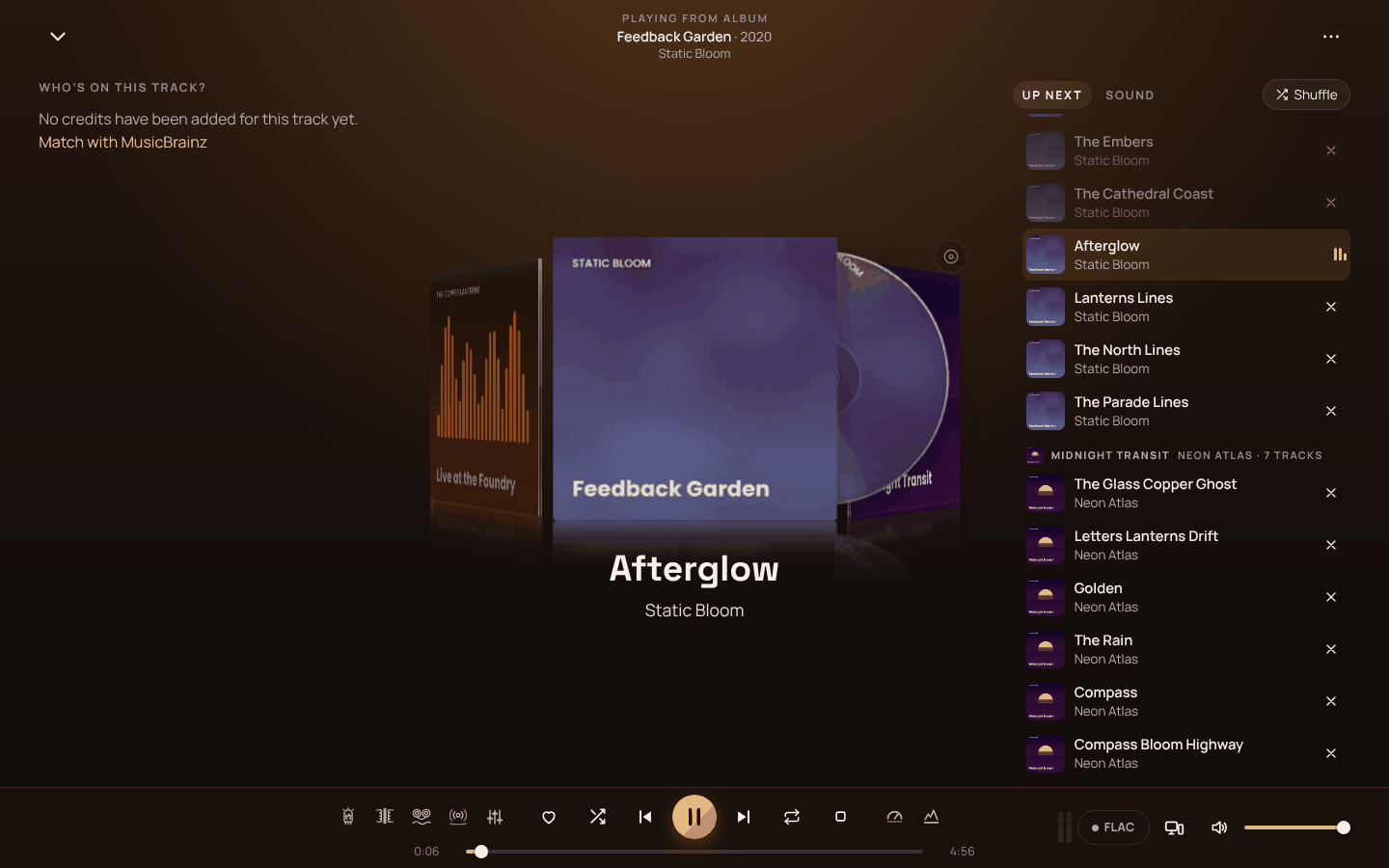
Why Amberwave? My goal is to make listening to music on your PC an experience again – away from minimalist interfaces where the album covers are the only colour on the screen. Amberwave has warmth and character: a record crate for your queue, VU meters, tubes and tape machines in the effects rack. And it brings together what used to take several programs and sketchy driver routing – library, bit-perfect playback, effects, plug-ins, multi-channel routing and remote control – in one place.
Public beta – 0.9.1-beta.4. Please back up your music before you try it. Amberwave only reads your music by default; it writes nothing until you allow it. Deutsche Anleitung: README.de.md
 |
 |
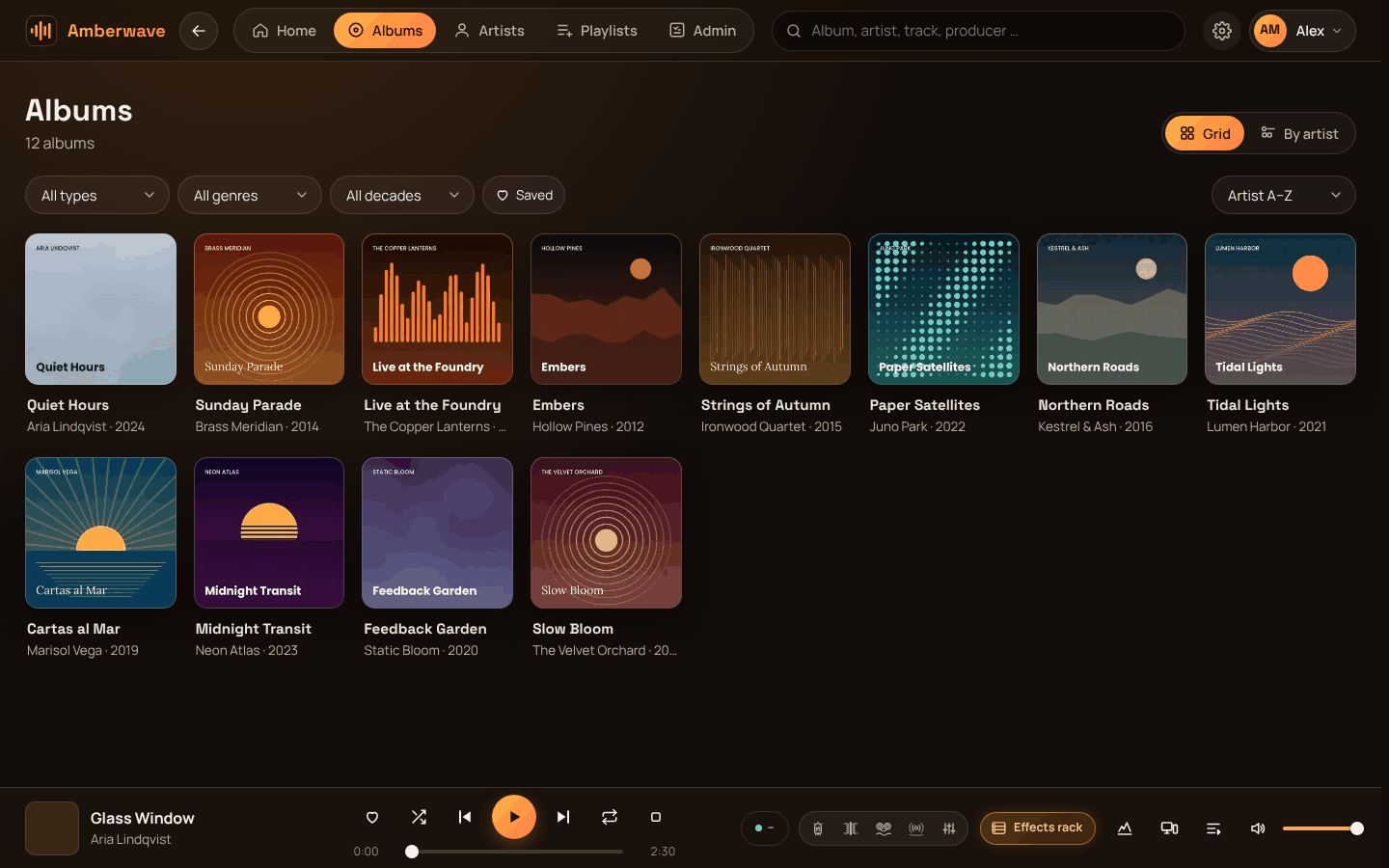 |
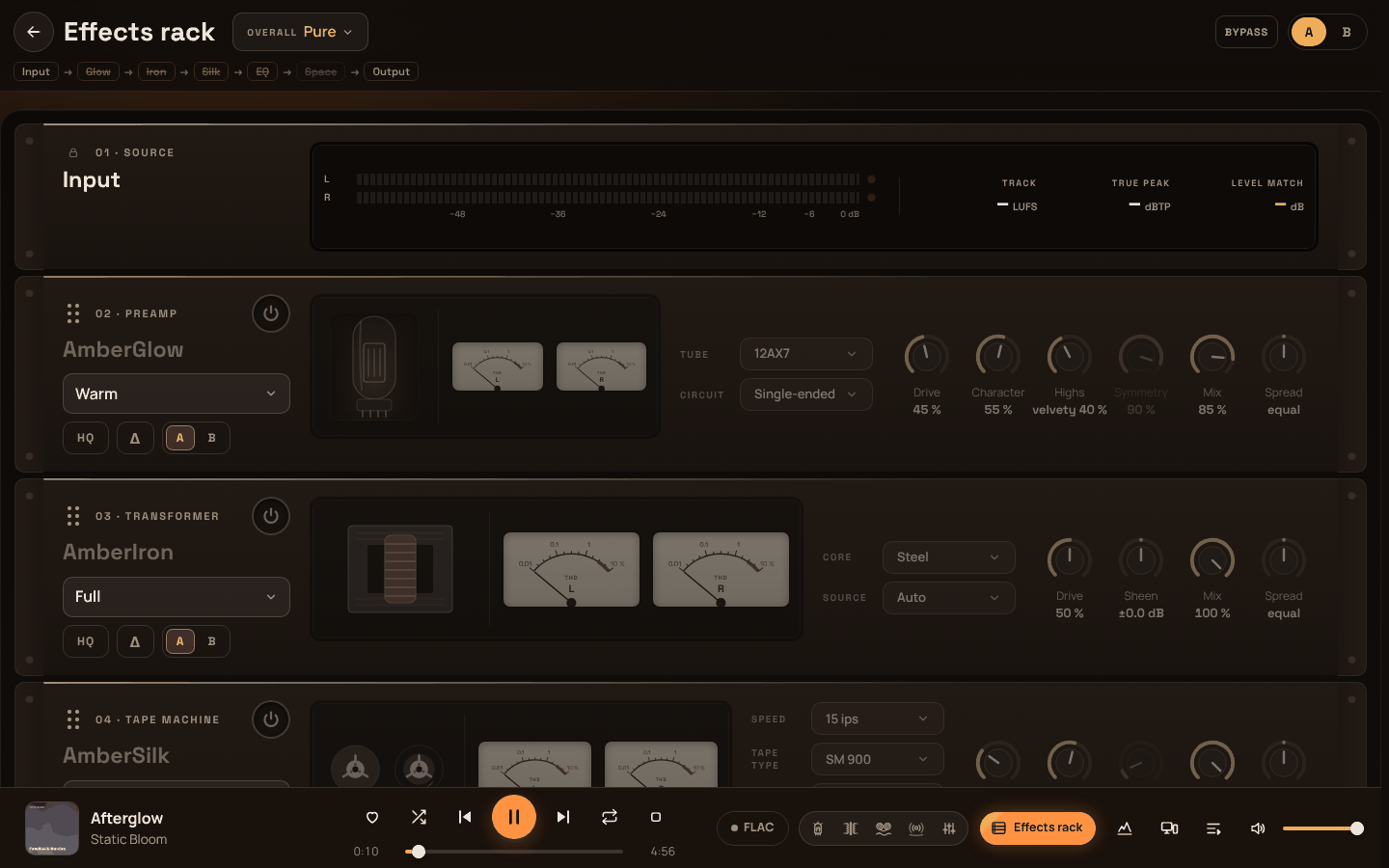 |
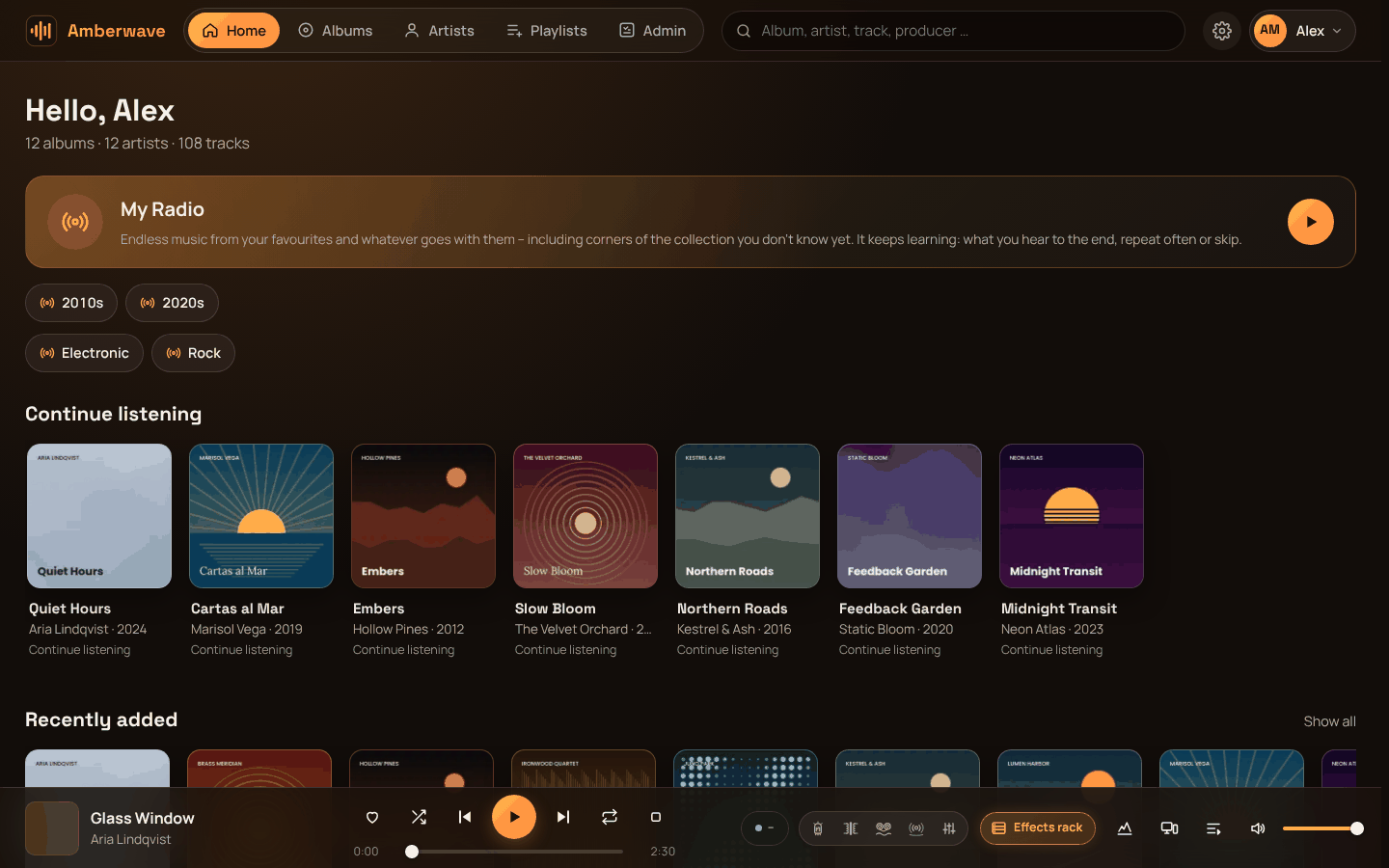
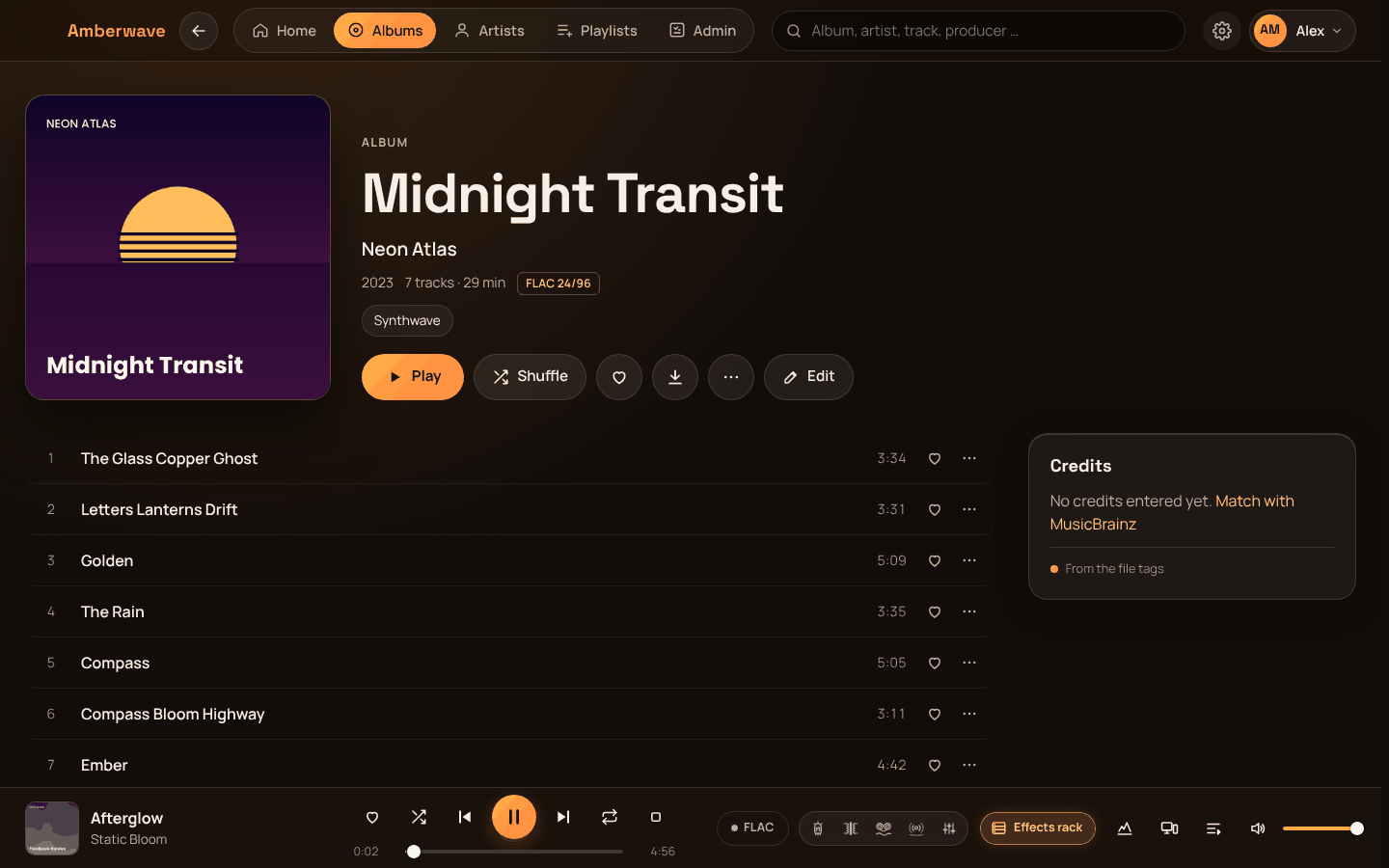
Screenshots use a demo library with made-up artists and generated cover art.
What it does
- Your library, cleaned up: FLAC, ALAC, MP3, Opus, OGG, WAV, AIFF, WavPack and more. Albums are matched against MusicBrainz (all editions, track-by-track comparison), plus recognition by sound (AcoustID) for untagged files. Credits link artists, producers, songwriters and musicians with their instruments.
- Plays everywhere: web app for desktop, tablet and phone (installable, lock-screen controls, offline listening), gapless playback, loudness normalisation (EBU R128), "now playing" with a record-crate view of your queue.
- Remote streaming: at home the original file, on the go Opus 256/160/128 depending on device and network – remembered per device. Remote access via the built-in Cloudflare Tunnel, Tailscale/WireGuard or your own reverse proxy.
- Remote control: your phone controls the PC, the PC controls the living-room client – queue, volume, skip. Also plays to DLNA/UPnP renderers (AV receivers, streamers) and Google Cast devices.
- Windows client: bit-perfect output via WASAPI exclusive or ASIO, sample rate follows the file, gapless, plus effects (tube, transformer, tape, EQ, 5.1 upmix with real room responses) and your own VST3 plug-ins.
- Family accounts: registration with approval, expiry, per-user history, favourites, shared playlists, radios.
- Optional: tidy up files and tags (preview first, then your approval), Usenet search via Prowlarr/Newznab with SABnzbd (off by default), WAV export for mixing desks.
Pro features – free during the beta
These are planned as paid Pro features later. During the beta they are free for everyone:
- DSP effects: AmberGlow (tube), AmberIron (transformer), AmberSilk (tape), AmberSpace (room reverb and 5.1 upmix), EQ
- Saturation focus: per effect, a curve with draggable points decides where it saturates (EQ before, the exact opposite after – the tone stays neutral and only the distortion moves; de-emphasis 0–100 %).
- VST3 plug-in support in the Windows client
- ASIO output in the Windows client
- Output routing matrix with per-channel EQ
Everything else – library, MusicBrainz matching, streaming, remote control, family accounts, the web app and bit-perfect WASAPI playback in the Windows client – is the free core.
Quick start (Docker)
All-in-one (one container, database included): ghcr.io/lfrank95/amberwave-aio contains Amberwave, MariaDB 11.8 LTS
and cloudflared. One folder for everything that must survive updates (/appdata), your music at /musik, port 80 in the
container. Set ADMIN_BENUTZER and ADMIN_PASSWORT to create the admin account on the first start (otherwise the setup
page asks). On Unraid it comes as a template (templates/amberwave.xml), soon in Community
Applications. Give it time to stop (--stop-timeout 60) so the database shuts down cleanly.
docker run -d --name amberwave --stop-timeout 60 -p 9950:80 \
  -e ADMIN_BENUTZER=admin -e ADMIN_PASSWORT='choose-a-good-one' \
  -v /path/to/appdata:/appdata -v /path/to/music:/musik \
  ghcr.io/lfrank95/amberwave-aio:beta
Docker Compose (separate database container):
You need Docker with Compose on a Linux host or NAS with an x86-64 CPU (Unraid, Synology, TrueNAS, a plain Linux box). ARM devices such as a Raspberry Pi are not supported yet.
- Create a folder, e.g.
/opt/amberwave, and putdocker-compose.ymland.env.exampleinto it. - Copy
.env.exampleto.envand set the paths:MUSIK_PFAD(your music),APPDATA_PFAD(Amberwave's own data – SSD recommended) and, if you like,APP_PORT(default 9950). LeavePUID/PGIDempty unless you know you need them (Unraid:99/100). docker compose up -d- Open
http://<server>:9950from a computer on your home network (or the setup link fromdocker logs amberwave_app). The assistant checks folders and permissions, asks whether Amberwave may write to your music folder (default: no), creates the database and your admin account, and scans your music.- From the home network no code is needed. Via a proxy, tunnel, the Docker bridge or the internet the page asks for the setup code (in the log; the link there already contains it). The setup window closes 30 minutes after the container starts (restart the container to reopen it).
- Match albums with MusicBrainz ("Match" on an album, or automatically by sound with a free AcoustID key).
Update: docker compose pull && docker compose up -d – database changes run automatically. The admin overview tells
you when a new release is out (switch off under Settings → Backup & update).
Unraid: install the Docker Compose Manager plugin from Apps, then Docker tab → Add New Stack (amberwave)
→ ⚙ Edit Stack → Compose File (paste docker-compose.yml) and Edit Stack → ENV File (paste .env.example, e.g.
MUSIK_PFAD=/mnt/user/music, APPDATA_PFAD=/mnt/cache/appdata/amberwave, PUID=99, PGID=100) → Compose Up.
The setup link is in the logs of the amberwave_app container. Update with Update Stack.
Synology (DSM 7.2, Container Manager): create a shared folder for Amberwave's data, e.g. /volume1/docker/amberwave,
and put docker-compose.yml and your .env into it (MUSIK_PFAD=/volume1/music, APPDATA_PFAD=/volume1/docker/amberwave/data;
PUID/PGID = the user that owns your music, often 1026/100 – check with id <user> over SSH). Then Container Manager →
Project → Create, choose that folder as path and "Use existing docker-compose.yml" → Build. The setup link is in the
log of amberwave_app (Container → amberwave_app → Log). Update: Project → amberwave → Action → Build (pulls the new image).
Self-build instead of the image: docker-compose.build.yml (mounts the code as a folder;
updates then come as a zip under Settings → Backup & update). Every .env option is documented in
.env.reference – almost all of them can also be changed in the app.
Safety defaults
- Music folder read-only: writing tags, tidy-up, download import and the trash folder stay locked until you allow
writing (setup assistant or Settings → Library & automation → Music folder, or
MUSIK_SCHREIBEN=1). For a hard guarantee also mount it read-only:MUSIK_MOUNT_MODUS=ro. - Even with writing allowed nothing happens on its own: tidy-up always shows a preview and only runs what you approve;
replaced files go to
.amberwave-papierkorbinside your music folder. - Usenet downloads are off until you switch them on (Settings → Downloads). You are responsible for what you download.
- No telemetry, no installation ID, no counting of installations. Amberwave talks to MusicBrainz, Cover Art Archive, AcoustID, fanart.tv, Deezer and ListenBrainz for metadata, to GitHub for the update notice, and – only if you set them up – to Cloudflare and your own services.
Remote access
- Cloudflare Tunnel (included in the stack, needs your own domain on Cloudflare): Settings → Access & network →
"When you are away: Cloudflare Tunnel". Amberwave creates the tunnel and DNS record; no open router port, works behind CGNAT. Cloudflare's
terms apply – streaming household amounts of music is a grey area there.
Not using it? Set
TUNNEL_IM_STACK=0. - Tailscale / WireGuard: open
http://<vpn-ip>:9950. Without HTTPS the web app can't be installed or used offline – put a proxy with a certificate in front, or use Tailscale's HTTPS. - Your own reverse proxy (Nginx Proxy Manager, Traefik, Caddy): point it at
http://<server>:9950and setAPP_URL=https://music.example.comandPROXY_IPS=<proxy IP>in.env.
Windows client
Download it from the releases. It is not code-signed yet, so Windows SmartScreen shows "Windows protected your PC" on first start: click More info → Run anyway. The client finds your server in the home network by itself. Details: windows-client/README.md.
VST3 plug-in support is experimental in the beta: each plug-in runs in its own process, so a crashing plug-in doesn't stop the music – but third-party plug-ins are the most likely source of trouble. Please report problems with the plug-in's name and version.
Android app
A first test build is attached to the releases as Amberwave-Android-<version>.apk (Android 10 or newer). Allow your
browser or file manager to "install unknown apps" once, install, enter your server's address, sign in. Music you save
offline stays on the phone as files and plays without a network; playback continues in the background with lock-screen
controls. The app looks for updates on GitHub and asks before installing. Not in the Play Store yet.
Known limitations of the beta
- The interface still needs polish. Finding the right balance between simple, good-looking and detailed is ongoing work – feedback on what feels cluttered or missing is very welcome.
- Docker image for amd64 only (arm64 needs the effects renderer ported).
- Code comments and parts of the documentation are German; the app itself is German and English.
- The Windows client is unsigned, has no auto-update yet (it tells you when a new version is out) and VST3 support is experimental.
- No Subsonic/OpenSubsonic API yet, so third-party Subsonic apps don't work – use the web app (installable on phones) or the Windows client.
Roadmap
No dates, just direction:
- Mid-term: Amberwave server for Windows (no Docker needed).
- Long-term: a standalone Windows version (server and player in one), the Android app in the Play Store.
- Further out, not ruled out: versions for macOS, iPhone and Linux desktops.
- Along the way: UI polish, arm64 image, more import and tidy-up tools – shaped by your feedback.
FAQ
Does Amberwave change my files? Not by default. The music folder is read-only until you allow writing, and even then every change (tags, renaming, tidy-up) is shown as a preview first and only runs after you approve it.
How is it different from Plex, Jellyfin or Navidrome? Amberwave is music-only and built around a well-kept library: MusicBrainz editions and full credits, bit-perfect playback in its own Windows client, remote control between all your devices and a family setup with accounts that need approval and can expire. It does not do video.
What hardware do I need? Any x86-64 machine that runs Docker. The first scan of a large library takes a while (every file is read once – about 100 files per second in our load test). Keep the app data on an SSD if you can. With 100,000 tracks, lists, album pages and search answer in well under a second; a search with a typo takes about a second (load test on MariaDB 11.4).
Where is my data, and how do I back it up? Everything Amberwave creates lives in APPDATA_PFAD (database, covers,
keys). Amberwave backs up its database daily (Settings → Backup & update) and before every update. Back up the
app-data folder with your usual NAS backup as well.
Can I use it without MusicBrainz? Yes – albums work from your file tags alone. Matching adds editions, credits and better artist pages.
Is it free? The core is free and open source (AGPL-3.0). DSP effects, VST3 support, ASIO output and the output routing matrix with per-channel EQ are planned as Pro features – during the beta they are free for everyone (see Pro features).
I found a bug / have an idea. GitHub issues for bugs, r/Amberwave for questions and ideas.
Feedback
- Bugs: GitHub issues (templates included) · questions and ideas: r/Amberwave
- Security problems: please report privately, see SECURITY.md.
- Contributing: CONTRIBUTING.md (includes a short CLA).
License
Amberwave is licensed under the GNU Affero General Public License v3.0 – see LICENSE; copyright notice and scope in COPYRIGHT. Third-party components: THIRD_PARTY_NOTICES.md. History: CHANGELOG.md.
Media gallery
1 / 6Requirements
Categories
Related apps
Explore more like this
Explore allDetails
ghcr.io/lfrank95/amberwave-aio:betaRuntime arguments
- Web UI
http://[IP]:[PORT:80]/- Network
bridge- Shell
bash- Privileged
- false
- Extra Params
--stop-timeout=60 --security-opt no-new-privileges:true
Template configuration
Port for the web app, the Windows client and the phones.
- Target
- 80
- Default
- 9950
- Value
- 9950
Your music collection. Amberwave only reads it until you allow writing under Settings › Library (for renaming and tagging). Set the access mode to read-only for hard protection.
- Target
- /musik
- Default
- /mnt/user/music
- Value
- /mnt/user/music
Database, covers, artist images and backups. Keep it on the cache SSD.
- Target
- /appdata
- Default
- /mnt/user/appdata/amberwave
- Value
- /mnt/user/appdata/amberwave
Only needed for the very first setup: creates the first admin account (3–50 characters: letters, digits, . _ -). Clearing this field afterwards is recommended – the account keeps working. Leave empty to create the account on the setup page in the browser instead.
- Target
- ADMIN_BENUTZER
Only needed for the very first setup (at least 8 characters). Clearing this field after your first login is recommended – the account keeps working. Change the password later in Amberwave under Profile.
- Target
- ADMIN_PASSWORT
Optional e-mail address of the admin (password reset, notices).
- Target
- ADMIN_EMAIL
Optional: folder with finished music downloads from SABnzbd or Tidarr (e.g. /mnt/user/downloads/complete/music) for automatic import.
- Target
- /downloads
Direct HTTPS access in your home network with your own certificate (Settings › Access & network). No port forwarding needed.
- Target
- 8443
- Default
- 8443
- Value
- 8443
User ID Amberwave and its database run as (Unraid: 99 = nobody).
- Default
- 99
- Value
- 99
Group ID (Unraid: 100 = users).
- Default
- 100
- Value
- 100
Memory MariaDB keeps for data and indexes. 1G or more for libraries with 100,000+ tracks.
- Target
- DB_PUFFER
- Default
- 512M
- Value
- 512M