
All apps · 0 apps

Airbridge
Docker app from Selfhosters
Overview
Creates virtual DLNA renderers that forward audio to AirPlay speakers, allowing media servers like Music Assistant or Plex to stream to AirPlay-only devices through DLNA.
Features:
- Virtual DLNA renderer per AirPlay zone
- Automatic AirPlay device discovery (mDNS)
- Web admin interface for managing devices
- Volume control support
Requires host network mode for mDNS device discovery and SSDP announcements.
Readme
View on GitHubAirbridge
Anything → Everywhere: Bridge DLNA audio streams to AirPlay & Chromecast
Airbridge creates virtual DLNA renderers that forward audio to AirPlay speakers and Chromecast devices. This allows media servers like Music Assistant to stream to these devices through DLNA.
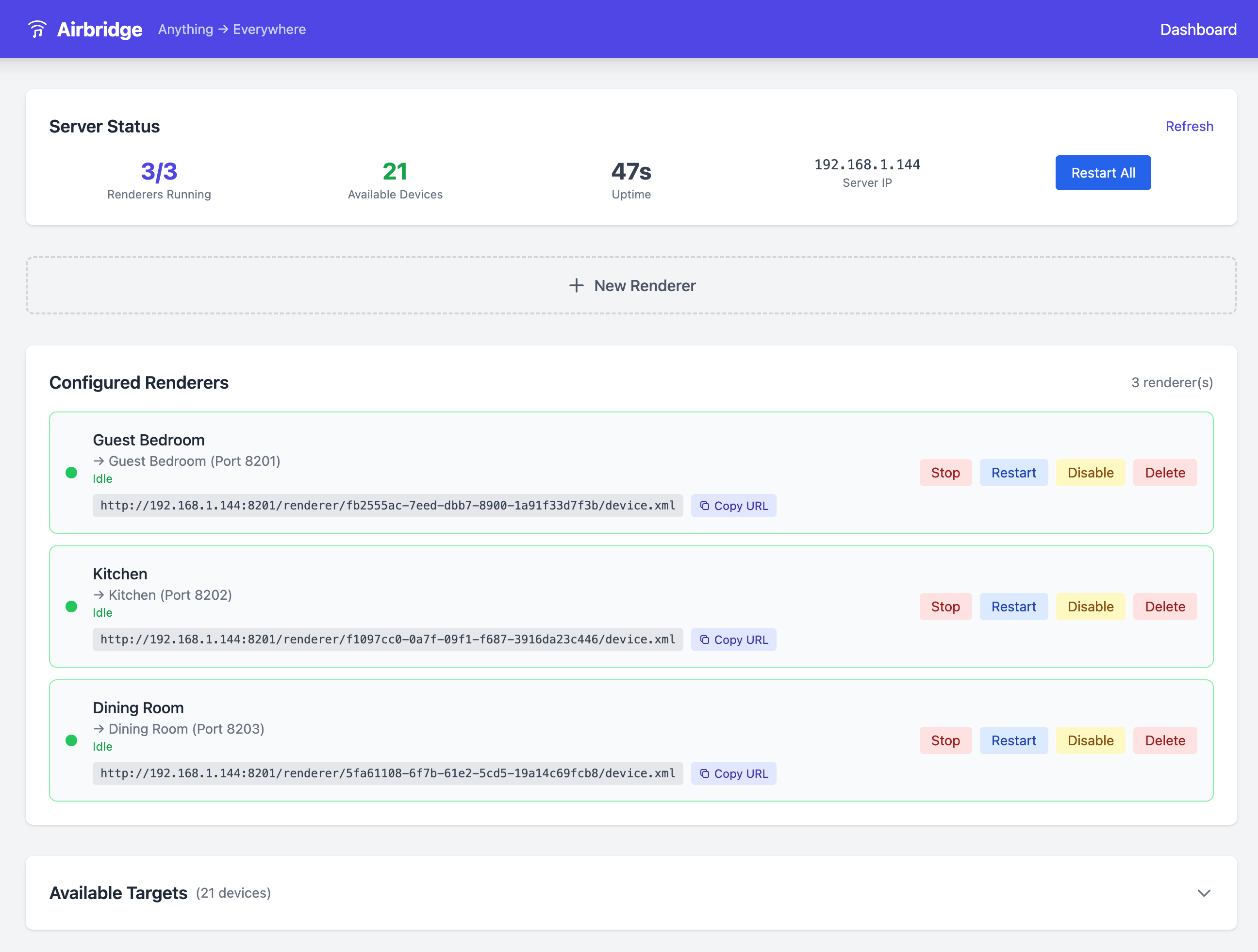
Why?
Some AirPlay devices (like Juke Audio multi-zone speakers) have compatibility issues with certain AirPlay implementations. Airbridge works around this by:
- Presenting itself as standard DLNA/UPnP renderers
- Receiving audio streams via HTTP
- Forwarding to AirPlay devices using libraop
- Or sending media URLs to Chromecast devices via CASTV2
Features
- 🎵 Virtual DLNA renderer per AirPlay/Chromecast zone
- 📡 Automatic device discovery (mDNS for both AirPlay and Chromecast)
- 📺 Chromecast support - cast DLNA audio to Chromecast devices
- 🌐 Web admin interface with real-time status updates via WebSocket
- 🎛️ Live playback status (Playing/Idle/Paused) with instant UI updates
- ⚙️ YAML configuration for device filtering and aliases
- 🔊 Volume control support
- 🐳 Docker deployment with Unraid support
- ✅ Comprehensive test suite with CI/CD
Status
⚠️ Early Development (v0.x) - Core functionality works but expect breaking changes, bugs, and missing features. Not yet recommended for production use.
What works:
- DLNA renderer creation and discovery
- Audio streaming to AirPlay devices
- Chromecast as output target (URL-based media playback)
- Web admin interface with live status updates
- Real-time playback state via WebSocket
- Docker/Unraid/Home Assistant deployment
- Full test suite with CI/CD pipeline
Known Limitations:
- Chromecast receiver support (casting FROM apps like Spotify TO Airbridge) is blocked by Google's device authentication requirements
Quick Start
Option 1: Docker (Recommended)
docker run -d --network=host -v airbridge-data:/data ghcr.io/kenyonj/airbridge:latest
Access the web admin at http://localhost:8200/admin
Option 2: Build from Source
1. Download cliraop binary
Get the pre-built cliraop binary for your platform from libraop releases and place it in the bin/ directory:
mkdir -p bin
# Download appropriate binary for your platform
# Rename to: bin/cliraop-macos-arm64, bin/cliraop-linux-amd64, etc.
chmod +x bin/cliraop-*
2. Build airbridge
make build
3. Run
Web admin interface (recommended):
./bin/airbridge --web
Bridge a single device:
./bin/airbridge --serve --target "Guest Bedroom"
Test streaming to a device:
./bin/airbridge --test "Guest Bedroom"
Usage
Usage of ./bin/airbridge:
  -db string
      Path to SQLite database (default "./airbridge.db")
  -port int
      HTTP port for DLNA server (default 8200)
  -serve
      Run as DLNA renderer server (single device)
  -target string
      Target AirPlay device name (for serve mode)
  -test string
      Test streaming to device (by name)
  -version
      Print version
  -web
      Run with web admin interface
Configuration
Create a config.yaml file (or place at ~/.config/airbridge/config.yaml):
# HTTP port for the first renderer (subsequent use incremental ports)
http_port: 8200

# Enable automatic discovery of AirPlay devices
auto_discover: true

# Prefix for DLNA friendly names
name_prefix: "Airbridge"

# Optional: Filter to only include specific devices
device_filter:
  - "Kitchen"
  - "Living Room"
  - "Guest Bedroom"

# Optional: Device-specific configuration
devices:
  - name: "Kitchen"
    alias: "Kitchen Bridge"
    port: 8201

  - name: "Office"
    enabled: false  # Exclude this device
Architecture
┌─────────────┐     DLNA/UPnP     ┌─────────────────┐     RAOP      ┌──────────────┐
│ Media       │ ────────────────▶ │   Airbridge     │ ────────────▶ │ AirPlay      │
│ Server      │                   │                 │               │ Speakers     │
│ (MA, Plex)  │                   │ ┌─────────────┐ │               └──────────────┘
└─────────────┘                   │ │ Virtual     │ │
                                  │ │ DLNA        │ │     CASTV2    ┌──────────────┐
                                  │ │ Renderers   │ │ ────────────▶ │ Chromecast   │
                                  │ └─────────────┘ │   (URL-based) │ Devices      │
                                  └─────────────────┘               └──────────────┘
Device Types
| Type | Protocol | How it works |
|---|---|---|
| AirPlay | RAOP via cliraop | Airbridge receives audio, transcodes, and pushes to device |
| Chromecast | CASTV2 via go-chromecast | Airbridge sends URL, device pulls media directly |
How It Works
- Discovery: Airbridge uses mDNS to discover AirPlay (
_raop._tcp) and Chromecast (_googlecast._tcp) devices - SSDP: For each device, it advertises a virtual DLNA MediaRenderer
- SOAP: When a media server (like Music Assistant) connects, it handles AVTransport and RenderingControl SOAP requests
- Streaming:
- AirPlay: Audio is received via HTTP and piped to the
cliraopbinary, which streams to the device - Chromecast: The media URL is sent to the Chromecast, which fetches and plays it directly
- AirPlay: Audio is received via HTTP and piped to the
Use with Music Assistant
- Start airbridge:
./bin/airbridge --web - In Music Assistant, go to Settings → Players
- You should see "Airbridge (Device Name)" devices appear as DLNA players
- Select a device and start playing music!
Web Admin Interface
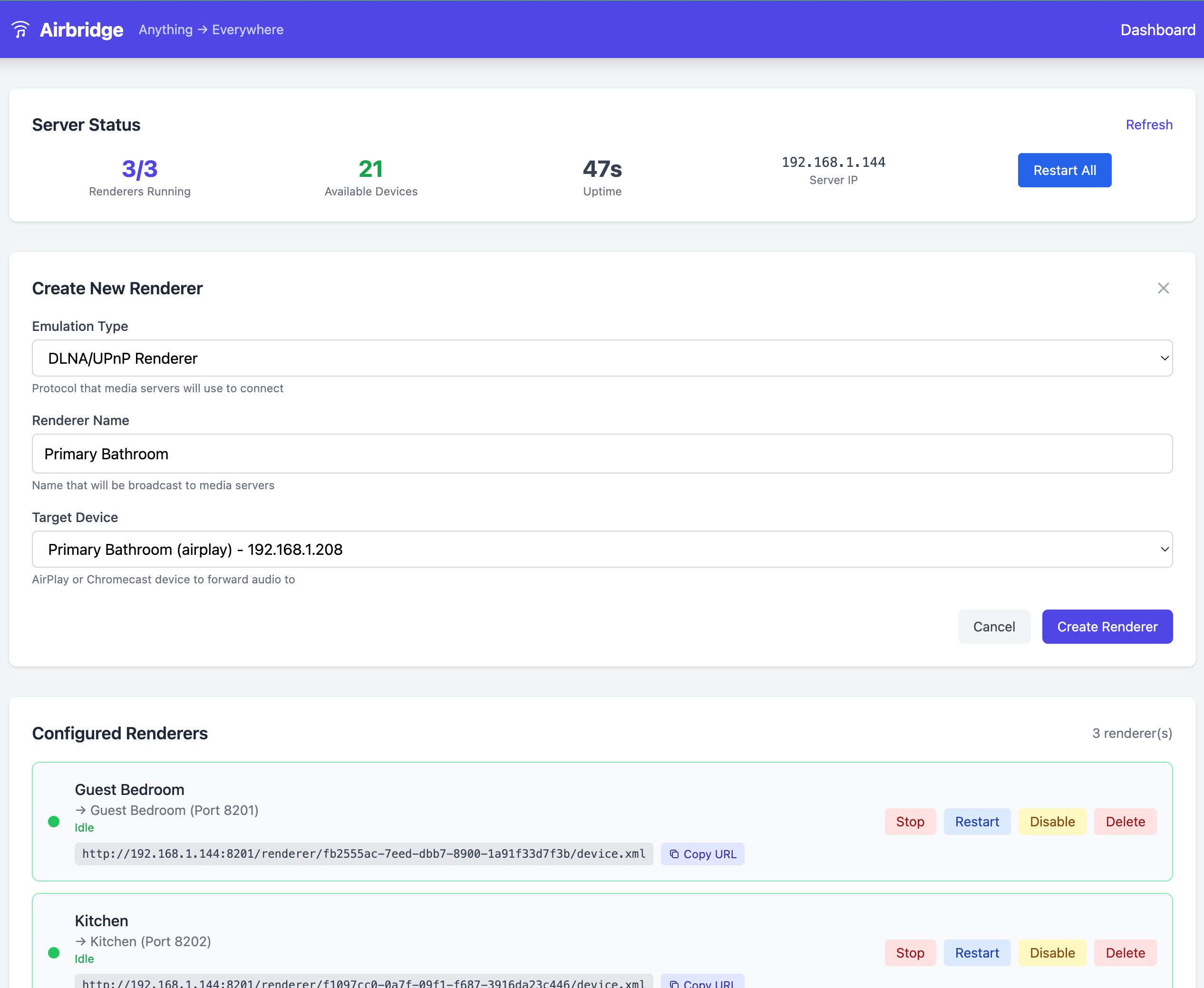
The web admin (--web mode) provides a modern UI for managing renderers:
- Real-time status - See which renderers are Playing, Idle, or Paused (updates via WebSocket)
- Easy renderer creation - Click "New Renderer" to create a virtual DLNA device
- Device discovery - Automatically finds AirPlay and Chromecast devices on your network
- Full control - Start, stop, restart, enable/disable, or delete renderers
Docker
Run with Docker
# Run with web admin interface
docker run -d --network=host -v airbridge-data:/data ghcr.io/kenyonj/airbridge:latest
Note: Host network mode is required for mDNS device discovery and SSDP announcements.
Unraid
Airbridge is available in the Unraid Community Applications store. Search for "Airbridge" or manually install using the template at unraid/airbridge.xml.
Home Assistant
Airbridge is available as a Home Assistant add-on:
- Go to Settings → Add-ons → Add-on Store
- Click the ⋮ menu → Repositories
- Add:
https://github.com/kenyonj/airbridge - Click Close and refresh the page
- Find "Airbridge" in the add-on list and click Install
- Start the add-on and open the Web UI to manage devices
Build Docker Image Locally
make docker-build
make docker-run
Development
Prerequisites
- Go 1.22+
- Docker (for building libraop, optional)
- Make
Building
make build      # Build airbridge
make clean      # Clean build artifacts
Local Development
The easiest way to run Airbridge locally is with the dev script, which rebuilds and runs in one command:
./scripts/dev.sh --web        # Web admin interface (recommended)
./scripts/dev.sh --serve "Device Name"  # Single device
Project Structure
.
├── cmd/airbridge/       # Main application entry point
├── internal/
│   ├── bridge/          # Unified DLNA bridge with embedded devices
│   ├── database/        # SQLite database for web mode
│   ├── discovery/       # mDNS-based AirPlay and Chromecast discovery
│   ├── httpserver/      # HTTP server for UPnP endpoints
│   ├── player/          # Player implementations (RAOP + Chromecast)
│   ├── renderer/        # Multi-device renderer manager
│   ├── ssdp/            # SSDP announcement/discovery
│   ├── state/           # Playback state management
│   ├── upnp/            # UPnP/DLNA SOAP handlers
│   └── web/             # Web admin interface
├── pkg/
│   ├── config/          # YAML configuration
│   └── raop/            # cliraop subprocess wrapper
└── unraid/              # Unraid Community Apps template
Testing
make test           # Run all tests
make lint           # Run golangci-lint
go test -race ./... # Run with race detection
Tested With
- ✅ Juke Audio 8-zone multi-room speakers (AirPlay)
- ✅ HomePod mini (AirPlay)
- ✅ Apple TV (AirPlay)
- ✅ Sonos (AirPlay mode)
- ✅ Google Chromecast (Chromecast)
- ✅ Google Nest Hub (Chromecast)
Troubleshooting
Device not discovered
- Ensure your device is on the same network
- For AirPlay:
dns-sd -B _raop._tcp - For Chromecast:
dns-sd -B _googlecast._tcp - Check firewall settings allow mDNS (port 5353 UDP)
Audio doesn't play (AirPlay)
- Verify cliraop binary is in
bin/directory - Test directly:
./bin/airbridge --test "Device Name" - Check logs for connection errors
Audio doesn't play (Chromecast)
- Ensure the media URL is accessible from the Chromecast's network
- Chromecast pulls the media directly - it needs to reach the URL
- Check logs for CASTV2 connection errors
DLNA renderer not visible
- Ensure port 8200+ is not blocked by firewall
- Try:
curl http://localhost:8200/device.xmlto verify HTTP server
Unraid: Changing the default port
When changing the default port in Unraid:
- Set the
AIRBRIDGE_PORTenvironment variable to your desired port - Expand Advanced View in the container settings
- Update the WebUI field to match the same port (e.g.,
http://[IP]:[PORT:XXXX]/admin)
License
MIT License - see LICENSE
Support
If you find Airbridge useful, consider supporting development:


Credits
- philippe44/libraop - RAOP client library
- vishen/go-chromecast - Chromecast client library
- tr1v3r/rcast - DLNA renderer reference
- grandcat/zeroconf - mDNS library
Categories
Related apps
Explore more like this
Explore allDetails
ghcr.io/kenyonj/airbridgeRuntime arguments
- Web UI
http://[IP]:[PORT:8200]/admin- Network
host- Privileged
- false
Template configuration
Persistent storage for database and configuration
- Target
- /data
- Default
- /mnt/user/appdata/airbridge
- Value
- /mnt/user/appdata/airbridge