

ai-shuffle
Docker app from HobbyCoder's Repository
Overview
Readme
View on GitHubAI Shuffle
Your AI agents, on your own machines, from anywhere.
AI Shuffle is a free, open-source workspace for running AI agents on your PC, home server or NAS. Sign in with the AI account you already have and put agents to work: writing code, running scheduled jobs, answering your messages, or handling chores across your machines. Check in from your phone.
Watch the tour · Download · Docs · Discord
Why AI Shuffle
- Use the AI you already pay for. Claude, ChatGPT or SuperGrok subscriptions, or API keys for Claude, OpenAI, OpenRouter, xAI and local models. Your provider bills you directly; we add no markup and never see your prompts.
- Runs on your hardware. Code, chats and keys stay on your machines. No account needed.
- Mix models freely. Any signed-in model can hand work to any other. A Claude session can delegate to a ChatGPT model, or the other way round.
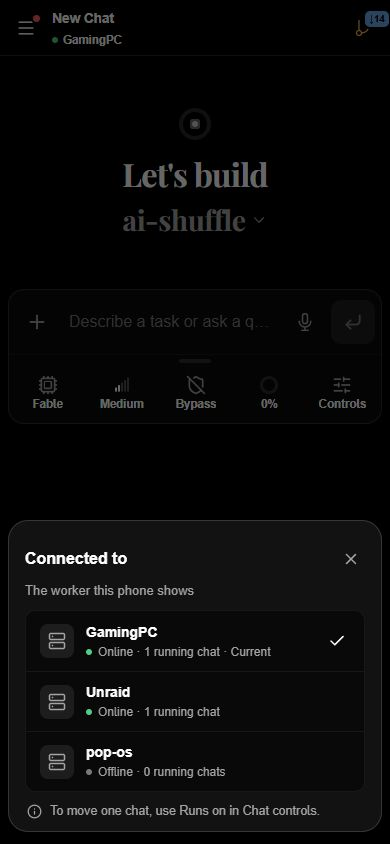
- All your machines, one app. Connect your desktop, laptop and server, move chats between them, and check in from the Android app.
- All your usage in one place. See what's left on every plan, with reset times, without visiting each provider's site.
- A smarter harness. Every session runs on Fluid, our own agent engine: compaction that forgets nothing, memory that learns, and batched tool calls.
- Free and open source. AGPL-3.0, with no license key, trial or usage cap.
Install
Every download is free and needs no account or license key.
| Platform | How |
|---|---|
| Windows or Linux | Desktop app with a built-in worker, from hobbycoders.com |
| Server or NAS | Docker Compose (below) |
| Android | APK from the downloads page; Google Play testing track. Connects to your workers; does not run agents itself. |
| macOS and iOS | Coming soon |
Docker: a 64-bit Intel or AMD machine with Docker; 8 GB of memory recommended. In an empty folder:
curl -fsSLo compose.yaml https://raw.githubusercontent.com/HobbyCoders/ai-shuffle/main/docs/install/compose/compose.yaml
curl -fsSLo .env https://raw.githubusercontent.com/HobbyCoders/ai-shuffle/main/docs/install/compose/env.example
docker compose up -d
Then open http://localhost:8000 on that machine. It pulls the public image ghcr.io/hobbycoders/ai-shuffle-server; the Docker Compose guide covers network access and storage.
Next, follow first run to connect your AI account. For a Claude subscription, setup can install Claude Code with Anthropic's installer; you sign in yourself, and no Claude Code binary is bundled.
What you can do
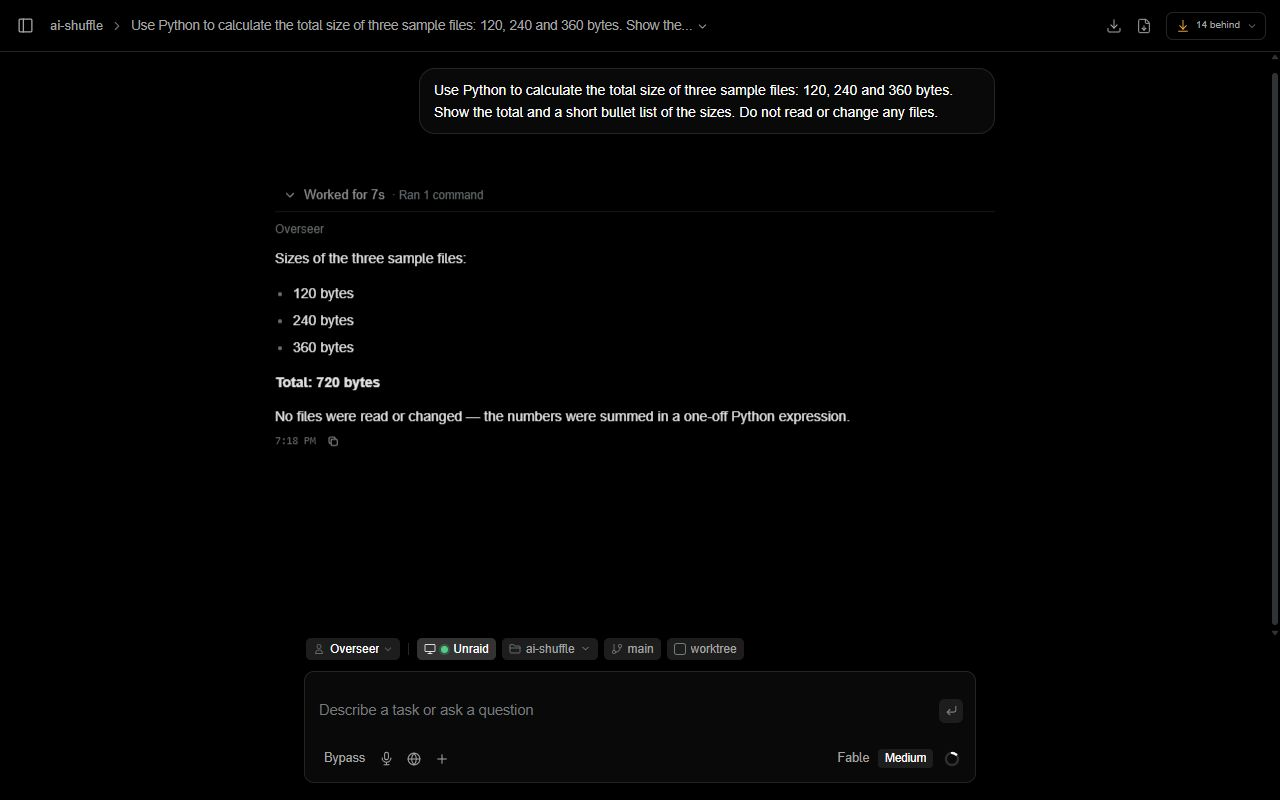
- Code with agents. Point a project at a folder; agents read, edit, test and commit. Run several chats at once, each in its own git worktree, and let agents hand parts of a job to subagents.
- Work across machines. A worker network shares settings, keys and chats. Move a chat mid-task, or let an agent start and run chats on your other machines for you.
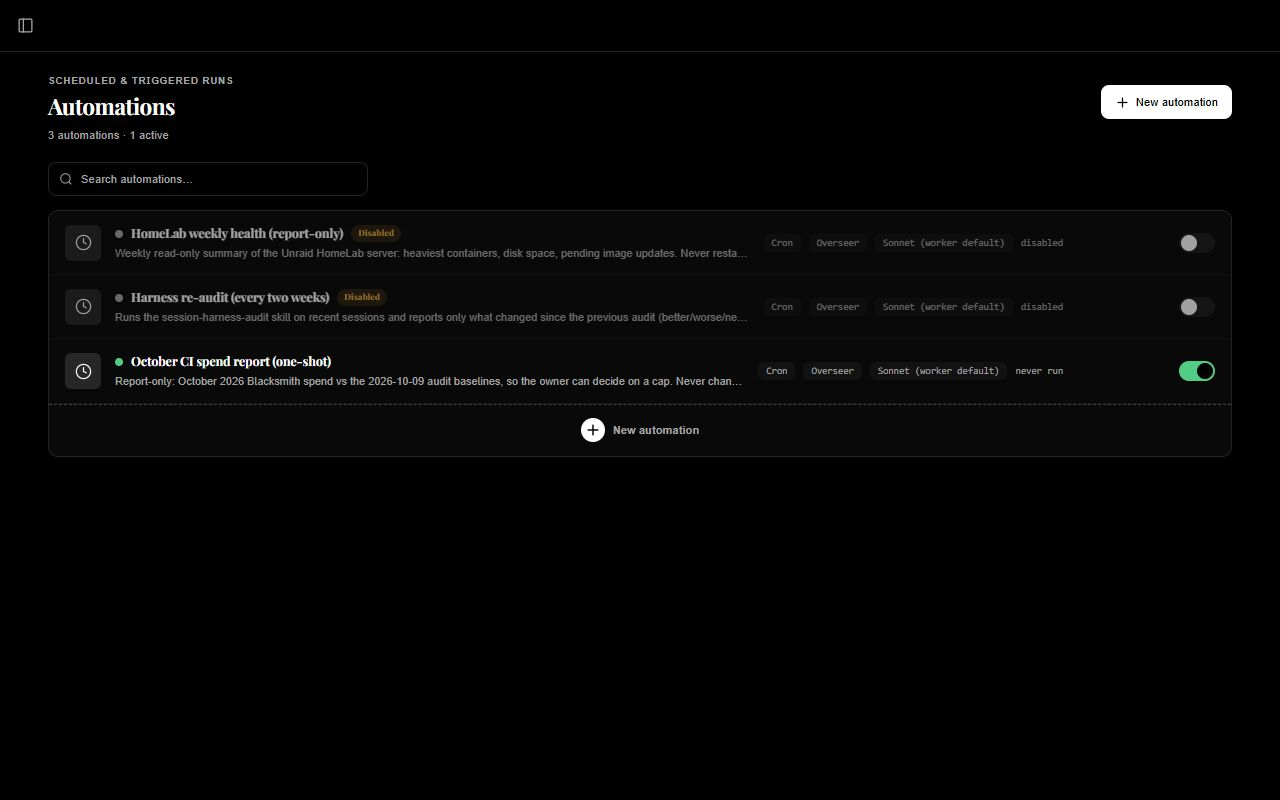
- Automate. Automations run agents on a schedule, a timer, a webhook or an incoming message, with spending limits and approval steps.
- Connect your apps. Connectors for Telegram, Discord, Slack, WhatsApp, Signal, iMessage, Gmail, Home Assistant, Philips Hue, Spotify and more, plus any MCP server and plugins.
- Talk and create. Live voice calls on OpenAI's realtime voice models, dictation, and images, video and audio from fal.ai's model library. Higgsfield support is coming soon.
- Stay in control. Choose what each agent may do, approve risky steps, and block commands with hooks.
- And more. Terminals beside the chat, notes, and a REST API.
Fluid: our own agent harness
Fluid is the engine that runs your agents: it talks to the model, runs tools, asks for approval, and manages context and memory. It lives in fluid/ and also runs on its own from the command line.
What we fixed. If you have run long sessions in other agent harnesses, you have likely hit these:
- Compaction that forgets nothing. Most harnesses compact by having the model summarize, which is slow and lossy; small drifts from your original ask compound over long work. Fluid compacts in seconds with no summary pass. The full transcript is always kept, and the model can search and re-read any part of it.
- Memory that maintains itself. Instead of a memory file that bloats and needs constant pruning, the model keeps checking and updating what it knows from what you say and correct.
- Skills it writes for you. Work you repeat becomes a reusable skill automatically. Each skill is tested before it is kept, and broken ones are flagged.
- Many tool calls in one step. A Python layer lets the model batch independent tool calls in a single step instead of one round trip each, with every call still going through approvals.
- Cheap long sessions. The prompt is laid out so providers can reuse almost all of it between turns.
Why not just wrap each provider's agent? Claude Code, Codex and the rest each have their own tools, permissions, memory and limits. Wrapping them would mean features that differ by provider and bugs we can't fix. With Fluid, an agent works the same way whichever model you pick.
The exception: Claude subscriptions. Anthropic only allows Claude Pro and Max subscriptions through its own Claude Code, so for those Fluid drives the official Claude Code CLI and never reuses your sign-in elsewhere. Those sessions keep AI Shuffle's tools, connectors and memory, but compaction and tool calling are Claude Code's own. For Claude fully inside Fluid, use an Anthropic API key.
How each provider runs
| Provider | How Fluid runs it | Sign-in |
|---|---|---|
| Anthropic (Claude) API | Fluid's own loop | API key |
| OpenAI | Fluid's own loop | API key or ChatGPT subscription |
| xAI | Fluid's own loop | API key or SuperGrok subscription |
| OpenRouter and OpenAI-compatible gateways | Fluid's own loop | API key |
| Local models (llama.cpp, Ollama and similar) | Fluid's own loop | Optional key |
| Claude Pro or Max subscription | Official Claude Code CLI, driven by Fluid | Claude Code's own sign-in |
Free and Cloud
The app is free: run it on your own hardware, on your home network or your own VPN, with no HobbyCoders account. Updates and same-network worker sync are free too.
AI Shuffle Cloud is the optional paid part for reaching your workers from anywhere without a VPN: remote access, sync across networks, public connector endpoints, plugin sign-in relays and in-app support. A free account includes two remote workers, no card needed. Ending a plan never disables the local app, and AI usage is always between you and your provider.
Contributing, security and license
- Contributing: outside contributions are welcome. See CONTRIBUTING.md for DCO sign-off, local checks and draft pull requests; team setup is in docs/internal/CONTRIBUTING.md.
- Security: report vulnerabilities privately to support@hobbycoders.com, and never post secrets in issues. See SECURITY.md and SUPPORT.md.
- License: GNU AGPL-3.0 only. Copyright (c) 2026 HobbyCoders. "AI Shuffle", "HobbyCoders" and the shuffle mark are trademarks of HobbyCoders; modified builds may not ship under those names. See TRADEMARKS.md and third-party notices.
- Not affiliated: AI Shuffle is not affiliated with Anthropic, OpenAI, xAI or any other AI provider. None of them build, endorse or support it; their names and marks belong to their respective owners.
Media gallery
1 / 3Requirements
Categories
Related apps
Explore more like this
Explore allDetails
ghcr.io/hobbycoders/ai-shuffle-server:latestRuntime arguments
- Web UI
http://[IP]:[PORT:8000]/- Network
bridge- Shell
bash- Privileged
- false
- Extra Params
--restart=unless-stopped --stop-timeout=90 --shm-size=1g --pids-limit=8192 --security-opt seccomp=unconfined --security-opt systempaths=unconfined --security-opt apparmor=unconfined
Template configuration
Port for the web interface and API.
- Target
- 8000
- Default
- 8000
- Value
- 8000
Your projects, as ordinary files you can open from a share. Point this at a share if you want to browse them over the network.
- Target
- /workspace
- Default
- /mnt/user/appdata/ai-shuffle/workspace
- Value
- /mnt/user/appdata/ai-shuffle/workspace
Database, encryption key, chats and saved credentials. Back up this folder (with the container stopped) together with the others below.
- Target
- /data
- Default
- /mnt/user/appdata/ai-shuffle/data
- Value
- /mnt/user/appdata/ai-shuffle/data
Optional. Sets the sign-in password on the first start only (at least 12 characters). Leave empty to create it in the browser on your first visit. Change it later in Settings, Security.
- Target
- OWNER_PASSWORD
App settings, skills and plugins.
- Target
- /home/appuser/.fluid
- Default
- /mnt/user/appdata/ai-shuffle/fluid
- Value
- /mnt/user/appdata/ai-shuffle/fluid
Sign-in and settings for the Claude Code CLI, if you use a Claude subscription.
- Target
- /home/appuser/.claude
- Default
- /mnt/user/appdata/ai-shuffle/claude
- Value
- /mnt/user/appdata/ai-shuffle/claude
Provider CLI programs installed on demand, such as Claude Code, kept across updates.
- Target
- /home/appuser/.local
- Default
- /mnt/user/appdata/ai-shuffle/local
- Value
- /mnt/user/appdata/ai-shuffle/local
GitHub CLI sign-in.
- Target
- /home/appuser/.config/gh
- Default
- /mnt/user/appdata/ai-shuffle/gh
- Value
- /mnt/user/appdata/ai-shuffle/gh
The built-in browser's profile, so sites you sign in to stay signed in.
- Target
- /home/appuser/chrome-profile
- Default
- /mnt/user/appdata/ai-shuffle/chrome-profile
- Value
- /mnt/user/appdata/ai-shuffle/chrome-profile
User ID that owns your project files. 99 (nobody) is the Unraid default.
- Default
- 99
- Value
- 99
Group ID that owns your project files. 100 (users) is the Unraid default.
- Default
- 100
- Value
- 100
Keep false for plain http:// on your LAN. Set true only when you reach AI Shuffle through HTTPS (a reverse proxy or Tailscale Serve).
- Target
- COOKIE_SECURE
- Default
- false
- Value
- false
Optional. The address of your reverse proxy as the container sees it, for example 172.17.0.1. Never list your whole network.
- Target
- TRUSTED_PROXIES
off, on or required. on keeps agents' shells away from AI Shuffle's own database password and keys. Back up first; see the install guide.
- Target
- AGENT_ISOLATION
- Default
- off
- Value
- off