

agendav
Docker app from Vilhjalmr's Repository
Image contains AgenDAV, php 7.4.28 and Apache2, setup for external MySQL database and DAV server Initial run will create example.settings.php and example.timezone.ini that will…
Overview
Readme
View on GitHubAgenDAV - CalDAV web client
Maintenance mode Build Status Docs Made With License Contribution
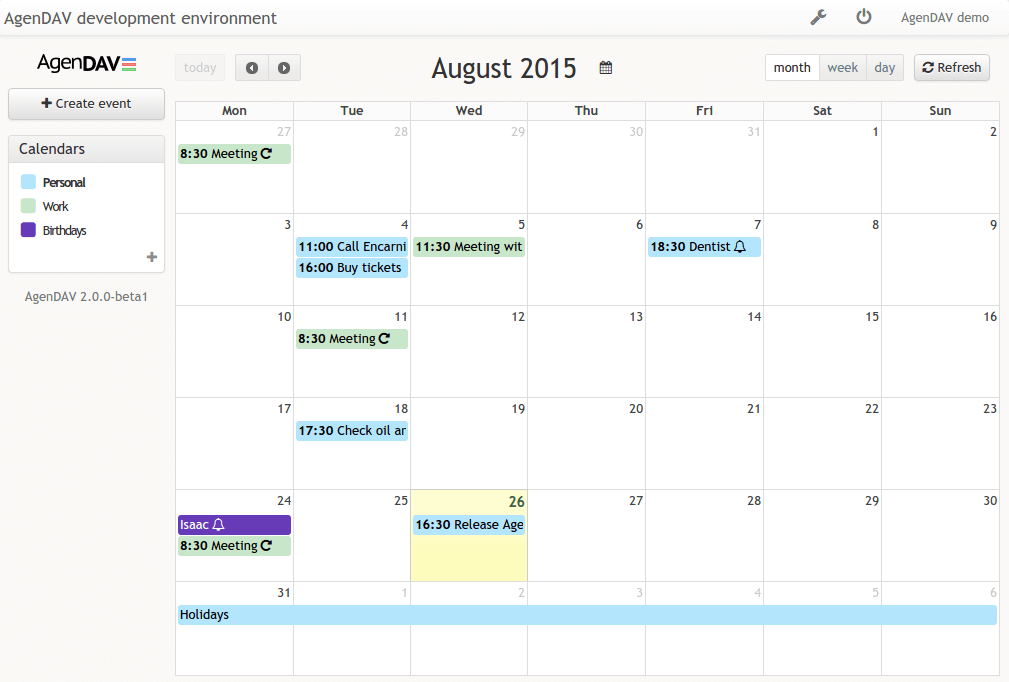
AgenDAV is a self-hosted, open-source web client to manage your own and shared calendars.
It speaks the open CalDAV standard, so you can point it at any compliant server - Baïkal, Nextcloud, DAViCal, Radicale, and others - and keep using the same calendars from other apps like Thunderbird, Apple Calendar, and DAVx5. AgenDAV itself just displays the events and sends your changes back to the CalDAV server.
Features
- Calendar views - Month, Week, Day, and List
- Event management - create, edit, duplicate, and delete events
- Drag and drop - move events to a new time slot or day, resize to adjust duration
- Recurring events - create and edit repeating events with recurrence rules
- Reminders - per-event reminders with a configurable default for new events
- Event status - cancelled, confirmed and tentative events marked differently
- Event colors - per-event colors on top of calendar colors
- Calendar delegations - access calendars delegated by other users (read or read/write)
- iCal subscriptions - subscribe to external iCal feeds
- User preferences - each user may set language, timezone, week start, hide weekends and working hours
- Dark mode - light, dark or automatic following system preference
- Kiosk mode - read-only calendar view for unattended wall screens
- Multi-language - localized UI with fallback to English
- Multiple CalDAV backends - works with Baikal, DAViCal, Radicale, Nextcloud, and others
- Interoperable - the same calendars stay usable from other CalDAV apps like Thunderbird or DAVx5
- Multiple database backends - MySQL, PostgreSQL, SQLite
Requirements
AgenDAV requires:
- A web server
- PHP >= 8.5.0
- PHP mbstring extension
- PHP openssl extension
- PHP cURL extension
- A database supported by Doctrine-DBAL like MySQL, PostgreSQL, SQLite
- A CalDAV server like Baïkal, DAViCal, or Radicale
- Optional: nodejs & npm to build assets (releases include a build)
Documentation
https://agendav.readthedocs.io/
Installation
Docker Image
Agendav offers no official Docker image.
A docker-compose.yml is provided in this repository for local
development though. Run docker compose up from the repository root
to bring up AgenDAV (PHP-Apache, on port 8080), MariaDB,
and a Baikal CalDAV server (on port 8081).
The asset build the first time the stack starts. Run
bash docker/reset-events.sh to reset the docker calendars with
example events.
Source
https://github.com/agendav/agendav
License
GNU General Public License v3.0 or later https://spdx.org/licenses/GPL-3.0-or-later.html
Changelog
See CHANGELOG.md
Maintenance Mode
AgenDAV is in maintenance mode currently. This means that the maintainers choose to prioritize stability and compatibility over new features for now.
- There is no active development & new major features are not planned
- New features may be added by PRs however
- New features may be proposed in issues tickets, send as Pull Requests, and the maintainers will review and presumably merge them
- PRs for bugfixes are welcome and will be reviewed & merged
- PRs to keep the software compatible with new PHP versions or the like are welcome and will be reviewed & merged
- Critical security concerns will be addressed
Contribution
Contributions are welcome!
Categories
Download Statistics
Total Downloads Over Time
Related apps
Explore more like this
Explore allLinks
Details
vilhjalmr26/agendavRuntime arguments
- Web UI
http://[IP]:[PORT:80]- Network
bridge- Shell
sh- Privileged
- false
Template configuration
Http port for accessing calendar
- Target
- 80
- Default
- 80
Config path, where settings.php and timezone.ini must reside.
- Target
- /config
- Default
- /mnt/user/appdata/agendav/