

Aether Glass
Plugin from aegisnir
Overview
Readme
View on GitHub Aether Glass
A deep-violet frosted-glass theme for the Unraid webGUI.
Unofficial. Aether Glass is a community theme. It is not made, endorsed or supported by Lime Technology. "Unraid" is a trademark of Lime Technology, Inc.
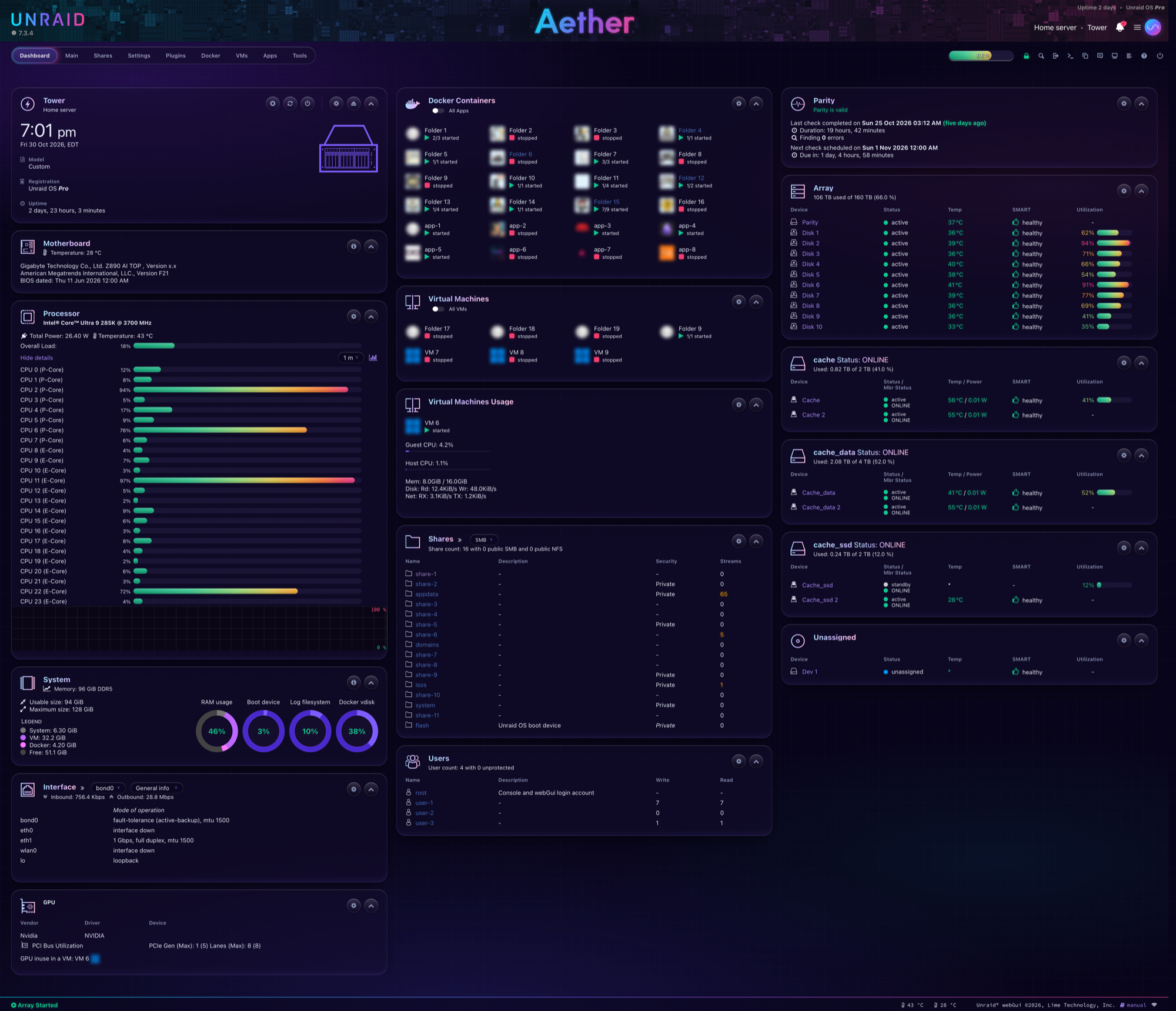
| Login | Settings |
|---|---|
 |
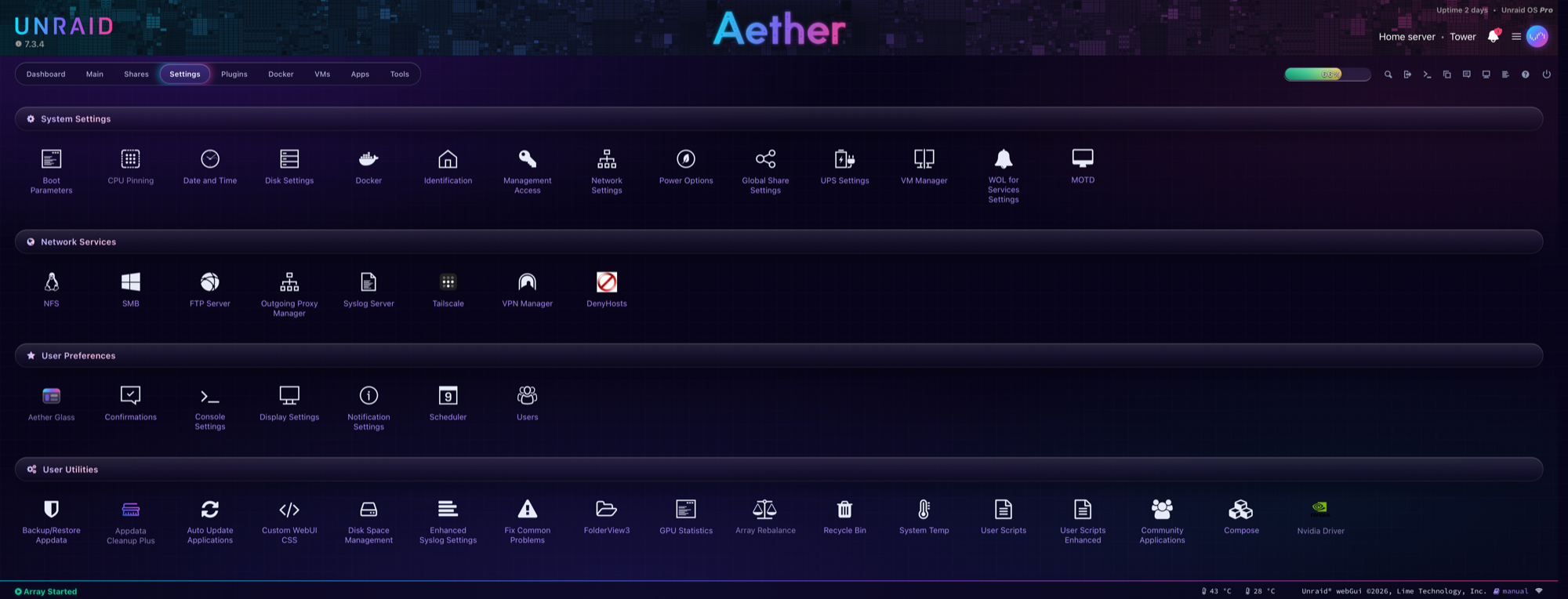 |
Screenshots use anonymized data.
What it changes
- Look: a violet aurora behind frosted-glass panels, cyan → violet → pink accents, the system font (SF Pro on Apple devices, Segoe UI on Windows).
- Status colours: sea green for normal, amber for warning, crimson rose for critical, with soft glows.
- Controls: pill buttons and fields, macOS-style toggles, a segmented glass main menu.
- Pages covered: every normal page, the login page, the reboot and shutdown page, and the pop-up log windows plugins open (for example a "Downloading Package" window).
It is CSS only. It changes how pages look and nothing else: the array, Docker, VMs, shares and data are not touched. The worst case is a page that looks wrong, and the Settings page or the kill switch puts it back to stock.
Requirements
- Unraid 7.2 or newer. Tested on 7.3.4.
- Display theme set to Black:
Settings → Display Settings → Dynamix color theme. On another theme, normal pages stay stock and only the login page is themed.
Install
Make a flash backup first:
Main → Boot Device → Flash → Flash Backup.Open
Plugins → Install Pluginand paste:https://raw.githubusercontent.com/aegisnir/Aether-Glass-Unraid-Theme/main/aether-glass.plgOpen
Settings → Aether Glassand click Approve this version and turn on. The theme stays off until you do.Reload the page. If it still looks stock, reload while holding Shift.
Dev channel (optional)
New changes land on the dev branch first and are tested there before they reach main. main is always the default: the install link above, and Community Apps. If you'd like to try changes early, install the dev build instead:
https://raw.githubusercontent.com/aegisnir/Aether-Glass-Unraid-Theme/dev/aether-glass.plg
- It replaces your normal install (same plugin, so the two never run together) and from then on updates from
dev. Its version ends in-dev, soPluginsshows which channel you're on. - Dev builds can have rough edges. Please report them in the issues.
- To go back, install the
mainlink above. Your settings are kept. If the dev build is newer than the current release, you stay on that version until the next release passes it.
Settings page
Settings → Aether Glass shows the Unraid version, the approved version, the kill switch, whether the Display theme is Black, and which pages are themed.
| Button | Does |
|---|---|
| Approve this version and turn on | records the current Unraid version as approved and applies the theme |
| Turn off | switches the kill switch on and goes back to stock, also after reboots |
| Turn back on | switches the kill switch off and applies the theme again, if this version is approved |
Safety features
- Pauses after Unraid updates. The theme only loads on the Unraid version you approved. After an update it stays off, a notification says so, and you check the stock pages before approving the new version. A webGUI change in a new release can't leave you with a broken-looking UI you didn't choose.
- Kill switch. If the file
config/plugins/aether-glass/DISABLEDexists on the flash drive, the theme never loads. It works even with the flash drive plugged into another computer. - Exact restore. Before changing anything, the plugin saves untouched copies of Unraid's original files in memory. Turning the theme off or uninstalling copies them back byte for byte.
- Nothing on the flash drive changes. The theme is added to the copies of the webGUI files that Unraid loads into memory at boot. Unraid's own files on the flash drive are never edited, so every boot starts from stock.
- Downloads are verified. Each file the plugin downloads is checked against a SHA256 fingerprint in the
.plg. A file that doesn't match is refused.
Uninstall
Plugins → Installed Plugins → Aether Glass → Remove. The webGUI goes back to stock right away, and the plugin deletes its own files from the flash drive and from memory.
If the webGUI won't load
This should never happen from a CSS theme, but just in case:
- Shut down the server and plug the flash drive into another computer.
- Create an empty file named
DISABLEDinconfig/plugins/aether-glass/. - Put the flash drive back and boot. The theme won't load. Delete the file later to allow it again.
Compatibility
| Tested with | Version |
|---|---|
| Unraid | 7.3.4 |
| Community Applications | 2026.07.21 |
The theme also styles a few popular plugins. Those rules only match when the plugin is installed and do nothing otherwise:
- Community Applications: the Apps page cards, side panel and spotlight.
- Dynamix System Buttons: the header power button and its menu icon.
- FolderView3: folder boxes and dropdowns on the Docker and VMs pages.
- Nvidia Driver and other plugins that open a pop-up log window: the window is themed.
Known conflicts:
- Custom WebUI CSS (or any plugin that adds its own CSS) loads after this theme and wins. Clear it out if something looks half-themed.
- Other theme plugins that change the same stylesheets. Use one theme plugin at a time.
Browsers: current Safari, Chrome, Edge and Firefox. Dropdown menus in Safari are drawn by macOS, so their highlight follows the system accent colour.
How it works
Unraid unpacks its webGUI into memory at every boot and reinstalls plugins from /boot/config/plugins/. At each boot this plugin:
- Checks that this Unraid version is approved and the kill switch is off.
- Saves untouched copies of three webGUI files in
/tmp. - Appends the theme to
themes/black.css(normal pages) anddefault-cases.css(the login page, which loads no other stylesheet), and inserts a<style>block intologging.htm(the pop-up log window). Each addition sits betweenAETHER-GLASS-STARTandAETHER-GLASS-ENDmarkers.
Results go to the system log under the tag aether-glass:
grep aether-glass /var/log/syslog
For maintainers: releasing
Two channels, chosen by the branch you're on. tools/release.sh sets the update link in the .plg to match and adds -dev to dev versions. Both channels download files from the version's tag: a new tag is an address GitHub hasn't cached, so a build installs as soon as it's pushed.
One-time setup per clone, so the push guard below runs (GitHub Desktop runs it too):
git config core.hooksPath tools/hooks
Dev build (on dev)
- Edit files in
source/. - Run
tools/release.sh 2026.11.02. The.plgbecomes2026.11.02-dev, updating from thedevbranch. - Add a line under
<CHANGES>in the.plg. - Commit, tag it
2026.11.02-devbefore pushing, then pushdevand the tag.
Release (to everyone)
- Merge
devintomain. - Run
tools/release.sh 2026.11.02onmain. It refuses to keep a-devversion and points the update link back atmain. - Commit, then tag that commit with the same version before pushing:
git tag 2026.11.02. The.plgdownloads its files from that tag, so a release pushed without it fails to install. - Push the commit and the tag:
git push && git push --tags. - Check the tag is on GitHub and each file in the
.plgdownloads with a matching SHA256. - Merge
mainback intodev, then runtools/release.shondevso it's a dev build again.
The push guard (tools/hooks/pre-push) stops a push to main while its .plg still has a -dev version or the dev update link. That's the one mistake that would move every user onto the testing channel.
Changes that don't touch source/ or the .plg (README, screenshots, tools) need no new version and no tag.
License
MIT, see LICENSE. No Lime Technology artwork is included: the header wordmark is recoloured using a mask of the logo file already on your server.
Media gallery
1 / 3Categories
Download Statistics
Downloads by Month
Related apps
Explore more like this
Explore allDetails
https://raw.githubusercontent.com/aegisnir/Aether-Glass-Unraid-Theme/main/aether-glass.plg