
All apps · 0 apps

Advanced-Automations
Docker app from grtgbln's Repository
Overview
Readme
View on GitHubAdvanced Automations
Advanced Automations is a local visual automation engine for Unfolded Circle Remote Two and Remote 3. It can run directly on a Remote as an ARM64 custom integration or as an external container managed by an external integration installer.
The integration combines entity triggers, conditions, commands, schedules, waits, HTTP requests, recovery behavior and persistent diagnostics in one workflow editor.
v2 architecture
Advanced Automations v2 uses ucapi-framework 1.9.6 for Integration-API lifecycle handling and entity abstractions, and Unfurled 0.5.0 for authenticated Remote Core REST/WebSocket communication.
ucapi-frameworkowns theIntegrationAPIinstance and standard Remote lifecycle/event handling.- Generated Remote and Sensor entities use the framework entity base classes.
Unfurledowns REST authentication, API-key rotation, Remote Core REST operations and the reconnecting WebSocket transport.CoreClientremains as a narrow application adapter so the automation engine, trigger manager and web editor are independent from transport-library internals.- The automation engine, database, configuration store and editor remain application-owned domain components.
See docs/ARCHITECTURE.md for the detailed boundary between the framework, Unfurled and the automation domain layer.
Screenshots
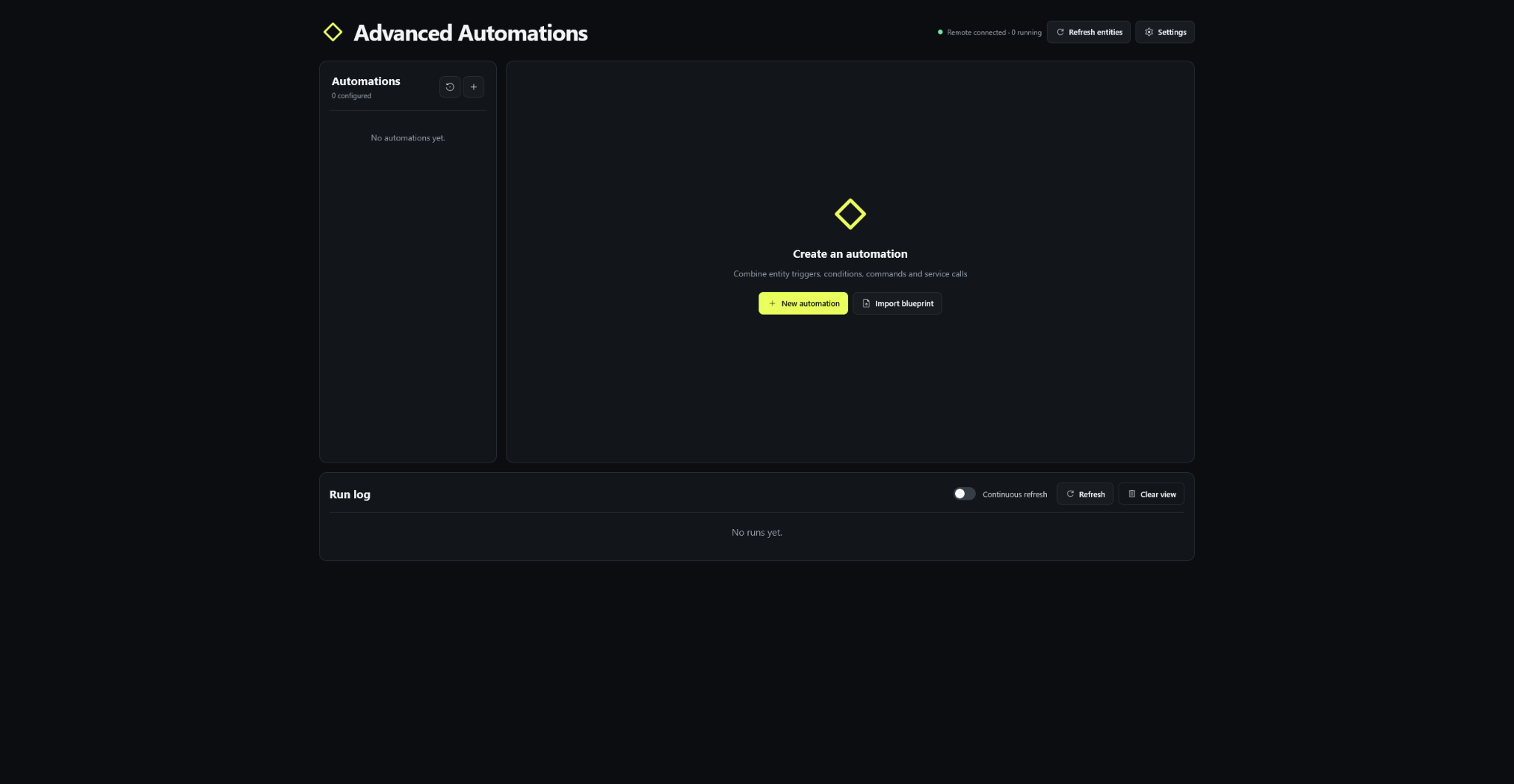
Automation dashboard
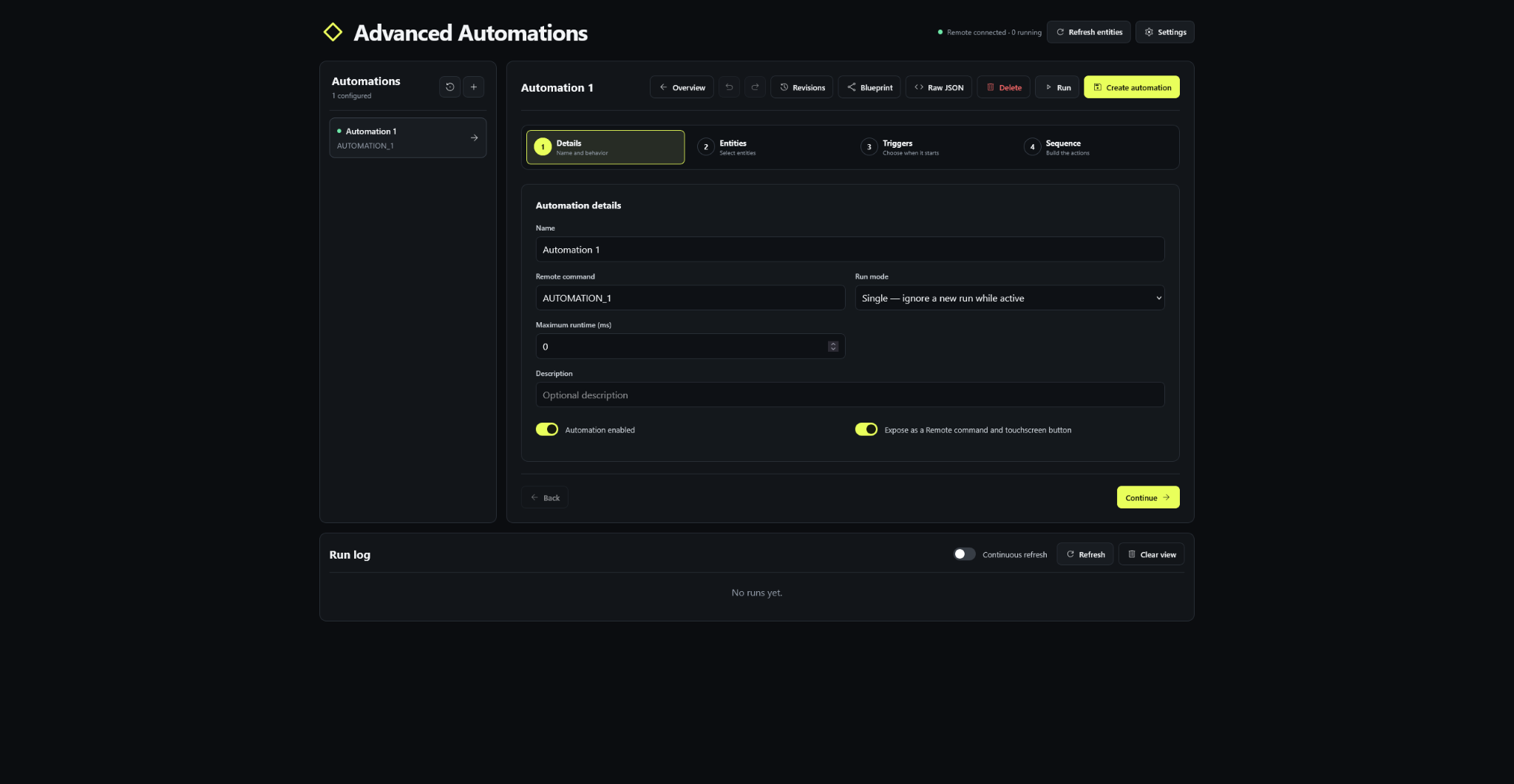
Guided automation editor
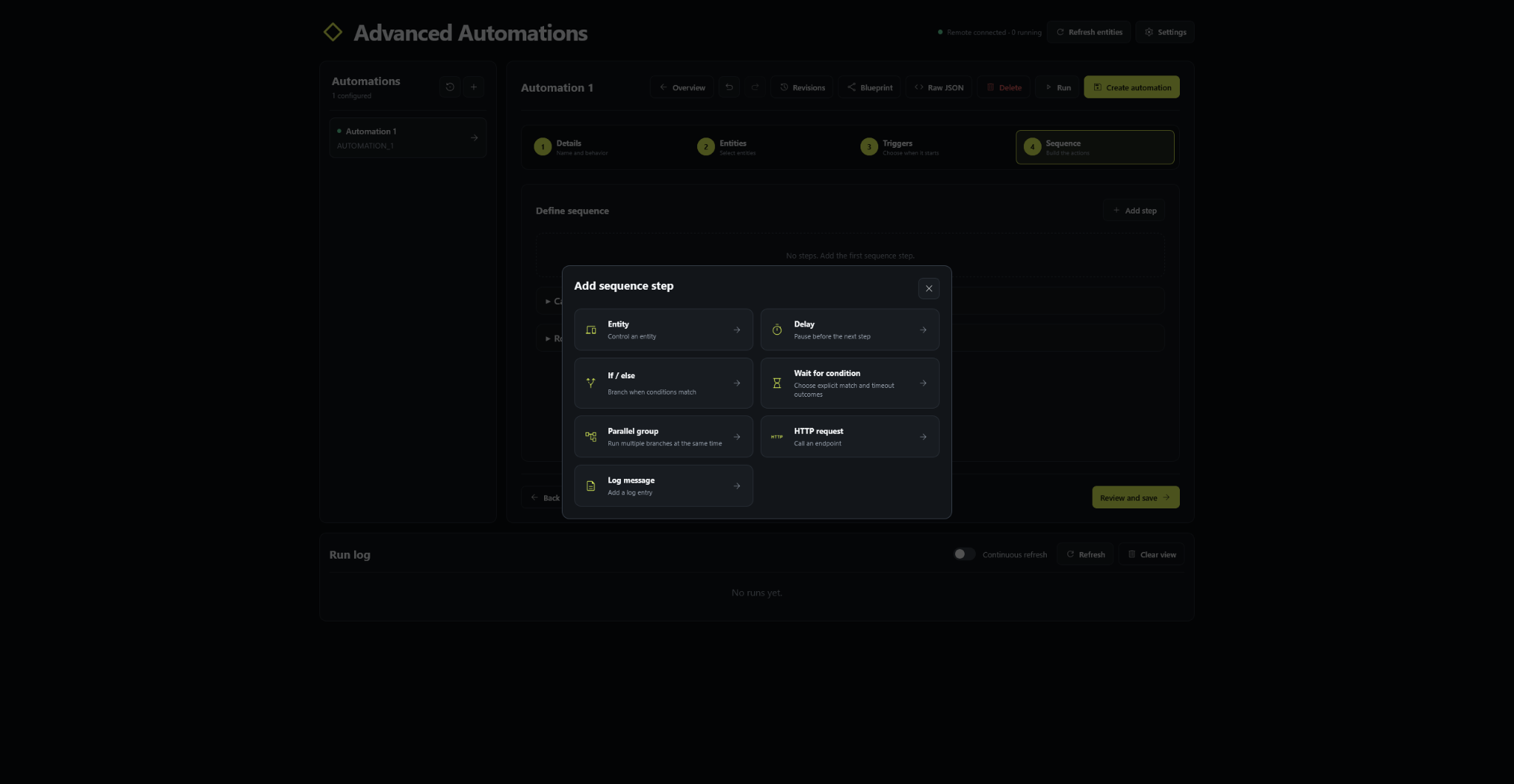
Sequence step picker
Automation editor
Selecting an existing automation opens its overview. Select Edit to enter the guided configuration flow.
1. Automation details
Configure:
- Name and description
- Enabled or disabled state
- Optional Remote command and touchscreen exposure
- Run mode:
- Single: ignore another start while the automation is active
- Replace: cancel the active run and start again
- Parallel: allow simultaneous runs
- Optional maximum runtime
- Cancellation cleanup sequence
- Rollback sequence
2. Choose entities
The compact entity dropdown contains all entities reported by the Remote. It supports:
- Search
- Entity-type filters
- Source-integration filters
- Select-visible and clear-unused actions
- Protection for entities already referenced by the automation
Sensors can be selected for triggers and conditions but are not available as command targets.
3. Define triggers
Trigger cards are collapsible and can be reordered with drag and drop.
Supported trigger types:
- Entity state transition
- Entity remains in a state for a duration
- Numeric threshold crossing with optional hysteresis
- Any entity attribute change or one selected attribute change
- Scheduled local time with weekday selection
- Periodic interval
- Remote reconnect or integration startup
- Local webhook
- Completion or failure of another automation
- Manual virtual button
Trigger behavior can be configured as:
- Start when any enabled trigger matches
- Start when the changed trigger matches and all configured target states are currently true
4. Define sequence
Sequence cards are collapsible, support drag-and-drop ordering and can contain nested branches.
Available step types:
- Entity: send a supported command to a controllable entity
- Delay: pause for a fixed duration
- If / else: evaluate entity or time conditions and run a branch
- Wait for condition: wait for a condition with explicit match and timeout outcomes
- Parallel group: run multiple branches concurrently and wait for all or any branch
- HTTP request: call an HTTP or HTTPS endpoint
- Log message: write a diagnostic run event
Wait for condition
A wait step defines:
- Conditions and whether every or any condition must match
- Timeout and polling interval
- Time reference:
- From the automation trigger
- From when the wait step begins
- When the condition matches:
- Continue the sequence
- Stop successfully
- Run a match branch
- When the timeout expires:
- Continue the sequence
- Stop successfully
- Fail the automation
- Run a timeout branch
Example:
Wait up to 10 seconds from the trigger for playback to resume. If playback resumes, stop successfully. If the timeout expires, continue with the remaining sequence.
Execution policies
Command, condition, wait, parallel, HTTP and log steps support structured failure handling:
- Per-step timeout
- Retry count
- Retry delay
- Fixed or exponential retry backoff
- Continue, fail, rollback or run a failure branch after the final failure
Automation-level controls include:
- Maximum runtime
- Parallel sequence groups
- Cancellation cleanup steps
- Rollback steps
Automation overview and persistent history
The overview shows the complete trigger and sequence timeline together with persistent execution information:
- Last run
- Last successful run
- Last failure
- Average duration
- Recent run history
- Currently active step
Run history, step progress and diagnostic events are stored in automation-data.sqlite3 and survive service restarts. Runs left active by an unexpected restart are marked as cancelled.
The run log is refreshed only when Refresh is selected or Continuous refresh is enabled.
Revisions, undo and rollback
Before a persisted automation is updated, deleted, restored or replaced through the raw editor or blueprint import, the previous state is saved as a revision.
- Up to 50 revisions are retained per automation
- Revisions record the timestamp, action and source:
- Visual editor
- Raw editor
- Blueprint import
- Rollback
- Revisions can be compared as formatted JSON
- Any retained revision can be restored
- Deleted automations remain available in the deleted-automation archive and can be recreated with their original identifier
- The visual editor and raw JSON editor each provide local undo and redo controls before saving
Automation blueprints
Blueprint exports contain the automation template only. They do not attach or export entity records from the source installation.
Every entity reference in a trigger, condition, command, failure branch, wait branch, parallel branch, cancellation sequence or rollback sequence is replaced with its own placeholder. During import, the user must select a local entity for every placeholder before the automation can be created.
Blueprints never contain API keys, Remote connection settings or other installation credentials.
Raw JSON editor
JSON is the integration's native persisted automation format. The raw editor therefore uses JSON rather than YAML, avoiding implicit YAML type conversion and keeping visual and raw representations identical.
The raw editor provides:
- Formatting and syntax validation
- Undo and redo
- Structured server-side validation when saved
- Revision creation with
raw_editoras the edit source
Last automation triggered sensor
The integration exposes a read-only sensor named Last automation triggered. Its value updates whenever an automation run is accepted from a trigger, the Remote or the web interface. The last value is restored from persistent run history after restart.
Remote authentication setup
During integration setup:
- Enter the Remote address.
- Enter the current Web Configurator PIN.
- Unfurled authenticates as
web-configuratorand creates anadmin-scoped persistentAdvanced AutomationsAPI key. - If a key with that name already exists, Unfurled safely replaces it before issuing the new secret.
- The returned one-time API key is stored in the private configuration file.
- The submitted PIN is discarded and never persisted.
When reconfiguring the same Remote, an empty PIN retains the existing API key. Entering a PIN rotates the persistent key.
External service installation
Runtime behavior:
- Host networking for direct Remote access
- Persistent configuration mounted at
/config - Integration API port assigned in the reserved range
- Web editor starting at port 9201 and scanning upward if occupied
- Integration discovery publishing disabled by default for managed external containers
After installation, open:
http://SERVER-IP:9201
The selected editor port is written to:
/config/web-port.txt
Docker Compose
docker compose up -d --build
Custom integration package
Build the ARM64 package in an ARM64 environment or through GitHub Actions. The included workflow uses GitHub's native ubuntu-24.04-arm runner and the official r2-pyinstaller image, avoiding QEMU emulation:
bash ./tools/build_remote.sh aarch64
The generated archive uses this pattern:
uc-intg-advanced-automations-v2.0.0-aarch64.tar.gz
Verify an archive before installation:
bash ./tools/verify_remote_archive.sh ./uc-intg-advanced-automations-v2.0.0-aarch64.tar.gz
The Python wheel is for external/server deployment and is not a custom-integration archive.
Web API
| Method | Endpoint | Purpose |
|---|---|---|
GET |
/api/health |
Container liveness and service diagnostics |
GET |
/api/status |
Connection, trigger and run status |
GET |
/api/entities |
Available entities and current attributes |
GET |
/api/entities/{id}/commands |
Command metadata for an entity |
GET |
/api/automations |
Automations and persistent history summaries |
POST |
/api/automations |
Create an automation |
PUT |
/api/automations/{id} |
Update an automation |
DELETE |
/api/automations/{id} |
Delete and archive an automation |
POST |
/api/automations/{id}/run |
Start an automation |
GET |
/api/automations/{id}/history |
Persistent history and current step |
GET |
/api/automations/{id}/revisions |
Retained revisions |
POST |
/api/automations/{id}/revisions/{revision}/restore |
Restore a revision |
GET |
/api/revisions/deleted |
Deleted-automation archive |
POST |
/api/revisions/{revision}/restore-deleted |
Restore a deleted automation |
POST |
/api/triggers/{trigger}/run |
Run a manual trigger |
POST |
/api/webhooks/{webhook} |
Run matching webhook triggers |
GET |
/api/logs |
Persistent run events |
POST |
/api/integration/refresh |
Refresh generated entities and commands |
Invalid automation payloads return HTTP 400 with JSON-safe field details instead of an internal-server-error response.
Persistent storage
config.json contains connection settings and automation definitions. It is written atomically and, where supported by the filesystem, uses mode 0600.
automation-data.sqlite3 contains run history, run events and automation revisions. SQLite WAL mode is enabled for durable local access.
Corrupt or incompatible JSON configurations are backed up and recovered. Valid automations are salvaged individually where possible.
Development
Install runtime dependencies and run the public validation suite:
python -m pip install -r requirements.txt
make test
The public validation suite compiles the Python sources, imports the package, checks version and driver metadata, verifies packaged frontend assets, and validates every JavaScript module. If a private tests/ directory is present locally, make test discovers and runs it automatically after the public checks.
Build the external wheel:
python -m pip wheel . --no-deps --no-build-isolation -w dist
License
Released under the MIT License.
Media gallery
1 / 3Requirements
Requires an Unfolded Circle Remote 2 or Remote 3.
Categories
Related apps
Explore more like this
Explore allDetails
ghcr.io/jstnjx/uc-advanced-automations:latestRuntime arguments
- Web UI
http://[IP]:[PORT:9201]/- Network
bridge- Privileged
- false
Template configuration
Container Port: 9201
- Target
- 9201
- Default
- 9201
- Value
- 9201
Container Port: 9090
- Target
- 9090
- Default
- 9090
- Value
- 9090
- Default
- true|false
- Default
- external
- Value
- external
- Default
- true|false
Path to the app data
- Target
- /data
- Default
- /mnt/user/appdata/advanced_automations/data
- Value
- /mnt/user/appdata/advanced_automations/data
Internal data path. Not recommended to change.
- Target
- UC_AUTOMATIONS_DATA_DIR
- Default
- /data
- Value
- /data
Internal host. Not recommended to change.
- Target
- UC_INTEGRATION_INTERFACE
- Default
- 0.0.0.0
- Value
- 0.0.0.0
Internal port. Not recommended to change.
- Target
- UC_INTEGRATION_HTTP_PORT
- Default
- 9090
- Value
- 9090
Internal host. Not recommended to change.
- Target
- UC_AUTOMATIONS_WEB_HOST
- Default
- 0.0.0.0
- Value
- 0.0.0.0
Internal port. Not recommended to change.
- Target
- UC_AUTOMATIONS_WEB_PORT
- Default
- 9201
- Value
- 9201