
All apps · 0 apps

adguard-exporter
Docker app from TQ's Repository
Overview
Docker AdGuard Exporter for Prometheus.
Check here for all documentation: https://github.com/henrywhitaker3/adguard-exporter
Readme
View on GitHubAdGuard Home Prometheus Exporter
This is a Prometheus exporter for AdGuard Home.
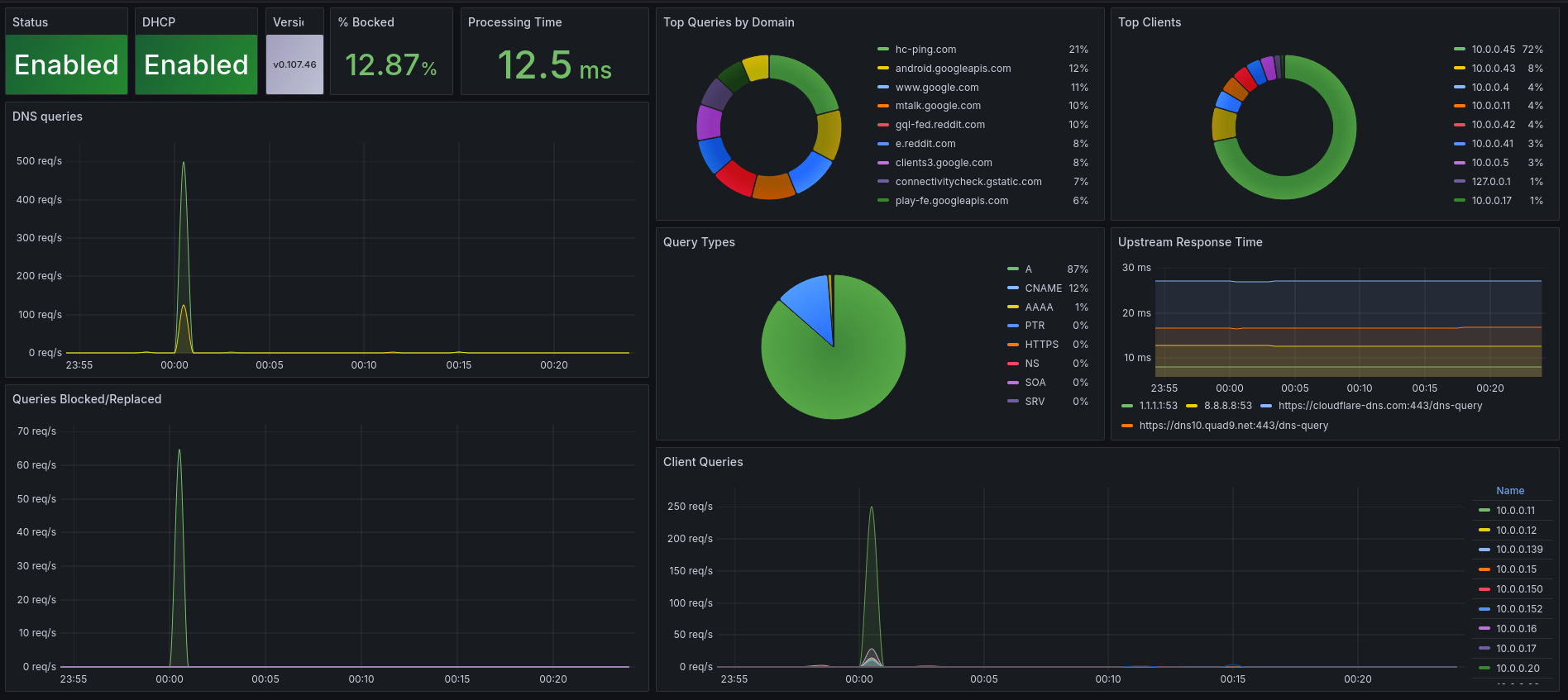
Installation
Using Docker
You can run it using the following example and pass configuration environment variables:
$ docker run \
  -e 'ADGUARD_SERVERS=http://192.168.1.2' \
  -e 'ADGUARD_USERNAMES=demo' \
  -e 'ADGUARD_PASSWORDS=mypassword' \
  -e 'INTERVAL=15s' \ # Optional, defaults to 30s
  -p 9618:9618 \
  ghcr.io/henrywhitaker3/adguard-exporter:latest
A single instance of adguard-exporter can monitor multiple AdGuard Home instances. To do so, you can specify a list of servers, usernames and passwords by separating them with commas in their respective environment variable:
$ docker run \
  -e 'ADGUARD_SERVERS=http://192.168.1.2,http://192.168.1.3,http://192.168.1.4"' \
  -e "ADGUARD_USERNAMES=$USERNAME1,$USERNAME2,$USERNAME3" \
  -e "ADGUARD_PASSWORDS=$PASSWORD1,$PASSWORD2,$PASSWORD3" \
  -p 9618:9618 \
  ghcr.io/henrywhitaker3/adguard-exporter:latest
Env Vars
| Variable | Description | Required | Default |
|---|---|---|---|
ADGUARD_SERVERS |
The servers you want the exporter to scrape. Must include the scheme http(s) and port if non-standard. |
True |
|
ADGUARD_USERNAMES |
The username to connect to the adguard api with. Must be in the same order as ADGUARD_SERVERS if scraping multiple instances. |
True |
|
ADGUARD_PASSWORDS |
The password to connect to the adguard api with. Must be in the same order as ADGUARD_SERVERS if scraping multiple instances. |
True |
|
INTERVAL |
The interval that the exporter scrapes metrics from the server | False |
30s |
DEBUG |
Turns on the go profiler | False |
false |
BIND_ADDR |
Address to which the Http-Server is bound | False |
:9618 |
Usage
Once the exporter is running, you also have to update your prometheus.yml configuration to let it scrape the exporter:
scrape_configs:
  - job_name: 'adguard'
    static_configs:
      - targets: ['localhost:9618']
If you want to strip the scheme and port out of the server label in the metrics, you can add a relabeling:
- action: replace
  sourceLabels: ["server"]
  regex: http(|s):\/\/([0-9]{1,3}\.[0-9]{1,3}\.[0-9]{1,3}\.[0-9]{1,3}).*
  replacement: $2
  targetLabel: server
Available Prometheus metrics
| Metric name | Description |
|---|---|
| adguard_scrape_errors_total | The number of errors scraping a target |
| adguard_protection_enabled | Whether DNS filtering is enabled |
| adguard_running | Whether adguard is running or not |
| adguard_queries | Total queries processed in the last 24 hours |
| adguard_query_types | The number of DNS queries by adguard_query_types |
| adguard_blocked_filtered | Total queries that have been blocked from filter lists |
| adguard_blocked_safesearch | Total queries that have been blocked due to safesearch |
| adguard_blocked_safebrowsing | Total queries that have been blocked due to safebrowsing |
| adguard_avg_processing_time_seconds | The average query processing time in seconds |
| adguard_avg_processing_time_milliseconds_bucket | The processing time of queries |
| adguard_top_queried_domains | The number of queries for the top domains |
| adguard_top_blocked_domains | The number of blocked queries for the top domains |
| adguard_top_clients | The number of queries for the top clients |
| adguard_top_upstreams | The number of repsonses for the top upstream servers |
| adguard_top_upstreams_avg_response_time_seconds | The average response time for each of the top upstream servers |
| adguard_dhcp_enabled | Whether dhcp is enabled |
| adguard_dhcp_leases | The dhcp leases |
| adguard_queries_details | Queries with times and additional labels |
| adguard_queries_details_histogram | Histogram of queries with times and additional labels |
Categories
Related apps
Explore more like this
Explore allDetails
Repository
ghcr.io/henrywhitaker3/adguard-exporter:latestLast Updated2026-10-14
First Seen2025-09-06
Runtime arguments
- Web UI
http://[IP]:[PORT:9618]/metrics- Network
bridge- Shell
sh- Privileged
- false
Template configuration
Port to expose metricsPorttcp
- Target
- 9618
- Value
- 9618
adguard_protocolVariable
- Default
- http
- Value
- http
adguard_hostnameVariable
- Default
- AdGuard IP
- Value
- AdGuard IP
adguard_usernameVariable
- Default
- AdGuard UserName
- Value
- AdGuard UserName
adguard_passwordVariable
- Default
- AdGuard Password
- Value
- AdGuard Password
adguard_portVariable
optional if adguard is not using port 80 (http)/443 (https)
intervalVariable
- Default
- 30s
- Value
- 30s
server_portVariable
- Default
- 9618
- Value
- 9618